Circle to Search now spots scam texts instantly with AI-powered detection across Android devices


5 Sources
[1]
Worried that text is a scam? Circle to Search now has your back
Circling a message will bring up an AI Overview that provides relevant guidance and suggested next steps. By design, scams are difficult to suss out on your own. While some are easier to spot than others, there are times when scams are nearly indistinguishable from the real thing. To help you stay
[2]
Android has a secret feature to help you identify scams and fraud -- here's how to use it
Over the past few months, Google has added many new features to Android. Be it the new Material 3 Expressive design that brings a bolder look to Android or iOS-like Live Updates for notifications, there's a lot Google has rolled out recently. However, of all the new features Google has
[3]
Circle to Search can now recognize and detail digital scams with AI Overview
Circle to Search is getting a new trick that detects suspicious messages or web content, letting users know why it could be part of a scam. Malicious actors are becoming increasingly common, and scam texts appear to be increasing exponentially. As more of those ill-intentioned actors get hold of
[4]
Your phone can now tell you when a text looks like a scam
Google Lens will now guide you away from risky or fake texts instantly Google is rolling out a new layer of protection for Android users, specifically teaching Circle to Search and Google Lens how to spot scam messages right on your screen. Since our messaging apps are constantly getting hammered
[5]

Use Circle to Search and Google Lens to spot scam messages.
One trending tactic among scammers involves sending fraudulent text messages, either directly to your phone or through messaging apps and social media sites. These messages often solicit or demand money and link out to scammy sites. To help you spot these scams, we've now added new capabilities to
Share
Copy Link
Google rolled out scam detection capabilities to Circle to Search and Google Lens globally in December 2025. Users can now circle suspicious messages to receive AI-powered analysis that identifies phishing patterns, explains red flags, and provides suggested next steps. The feature works on-device without sharing data with human reviewers, marking a shift in how Android handles the rising tide of sophisticated fraud attempts.
Circle to Search Gains Scam Detection Powers to Combat Rising Digital Threats
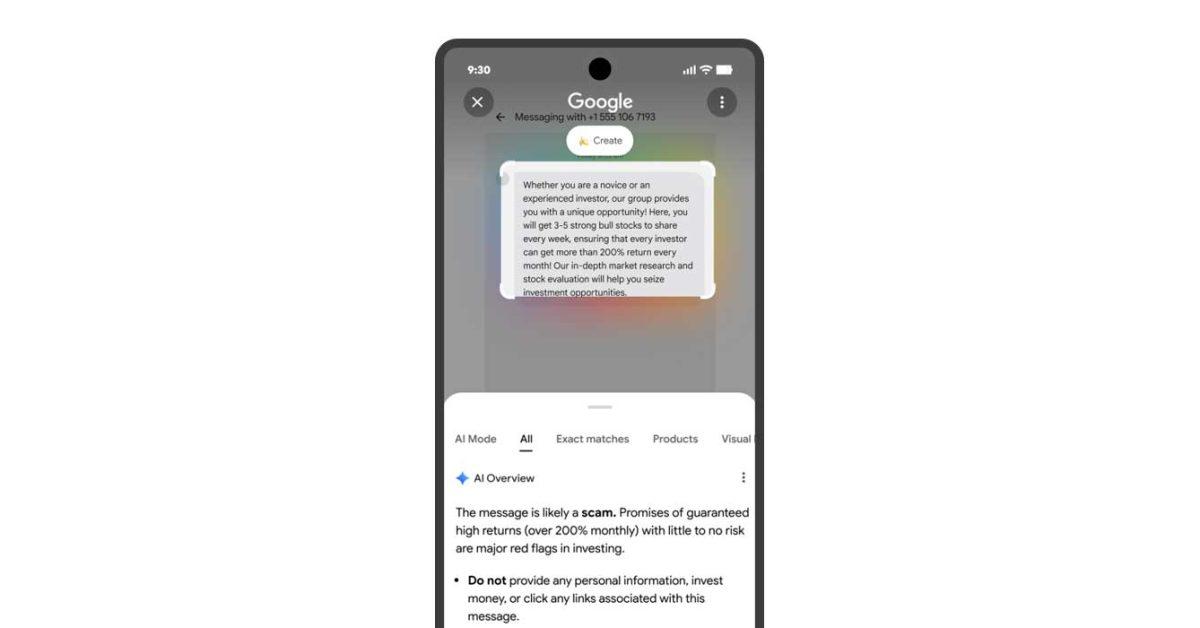
Google has expanded Circle to Search with scam detection capabilities that help users identify scam messages directly on their screens. The feature, rolling out globally as part of the December 2025 update alongside Android 16 QPR2, allows users to circle or highlight suspicious messages to receive instant analysis powered by Google AI
1
3
. When activated, the Android security feature generates an AI Overview that assesses whether content is likely fraudulent by analyzing information from across the web, then offers relevant guidance and suggested next steps5
.
Source: Digital Trends
The timing addresses a pressing need. Fraudulent text messages have become increasingly sophisticated as malicious actors leverage AI to craft convincing scams that mimic official language and apply urgency pressure to trigger immediate responses
4
. Google identifies one trending tactic where scammers send messages through messaging apps and social media sites that solicit or demand money or link to scam websites5
. These digital threats range from fake delivery fee demands to phishing attempts impersonating legitimate companies.How AI-Powered Scam Detection Works on Android Devices
To use the feature, users activate Circle to Search by tapping and holding the navigation bar or home button, then highlight the suspicious messages they want to analyze
2
. The system uses AI and web content analysis to detect digital scams by identifying common phishing patterns and red flags that characterize fraudulent schemes3
. Real-world testing on a Google Pixel 10 Pro demonstrated the feature accurately distinguished spam messages from genuine communications2
.
Source: 9to5Google
For cases where the AI cannot directly determine if content is fraudulent, users can manually query Google AI mode through the "Ask anything" bar within Circle to Search. One test revealed how this follow-up capability identified a message as likely a loan scam or phishing attempt when the initial scan proved inconclusive
2
. This layered approach to combating online fraud provides multiple opportunities to catch sophisticated attempts that might otherwise slip through.Google Lens offers the same functionality for devices that don't support Circle to Search, working on both Android and iOS platforms. Users simply take a screenshot of the questionable message, upload it to Google Lens in the Google app, and receive the same AI-powered analysis
2
4
.Privacy-First Design and System Confidence Requirements
The scam detection feature operates with on-device privacy protections, meaning users don't need to send messages to human reviewers for analysis
4
. This addresses concerns about sharing potentially sensitive communications while still providing robust protection against online fraud. However, Google notes the feature will only display warnings when systems have high confidence in the quality of the response3
5
.
Source: Android Police
As with any AI product, users shouldn't place absolute trust in the technology, as AI Overview results could potentially be incorrect
1
. The feature serves as an additional tool in a broader security arsenal rather than a definitive judgment system. Google has been building complementary protections, including on-device fraud detection within apps and scam call blocking through the Phone app2
.Related Stories



Future Implications for AI-Powered Security
Google indicates the system will become smarter over time as it learns from emerging scam tactics
4
. The company is betting on AI-powered defenses to keep pace as scammers themselves adopt AI to accelerate and refine their attacks. Experts speculate Circle to Search could eventually expand beyond identifying scam messages to become a universal warning system for various digital threats, including sketchy websites, malicious QR codes, and fake payment requests4
.The December 2025 update includes other safety features like the ability to opt out of unwanted group chats more quickly and mark outgoing calls as urgent
3
. These additions reflect Google's broader strategy to create a safer ecosystem for daily communications. For users, the immediate benefit is clear: less second-guessing about message authenticity and a more secure inbox built directly into tools they already use, without waiting for major system updates4
.References
Summarized by

Navi
[1]
[2]
[4]
Related Stories
Recent Highlights



Recent Highlights
Today's Top Stories



Don’t drown in AI news. We cut through the noise - filtering, ranking and summarizing the most important AI news, breakthroughs and research daily. Follow topics that matter to you and stay ahead.


