Firefox Smart Window Gets AI Form Filling and Webpage Monitoring in Latest Beta Update


2 Sources
[1]
Firefox's Smart Window adds AI form filling and webpage monitoring
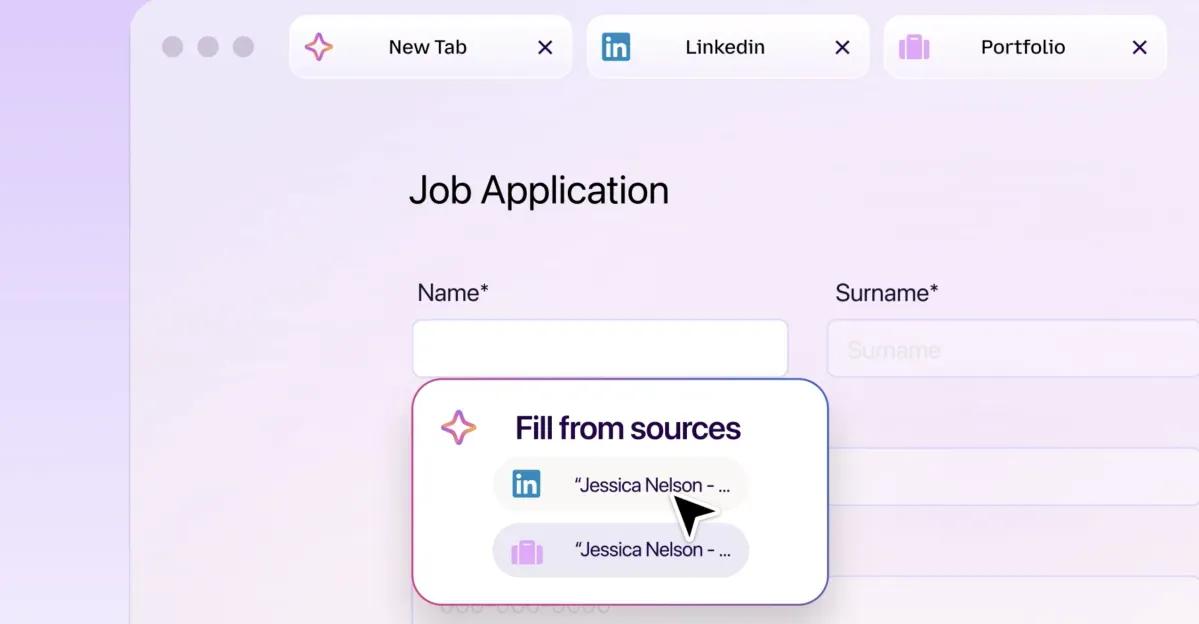
Mozilla is updating Smart Window -- Firefox's AI-powered browsing experience -- with a new feature that can help you fill out online forms based on your open tabs. As an example, Mozilla says Smart Window can pull information from your online portfolio or LinkedIn page to paste your work history
[2]
Firefox's Smart Window gets form autofill and website monitoring
Mozilla today announced two new features for Smart Window, its opt-in AI-powered browsing experience in Firefox. Here are the details. Smart Window adds two features Nearly one year ago, Mozilla announced plans to introduce AI Window, an opt-in experience that would let Firefox users interact
Share
Copy Link
Mozilla has updated Firefox Smart Window with two AI-powered features now available in beta. The browser can now autofill web forms using information from open tabs and monitor webpages for changes like price drops and job listings, with both features currently limited to US and Canada users.
Mozilla Expands Firefox Smart Window with AI-Powered Capabilities
Mozilla is rolling out two significant AI features to Firefox Smart Window, its opt-in AI-powered browsing experience. The update introduces AI-assisted form filling and webpage monitoring capabilities, marking nearly one year since the company first announced the feature as AI Window
1
. Both features are now available in the Smart Window beta for desktop users in the US and Canada, with plans to expand to additional markets in the coming months2
.AI-Assisted Form Filling Draws Context from Open Tabs
The AI-powered form autofill feature represents a step beyond traditional autofill systems. While conventional autofill handles basic information like names, addresses, and contact details, Firefox Smart Window can now generate responses based on information found across currently open tabs
2
. Mozilla provides an example where Smart Window could pull information from your online portfolio or LinkedIn page to paste your work history into job applications, or draft answers to questions like "Tell me about a time when..."1
.To use this feature, click into a form with at least four text fields. An option to "Fill from sources" will appear, displaying all tabs Firefox can draw from. You can select or deselect tabs that you want Firefox to use, and the browser will generate suggestions based on the information in them
1
. The feature currently supports text fields on web forms, with Mozilla working to add support for dropdown menus and PDFs. Data from your source pages is shared with Google Gemini 3.1 Flash Lite, the AI model that generates the text suggestions1
.Webpage Monitoring Tracks Price Drops and Job Listings
The website monitoring feature functions similarly to Safari's "Notify Me" feature introduced with iOS 27 and macOS 27
2
. Users can set up monitoring tasks by typing "/watch" in the Smart Window chat, describing what they're looking for, and adding the webpages to watch. Firefox can monitor for sales, new job listings, product availability, price drops, and other updates1
.Users can choose between daily or weekly checks, monitoring up to 5 webpages per task, though the feature only runs while Firefox is open
2
. When Firefox detects the change you're looking for, it sends notifications through the Tasks button on the toolbar or via desktop alerts if enabled1
. Users can maintain up to 15 active tasks at a time and can edit, pause, or delete tasks as needed. Firefox will pause watching for updates if it doesn't detect a change after 60 days, before stopping them completely after 90 days1
. Mozilla uses the Qwen AI model to identify changes that match what users are looking for2
.Related Stories

Firefox Smart Window's Evolution and Privacy Considerations
Since its initial announcement, Smart Window has gradually gained new capabilities beyond these latest additions. A few months ago, Mozilla introduced AI-powered web search to Smart Window, alongside automatic tab grouping, duplicate tab detection, and the ability to search browsing history using natural language
2
. The feature allows users to interact with an AI assistant while browsing, with capabilities like summarizing content, comparing information across tabs, and answering questions without leaving the browser2
.Both new AI features require sharing data with external AI models for processing. The form filling feature shares information from selected tabs with Google Gemini 3.1 Flash Lite to analyze form fields and extract relevant information, while the monitoring feature uses Qwen to process webpage changes
2
. These features remain opt-in, giving users control over whether to enable AI-powered functionality. Both features are currently limited to English-language users in the US and Canada, with Mozilla planning to roll them out to additional markets in the coming months2
.References
Summarized by

Navi
Related Stories
Mozilla Expands Firefox Smart Window with AI-Powered Tab Grouping and Privacy-First Search
18 Aug 2026•Technology

Mozilla Introduces AI Window for Firefox Amid User Backlash
13 Nov 2025•Technology
Mozilla Firefox Partners with Mistral AI to Launch Privacy-First Smart Window Assistant
17 Sept 2026•Technology

Recent Highlights



Recent Highlights
Today's Top Stories










Don’t drown in AI news. We cut through the noise - filtering, ranking and summarizing the most important AI news, breakthroughs and research daily. Follow topics that matter to you and stay ahead.


