Gemini for Google Home now uses cameras to trigger smart automations based on what they see


2 Sources
[1]
Gemini for Google Home can now use your cameras to trigger automations
Google Home is rolling out a new Gemini-powered automation feature that can trigger smart home routines based on what your security cameras can see. This is one of several updates announced yesterday for Gemini for Home, including enhanced voice command support and general stability improvements,
[2]
Gemini gives Google Home cameras smarter automation powers
Your Google Home experience is about to get a lot smarter. With the latest round of Google Home improvements, Google is rolling out new Gemini-powered automation features that let your smart home react to what your cameras actually see. With compatible cameras, Gemini can understand real-world
Share
Copy Link
Google Home is rolling out a Gemini-powered automation feature that triggers smart home routines based on what your security cameras can see. The AI can now understand visual events like mail delivery or specific vehicles in your driveway, automatically activating connected devices. The feature requires a Google Home Premium Advanced subscription at $20 per month.
Gemini Brings Visual Intelligence to Google Home Automations
Google is deploying a significant upgrade to its smart home platform that fundamentally changes how Gemini and Google Home interact with your living space. The Gemini-powered automation feature now enables security cameras to serve as visual triggers for smart home routines, marking a shift from voice-only controls to AI-driven visual understanding
1
. This capability allows cameras to trigger automations based on real-world events they observe, creating a more responsive and context-aware smart home ecosystem2
.
Source: Android Police
The technology works by allowing cameras to actually comprehend what they see, not just record it. According to Google's announcement, "your cameras can now actually understand what they see, your smart home can automatically react to almost anything happening around your home"
1
. Users can describe specific events in natural language, and the system will monitor for those exact scenarios. For instance, you can configure the system to watch for "raccoons near the trash bins" to activate security lighting, or detect when "mail has been delivered" to send notifications1
.How Cameras Trigger Automations with Visual Input
The implementation supports both Nest cameras and select third-party cameras equipped with "Gemini Built-In" capabilities
1
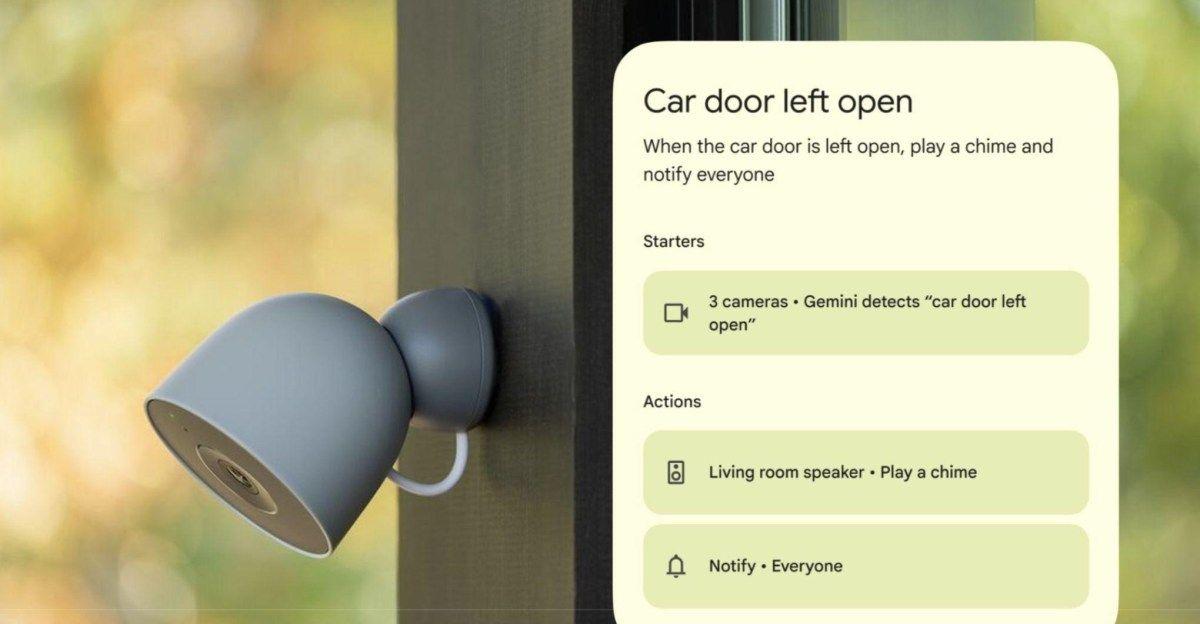
. Setting up these smart home automations requires users to describe the exact event they want monitored using natural language understanding, then select which cameras should watch for it2
. The system can recognize specific objects, vehicles like a "red BMW enters driveway," or even particular people when the Friendly Faces feature is enabled, triggering actions such as opening smart blinds or adjusting heating systems1
.
Source: The Verge
Google emphasizes that cameras "need a brief moment to process what they see," meaning this shouldn't be relied upon for instant alerts or time-sensitive security purposes
1
. The feature currently remains limited to English-speaking US users enrolled in the Google Home Public Preview program, and requires activation of AI descriptions through "Gemini for Home camera features"1
.Related Stories

Subscription Requirements and Enhanced Voice Command Capabilities
Accessing these smarter automation powers requires a Google Home Premium Advanced plan subscription, priced at $20 per month or $200 per year
1
. Beyond visual automations, Google has expanded Gemini's ability to handle multi-step instructions in a single voice command. Users can now issue complex requests like "lower the blinds, dim the lights, set a 20 minute timer, and start your favorite podcast," and Gemini will execute all actions automatically1
2
.The platform has also achieved improved responsiveness with reduced latency for everyday commands, making interactions feel faster and more natural
2
. Google reports better understanding of casual language, allowing commands like "set brightness to 0" to turn off lights, and more consistent responses to requests such as making room lighting "a little warmer"1
2
. Additional refinements include optimized alarm and timer commands, fewer instances where Gemini incorrectly claims it cannot perform supported tasks, and the ability to say "stop" to end a Gemini response without interrupting background music2
.References
Summarized by

Navi
[2]
Related Stories
Google Home's Gemini AI now monitors live camera feeds, sparking privacy questions
03 Mar 2026•Technology
Google Home gets Gemini 3.1 upgrade with new camera controls and expanded automations
05 May 2026•Technology
Google Enhances Smart Home Automation with Gemini AI in Google Home App
07 Dec 2024•Technology

Recent Highlights
1
OpenAI's AI Models Disprove 27-Year Exponential Time Hypothesis, Rendering Decades of Research Obsolete
Science and Research

2
Google DeepMind unveils Genie 4 world model with audio and 2-minute interactive simulations
Technology

3
OpenAI Cuts Internet Access for AI Model Training After Security Breaches
Technology

Recent Highlights
Today's Top Stories






Don’t drown in AI news. We cut through the noise - filtering, ranking and summarizing the most important AI news, breakthroughs and research daily. Follow topics that matter to you and stay ahead.


