Google Sheets gets Gemini upgrade that fixes formula errors with one click


4 Sources
[1]
Gemini can now help you fix those broken Google Sheets formulas
This functionality will be available for Google AI Pro and Ultra users. How many times have you entered a formula into a spreadsheet only to see an error message? Sometimes you can spot the error right away, other times you may have no idea what went wrong. Google is rolling out a new capability
[2]
Google Sheets gets a Gemini upgrade you'll actually use
For all the improvements that Google has rolled out to Gemini in Google Sheets, there's still a lot more it can do. While Gemini can help create new formulas in spreadsheets, it was of little help if you ran into an error when manually entering a formula. That's changing now, with Gemini in Google
[3]
Google Sheets gets a Gemini upgrade that's actually useful
When not writing, Dave enjoys spending time with his family, running, playing the guitar, camping, and serving in his community. His favorite place is the Blue Ridge Mountains, and one day he hopes to retire there (hopefully his fear of heights will have retired by then, too!). * Gemini in Sheets
[4]
Gemini's New Google Sheets Trick Fixes Your Formula Headache in One Click
Anyone who's used Google Sheets has hit that wall. You build a formula that looks right, then a #REF! or #VALUE! pops up with no explanation. The usual fix means squinting at the formula bar, then searching the error code. Maybe you ask a chatbot, but it can't see your sheet either. Google just
Share
Copy Link
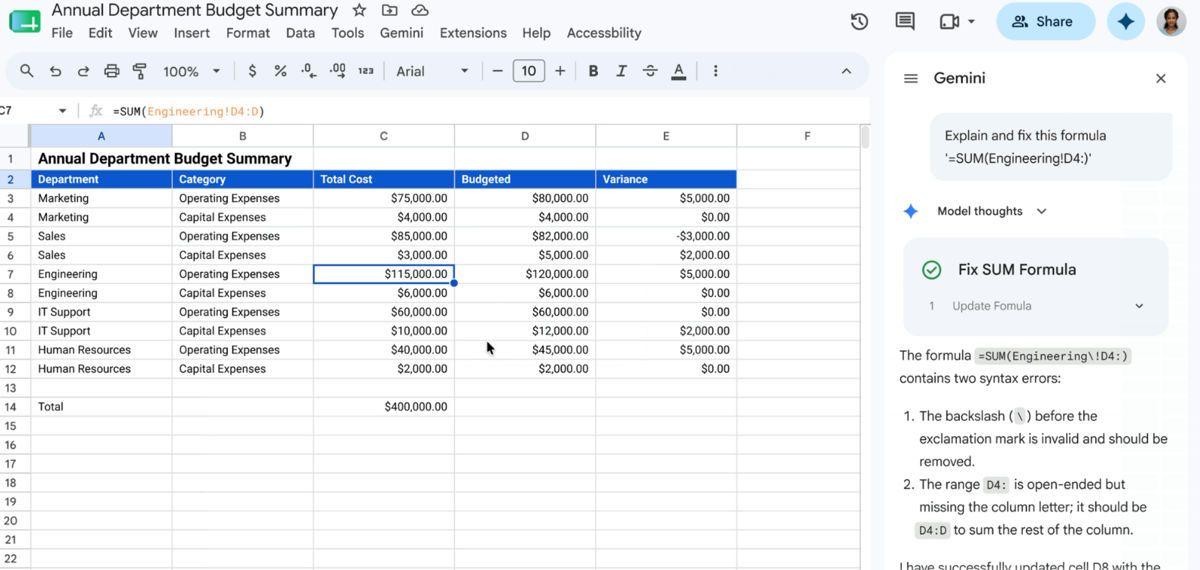
Google rolled out a new Gemini feature in Sheets that diagnoses and fixes formula errors automatically. When users encounter cryptic error messages like #REF! or #VALUE!, a Fix button now appears, triggering Gemini to analyze the formula and surrounding cells, explain the issue in plain language, and provide the corrected formula—eliminating hours of troubleshooting.
Gemini in Google Sheets Now Fixes Formula Errors Automatically
Google announced a significant update to Gemini in Google Sheets that addresses one of the most frustrating aspects of working with spreadsheets: formula errors
1
. The AI-powered feature introduces a Fix button that appears whenever users enter a formula containing an error, offering to diagnose and fix errors with a single click4
.
Source: Android Police
Unlike the generic error messages Google Sheets traditionally displays—cryptic codes like #REF!, #VALUE!, or other technical alerts that leave users confused—Gemini provides context-aware explanations
2
. The AI assistant analyzes both the formula entered and the surrounding cells to understand what went wrong, then delivers an easy-to-understand explanation of the core issue alongside the corrected formula3
.How the Google Sheets Formula Fix Works
When a formula error occurs, users simply click the Fix button that Gemini displays. This action opens the Gemini sidebar on the right side of the screen, where the AI assistant presents its analysis
2
. The tool doesn't just auto-corrects formulas—it also functions as a productivity tool by helping users understand their mistakes and learn from them3
.
Source: Phandroid
Google emphasizes that this AI-driven enhancement handles everything from basic arithmetic to complex equations, making it valuable for both spreadsheet novices and advanced users who work with intricate calculations
1
. The feature aims to remove barriers to writing advanced formulas, allowing users to focus on analysis rather than syntax troubleshooting.Why This AI Assistant Update Matters for User Productivity
This capability addresses a real pain point that has kept many users from fully utilizing spreadsheet functions. Formulas represent one of the most powerful aspects of tools like Google Sheets, capable of saving hours of manual work
3
. However, even a single misplaced comma can transform a working formula into an incomprehensible error message, creating a barrier that discourages users from attempting more sophisticated analyses4
.The ability to troubleshoot formula errors directly within the workflow—without copying formulas into separate chat windows or searching for error code explanations—represents a meaningful improvement in how people interact with spreadsheet software
4
. For professionals who spend significant time in spreadsheets, this feature should accelerate error resolution and reduce frustration.Related Stories

Availability Across Google Workspace and AI Plans
The rollout began on June 22 for select Google Workspace and Google AI Pro subscribers
1
. Specifically, the feature is available for Business Standard and Plus, Enterprise Standard and Plus, Google AI Pro and Ultra users, and Google AI Pro for Education3
.
Source: Android Authority
Google notes that the gradual rollout could take up to 15 days for the feature to appear on all eligible accounts
3
. Through July 15, 2026, Google Workspace customers receive promotional access to higher usage limits for this improved experience2
. After that date, per-usage limits will apply, with only AI Expanded Access license holders maintaining higher limits2
.This update follows Google's recent addition of custom instructions in Gemini for Google Docs, continuing the company's strategy of embedding AI capabilities directly into its productivity suite
2
. As organizations evaluate AI tools for practical business applications, features that solve specific workflow problems—rather than offering generic assistance—may prove more valuable for driving adoption and justifying subscription costsReferences
Summarized by

Navi
[1]
[2]
Related Stories
Gemini AI Revolutionizes Google Sheets with Formula Assistance and Error Correction
26 Sept 2025•Technology

Google Enhances Gemini AI Capabilities in Google Sheets for Advanced Data Analysis
17 Oct 2025•Technology

Google Enhances Google Sheets with Gemini AI: Revolutionizing Data Analysis and Visualization
04 Feb 2025•Technology

Recent Highlights
1
Microsoft and Nvidia Launch Surface Laptop Ultra: A $2,599 AI-Ready PC With RTX Spark Chip
Technology

2
Scientists Build AI Model That Reconstructs Images From Brain Scans in Record Time
Science and Research

3
Anthropic AI Cuts Live Internet Access After Model Sends False Homicide Tip to Philadelphia Police
Technology

Recent Highlights
Today's Top Stories








Don’t drown in AI news. We cut through the noise - filtering, ranking and summarizing the most important AI news, breakthroughs and research daily. Follow topics that matter to you and stay ahead.


