Google Chrome's AI Mode update lets you explore web pages side-by-side with AI search


17 Sources
[1]
Google now lets you explore the web side-by-side with AI Mode | TechCrunch
Google announced on Thursday that it's rolling out a new way to explore the web with AI Mode, its conversational search experience. Now, when you're using AI Mode on Chrome desktop, clicking a link will open the webpage side-by-side with AI Mode. The goal is to make it easier to explore relevant
[2]
Google's AI Mode Update Tries to Kill Tab Hopping in Chrome
Starting today in the US, if you click a hyperlink in AI Mode on the desktop version of Chrome, the link opens right there -- with Google's search chatbot still present as a sidebar on the left side of the screen. Previously, when you clicked on a hyperlink in one of Google Search's AI Mode
[3]
Google Is Adding New Ways to Use AI Mode in Chrome
Macy has been working for CNET for coming on 2 years. Prior to CNET, Macy received a North Carolina College Media Association award in sports writing. Google has rolled out a slew of updates and features to Chrome in the last few weeks, such as immersive reading and vertical tabs. And the changes
[4]
Google's AI Mode update lets you open links without leaving the page
Google is upgrading AI Mode in Chrome with a new feature that will allow you to open links to sources alongside your chat. Now, instead of automatically opening a new tab, clicking a source will open the website side by side with AI Mode, allowing you to ask follow-up questions about what's on the
[5]

How Google's updated AI Mode will ease your tab clutter when you search
Running a Google search typically shows me the AI overview with an AI-generated summary of the information I want. Since AI isn't always accurate, I make sure to click on some of the links to the third-party sources to investigate them directly. But in the past, this was a clumsy process as each
[6]

Google Chrome makes it easier to wrangle different tabs in AI Mode
Love 'em or hate 'em, no modern browser is complete without robust tab support, and so too would it seem Google's AI Mode. Starting today, the company is rolling out an update to users in the US that makes the tool better at interacting and understanding tabs. To start, the next time you use AI
[7]

Chrome is leveling up AI Mode with split-screen view and local tab search
Creative tools like Canvas and Nano Banana are finding a more prominent home. Google's already come a long way with its approach to AI across Search, and that's only been getting more useful with easy access to AI Mode in the Chrome browser. This week, Google's sharing two simple yet powerful
[8]

Chrome just flipped the switch on its new enhanced AI Mode, and it's a huge upgrade
Timi is the news and deals reporter for Android Police, who has been reporting on technology since 2008. He has worked in tech retail and also the IT space, providing hardware and software support, which gives him a unique perspective on the tech that he covers. This allows him to effectively break
[9]

Google AI Mode getting deep Chrome integration on desktop, mobile
Like the Gemini app before, Google is now deeply integrating AI Mode with desktop and mobile Chrome. On the desktop New Tab Page (NTP), tapping the "AI Mode" button now opens an inline prompt box instead of just taking you to the website. When you click on links in AI Mode, the conversation will
[10]

AI mode in Chrome gets a big upgrade to save you some tab hopping
Chrome just made tab hopping a thing of the past with its upgraded AI Mode, and it's genuinely useful. If you have ever gone down a rabbit hole while searching for something online, you know the drill. You open one tab, follow a link, open another, and another, and suddenly you have 14 tabs open
[11]

A new way to explore the web with AI Mode in Chrome
This content is generated by Google AI. Generative AI is experimental Finding information online can often feel like a constant game of "tab hopping." You start searching in one tab, then open another to follow a specific idea or topic. Then you have to switch back to Search to keep your train of
[12]

AI Mode Gets Massive Update in Chrome
Google is rolling out an updated experience for AI Mode on Chrome for both desktop and mobile users. During a roundtable event with media this week, the company said the ultimate goal is to, "Help people dive deeper into topics while searching AI Mode alongside the web, all without losing their
[13]

AI Mode in Chrome adds split-screen view to enhance the web search experience - SiliconANGLE
AI Mode in Chrome adds split-screen view to enhance the web search experience Google LLC today rolled out a major revamp of AI Mode in Google Chrome, giving users a more efficient way to explore the web through its conversational search experience. The most impactful update is that clicking links
[14]

Google rolls out AI Mode feature for Chrome desktop
Google introduced AI Mode on Thursday for Chrome desktop, allowing users to explore the web with a side-by-side view of a web page and the AI assistant. This feature aims to enhance user experience by enabling easier comparisons and follow-up inquiries while keeping the search context intact. AI
[15]

AI Mode for Google Chrome Just Got a New Upgrade - Phandroid
Google recently announced that it's rolling out a new update to AI Mode in Chrome, which now brings a dual-pane interface that lets users browse websites and interact with search tools simultaneously. According to Google, the new functionality is designed to create a more fluid discovery process by
[16]

Google Chrome's AI Mode Now Supports Side-by-Side Browsing and More
The + menu in Chrome adds tabs to a query for better contextual searches Google announced upgrades to AI Mode in Google Chrome on Thursday. As per the Mountain View-based tech giant, the new features in the browser are aimed at making search more fluid and context-aware. Google is integrating
[17]

Google expands Chrome AI Mode with side-by-side browsing and contextual AI assistance
Google is rolling out a new AI Mode experience in Chrome that integrates AI assistance directly into the browsing flow. The update reduces the need to switch between tabs by allowing users to view webpages, search results, and AI responses in a single interface. The aim is to keep browsing context
Share
Copy Link
Google rolled out a major update to AI Mode in Chrome that opens web pages alongside the AI chatbot sidebar, eliminating constant tab switching. Users can now search across multiple open tabs and ask follow-up questions while viewing source pages, streamlining research and shopping tasks.
Google Chrome Transforms AI Mode Into a Persistent Search Companion
Google has launched a significant update to AI Mode that fundamentally changes how users interact with AI search in Google Chrome. Starting Thursday, clicking hyperlinks within AI Mode on Chrome desktop no longer opens a new browser tab. Instead, web pages now appear side-by-side with AI Mode, which transforms into an AI chatbot sidebar on the left side of the screen
1
2
. This approach allows users to explore the web side-by-side with their search context preserved, making it easier to ask follow-up questions without losing their place.
Source: Engadget
The update addresses a common frustration in AI search workflows. Previously, clicking a link effectively ended the AI search journey, leaving the chatbot behind in the original tab
2
. Now, AI Mode becomes an always-on aspect of the user experience once you begin a search in Chrome. According to Google, early testers appreciated not having to constantly switch tabs when working with comprehensive articles or long videos, and found that having both the search engine and web pages side-by-side helped them stay focused on their tasks1
.How the Side-by-Side Feature Works in Practice
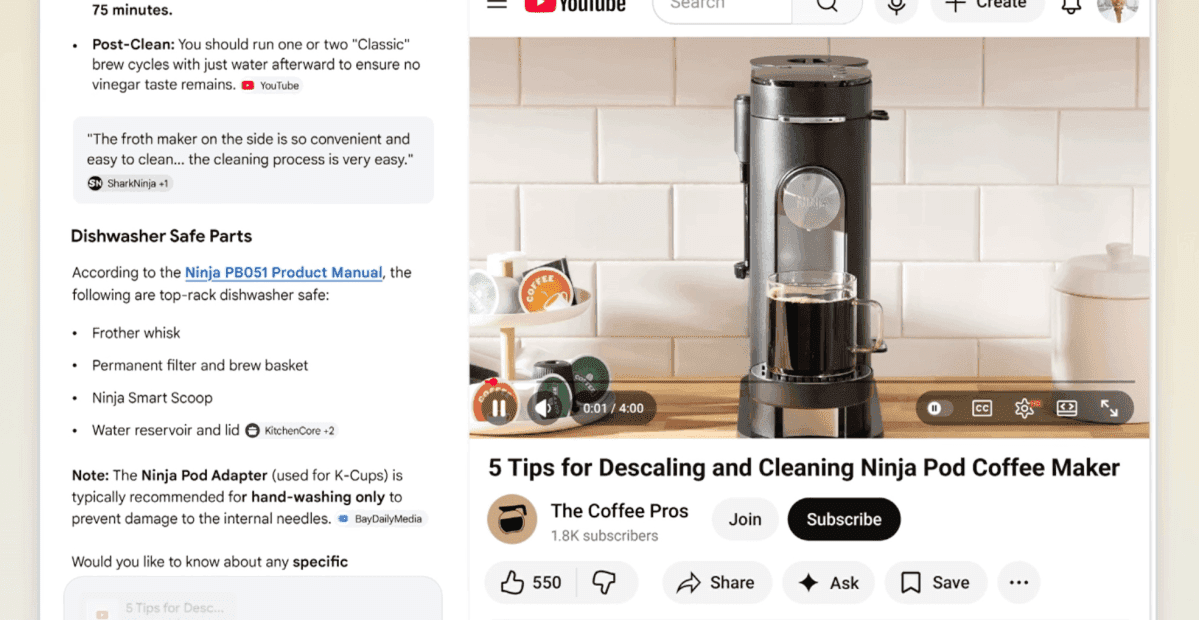
During a demonstration for reporters, Robby Stein, vice president of product for Google Search, showcased how users can explore web content without breaking their flow
3
. In one example, a user searching for a Ninja coffee maker that fits in a small apartment receives AI-generated suggestions for compact single-serve models. When clicking on a product link, the retailer's website appears alongside AI Mode, allowing the user to ask contextual queries like "how easy is this to clean?" without navigating away1
2
.The feature also works with video content and research tasks. Users can click on YouTube videos referenced in AI overview responses, which then display in the same tab with the search tool beside it
2
. This capability to open links without leaving the page reduces tab clutter significantly, addressing what Google describes as the "clumsy process" of juggling multiple tabs when investigating third-party sources5
.
Source: The Verge
Search Across Multiple Open Tabs for Enhanced Context
Google has also introduced the ability to search across multiple open tabs, bringing existing browser content directly into AI Mode queries. On both Chrome desktop and mobile, users can tap a new "plus" menu in the search box on the New Tab page or within AI Mode itself, then select recent tabs to include in their search
1
4
. This means users can mix and match multiple tabs, images, or PDFs and bring that search context into their queries.The workflow implications are substantial for students and researchers. Mike Torres, vice president of product for Chrome, demonstrated how users studying for a midterm can incorporate context from open tabs containing class notes, lecture slides, and readings, then ask AI Mode for help
3
. Similarly, someone researching hiking trails with several tabs already open can add them to their search and ask for similar trails in a different location1
.
Source: Droid Life
Related Stories

Availability and What to Watch For
The AI Mode updates are available now to users in the US in English, with Google planning to expand to additional regions soon
4
. Users need Chrome version 146.0.7680.174 or higher to access these features5
. While currently accessible only in Chrome on desktop, a Google spokesperson indicated the goal is to bring these capabilities to as many people as possible across the web5
.It's worth noting that WIRED's testing of similar AI search tools for product recommendations found that AI summaries weren't as accurate or reliable as reading websites directly
2
. This update comes as Google faces concerns that its AI-powered search features negatively impact traffic to news publishers and other websites, prompting the company to show links to sources more prominently4
. The side-by-side approach may help balance AI assistance with direct access to original web pages, though its long-term impact on publisher traffic remains to be seen.References
Summarized by

Navi
Related Stories
Google Expands AI Mode Access with New Chrome Mobile Shortcut and Enhanced Booking Capabilities
05 Nov 2025•Technology
Google Chrome becomes an AI browser with Gemini integration and native AI Mode in address bar
10 Dec 2025•Technology

Google Chrome's New Tab Page to Feature AI Mode Shortcut, Signaling Deeper AI Integration
15 Jul 2025•Technology

Recent Highlights
1
Microsoft and Nvidia Launch Surface Laptop Ultra: A $2,599 AI-Ready PC With RTX Spark Chip
Technology

2
Google Unveils Gemini 4 Argon AI Model, Restricts Access to Trusted Cyber Defenders
Technology

3
Trump Consulted Grok AI Before Ordering Venezuela Invasion and Capture of Nicolás Maduro
Policy and Regulation

Recent Highlights
Today's Top Stories






Don’t drown in AI news. We cut through the noise - filtering, ranking and summarizing the most important AI news, breakthroughs and research daily. Follow topics that matter to you and stay ahead.


