Google Gemini overlay will let you multitask while AI processes requests in the background


4 Sources
[1]
Gemini will let you keep working in other apps as it processes your request
You can even navigate away while Gemini's working on its results and be told when they're ready. 2025 is the year many of us got comfortable using Gemini, and even as Google pushes back its timetable for moving everyone off of Assistant, those of us who have already made the transition know just
[2]
Google is fixing the Gemini overlay's biggest annoyance
Karandeep Singh Oberoi is a Durham College Journalism and Mass Media graduate who joined the Android Police team in April 2024, after serving as a full-time News Writer at Canadian publication MobileSyrup. Prior to joining Android Police, Oberoi worked on feature stories, reviews, evergreen
[3]
Gemini could soon handle tasks in the background without holding your screen hostage
You might finally be able to switch apps without starting over Using the Gemini overlay on Android today comes with a major limitation that breaks the flow of multitasking. When you trigger Gemini using the hotword or by long pressing the power button, the assistant appears on top of whatever app
[4]
Google reveals "pill-shaped" button for persistent Gemini sessions
Gemini, Google's AI chatbot, may soon process user requests in the background on Android devices, according to a report by Android Authority. The feature was observed in the latest beta version of the Google app, addressing a current limitation where the Gemini overlay, activated via the Google
Share
Copy Link
Google is testing a major upgrade to the Gemini overlay on Android that addresses its biggest limitation. Users will soon be able to navigate away from Gemini while it processes queries, with a floating action button allowing them to return to persistent sessions. The update transforms how the AI assistant handles multitasking.
Google Gemini Overlay Gets Background Processing Capability
Google is preparing to fix one of the most frustrating limitations of the Gemini overlay on Android devices. Currently, when users activate the AI assistant through the hotword or by long pressing the power button, the Gemini overlay appears on top of their current app but disappears entirely the moment they tap away
1
. This forces users to start conversations from scratch each time they return, breaking the flow of multitasking on Android and making longer queries impractical to manage3
.
Source: Digital Trends
The upcoming enhancement was discovered in version 16.51.52.sa.arm64 beta of the Google app for Android, revealing that Google understands this limitation and is actively working to improve user experience
2
. The change will allow Google Gemini to handle tasks in the background while users continue working in other applications, addressing a core functionality gap that has plagued the overlay since its introduction.Gemini Floating Action Button Enables Persistent Sessions
The solution involves a significant UI change that transforms how the Gemini overlay behaves. Instead of disappearing when minimized, the overlay will collapse into a small Gemini floating action button that remains visible on the display
2
. This pill-shaped button serves as a visual indicator that the AI assistant is still processing user requests in the background, allowing for persistent Gemini sessions that don't reset when users switch contexts4
.Users will be able to pose a question to the AI chatbot via its overlay, then navigate back to their original app while Google Gemini continues working on the query. Once processing concludes, the floating button provides quick access to return to the exact conversation without losing original prompts or context
4
. When users finish their conversation, swiping the button away will close Gemini completely2
.Real-World Applications for Context Sharing
This Gemini quality-of-life update opens up practical use cases that were previously cumbersome or impossible. Users could compare various cars on a dedicated app while simultaneously analyzing their pros and cons within the Gemini overlay, switching back and forth seamlessly
2
. The same workflow applies to evaluating travel options, hotels, or any scenario requiring context sharing between multiple applications and the AI assistant.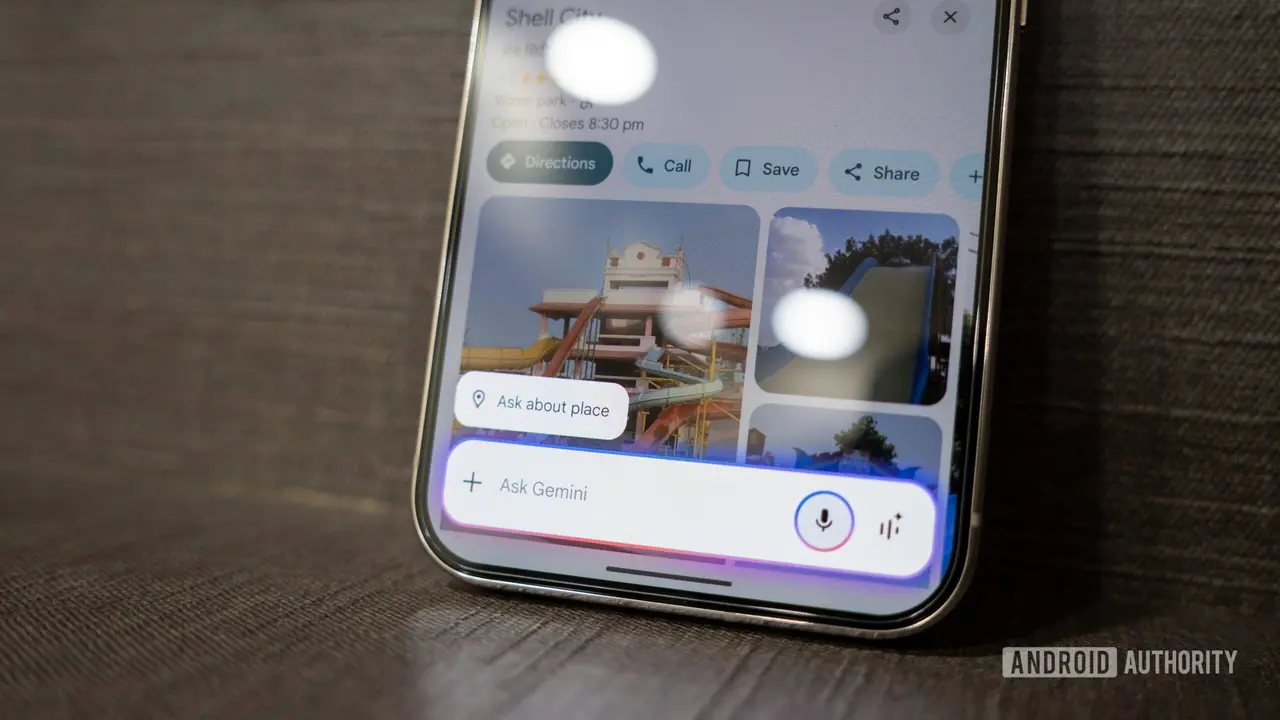
Source: Android Authority
The ability to run in the background means users can gather information from different apps, feed it into their ongoing Gemini conversation, and refine queries without starting over each time
3
. This mirrors the experience already available in the full Gemini app on desktop, Android, and iOS, but brings that functionality to the more convenient overlay interface2
.Related Stories

Timeline and Broader Integration Strategy
While the feature isn't live yet, its appearance in the beta version suggests it shouldn't be too far from a wide public rollout
2
. The background processing functionality remains in early stages of development, and changes may still occur before final release4
.This update fits into Google's broader strategy to make Gemini faster and more useful across Android devices. The company recently revealed Gemini 3 Flash, a lighter model designed to speed up AI Search and enhance app integration
3
. Google is also extending its Deep Research AI capabilities beyond its own apps through an API for third-party applications. These moves come as Google confirmed that Gemini will fully replace Google Assistant on phones in 2026, making improvements to the overlay experience increasingly critical for widespread adoption3
.References
Summarized by

Navi
[1]
[2]
[3]
Related Stories
Google Gemini to Introduce Mic Lock Feature for Improved Voice Interactions
22 Oct 2025•Technology
Google's Gemini AI Set to Revolutionize Personal Assistance with Enhanced Data Integration and App Connectivity
02 May 2025•Technology

Google Gemini Live Update: AI Assistant Now Mimics Phone Call Interface
05 Feb 2025•Technology

Recent Highlights



Recent Highlights
Today's Top Stories



Don’t drown in AI news. We cut through the noise - filtering, ranking and summarizing the most important AI news, breakthroughs and research daily. Follow topics that matter to you and stay ahead.


