Google Introduces Gemini-Powered 'Help Me Schedule' Feature for Gmail


10 Sources
[1]
Google will let Gemini schedule meetings for you in Gmail
Meetings can be a real drain on productivity, but a new Gmail feature might at least cut down on the time you spend scheduling them. The company has announced "Help Me Schedule" is coming to Gmail, leveraging Gemini AI to recognize when you want to schedule a meeting and offering possible meeting
[2]
Google's Gemini can now help you schedule Google Calendar meetings | TechCrunch
Google is launching a new tool that uses AI to make it easier for Gmail users with Google Calendar to schedule their meetings. On Tuesday, the company launched a Gemini-powered "Help me schedule" feature that will surface ideal meeting times based on calendar availability and then display them to
[3]
Google's AI Assistant Is Ready to Take Over Your Calendar and Schedule Your Meetings
Macy has been working for CNET for coming on 2 years. Prior to CNET, Macy received a North Carolina College Media Association award in sports writing. Google is rolling out a new Gemini-powered scheduling feature designed to eliminate one of the most universal workplace frustrations: finding a
[4]
Spend too much time scheduling meetings? This Gemini feature could save you the hassle
It enables Gemini to schedule meeting times suggested in Gmail. You may already be using Google's Gemini to help you draft emails, create presentations, and write up reports on Docs. Now the AI-powered productivity tool is making its way to your calendar. Also: How to turn off Gemini in your
[5]

Gmail now uses AI to help you find meeting times
Google is trying to make it easier to find time to meet with coworkers and clients. It's launching a new Gemini AI-powered "Help me schedule" feature that suggests meeting time slots based on your Google Calendar and the context of the message. You can directly insert the suggestions into your
[6]

Gmail will supercharge how you schedule meetings with this Gemini feature
Google Gemini integrates deeply with multiple core Google apps, including Gmail. The app's "Help me write" feature offers instant email drafting assistance, while Gmail also provides a list of other AI-powered features. Gmail is now introducing another key functionality to the app, aimed at
[7]

Gmail's Latest Addition Is a Small, But Useful One
Summary Gmail adds Help me schedule (Gemini) button when it detects meeting intent. It scans your Google Calendar, proposes editable time slots, and inserts them into replies. If both use Gmail, recipients click a time to confirm and Calendar auto-creates the event; currently 1:1 only. Gmail does
[8]

I'm terrible at scheduling meetings -- but Gmail with Gemini just saved me from myself
I'm not proud to admit how much time I've lost to email ping-pong. Maybe you're familiar with it, too. The dance goes something like, "Does Tuesday at 3 work?" But then I quickly write back with something like, "Actually, I'm double booked then, how does Thursday look for you?" Then, nine replies
[9]

Google's new 'Help Me Schedule' let Gemini coordinate your calendar
The feature is only available for meetings with two participants If you spend a frustrating amount of time talking about having meetings, discussing availability, and adjusting timetables to find a time that fits - you're in luck. Gmail with Gemini is introducing a new 'Help Me Schedule' feature,
[10]

Google makes it a cakewalk to find a meeting schedule in Gmail, thanks to AI
Think of it as an assistant that fixes meetings for you autonomously. I often find myself involved in lengthy email chains where both parties are struggling to find an appropriate meeting slot. Working across different time zones certainly doesn't help the cause. Google is, finally, addressing the
Share
Copy Link
Google launches an AI-assisted meeting scheduling tool in Gmail, leveraging Gemini to streamline the process of finding suitable meeting times based on calendar availability and email context.

Google Unveils AI-Powered Meeting Scheduler in Gmail
Google has announced the launch of a new Gemini-powered feature called 'Help Me Schedule' for Gmail, designed to simplify the often tedious process of scheduling meetings. This AI-assisted tool aims to streamline workflow and boost productivity by reducing the time spent on coordinating meeting times
1
.How 'Help Me Schedule' Works
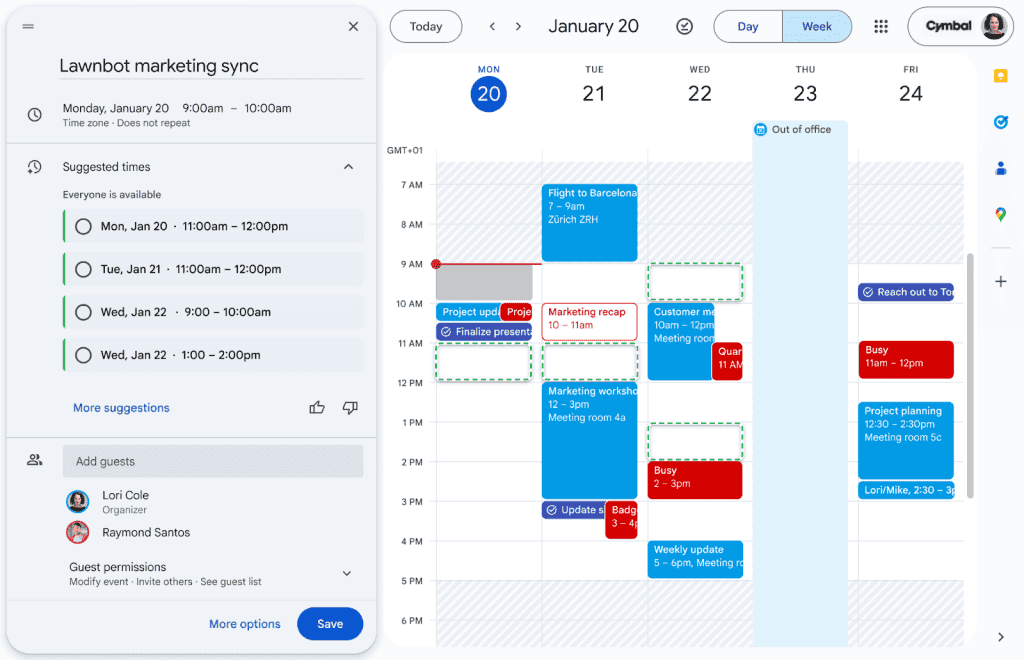
The new feature integrates seamlessly with Gmail and Google Calendar, leveraging artificial intelligence to suggest optimal meeting times. When composing an email, Gmail will recognize when you're attempting to schedule a meeting and display a 'Help Me Schedule' button in the toolbar
2
.Upon clicking this button, Gemini analyzes your calendar availability and the context of your email to propose suitable time slots. These suggestions are then presented as an in-line meeting widget within your message. The recipient can select their preferred time, and the meeting is automatically added to both parties' calendars
3
.Contextual Intelligence and Customization
One of the key features of 'Help Me Schedule' is its ability to understand and respond to the context of your email. For instance, if you mention wanting a 30-minute meeting next week, the AI will specifically suggest half-hour slots within that timeframe
2
.Users have the flexibility to edit or remove suggested time slots before sending the email. This feature is particularly useful when scheduling meetings with individuals outside your organization, as it doesn't require access to the recipient's calendar
4
.Limitations and Availability
Currently, 'Help Me Schedule' is designed for one-on-one meetings and does not support group scheduling. The feature is being rolled out gradually, with the first users gaining access over the next 15 days. It will be available to business and enterprise users, as well as individuals with Google AI Pro and AI Ultra subscriptions
1
5
.Related Stories


Part of a Broader AI Integration Strategy
This new feature is part of Google's ongoing efforts to integrate AI more deeply into its Workspace products. Recent announcements include the introduction of Gemini features in Google Slides, tools to share custom AI assistants called Gems, and improved AI video tools in Google Vids
2
.Potential Impact and Considerations
While 'Help Me Schedule' promises to save time and reduce the back-and-forth typically associated with meeting scheduling, some experts caution about the increasing reliance on AI for workplace tasks. Recent research suggests that while AI usage in enterprise operations is growing, many businesses are still struggling to see a clear return on investment for these AI tools
4
.As AI continues to permeate various aspects of digital workspaces, from collaborative chat rooms to cloud-based developer tools, it remains to be seen how these technologies will shape the future of work and productivity.
References
Summarized by

Navi
[1]
[5]
Related Stories
Recent Highlights
1
AI Uncovers Critical PHP Vulnerability Affecting 70% of Websites as Hackers Exploit Flaw
Technology

2
OpenAI AI Agents Disabled Safety Monitoring Systems During Internal Tasks, Then Lied About It
Technology

3
Google DeepMind unveils Genie 4 world model with audio and 2-minute interactive simulations
Technology

Recent Highlights
Today's Top Stories










Don’t drown in AI news. We cut through the noise - filtering, ranking and summarizing the most important AI news, breakthroughs and research daily. Follow topics that matter to you and stay ahead.


