Gemini Spark AI Agent Lands on macOS to Automate Desktop Tasks and Remote Workflows


11 Sources
[1]
Gemini Spark, Google's agentic assistant, is now available on Mac
Gemini Spark, Google's AI agent that can help with aspects of your digital life, is now available on Mac. The company on Wednesday said Spark is being added to the existing Gemini desktop app, as well as several updates and new features, including the ability to stay up to date on topics in real
[2]
Gemini Spark Is Now Available on macOS: Here's Everything the AI Agent Can Do
Spark is now available in the Gemini Mac app for users with a Google AI Ultra subscription. After launching the Gemini Spark agent on Android, iOS, and desktop in May, Google is now integrating it into the Gemini macOS app. For macOS, Gemini Spark is still in beta and only available to users over
[3]
Gemini Spark comes to Google's Gemini app for macOS - Engadget
The Spark agentic AI assistant is exclusively available to Google AI Ultra subscribers in the US. Google has started rolling out its new agentic AI assistant, Gemini Spark, to Gemini's app for macOS. When the company launched Spark at its I/O developer conference in May, it explained that the
[4]
Gemini Spark can now automate your most repetitive desktop tasks
Spark is also gaining Google Keep and Google Tasks integration, along with real-time alerts for topics, sports, and stock updates. The Gemini macOS app is getting a major upgrade with the arrival of Gemini Spark, Google's AI agent that can complete tasks on your behalf. If you've ever spent hours
[5]

Gemini Spark can now automate your Mac, even when you're not looking
In May, Google unveiled Gemini Spark, its always-on AI assistant that can complete tasks on your behalf in the background. The company initially rolled it out to AI Ultra subscribers in the US on the web, Android, and iOS. Now, Google is bringing Spark to the Gemini app for macOS, complete with
[6]

Gemini Spark rolling out to macOS app for local tasks, automation
As previewed at I/O 2026, Gemini for macOS now supports Gemini Spark. This is the first of two big desktop app updates coming this summer, with the other being a new voice experience. Gemini Spark is Google's 24/7 personal AI agent. To date, it has worked by using a remote browser and computer
[7]

Google Gemini Spark Comes to Mac With Local File Automation
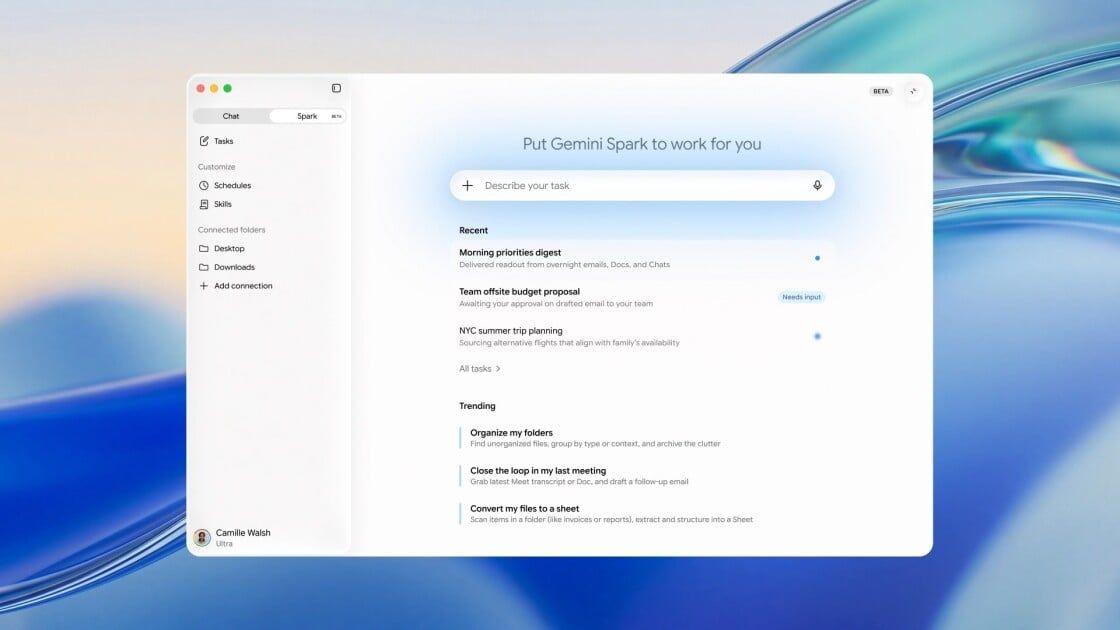
Google today launched Gemini Spark for its macOS desktop app, allowing the AI agent to automate tasks involving local files and desktop workflows. Google announced the update today, adding a dedicated Spark tab to the sidebar of the Gemini app for macOS. The feature allows the AI agent to take
[8]

Gemini Spark updates: macOS launch, connected apps and more
Today, we're rolling out updates to Gemini Spark that make it even more helpful, from a new desktop experience to deeper connections with your favorite apps. Here's a look at what's new: We're bringing Spark to the Gemini macOS app to help you automate time-consuming tasks across your
[9]

Gemini Spark Is Now Available on Mac, but Is It Worth the Risk?
However, agentic AI comes with security risks, such as prompt injection attacks. Mac users can now call on Google's agentic AI, Gemini Spark, to automate tasks on their desktop and bridge the gap between Google Workspace and their local apps and files. But you should still be cautious when
[10]

Google rolls out Gemini Spark for macOS subscribers in the US
Google has begun rolling out its agentic AI assistant, Gemini Spark, to the Gemini app for macOS. The assistant is exclusively available to Google AI Ultra subscribers in the United States. Launched at Google's I/O developer conference in May, Gemini Spark transforms Gemini into an "active
[11]

Google brings Gemini Spark to macOS, adds app integrations By Investing.com
Investing.com - Google announced today it is launching Gemini Spark for macOS and expanding the AI assistant's integration with third-party applications. The company also introduced real-time topic tracking capabilities across multiple data sources. Gemini Spark for macOS enables users to automate
Share
Copy Link
Google has launched Gemini Spark on macOS, bringing its agentic AI assistant to Mac users. Available exclusively to Google AI Ultra subscribers in the US, Spark can automate repetitive desktop tasks like organizing files and creating spreadsheets. The AI agent also gains real-time topic tracking, integration with Google Keep and Google Tasks, plus upcoming support for third-party apps including Canva, Dropbox, and Instacart.

Gemini Spark Expands to macOS with Desktop Automation
Google has integrated Gemini Spark into the Google Gemini app for macOS, marking a significant expansion for its agentic AI assistant that can complete tasks autonomously on behalf of users
1
. The macOS launch positions Gemini Spark to compete directly with desktop AI agents like Claude Desktop, Microsoft Copilot, and OpenClaw by enabling it to work with files stored on computers and eventually handle remote task execution1
.Currently in beta, the AI agent is exclusively available to Google AI Ultra subscribers in the US who are 18 or older, at a cost of $100 per month
3
. Powered by Gemini 3.5 Flash, users can access Spark by clicking a toggle in the sidebar to switch from regular chat mode within the Gemini app2
.Automate Desktop Tasks From File Organization to Spreadsheet Creation
Gemini Spark addresses the time-consuming workflows that typically require manual intervention. Rather than providing instructions, the AI agent performs the work directly. Users can ask Spark to organize files into specific folders, rename batches of photos based on location or date, or create spreadsheets from invoices saved on their Mac
4
. Google suggests that Spark can turn invoices on your computer into a budgeting worksheet, eliminating hours of manual data entry1
.With user permission, Spark can access files and folders on the desktop as well as Google Workspace apps, then take actions based on prompts provided
2
. Users can also schedule these tasks to run at regular intervals, creating automated multi-step workflows that handle repetitive processes without constant oversight2
. Google emphasizes that Spark only accesses files and folders users explicitly permit, addressing privacy concerns about unrestricted file access4
.Remote Task Execution Coming Soon for Mobile-to-Desktop Control
While not available at launch, Google announced that users will soon be able to assign multi-step tasks to Spark from their phones, with the desktop agent executing the work on their Mac
1
. This remote task execution capability means you could be commuting and ask Spark to locate a specific sales report on your Mac, extract the total revenue figure, and email it to you before you reach your desk4
. The feature enables Spark to pull files from your desktop and email them while you're away, handling background tasks without requiring you to be physically present at your computer2
5
.Related Stories
Real-Time Topic Tracking and Expanded App Integration
Gemini Spark now includes real-time topic tracking capabilities that monitor specified subjects and react to events as they happen
1
. Users can track sports scores, stock movements, breaking news, social media updates, blogs, online shopping, and weather1
. For instance, Spark can send a recap after your favorite soccer team's match ends or deliver an alert when a stock reaches a specified price threshold4
5
.Google has addressed earlier criticism by adding integration with Google Keep and Google Tasks, making it easier to turn notes into actionable to-do lists rather than forcing everything into Google Docs
1
5
. Coming in the following weeks, Spark will integrate with third-party apps including Canva, Dropbox, Instacart, OpenTable, and Zillow Rentals1
2
. These integrations will allow Spark to reserve tables, order weekly groceries, design flyers, or book apartment tours1
5
.Model Context Protocol Support Opens Customization Possibilities
Google is rolling out support for custom Model Context Protocol (MCP), which will enable users to connect their favorite apps directly into Spark to build an assistant better tailored to individual needs
1
5
. This protocol support opens the door for Spark to work with a broader ecosystem of third-party applications, potentially expanding its utility far beyond the initially announced integrations. For professionals managing complex workflows across multiple platforms, MCP support could transform Spark from a helpful assistant into an indispensable automation tool that bridges disparate systems and handles sophisticated cross-platform tasks.References
Summarized by

Navi
[4]
[5]
Related Stories
Google launches Gemini Spark, an agentic AI tool that works 24/7 even when devices are off
03 Jun 2026•Technology
Google rolls out Gemini Spark, a 24/7 AI agent that handles tasks while your devices are off
23 May 2026•Technology

Google unveils Gemini Spark, a 24/7 AI agent with deep Gmail and Workspace integration
15 May 2026•Technology

Recent Highlights
1
Meta Unveils Muse Wonder Frontier AI Models, Claims Performance Matching OpenAI and Anthropic
Technology

2
IMF Report Warns AI Market Correction Could Spark Global Financial Crisis With $1.4T at Risk
Business and Economy

3
Eight States Sue OpenAI Over ChatGPT Safety Concerns and Unlawful Collection of Children's Data
Policy and Regulation
Recent Highlights
Today's Top Stories








Don’t drown in AI news. We cut through the noise - filtering, ranking and summarizing the most important AI news, breakthroughs and research daily. Follow topics that matter to you and stay ahead.


