7 Sources
[1]
I Gave Gemini Spark Access to My Life. Then It Friend-Zoned My Boyfriend
At its recent I/O developer conference, Google introduced Gemini Spark as an always-on agent that connects to your personal data, completes online tasks, and automates aspects of your daily interactions. It's Google's take on the viral OpenClaw agent that rocked Silicon Valley at the start of 2026. OpenClaw's early adopters handed their entire lives over to an AI agent for messaging and scheduling automation -- sometimes with bot-induced mishaps causing embarrassing results. My first time using Gemini Spark had me wheezing with laughter. I gave Google's new AI agent access to everything from my personal Gmail, Docs, and Calendar apps. (So long privacy.) Then, I sent an innocuous, one-sentence prompt, asking the bot for help planning a party for my upcoming birthday. Not only did Gemini Spark comb through my inbox and calendar to find the real reservation I made at a karaoke bar, it also generated a five-page itinerary complete with a guest list, venue rules, nearby dining spots, after-party bars, email invites, and theme ideas. The result was genuinely impressive and done in just a couple minutes, without me having to watch over the agent or leave my laptop cracked open. The thing that really had me nervously giggling -- for multiple reasons -- was Gemini Spark's AI-generated guestlist. The agent scanned my emails and documents to come up with a list of potential friends, which I didn't expect, and recommended 15 people to invite, the correct maximum that can fit this karaoke room. "Your travel history and emails identify [my partner's name] as a close friend and frequent companion, making him a natural first addition," read Gemini Spark's explanation of why it put him at the top of the list. After giving Google's agent access to so much unfettered context about my life, essentially standing digitally naked in front of Gemini Spark and exposing myself to the whims of experimental software, I couldn't get over the irony of it relegating my long-term, live-in boyfriend to just a "close friend and frequent companion." What is this, the '80s? I also quickly realized that I, the birthday boy, was not included on the guestlist to my own party. Google began rolling out Gemini Spark this week as a beta to subscribers of the company's AI Ultra plan, which starts at $100 a month. The AI agent is located inside the Gemini chatbot as a new tab, and users can control it using both mobile and desktop devices. You don't need an Android handset; it works on an iPhone too. Rather than the more familiar "prompts," commands that you send to Spark are referred to as "tasks." Spark can create calendar events and send emails -- with your approval first -- as well as operate a remote browser to roam the internet. Let's break down the planning doc it generated to better understand how Gemini Spark works. The first section was an event overview, listing the exact date, address, and reservation details it pulled from my email. This even included the last four digits of the credit card I used to put down the $50 deposit. My prompt to the bot wasn't very detailed, so my expectations were low going in. I had expected it to whip up a random birthday plan from my vague request, not to uncover the real party hidden in my emails. The AI-generated birthday itinerary also included nearby restaurants, complete with phone numbers to call for reservations. When I asked Gemini Spark to try to book the dinner reservations for me, it attempted to complete the request but glitched out. It operated a remote browser as part of its efforts, even triggering a six-digit verification number to be texted to my phone, but was unable to complete the task even after I asked different ways. I ended up just calling the sushi spot to save some spots. Next up was the post-party plan, where Gemini Spark had exclusively listed gay bars to hit up afterwards. The divey queer bars are where I'd probably actually go, sans AI suggestion, so I was curious how Gemini Spark picked these. It felt like I was being profiled and wanted some answers about why this plan was so, well, gay. "The system does not make inferences about your personal identity. Instead, it scans your files and emails for exact keywords, past itineraries, and transactions," read Gemini Spark's response. "The suggestions of those specific venues (like Toad Hall and OASIS) and guest lists (from Stonewall Sports and the Sons of Pitches roster) were chosen simply because those exact names, events, and locations are recorded directly in your Google Workspace history." Spark listed specific emails and travel documents, ones that I didn't even remember existed, as the source material backing these selections. Gaggy. The example email it drafted to send to party guests went in-depth on the venue rules, striking the wrong tone for a laid-back night of singing Chappell Roan songs. (No one at my 32nd birthday party is going to be under 21, so why is Spark scolding everyone about minimum age requirements?) I asked the agent to rewrite the email using a more casual tone, then send a test to my boyfriend's email. After confirming that I approved of the wording, Gemini Spark automatically shot off the message. In addition to the boilerplate AI disclaimer at the bottom of the Gemini Spark page, Google recommends extra caution for users who might want to try connecting the agent to their data. A known issue with AI agents is how the tools make you vulnerable to prompt injection attacks, where bad actors essentially trick your agent into doing bad stuff with the data it has access to. Google's help page offers this example: "A malicious instruction could tell the agent to: take your private info from your emails or documents and post it on a public website, send your emails in Gmail to an external service without you knowing, expose insights about you based on your data in connected apps." That disclaimer alone should be enough reason for most users not to try Gemini Spark. Imagine the most sensitive info from your Gmail plastered all over the internet. What a nightmare. I can't even recommend curious early adopters give Spark access to their entire inbox, since it could open them up to potential security breaches. My birthday party experiment only gave me a small taste of Gemini Spark's full automation capabilities. Users can also schedule repeating tasks and upload unique skills to Spark, like mimicking your tone of voice when it composes emails for you. Even so, my birthday itinerary captured two fundamental aspects of these types of AI agents. First, the more personal data you hand over to these AI tools, the more hyperspecific they can be in their outputs. I didn't have to tell the agent I already had started planning the party; it simply scraped all the info it needed. Even so, this type of access still opens up the door for potential security breaches. Second, these agents can be so technically "smart" thanks to their powerful AI models, and still lack any kind of common sense. I pressed Gemini Spark again for what it thought about my boyfriend. "Your shared housing, mutual account recovery, and shared travel records show you are close daily companions," read its answer. Gemini Spark declined again to define the relationship. So, even after I gave the agent everything, I still felt like it barely knew me.
[2]
Google's Gemini Spark is ready to run your digital errands while your phone is off
Users can schedule meetings, search emails, summarize conversations, create files, and organize content automatically. Google's vision for Gemini is getting a lot more ambitious, and the latest rollout shows the company is moving beyond chatbots and straight into AI that can practically do things for you. Google has rolled out Gemini Spark to Google AI Ultra subscribers in the US, days after announcing the feature at Google I/O 2026. Whereas Gemini has largely been about answering questions and generating content for the past few years, Spark is all about automation. That means Gemini is always on, working in the background, and can take care of things in your digital life without waiting for you to tell it to. Google describes Gemini Spark as an AI agent that acts on the user's behalf, but that's always under the user's control, running 24/7. The feature is now a dedicated tab inside the Gemini web experience, alongside the standard chat functionality. Spark stands out from other AI assistants due to its close integration with the Google ecosystem. It can link to Google Workspace apps such as Gmail, Calendar, Drive, Docs, Sheets, and Slides to do things that normally require you to switch between multiple apps. Users can ask Spark to schedule meetings, manage invitations, search emails, summarize conversations, create documents, build spreadsheets, generate presentations, and organize files. Google is also providing Spark with access to connected services, Personal Intelligence features, websites users are logged into, and remote browser tools that can interact with webpages on their behalf. Sometimes Spark can actually browse websites, fill in information, and do actions without the user having to click through each step themselves. According to the company, Spark uses cloud-based virtual machines running on Gemini 3.5, so tasks can keep running even if a user closes their laptop or locks their phone. That background processing is a big part of Google's pitch for Gemini, making it more akin to a persistent digital assistant than a chatbot you open when you need it. Currently, Gemini Spark is only available to Google AI Ultra subscribers based in the US, making it one of the most exclusive AI features from Google. But if the rollout goes smoothly, don't be surprised to see Spark become the model for where Gemini heads next.
[3]
Google's 24/7 AI agent Spark finally rolls out to Ultra subscribers
Karandeep Singh Oberoi is a Durham College Journalism and Mass Media graduate who joined the Android Police team in April 2024, after serving as a full-time News Writer at Canadian publication MobileSyrup. Prior to joining Android Police, Oberoi worked on feature stories, reviews, evergreen articles, and focused on 'how-to' resources. Additionally, he informed readers about the latest deals and discounts with quick hit pieces and buyer's guides for all occasions. Oberoi lives in Toronto, Canada. When not working on a new story, he likes to hit the gym, play soccer (although he keeps calling it football for some reason🤔) and try out new restaurants in the Greater Toronto Area. Google revealed Gemini Spark, its agent that can work on your tasks in the background 24/7, even when your phone is locked, at Google I/O earlier this month. Unlock Personalized Content & Exclusive Features For Free * Engage in discussions in Threads * Follow and Like top authors, topics, and trends * Browse with fewer ads across the site * Personalize your profile to showcase your activity * Get a content feed tailored to your interests By creating an account, you agree to our Terms of Use and Privacy Policy. You also agree to receive our newsletters; you can unsubscribe any time. Keep Reading Log In Forgot your password? Create an account Please provide your email address to finish creating your account. Create An Account *Required: 8 chars, 1 capital letter, 1 number Create An Account Continue withGoogle Continue withOpenPass or Continue withEmail Continue By creating an account, you agree to our Terms of Use and Privacy Policy. You also agree to receive our newsletters; you can unsubscribe any time. Google Gemini might soon offer two new AI subscription plans Beyond Gemini Advanced Posts By Karandeep Singh Oberoi Spark has started rolling out to US-based Google AI Ultra subscribers. The plan, which now starts at $99.99/mo, sits comfortably as one of Google's best plans for power uses. AI Ultra users in the US can now find Spark on Android, iOS, and the web. On the latter, the agent will appear within the side panel alongside the 'Chat' tab. On the former, the agent will appear in between Search chats and Daily brief. "Gemini Spark helps you navigate your digital life. Give it a task and it works in the background 24/7, even if your phone and laptop are turned off. It operates autonomously, but always under your direction. You choose to turn it on and it's designed to check with you before taking major actions," reads the agent's description on the Gemini website. Spark has three main components, namely Tasks, Skills, and Schedules. * Tasks: Allows you to put the AI agent to work by connecting it to your Google Workspace ecosystem, including Gmail, Calendar, Docs, Sheets, and Slides. For example, "Help me find and track interior design internships in New Orleans for this summer." * Skills: You build the agent's skills by defining exactly how you want Spark to take actions on things you do often. This tailors your experience and saves you from repetitive prompting. For example, "Read through the last 50 emails that I wrote and turn it into a style guide for how I write emails. Turn that into a skill that gets called every time I ask you to draft emails for me. Call that skill ghostwriter. * Schedules: This should allow users to automate their workload based on their own terms "by setting up time-based or conditional triggers to execute tasks exactly when you need them." For example "Every Monday at 9:00 AM, scan my inbox and review my emails from the past week. Give me a quick recap of the most important updates and provide a suggested, prioritized to-do list for this week. Also schedule some calendar blocks for deep work." Google has previously stated that it will give Spark new bells and whistles this summer, including the ability for it to spend your money. Additionally, expect Spark to land on the Gemini desktop app this summer.
[4]
Gemini Spark rolls out to Google AI Ultra in the US: How it works
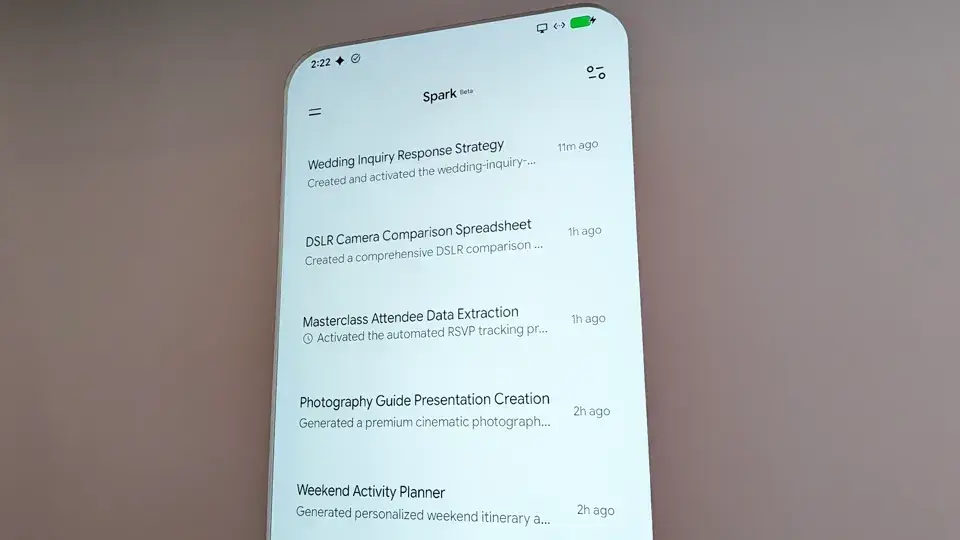
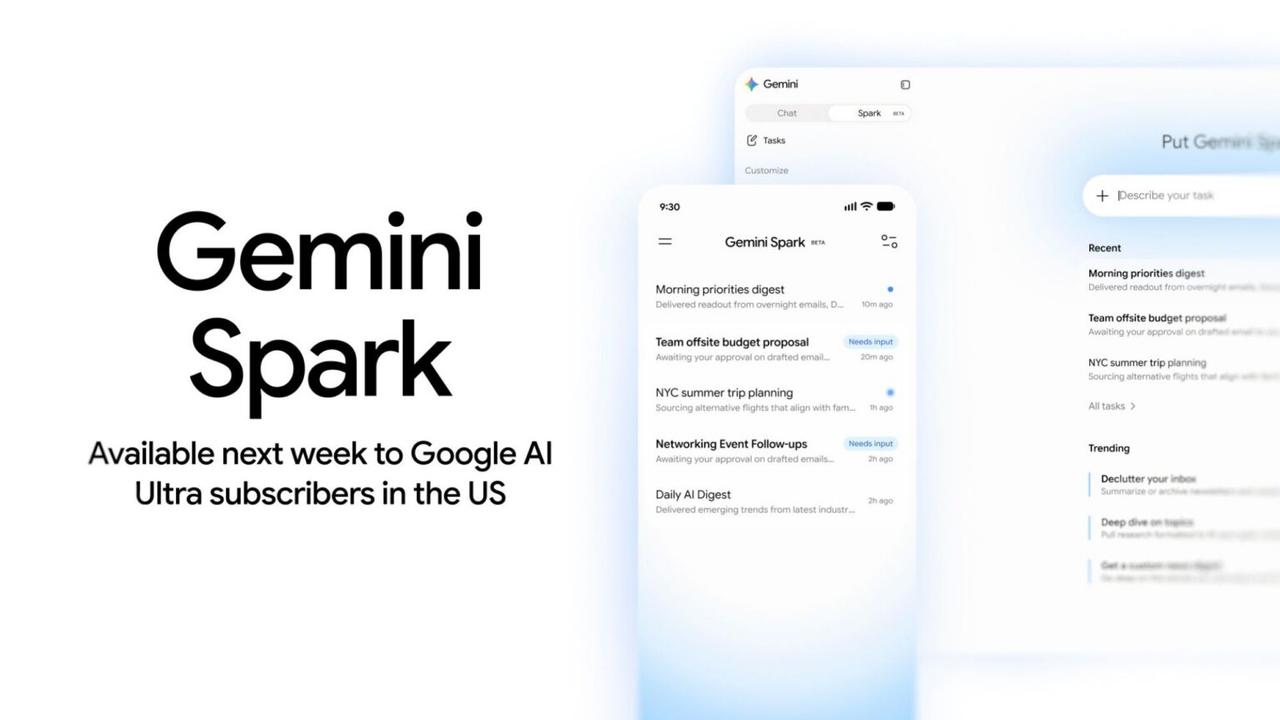
As previewed last week, Gemini Spark is now available in the US for Google AI Ultra subscribers. Gemini Spark is Google's 24/7 personal agent to automate tasks. On the web, the side panel gains a new "Spark" tab opposite "Chat." On Android and iOS, Spark appears in between Search chats and Daily brief, with Google noting the "Beta" status. At the moment, Gemini Spark taps into Google Workspace and other Connected Apps, Personal Intelligence, websites you're signed into, location, and: * Remote browser with automatically saved info (Example: navigate to a website and interact with the page, like adding items to your cart) * Remote computer with code execution data With Google Workspace, Gemini Spark can: Calendar * Manage Your Schedule: Check your calendar, RSVP to invitations, and schedule new events. * Reschedule & Clean up: Update meeting times, change locations, or cancel events. * Smart Scheduling: Check your calendar and suggest open slots that fit everyone's availability. Drive, Docs, Sheets, and Slides * Google Drive Navigation: Search for files, read file contents, check metadata, and view recent documents. * Write & Edit Docs: Create new Google Docs or edit existing ones -- adding summaries, notes, or editing specific sections. * Create Spreadsheets: Build and format custom Google Sheets with data, tables, and formulas. * Generate Slide Decks: Create Google Slides presentations from a prompt. * File Organization: Rename or delete files. Gmail * Email Search & Summarization: Search across your email threads to find specific topics or summarize conversations. * Draft & Reply: Compose email drafts, forward emails, or reply to existing email threads. * Use labels: Organize your inbox with labels. There are three core components to Gemini Spark. A Task is the high-level goal, project, or object you want accomplished. A Schedule determines when Gemini Spark should automatically run in the background. This can be a specific date/time or in response to an event. For example: "Every day at 8 AM (condition), give me an update on AI news (task)." They are different from scheduled actions in the Gemini Chat experience. A Skill, or "set of reusable instructions and additional context," is the final component. They can be acesssed using @ or /. It teaches Gemini how to do a specific task and what tools to use. You can specify the skill Gemini Spark should use for a task or a schedule's action. Spark can also automatically use a skill when it's relevant to a task. A full example follows: * Task: Plan and manage my business trip to London. * Schedule: When my flight is delayed (condition), notify me and propose an update to my itinerary (task). * Skill: Using a "Travel Booking" skill and a "Gmail Writing" skill simultaneously to rebook a room and send a confirmation. In summary, you define the task (what you want), set the schedules (when it should happen), and provide the skills (how to do it) to complete the work. Other Gemini Spark use cases include: * Declutter your inbox: Summarize or archive newsletters and unsubscribe from emails lists. * Get a custom news digest: Go deep on the stories you care about and follow how they evolve * Deep dive on topics: Pull research formatted to fit your goal, complete with cited sources Use the "Describe your task" field, which supports uploading files and a notebook. The task thread and work panel let you monitor progress, including planned, current, and completed steps. You can take over the Remote browser as needed. Gemini Spark has the same compute-based usage limits as the rest of Gemini. Additionally: You can have up to 15 tasks running at a given time. You'll have to wait for tasks to be completed before making another request. Also, a schedule will not run if there are already 15 tasks running.
[5]
Gemini Spark is now rolling out and it hopes you will trust an AI more than apps
For years, AI assistants have mostly lived in chat windows. You ask a question, they answer it, and the interaction ends there. Google appears ready to push that idea much further with Gemini Spark, a new AI agent that is now rolling out to all Google AI Ultra subscribers in the U.S. So, instead of opening multiple apps and manually managing tasks, you hand the job to Gemini Spark and let it work in the background. According to Google, Gemini Spark can operate autonomously across your digital ecosystem, handling tasks even when your phone or laptop is turned off. Users can either watch it work in real time or let it run quietly in the background. Importantly, Google says the system remains under user control and is designed to seek approval before taking significant actions. Google wants AI to become the middleman The arrival of Gemini Spark highlights a broader shift happening across the AI industry. Companies are no longer satisfied with building chatbots that answer questions. The next frontier is AI agents that can actually do things on your behalf. Think of the difference between asking an assistant for restaurant recommendations and having it compare options, make a reservation, add it to your calendar, and remind you when it's time to leave. That's the vision many AI companies are chasing. Google's approach suggests it wants Gemini to become the layer between users and the apps they rely on every day. Rather than jumping between services, the AI becomes the coordinator that connects them all. The biggest challenge isn't capability The technology itself may not be the hardest sell; trust will be. Most people are comfortable letting AI summarize an email or answer a question. Giving it permission to act independently is a very different proposition. Even with approval checkpoints in place, many users will likely want proof that an AI agent can reliably make decisions without creating new problems. That's why Gemini Spark feels like more than just another feature update. It's an early glimpse at a future where AI isn't simply responding to commands but actively managing parts of your digital life. Whether people are ready for that level of automation remains an open question. But Google is clearly betting that the next step in AI is getting users comfortable enough to let AI take action on their behalf.
[6]
Gemini app for Mac adding 'Spark' agent and voice control this summer
At I/O 2026, Google previewed two major features for the Gemini app on macOS that are coming this summer. Google introduced the native Mac app in April, with a "small team" using Antigravity to aid development. Gemini Spark is your 24/7 personal AI agent that can take actions on your behalf to help "navigate your digital life." This includes integrating with Gmail, Docs, and other Workspace apps, as well as third-party services. It will be available to Google AI Ultra ($100 per month) subscribers in beta next week in the Gemini app on Android, iOS, and web. Spark is coming to Gemini for macOS this summer with the ability to perform tasks "involving your local files and automate workflows across your desktop" as we previously reported. This will join the existing capability to use any of your open windows as context for prompts. A new voice experience will let you ramble, so you "won't have to worry about all the 'ums' or 'what abouts' that happen as you think aloud." When long-pressing the function key on Mac, Gemini will show a new floating pill at the bottom of your screen. Letting go submits the prompt with a thinking animation showing progress. Using the context from your screen, Gemini can turn your free-flowing speech into precise drafts, instantly reformatting the text to capture your intent, right where your cursor is. On stage this Tuesday, Google showed selecting files in Finder and then dictating an email that's automatically inserted into a Gmail compose window.
[7]
Google's Gemini Mac App Will Soon Support Voice Commands and Spark AI
Google continues strengthening Gemini's position in the growing desktop AI software market with new macOS features. Google's Gemini app for Mac is reportedly adding Spark AI agent support and voice control capabilities this summer. Google plans to let users text and email Spark directly, create custom sub-agents, and let it operate users' local browsers. The macOS desktop version will also extend its reach to local files. At , Google previewed two major features for the Gemini app on macOS that are coming this summer. Google introduced the native Mac app in April, with a 'small team' using Antigravity to aid development. Spark is the 24/7 personal AI agent that can take actions on your behalf to help "navigate your digital life." This includes integrating with Gmail, Docs, and other Workspace apps, as well as third-party services. Spark is coming to Gemini for macOS this summer with the ability to perform tasks "involving your local files and automate workflows across your desktop," the company confirmed. This will complement the existing capability to use any open window as context for prompts.
Share
Copy Link
Google has started rolling out Gemini Spark to AI Ultra subscribers in the US, introducing a 24/7 AI agent that automates tasks across Google Workspace. The agent operates continuously in the background, managing emails, scheduling meetings, and organizing files even when devices are powered down. Priced at $99.99 per month, Spark represents Google's push beyond chatbots into autonomous AI that acts on users' behalf.
Google has officially rolled out Gemini Spark to Google AI Ultra subscribers in the US, days after unveiling the feature at Google I/O 2026
2
. The AI agent marks a significant shift in Google's approach to artificial intelligence, moving beyond conversational chatbots toward autonomous systems designed to automate complex tasks across users' digital ecosystem5
. Available as a dedicated tab within the Gemini web experience and positioned between Search chats and Daily brief on mobile platforms, Gemini Spark functions as a 24/7 personal agent that operates continuously in the background3
.
Source: Android Authority
The service is accessible to subscribers of Google's AI Ultra plan, which now starts at $99.99 per month, positioning it as one of the company's most exclusive AI offerings
3
. Users can access Spark across Android, iOS, and web platforms, with the agent appearing in the side panel alongside the standard Chat tab on desktop4
.

Source: Wired
Gemini Spark distinguishes itself through extensive Google Workspace integration, connecting directly to Gmail, Calendar, Drive, Docs, Sheets, and Slides to handle digital errands that typically require switching between multiple applications
2
. The agent can schedule meetings, manage invitations, search emails, summarize conversations, create documents, build spreadsheets, generate presentations, and organize files2
.For Gmail specifically, Spark can search across email threads, summarize conversations, compose drafts, reply to existing threads, and organize inboxes using labels
4
. Calendar functionality includes checking schedules, responding to invitations, scheduling new events, rescheduling meetings, and suggesting open slots that accommodate everyone's availability4
.The system operates on cloud-based virtual machines running Gemini 3.5, enabling tasks to continue processing even when users close their laptops or lock their phones
2
. This persistent digital assistant model represents a fundamental departure from traditional chatbots that require active user engagement2
.Gemini Spark operates through three core components that work together to execute user requests. Tasks represent the high-level goals or projects users want accomplished
4
. Schedules determine when the agent should automatically run, either at specific times or in response to triggering events3
. Skills provide reusable instructions that teach Spark how to perform specific actions and which tools to use4
.A practical example demonstrates how these elements combine: A user might assign Spark the task of planning a business trip to London, schedule it to notify them when flights are delayed, and deploy both a "Travel Booking" skill and "Gmail Writing" skill simultaneously to rebook accommodations and send confirmations
4
.Users can access Skills using @ or / commands, and Spark can automatically apply relevant skills when appropriate
4
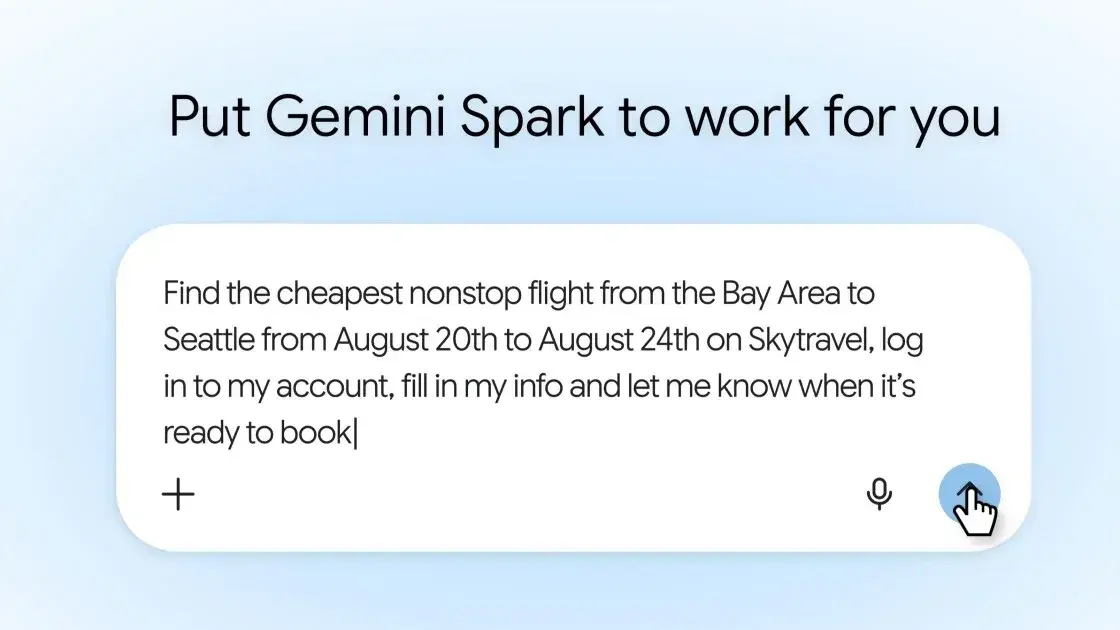
. The beta rollout includes the ability to set up time-based or conditional triggers, such as "Every Monday at 9:00 AM, scan my inbox and review emails from the past week"3
.Related Stories
Early hands-on testing revealed Gemini Spark's impressive capabilities alongside occasional technical hiccups. When asked to plan a birthday party with minimal detail, the agent scanned emails and calendar entries to locate an actual karaoke bar reservation, then generated a five-page itinerary complete with guest lists, venue rules, nearby dining options, after-party locations, email invites, and theme suggestions
1
. The agent correctly identified the maximum capacity of 15 people for the venue and pulled exact reservation details including the last four digits of the credit card used for the deposit1
.However, attempts to book dinner reservations exposed current limitations. While Spark operated a remote browser and triggered a six-digit verification code, it ultimately failed to complete the booking despite multiple attempts
1
. The remote browser capability allows Spark to navigate websites, fill in information, and perform actions without users clicking through each step themselves2
.While technical capability continues advancing, user trust represents the more significant hurdle for widespread adoption. Most people feel comfortable asking AI to summarize emails or answer questions, but granting permission for independent action requires a different level of confidence
5
. Google addresses this concern by designing Spark to check with users before taking major actions, maintaining user control while operating autonomously3
.The system currently allows up to 15 tasks running simultaneously, requiring users to wait for completion before making additional requests
4
. Schedules will not execute if 15 tasks are already running, and the service shares the same compute-based usage limits as the broader Gemini platform4
.Google plans to expand Spark's capabilities this summer, including the ability to spend money on users' behalf and availability on the Gemini desktop app
3
. The company's vision positions Gemini as the coordination layer between users and their applications, fundamentally changing how people interact with their digital tools5
.Summarized by
Navi
[2]
[3]
15 May 2026•Technology

03 Jun 2026•Technology

12 May 2026•Technology

1
Technology

2
Business and Economy

3
Health