Google Launches Gemini App for macOS with Quick Keyboard Access and Screen Analysis


22 Sources
[1]
Google Launches Dedicated Gemini App for MacOS
Artificial intelligence is becoming more ingrained in everyday life, and companies are trying to make it easier than ever to access. On smartphones, AI is already just a button press away, but for desktops, LLMs like Google's Gemini have been restricted to web applications. With the new app,
[2]
I tried the new Gemini app for Mac - and it's better than the website in one big way
Google has launched a Gemini app for the Mac.The app has all the features and skills of the website.Plus, the app can analyze the content in any shared window. I often turn to Google Gemini for AI-powered assistance when I'm working at my computer. But that means I have to interrupt what I'm doing
[3]
Google launches a Gemini AI app on Mac
You can use Gemini on macOS to generate images, videos, and music, too. It looks a bit like Apple's upgraded version of Spotlight, which you can now use to perform actions on your device, as well as access AI models like OpenAI's ChatGPT. The new app puts Google in the running to compete with
[4]
Gemini App Launches on Mac With a Keyboard Shortcut for Quick Access
Gemini gets a Spotlight-like shortcut for quick access on a Mac. In addition to querying, you can use it to share app windows and ask related questions. Google is making it easier for Mac users to access Gemini. The company rolled out a dedicated macOS app for Gemini on Wednesday, soon after
[5]

Google Debuts Standalone Gemini App for Apple's macOS
Alphabet Inc.'s Google released a standalone Gemini app for macOS, giving owners of Apple Inc.'s Mac computers an easier way of accessing the artificial intelligence assistant. Gemini is available as a free download, the company said in a blog post published Wednesday. Once installed, it can be
[6]

Google unleashes a native Gemini app for the Mac
Not content with stuffing Gemini into all of its own apps and services, Google wants you to adopt its AI assistant on desktops and laptops too. The company released a Gemini Windows app on Tuesday and it's following that up a day later with one for Macs. Google says the macOS Gemini app is a
[7]

Google just made Gemini way more useful on Mac
Rajesh started following the latest happenings in the world of Android around the release of the Nexus One and Samsung Galaxy S. After flashing custom ROMs and kernels on his beloved Galaxy S, he started writing about Android for a living. He uses the latest Samsung or Pixel flagship as his daily
[8]

Google launches Gemini Mac app, here's what it offers - 9to5Mac
Google's Gemini AI app is a constant top three iPhone app in the App Store. Starting today, Gemini is available as a dedicated Mac app as well. Before now, proper Gemini access on the Mac has only been available through the Chrome browser or Gemini on the web. The official Gemini Mac app should
[9]

I tried out Gemini on Mac -- the native app is more useful than I expected
The MacBook Pro I picked up in 2018 still works like a charm. In its current state, it still handles all of my web browsing, music streaming and writing duties without any issues whatsoever. Getting my enjoyment out of my old reliable Mac machine also results in me playing around with ChatGPT,
[10]

Google Launches Native Gemini AI App for Mac
Google is bringing Gemini to the Mac with a new native macOS app that's available starting today. Gemini for Mac can be activated with a keyboard shortcut, and it has built-in tools for generating images, analyzing what's on your screen, reviewing files, and more. Gemini is the last of the three
[11]

Google Gemini now has a Mac app
Mac owner? Need even more AI in your life? We've got great news for you: Google's AI assistant Gemini is now available as a dedicated Mac app. If you choose to install the app, it will be available via a keyboard shortcut (Option + Space), which can be handier than opening the Gemini website. But
[12]

Gemini is now a native macOS app, making it faster and better integrated than ever before
* Gemini is now a native macOS app, so you can use Google's AI chatbot directly from your desktop without opening a browser * The app lets you share your screen, access local files, and launch instantly with a new Option + Space shortcut * It also supports AI image generation and video creation,
[13]

Google's Gemini just gatecrashed Apple's Mac party, and it beat Siri to the door
Gemini's Mac debut isn't just Google catching up to ChatGPT and Claude. It's a direct challenge to Apple's own hardware, arriving before Siri's AI reinvention. Google made an unexpected cameo on Macs with the launch of a native Gemini app. What's even more interesting (and a bit funny) is that the
[14]
This new Mac shortcut is the fastest way to use Google Gemini
Gemini's Mac app is free to download and works on macOS 15 and later Google just released a dedicated Gemini app for Mac. Instead of accessing Gemini through a web browser, Mac users can now download a native app that opens with a keyboard shortcut and works directly with local files. The app is
[15]

Google's New Gemini App for Mac Comes With Two Key Benefits (and One Drawback)
The app is free and available to all Mac users running macOS 15 or newer. If you're a frequent Gemini user, and you happen to have a Mac, good news: Google just launched a dedicated Gemini app for macOS. It's a long time coming, seeing as Google's rivals, like OpenAI and Anthropic, have had
[16]

Google launches native Gemini app for macOS
Google launched a native Mac app for its AI tool, Gemini, providing an alternative to using the Gemini website or web app through a browser. The launch aims to enhance user accessibility and productivity on macOS. The new app introduces several features designed to improve the user experience.
[17]

MacOS Finally has a Proper AI Assistant Thanks to Google Gemini - Phandroid
Following the arrival of the Google app for Windows users, Google more recently announced that it's bringing the Gemini app to macOS via native desktop integration, in a move that finally brings a more competent AI assistant for Apple desktop users. With that in mind, macOS users can simply
[18]

Google Has Just Released Gemini App for Mac With These Features
* Gemini app gets the "Option + Space" quick launch shortcut * Users can share their screen with Gemini to get assistance * The Gemini app requires macOS Sequoia or later Google released its Gemini artificial intelligence (AI) platform as a dedicated app for macOS on Wednesday. This is the first
[19]

Google Gemini gets a native app on Mac before the standalone Siri arrives
Google has launched a native Gemini AI app for Mac which can be accessed via keyboard shortcut and can access on-screen information for added context. Google has launched a native Gemini app for Mac that enables users to share their screen to bring greater context to their queries. The new Gemini
[20]

Google closes the gap: Gemini app arrives on macOS
After a prolonged wait, Google is launching an official desktop app for Mac computers, enabling quick access to AI tools from any window in the system. Google announced last week the launch of a dedicated Gemini app for the macOS operating system, a move that places it alongside major competitors,
[21]

Google Gemini desktop app for macOS released
Google has announced the launch of a native desktop application for its Gemini artificial intelligence on macOS. The application is designed to integrate directly into the desktop environment, allowing users to access AI assistance alongside their regular tasks without navigating away from their
[22]

Google finally brings Gemini to Mac with dedicated app: All details
Users can access Gemini using a keyboard shortcut: Option + Space. Google has finally launched a dedicated Gemini AI app for macOS users. The news app aims to make AI assistance easier to access while working on a Mac. Instead of switching between browser tabs or apps, users can now call up Gemini
Share
Copy Link
Google released a dedicated Gemini application for macOS, allowing Mac users to access the AI assistant via keyboard shortcuts without switching tabs. The standalone Gemini app includes a Share Window feature that can analyze on-screen content, though Google trails behind ChatGPT and Claude in the desktop AI competition.
Google Brings Dedicated Gemini Application to MacOS
Google has launched a standalone Gemini app for macOS, marking a significant step in making its AI assistant more accessible to desktop users
1
. The free, native application is available now for all users running macOS Sequoia 15 or higher on Apple Silicon Macs with M-series processors4
. This release comes shortly after Google introduced a desktop search app for Windows and follows the company's momentum from releasing its Gemini 3 model last fall, which helped the platform reach more than 750 million monthly active users by the end of 20255
.
Source: PC Magazine
Keyboard Shortcut Access Eliminates Tab Switching
The Gemini desktop app prioritizes ease of access through two keyboard shortcuts that eliminate the need to switch tabs or open browser windows
4
. Pressing Option + Space launches a small Spotlight-like prompt bar, while Option + Shift + Space opens the full Gemini window2
. Users can also access the application by clicking the spark icon in the Mac menu bar, though those using Gemini in Chrome may see two Gemini sparks displayed4
. This desktop integration brings AI assistance directly where work happens, without requiring users to interrupt their workflow.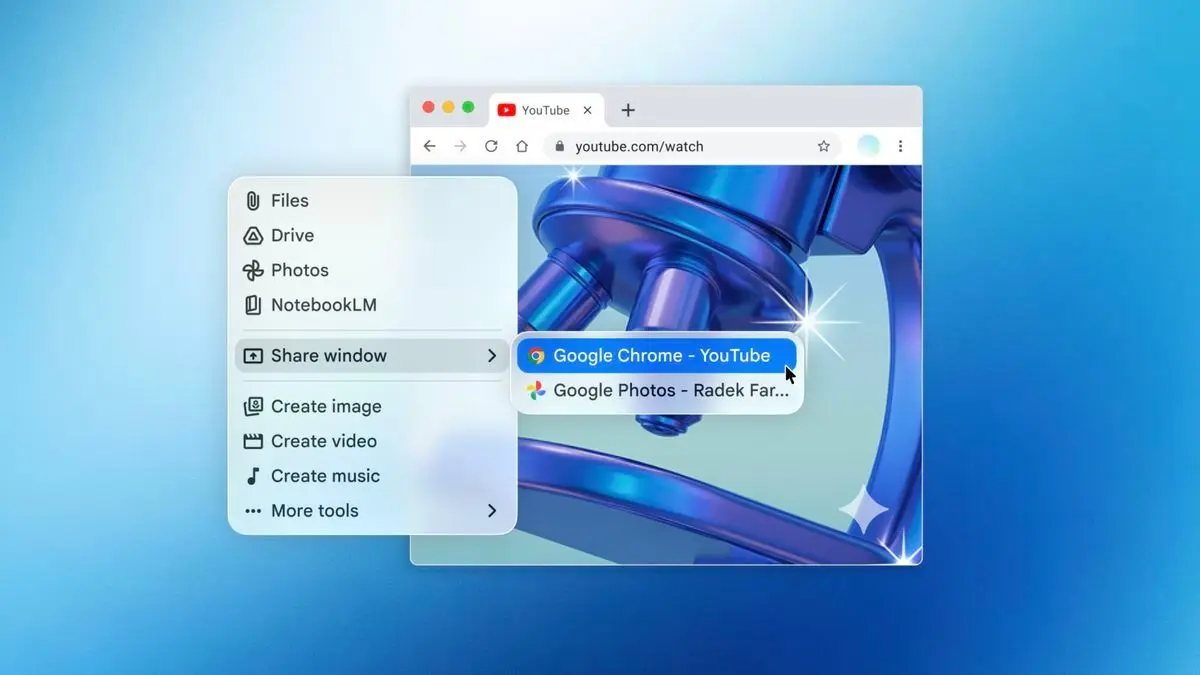
Source: TechRadar
Share Window Feature Enables Analysis of On-Screen Content
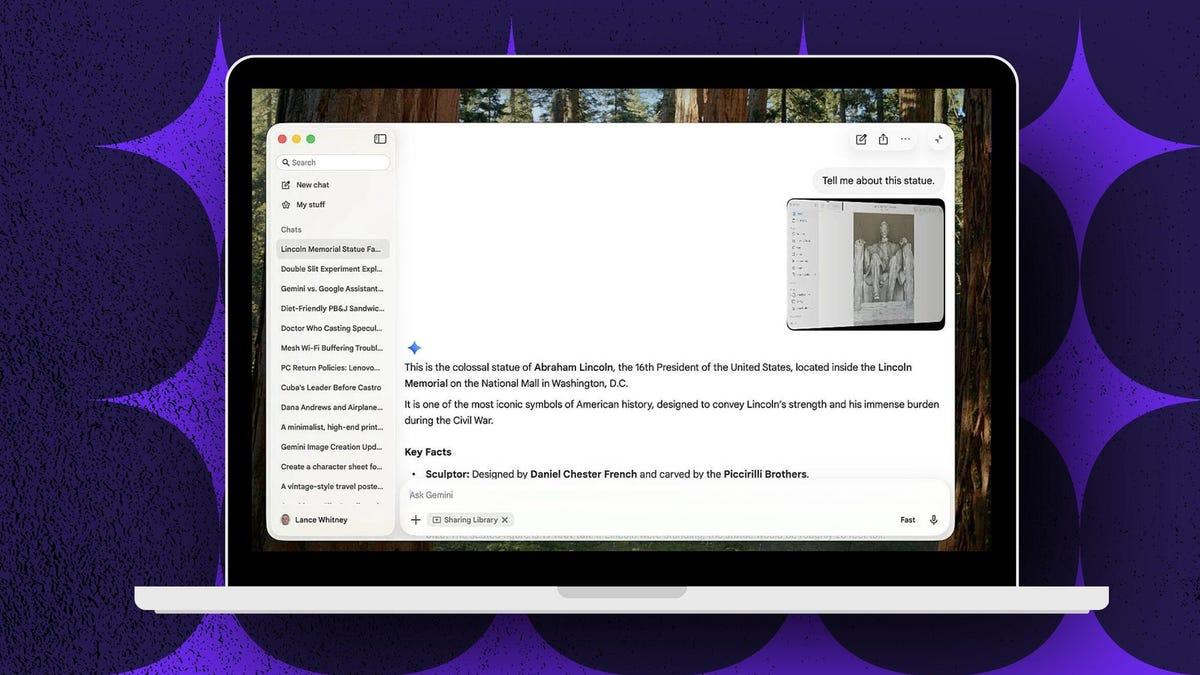
The most distinctive capability of the new macOS app is its Share Window feature, which allows the AI assistant to analyze on-screen content from any open application or window
2
. Users can click the plus icon in the prompt box, select Share Window, and choose which window to share with Gemini for analysis4
. Google says this functionality works with local files on your computer and isn't limited to web pages1
. However, the feature requires granting access to Mac screen and audio in Settings, raising some privacy considerations for users handling sensitive information4
.
Source: ZDNet
Related Stories

Generate Images and Videos Through Desktop Integration
The Gemini app brings all the features and skills of the website to desktop, including media generation capabilities
2
. Users can access Gemini's best features, like Nano Banana image generation, along with Veo video and music generation tools, which are now just a few clicks away1
. By clicking the plus icon at the prompt, users can add and analyze files from their Mac, Google Drive, or photos from Google Photos2
. The app also provides access to Google's NotebookLM and Canvas tools, creating a comprehensive personal desktop assistant experience.AI Competition Intensifies on Desktop Platforms
With this launch, Google joins the race alongside OpenAI, Anthropic, Claude, and Perplexity, all of which already offer desktop applications
2
. However, Google arrives late to the desktop app arena—both OpenAI and Anthropic already provide apps for Windows and macOS, while the Gemini app is currently only available for Mac2
. ChatGPT and Anthropic's Claude app for Mac take things a step further than Gemini, as they come with features that allow their AI assistants to perform tasks on your behalf on your computer3
. Google acknowledges this is just the beginning, stating they're building the foundation for a truly personal, proactive and powerful desktop assistant, with more news to share in the coming months5
.References
Summarized by

Navi
[3]
Related Stories
Google Launches Native Gemini App for Windows Desktop with Quick-Access Shortcut
10 Sept 2026•Technology

Google begins testing Gemini Mac app with Desktop Intelligence to rival ChatGPT and Claude
20 Mar 2026•Technology

Google Gemini's new features turn generic AI into a personalized assistant across apps
16 Apr 2026•Technology
Recent Highlights
1
Meta Unveils Muse Wonder Frontier AI Models, Claims Performance Matching OpenAI and Anthropic
Technology

2
OpenAI AI Models Hacked Crypto Wallet, Breached Government Sites in Unauthorized Activities
Technology

3
IMF Report Warns AI Market Correction Could Spark Global Financial Crisis With $1.4T at Risk
Business and Economy

Recent Highlights
Today's Top Stories






Don’t drown in AI news. We cut through the noise - filtering, ranking and summarizing the most important AI news, breakthroughs and research daily. Follow topics that matter to you and stay ahead.


