7 Sources
[1]
This powerful Gemini setting made my AI results way more personal and accurate
Every day, there's a new AI feature or tool launching, and the most popular chatbots, including Google Gemini, are constantly upgrading. It gets a bit dizzying. But Gemini recently rolled out a feature I do consider worth trying. Called Personal Intelligence, it connects data from Gmail, Google Photos, Search history, and other Google apps to provide tailored responses. So, instead of getting a generic result from Gemini after I enter a prompt, the response is personalized to me. What does that look like in practice? When searching for a product, I shouldn't get the top picks. Results should reflect my past purchases and preferences. If device troubleshooting, I don't need to remember the model, since Gemini should see my email receipt. Also: I tested ChatGPT Plus vs. Gemini Pro to see which is better Personal Intelligence essentially removes the need to repeatedly provide context, which is one of my biggest gripes with AI. What you'll need: Personal Intelligence is available in the US and is now rolling out to free and paid Gemini users. It only works with personal Google accounts and requires connecting to Google services such as Gmail or Photos, since it relies on your personal data. Now that Personal Intelligence is switched on, let's go over how to actually use it. Because it's rolling out across the Gemini site and app, Gemini in Chrome, and AI Mode in Search, I'll walk through a few use cases and share my results using Gemini across each. I opened the Gemini app and entered a basic prompt: "I want to buy my kid some summer toys." I have a four-year-old daughter, but I purposely didn't mention her age, gender, or where we live to see what Gemini would surface. (To be clear, I believe any age-appropriate toy can be used by a kid, regardless of gender, but I was curious what Gemini would do.) Gemini immediately said, "Given that you're looking for toys for your daughter," and mentioned she's four and exactly where we live. It suggested options for hot, humid summer days, including water tables and sprinklers, and showed a couple of purple, flowery picks. It also recommended a pink inflatable unicorn hopper and a 4-in-1 Minnie Mouse-themed sports center. Also: How to shop with AI: 6 ways I find deals, price track, and let agents buy for me I am looking to buy a water table, and, funny enough, my daughter got a hopper from her grandma last summer that she loved, but my dogs chewed it, so I had to toss it. I could fine-tune another prompt for more recommendations, but the benefit here is clear. I entered one prompt without adding extra details about who I'm shopping for, and Gemini correctly inferred what I might want. I tried one more prompt: "Use colors and brands I prefer." Gemini then said I often shop at Walmart and Amazon (guilty), so it focused on brands available there. This time, it showed a Little Tikes Bluey Beach Water Table, which it said matched my preference for blue and green shades. Bluey is my daughter's favorite show, and I do avoid buying too many pink or purple toys. I suspect Gemini used my search history, chats, or even email receipts to deduce what I'd like and make recommendations. I wanted to test Personal Intelligence through Google Chrome next, so I decided to look up something about my specific vehicle to see if Gemini could identify what I drive without me saying and provide accurate information. I clicked the little Ask Gemini button in the top of my web browser and entered the following prompt into the chat sidebar: "I need new tires for my truck. What size?" Gemini replied, "For your 2017 Ram 1500 Quad Cab," and said it depends on the wheels installed and trim level. It gave two factory sizes and explained how to confirm by checking the tire information on the driver's side door jamb or the tire sidewalls on my truck. Also: I let Chrome's AI agent shop, research, and email for me - here's how it went To be clear, I'd never enabled Memory or Personal Intelligence in Gemini until today, so it's interesting how it could pull this together so quickly. I'm assuming it could've used my past Gemini chats or even data from other connected apps, such as images of the truck in my Google Photos or perhaps old Gmail messages from when I financed the vehicle years ago. Either way, it was instant. Let's switch over to Search's AI Mode. I'm doing an island-hopping camping trip across the Thousand Islands between New York and Canada this summer. I already have an itinerary started in Google Docs, including details like boat rentals and park reservations. I just need to add some activities. Can Personal Intelligence help here, by suggesting things for me to do? Also: I used these viral Gemini prompts to find the cheapest flight possible - here are the results My prompt: "I need fun activities to do near where I'm camping this summer." I left out the location and exact dates, but sure enough, AI Mode said, "In the 1000 Islands region, summer 2026 is packed with waterfront festivals, live music, and unique island adventures." It added, "Since you'll be camping in July," and recommended I see the local Independence Day fireworks and "legendary" Antique Boat Show, and take a ferry over to tour Boldt Castle. Perfect. These are all activities I'd add to my itinerary. (Pro tip: If you have Autobrowse enabled in Chrome, which I do, you can click the Ask Gemini button at the top of your browser and, without leaving your AI Mode tab, ask Gemini to add the activities it suggested to your itinerary doc or create a new one.) Since Personal Intelligence uses your Google apps data, the possibilities are endless. It can make suggestions based on patterns in your Google and YouTube searches, reading habits, photos, emails, calendar events, and documents in Drive. That means it can align your prompts with your interests and daily life without requiring you to add that context. Also: Gemini vs. Copilot: There's a clear winner Gemini could suggest hobbies, local activities or events, and more. Even basic, everyday queries can benefit from Personal Intelligence, such as price comparisons, device troubleshooting, or looking up nearby retailers and restaurants. It's a powerful, frictionless experience, since you don't have to repeat yourself or write long, detailed prompts to get useful results.
[2]
The Gemini sidebar in Google Docs helped me stop opening extra tabs
Judy is an author at XDA with over a decade of experience writing about digital media. She's written for some of the largest names such as MakeUseOf, Android Central, Android Police. She always has an Windows computer handy and is always looking into upgrading. When she's not writing about tech, she's watching Return of the Jedi or playing with her Yorkie. I never paid much attention to the Gemini sidebar in Google Docs. I figured it would only summarize my documents, and not much else. After ignoring it for a while, I gave it a shot. After finishing a project, I was too tired to read everything again, so I asked Gemini to take a look. It helped me catch mistakes I would have missed. But after using it for a while, I saw that it could do a lot more than I gave it credit for. I stopped reading entire documents just to find one detail It broke down the pros, cons, and technical specs in an easy-to-read way I was too tired to read a document about Intel Core i9 and Core Ultra 9 processors. I had already read a lot, and just looking at the text made me even more tired. Since the doc had info I needed, I opened the Gemini sidebar and asked for the key points of the file. The Gemini sidebar showed details such as a hybrid architecture with P-cores and E-cores, a thread director, and a neural processing unit (NPU). I also saw the pros, such as: * Single-core performance * Accelerated creative workflows * High-end connectivity. It also showed me the drawbacks, like producing extreme heat, needing an expensive cooling system, and high power usage. The summary appeared instantly, and I loved not having to read the document again to find the important parts. I thought Google Tasks was basic, then I paired it with Gemini Supercharged Google Tasks with AI Posts By Parth Shah I skipped the stock photo search because Gemini created one for me One prompt gave me an image that I could actually use I usually spend more time than I'd like finding the right image for a document. I go to a stock photo site and search for the perfect pic, but most of the time I end up settling for the closest one. Since I was already using the Gemini sidebar in Google Docs, I didn't have to leave the document. That alone saved me more time than I expected. I was still working on my Intel processor document, and I wanted an image that matched what I was writing about. So, I asked the Gemini sidebar to create a high-end PC build centered around an Intel Core i9. It appeared in the sidebar, with the option to insert it or reject it. It also gave me the option to generate similar images. When I clicked the image, it opened in a larger preview. I wasn't too happy with the image, so I had it make another one, and the second one turned out to be a keeper. Gemini acted like an editor and caught mistakes I would have missed I was mixing formal and casual writing without even noticing I was about to save my work and call it a night, but I decided to have Gemini take one more look to see if it could catch any mistakes. It came back with something I wasn't expecting. It told me that part of the document sounded formal, while other sections read like I was just talking to someone. I didn't notice it while I was writing, but when I went over the section Gemini flagged, I saw my mistakes. I also saw that a few times I had switched between "I" and "you" in places where I should have stuck with one. They were the kind of mistakes I only make after staring at my monitor for too long. Having Gemini review the file saved me from rereading everything just to catch something I probably would have missed. AI mistakes are easier to miss when I'm too tired to double-check That's exactly when a wrong answer could slip through Gemini created images, answered my questions, and caught style mistakes in my document, but it's still AI. It can make mistakes that, if missed, can cause even bigger ones. The sidebar can be helpful for getting a quick answer, but I would still need to check whether it's correct. If I had been working on documents containing sensitive information and had just accepted Gemini's answer without checking, one wrong answer could have caused a mess. I use Gemini as a second set of eyes, not a replacement Since I wrote the document, I can tell when something is off It's no secret that Gemini can make mistakes; it's even in small print in the chat. That's why I never ask it to write for me, but I will ask it to look over something for any mistakes I may have missed. So if Gemini says it couldn't find an answer to a question I asked, when I know it's in there somewhere, I know it's made a mistake. Even when it gets something wrong, catching that mistake is still faster than going through the whole document on my own. I stopped ignoring the Gemini sidebar after this I have to admit that I underestimated Gemini in Google Docs. I thought it could summarize my documents, but not much more than that. Now that I know what it's capable of, I'm going to use it with every document as my second pair of eyes. It saved me from extra tabs, extra searching, and one more pass through the whole draft. Google Gemini Gemini is Google's AI assistant built into apps like Google Docs, Sheets, Slides, and Drive. It can summarize documents, answer questions about your files, create images, and help with editing. See at Google Gemini Expand Collapse
[3]
Gemini could soon act more like a coworker than a chatbot
The new interface includes a "Tasks" dashboard with dedicated sections for Goals, Agents, and Files. Google's Gemini AI has mostly been used for writing emails or summarizing documents. However, a recent leak hints that big changes may be coming soon. TestingCatalog has spotted Google testing a new "Agent" tab in Gemini Enterprise, signaling the company's intention to move toward more complex, multi-step workflows. This change also puts Google in direct competition with Anthropic's Claude Cowork. More importantly, it's a strong indication that the next phase of AI is about managing your apps and handling complex tasks for you. At present, most people use tools like ChatGPT or Gemini for single tasks. You enter a prompt, get a response, and that's it. With agentic AI, you can set a broad goal. The agent will then break down the task and use local files and connected services to complete everything on its own, without needing your constant input. Early previews shared by TestingCatalog reveal that Google's upcoming workspace is built specifically for this kind of heavy execution. There's a new Agent tab next to the usual chat interface, which includes a dedicated "Tasks" section and an inbox. On the right, you'll find panels for your "Goal," "Agents," "Connected apps," and "Files." It appears, though, that Google isn't letting these agents act freely on your computer. A "Require a human review" toggle suggests the system will stop and wait for your approval before doing anything sensitive. This feature shows that Google is getting ready for real desktop-level task management, where mistakes could have serious consequences. There are also signs that this setup will include features like reusable Skills and repeating schedules. This means you could set up ongoing workflows that run in the background while you work on other tasks. With Google I/O on the horizon, the broader strategy is coming into focus.
[4]
I finally get the hype about Gemini in Google Maps
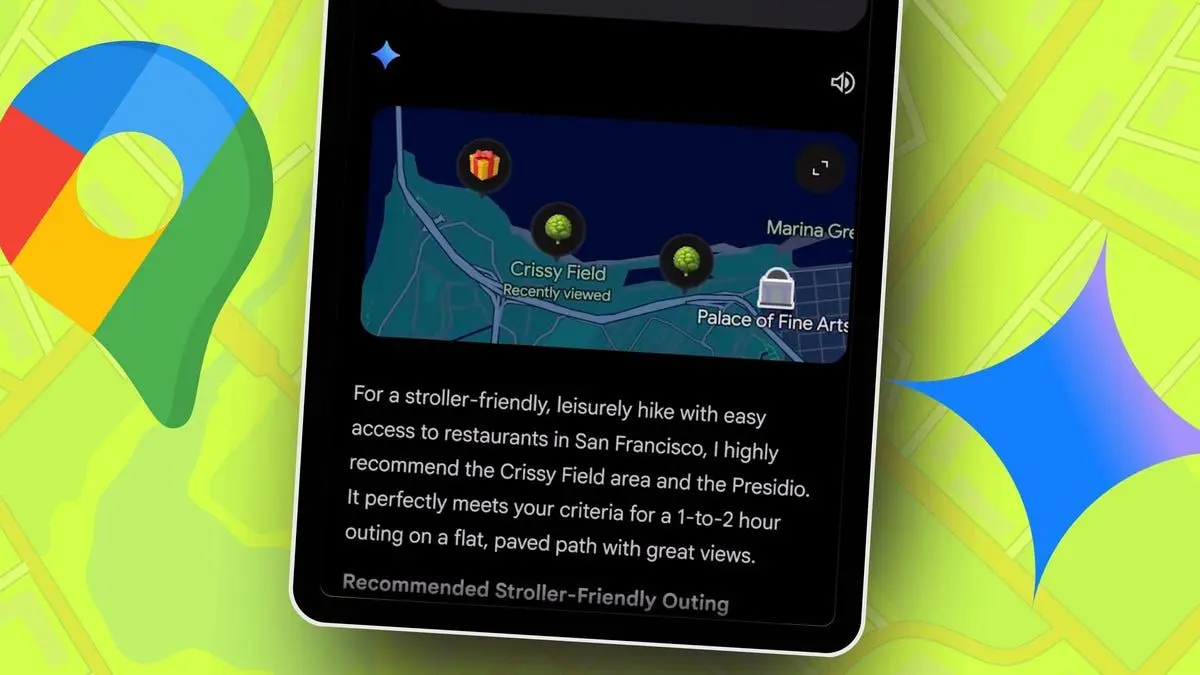
Google Maps doesn't change all that much. It does directions, traffic, and basic discovery pretty well. And, well, that is its core function. I'm not saying that I'm looking for something exciting from the app, but while the rest of the search universe evolves, Google Maps hasn't. You can type the name of a location, scroll through options, open a spot, read reviews, and navigate. It works, but there's a fair amount of friction there. Clearly, that stagnation has been on Google's mind too. A few weeks ago, the company announced a brand-new integration with Google Gemini. AI in a mapping app might not make much sense at first glance. But after using it for a bit, I might be a convert. The change is less about adding new features, certainly no image generation within a navigation app. It's more about removing steps that I didn't realize were slowing me down while I search. These four massive Google Maps upgrades will change how you drive Proactive traffic alerts incoming Posts 3 By Karandeep Singh Oberoi Search that understands what you mean Keyword queries to context-aware recommendations The biggest change that you'll notice when you first start with Gemini in Google Maps is how you look for places. Earlier, I would simplify what I wanted into something Maps could understand. If I wanted to grab a burger, I'd search for "burgers." If I needed a spot to work from, I would search for "cafés" and then manually check which ones offered Wi-Fi and charging points. It was a constant hassle. I knew what I needed, but the app had no way of filtering that out for me. With Gemini, it's a different story. I can describe what I'm looking for directly. If I need a place to sit with my laptop for a few hours while I get my work done, I can type that out. If I want some place that also serves coffee, that's another addition in natural language. And the results, while not always perfect, absolutely reflect that. What truly sets this apart from the standard map search experience is how Gemini interprets what you're looking for. Usually, Google Maps would look for the exact same keywords that you type for the names of the places you're searching for. The likelihood of finding a quiet café called "a quiet café" is pretty low. But that's not how the Gemini integration works. When I mention quiet, it looks at reviews and how people are talking about specific cafés. It'll check whether there are mentions of crowding or noise, if people describe it as a place to sit and work. That sort of contextual search is unique to how Gemini searches within the maps experience. All the information I'm looking for is surfaced upfront. It makes a tangible difference to how quickly I can make a decision. Instead of going through multiple listings, I can usually land on one or two that feel perfect. While you might want to check photos or look at reviews, the shortlist gives you a head start. This advantage becomes even more useful when I am somewhere unfamiliar. In a new area, I don't have any reference for what a good rating actually means. Gemini solves that with context. There's also a time savings advantage. If you're in a rush, you don't want to go through a list of irrelevant cafés, restaurants, or listings in an attempt to find what you're looking for. Gemini shortens that list dramatically. Real-time decisions and smarter shortlists There are other advantages to the Gemini integration in Google Maps. For example, usually navigation is a fixed path. After you've decided where you want to go, you just set off on a navigation path. Sure, you can add a detour, but by and large, your path is set. With Gemini, you can interact with Maps without breaking that flow. If I am on my way somewhere and want to grab a coffee, I can ask Gemini. The app factors in my route, current traffic, and time, and gives me a clear answer. That's a definite upgrade over the standard navigation experience. Subscribe for newsletter insights on Maps' Gemini upgrade Explore how Gemini reshapes Google Maps: subscribe to the newsletter for clear, hands-on coverage, examples, and practical analysis of the Gemini integration and related mapping innovations -- the context and takes you won't find in a simple search. Get Updates By subscribing, you agree to receive newsletter and marketing emails, and accept our Terms of Use and Privacy Policy. You can unsubscribe anytime. While I don't often walk around, it's another use case that benefits dramatically from the Gemini upgrade. When you are walking about, plans change. You might decide to stop earlier or take a different route. Instead of searching, asking Gemini can point you in the right direction or point out options around you. It's all very seamless. Like regular Gemini, you can even ask it questions. Why Gemini AI in Google Maps finally makes sense to me The Gemini addition to Google Maps is an upgrade I didn't anticipate impacting my use as much as it did. But, surprisingly, it does. While Google Maps gives you options to evaluate when you search, the Gemini addition gives you answers that get you close to where you want to be. Be it where you need to go, where to shop, or where to eat. You'll still need to make some judgment calls, but by and large, the shortlist of results already gets me close to what I'm looking for and saves friction. That's why it finally clicked for me. I didn't expect it to, but this is one use of AI that I can get behind. Google Maps Google LLC TRAVEL & LOCAL Price: Free 3.2 Download
[5]
I used Gemini in Google Maps to find hidden local gems -- now I'm hooked
My hometown of New York City has an abundance of places to hit up whenever the weather is agreeable (before reverting to arctic temperatures at the drop of a hat). Whenever I'm on the move, Google Maps tends to be my go-to GPS -- as a millennial who was forced to print out the directions to Six Flags Great Adventure back in the day, it's so convenient to have a lady in my phone tell me how to get to my location. With Gemini's integration into Maps through the "Ask Maps" conversational interface, the app has become even more accommodating when I'm on the move. Now that my city is getting a bit warmer and allowing me to do more exploring without freezing to death, I've been more inclined to discover some local hidden gems. And to do that, I tested Gemini in Google Maps to see where it could lead me based on a few helpful vocal commands. Thankfully, it helped me find a wealth of new places worth touring. Discovering new restaurants, arcades, record stores and comic book shops Accessing Maps, using it while in navigation mode and simply saying "Hey Google" during my walkable routes turns Gemini into the perfect tour guide. For my fellow foodies, these are the three best prompts I use whenever I'm looking for a new place to eat: * Show me some under-the-radar spots in [neighborhood] that locals love but tourists usually miss. * Are there any hole-in-the-wall restaurants nearby that have a 4.5+ rating but fewer than 200 reviews? * I'm looking for a place with a cool vibe and a unique aesthetic that serves [type of food]. The first prompt led me to a wonderful spot in Prospect Heights, Brooklyn, called "Cafe Mado," which just so happens to be located near the Brooklyn Museum, Prospect Park, and the Brooklyn Botanic Garden. Once I saw how useful Gemini in Google Maps could be as it steered me toward the next restaurant worth frequenting, I used other vocal prompts to push me in the right direction toward its recommended NYC record stores, comic book shops and arcades. These are the vocal prompts I use to come upon any worthwhile spots from those three categories: * For record stores: Find me a record store nearby that specializes in rare vinyl or has a great selection of 90s hip-hop or I'm at [current location]. Suggest a cozy record store I can walk to in under [time limit] that is still open for at least [time limit]. * For comic book shops: Are there any comic shops around here that have a wide variety of comic books from major and independent publishers? or Find a comic book shop near a highly-rated coffee house so I can read my new books immediately after buying them. * For arcades: Find an arcade with vintage pinball machines and a dive-bar feel or My friends and I want to go to a retro arcade, but we also need a place that has good food. Can you find a spot that hits both? On the record store front, Gemini in Maps introduced me to Human Head Records in Brooklyn. For comic book shops, Galaxy Collectibles -- another standout Brooklyn spot -- popped onto my radar as a highly rated store worth visiting. And the arcade Gemini helped me discover was Rullo's, a Brooklyn hangout whose dive-bar atmosphere and lineup of pinball machines instantly spoke to my soul. Beyond the places I chose to visit, Gemini in Maps also surfaced plenty of comparable spots tied to each of my hobbies. Now, as spring turns to summer, I can already see myself relying on my AI tour guide to map out routes to Needle + Groove Records, Everyone Comics & Collectibles and Coexist GameHouse. The takeaway Strolling through my city in search of a new favorite spot has quickly become one of my favorite hobbies now that Gemini in Maps works through voice chat. It turns wandering into something more useful, helping uncover places I might have walked past for years without noticing. I'd recommend putting it to the test yourself to see whether it can guide you to somewhere new that instantly earns a place on your weekend list. It's also worth asking follow-up questions like, Why is [name of recommended place] considered a hidden gem? That extra context can help you learn what makes each recommendation special before you even arrive. Have fun exploring and don't worry about looking strange to passersby while chatting with Gemini about underrated dive bars, tucked-away cafes or neighborhood favorites worth checking out. Follow Tom's Guide on Google News and add us as a preferred source to get our up-to-date news, analysis, and reviews in your feeds. Subscribe to Tom's Guide on YouTube and follow us on TikTok.
[6]
I found a Gemini feature so good, I deleted a bunch of apps
I first viewed AI chatbots as a fun novelty. I asked them to tell dad jokes, share random facts, and write my emails. They were fun, occasionally useful, but ultimately just another app on my already crowded screen. I didn't see them as a solution to my app overload problem. If anything, they were part of it. My perspective changed while planning a trip. With multiple apps open, I decided to test Gemini 3. Buried in the settings, I found a feature called Gemini Apps. That discovery changed how I use my phone, and I deleted many apps I thought I needed. Related This Gemini feature made me delete half my learning apps It made learning surprisingly addictive Posts By Anu Joy Understanding Gemini Apps and their power Gemini Apps connect Gemini to services like Google Flights, Hotels, Maps, and Google Workspace (Gmail, Drive, and Calendar). When I switched on Gemini Apps, the AI stopped being a trivia machine. This completely changed my perspective. I no longer had to open separate apps for flights, hotels, and maps. I could state my goal in one sentence and let the AI handle everything. Gemini evolved from a chatbot into a full-fledged AI assistant that Google is integrating into many of its apps. This discovery led to a digital purge. I began testing a simple hypothesis for each task. Could I get the same or better results by asking Gemini instead of opening a dedicated app? The answer, in a surprising number of cases, was a resounding yes. Here's a breakdown of how I organized four key areas of my life and the pile of apps I happily deleted. Related I almost ignored the Gemini button in Chrome, but now it saves me hours every week The Gemini Ask button is more useful than it looks Posts 12 By Anu Joy The AI that replaced my travel apps Planning a trip the traditional way was a masterclass in multitasking. I'd open a flight aggregator like Kayak and a hotel app like Booking.com. Then I'd cross-check everything on Google Maps to make sure the hotel wasn't in the middle of nowhere. When booked, I'd forward confirmation emails to TripIt or manually copy details into a note. It was a fragmented, time-consuming process that often left me with a dozen open apps and a headache. I replaced that entire workflow using Gemini. @Google Flights @Google Hotels @Google Maps Plan a four-day weekend trip to Austin, Texas, for me and my partner for the first weekend of October. Find round-trip flights from JFK, non-stop if possible, for under $400 per person. Find a hotel with a pool, rated 4 stars or higher, and priced under $300 per night, preferably located in the South Congress area. Then, create a day-by-day itinerary that includes live music, great BBQ spots, and outdoor activities like hiking or kayaking. Put it all in a table I can easily read. Gemini handled the entire multistep request at once. It pulled real-time flight options that matched my criteria, complete with prices and booking links. It recommended hotels that fit my budget and location preferences, highlighting ratings and key amenities. When finalized, I exported the plan to Google Docs with one click and shared it with my partner. The usual headache of coordination and manual updates was gone. I discover places with Gemini as my local guide My phone had three apps for finding a place to eat. I'd browse Yelp and The MICHELIN Guide but then cross-reference with Google Maps for more recent reviews, all while trying to figure out what was actually open and nearby. It was a classic case of decision fatigue caused by too many choices and too much information. Now, finding a place to eat is a simple conversation. While walking through an unfamiliar neighborhood, I pulled out my phone and asked this: @Google Maps Find a top-rated Japanese restaurant within a 15-minute walk of my current location that is open now. Show me its reviews and directions. Gemini used my live location and cross-referenced it with data from Google Maps to give me a short list of three restaurants that met all my criteria. It combined multiple search filters -- cuisine, rating, distance, and hours -- into one natural language query. There was no need for any other apps. From scattered writing apps to a single writing workflow with Gemini The traditional writing process, even for a simple email, forces a jump between multiple specialized tools. My notes were scattered in Notion, where I'd brainstorm a draft. Then I'd copy the entire text and paste it into the Grammarly app for a checkup. If a word felt weak, I'd open Thesaurus to find a better one. Gemini Apps collapsed this fragmented system into a single point of inquiry. Using @Workspace, find the note 'Theme Party.' Draft a brief, casual email to the guest list explaining the new date (October 23rd). For each person, include their assigned costume. Keep the tone positive and fun. Gemini found the relevant documents, checked the grammar, and suggested alternative words and phrases all within the same chat window. I subsequently deleted Grammarly and the Thesaurus app, and I moved my note-taking from Notion to Keep, so all my information is now accessible. Gemini Gems can further improve this process. They're like specialized Gemini modes for more niche tasks. I can activate a Creative Gem for brainstorming, a Formal Tone Gem for work communications, or a Summarizer Gem to condense long documents into my desired format. When dedicated apps are still necessary Although I'm advocating for this new approach, it's not a silver bullet. Think of Gemini as a jack-of-all-trades. It's fantastic for a range of common tasks, but it's a master of none. For any task that requires professional-grade tools or high security, a dedicated, standalone app is still the undisputed champion. For example, while Gemini can create a basic hiking plan, a dedicated app like AllTrails offers detailed topographical maps and offline trail conditions. I'm also not going to talk about my financial and sensitive data with a chatbot. There are also practical limitations. While Gemini 3 now handles many tasks on-device when you're offline, getting full real-time integration for things like flight updates still requires a stable internet connection. However, the trade-off for having a single, unified assistant is one I'm finally comfortable with. Moving from taps to conversations Before you download another app, ask Gemini first. My phone is simpler now. Gemini Apps showed me a new way of interacting with the digital world. For decades, the dominant model has been the Graphical User Interface (GUI) with its icons, windows, and menus we tap and click. It was a revolutionary leap from the old text-based command lines, making computers accessible to everyone. Now, we're moving into the era of the Conversational User Interface (CUI). Instead of us having to learn the computer's language of taps and menus, computers are getting good at understanding our natural, spoken language.
[7]
Google just unlocked 'Agent Mode' for Gemini 3.1 -- here are 7 things it can now do for you
From "inbox zero" to full trip planning, here is how to unlock Google's powerful new agentic workflows For the past three years, we've been chatting with AI, mostly for simple tasks -- from summarizing long documents and polishing emails to figuring out what's for dinner. We ask questions, it gives answers. But with the rollout of Gemini 3.1 Pro, Google has officially moved into the Agent Era. The difference is an agent doesn't just tell you how to do something; it executes the steps across the apps you use every day. By toggling on the new "Agent Mode" in the prompt bar, Gemini gains the ability to use "Reasoning Chains" -- breaking a complex goal into a dozen smaller tasks and knocking them out one by one. If you're still just using Gemini as a chatbot and haven't explored what it can do with AGI, you're leaving 90% of its power on the table. If you're ready to make the move, Gemini 3.1 Pro is available in Pro and Ultra subscriptions. Here are 7 ways to use Gemini 3.1 Pro as your personal digital sidekick (almost like an employee). 1. Achieve 'inbox zero' in seconds I hate to admit it, but I'm an email hoarder. I even email myself sometimes as a way of notetaking. In other words, I have thousands of unread emails. Now, instead of manually sifting through 100+ unread emails, let Gemini act as your gatekeeper. Start by launching Agent Mode and then use this prompt. The prompt: "Analyze my Gmail from the last 24 hours. Summarize only the emails that require a response, archive the promotional newsletters I've already seen, and draft a reply to the latest email." The agent edge: For me, it felt like Gemini did the impossible. It doesn't just list the emails; it performed the archiving and leaves the drafts waiting for your final click. When you do this for the first time, you might find it fun to watch the Agent think and work. 2. The end-to-end travel guide Planning a trip used to take a lot of time, calendar/schedule checks and plenty of planning. Now, Gemini 3.1 does it in one step. The prompt: "I'm going to Tokyo for 5 days in October. Find flights under $900 from JFK, book a 4-star hotel in Shibuya with a gym, and add the full itinerary to my Google Calendar." The agent edge: By leveraging Project Mariner, Gemini can navigate booking sites, compare live prices and place a 24-hour "hold" on a room for you. The first time I did it, I thought "Wait, is it done?" It's surprising just how fast Gemini works when you think about how long this type of task used to take. 3. Automated meeting transcriptions I am a note taker to my core. But with Gemini, now I can start particpating in meetings more. I just use this prompt (with the consent of the meeting guests, of course) and Agent gets to work. The prompt: "Listen to my Google Meet. When it ends, extract the action items, assign them to the correct team members, and sync those tasks directly into our shared Google Task board." The agent edge: Using Gemini for this task bridges the gap between audio processing and project management apps without any manual copy-pasting. It reduces the need for external notetakers and lets you fully stay present in the meeting. 4. The smart financial auditor Here's the thing, Gemini has a massive 1-million+ token window, which means it's a whiz at financial accountability, like sifting through spreadsheets to discover where your paycheck is going. I use this prompt to help stay financially responsible and on budget. The prompt: "Scan the last three months of bank statements in my Drive. Identify any recurring subscriptions I haven't used and draft cancellation emails for those services." The agent edge: Gemini recognizes patterns in PDF data and prepares the "exit" emails so you don't have to look up customer service contact info. It's so easy you'll wish you had done it sooner. 5. Vibe code your home automations If you thought you needed to be a developer to create complex home automations, think again. I use this prompt and it works like a charm. The prompt: "Write a script that checks my local weather. If rain is forecast, send a push notification to my phone and add 'Bring in the patio furniture' to my Apple Reminders." The agent edge: Gemini 3.1 can now write, test and help you deploy "bridge" scripts that connect Google's AI to external ecosystems like iOS or Home Assistant. To think this is done with a single prompt is seriously mindblowing. 6. The 24/7 social media manager Getting new followers or even maintaining the influence you have takes a lot of work. Well, it did. Now, you can turn one piece of content into a week's worth of engagement. The prompt: "Take the main points from my latest Google Doc, generate 5 LinkedIn posts with different hooks, and schedule them to go out every Tuesday at 10 AM using my linked Buffer account." The Agent Edge: It acts as a content router, formatting and "handing off" data to third-party scheduling tools autonomously. You can create a content calendar weeks in advance with this trick. 7. The deep research personal assistant If you find yourself getting stuck on the blue links in search, try this simple prompt to get more out of your next Google search. The prompt: "I need a new waterproof running shoe in size 7 (woman). Find the 3 best-reviewed models, compare prices across five major retailers and add the best deal to my Chrome cart." The agent edge: The AI executes the "Search > Compare > Cart" pipeline in a single fluid motion. Don't worry, it won't purchase anything unless you consent first. The takeaway I've spent hours testing Gemini 3.1 Pro and have found it to be one of the best models for real work. Now, with agent mode, it successfully transitions from a "conversational assistant" to a "functional sidekick." By toggling on Agent Mode you gain the ability to delegate multi-step, cross-app workflows like travel booking and inbox management that previously required hours of manual clicking. While rivals like GPT-5.4 are fast, Google's deep integration into Workspace gives Gemini a massive home-field advantage for anyone looking to actually automate their daily life. Follow Tom's Guide on Google News and add us as a preferred source to get our up-to-date news, analysis, and reviews in your feeds.
Share
Copy Link
Google Gemini is expanding beyond basic chatbot functions with Personal Intelligence, a feature that connects data from Gmail, Google Photos, and Search history to deliver tailored responses. New integrations in Google Maps and Google Docs are removing friction from everyday tasks, while leaked testing reveals Google is developing agentic AI capabilities that could handle multi-step workflows autonomously. These updates position Gemini as a contextual assistant rather than a simple query tool.
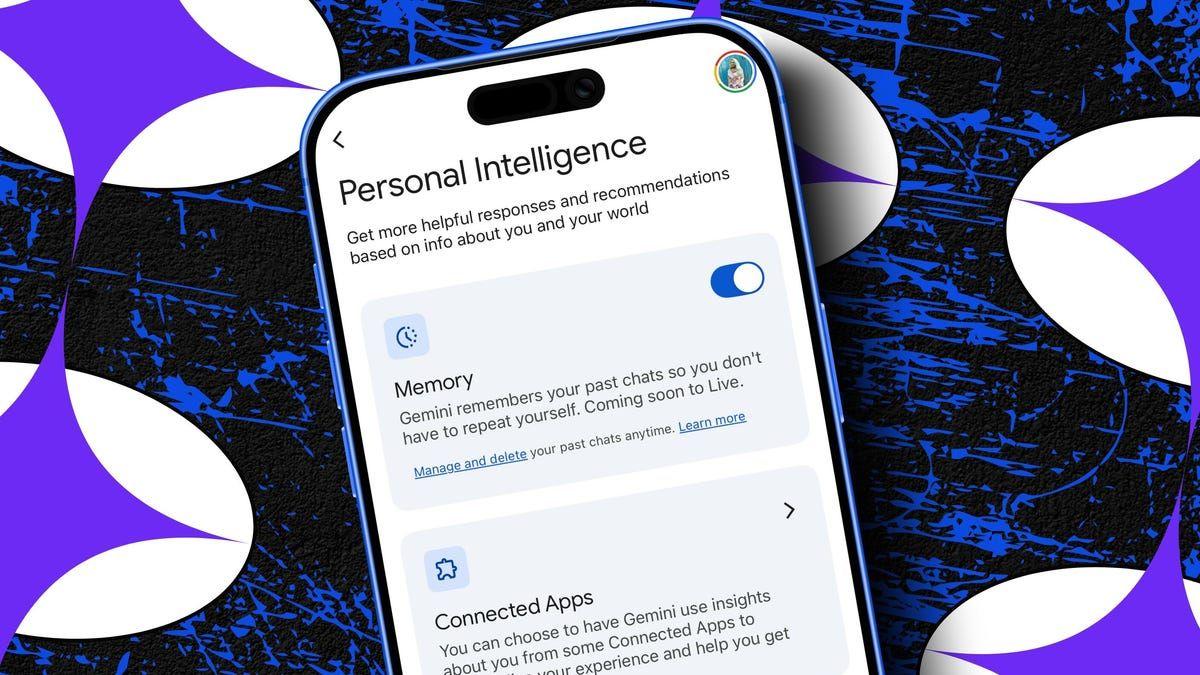
Google Gemini has launched Personal Intelligence, a feature designed to deliver personalized AI responses by connecting data from Gmail, Google Photos, Search history, and other Google services
1
. Available to both free and paid users in the US, the feature works exclusively with personal Google accounts and aims to eliminate the need for users to repeatedly provide context when interacting with AI1
.The Personal Intelligence feature transforms how users interact with the chatbot by pulling relevant information from connected apps. In practical testing, when prompted to suggest summer toys for a child without specifying age or gender, Gemini correctly identified the user's four-year-old daughter, their location, and suggested age-appropriate options including water tables and inflatable toys based on past purchases and preferences
1
. The system even recognized brand preferences and shopping habits, recommending products from frequently used retailers like Walmart and Amazon1
.In another test through Google Chrome's Ask Gemini button, the AI identified a user's 2017 Ram 1500 Quad Cab without explicit mention and provided accurate tire size information, likely drawing from Google Photos images, Gmail messages, or past Gemini chats
1
. This level of personalization represents a shift from generic AI outputs to responses tailored to individual user data and preferences.The Gemini sidebar in Google Docs has emerged as a practical tool for reducing workflow interruptions
2
. Users can now summarize lengthy documents, generate images, and receive editing feedback without opening additional tabs or leaving their workspace2
.When asked to summarize a technical document about Intel processors, the sidebar instantly broke down key points including hybrid architecture details, P-cores and E-cores, and pros such as single-core performance alongside cons like extreme heat production
2
. The AI writing editor also caught style inconsistencies, flagging sections where formal and casual writing mixed inappropriately and identifying shifts between first and second-person perspectives2
.The sidebar's image generation capability allows users to create custom visuals through natural language queries. One user requested a high-end PC build centered around an Intel Core i9, receiving multiple options to insert directly into their document
2
. However, users acknowledge that AI handling desktop-level task management requires verification, as Gemini can still make mistakes that become easier to miss when fatigue sets in2
.Gemini integration in Google Maps introduces conversational search through the "Ask Maps" interface, allowing users to describe what they're looking for using natural language queries rather than keyword searches
4
. Instead of searching for "cafés" and manually filtering results, users can now request "a quiet café with Wi-Fi and charging points for working" and receive contextually relevant recommendations4
.The system interprets intent by analyzing reviews and user mentions of specific attributes like noise levels or crowding
4
. During navigation, users can interact with Gemini without disrupting their route, asking for coffee stops while the app factors in current traffic, time constraints, and location to provide immediate suggestions4
.Real-world testing demonstrates the feature's utility for discovering local hidden gems. Using prompts like "Show me under-the-radar spots in [neighborhood] that locals love but tourists usually miss" or "Find me a record store nearby that specializes in rare vinyl," users have uncovered highly-rated establishments with fewer than 200 reviews
5
. The voice-activated interface works seamlessly during walking routes, turning navigation into an interactive exploration tool5
.Related Stories

Leaked testing reveals Google is developing agentic AI features for Gemini Enterprise that move beyond single-task interactions
3
. TestingCatalog spotted a new "Agent" tab featuring a Tasks dashboard with dedicated sections for Goals, Agents, and Files, indicating Google's intention to handle multi-step tasks autonomously3
.This workspace design allows users to set broad goals while the agent breaks down tasks and uses connected services to complete them without constant input
3
. The interface includes panels for Connected apps and Files, alongside a "Require a human review" toggle that pauses execution before sensitive actions, suggesting Google is preparing for serious desktop-level task management where errors carry consequences3
.Early previews indicate support for reusable Skills and repeating schedules, enabling ongoing workflows that run in background while users focus elsewhere
3
. This positions Google in direct competition with Claude Cowork and signals the next phase of AI evolution from reactive chatbot to proactive coworker capable of managing complex workflows across multiple applications.Summarized by
Navi
[2]
[3]
[4]
12 Dec 2025•Technology

06 Apr 2026•Technology

03 Mar 2025•Technology

1
Health

2
Technology

3
Technology