Google Messages Launches Enhanced Protection Mode with Gemini AI to Combat Spam and Scams


2 Sources
[1]
Google Messages rolling out Enhanced Protection mode against spam and scams
Following the announcement earlier this month, Google Messages for Android is rolling out an Enhanced Protection mode to counter spam and scams. To date, Google Messages has offered Standard Protection to block "spam and suspected harmful links." Enhanced Protection introduces "Advanced detection
[2]
Google Messages is getting a powerful new weapon against sneaky text scams
Google Messages is getting smarter about scams, with Gemini helping catch threats before you fall for them. Scam messages aren't always as obvious as a suspicious link or a text claiming you've won a lottery you never entered. Some scammers are clever enough to start perfectly normal
Share
Copy Link
Google Messages is deploying Enhanced Protection mode powered by Gemini AI to detect sophisticated scams before users fall victim. The opt-in feature uses cloud-based Gemini models and on-device Gemini Nano to analyze message context, evaluate suspicious links, and provide redesigned warnings for unknown senders.
Google Messages Introduces Enhanced Protection with Gemini AI
Google Messages is deploying a significant upgrade to its spam and scam protection capabilities with the rollout of Enhanced Protection mode for Android users. Following its announcement earlier this month, the feature is now appearing in Google Messages beta version 20261020_00_RC00, marking a substantial shift in how the messaging platform combats increasingly sophisticated threats
1
2
.
Source: 9to5Google
The Enhanced Protection mode represents a departure from the existing Standard Protection approach, which has primarily focused on blocking spam and suspected harmful links. This new tier introduces advanced detection capabilities specifically designed to prevent spam and scams that traditional methods might miss. Unlike scams with obvious red flags like lottery winnings or suspicious links, modern scammers often initiate seemingly normal conversations, gradually building trust before revealing their true intent
2
.Cloud-Based Gemini Models Power Scam Detection
At the core of Enhanced Protection lies scam detection powered by cloud-based Gemini models. These AI-driven improvements enable Google Messages to evaluate complex message context and understand a scammer's intent more quickly when users engage with unknown senders. The system excels at identifying novel and sophisticated attacks that might bypass traditional on-device detection methods
1
.The technology proves particularly effective against social engineering tactics where scammers pose as delivery agents or bank representatives. Their initial messages appear completely harmless, but conversations eventually pivot toward requests for money or personal information. Google's upgraded detection aims to recognize these patterns earlier, even when scams don't follow obvious scripts
2
.To address privacy concerns inherent in AI analyzing private conversations, Google employs Private AI Compute technology. This feature encrypts messages and processes them in a secure, isolated environment that remains private to individual users and inaccessible to anyone else, including Google itself
1
2
.Enhanced Link Protections Using On-Device Gemini Nano
Beyond conversation analysis, Enhanced Protection introduces enhanced link protections that leverage the on-device Gemini Nano model combined with real-time web signals. This dual approach evaluates whether unfamiliar links are trustworthy before users tap them, potentially catching dangerous websites that haven't yet appeared on existing blocklists
1
2
.Currently, this advanced link-checking capability is available on the Pixel 10 series and newer devices, Samsung Galaxy S26 lineup, Galaxy Z Flip 8, Galaxy Z Fold 8, and other select devices. The device-specific availability reflects the computational requirements of running Gemini Nano locally
1
2
.Related Stories

Redesigned Warnings Provide Additional Context
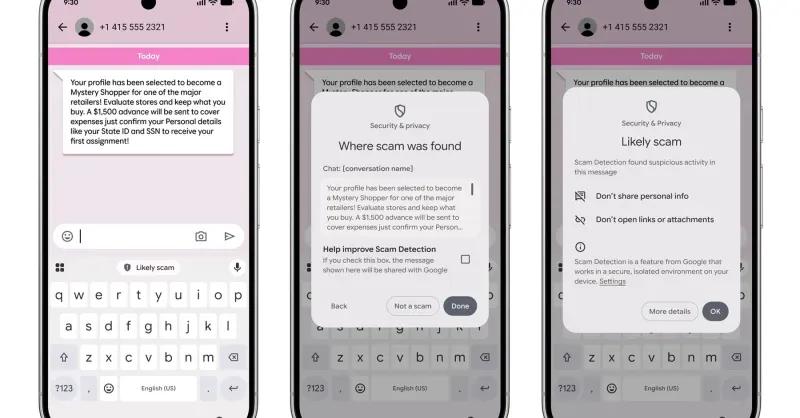
The third pillar of Enhanced Protection involves redesigned warnings that give users additional time and more context to pause before tapping links sent by numbers not in their contacts. These improved alerts serve as a final checkpoint, offering another opportunity to reconsider potentially dangerous interactions
1
2
.
Source: Digital Trends
How to Enable Enhanced Protection
Enhanced Protection operates as an opt-in feature, requiring users to actively enable it through Google Messages settings. To activate spam & scam protection enhancements, navigate to your profile picture in the Google Messages app, select Messages settings, then Protection & safety, and finally tap Spam & scam protection. Instead of a simple toggle, users now encounter three distinct options: Enhanced Protection, Standard Protection, and No Protection (not recommended). Standard Protection remains the default setting
1
2
.Google is executing a gradual rollout, meaning the feature may not immediately appear for all users. If the setting isn't visible on your device yet, the company is still expanding availability across its user base
2
.References
Summarized by

Navi
Related Stories
Google Messages Enhances User Safety with AI-Powered Scam Detection and Privacy Features
23 Oct 2024•Technology

Google Deploys AI-Powered Scam Detection to Protect Android Users from Mobile Fraud
14 Oct 2026•Technology

Google Rolls Out AI-Powered Scam Detection for Android Messages and Calls
05 Mar 2025•Technology

Recent Highlights



Recent Highlights
Today's Top Stories



Don’t drown in AI news. We cut through the noise - filtering, ranking and summarizing the most important AI news, breakthroughs and research daily. Follow topics that matter to you and stay ahead.


