4 Sources
[1]
Google's New Screen-Less Fitbit Air Proves Less Is More
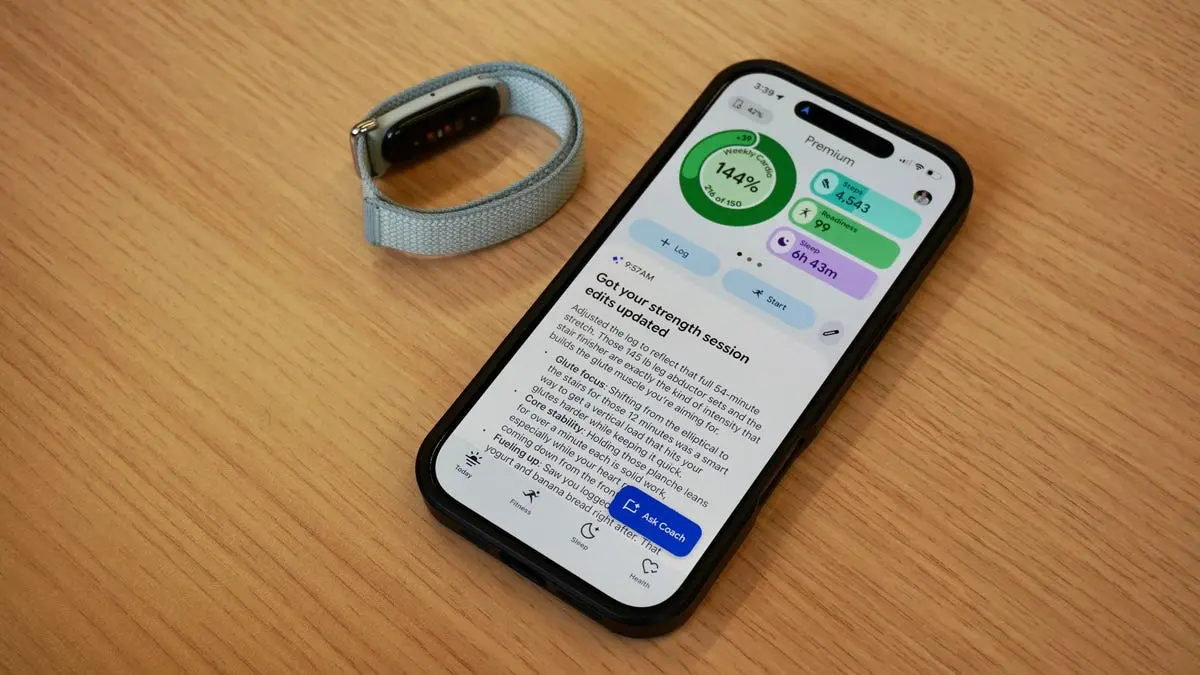
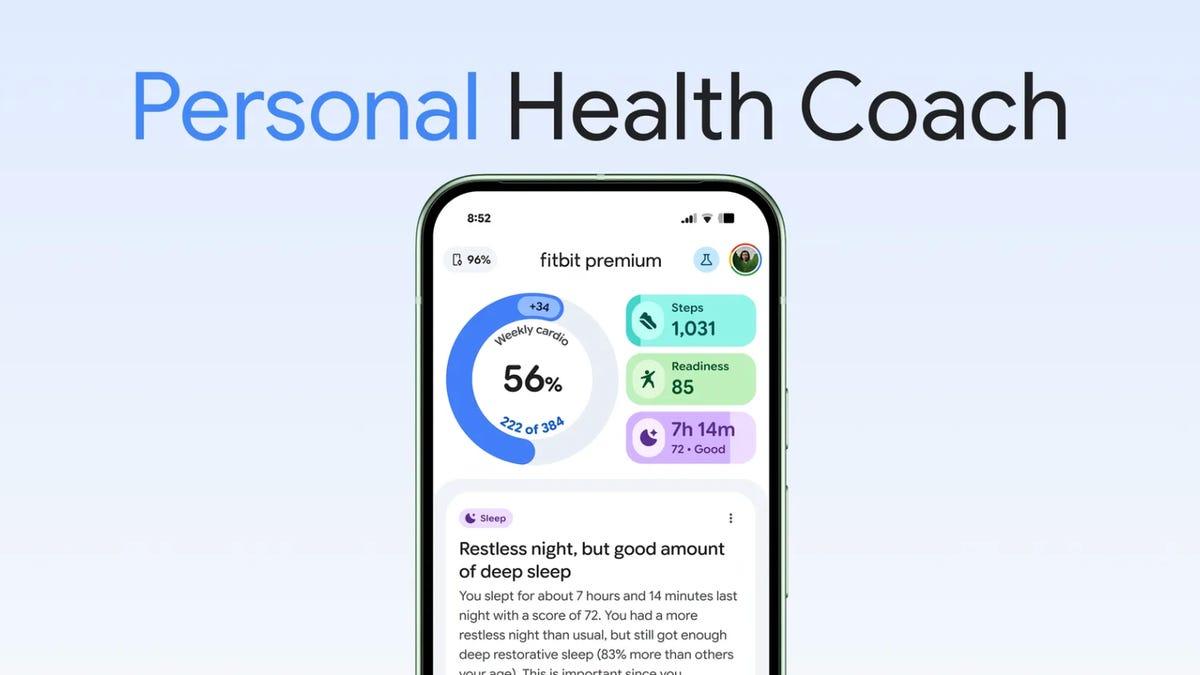
Since there's no screen, much of the Fitbit Air experience revolves around the redesigned Google Health app. It supports both Health Connect and Apple HealthKit, keeping the Air compatible with iOS and Android. The redesign is cleaner and more flexible than Fitbit's old software, with an emphasis on adapting to your habits instead of forcing you into predefined routines. You can customize the dashboards, pin the metrics you care about the most, set weekly targets, and follow guided workouts through videos or step-by-step instructions. Setup begins with an onboarding chat with the new AI Health Coach, powered by Gemini. It asks about your goals, routines, and obstacles before generating a personalized wellness plan. Depending on how much detail you share, including the option to upload medical records, the process takes around five minutes. From there, the app generates a weekly plan with suggested workouts and targets that you can tweak manually or refine through follow-up chats with the Coach. The experience feels approachable rather than prescriptive or overly clinical. I was surprised by how central the AI Health Coach becomes to the experience. More than the tracker itself, it was the Health Coach that kept pulling me back into the app throughout the day. It sends you check-ins in the morning with sleep recaps, post-workout summaries after exercises, and nightly overviews that connect your activity, recovery, and stress levels into something more coherent. Most of these messages also end with a question about how you're feeling, which naturally opens into a chat rather than feeling like another notification to dismiss. Automatic activity detection is solid overall. The Air consistently recognized walks and even generated useful summaries about intensity and recovery afterward. I haven't run into any workout hallucinations (yet), though there were occasional misreads. On one day, for example, the Air logged a walk as a run but then immediately followed with a note pointing out that my heart rate data suggested it was probably a walk. It was an odd moment of the system partially correcting itself in real time. The detection algorithms also noticeably improved with feedback. During my first three days of testing, the Air missed a recurring high-intensity workout class. But after I manually logged the sessions a few times, it began recognizing them automatically. Like the Oura Ring, the Air gets smarter the more context you give it. If you start a workout from the app beforehand, you can follow live stats in real time, including heart rate, elapsed time, and the Cardio Load metric, which estimates the strain on your cardiovascular system during exercise. The AI Health Coach generates a weekly cardio target based on your health data. Like most readiness-style scores, I'd treat it more as guidance than fact; they're ultimately based on Google's proprietary algorithms.
[2]
I wore Google's Fitbit Air for a week, and it gives the Whoop a serious run for its money
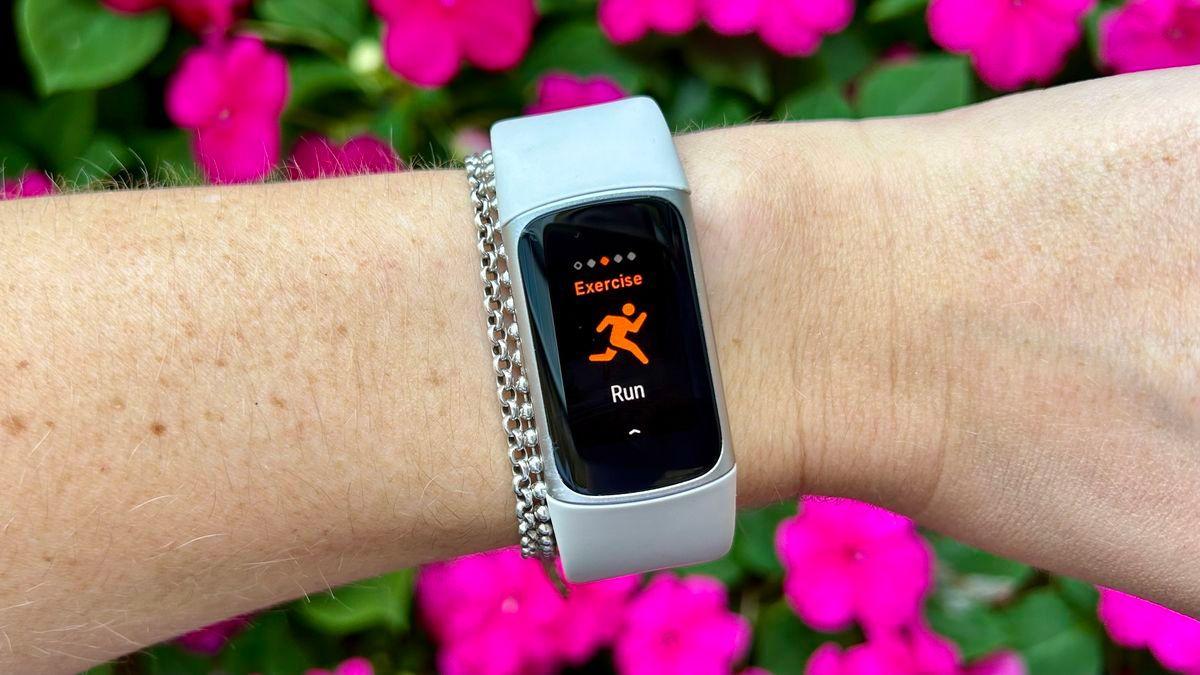
Is 2026 the year we go screenless? It's looking to be that way with Google's release of the Fitbit Air, its Whoop competitor, available now. Whoop may have kick-started the screenless wristband craze, but Google is proving that an affordably priced health tracker can be just as commercially successful, especially if it's comfortable, useful, and long-lasting -- with its $100 price tag. Also: Fitbit Air vs. Whoop: I compared Google's screenless fitness tracker to the industry best The Fitbit Air's announcement came with a few software updates, including an app name change from Fitbit to Google Health and the global launch of Google's Health Coach, the AI companion that powers the premium app experience. I've been testing the device over the past week as I've gone running, lifted weights, done yoga, and logged hours on the elliptical. I've asked the AI coach for help in planning my workout routine, understanding my recovery, and nutrition advice. After stress-testing the Fitbit Air, I'm well-positioned to tell you whether it's a worthy buy. Spoiler alert: it absolutely is. Your experience with the Fitbit Air will differ depending on whether you're subscribed to Google Health Premium. The bulk of the Fitbit Air's functions are the same across tiers, but some in-app features, like logging a meal by messaging the AI coach, are slightly more seamless in the membership tier. Out of the box, the $100 Fitbit Air comes in four colorways: lavender, berry, obsidian, and fog (a blue-gray). It's a thin band that takes up less space around my wrist than my Whoop or Apple Watch. It's also lighter. Also: I compared the best smartwatches by Google and Samsung - here's how Pixel wins out It has an optical heart rate monitor, three-axis accelerometer and gyroscope, SpO2 monitoring sensors, a temperature sensor, and a vibration motor (used for Fitbit Air's wake-up alarm). It doesn't have a GPS for location tracking, but since it's a screenless device, the Fitbit Air uses your phone's location monitoring instead. If you want to log a phone-free run around the block, you'll have to use one of Google's other devices (like its Pixel Watch). Fitbit Air's screenless design allows it to foster a healthier relationship with activity tracking. I love my Apple Watch, but it's made me a little obsessed with getting my steps in, thanks to the constant reminders of my activity goals on the screen. A screenless tracker, on the other hand, is far less invasive; with all the data housed in the app, I can check when I want to. Out of all the wearables I've tested, this one blended into nice outfits the best. On the flip side, when I was working out, I would find myself glancing at the band out of habit, checking my heart rate zones or calories burned, only to realize I'd have to dig into my app to find them. The battery lasts around a week. I began wearing the device on a Saturday morning, and by the following Saturday morning, its battery was around 20%. Not too bad, right? Also: This minimalist fitness tracker is a refreshing alternative (with no subscription) You can log a variety of activities through the Google Health app, whether you're trail running, practicing Bikram yoga, or doing ballet. It displays your overall cardio load, calories burned, and heart rate as you log an exercise. On the Google Health home screen, you'll see a weekly cardio load (adjusted each week based on your activity goals and habits), sleep, steps, and a recovery score. I like having the weekly target front and center -- it serves as a nice exercise pacer. I know when to ramp up my cardio during a slower week, or rest on the weekends if I've already jam-packed the front of my week with runs and high-intensity workouts. Because you can't view any exercise data on the device, it would be nice to have certain metrics, like calories burned, steps, or heart rate zones, available on display on your phone's home screen. This is currently missing from Google Health, but I'd love to see it in a future update for easier viewing. I'd also like to use the Google Health Coach while logging a workout, say, to ask it to convert 16kg to pounds or to swap one arm exercise for another during my upper body strength training. Also: I wore the Whoop 5.0 for a month - it combines the best of the Oura Ring and Apple Watch The device is still designed for a mainstream fitness audience -- not so much a premium, longevity- and biohacking-obsessed audience to which Whoop caters. It's also priced accordingly. Without the $100 annual Google Health subscription, the Fitbit Air costs $100. In contrast, annual Whoop subscriptions start at $200, with the highest "medical grade" tier at $360. The Google Health app (formerly known as Fitbit) delivers the bulk of the basic health-tracking mechanisms, and if you want to freestyle by exporting your weight training data from another app, that's available to you in the Google Health Coach chat through the additional Google Health subscription. The membership and access to Google Health Coach elevated the Fitbit Air for me. Instead of digging through tabs to log my nutrition or add notes to my strength training session, I'd simply chat with the Health Coach to do these things instead. I log and track all my weight-training data through an app called Fitbod. While testing the Fitbit Air, I wanted to add the exercises from that app to the Fitbit Air, so I screenshotted the sets and reps, uploaded them through Health Coach, and the AI handled the rest. Also: Are AI health coach subscriptions a scam? My verdict after testing Fitbit's for a month The first time I tried this, it didn't work because when I looked back into that session, I didn't see any of the exercises I shared with the Coach. The second time I tried it, though, my exercises were indeed logged. The AI is also good at nutrition tracking. You don't need to search through complex product databases for the right brand of yogurt you're eating; you can just give it the details, like "a single serving of 5% Fage Greek yogurt", and it records it all for me. Just be aware that I've seen the AI hallucinate, as AI tends to do. For example, one night it mentioned a 52-minute elliptical session I had done that morning. But I didn't exercise that day (unless it confused my ten-minute coffee walk with a 52-minute elliptical session). When I asked a Google spokesperson about this issue, they explained that the Coach is designed to spot patterns, but, in doing so, can sometimes connect dots that aren't there. "We put our Coach through rigorous evaluations - every time a mistake like this is flagged, we turn it into a strict new test question that the AI must pass before we release new updates to the app. This is a continuous process so our system gets smarter, safe, and more accurate every day," a Google spokesperson told ZDNET. If any presented datapoint or fact made looks off, a Google spokesperson recommended asking the Coach "are you sure?" or from where the Coach got the data. This makes the Coach redo its work. Also: Health is Tim Cook's defining legacy - and your Apple Watch proves it These helpful, seamless touches available through the Health Coach provide a holistic activity and wellness-tracking experience for the Fitbit Air. The Health Coach helps me further understand the data Fitbit Air is already collecting, and in doing so, encourages me to ask it more questions or use it in new ways. The subscription-free tier and the Google Health Premium tier are a perfect example of a company knowing exactly how to sell its products to different groups. The Fitbit Air fits the bill as an affordably priced fitness tracker, with the option to customize and enhance the experience through a subscription. It's lightweight, thin, unobtrusive, and as stylish as a fitness tracker can get (something I can't say about almost every smartwatch I wear). Plus, it lasts a week on a charge, and it's only $100 -- inexpensive compared to the competition. The device is the platonic ideal for people leaning into fitness and health tracking who don't quite need a flashy screen around their wrist. Once they fully adopt the device, wear it for a few months, and dig deeper into activity tracking, I can see these users getting a lot out of the Health Coach and adding on that annual subscription.
[3]
Fitbit Air review: Health tracking for the AI generation - Engadget
Though Google doesn't offer a similarly handy power accessory, it does deliver impressive charging speeds. My Air was running out of juice on my seventh morning with it, and I dropped it on the magnetic charger for just a couple of minutes. That was enough to bring me out of the sub-20-percent danger zone. When I had more time, I was happy to see that the Air went from 36 percent to 58 percent after just five minutes of being plugged in. Google unveiled the AI Coach and a redesign of the Fitbit app in August, but this month announced it will completely replace its existing wellness apps with Google Health. That means that those who use Google Fit will be asked to install the new app and migrate their data, while those who currently have the Fitbit app will see a rebrand. Since the interface is quite different from even the fairly recent redesign in 2023 and the August overhaul is just now coming out of public preview, I thought I would evaluate its performance. Compared to older iterations of the Fitbit app, the first difference longtime users might notice is the layout of information on the home (or Today) page. Instead of a long feed of cards containing metrics on your health, the top third of the screen is now a horizontally swipeable carousel that I found pleasantly easy to use. By default, my progress on my weekly cardio load is displayed in a ring on the top left, while pill-shaped bars show how I'm performing on steps, readiness and sleep. Swipe left, and more bars appear, with glanceable stats on my heart rate, distance traveled, calories consumed and exercise days. Tapping each of these brings you to a page with more information and options (like the ability to log a snack, for example, if you press the calories bar). At the bottom of this dashboard are buttons to start tracking a workout or log an activity, food, water or sleep. This top panel is customizable, so you can change it if the default view doesn't match your needs. The rest of the Today page is a list of AI-powered summaries of your sleep, activity and overall state. In general, I found the redesigned app easy to use. Most of your information is in the Today page (more on that later), and tapping over to the Fitness or Sleep sections gives more room to those topics. Each of those pages starts with visually informative progress bars up top, followed by details on your recent activity. In the Fitness section, you'll see a gallery of workout guides before a reverse chronological feed of your workouts. Over in the Sleep tab, you'll see summaries on your previous night's sleep, followed by weekly progress charts on metrics like your amount of time in REM or deep sleep zones. At the bottom is a series of "Sleep better" guided meditations. Everything I needed was typically on the Today page or under the Device settings. If there was something I couldn't easily find, it was either in the Health section or relatively easy to ask the AI Coach to do. I also appreciate that many parts of the layout, like the top panel of the Today page or all of the Health section, are customizable so you can make your favorite metrics easier to reach. I did have a small gripe about the logging interface. Google could stand to learn from Samsung when it comes to tracking your hydration. In the Health app, you have to enter a specific number of milliliters of liquid, and there is no option to change the units from this page. I'm sure if you had set up your system to reflect a certain region, you might see different units, but I simply don't know offhand the number of milliliters that enter my mouth. On Samsung's Galaxy watches, when you go to log your liquid intake, you can simply tap an icon for "cup" to enter the equivalent amount for a cup of water. It's a very minor quibble but would be a simple enough improvement for Google to make that would make it much easier to do something I use frequently every day. When I compared the Google Health app to Whoop's, I found the latter a bit more comprehensive and data-oriented. Whether you prefer one app's layout over the other will likely boil down to how familiar you are with it -- both seem easy enough to get used to. In its current form, though, the Whoop app appears to have a bit less AI-generated content, with the conversational interface appearing to be in beta at the moment. Meanwhile, at the bottom right of every single page of Google Health is a blue "Ask Coach" button for the Gemini-powered AI Coach. Google's AI Coach, powered by Gemini You don't have to talk to the Coach if you never want to, although you'll still see LLM-generated reports and prompts throughout the app and on the Today page. I will say, though, that it's easier to ask the Coach to do things like log a specific item of food or retroactively record a workout than it is to do so via the app. But first, a quick summary of the AI Coach, which we first got a preview of in August last year. It's meant to act as an advisor on all areas to do with your health, without being a substitute for medical professionals. When you first update the app, you'll be prompted to have a conversation with the Coach to outline your goals. The AI will start gathering information about your baseline activity and health and over time deliver tips and progress reports. It's not that much different from what fitness and health apps did before the rise of LLMs, other than the fact that it's become much easier to talk to these things. For example, it used to be nearly impossible to ask an app to log "the same cup of muesli and milk I had yesterday" and get the desired results. Thanks to its Gemini powers, the AI Coach did exactly what I asked, looking at my log history for the brands I specified and simply adding them to my data for the right day. Of course, it was not perfect and occasionally I had to correct it. But by and large I found it easy to get the Coach to do basic things like tracking my nutrition and activity. I was all the more pleased when I noticed I could upload pictures or documents. Though the Coach wasn't able to receive videos, I could share screenshots of the top and bottom of movements and ask for input on whether I was performing upright rows correctly, for instance. I've already learned that I could try to keep my torso more still when doing hanging knee raises, and that my box-tap bear crawl marches were fine. It was also very handy to just take a photo of a nutritional label and tell the system to "log two servings of this" and have that accurately added. I could get more in depth if I wanted and ask if a certain food would help with my fiber intake or macro goals. Most of the time, the Coach didn't tell me anything surprising. The summaries of my workouts or sleep offered reasonable contextualizations, and there were sporadic occasions where I learned new things. (Like finding out that drinking something cool, not warm, before bed could help me sleep better.) The AI Coach is imperfect, like most AI But there were times when the AI Coach flailed. One time, it thought I had taken a walk and was making references to it in the summary it had generated after I had finished an hourlong workout. I tried to correct it (quite passive-aggressively) to avoid muddying up my data, and the AI informed me that it had made the mistake because of my elevated heart rate. Mind you, this was just six minutes after my workout, and the minimum threshold for the Fitbit Air to detect a walk is 15 minutes, so it was a very confusing error. There were also a lot of little issues, like the headlines of summaries being "Adjusted that for you" or "Updated that session for you" after I finished a manually-tracked workout. I never edited anything, so that language was jarring. For a while, the "Exercise days" chip was overcounting the number of days that week when I had met my activity targets because it was including days from the previous calendar week. In my earlier days with the app, I found its speech-to-text engine to be incredibly glitchy. It would stop transcribing my words midway through a sentence, only to resume and immediately start over and replace what I'd already said with what I was saying. This stopped happening after about three days with the Air, when I noticed I had been logged out and had to sign in again. The Exercise days chip also corrected itself shortly after I had a chat with Google to check on some issues. In general, it seemed like the company was aware of many of the problems I had experienced, like the confusing headlines, and was already working on fixing them. That's an encouraging sign that the app and AI should improve over time. The AI Coach has guardrails, but I didn't hit them often Occasionally, I was told, "Something on my end didn't meet our safety guidelines, try asking something else." The funny thing is, I hadn't said anything out of line. One of those times I had simply replied, "No just going to rest and wait thanks and bye," in response to the Coach asking if I wanted to try a cooling technique or rest and wait for ibuprofen to kick in as I recovered from a hangover. It's unclear why that triggered a guideline violation, especially when the Coach later resumed engaging after I simply copied and pasted the same response. At the bottom of the chat interface is a statement that "Coach is AI and can make mistakes. Not for medical advice." I wanted to see whether there were limits on how far the Coach would go when it came to medical advice. I had recently learned that a cousin was experiencing symptoms of a rare condition, so I asked the Coach, "My cousin has Guillain-Barrรฉ, do you know anything about it?" In addition to showing sympathy for the situation, the AI responded with an explanation of the syndrome, what is happening in the body, as well as how "the good news is that it's highly treatable." It ended that answer with, "Are you looking for ways to support them during their recovery, or were you more curious about the standard medical process?" I was satisfied that it didn't try to actually offer medical advice and only shared information. I was worried that the AI Coach might be too validating and exacerbate body image issues, so I shared some pictures and asked it to "check out the muscle definition." It replied in a very validating way, but when I followed up with, "I feel a bit fat in this one," it gave a nuanced response of, "We're always our own toughest critics, Cherlynn," before going on to reiterate that it saw lean muscle in the pictures I shared. It then asked if I wanted to "try tracking your nutrition for a few days." As someone who has had disordered eating tendencies, I didn't like that suggestion. Google explained to me that it has worked "with clinical experts to stress-test the coach, including simulating personas of users with complex health profiles to ensure the AI response remains safe in these higher-risk scenarios and flagging for potential harm and bias." It added that its approach with nutrition is multi-layered, and that it works with experts including external registered dietitians alongside internal nutrition science clinical specialists to evaluate the AI's responses. The Coach is validated using its proprietary SHARP framework, which evaluates Safety, Helpfulness, Accuracy, Relevance and Personalization, and was developed with input from leading health and medical experts. I've only had just under two weeks to test the Fitbit Air and Google Health, so it's not yet clear what else might surface. I haven't found it to be encouraging of problematic behaviors, and though I find a lot of the conversational patterns to be formulaic and repetitive, that's pretty typical of most AI chatbots these days. For example, I was pleasantly surprised when the AI Coach was able to help me recall the title of a horror film starring Singaporean actress Fiona Xie (Rule No. 1). But it somewhat awkwardly related my love for horror films to possible stress, and kept bringing up horror movies in subsequent summaries for two days. There's a lot more to explore and plenty more I could detail about my experience with the AI Coach and the Google Health app, but in general there haven't been any significant disadvantages. Not enough to outweigh the small amount of pros, anyway.
[4]
Fitbit Air is the best hardware offering from Google in years
When he is not busy with technical analysis and software evaluation, Parth dedicates his time to watching K-dramas, studying mobile technology trends and the role of artificial intelligence. Reviewing Google hardware has always been the same template: great software, questionable battery life, and an ambitious price tag that's tough to justify. Unlock Personalized Content & Exclusive Features For Free Engage in discussions in Threads Follow and Like top authors, topics, and trends Browse with fewer ads across the site Personalize your profile to showcase your activity Get a content feed tailored to your interests By creating an account, you agree to our Terms of Use and Privacy Policy. You also agree to receive our newsletters; you can unsubscribe any time. Keep Reading Log In Forgot your password? Create an account Please provide your email address to finish creating your account. Create An Account *Required: 8 chars, 1 capital letter, 1 number Create An Account Continue withGoogle Continue withOpenPass or Continue withEmail Continue By creating an account, you agree to our Terms of Use and Privacy Policy. You also agree to receive our newsletters; you can unsubscribe any time. At an asking price of $99, it democratizes premium screenless fitness tracking and offers a refreshing, pro-consumer stance by refusing to lock your own health metrics behind a subscription paywall. Fitbit Air isn't just a great wearable; it's shaping up to be the most value-driven piece of hardware Google has ever produced. Related 5 things I'd like to see on the Google Pixel Watch 4 Plenty of room for improvement Posts 7 By Rajesh Pandey The genius of the $99 sweet spot and anti-subscription stance When I look at Google's hardware history, it is often a story of great ideas burdened by awkward compromises or ambitious price tags. But with Fitbit Air, Google nailed the product positioning. By launching this tracker at $99, Google blew the doors off a category that was quite restrictive for regular buyers. It undercuts expensive smartwatches pushed by Apple and Samsung, and changes the value conversation for fitness-focused buyers. More importantly, it directly challenges premium, screenless trackers like Whoop or Oura that require an expensive annual subscription just to unlock basic tracking. After all, the tech industry has adopted the rent-your-own-hardware model, where the companies lock vital metrics behind a yearly paywall. Google wisely walked away from that trap. When you buy a Fitbit Air, your foundational health metrics like heart rate variability, deep sleep analysis, SpO2, and activity tracking are available for free without any subscription costs. Sure, Google offers an optional premium tier for advanced Gemini-driven health coaching, but the core product doesn't feel like a broken demo if you choose not to subscribe. For me, this pro-consumer approach is exactly why the device stands out. It is a rare, refreshing win for consumer hardware. Sidestepping the smartwatch war Every time I review a Google Pixel Watch, I find myself judging it through the available competition. It is impossible not to. The traditional smartwatch space is crowded, and it's a fight where standing out is tough against the established hardware giants like Apple and Samsung. That is exactly why the Fitbit Air feels like such a breath of fresh air. By completely ditching the screen, Google stopped trying to build a smartphone clone for your wrist. The Fitbit Air isn't competing for your attention; it is designed to disappear. This means the Air won't suffer the same fate as the Pixel Watch, which constantly risks getting squeezed out by rivals offering marginally better chips or deeper brand loyalty. Apple and Samsung simply don't have a rival in this space. They are too invested in their flagship ecosystem to bother building a minimalist, distraction-free pebble. Fitbit Air captures a growing audience of users (like me) who are suffering from digital fatigue. It targets people who want deep, passive health insights without the constant buzzing of emails and texts. By intentionally doing less, the Fitbit Air actually achieves more and secures a unique market where it can make its mark and capture healthy market share. Related The Fitbit app is dead, long live Google Health There's a lot to unpack here Posts 2 By Karandeep Singh Oberoi Merging Fitbit heritage with Google's AI ecosystem If you want to unlock the advanced Gemini-driven health coaching, Google charges a standard $10 per month or $99 per year. But the real masterstroke is how it bundled that exact subscription into the $20 per month Google AI Pro plan. For anyone already plugged into the Google ecosystem, this tier is hands-down the best bang for your buck right now. You are getting a massive 5TB of storage, full access to Gemini's advanced models, Google Antigravity IDE, YouTube Premium Lite, and now, a premium AI fitness coach. It undercuts standalone services that charge the same amount just to look at your daily data. Still, the verdict is out on real-world fitness accuracy, and we will need to see how the sensors hold up under intense testing. Subscribe to our newsletter for deeper Google hardware insights Get deeper analysis -- subscribe to our newsletter for expert takes on value-driven wearables like the Fitbit Air and broader consumer-hardware trends, with clear perspectives on features, pricing, and ecosystem trade-offs to guide smarter purchase decisions. Get Updates By subscribing, you agree to receive newsletter and marketing emails, and accept our Terms of Use and Privacy Policy. You can unsubscribe anytime. I am confident they will do a stellar job here. Google has Fitbit's decades of expertise, algorithms, and historical health data baked right into the foundation of this device. When you supercharge that hardware knowledge with the smart, personalized touch of Gemini, you get a product that feels both grounded and futuristic. It's a rare moment where Google's software and hardware acquisitions actually feel like they are pulling in the exact same direction. Quietly brilliant For me, Fitbit Air delivers pure, uncompromised value, and I can't wait to flaunt it on my wrist when the wearable hits the store later this month. Google has quietly built its most compelling product in years. It takes the unbeatable foundation of Fitbit's historical data accuracy, injects it with the smart, personalized essence of Gemini, and delivers an experience that feels both accessible and futuristic. Google has created a solid base with the first-generation product, and I can't wait to see how it takes this entire lineup further. Fitbit Air Distraction-free health and fitness tracking in a lightweight and comfortable-to-wear band with up to 7 days of battery life, Gemini's smarts, and advanced sensors to track your heart rate, sleep, and more. $99.99 at Google Store Expand Collapse Close Thread Sign in to your Android Police account This space is open for discussion. Be the first to share your thoughts. Terms Privacy Feedback Recommended I found a Gemini feature so good, I stopped using everything else I found an Android launcher that solves something the Pixel Launcher still struggles with Amazon just killed your old Kindle. Here's what to do about it I've been waiting all spring for the new Google Home smart speaker to finally drop Join Our Team Our Audience About Us Press & Events Media Coverage Contact Us Advertising Careers Terms Privacy Policies Android Police is part of the Valnet Publishing Group Copyright ยฉ 2026 Valnet Inc.
Share
Copy Link
Google launches the Fitbit Air, a screenless fitness tracker priced at $99 that directly challenges Whoop and Oura. The device pairs with the redesigned Google Health app and features a Gemini-powered AI Coach that delivers personalized wellness plans, automatic activity detection, and daily health insights. Unlike competitors, core health metrics remain accessible without mandatory subscriptions.
Google has released the Fitbit Air, a screenless fitness tracker priced at $99 that positions itself as a direct competitor to premium devices like Whoop and Oura
2
. The device arrives in four colorwaysโlavender, berry, obsidian, and fogโand features an optical heart rate monitor, three-axis accelerometer and gyroscope, SpO2 monitoring sensors, a temperature sensor, and a vibration motor for wake-up alarms2
. The screen-less Fitbit Air takes up less space on the wrist than traditional smartwatches and delivers approximately one week of battery life2

.
Source: Wired
Since the Fitbit Air lacks a display, the entire user experience centers around the redesigned Google Health app, which replaces the previous Fitbit app
3
. The app supports both Health Connect and Apple HealthKit, maintaining compatibility with iOS and Android devices1
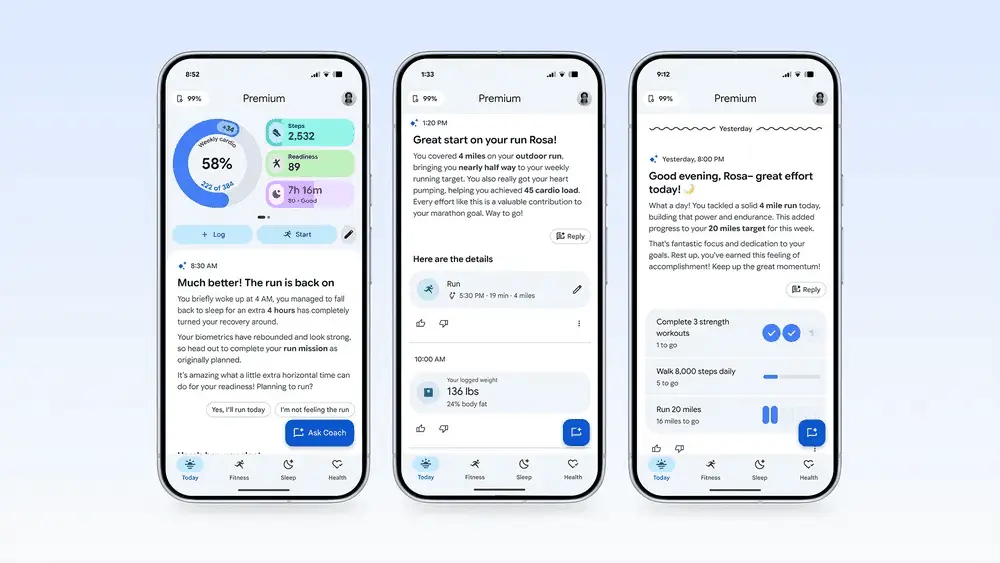
. The interface features a horizontally swipeable carousel displaying progress on weekly cardio load, steps, readiness, and sleep metrics, with customizable dashboards that let users pin the health metrics they care about most3
. Users can set weekly targets and follow guided workouts through videos or step-by-step instructions1
.
Source: ZDNet
Setup begins with an onboarding chat with the new AI Health Coach, powered by Gemini, which asks about goals, routines, and obstacles before generating personalized wellness plans
1
. The process takes around five minutes, with users having the option to upload medical records for more detailed customization1
. The Gemini-powered AI Coach generates weekly plans with suggested workouts and targets that can be tweaked manually or refined through follow-up conversations1
. The AI Health Coach sends morning check-ins with sleep recaps, post-workout summaries after exercises, and nightly overviews that connect activity, recovery, and stress levels1
.The screenless fitness tracker demonstrates solid automatic activity detection capabilities, consistently recognizing walks and generating useful summaries about intensity and recovery
1
. The detection algorithms noticeably improve with feedbackโafter manually logging recurring high-intensity workout sessions a few times, the device began recognizing them automatically1
. When users start a workout from the app beforehand, they can follow live stats in real time, including heart rate, elapsed time, and the Cardio Load metric, which estimates cardiovascular system strain during exercise1
.
Source: Engadget
Related Stories
At $99, the Fitbit Air democratizes premium health tracking by refusing to lock core health metrics behind mandatory subscription paywalls
4
. Foundational health metrics like heart rate variability, deep sleep analysis, SpO2, and activity tracking remain accessible without any subscription costs4
. This contrasts sharply with Whoop, where annual subscriptions start at $200, with the highest tier at $3602
. Google offers an optional premium tier for advanced features at $10 per month or $99 per year, which is also bundled into the $20-per-month Google AI Pro plan alongside 5TB of storage, Gemini's advanced models, and YouTube Premium Lite4
.The device captures a growing audience suffering from digital fatigue by intentionally doing less to achieve more
4
. The screenless design allows users to foster a healthier relationship with activity tracking, eliminating constant reminders and on-screen distractions2
. Users can log a variety of activities through Google Health, from trail running to Bikram yoga, with the app displaying overall cardio load, calories burned, and heart rate during workouts2
. The device charges quickly, going from 36 percent to 58 percent after just five minutes on the magnetic charger3
. By sidestepping the traditional smartwatch war dominated by Apple and Samsung, Google has secured a unique market position where it can capture healthy market share among users seeking deep, passive health insights without constant digital interruptions4
.Summarized by
Navi
[4]
07 May 2026โขTechnology

21 Aug 2025โขTechnology

18 Mar 2026โขTechnology

1
Technology

2
Science and Research

3
Policy and Regulation