9 Sources
9 Sources
[1]
Google releases new apps for Windows and MacOS
Most people access Google's search and AI products through a browser, but you've got some new options today. Google has been testing a Windows search app for some months, and it's now officially available. Over on the Apple side of the fence, Google has focused its efforts on designing a native Gemini app. That one is also available widely today with the same features you get in the Gemini web interface. The "Google app for desktop" first arrived on Windows in a beta form last September. It was pretty rough at first, and Google couldn't even update the app's early versions, forcing users to uninstall and reinstall new builds. That won't be a concern with the official release, which brings assorted search capabilities to your Windows PC. You can open the Google app by pressing Alt + Space at any time. The compact search UI floats on top of whatever you're doing, allowing you to instantly search the web and (with authorization) your local files and apps. Web results look like what you'd get in a browser, right down to the inclusion of AI Overviews and AI Mode. The Google Windows app can also pull the context from your screen for searches. There's a Lens button, allowing you to highlight any part of the screen to instantly run a web search. You can also share your screen -- either a single window or the entire screen -- as context for your searches. The Google desktop app requires Windows 10 or 11, and it only works in English. You can use it without logging in to your account, but the app won't have as many features in that mode (just like using Google on the web). It's available for download from the new dedicated landing page.
[2]
New Google Windows App Lets You Search With Gemini Anywhere On Your Computer
With over a decade of experience reporting on consumer technology, James covers mobile phones, apps, operating systems, wearables, AI, and more. Six months after its reveal, Google's desktop app for Windows is now available to help you better search your computer's files, other apps, Google Drive, and the web with various AI-powered Gemini features. The Google desktop app for Windows is available worldwide in English and works similarly to Spotlight on macOS, offering a system-wide search that pulls in results from other services alongside Google's own tools. The tool is accessible anywhere on your computer through a keyboard shortcut. To launch the app, download it from Google's website, and once installed, you can press Alt and space together. A search box will then appear, allowing you to add a prompt that Gemini will understand in context. Results for internet searches will appear in AI Mode at first, but you can also head to the All tab to see the full traditional results, or search for images, videos, and other multimedia via the tabs at the top. You can also use Google Lens through the app to search for a specific image or share your entire screen. You'll be asked for permission across some services before you can share your display. This desktop app provides a faster way to access Lens than opening your browser, and Google's marketing materials show the tool proving useful for someone identifying a piece of classic artwork in a PDF. There's been no confirmation from Google of a similar service coming to Mac. If you have a Windows computer, it'll work across all versions of Windows 10 and beyond. Yesterday, Google also introduced a new Chrome tool to help you save frequently used prompts for reuse. They're called Skills, and Google believes they will help with replicable searches, such as asking for ingredient details in new recipes you may research regularly.
[3]
You can now get Google's AI search on Windows without ever opening a browser
* Google's AI search matured from early gaffes and is now central to the Google experience. * Google's Windows app is now available worldwide in English, expanding access beyond the US. * The app lets you use AI mode outside a browser and search web, files, apps, and Drive via Alt+Space. Google's AI searching has some a long way since it released. It had a rough start, including the pizza-based error that went viral after AI Overviews recommended using glued to keep the cheese on. Now, AI has become a key part of the Google experience, both the AI Overviews and 'AI mode' that skips the search entirely and let's you tap into Google's powerful LLMs. And with Google's app that's now releasing worldwide in English, you don't even need to use your browser. Google's new desktop app might finally make finding files on Windows simple And it even steals a page from macOS. Posts 3 By Mahnoor Faisal The Google app on Windows is now available worldwide It's only in English, though Over on The Keynote, Google has announced the general English release of the Google app. It was originally just for US users, but now it's available worldwide; at least, if you understand English. The Google app lets you use AI mode without even needing to open your browser. Granted, Google Chrome does make it really easy to use AI mode right away, but it's nice to have it if you don't, or can't, use Chrome. The Google app is more than just a glorified AI tool, though: Access everything from the Search box: With a simple keyboard shortcut (Alt + Space) you can instantly find what you need on your desktop -- including information from the web, your computer files, installed apps, and Google Drive files. Using the Google app also lets you use Lens on your desktop. If you've never given it a go before, you can use Lens to quickly upload a screenshot to Gemini for further analysis. I've been using Lens to translate things in a moment's notice, so this sounds like a useful tool to have on hand. If you want to give the app for yourself, be sure to visit the Google app download page and grab it today. Yes, you can use a web browser in Android Auto (when you're parked) It might be time to use your car as a cinema Posts 1 By Jasmine Mannan
[4]
Google's new Windows app speeds up search on desktop
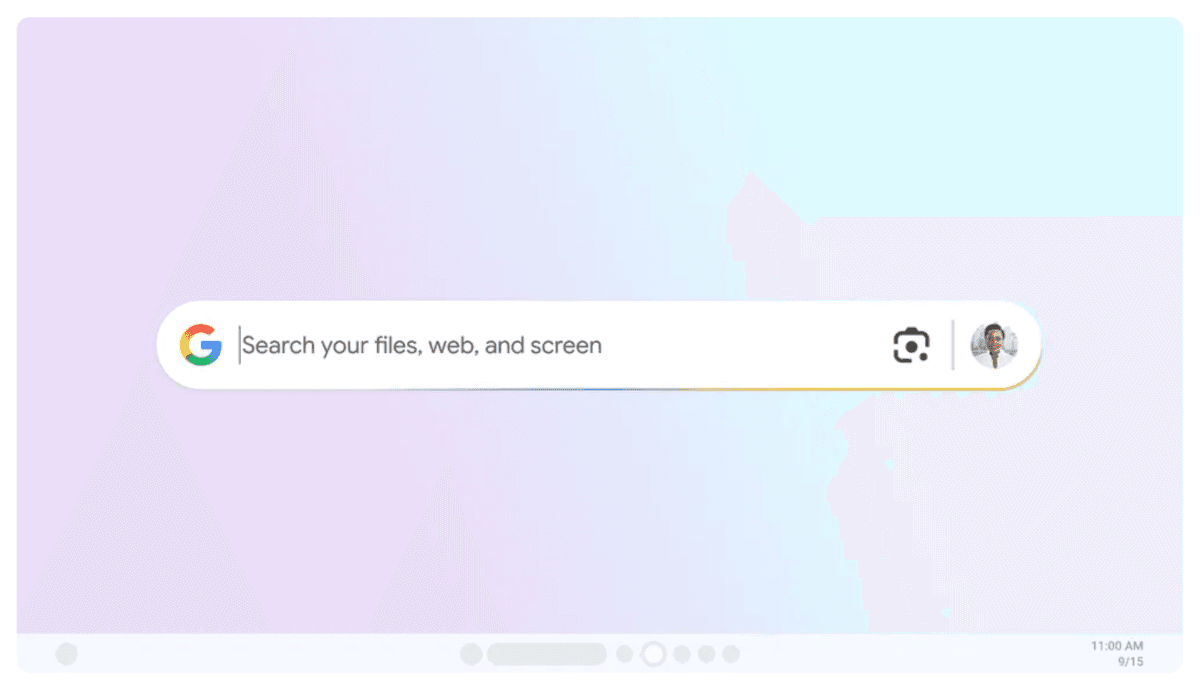
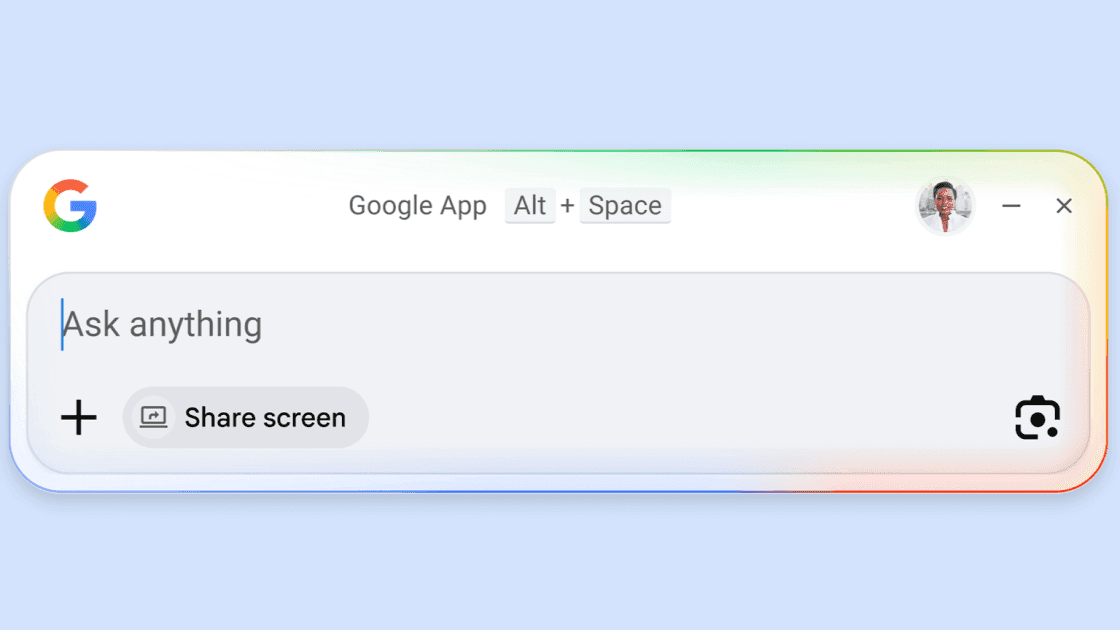
The app is currently available everywhere, but only in English on Windows 10 and up. Last year, Google released an experimental app for Windows that enabled a simple keyboard shortcut to search the web, content in your Google account, and even local apps and files. Starting today, that app has graduated from Search Labs experimental status and is available worldwide. The Google app for Windows opens a floating search bar when you press Alt + Space. In addition to a text field, the search bar includes options to upload files, share your screen, or select visual elements using Google Lens. The app defaults to AI Mode, but there are options to use Google's other search modalities, as well. In its earlier, experimental form, the Google app didn't have as much of a focus on AI Mode, instead making web searches in Google's classic search interface with an option to move over to AI Mode (though these searches typically included AI Overview summaries by then). The current version seems to have reversed that dynamic, as searches go first through AI Mode with other search options being a click away. That initial version of the app hit a snag early on, with Google advising early adopters to uninstall and reinstall the app to keep receiving updates. This stable release is presumably in a more complete state. Windows' built in search functionality isn't especially well liked, and power users often rely on third-party solutions. Time will tell whether Google's new app becomes a popular alternative. The new Google app is available globally, but it's currently exclusive to Windows (Windows 10 or newer) and only supports English.
[5]
Hands on: Google's new desktop app is just another Gemini portal
While the free app provides quick Gemini access via Alt + Space, it functions more like a basic launcher than a comprehensive desktop search tool. Google literally built its business around search. Gmail became popular because you could quickly find and resurface old emails. But I've tried Google's new Google app for Windows... and I'm not convinced. Google's new freely downloadable Google app for desktop (available today on PCs using English) may remind you of the latest iteration of the 20-year-old macOS "Spotlight" app, which is both a file manager, an app launcher, and a sophisticated search tool. The new Google app floats over your desktop like Spotlight does, but to use it, you'll first need to install it and -- for best results -- sign in. Normally, the app hides in the background. You can summon it with the Alt + Space shortcut. It pops into view, hovering over your screen. Google's app naturally leads into Gemini, where you can type in a query. In fact, the "Search" within the Google app leads right into a small floating window with Google's controversial "AI Mode." If you head in this direction, the AI results look just like Google's Gemini, and the Google app essentially becomes a Gemini portal, with a chat history and more. Even if you select the "All" mode versus the AI Mode, an AI summary pops up first, just like an ordinary search page. In this context, the Google desktop app isn't much different than just opening a browser window. Likewise, the Google Search app offers an opportunity to share a window or an entire display -- again, this is all about Gemini and asking questions of a page that's open in your browser or another application. This is more useful than you might think. When I tried Microsoft's Copilot Vision with middling success, that app could "see" what you had on your screen and would walk you through it. Oddly, Copilot Vision didn't seem to be active when I launched the Copilot app on my test PC. However, when I shared my screen (with the Microsoft Solitaire app open) with the Google desktop app, it did a far better job identifying the available cards and walking through the moves. It wasn't perfect -- it hallucinated and misread cards -- but it was far better than Microsoft's model. But Microsoft has an advantage: it's a Microsoft PC. Google's app promises to make searching through your desktop and cloud files a breeze, and I downloaded the Google app thinking the app could be a replacement for File Explorer or Microsoft's own search. It isn't. Google's desktop search app can see files stored locally on your PC, as well as anything backed up to Google Drive. But it can't see OneDrive files or local documents, and it didn't seem able to search Google Photos either. Just performing a basic search for "Google" on my PC pulled up far more content on my own PC via Windows' own search function than anything else. This is clearly a situation where one user's experiences will differ from another, but I just wasn't impressed. Google's desktop app primarily serves as a front door to Gemini. Don't we have enough of those already?
[6]
'Google app for desktop' launches on Windows
This app is intended to bring the "best of Google Search right to your desktop." The Alt + Space keyboard shortcut opens a Search box for the web, Google Drive and local files, and installed apps. Those last two aspects make for a very Mac Spotlight-like experience. Web search includes AI Mode, with the ability to invoke Google Lens for a specific search, translate text/images, get homework help, and more. There's also the ability to share your entire screen or a specific window to ask contextual questions. Results open in a floating window with the ability to ask follow-up prompts. The UI is very much aligned with the mobile Search experience. The Google app is now available on Windows 10+ in English around the world after previously requiring Google Labs sign-up. You can download from: search.google/google-app/desktop. Google is framing the application as a continuation of the mobile clients that phone users are already familiar with. There's no word on macOS, but the Gemini team is working on such an application. The company rarely makes consumer desktop apps, and instead favors the browser with Progressive Web Apps. This Google app joins Google Drive for desktop, Quick Share, Google Play Games, and Chrome.
[7]
Google launches upgraded desktop app with AI features for Windows
Google announced the global rollout of its upgraded Google app for desktop on Windows, featuring AI-powered Search functionalities. The new app integrates AI Mode in Search, allowing users to ask questions and receive contextual AI-generated responses without the need to open a browser. The app combines web search, local file discovery, and AI tools into one interface, creating a system-wide search experience accessible through the Alt + Space keyboard shortcut. Users can search across multiple sources, including web content, local files, installed applications, and Google Drive. AI Mode takes an interactive approach, enabling users to continue conversations with follow-up queries. This mode provides users with AI-generated answers and relevant web links, enhancing the search process compared to traditional methods. The application includes screen-aware capabilities, allowing users to focus on their current task while asking questions related to what they view on their screen. Additionally, the integration of Google Lens permits users to search, translate, or analyze content directly from images or webpages displayed on their desktops. Google emphasized that the app is designed to minimize distractions by allowing users to retrieve information without switching between multiple tabs or applications. This aims to maintain workflow continuity while leveraging search and AI tools. To utilize the app, users must be at least 13 years old and operating on a Windows 10 or later system. Currently, the app is available only in English, and AI Mode support may vary by account, region, or language, according to Google.
[8]
Google App for Windows Rolls Out Globally With These Features
Screen-aware capabilities let users ask specific questions Google on Monday announced the global rollout of its upgraded Google app for desktop on Windows. It brings AI-powered Search features directly to users' PCs. As per the Mountain View-based tech giant, the app integrates AI Mode in Search, which enables users to ask questions and receive contextual responses without opening a browser. The new Google app for Windows combines web search, local file discovery, and AI tools into a single interface. Google's App Lets You Search for Files Like Spotlight on macOS The new Google app introduces a system-wide search experience, Google explained in a blog post. This is accessible via the Alt + Space keyboard shortcut. The feature allows users to quickly search across multiple sources, including the web, local files, installed apps, and even Google Drive content. A notable inclusion is the integration of AI Mode. Similar to the web experience, AI Mode in the Google app for Windows enables users to ask questions and receive AI-generated responses along with relevant web links. They can continue conversations with follow-up queries, making it more interactive compared to traditional search. As per the company, the app also features screen-aware capabilities. With this feature, users can select a specific window or their entire desktop and continue asking questions based on what they are viewing. Another feature is Google Lens. The company says this allows users to search, translate, or analyse content, such as text in images or webpages, directly from their screen. Instead of switching between tabs or applications, users can retrieve information and return to their work with the Google app for Windows. As per Google, the app is designed to minimise interruptions by keeping users within their current task while accessing search and AI tools. To use the app, users need to be 13 years or older and running a Windows 10 or later PC. It is currently available only in English. The company notes that AI Mode may not yet be supported across all accounts, regions, or languages.
[9]
Google app for Windows expands with AI-powered search features
Google has introduced a new experimental application for Windows, first made available through its Labs program last September, and has now rolled it out more widely as a Google app for desktop. The app expands its PC ecosystem alongside Google Drive, Quick Share, Google Play Games, and Google Chrome, bringing faster access to Search, AI-powered responses, and screen-based queries on Windows devices. The Google app for desktop is currently available only in English on Windows 10 and newer desktop devices. It is limited to users aged 13 and above. There is no information yet on macOS availability. AI Mode in Google Search is not supported for all accounts, regions, and languages at this time.
Share
Share
Copy Link
Google officially released its desktop app for Windows worldwide after six months of testing. The app brings AI-powered Gemini features directly to Windows desktops through a simple Alt + Space shortcut. Users can search the web, local files, and Google Drive without opening a browser, though early hands-on reviews suggest it functions more as a Gemini portal than a comprehensive desktop search tool.
Google has officially launched its desktop app for Windows following a six-month testing period that began last September. The Google Windows app is now available worldwide in English on Windows 10 and later versions
4
. The initial beta release faced technical challenges, forcing early adopters to uninstall and reinstall new builds to receive updates. The stable release addresses these issues while bringing AI-powered Gemini features directly to Windows desktops.
Source: PC Magazine
The desktop app for Windows activates through the keyboard shortcut Alt + Space, summoning a floating search bar that hovers over any active application
2
. This approach mirrors macOS Spotlight functionality, offering system-wide search capabilities without opening a browser3
. Users can search the web, search local files, installed applications, and Google Drive content from a single interface2
. The app works without requiring a Google account login, though functionality is limited in that mode, similar to using Google search on the web.
Source: 9to5Google
The current release prioritizes AI Mode as the default search experience, reversing the earlier beta's approach
4
. When users enter prompts, results appear first through AI Mode with AI Overviews included, while traditional search results remain accessible through an "All" tab2
. This shift positions the app as a direct gateway to Google's powerful LLMs, enabling AI search without Chrome or any browser3
. The interface includes tabs for images, videos, and other multimedia content alongside text-based results2
.
Source: PCWorld
Related Stories
The app integrates Google Lens functionality, allowing users to highlight any portion of their screen for instant web searches. Users can share screen context either by selecting specific windows or their entire display, providing visual information for search prompts. This AI-powered screen analysis proves faster than opening a browser to access Lens, with Google's marketing materials demonstrating use cases like identifying classic artwork in PDF documents
2
. One hands-on test showed the app successfully identifying cards in Microsoft Solitaire and suggesting moves, though with some hallucinations and misread cards5
.Early reviews suggest the app functions more as a Gemini portal than a comprehensive desktop search tool
5
. Testing revealed limitations in local file indexing, with the app unable to access OneDrive files or local documents stored outside Google Drive5
. Windows' native search function returned more local PC content than the Google app in direct comparisons5
. Whether the app becomes a popular alternative to Windows' built-in search functionality remains uncertain, as power users often rely on third-party solutions4
. Google has not confirmed plans for a similar service on macOS, focusing Windows users as the primary audience2
. The app is available for download from Google's dedicated landing page.Summarized by
Navi
[1]
[4]
17 Sept 2025•Technology

15 Apr 2026•Technology

20 Mar 2026•Technology

1
Policy and Regulation

2
Policy and Regulation

3
Technology