8 Sources
[1]
iOS 27 Could Give Your iPhone a Custom Camera App and a ChatGPT-Like Siri, Finally
Apple's next big iOS update could make one of the iPhone's most important apps feel a lot more personal. The company is planning to overhaul the iPhone's Camera app in iOS 27 with a fully customizable interface, according to a Tuesday report from Bloomberg's Mark Gurman. You would reportedly be able to decide which camera tools appear on-screen and where they sit, including controls for flash, exposure, the timer and resolution. That could be especially useful for people who use the iPhone as more than a casual point-and-shoot camera. Instead of digging through settings or working around Apple's default layout, you may be able to build a camera interface around the tools you actually use (get that Shared Library button out of there!). The report follows earlier rumors that Apple was preparing to expand Visual Intelligence in iOS 27 with a Siri mode inside the Camera app. These changes are part of a broader iOS 27 redesign that could touch Siri, Search, Safari, Weather, Image Playground and more. Apple is expected to unveil iOS 27 at WWDC26, which will run online from June 8 to 12, with an in-person special event at Apple Park on June 8. Here's what may be changing. Bloomberg reports that the Camera app will still open with familiar default controls, such as resolution, night mode, flash and Live Photos, but you will be able to switch to a more advanced set of options or pick your own controls. Each capture mode would have its own set of controls at the top of the screen, which Bloomberg says Apple calls "widgets." In Photo mode, the advanced mode is said to include widgets for depth of field and exposure, with the available controls organized into categories such as basic, manual and settings. These widgets are essentially small Camera controls that you can place at the top of the interface, unlike the larger widgets that live on the iPhone's home and lock screens. Apple is also reportedly moving the button that reveals all available controls from the top-right corner of the Camera interface to a new spot near the shutter button. The Camera app may also get a new Siri mode. That mode would reportedly tap into Apple's Visual Intelligence features, making it easier to identify objects, translate text or get information about something in the camera's viewfinder. Siri may be in for the kind of overhaul Apple has been promising for years. Bloomberg reports that Apple is rebuilding Siri in iOS 27 so it can act more like an always-on AI agent, with the ability to use personal data and take action across apps. The new version would also reportedly support more back-and-forth text conversations, bringing Siri closer to the AI chat apps people already use. The redesigned Siri may live partly in the Dynamic Island, the pill-shaped interface area Apple introduced with the iPhone 14 Pro in 2022. When activated, Siri would reportedly appear as a large animation at the top of the screen. Users may also be able to swipe down from the top center of the iPhone to open a new "Search or Ask" bar, which could handle Siri queries, system search and third-party AI options like ChatGPT and Google Gemini. Bloomberg also says Siri could get a standalone app for the first time, with past conversations displayed in a grid and an "Ask Siri" input bar for new queries. Beyond Camera and Siri, Apple is reportedly planning design changes across several apps. Safari may get a new start page with tabs for favorites, bookmarks, reading list and history. Weather could add a new Conditions panel that makes it easier to view rain, wind and other data without having to jump to another page. Image Playground, Apple's image-generation app, is also expected to get a cleaner interface and more lifelike image models. Systemwide, Apple is reportedly tweaking the bottom navigation bars in apps including Podcasts, TV, Music, Health and News, folding search back into the main row of app tabs. The iPhone keyboard may also get a new animation, and you could get undo and redo controls when customizing the home screen. Apple hasn't announced iOS 27 yet, and Bloomberg said an Apple spokesperson declined to comment. Apple did not immediately respond to CNET's request for comment. But with WWDC less than a month away, the report offers a clearer picture of what Apple may emphasize this year: not just new AI features, but a more flexible iPhone interface you can shape to your phone's use.
[2]
Latest iOS 27 Rumor Tips Major Design Overhaul For the Camera App
Users will reportedly be able to swap out existing controls and add a new row of settings, known as widgets. iOS 27 is expected to be unveiled in less than a month, and the latest rumor tips a major overhaul for the Camera app. According to Bloomberg's Mark Gurman, the app could gain a fully customizable interface, with options to replace existing controls and add widgets. According to Gurman, the Camera app's overhaul is designed to give users easier access to controls. You'll be able to replace night mode and flash with more advanced tools like depth-of-field and exposure controls, or with basic options like a timer and photo styles. You'll also be able to add widgets, which are sets of camera controls that you can either choose from preset collections or customize yourself. The option to "Add Widgets" will appear at the bottom of the interface, and once you choose a widget, the tools it contains will appear in a row at the top. Each camera mode you choose from the bottom, such as Photo, Video, Portrait, and others, will have its own set of widgets. In Photo mode, widgets will be categorized into basic, manual, and settings, Gurman says. Along with these changes, Apple is also reportedly developing new grid and level options. More importantly, the iPhone maker is making its full range of camera options easier to access. Currently, Apple's camera options are hidden behind a six-dot menu in the top-right corner. With iOS 27, the menu will drop down to the right of the white shutter button, Gurman says. The revamped Camera app will also have a new AI Siri mode. According to Gurman, the feature will use Apple's Visual Intelligence to identify objects and translate text, which is something Google Lens already does. Alongside these updates, Gurman has reiterated that Siri will become a standalone app in iOS 27. You'll be allowed to choose a preferred chatbot and have back-and-forth conversations with it in the app. As with most chatbot apps, Siri will add a plus (+) button for photo or document uploads. You will also be able to perform a web search on Siri, with the prompt bar inviting you with "Search or Ask" written on it. According to Gurman, Siri will also be added to the Dynamic Island. When you summon the AI assistant, its animation will pop out of Apple's camera cutout. Other iOS 27 rumors reported by Gurman include an update to Safari's start page and new AI image editing tools for the Photos app. All of these updates are still just rumors, and not all of them may make it to the final build, which is expected to be unveiled at the WWDC 2026 keynote on June 8.
[3]
Apple reportedly has a lot of changes planned for the Camera app - Engadget
iOS 27 could completely overhaul the iPhone's Camera app, Bloomberg's Mark Gurman reports, making it more customizable and offering pro and hobbyist users more control over the image output of Apple's smartphone. The new camera options will join the other features Apple will reportedly highlight at WWDC 2026: performance improvements and AI. The biggest change Apple is making to the Camera app is to make it more customizable. Rather than being stuck with the company's predetermined interface for shooting photos and capturing videos, you'll reportedly be able to tweak it to your liking. Bloomberg reports iPhones will still default to a familiar Apple interface, but individual widgets for controlling things like resolution, flash or whether live photos are on or off will be able to be swapped for other options from a new "Add Widgets" tray. The app will reportedly also include more "advanced" options like controls for depth-of-field, exposure and the company's photo styles feature. Apple offers a theoretically easy way to tweak these settings on the iPhone by using the Camera Control button, but changing things from the touchscreen should be even easier. As part of these interface tweaks, Apple is also adding new grid and level features while you're capturing images and moving the toggle that lets you see all your available controls from the top right of the Camera app to the right of the shutter button. Some of Apple's AI updates are coming to the camera, as well. Rather than having a separate interface for Visual Intelligence you can only access through the Camera Control, Apple is reportedly adding a new Siri mode to the Camera app for accessing AI features that use the camera, like using image search or translating text. AI will reportedly power new photo editing tools, too. Siri's changes are equally massive. Besides being smarter, the AI assistant's glowing animation is moving from the border of iPhones, to a new home in the Dynamic Island as part of Apple's planned updates. Users will also be able to type requests or searches through a new "Search or Ask" interface that's replacing iOS' existing Spotlight Search, Bloomberg writes. The interface will produce results shaped like cards, but can also launch into a chat interface for direct conversations with the new Siri. The tool can also tap into results from the web and supports voice input. As previously reported, past chats with Siri will be viewable in a standalone Siri app. Other changes will be smaller. Apple will reportedly update Safari with a new start page, the Weather app will display more data and the Image Playground app will be redesigned to be simpler to use. WWDC 2026 doesn't start until June 8, so more leaks are bound to be on the way, but at the very least Apple appears to be preparing at least one interesting change that has little to do with AI.
[4]
AI could make iOS 27 much bigger than the rumors suggest
This optimization approach could significantly boost iPhone speed, extend battery life, and improve long-term reliability through bug fixes and code cleanup. WWDC is many Apple enthusiasts' favorite event of the year. During the opening keynote, the iPhone maker unveils the upcoming major versions of its operating systems. It then releases the first beta builds to enrolled testers, giving them an early look at what's to come. These updates tend to pack dozens of changes, including user interface tweaks, fresh features, bug fixes, and other improvements. Following last year's substantial Liquid Glass redesign, iOS 27 is believed to focus on implementing AI tools and optimizing performance and reliability. The forthcoming update seemingly won't introduce a ton of noteworthy features (beyond AI). While geeks may find the boring nature of iOS 27 underwhelming, I think it's exactly the kind of update that Apple's platforms currently need. As we've established, most of iOS 27's new user-facing features will likely revolve around AI. Many users assume that the Apple Intelligence upgrade will be limited to a smarter Siri and some other gimmicks they'll rarely use. In reality, iOS 27's AI boost is shaping up to be much more than just that. For starters, the Photos app could finally be getting some new AI tools, apart from the existing Clean Up feature. The rumored Enhance, Extend, and Reframe features could allow users to apply suitable color edits, stretch an image beyond the frame, and change its perspective. These are much-needed additions that mobile photographers will especially appreciate. Other handy introductions could include a Grammarly-like keyboard that helps you pick the right words, tailored analyses in the Health app, and an AI-powered Calendar overhaul. These are all apps that we use every day, and the meaningful AI additions are bound to make them even more useful. It goes without saying that Siri is finally getting some love with iOS 27, too. The assistant is rumored to get a dedicated app with support for complex conversations, world knowledge, multitasking, third-party model extensions, and more. Apple's virtual assistant will also be able to pull up personal data stored on your iPhone, understand on-screen elements, execute in-app actions, build Shortcuts using natural language, and more. Even if you don't currently rely on Siri to perform basic tasks, you'll likely appreciate the advanced capabilities it's gaining with the next big release. If successful, it will likely transform how users interact with their iPhones over the coming years. iOS 26 brought the most dramatic iPhone interface change since iOS 7, featuring the futuristic Liquid Glass design language. The new look heavily relies on fluidity and translucency, and it can be perceived in menus, buttons, toggles, navigation bars, and other interface elements across apps and the system itself. Naturally, many users absolutely hate how it looks and functions due to text legibility concerns and how drastic of a change it is. During iOS 26.0's initial beta cycle, Apple listened to testers' feedback and repeatedly tweaked the intensity of Liquid Glass. With iOS 26.1, it even gave users control over Liquid Glass by letting them set the look to Clear or Tinted. iOS 26.2 then added a dedicated slider that lets you precisely adjust the Liquid Glassiness of the Lock Screen clock. Given that Liquid Glass is still relatively fresh, iOS 27 will almost certainly include tweaks that improve its functionality and aesthetic. It's also rumored that, similar to the existing Lock Screen clock, the operating system will offer a slider that controls the intensity of Liquid Glass universally. This would make the design more flexible and allow users to opt for whichever system-wide appearance they prefer. Beyond the AI goods and potential Liquid Glass tweaks, iOS 27 is rumored to be a Mac OS X Snow Leopard sort of update. For those unfamiliar, Snow Leopard launched in 2009 to optimize the performance of Macintosh computers and improve their stability through bug fixes and code clean-up. This would get rid of outdated and unnecessary iOS code in the background, boosting the operating system's speed and possibly extending the battery life. It may not be as exciting as visible changes, but it's certainly necessary to maintain the iPhone's long-term reliability. Taking the above-mentioned leaks and rumors into consideration, iOS 27 already appears to be a somewhat feature-packed update -- despite its "Snow Leopard" nature. Still, Apple will surely include a slew of other smaller quality-of-life updates that actually make a difference to our everyday digital lives. For example, the Wallet app will reportedly allow users to create and store custom passes without depending on third-party apps. These minor, albeit handy, introductions often don't leak in advance, so we can expect to see several of them during WWDC and once we get our hands on the first iOS 27 beta build next month. The iPhone's time to properly embrace AI and run more smoothly has come, and that's what iOS 27 could be all about.
[5]
iOS 27 will bring updates to key apps on your iPhone, report claims, but don't expect big Liquid Glass changes
* A new report says Apple wants to "streamline" Liquid Glass in iOS 27 * This could mean design changes for apps like Camera, Weather, and Safari * Liquid Glass's transparent effects might not change much, though With iOS 27 set to be presented to the world in less than a month at Apple's Worldwide Developers Conference (WWDC), there's a lot of speculation surrounding what we might see happen to Apple's apps, including any new features that might arise and what will become of the Liquid Glass design language. We might just have got a better idea of that thanks to a new report from Bloomberg's Mark Gurman, though. According to the leaks by Gurman, Apple wants to bring numerous changes to some of its core iOS apps, including Camera, Weather, and Safari. This will affect not just how the apps look but also how they work. One of the most drastic overhauls is set to come to the Camera app, which was overhauled recently in June 2025. In iOS 27, Gurman says that Apple will let users customize the app to their needs. You'll be able to pick a set of controls (or "widgets") that suit you, and each shooting mode will be able to have its own set of widgets. You'll get the option to choose from basic or advanced controls, while there will also be a Siri mode that taps into Apple's Visual Intelligence to identify plants, translate text, and more. Elsewhere, Safari will get a new start page with columns for bookmarks, favorites, browsing history, and your reading list. Weather is gaining a new "Conditions" panel for data on wind, rain, and other conditions, while the Image Playground app -- which is used to generate images using artificial intelligence (AI) -- will be redesigned with a simplified interface and upgraded AI models. Here to stay Apple's Liquid Glass interface has received a mixed response so far, but at least its implementation in iOS 26 is a whole lot more usable than the mess over on macOS. But while Gurman's report mentioned Apple's plans to "streamline the Liquid Glass design language," he barely outlined any changes to the system's glassy effects in his article. Instead, most of the changes coming to iOS 27's apps, as presented in the report, appear to be more about the positioning of on-screen elements and the addition of new features. Past reports have outlined how Apple is seeking to tune up Liquid Glass in iOS 27, which could include a new system-wide slider to adjust the effect's strength, plus other changes to improve text legibility and the overall system experience. But with iOS 27 rumored to be a much more scaled-back overhaul than what we got with iOS 26, we shouldn't expect Liquid Glass to change in any kind of drastic manner. Given the incredibly low chances of Apple ditching this design theme so soon after introducing it, you shouldn't expect it to go anywhere any time soon. Love it or hate it, Liquid Glass is here to stay -- but it could be about to enter a new chapter. Follow TechRadar on Google News and add us as a preferred source to get our expert news, reviews, and opinion in your feeds.
[6]
Apple to debut redesigned Camera app with AI tools in iOS 27
Apple plans a significant overhaul of the Camera app in iOS 27, according to Bloomberg's Mark Gurman. The update aims to enhance customization and control for both professional and hobbyist users, moving away from Apple's predetermined settings. The new Camera app will allow users to modify the shooting interface by swapping individual widgets such as resolution and flash through a new "Add Widgets" tray. While the app will retain a familiar design, it will integrate advanced features like depth-of-field and exposure controls, alongside Apple's photo styles. Apple aims to simplify adjustments with touchscreen controls, improving ease of use compared to existing Camera Control buttons. New features will include grid and level indicators during image capture, with the controls menu shifting to the right of the shutter button. AI updates are also on the horizon for the Camera app. A new Siri mode will facilitate access to AI features like image search and text translation. Additionally, upgraded photo editing tools will reportedly be driven by AI capabilities. Siri will undergo substantial changes, with its animation moving to the Dynamic Island on iPhones. A new "Search or Ask" interface will replace the current Spotlight Search, providing card-shaped results and enabling direct conversations with Siri. This updated version will support web results and voice input, and past interactions with Siri will be available in a standalone app. Other updates from Apple include a redesigned start page in Safari, enhanced data display in the Weather app, and a revamped Image Playground app for user-friendliness. WWDC 2026, scheduled for June 8, is expected to unveil more details about these changes.
[7]
iOS 27 could bring a redesigned Camera app, rebuilt Siri, and major UI changes
Apple is preparing a major software update with iOS 27, focusing on deep personalization, AI integration, and a refreshed system-wide design language, according to Bloomberg's Mark Gurman. This follows earlier reports that macOS Tahoe 27 could bring UI refinements and Siri AI upgrades. The iOS 27 update is expected to introduce a redesigned Camera app, a rebuilt Siri experience, and UI improvements across core Apple apps and system interfaces. Apple is reportedly overhauling the Camera app to allow full interface customization, targeting both casual users and professional photographers. Users will be able to rearrange key controls such as flash, timer, exposure, resolution, night mode, live photos, and photo styles. These controls will also adapt based on capture modes like photo and video, allowing more flexible usage depending on shooting needs. Key updates include: Apple is also introducing a Siri-assisted capture mode designed to support Visual Intelligence features such as object recognition, plant identification, and real-time translation within the camera interface. Apple is reportedly rebuilding Siri into a full AI-powered assistant with conversational capabilities and deeper system-level integration across apps. The redesigned Siri will adopt a chatbot-style interface and integrate into the Dynamic Island, where a pill-shaped animation appears when activated. It will also introduce a new system-wide search experience called "Search or Ask." Key upgrades include: Siri will also gain a dedicated app that includes a chat history grid, search tools for past conversations, and a "+" button for starting new chats. The app will support image, file, and document uploads, along with both voice and text input modes. Apple is updating several core apps with simplified layouts and improved usability. Apple is introducing multiple interface refinements across iOS 27 aimed at improving consistency across apps and system areas. A key change includes redesigned tab bars that combine search and navigation into a unified layout. The keyboard will also feature a new animation where keys slide up smoothly from the bottom of the screen. Apple is adding undo and redo controls for Home Screen customization, making it easier to adjust app layouts. Several apps, including Music, TV, Podcasts, Health, and News, will adopt updated navigation structures. System-wide animations are also being refined for smoother transitions across the interface. Apple is expected to unveil iOS 27, macOS updates, and the redesigned Siri system at WWDC on June 8.
[8]
iOS 27 features may completely change how you take pictures and search on your iPhone: Here is how
Apple may extend iOS 27 support up to the iPhone 12 series and introduce AI-focused UI changes across apps. Ahead of Apple WWDC 2026, Apple is planning to introduce one of the biggest interface upgrades for iPhone users. As per the reports, the upcoming iOS 27 update will bring big upgrades across the Camera app, Siri, Safari, Weather, and several system-level features with a strong focus on Apple Intelligence and customisation. Bloomberg's report suggests that the Camera app may get the biggest changes. Apple is said to be making the interface fully customisable, allowing users to choose which controls appear on screen and where they are placed. Features like flash, timer, exposure, resolution, and depth controls may soon be arranged according to user preference. Reports also suggest the app will include separate basic and advanced layouts aimed at both casual users and professional creators. The Camera app is also said to get a dedicated Siri-powered mode along with Apple's Visual Intelligence features. This can allow users to identify objects, translate text, or interact with the environment directly via the camera interface. Adding on, Siri is also said to get some big upgrades. Apple is said to be rebuilding the assistant into a more conversational AI system capable of handling tasks across apps and responding more naturally, similar to chatbot-style assistants like ChatGPT and Gemini. The reports suggest Siri will get a dedicated app, conversation history support, and deeper integration with the Dynamic Island interface. Also read: Sam Altman says Elon Musk wanted OpenAI under family control, hurt company culture with pressure Apple is also said to get upgrades in the system search. It may offer a new Search or Ask interface, which may allow users to switch between Siri and third-party AI services for queries while also surfacing more app-specific information. Apple may also offer interface refreshes. Safari may get a redesigned homepage with easier navigation between bookmarks, reading lists and browsing history. The Weather app may also get a few changes. It may get a new conditions panel for quicker access to wind, rain and temperature information. Meanwhile, Image Playground is expected to receive a cleaner interface and more realistic AI image generation tools. Apple is expected to officially unveil iOS 27 and its AI upgrades during WWDC on June 8. It will debut along with the iPhone 18 Pro series and iPhone Ultra in September. However, these details are not confirmed yet. Check out the eligible devices. iPhone 18 Series: iPhone 18, 18 Pro, 18 Pro Max, and the first iPhone Fold (pre-installed).iPhone 17 Series: iPhone 17, 17 Pro, 17 Pro Max, 17e, and the ultra-thin iPhone Air.iPhone 16 Series: iPhone 16, 16 Plus, 16 Pro, 16 Pro Max, and 16e.iPhone 15 Series: iPhone 15, 15 Plus, 15 Pro, and 15 Pro Max.iPhone 14 Series: iPhone 14, 14 Plus, 14 Pro, and 14 Pro Max.iPhone 13 Series: iPhone 13, 13 mini, 13 Pro, and 13 Pro Max.iPhone 12 Series: iPhone 12, 12 mini, 12 Pro, and 12 Pro Max (Expected to be the oldest supported generation).iPhone SE: 3rd generation (2022).
Share
Copy Link
Apple is preparing a major update to iOS 27 with a fully customizable Camera app that lets users pick their own controls and widgets. The update also brings a ChatGPT-like Siri overhaul with a standalone app, conversation history, and AI integration across iPhone apps including Safari, Weather, and Image Playground.
Apple is preparing to overhaul the iPhone's Camera app in iOS 27 with a fully customizable interface, according to Bloomberg's Mark Gurman
1
. Users will reportedly be able to decide which camera tools appear on-screen and where they sit, including controls for flash, exposure, timer, and resolution2
. This major design overhaul aims to give iPhone photographers easier access to the controls they actually use, rather than digging through settings or working around Apple's default layout.
Source: Engadget
The customizable camera app will introduce a new widget system that allows users to swap out existing controls and add new rows of settings
2
. Each capture mode—Photo, Video, Portrait, and others—will have its own set of widgets organized into categories such as basic, manual, and settings1
. Users can replace night mode and flash with more advanced tools like depth-of-field and exposure controls, or stick with basic options like a timer and photo styles2
. The Camera app will still open with familiar default controls, but switching to a more advanced set of options or picking custom controls will be straightforward1
.The Camera app is gaining significant AI features through a new Siri mode that taps into Apple's Visual Intelligence capabilities
3
. This mode will make it easier to identify objects, translate text, or get information about something in the camera's viewfinder1
. Rather than having a separate interface for Visual Intelligence accessible only through the Camera Control button, Apple is integrating these AI enhancements directly into the Camera app3
. This brings functionality similar to Google Lens, allowing for object identification and text translation directly within the camera interface2
.
Source: Digit
Beyond the camera, AI image editing tools are coming to the Photos app with rumored features including Enhance, Extend, and Reframe capabilities
4
. These AI-powered tools would allow users to apply suitable color edits, stretch an image beyond the frame, and change its perspective—additions that mobile photographers will especially appreciate4
.Apple is rebuilding Siri in iOS 27 to act more like an always-on AI agent, with the ability to use personal data and take action across apps
1
. The Siri overhaul will bring support for more back-and-forth text conversations, making it function more like a chatbot and bringing Siri closer to the AI chat apps people already use1
. For the first time, Siri will get a standalone app with past conversations displayed in a grid and an "Ask Siri" input bar for new queries1
.The redesigned Siri will live partly in the Dynamic Island, the pill-shaped interface area Apple introduced with the iPhone 14 Pro in 2022
1
. When activated, Siri will appear as a large animation at the top of the screen2
. Users will be able to swipe down from the top center of the iPhone to open a new "Search or Ask" bar, which will handle Siri queries, system search, and third-party AI options like ChatGPT and Google Gemini1
. The assistant will pull up personal data stored on your iPhone, understand on-screen elements, execute in-app actions, and build Shortcuts using natural language4
.Related Stories
Apple is planning design changes across several apps beyond the Camera
1
. Safari will get a new start page with tabs for favorites, bookmarks, reading list, and history1
. The Weather app will add a new Conditions panel that makes it easier to view rain, wind, and other data without having to jump to another page1
. Image Playground, Apple's image-generation app, is expected to get a cleaner interface and more lifelike image models1
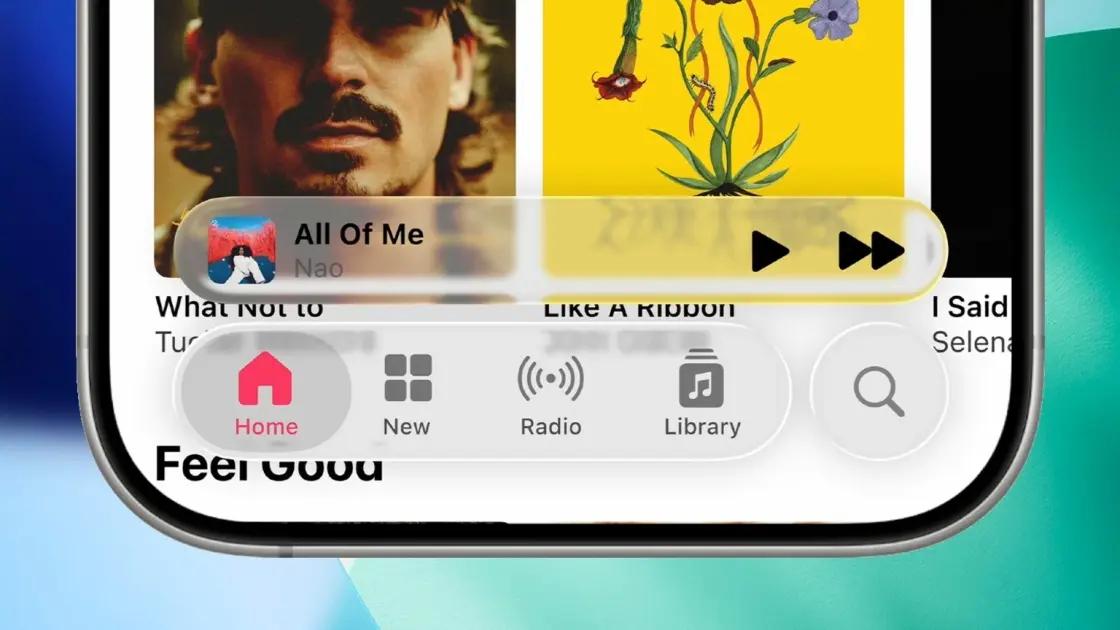
.Systemwide changes include tweaks to the bottom navigation bars in apps including Podcasts, TV, Music, Health, and News, with search folded back into the main row of app tabs
1
. The iPhone keyboard may also get a new animation, and users could get undo and redo controls when customizing the home screen1
.Following last year's substantial Liquid Glass redesign, iOS 27 is believed to focus on implementing AI tools and optimizing performance and reliability
4
. While Apple wants to "streamline" the Liquid Glass design language, most changes appear focused on the positioning of on-screen elements and the addition of new features rather than drastic visual overhauls5
. The operating system may offer a slider that controls the intensity of Liquid Glass universally, making the design more flexible and allowing users to opt for whichever system-wide appearance they prefer4
.
Source: FoneArena
Apple is expected to unveil iOS 27 at WWDC 2026, which will run online from June 8 to 12, with an in-person special event at Apple Park on June 8
1
. The update represents a shift toward giving users more control over their iPhone experience while integrating AI capabilities throughout the operating system. With user interface customization at the forefront and performance optimization happening behind the scenes, iOS 27 aims to make the iPhone both more personal and more intelligent.Summarized by
Navi
17 Apr 2026•Technology

28 Apr 2026•Technology

26 May 2026•Technology

1
Technology

2
Policy and Regulation

3
Policy and Regulation