6 Sources
[1]
I'm no Copilot fan, but these 6 new AI skills turned Edge into my favorite mobile browser
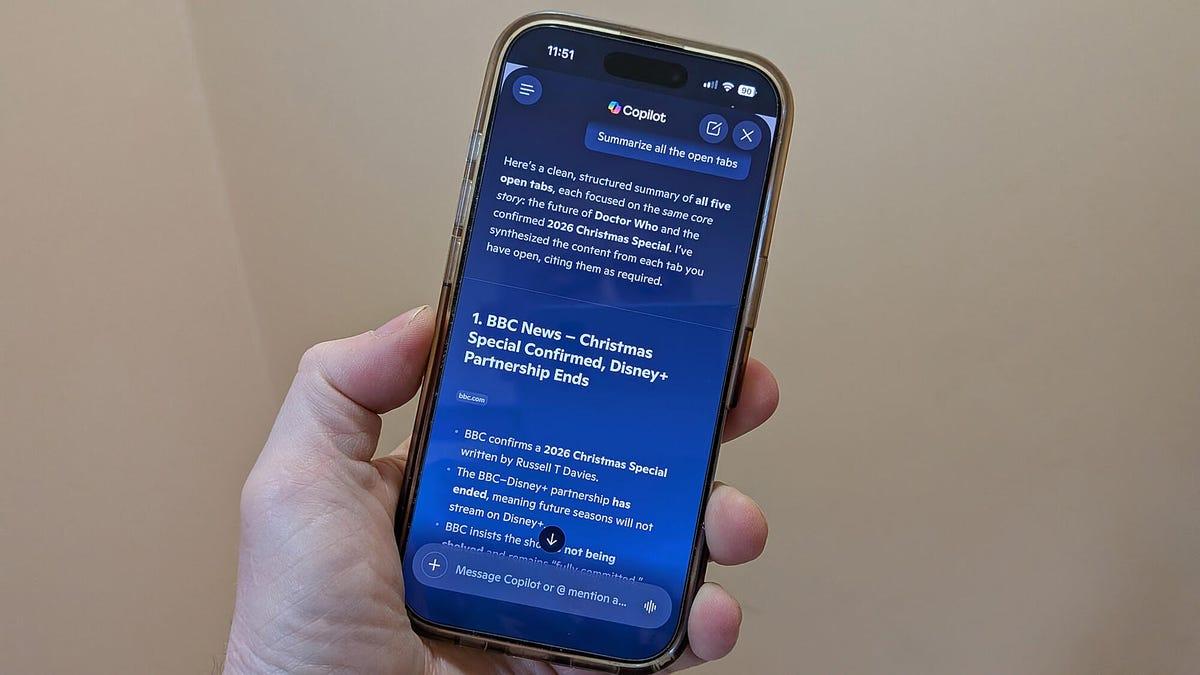
You can also ask Copilot to create podcasts and quizzes from a web page. My go-to mobile browser on my iPhone is Safari. On my Android phones, it's Google Chrome. But now there's another browser vying for first place on my mobile devices. And that's Microsoft Edge. Why? The latest version of mobile Edge integrates AI more heavily, helping gather information and answer questions across multiple tabs all in one shot. Before we delve into the details, know that I'm certainly no AI or Copilot fanboy. I've criticized Microsoft's strong-arm tactics to push Copilot into every nook and cranny of its many products and services. And we all know that generative AI itself is fallible. But when done right, AI can be a helpful tool. That's why lately I've been turning to Edge on my iPhone and Android phone for specific types of searches. Also: Why Edge stores your passwords in plaintext, according to Microsoft Now for the details. As described in a new blog post by Edge product VP Sean Lyndersay, Edge for mobile has adopted several AI-powered skills previously found only in its desktop counterpart. Plus, there are a few features new to both the mobile and desktop flavors. In mobile Edge, you can now ask Copilot to summarize or answer questions about multiple tabs just as you can in the desktop version. That means no more hopping from one tab to another to summarize each one separately. To try this, first make sure you've updated Edge on your Apple or Android device so that you're running version 148 or higher. Fire up the browser. As you research a particular topic, you'll likely open multiple tabs on it. On the new tab page, tap the Copilot icon at the start of the search bar, then type or speak your question or request, such as "Summarize the information in the open tabs." Copilot analyzes the content of all the open pages and then generates its response. In a feature known as Journeys, mobile Edge will now keep track of topics you've explored through past searches, just as in the desktop version. The latest topic appears on the new tab page for easy access so you can pick up where you left off. Also: I let Microsoft Edge's new AI feature read all my open tabs - and it's a total research time-saver To set this up, go to Settings in mobile Edge, then tap the Copilot and AI setting. Select the option for Copilot New Tab Page and turn on the switches for Enable Copilot New Tab Page and Enable Journeys. After you've run some searches and checked out different pages, Edge will eventually turn your browsing journey into summaries that appear at the new tab page. Select a specific journey to continue exploring that topic. Like the desktop version, mobile Edge has streamlined the new tab page with more useful content. From the page, you can run a traditional search or give Copilot a question or request. You'll see icons for certain web pages so you can revisit them. Tap the Add button to add more pages and even built-in features to the list. You can also remove any icon by pressing down on it and tapping the X. And then there's the summary of a past website journey. In one feature new to both the desktop and mobile editions of Edge, Copilot can remember and tap into your browsing history to continue a conversation. Just tell the AI to discuss the topic you were browsing earlier, and it should review your history and reference your past chats to provide updated information. Here's another AI skill in Edge that has expanded from the desktop to mobile. You can now ask Copilot to generate a podcast of your current web page or all open tabs. At the Copilot prompt, just type or tell it to create a podcast. Wait a few minutes while the podcast is generated. Once it's ready, just tap the Listen button to kick it off. From there, you're able to pause and skip ahead or go back 10 seconds. Also: Vivaldi's new feature should have every other browser taking note With the new Study and Learn mode in Edge for the desktop and mobile, you can ask Copilot to break down complex topics into study sessions or interactive quizzes. For this one, just open a web page on a difficult subject. At the Copilot prompt, type "Quiz me on this topic." The AI generates a brief multiple-choice quiz to challenge you. There are a few other tricks up Copilot's sleeve. Edge for desktop and mobile now offers a new AI-powered assistant that can help you if you're stuck for the right words. Using Copilot Vision, you can now share your current screen on mobile just as on the desktop and then ask the AI questions about the content. Also: What is digital transformation? Everything you need to know about how technology is changing business In the past, I never used mobile Edge very much since Safari and Chrome always felt more convenient and accessible. But with these new Copilot skills, I'll be sure to turn to Edge more frequently, especially when I'm searching for information that could use a helping hand from AI.
[2]
Microsoft's Edge Copilot update uses AI to pull information from across your tabs
Microsoft Edge is adding a new feature that will allow its Copilot AI chatbot to gather information from all of your open tabs. When you start a conversation with Copilot, you can ask the chatbot questions about what's in your tabs, compare the products you're looking at, summarize your open articles, and more. In its announcement, Microsoft says you can "select which experiences you want or leave off the ones you don't." The company is retiring Copilot Mode as well, which could similarly draw information from your tabs but offered some agentic features, like the ability to book a reservation on your behalf. Microsoft has since folded these agentic capabilities into its "Browse with Copilot" tool. Several other AI features are coming to Edge, including an AI-powered "Study and Learn" mode that can turn the article you're looking at into a study session or interactive quiz. There's a new tool that turns your tabs into AI-powered podcasts as well, similar to what you'd find on NotebookLM, and an AI writing assistant that will pop up when you start entering text on a webpage. You can also give Copilot permission to access your browsing history to provide more "relevant, high-quality answers," according to Microsoft. Copilot in Edge on desktop and mobile will come with "long-term memory" as well, which can tailor its responses based on your previous conversations. And, when you open up a new tab, you'll see a redesigned page that combines chat, search, and web navigation, along with the Journeys feature, which uses AI to organize your browsing history into categories that you can revisit. Meanwhile, an update to Edge's mobile app will allow you to share your screen with Copilot and talk through the questions about what you're seeing. Microsoft says you'll see "clear visual cues" when Copilot is active, "so you know when it's taking an action, helping, listening, or viewing."
[3]
Microsoft Edge Drops Copilot Mode, Brings More AI to Browser
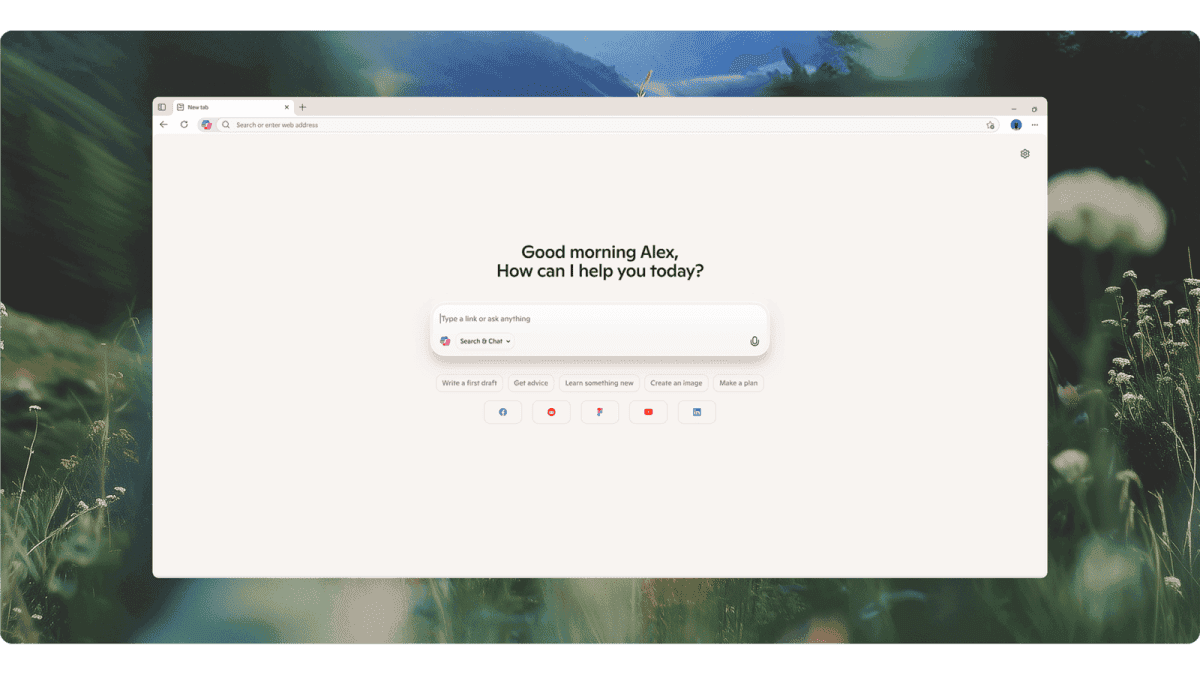
With over a decade of experience reporting on consumer technology, James covers mobile phones, apps, operating systems, wearables, AI, and more. Microsoft's Copilot Mode in Edge is being retired, but its features aren't being removed. Instead, Microsoft thinks its AI-powered search tools are ready for primetime, allowing you to use them directly in Edge on both desktop and mobile. One of the key new tools lets Copilot AI analyze multiple open tabs and generate a side-by-side comparison or summary. For example, you could have multiple hotel websites open at once and use Copilot to compile key details into a single, easy-to-read roundup, making it easier to pick where to stay. You no longer need to enable a separate mode; instead, use the Copilot button to activate the feature and ask a question, such as "Compare the hotel bookings across my open tabs." You can now also share your screen directly with Copilot on mobile, so it can see what you're looking at in real time and answer questions via voice without you having to type prompts. This works similarly to tools like Google Gemini Live or ChatGPT's voice mode. Other new Edge features include Copilot's ability to build what Microsoft calls a "long-term memory," using previous conversations to inform its responses. It's not yet clear whether Microsoft plans to incorporate memories learned through other Copilot tools. If you've searched on a topic before, expect Edge to become better at recommending high-quality answers using that context. To activate this, you need to give Copilot AI access to your browsing history. Microsoft previously introduced a browsing history feature called Journeys, which condenses your search history into individual projects to make it easier to find previous research or resume planning. These changes bring that tool to the mobile for the first time. Microsoft is also introducing Study and Learn mode, which turns whatever you're reading into an interactive quiz. If you ask Copilot to "Quiz me on this topic," it'll generate questions to help you learn quicker rather than just reading. As with many other AI tools, Microsoft is also building AI-generated podcasts you can create to help you learn on the move. Ask Edge to make a podcast of the current research you have open in a tab, and it'll summarize the information into an audio file. Plus, there's a new Writing assistant feature, which sounds like a new and improved version of spell check, monitoring your writing and telling you where you can improve with a blue dot next to your text to indicate when changes are suggested. Copilot Mode first launched on Edge in July 2025, so the features were in beta for less than a year before Microsoft deemed them ready for everyone. Microsoft says these tools are now rolling out to both mobile and desktop versions of Edge.
[4]
Copilot is replacing Edge's browser history with AI slop
Microsoft is also discontinuing the useful 'Collections' feature while introducing AI capabilities that mirror existing Google functionalities like Copilot Vision and Voice. There's a school of thought that says that "AI brain" is a real thing, where AI quietly removes the traditional need to think through a problem. In this context, Microsoft Edge's AI-brain problem just got a lot worse -- and it's actively blocking your ability to get things done. Microsoft began rolling out substantial updates to the Edge desktop and mobile browser today, and yes, they obviously prioritize Copilot. Some of these feel familiar; didn't Google launch automated quizzes and podcasts months ago? But Copilot isn't just being added to Edge. It's actively taking over portions of Edge that humans used to manage themselves, specifically the nearly infinite list of sites that you've browsed as part of your browser history. That's both good and bad. Most people absolutely refuse to manually pore over the list of websites that make up a browser's history in search of a specific site or topic, and who can blame them? Google's Chrome browser allows you to search your browser history for a specific site or topic, which feels like a good compromise. Microsoft has taken this a step further, and outsourced the task to Copilot. You're not searching your browser's history. Instead, Edge now uses the Copilot AI function to search out the sites and tabs you previously browsed, and then summarize them -- all using AI, which is notorious for not linking sites. And in fact, that's what you're going to get. Microsoft calls this "Journeys," and it's designed to help you pick up where you left off. Various browser makers and search engines have wrestled with this problem: What happens when you begin researching a topic, then get called away? Most browsers share tabs between your smartphone and desktop. Alternatively, you can create tab groups and store them for a future occasion. Microsoft even solved the problem in 2019 with a feature called Collections, in which you could group and store tabs in a sidebar for later use. But oops! Microsoft indicated in January that it would kill Collections later this year, even though it currently remains part of the present browser. All of these solutions, however, aggregated the tabs themselves. Journeys doesn't. Edge's new tab page may suggest that you resume "recent browsing" for (as an example) cross-stitch guides. The result Microsoft shared auto-generated a Copilot prompt for "Summarize the most beginner-friendly projects offered across these pages," then began pumping out an AI summary without any link in sight. Now I have to stop, search, and try to find what I was looking for previously. How horribly unproductive that is! (Do you hate the term "Microslop," Microsoft? Because this is how you get labeled that.) To be fair, I can see some advantages in a related feature. You now have the option of adding specific tabs to a Copilot query, and the example Microsoft chose is a good one: You've done some of your own research, narrowed down a few choices, and want some AI input to help you make a final decision. In this case, the user is leading the discussion, and allows Copilot to provide assistance. Some might want Copilot to make all the decisions in the process, but again -- AI brain. Why wouldn't you want humans and AI working together, with humans making the final call? What Microsoft doesn't really tell you is that all of these new features are aligned with Edge's new tab page, which has traditionally looked a lot like the crazy quilt of content that is Windows' widgets, a collection of stock, news, weather, and random celebrity data. What Microsoft is trying to replace that with is a world where (a bit like Google) topics of interest are synthesized, cobbled from information pulled from a variety of sources. I've already caught Copilot making some dubious claims not backed up by the somewhat-dubious sources that it pulled from. (Yes, I know I can manage that information, but do I want to? It's exhausting.) Microsoft is very proud of the fact that these new AI announcements are accompanied by "long-term memory," which feels like a very AI-specific term that speaks to various techniques to resurface tokens and the like. But we have a solution to this problem, and we've had it for years: Just write the damn URL to a file, and store it on the user's PC. Otherwise, Microsoft's big Edge announcements feel very familiar, with Copilot Vision and Voice finally arriving on the mobile version of Edge. (Google Lens debuted eight years ago, Microsoft!) You now can create quizzes for students to test themselves on web pages, create podcasts, and more -- again, what Google has been able to do for some time. Microsoft's cyborg-ization of Edge, where AI is taking over some of the traditional "human" parts of the browser, isn't what makes me turn up my nose. I can appreciate AI tools that save me time and mental effort, such as the software that maps out directions for my car. But ultimately, I can create my own shortcuts from A to B. From what I can see, Microsoft's new Edge Journeys appear to strip out all autonomy. It's a direction that Microsoft originally promised that it would reverse course on. So why has it continued?
[5]
Microsoft's Copilot can now peek into your open tabs in Edge -- if you let it -- as part of new AI features for the browser
* There's a new update for the Edge browser on desktop and mobile * Microsoft has retired Copilot Mode, which came to the browser last year * It's been replaced by a raft of separate AI features, including one that can (with your permission) scan across all your open tabs Microsoft is dropping Copilot Mode from Edge, but if you thought that AI was going away from the web browser, think again, as AI features are actually being baked directly into the app instead. Microsoft announced that as part of the latest update for Edge, Copilot Mode is being retired from the browser, but there are new AI features coming in for the desktop version of the app (and the mobile one, too). The biggest change here is that Copilot can now scan over all the tabs you have open in Edge and pull information to answer your queries. The idea is that if you are, for example, planning to book a meal and you're mulling over different choices for restaurants across multiple tabs, you can get Copilot to compare those options without having to leave your current web page. There's no setup required for this; you can just click the Copilot icon and get it to do the legwork for you in terms of pulling details from across those open tabs. Microsoft explains: "Copilot in Edge, with your permission, reads across every tab you have open, so you can compare options, surface what matters, and make decisions with less tab-hopping." Copilot can go further than this, and -- with your permission again, Microsoft underlines -- the AI can access your browsing history to improve its responses. It can remember and draw from previous queries, too. As Microsoft notes: "Now, with long-term memory on desktop and mobile, Copilot not only builds on what you've seen but also can reference your past chats to provide more relevant help. You're always in control of what Copilot can access." Extra AI functionality is also being added in terms of a 'Study and Learn' mode, which can break down a topic on a web page you're viewing to create a guided study session, or you can even have Copilot compile a quiz on the subject to test your knowledge. Another AI feature is an in-line writing assistant, essentially summoning Copilot to write (or edit) things like social media posts for you in Edge. Copilot can also generate a podcast based on the content of any given web page. In terms of Edge for mobile, the browser also gets Copilot's ability to work across all your open tabs to concoct better answers to your queries, as well as other functionality pulled from the desktop browser. (That includes 'Journeys,' which organizes your browsing history into topics, letting you pick up where you left off with those threads). Note that some features are for the US only, for the moment -- namely, the writing assistant and Journeys on Edge mobile. Analysis: Copilot cloak engaged So, the tack Microsoft is now taking is to effectively cloak Copilot. The AI isn't going away from Edge, but the more in-your-face presence -- Copilot Mode, introduced almost a year ago now -- is being shelved, with AI functionality instead being woven more subtly into the browser in different ways. And granted, some of the features outlined above could be pretty useful. The worry for some is on the privacy front, although Microsoft is clear enough that Copilot only gets access to nose around in your tabs if you click the button for the AI. The company makes clear: "With Copilot in Edge, your data stays yours. Microsoft only collects what's needed to improve your experience -- or what you choose to provide via Personalization settings." If you steer clear of clicking the Copilot icon and don't enable any of these features in Edge's settings, there will be no privacy issues. Or there shouldn't be, anyway, but that hasn't stopped some predictably negative reaction to Microsoft's latest Edge update. There are certainly a few Redditors who don't trust what Microsoft is up to here, and comments like this aren't uncommon: "Microsoft Edge and privacy don't go in the same sentence." Microsoft is busy trying to change the bad reputation it has been saddled with since Windows 11 arrived -- which very much worsened with the advent of Copilot in the OS -- and notably, we now have the big drive to fix everything that's wrong with Windows 11. However, with skeptical Redditors saying things like "K2 will mean nothing" in reaction to this latest move for Edge -- K2 is the codename of the project to streamline Windows 11, debloat the OS, and make it more performant -- it looks like Microsoft still has a good deal of trust-building to do. Follow TechRadar on Google News and add us as a preferred source to get our expert news, reviews, and opinion in your feeds.
[6]
Microsoft Edge Now Lets Copilot Access Information From Your Open Tabs
Edge on desktop will now allow users to turn open tabs into podcasts Microsoft has introduced the Copilot's agentic AI capabilities to the Edge mobile app. Now, users will be able to ask queries to Microsoft's AI agent, which will access information for them from active tabs to generate answers. The company is also rolling out the AI-backed Journeys tool for the Edge mobile app, which will organise the user's browsing history into different topics, allowing users to pick up browsing from where they left off. Microsoft recently redesigned the new tab page for the Edge desktop app. It is now bringing the same design to its mobile browser, where users will be able to directly ask questions to Copilot. Microsoft Edge New Copilot AI Feature on Mobile and Desktop In a blog post on Wednesday, the US-based tech giant announced that, for the first time, it is bringing agentic capabilities with Copilot in Edge on phones. On top of this, the company has introduced new AI-backed features for the desktop version of the browser. With Copilot in Edge, users will be able to ask queries on their handsets without leaving the browser, and Microsoft's AI assistant will be able to generate answers by retrieving context and information from various open tabs. Similar to Gemini in Chrome on desktops, Microsoft Edge, with Copilot, will be able to compare texts and details from different tabs, too, eliminating the need for users to move between tabs repeatedly. Apart from this, to offer a more consistent experience across platforms, the company is also bringing the same redesigned "new tab page" as seen on the desktop version of the browser, where users will be able to directly ask questions to Copilot from the search bar. When reading from an open tab, users will be able to click the Copilot icon in the top right corner to ask Copilot to summarise the information or find a particular piece of information. It can also retrieve information from multiple active tabs. For example, users can ask Copilot to plan a holiday based on the information from the tabs that are already open in Edge on their phone. Copilot in Edge can summarise tabs on phones Photo Credit: Microsoft Additionally, with the new AI-backed Vision and Voice tool, available for all desktop and mobile Edge users, users share their device's screen and ask Copilot to generate answers based on what is being displayed. However, users will have to grant permission to the AI agent to let it view the screen. Microsoft claims that when Copilot is at work, users will be shown "clear visual cues", regarding whether the AI agent is generating an answer, listening to what the user has to say, or viewing the screen. Similarly, users can grant permission to Copilot to access their browsing history on Edge to generate answers. The company says that Copilot will be able to pull relevant information from the previously visited tabs to "finish up your shopping, returning to a thread you were following, or picking up research you started days ago". In addition to this, the company has introduced long-term memory for Copilot in Edge, allowing it to remember past conversations and use them as context. Both features are available on Edge desktop and mobile versions. Apart from this, Microsoft is also bringing Journeys to Edge on phone, a functionality that was already available on the desktop version of the browser. With the user's permission, the Journeys tool organises their browsing history "into meaningful topics", along with summaries and suggested next steps, allowing users to pick up work and projects from where they left off. New Productivity Tools in Microsoft Edge on Desktop Microsoft has also introduced new productivity tools for the desktop version of Edge. The new Study and Learn mode will allow users to ask breakdowns for complex topics and organise them into guided study sessions and interactive quizzes, similar to Google's NotebookLM. Users can ask Copilot in Edge to quiz them on a particular topic after selecting the Study and Learn mode from the bottom-left corner of the screen. The tech giant has also introduced a new Writing Assistant tool, which lets users generate, rewrite for clarity, and adjust the tone of drafts with Copilot's help. Moreover, Copilot is now capable of turning tabs into podcasts, which users can listen to on the go. However, this tool is only available for English-speaking markets.
Share
Copy Link
Microsoft is retiring Copilot Mode from Edge but weaving AI deeper into the browser. The update lets Copilot AI analyze multiple open tabs, generate podcasts from web pages, and access browsing history with user permission. New features include Study and Learn mode for interactive quizzes and a writing assistant. While some praise the productivity boost, critics worry about privacy and AI replacing human-managed browser functions like Collections.
Microsoft is retiring Copilot Mode from Edge after less than a year in beta, but the company isn't pulling back on AI integration. Instead, Microsoft Edge now embeds Copilot AI directly into the browser experience on both desktop and mobile platforms
1
3
. The shift represents a strategic move to make AI features more accessible without requiring users to toggle a separate mode. Sean Lyndersay, Edge product VP, outlined how these new AI features for the browser aim to streamline information gathering and reduce tab-hopping1
.
Source: The Verge
One of the most significant updates allows Copilot AI to analyze and summarize multiple open tabs simultaneously. Users can now ask the chatbot to compare products, summarize articles, or compile hotel booking details across different tabs without switching between them
2
5
. Microsoft emphasizes that Copilot only accesses tabs with user permission, stating that "your data stays yours" and the company only collects what's needed to improve the experience5
. To use this capability, simply click the Copilot icon and request actions like "Compare the hotel bookings across my open tabs"3
.
Source: ZDNet
The latest version of Microsoft Edge for mobile now includes AI skills previously exclusive to desktop, making it a compelling alternative to Safari and Chrome for certain users
1
. Edge version 148 or higher brings summarizing multiple tabs, screen sharing with Copilot, and AI-generated podcasts from open tabs to mobile devices1
2
. The mobile browser also gains Copilot Vision, allowing users to share their screen directly with the AI and ask questions via voice without typing prompts3
. This functionality mirrors tools like Google Gemini Live, enabling real-time assistance as you browse.Microsoft introduced Journeys, an AI-powered feature that condenses browsing history into organized topics rather than displaying a traditional chronological list
3
4
. While Journeys aims to help users pick up where they left off on research projects, critics argue this approach removes human control. The feature generates AI summaries of past browsing sessions without always linking to original sources, forcing users to search manually for previously visited sites4
. Microsoft is also discontinuing the Collections feature, which allowed users to manually group and store tabs in a sidebar, further shifting control from users to AI4
.
Source: PCWorld
Related Stories
Copilot now includes long-term memory capabilities on desktop and mobile, allowing the AI to reference previous conversations and provide contextually relevant answers
2
5
. Users can also grant Copilot access to their browsing history to improve response quality3
. While Microsoft asserts users remain in control through permission settings, some observers express skepticism. Reddit users have voiced distrust, with comments like "Microsoft Edge and privacy don't go in the same sentence" reflecting ongoing concerns about data collection5
.Microsoft Edge now offers Study and Learn mode, which transforms web page content into interactive quizzes or guided study sessions
1
2
. Users can simply ask Copilot to "Quiz me on this topic" to generate multiple-choice questions1
. The browser also introduces AI-generated podcasts from web pages or multiple tabs, similar to NotebookLM, allowing users to listen to summarized content2
3
. Additionally, a writing assistant feature monitors text input and suggests improvements with visual cues3
. These features roll out to both desktop and mobile versions, though some capabilities like the writing assistant and mobile Journeys are initially US-only5
.🟡 undeveloped_tool_code}Summarized by
Navi
[3]
23 Oct 2025•Technology

29 Jul 2025•Technology

27 May 2025•Technology

1
Technology

2
Technology

3
Technology