Microsoft Introduces AI Agent for Windows Settings: A New Era of User-Friendly Computing


4 Sources
[1]
Microsoft's new AI agent can change Windows settings for you - here's how
With so many settings in Windows, knowing where and how to adjust something can be challenging. Now Microsoft is using AI to help you tackle that challenge more easily. Also: You can try Windows 11's newest Start menu now - here's how In a blog post published Friday, Microsoft announced the
[2]
Latest beta version of Windows 11 gets the AI agent that Microsoft promised it would add: A search tool that works
Where anything to do with AI is often promoted as being a new paradigm for humanity, it makes a pleasant change to get an AI tool that's potentially very useful and, more importantly, is exactly what was promised. The fact that this has come from Microsoft is perhaps unexpected, but it really has
[3]
Windows 11 Will Now Let You Change Settings With AI Agent
In EEA, Recall snapshots can be shared with third-party apps and websites Microsoft released the latest Windows 11 Insider Preview build to the Dev channel last week. The new update brings two new artificial intelligence (AI) features to users. First is the introduction of AI agents in Windows 11,
[4]
Microsoft's new AI agent for Windows PC: What all can it do?
More than suggestions, Windows AI performs tasks for you, bridging the gap between intent and action. For decades, using a computer has meant adapting to its logic, its menu structures, its framework of settings, its mostly unintuitive controls. But Microsoft thinks it's time for Windows to adapt
Share
Copy Link
Microsoft has launched a new AI agent for Windows 11 that can understand user requests and autonomously change system settings, marking a significant step towards more intuitive computer interactions.
Microsoft Unveils AI Agent for Windows Settings
Microsoft has introduced a groundbreaking AI agent for Windows 11, designed to simplify the process of adjusting system settings. This new feature, announced in a blog post on Friday, represents a significant step towards more intuitive computer interactions
1
.How It Works
Source: PC Gamer
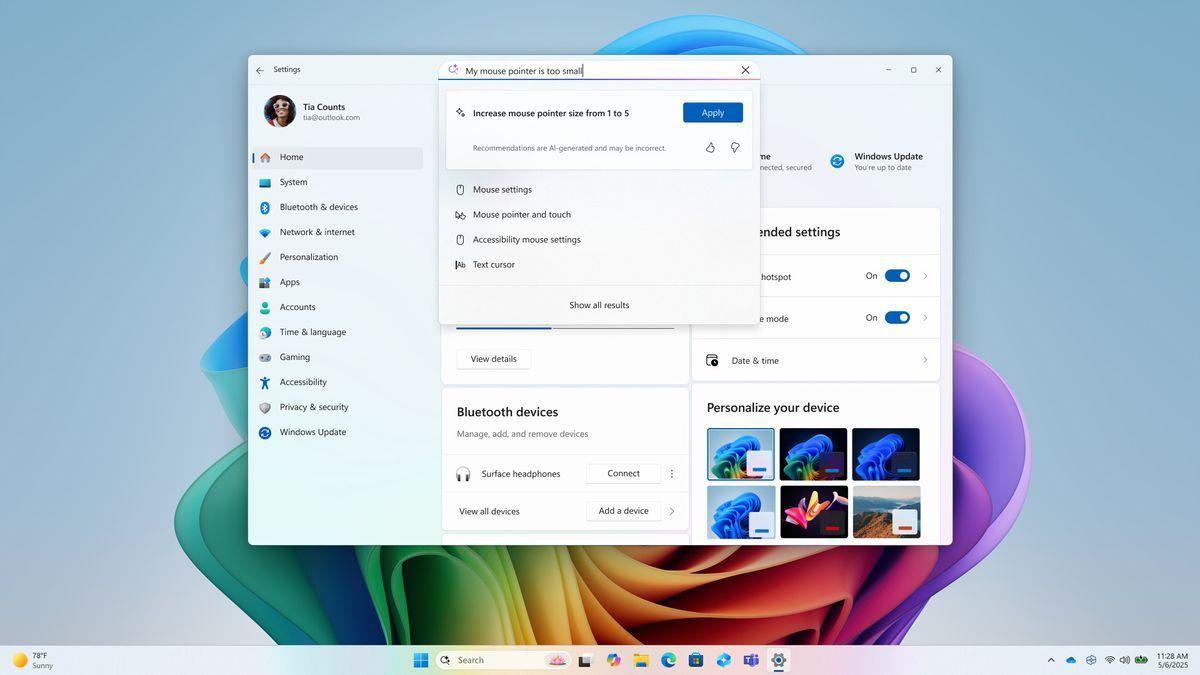
The AI agent can understand natural language requests from users and either recommend the appropriate steps or, with permission, execute the changes automatically. For example, users can simply type phrases like "my mouse pointer is too small" or "how to control my PC by voice," and the agent will guide them to the correct settings or make the adjustments directly
2
.Availability and Requirements
Currently, the AI agent is available only to Windows 11 Insiders using Snapdragon-powered Copilot+ PCs with the primary display language set to English. Microsoft has promised that support for eligible AMD and Intel PCs will be coming soon
1
.Context-Aware Assistance
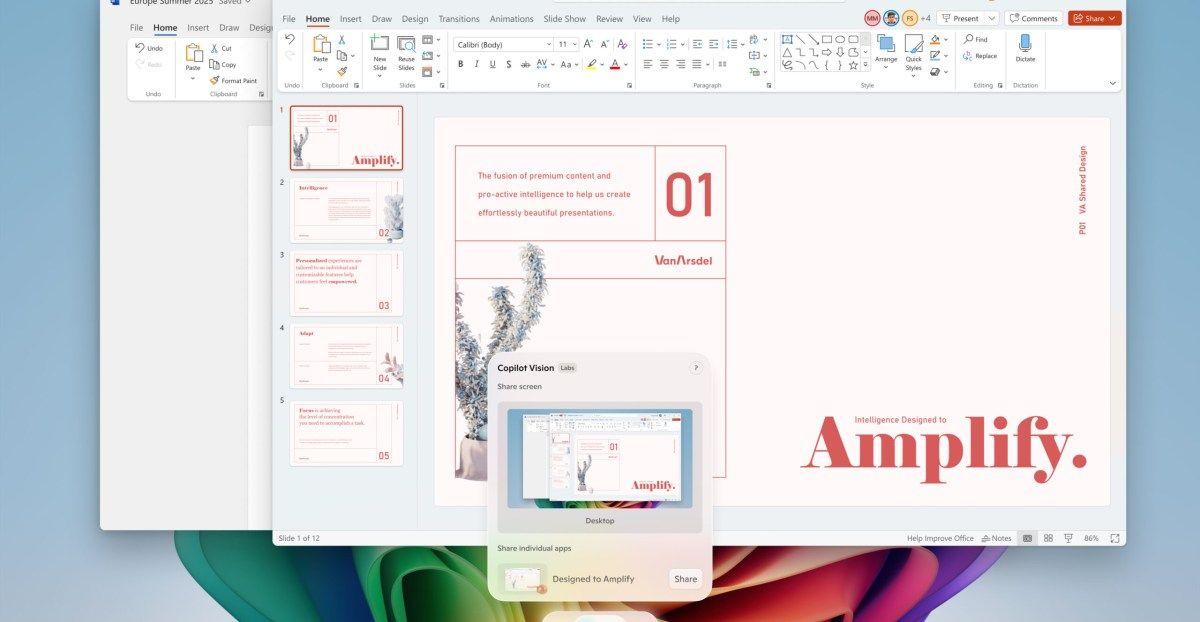
The AI agent is designed to be context-aware, meaning it can recognize what's on the user's screen and offer tailored assistance. For instance, it can suggest photo editing options when the user is working with images or summarize PDFs when reviewing documents
4
.Privacy and Security Considerations
Microsoft emphasizes that all processing is done locally on the device, addressing potential privacy and security concerns. However, the company is also introducing new features for managing data collected by the system, particularly for users in the European Economic Area (EEA)
3
.Related Stories


Additional Features for Windows Insiders

Source: ZDNet
The latest Windows 11 Insider build also includes other enhancements, such as:
- Recall feature improvements, allowing users to reset collected data and automatically delete snapshots after 90 days
1
. - Click to Do option with Microsoft 365 Copilot for sending text or images to the AI for analysis
1
. - New sharing options for OneDrive files in the cloud
1
.
Future Implications
This AI agent represents more than just a settings helper; it's a foundation for a new way of interacting with computers. Microsoft is positioning Windows as a platform for AI agents, with plans to allow developers to create their own agents that can communicate with each other and work together on behalf of the user
4
.
Source: Digit
As this technology evolves and becomes more widely available, it could fundamentally change how users interact with their PCs, making complex tasks simpler and reducing the learning curve for new users. The goal is to remove friction between intent and action, allowing users to focus more on their tasks and less on navigating the intricacies of the operating system
4
.References
Summarized by

Navi
[3]
Related Stories
Recent Highlights



Recent Highlights
Today's Top Stories






Don’t drown in AI news. We cut through the noise - filtering, ranking and summarizing the most important AI news, breakthroughs and research daily. Follow topics that matter to you and stay ahead.


