Microsoft Introduces AI Agents to Revolutionize Windows Settings Management


14 Sources
[1]
Windows Is Adding AI Agents That Can Change Your Settings
Microsoft says that the AI agents can find and change settings for users when given a natural language command. Microsoft is adding a new AI agent to Windows that will have the power to change your Windows settings "We set out to solve one of the most common frustrations we hear -- finding and
[2]
Microsoft Tests Using Copilot AI to Adjust Windows 11 Settings for You
Microsoft will roll out the capability in a Windows Insider beta release for Copilot+ PCs, which include laptops running processors designed for generative AI from Qualcomm, Intel, and AMD. Copilot already operates as a ChatGPT-like service on your PC. The company now sees an opportunity to apply
[3]
Microsoft will soon allow AI to change your Windows 11 settings
Microsoft is working on making Windows 11 even richer with AI features Microsoft is adding even more AI to Windows 11 courtesy of a new agent that can assist users in the settings app. Microsoft announced in a Windows Experience blog post that the new AI assistant will be capable of adjusting user
[4]
Microsoft unveils new AI agents that can modify Windows settings
Today, Microsoft announced new Windows experiences for Copilot+ PCs, including AI agents that will make changing settings on your Windows computer easier. The company says users will be able to use these new agents to find settings they want to change using natural language quickly, and even
[5]

Microsoft introduces agent for AI-powered settings controls in Copilot+ PCs
Click to Do and Windows 11 are also getting some new AI bells and whistles. Microsoft a series of upcoming new features for Copilot+ PCs and Windows 11. One of the most compelling updates for Copilot+ PCs is agent, which provides on-device AI assistance for adjusting a PC's settings. Some of the
[6]

Microsoft is introducing AI agents that can change your Windows 11 settings
In a nutshell: Does the prospect of more AI features coming to Windows 11, including an agent that can adjust user settings at your request, fill you with excitement? Possibly not, but Microsoft is introducing them anyway. Copilot+ PCs will get the updates first, but the AI flood is also coming to
[7]

Microsoft has a big new AI settings upgrade for Windows 11 on Copilot+ PCs - plus 3 other nifty tricks
Copilot+ PC owners are getting some very useful introductions for Windows 11, including functionality that Microsoft has been promising for a long time now - the ability for AI to change settings for you in the operating system. Microsoft covers all the introductions it's making in a blog post -
[8]
Find Windows 11's settings too confusing? Microsoft has an answer - and it unsurprisingly relies on AI
Also a new hardware-related FAQ has been introduced in Settings, too Windows 11 has a new preview build out and it comes with a big change: the introduction of AI to the Settings app in order to help Copilot+ PC owners find and choose the options they need. This is a new piece of work Microsoft
[9]
Windows 11 gets more AI upgrades we didn't ask for - as Copilot pops up on the desktop and Microsoft Store
If you're expecting to see more AI in Windows 11, well, you'd be bang on the money there, as it seems Copilot is creeping into another couple of places in Microsoft's desktop OS. Neowin noticed that the latest version of the Copilot app (1.25044.93.0) has planted a new choice to invoke Copilot
[10]

Microsoft's new AI can change your laptop's settings -- if you trust it to
Microsoft is bringing even more new AI features to your Windows 11 laptop, this time with a tool that might save you a lot of aggravation. Windows 11 users will soon be getting a new "AI agents" feature that will let you use natural language to change your system settings with AI. This feature
[11]

Microsoft unleashes an AI agent on your unsuspecting Windows settings, but initially only if you have a Snapdragon X-powered PC
Microsoft has been upping Window's AI ante of late. Its latest salvo is a new raft of autonomous features powered by an AI agent, which are due to roll out "over the next month" (via Bleeping Computer). Kiss goodbye to those ancient submenus that date back to Windows NT? Maybe, but somehow we
[12]

Microsoft will Deploy AI for Windows 11 Settings
Microsoft's next Windows 11 Insider update will bring an AI helper right into the Settings app, making it simple for gurus to tweak system options. You'll see a small icon at the top of the Settings window -- click it and ask for changes like adjusting your mouse speed or display scaling. With
[13]

Windows Is Now Smart Enough to Change Settings for You: Just Ask
The Best Windows Apps for Minimalists Who Still Want Full Control Do you find Windows settings too clunky to work with? Well, Microsoft has a solution -- you can now simply tell your PC what settings to change. Microsoft's New AI Agents Can Change Windows Settings Microsoft has announced several
[14]

Windows 11 Settings App Gets an AI Agent, First on Copilot+ PCs
The AI agent is powered by an on-device AI model to process user queries locally. Today, Microsoft released an AI agent in Windows Settings, which allows you to address PC issues with a single click. The update is first rolling out to Snapdragon-powered Copilot+ PCs in the Windows 11 Insider Beta
Share
Copy Link
Microsoft unveils new AI agents for Windows that can understand natural language commands and modify system settings, starting with Copilot+ PCs.

Microsoft Introduces AI Agents for Windows Settings
Microsoft has announced a groundbreaking addition to Windows: AI agents capable of modifying system settings based on natural language commands. This new feature, set to debut on Copilot+ PCs, aims to simplify one of the most common user frustrations - finding and changing settings on personal computers
1
2
.How AI Agents Work
The AI agents utilize on-device artificial intelligence to interpret user intent and, with permission, automate and execute tasks
1
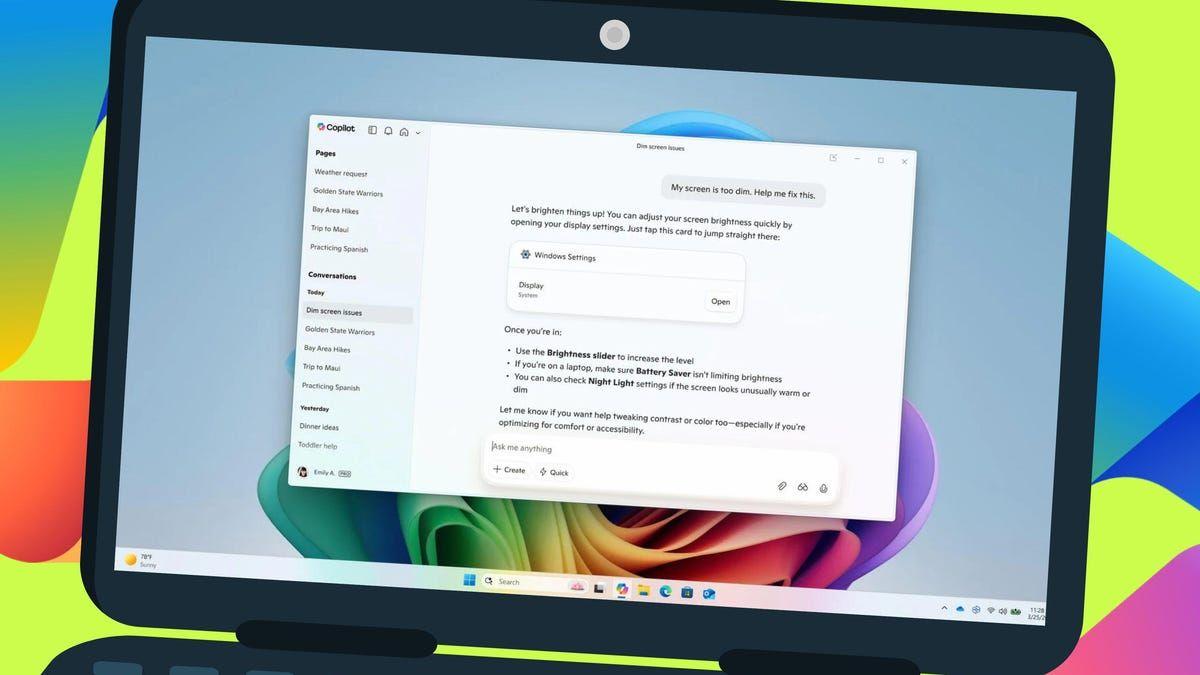
. Users can open Copilot, Microsoft's AI-powered tool, and describe their needs in natural language. For example, if a user mentions that their mouse pointer is too small, Copilot will recommend steps to increase its size and can even implement the change automatically if given permission1
2
.Initial Rollout and Availability
The feature will first be available to Windows Insiders on Qualcomm Snapdragon-powered Copilot+ PCs, followed by those with AMD and Intel chips
2
3
. Initially, only English language inputs will be supported, with more languages planned for the future1
4
.Expanded AI Capabilities in Windows
Microsoft is not stopping at settings management. The company is introducing several AI-enhanced features across various Windows applications:
- Photos App: New dynamic lighting controls for photo editing on Copilot+ PCs
3
. - Snipping Tool: Improved cropping capabilities and text extraction from images
3
4
. - File Explorer: AI actions for deeper file interaction, including content summarization and image editing
3
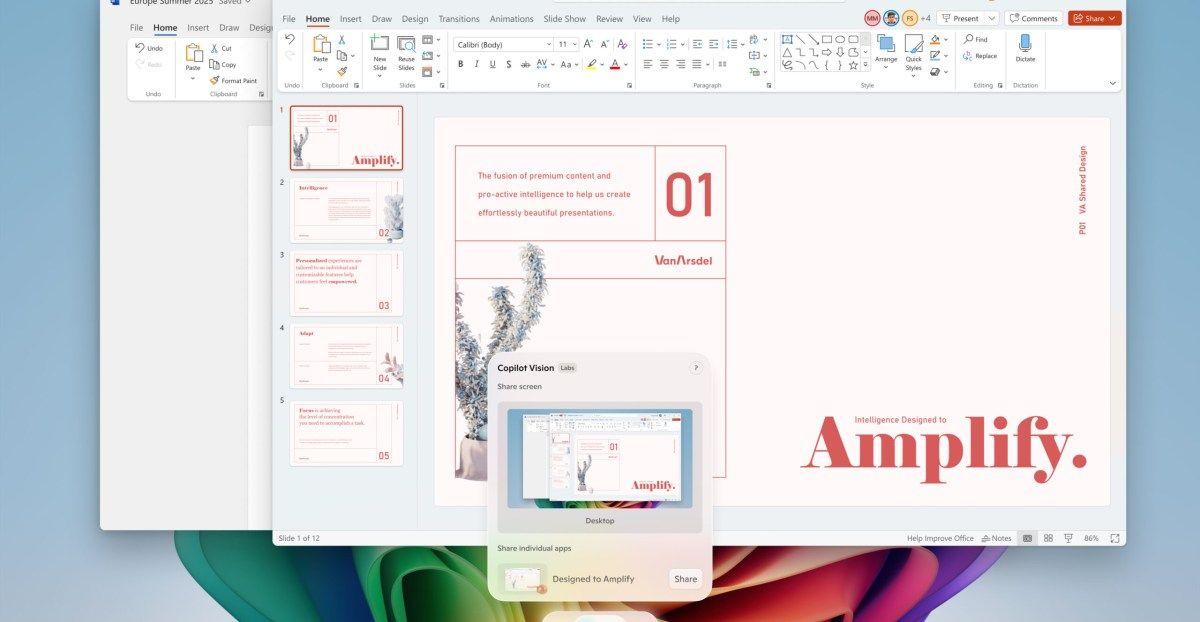
. - Copilot Vision: Allows users to share browser and app windows with Copilot for enhanced problem-solving assistance
3
.
Related Stories


AI Integration in Other Windows Features
Microsoft is also enhancing other aspects of Windows with AI capabilities:
- Windows Search: Improved functionality with more "Click to Do" text and image actions
4
. - Paint: New features like Sticker Generator and Object Select for easier image creation and editing
4
. - Notepad: A new write function that can create text from prompts
4
.
Implications and Future Developments
This integration of AI into core Windows functionalities represents a significant step towards more intuitive and user-friendly computing experiences. As these features roll out to Windows Insiders and eventually to the broader user base, they have the potential to reshape how users interact with their PCs
5
.Microsoft's focus on AI-powered assistance in Windows settings and applications demonstrates the company's commitment to leveraging artificial intelligence to enhance user experience and productivity. As these features evolve, they may set new standards for operating system interactions and user interface design across the industry
2
5
.References
Summarized by

Navi
[3]
[4]
Related Stories
Recent Highlights



Recent Highlights
Today's Top Stories






Don’t drown in AI news. We cut through the noise - filtering, ranking and summarizing the most important AI news, breakthroughs and research daily. Follow topics that matter to you and stay ahead.


