Nvidia Quietly Rolls Out GPU App Prioritization to GeForce RTX Users Without Official Announcement


4 Sources
[1]
Nvidia's RTX Spark GPU priority control is quietly showing up on regular GeForce PCs
Serving tech enthusiasts for over 25 years. TechSpot means tech analysis and advice you can trust. In a nutshell: Nvidia built a new GPU priority control for its RTX Spark laptops, allowing owners to keep games running smoothly while an AI agent churns away in the background. Now, the same
[2]
NVIDIA GPU App Prioritization appears on some GeForce systems
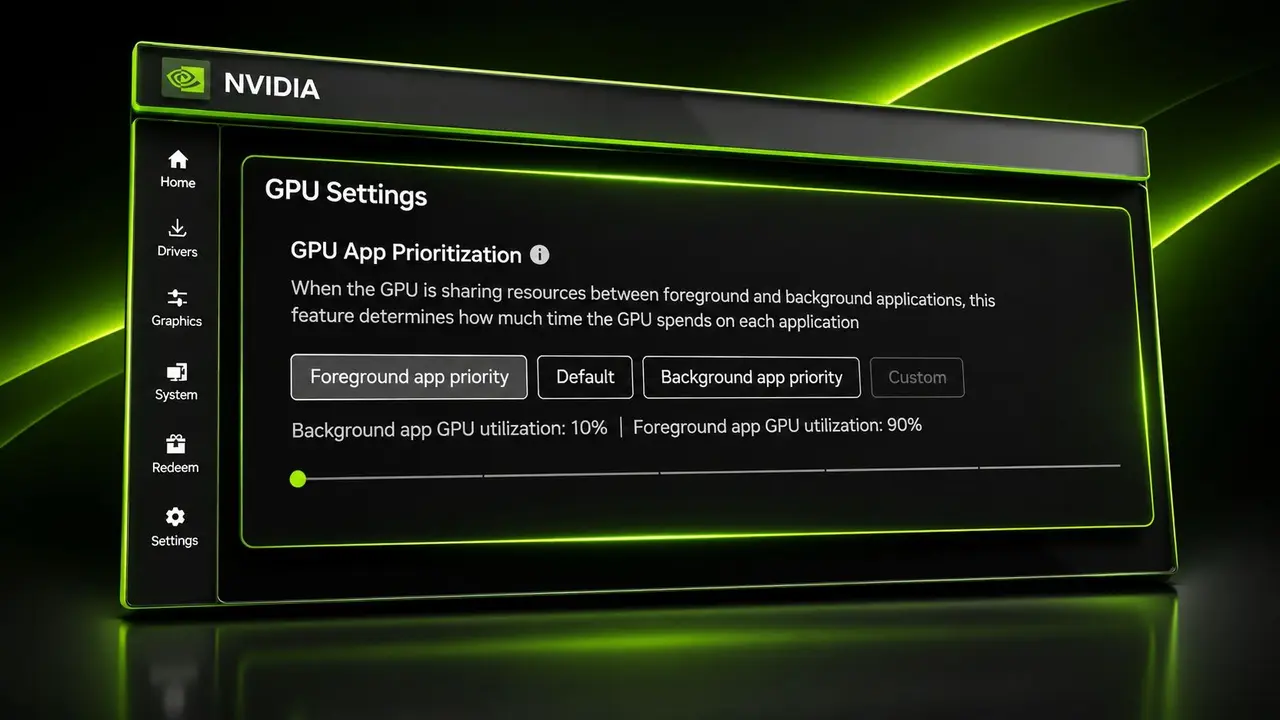
Some GeForce users have reported a new GPU App Prioritization control in NVIDIA App 11.0.9.585. The menu appears under System > Advanced and reportedly lets users set how GPU work is prioritized between foreground and background applications. The feature has not been officially announced for
[3]
NVIDIA accidentally exposes 'GPU App Prioritization' to GeForce RTX owners, a feature only announced for RTX Spark
NVIDIA recently launched a new GPU scheduling tool for the RTX Spark that allows users to control how applications are prioritized when multiple applications are running on the GPU simultaneously. However, this feature has spilled over to GeForce GPU owners despite NVIDIA not announcing support for
[4]
NVIDIA App Quietly Adds GPU Prioritization Controls, But The New Feature Isn't Available To Everyone
NVIDIA's latest App update reportedly introduces a new way to prioritize GPU resources between foreground and background applications, although its availability remains something of a mystery NVIDIA appears to have quietly introduced a rather interesting feature to its NVIDIA App, allowing users
Share
Copy Link
Nvidia's GPU App Prioritization feature, initially designed for RTX Spark laptops, has unexpectedly appeared on standard GeForce RTX systems. The tool lets users control how their GPU splits resources between foreground and background applications with an 80/20 default split, but availability remains inconsistent across different GPU models.
Nvidia GPU App Prioritization Surfaces on GeForce RTX Systems
Nvidia has quietly introduced GPU App Prioritization to some GeForce RTX users through Nvidia App version 11.0.9.585, despite never officially announcing the feature beyond its RTX Spark laptop lineup
1
. The GPU priority control, discovered by Reddit user Warkratos, allows owners to manage how their graphics card allocates GPU resources between foreground and background applications2
. Located under System > Advanced in the Nvidia App, the tool presents users with preset options and a custom slider to determine workload distribution3
.
Source: Wccftech
The feature matters because it addresses a growing need among users who simultaneously run gaming, streaming, rendering, or local AI model tasks. By providing granular control over GPU scheduling, users can theoretically maintain smooth gaming performance while running compute-heavy workloads in the background
4
. Game streamers using OBS, for instance, could prioritize their game over encoding tasks, while AI enthusiasts running inference jobs could balance responsiveness across applications3
.How GPU App Prioritization Allocates Resources
The default configuration assigns an 80/20 priority split, with foreground and background applications receiving 80% and 20% respectively
1
. Users can switch to a "Prioritize Foreground" mode that adjusts this distribution to 90/104
. A custom setting reportedly allows users to push the split as far as 95/5, giving the active application nearly complete GPU priority2
.These percentages should not be interpreted as hard caps on GPU utilization or guaranteed divisions of processing time. Nvidia has not explained the underlying scheduling implementation or how these figures translate into actual workload performance
2
. The control cannot create additional GPU capacity, and heavily saturated graphics cards may still experience reduced performance across tasks regardless of priority settings2
.Inconsistent Availability Across GeForce RTX Hardware
The feature's rollout has been notably uneven. One RTX 5090 owner confirmed that GPU App Prioritization appeared after updating to version 11.0.9.585
1
. However, another user with an RTX 5070 Ti running the same app version alongside hotfix driver 621.12 found no such option1
. Testing on an RTX 4090 system with the latest WHQL Game Ready Driver 621.01 also failed to reveal the setting4
.This inconsistency makes it impossible to determine whether the control is exclusive to specific GPU generations, tied to particular driver branches like the R620 series, or simply part of a staged rollout
2
. Nvidia's official release notes for version 11.0.9.585 make no mention of GPU App Prioritization, instead listing DLSS Override support for additional games, new optimization profiles, and stability fixes4
.
Source: TweakTown
Related Stories

Connection to RTX Spark and Hardware Requirements
Nvidia originally introduced resource management controls for RTX Spark systems on October 28, positioning the feature as a way to balance interactive applications against background AI agents
1
. On those machines, the functionality requires Hardware-Accelerated GPU Scheduling to be enabled in Windows graphics settings1
. While Nvidia hasn't confirmed whether the GeForce implementation shares this requirement, the RTX Spark precedent suggests users should verify that Hardware-Accelerated GPU Scheduling is active3
.The feature's appearance on standard GeForce RTX cards suggests Nvidia may be testing broader availability beyond its AI-focused RTX Spark lineup. However, without official documentation or controlled testing, the actual performance impact remains unverified
2
. Users curious about GPU App Prioritization can update to Nvidia App version 11.0.9.585 and check under System > Advanced, though availability appears dependent on factors Nvidia has yet to clarify1
.
Source: TechSpot
What This Means for AI Workloads and Gaming
If broadly released, GPU App Prioritization could significantly benefit users running AI workloads alongside gaming or streaming. Someone playing a game while exporting a video or processing inference tasks with a local AI model could decide which workload receives the larger slice of GPU resources
1
. The tool would prove particularly valuable for power users who need precise control over resource allocation when running multiple GPU-intensive applications simultaneously3
.The timing aligns with increasing demand for local AI capabilities on consumer hardware. As more users experiment with running inference models, image generation tools, and other compute-heavy workloads on their GeForce RTX cards, the ability to prioritize gaming performance while these tasks run in the background becomes increasingly relevant. Whether this represents an accidental early release or a deliberate soft launch remains unclear, but the feature's potential applications extend well beyond the AI-focused scenarios Nvidia emphasized for RTX Spark systems.
References
Summarized by

Navi
[3]
Related Stories
Nvidia Enhances App with Global DLSS Override and AI-Powered Features for Smoother Gaming Experience
19 Aug 2025•Technology

Nvidia's App Update Brings AI-Powered Features and User-Requested Improvements for Gamers
05 Oct 2024•Technology

NVIDIA Launches New App with AI-Powered Tools for Gamers and Creators
13 Nov 2024•Technology

Recent Highlights
1
Anthropic AI Development Doubles Speed as Self-Improving Systems Near Breakthrough
Technology

2
Google's AI Policy Forces Schools to Accept AI Overviews or Lose Search Access Entirely
Technology

3
Nvidia Opens Investigation as Jensen Huang Faces Chinese Spy Allegations Linked to $2B Chip Smuggling
Policy and Regulation

Recent Highlights
Today's Top Stories








Don’t drown in AI news. We cut through the noise - filtering, ranking and summarizing the most important AI news, breakthroughs and research daily. Follow topics that matter to you and stay ahead.


