8 Sources
[1]
DLSS 5 officially launches inside NBA 2K27, limited to RTX 50-series GPUs for now -- Nvidia promises to bring neutral rendering tech to RTX 40-series soon
After a heavily scrutinized announcement earlier this year and a very revealing past few days, DLSS 5 has finally, officially launched inside NBA 2K27. A sports game is a bit of an unusual choice to showcase what is seemingly the next big leap in real-time rendering, but it's the only game DLSS 5 works with for now. Fortunately, you don't need an RTX 50-series GPU to enjoy it, as Nvidia has confirmed that the tech is coming to previous-gen RTX 40-series hardware as well, though we don't know exactly when. Nvidia has worked closely with developer Visual Concepts to leverage DLSS 5 as an aid rather than the foundation of NBA 2K27. The game still uses scanned 3D models of all the players to form the base geometry. Then, DLSS 5 combines training data and engine data to infer things like lighting and shadows, upgrading the scene to look more photorealistic. Such engine-level implementation allows devs to fine-tune the end result as per their creative intent instead of just applying a global AI filter over everything. DLSS 5 will come to other titles soon, but for now it's limited to NBA 2K27, and even then, it's extremely taxing. Nvidia's own marketing shows DLSS 5 netting 370 FPS at 4K with an RTX 5090, compared to 240 FPS with DLSS turned off. What it doesn't highlight as clearly is that the 370 FPS number comes from 6x MFG -- five fake frames being interpolated for every real frame. That means the game is actually running at ~61 FPS; turning on DLSS 5 tanked performance by four times compared to native. Not to mention, it's being upscaled from 1080p to 4K, too. If you don't happen to own the latest-and-greatest in Blackwell silicon, and you also don't want to pay for the Ultimate tier of GeForce Now (RTX 5080), there's still some good news for you. After initially locking DLSS 5 to only the RTX 50-series, Nvidia has confirmed it'll bring the 3D-guided neural rendering tech to RTX 40-series GPUs soon. "Once RTX 50 Series performance is more fully tuned, we plan to work on expanding official support to the GeForce RTX 40 Series," said Ben Berraondo, head of PR at the company. It's likely that modders opening the floodgates for patched DLLs convinced, or perhaps forced, Nvidia to reconsider its initial stance. It's no secret that DLSS 5 has a merciless compute cost, so making it work on older Ada GPUs would only result in negative PR for an already divisive product. But once modders showed it's possible -- not just on the 40-series, but also on the 30- and even 20-series -- the ball was in Nvidia's court and, to its credit, the game hasn't stopped. It'll be interesting to see the performance, considering the RTX 40-series only has up to 2x MFG. For now, the focus is entirely on optimizing DLSS 5 for RTX 50-series, and that improvement will, in turn, help the future release on RTX 40-series, too. As more and more games implement the tech, the dataset behind it will mature, and DLSS 5 might one day grow to distinguish itself from AI slop for its critics. At the moment, don't expect granular control like we've seen through ReShade, as that's entirely a community effort. DLSS 5 will simply be an on/off toggle in most titles since the devs would've already tweaked the individual parameters themselves. Follow Tom's Hardware on Google News, or add us as a preferred source, to get our latest news, analysis, & reviews in your feeds.
[2]
I Tested Nvidia's DLSS 5 in NBA 2K27. AI Slop It Is Not
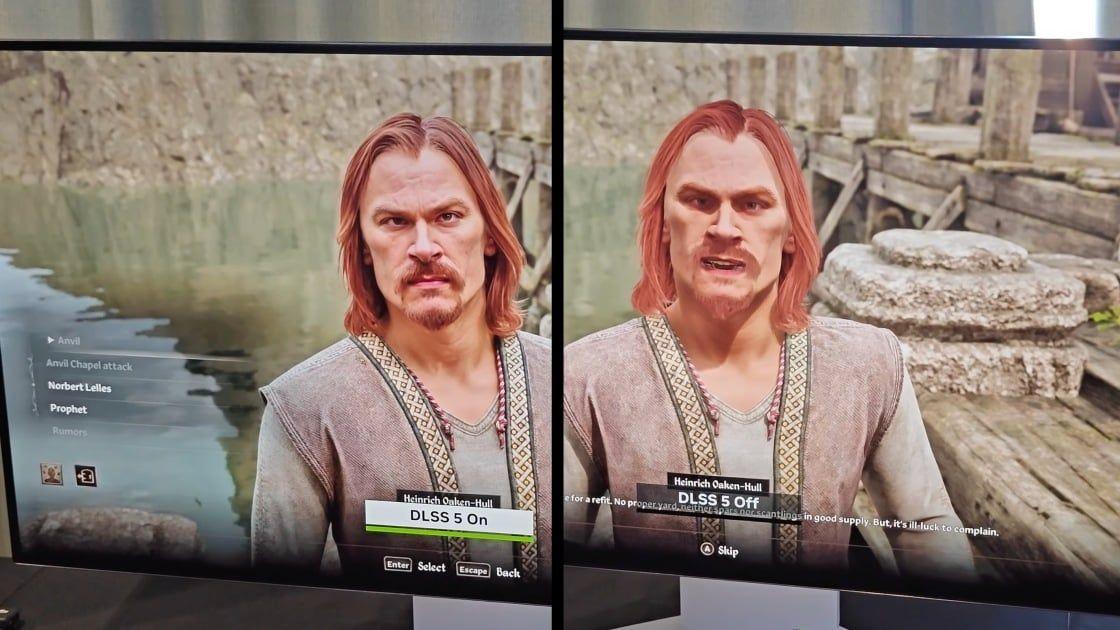
If you aren't hyped for the release of Nvidia's new DLSS 5 real-time neural rendering (RTNR) technology, I've seen the reasons why you should be. Unlike earlier versions of DLSS that focused on performance, DLSS 5 aims at improved image quality. The DLSS 5 difference is potentially revolutionary, making in-game graphics look more lifelike than ever before. I tested this feature with an Nvidia GeForce RTX 5090 graphics card and game developer 2K's NBA 2K27, the first title to support the new DLSS 5 AI models. Trust me, my in-game screenshots show its massive potential for PC gaming. How DLSS 5 Changes the Game Each new version of DLSS (known as Deep Learning Super Sampling) ships with a key defining feature. The key feature for DLSS 5 is referred to as real-time neural rendering, or RTNR. RTNR uses AI models to enhance the image quality of games in real-time. If you are familiar with DLSS, you might be wondering how this differs from previous versions of DLSS, which also relied heavily on AI. It all comes down to what the AI hardware is processing. In DLSS 1 and 2, the AI hardware improved frame rates and image quality by upscaling rendered frames. If you set your in-game resolution to 3,840 by 2,160 (4K) and utilize DLSS 1 or DLSS 2, the game renders internally at a lower resolution to improve performance. Then, the GPU's AI hardware upscales the image to match your target 4K resolution. The image quality isn't as sharp as running the game at 4K natively, but still sharper than rendering natively at a lower resolution. Nvidia's DLSS 3 and 4 technologies were both focused on frame generation. Here, the AI takes two rendered images from the game, analyzes them to see what changed, and then creates an artificial image that fits between the two original frames. This makes motion look more fluid in games and creates a higher frame rate. DLSS 4 extended this with up to an x4 frame multiplier. In DLSS 5, we see the AI hardware take the images rendered by the graphics card and actively work to enhance them by inserting more realistic lighting and textures. The web has been flooded with AI-generated images since generative AI took off, and you've likely seen some of these before. Those AI images are each syntheses of millions of real pictures, an attempt to create an enhanced image based on that data. This is essentially what DLSS 5 carries out in-game, in real-time. This is how Nvidia aims to make graphics in games more photorealistic, blurring the line between the artificially created game world and real-life images. This is the most resource-intensive version of DLSS to date, relying on every iteration of the technology until now to support it. This means you can use frame generation and resolution upscaling to help offset the performance impact of DLSS 5's real-time neural rendering. The DLSS 5 Effect on NBA 2K27 Frame Rates To gauge DLSS 5 performance and image quality, I tested it out while running NBA 2K27. For this test, I kept the resolution set to 4K resolution, and I used the Ultra graphics preset with a few modifications. Nvidia recommended disabling motion blur and depth of field for this test, which are typically on with the Ultra preset. These features create a more immersive experience, but that also blurs images, which isn't ideal when trying to compare screenshots. I turned both off, but also turned on Nvidia's Deep Learning Anti-Aliasing (DLAA) feature for the best image quality. I also tested the game in motion with frame generation off, at x4 and at x6, but this appeared to have little impact on the image results, likely because the GPU and AI hardware were already fully utilized by the game. Performance dropped slightly with x6 frame generation on, as the hardware was tied up generating artificial frames rather than rendering the frames outright, which signifies that if you are gaming at 4K with max settings and DLSS 5, you should test with frame generation off or at a lower multiplier to determine the best frame rate. I noticed something else odd about DLSS 5 performance while testing. A new game of NBA 2K27 begins with the camera hanging suspended over the basketball court and relatively far from the players in order to give you a full view of the court. When I paused the game and zoomed in closer to the players for the higher-detail screenshots of the players, the frame rate dropped significantly when DLSS 5 was enabled. This didn't happen with DLSS 5 off, and performance was roughly the same whether I was looking at the characters up close or from an overhead viewpoint. Also, I checked the frame rate with DLSS 5 on from the more distant overhead view while testing, but here, the new rendering tech had little impact on performance, and I observed about the same frame rate with DLSS 5 on or off. Rendering the improved DLSS 5 image clearly leads to a significant hit on frame rates, hence the difference you see in the chart. I also recorded the GPU's power consumption during this test using the Nvidia App overlay, which shows that using DLSS 5 significantly increases the power draw. The DLSS 5 Difference in Still Images The performance figures in the chart above were recorded from the same vantage point from which the screenshots were taken. I find this to be the most useful information to show, as it gives you the worst-case scenario performance difference between having DLSS 5 on or off. Here's a first round of screenshots showing how DLSS 5 elevates the raw rendered image. I think these screenshots largely speak for themselves. The difference activating DLSS 5 makes is night and day. I thought the game looked sharp and detailed when I first started it up with DLSS turned off. However, after seeing the game with DLSS 5 on, I can't help but feel the characters look more artificial without DLSS 5 enabled. Prior to testing DLSS 5 in NBA 2K27, I didn't have an opinion on DLSS 5. While Nvidia showed off the feature earlier this year, what was shown early often doesn't match the final product on launch day. At the time of the announcement, I heard complaints about DLSS 5 looking excessively artificial, but I don't feel that is the case with NBA 2K27. Nvidia indicated that it wants to maintain artist intent while also improving image quality, and from NBA 2K27 it appears the company has moved closer toward that goal. The DLSS 5 image enhancements do not look exceedingly artificial or skewed from how the game looks with DLSS 5 off. Instead, the graphics appear more detailed in a way that just makes them seem more realistic to me. Which Hardware and Games Support DLSS 5? In order for a game to support any version of DLSS, it requires the game developer to train the AI for that game. For this reason, not many games will support DLSS 5 upon its release. NBA 2K27 is the only title that works with it at this time, but more games will support it in the future. We already know that Resident Evil Requiem, EA Sports FC, Starfield, and Hogwarts Legacy will be among the first to support DLSS 5. Here are some more games expected to adopt the technology in the coming months: * AION 2 * Assassin's Creed Shadows * Black State * Cinder City * Delta Force * EA Sports FC * Hogwarts Legacy * Justice / Justice Online * Naraka: Bladepoint * NTE: Neverness to Everness * Phantom Blade Zero * Resident Evil Requiem * Sea of Remnants * Starfield * The Elder Scrolls IV: Oblivion Remastered It's possible that training for DLSS 5 may take longer than earlier versions of DLSS, which is why we only have a single game that supports it at launch. This is a first, as all earlier versions of DLSS had support for a few games at launch, and previous DLSS versions launched with support for dozens of games. Nvidia mentioned that since it first showed off DLSS 5 in March, it has achieved a fivefold increase in performance, which has likely come from optimizations made to the AI model through intensive training. To use DLSS 5, however, you need an Nvidia GeForce RTX 50-series graphics card. You don't necessarily need to have an RTX 5090, though. Nvidia provided performance figures for almost the entire RTX 50-series lineup while running this game. The only graphics card that Nvidia didn't show as capable of running DLSS 5 was the Nvidia GeForce RTX 5050. It's unclear if it simply left the 5050 out of this round of testing or if that GPU is underpowered for running DLSS 5, but the GeForce RTX 5060 can run DLSS 5 just fine at 1080p. Nvidia will expand DLSS 5 support backward to the RTX 40 series later, but at this time, the RTX 40 series is not supported. Don't Have an RTX 50-Series GPU? You Can Try DLSS 4.5 If you don't own an Nvidia GeForce RTX 50-series graphics card, you have Nvidia's recently released DLSS 4.5 as an alternative. The key feature in DLSS 4.5 is a second-generation AI transformer model that can process 20% more parameters and has 35% more computational power than Nvidia's first transformer model, which was released with DLSS 4. DLSS 4.5 works in 30 games so far, and RTX GPUs going back to the 20 series support everything but multi-frame generation, meaning all Nvidia RTX GPUs benefit from these enhanced models. The new DLSS 4.5 doesn't improve frame rates while gaming. Instead, the additional power provided by the second-gen transformer model is used to more accurately calculate in-game lighting effects. The following comparison photos from Resident Evil Requiem will help to give you an idea of how this differs from DLSS 4 in terms of image quality. In the first set of screenshots below, which show a car window, you can see more detail reflected on the glass, particularly the reflections of the two people standing nearby. The second set of comparison pictures shows the hood of a black car. In the DLSS 4.5 screenshot, dark colors like black are richer, the chrome on the bumper is more clear, and the light reflections on the hood have less noise. In many ways, this version does look better, but if you look at less zoomed-in copies of this image, you may feel differently. In this third set of comparison pictures, the most notable detail is the red light that reflects off the car. Here again, the DLSS 4.5 version looks more clear with a darker, more detailed image. I think the DLSS 4 version looks better, however, as it looks more realistic to me. This light is coming from a nearby building, and the level of clarity in the DLSS 4 image looks more appropriate to my eye for this sort of reflection. The game looks gorgeous either way, and while you can see some differences between DLSS 4 and DLSS 4.5 in Resident Evil Requiem, many of the details I've called out here aren't really noticeable unless you deliberately slow down to admire them. I'm not even sure which I would use if I play this game, and at this point, I feel like you would be equally well off with either of the two. Even Reined In, DLSS 5 Is Still a Massive Change to Graphics Rendering Nvidia's DLSS 5 technology is easily the most radical version of DLSS released to-date. While previous versions of DLSS were predominantly focused on improving performance, the fifth iteration instead introduces a groundbreaking visual enhancement that moves the needle on image fidelity closer to photorealism than ever before. I've only tested this feature in one game so far, but I am cautiously optimistic about the impact it will have on games going forward. Likely, AMD and Intel will also begin work on their own versions of Nvidia's AI rendering tech. If you own an RTX 50-series graphics card, look out for updates in the aforementioned games to try it for yourself for the best idea of the difference it can make.
[3]
DLSS 5 is called 'DLSS Neural Rendering' in the NBA 2K27 graphics options, and I think I smell a rebrand of Nvidia's controversial graphics tech
If you happen to pick up a copy of NBA 2K27, in your eagerness to try out the first official implementation of Nvidia's DLSS 5 AI image tech, you won't find it labelled as such in the settings menu. Instead, it appears as a simple on/off toggle under the label "DLSS Neural Rendering." And while that might seem like a small change, in terms of public perception, I think it makes a huge amount of difference. Calling it DLSS 5 in the first place was, at best, confusing. Traditional DLSS, as in the upscaling/super sampling technology, is well established at this point. While some still refuse to get on board, many have become accustomed to the idea that it works well at its primary task, running your games at lower resolutions to achieve better frame rates while outputting a high-resolution image. So much so, that DLSS updates are usually pretty well received. Slightly better image quality, slightly better performance. Ray Reconstruction niceties. That sort of thing. Given that DLSS is now a near requirement for smooth performance in many games (and I'm not opening that can of worms any further right now, believe me), the gradual, iterative improvements have been pleasing to see. But DLSS 5 changes things. Quite literally. And while Nvidia has gone to great pains in recent months to point out that it's both developer controlled, and a toggled option that can be safely ignored if you don't like the imagery, shoving the tech underneath the DLSS iterative umbrella felt like a poor move. Something in the association inferred, even if it was later made clear that it wasn't the case, that AI image alteration tech was just how games were going to be going forward, and you were going to have to get on board if you wanted to keep using DLSS in future. And what happens to DLSS 4.5, the current version of the upscaling tech? Does it simply update to DLSS 4.6, 4.7, etc, until we start getting into more and more decimals to avoid the big 5.0? I asked this exact question to several Nvidia staff at my Gamescom visit, and received little in the way of a satisfying answer. It was made clear, however, that regular DLSS upscaling will continue to receive consistent updates, separate from DLSS 5. Now it seems like we might have a clue to the solution of this branding mess. In NBA 2K27, it's been labelled as DLSS Neural Rendering, and it's an on/off switch that can be used independently of the upscaling, or ignored entirely for those who don't want to get on the AI image alteration train. Our Dave first noticed this change in the leaked DLL files last week, which refer to it as "Nvidia DLSSNR." But the fact it appears in an official game settings menu under the "Neural Rendering" title feels like a step in the right direction. Nvidia seems painfully aware that it needs to rehabilitate its new tech, and separating the nomenclature would be a good start. Of course, the naming scheme is only part of the story when it comes to the controversy. There are many who are dead set against the idea of any sort of AI generation tech entering their games, amid a wider AI backlash. Nothing's changed there, I would wager. Separate from that, whether you like the look of the AI-altered imagery is still a matter of taste. It's developer controlled, as Nvidia has repeatedly pointed out -- though if you start modding it into games yourself, like Dave has, you do get your own sliders to play with. Still, I've got a feeling we're going to see some relatively subtle implementations to start with -- and inevitably, some goppingly ugly, AI beauty filter-like imagery as time goes on. There's no accounting for taste in a general sense, and there's certainly no accounting for taste when it comes to graphics. It's also, in its current iteration, a massive performance hog. Nvidia claimed a 50-60% performance hit, but my early testing in NBA 2K27 shows it can hamstring an RTX 5080 by up to 73% at certain settings. That's a very powerful (and expensive) graphics card, held back significantly by Nvidia's new toy. All of which means the DLSS 5/DLSS Neural Rendering controversy is likely far from over. But I can't help but feel that, if the tech was unveiled as "DLSS Neural Rendering" in the first place, as just a new optional feature and not presented as the entirety of DLSS 5, a fair amount of the confusion -- and perhaps even initial backlash -- could have been avoided.
[4]
NVIDIA DLSS 5 Review with NBA 2K27
Introduction - Neural Rendering Changes the Game NVIDIA DLSS has traditionally been associated with performance. Super Resolution reconstructs a higher-resolution image from fewer rendered pixels, Frame Generation inserts additional frames between conventionally rendered ones, and Ray Reconstruction replaces multiple hand-tuned denoisers with an AI model. DLSS 5 takes the technology in a fundamentally different direction. Its new 3D-Guided Neural Rendering model is designed primarily to improve visual fidelity rather than simply increase frame rates. NBA 2K27 is the first game to showcase this technology. Developed by Visual Concepts and published by 2K, the basketball series is an unusually suitable demonstration. Players are frequently shown in close-up, arena lighting changes continuously, skin occupies a large portion of the image, and detailed hair, fabric, sweat, facial features and contact shadows all contribute to the broadcast-style presentation. DLSS 5 attempts to enhance those elements after the game engine has produced its conventional frame. It can improve the appearance of skin, hair, clothing and lighting without replacing the original geometry or disregarding the developer's art direction. The technology remains anchored to the information supplied by the engine, including the rendered color image, motion vectors, surface properties, lighting and geometry-related buffers. That distinction is important. DLSS 5 does not generate an arbitrary scene from a text prompt, nor does it redesign the characters. It processes the frame already created by the game and applies neural material and lighting enhancements as the final stage of the graphics pipeline. NBA 2K27 therefore offers more than a conventional performance demonstration. It provides an early look at how AI may become involved in the actual creation of the final game image. NBA 2K27 as a Technology Showcase Visual Concepts has spent more than two decades refining the NBA 2K presentation. The intention has always been to reproduce the atmosphere of a televised NBA or WNBA game, including recognisable athletes, accurately modelled arenas, courtside activity, broadcast cameras and presentation sequences. Player likenesses are particularly important. Modern NBA 2K titles use detailed scans to reproduce facial proportions, skin characteristics and hairstyles. These models already contain substantial geometric and texture detail, but real-time rendering still requires compromises. Accurately simulating how light penetrates skin, passes through hair, reflects from sweat or creates shadows between tightly spaced surfaces can be computationally demanding. DLSS 5 targets precisely these limitations. It introduces additional material and lighting information while preserving the facial geometry supplied by the game. The objective is not to turn a scanned athlete into a different person, but to make the existing model respond more naturally to arena lighting. The effect is most apparent during close-ups, free throws, replays and presentation sequences. During normal gameplay, when the camera is positioned high above the court, the differences naturally become more subtle. Improved shading and material separation remain visible, but the finer pores, facial hairs and sweat highlights are easier to appreciate through NBA 2K27's replay system. DLSS 5 can be switched on and off instantly with the F9 key, making direct comparisons relatively straightforward. Frame Generation is automatically disabled while the replay interface is open and returns when the replay menu is closed. This provides consistent frames for visual analysis without generated frames complicating screenshot capture.
[5]
NVIDIA DLSS 5 3D-Guided Neural Rendering in NBA 2K27 - Performance, Analysis, and More
DLSS 5 is described as 3D-Guided Neural Rendering, representing a major evolution in NVIDIA's DLSS suite, which includes AI-powered Super Resolution, Frame and Multi-Frame Generation, and Ray Reconstruction. Like the rest of the DLSS 5 family, DLSS 5 Neural Rendering takes a game's rendered frame, on-screen objects, and motion data. With that information, plus an understanding of objects, materials, and characters in a scene, it enhances materials and lighting effects like subsurface scattering, contact shadows, ambient occlusion, and more. It's worth noting early that DLSS 5 refers to the full DLSS suite of technologies, including the new 3D-Guided Neural Rendering, which necessitated the formal version-number change. However, much like Frame Generation was initially tied to DLSS 3 in gamers' eyes, the same applies here: DLSS 5 includes the new 3D-Guided Neural Rendering alongside Super Resolution, Ray Reconstruction (if available), and Multi Frame Generation. And from our testing, it's safe to say that only with the full DLSS stack enabled can you achieve a smooth, maxed-out 120+ FPS presentation. On its own, DLSS 5 is heavy with a massive performance cost, but it aims to transform real-time graphics to deliver, as NVIDIA puts it, "Hollywood-grade photorealism." A look that wouldn't be possible with modern GeForce RTX 50 Series GPUs with traditional rasterization or even with modern DLSS 4.5-powered path tracing. It's also additive, in that the higher the quality of the input, the better the results. This makes its debut in NBA 2K27 feel more like a tech demo, but one that makes sense. As developer Visual Concepts has always aimed to deliver visuals that represent what it would look like to watch an NBA broadcast in high definition, adding "Hollywood-grade photorealism" with DLSS 5 certainly brings the series closer to that goal on GeForce RTX 50 Series graphics cards. It also lets DLSS 5 debut more subtly than its controversial announcement earlier this year. Let's dig in. DLSS 5 Primer and Artistic Controls DLSS 5 Primer - How It Works and How We Got Here With DLSS 4.5 reconstructing frames to render higher-resolution images, generating additional frames for smoother presentation, and leveraging AI to deliver cleaner, more detailed ray-traced lighting, DLSS 5 is the next step. NVIDIA describes it as the "final rendering stage of the graphics pipeline," a complex and powerful 3D-Guided Neural Rendering model that uses a game's geometry, texture, lighting, and more to "infuse" each frame with lifelike lighting. If you've been tracking DLSS 5's progress and its eventual leak, you'll no doubt recall how controversial its initial GTC debut was earlier this year. There we saw an early version in popular titles like Resident Evil Requiem, Starfield, and Hogwarts Legacy, with the results being so dramatic that many felt that it altered the underlying art direction to the point where it looked more like a 'generative AI beautification filter' than an additive tool that enhanced the original image. This sentiment came up more in relation to how it transformed characters as opposed to environments, and it's feedback that NVIDIA has seemingly taken to heart. With that initial demo, which required two GeForce RTX 5090 graphics cards to run, NVIDIA has spent the last six months optimizing DLSS 5 to the point where it can now run on a single GeForce RTX 50 Series GPU, while also expanding developer controls to ensure that any DLSS implementation preserves artistic intent, with developers in control of the outcome. DLSS 5 isn't AI image generation; it's training, and the model uses a game's rendered frame to enhance visuals. What does this mean? Broadly speaking, the DLSS 5 model analyzes the rendered frame and considers geometry, textures, and lighting buffers. It can recognize materials like wood, leather, steel, and organics. It can break down a character to understand their face, silhouette, and clothing. It considers all objects in a scene and how they interact, what's touching what, and their physical properties. It gathers various lighting information across intensity, direction, and even the "mood." It also accounts for the camera, viewpoint, and perspective. It then uses all this data, along with motion vector information, to produce the final result. At 60 FPS, DLSS 5 does this 60 times every second, so from a purely technical standpoint, it's an impressive achievement for real-time rendering. This is also why the performance cost is so high: without further optimization to the model itself, running DLSS 5 right now has a fixed cost, regardless of the input frame rate. This means that for a game that runs exceptionally fast like NBA 2K27, we see the performance drop sit much higher than in leaked DLSS mods in more hardware-demanding titles. For example, the GeForce RTX 5080 can run NBA 2K27 in 4K with ray-traced reflections and native DLSS DLAA rendering at 145 FPS. Enabling DLSS 5 drops performance by 65%, down to 50 FPS. Switching from DLAA to the DLSS Super Resolution 'Performance' preset only sees performance increase to 55 FPS. With Multi Frame Generation (2X), performance increases to 97 FPS, and with Multi Frame Generation (4X), performance increases to 170 FPS. Interestingly, even when native DLAA drops by 20-30 FPS during close-ups, DLSS 5 performance remains impressively consistent and stable. Still, it comes at a massive cost. DLSS 5's debut in NBA 2K27 is interesting because it lets developer Visual Concepts rein in the technology's more controversial aspects and deliver an impressive, subtle photorealistic look. This is thanks to the in-depth controls NVIDIA gives developers looking to add DLSS 5 to their game. Artistic Controls For Game Developers "What's great is the level of control that it gives us," Peter Kavic, Senior Producer at Visual Concepts, said. "We can set the overall tone and style to match our existing art direction and then really get precise where it matters most, using a per-pixel uplift control mask to fine-tune detail on characters. Given that we want to respect their likeness with the utmost care." With DLSS 5 being very different from anything that has come before with the DLSS branding, the developer controls created for the technology are artist-centric. NVIDIA notes that its photorealistic output can deliver results no compute or VRAM budget would allow, which is why it includes multiple models and controls that let artists specify where and how it's applied. DLSS 5 doesn't alter a scene's geometry or object proportions; instead, it uses advanced rendering and lighting techniques to enhance the look and feel of a character or scene. Developers can pick and choose models for different scenes; they can mask or select specific objects or groups of objects in a scene to apply the effect to (or exclude them from the DLSS 5 pass). Artists also have control over Structure Intensity and Tone Intensity sliders. Structure Intensity covers all of the effects like ambient occlusion, reflections, and subsurface scattering on a character's skin. It's a photorealism slider for lighting, while Tone Intensity lets artists and developers fine-tune broader lighting and color intensity. A tone intensity slider set to zero retains the exact colors of the original rendered frame. All of these controls are available at the engine level, with NVIDIA confirming that a DLSS 5 Unreal Engine 5 plugin is already available or coming soon. The artist controls UI is clear and simple, with automatic object masking and sliders and checkboxes that let developers make granular adjustments to achieve their desired result. However, because DLSS 5's 3D-Guided Neural Rendering aims for photorealism, it delivers its best results with ray-traced or path-traced lighting. This also makes it best suited for titles that aim for photorealism in their characters, like NBA 2K27, or for games that want that cinematic, path-traced look. DLSS 5 in NBA 2K27 DLSS 5 in NBA 2K27 - The Great and The Not So Great For its NBA 2K27 debut, NVIDIA worked closely with Visual Concepts and 2K to level up the authenticity of its NBA broadcast look and feel. Although at a glance the effect is subtle or simply "slightly darker" because there's so much more shadow detail alongside enhanced ambient occlusion, it's best described as an almost never-ending series of subtle enhancements that, when viewed in motion, delivers a photorealistic look that can at times feel like you're watching an NBA game on a 4K TV. For players, one of the biggest improvements is the more lifelike, detailed skin subsurface scattering. It also adds better contact shadows on necks, arms, hands, and even where player jerseys meet skin, plus more detailed hair. Add all of this together, and the DLSS 5 Off-to-DLSS 5 On transformation is a real-time rendering achievement. It's the little things, like seeing realistic shadows in small creases and folds on jerseys and arm sleeves that deliver on that photorealistic promise. Because NBA 2K27 includes ray-traced reflections, DLSS 5 also enhances reflections and lighting on the court surface for a more realistic look. Everything from the ball to the rim, net, and backboard all looks more realistic with DLSS 5, which also applies to the crowd - to an extent. Because the crowd and various people on the sidelines aren't as detailed as the players, we see a DLSS 5 limitation here: even with enhanced contact shadows and other improvements, the underlying models lack the finer detail to look photorealistic. Another, potentially unintended, outcome of DLSS 5 3D-Guided Neural Rendering in NBA 2K27 is that a more photorealistic look makes some jarring animation transitions stand out. In a way, DLSS 5 in NBA 2K27 can trick your brain into thinking that you're watching a real NBA game, so animation that looks like it's from a game does stand out more than when DLSS 5 is turned off. The biggest downside, though, is the performance cost. DLSS 5 is groundbreaking, and it requires the full neural rendering power of the RTX 50 Series Tensor Cores to deliver a playable experience. DLSS 5 in NBA 2K27 - Comparison Videos DLSS 5 Performance Analysis Kosta's Test System DLSS 5 Performance Analysis - The Cost of Photorealism It's hard to argue for any graphics setting that drops performance by 60%, which is why DLSS 5 is best experienced with Multi Frame Generation enabled, at least in 2X mode. DLSS 5 in NBA 2K27 is currently only available for GeForce RTX 50 Series GPUs, and for our testing, we ran extensive benchmarks across 1080p, 1440p, and 4K on the GeForce RTX 5060 Ti, GeForce RTX 5070, GeForce RTX 5080, and flagship GeForce RTX 5090. Now, NBA 2K27 is playable with DLSS 5 enabled without any upscaling or frame generation, but that means going from 140 to 200+ FPS down to around 50 to 80 FPS in 4K on the RTX 5080 and RTX 5090. To kick things off, let's look at 4K performance on the GeForce RTX 5080 and RTX 5090. Here, the natively rendered game using DLAA delivers solid triple-digit performance on both cards. For reference, we captured our benchmark data using the game's TV-like broadcast camera mode, recording 90 seconds of gameplay after tip-off. To match or exceed performance with DLSS 5 off in NBA 2K27, you basically need to enable Multi Frame Generation at 4X. Yes, that means the cost is huge, with performance dropping by 65% on the RTX 5080 and 62% on the RTX 5090. Interestingly, switching from DLAA to DLSS Performance only offers a 10% performance increase, highlighting the model's rendering cost measured in milliseconds. Basically, there's no way to avoid it; the only solution to hitting super high frame rates (or smoothness) is to enable frame generation. This means that, like path tracing, the best results come from using the full DLSS suite of technologies. Switching to 1440p and the GeForce RTX 5070, it's a similar situation here for what is one of the most popular GPUs among PC gamers. With DLSS Super Resolution 'Quality' and Multi Frame Generation 4X, you can hit 200 FPS or so in the game running with DLSS 5 turned off. Of course, relying on frame generation to hit 100 FPS isn't ideal, but it reinforces how expensive DLSS 5 is when rendering time is limited. The good news is that DLSS 5 delivers a solid 70+ FPS experience when using DLSS 5 Super Resolution. The bad news? You're going from 200 FPS to 75 FPS. Switching to 1080p and using a GeForce RTX 5060 Ti 8GB model instead of the more VRAM-friendly 16GB variant, DLSS 5's performance stays consistent. The fact that it runs on an 8GB GPU with DLSS Super Resolution, Frame Generation, and the new 3D-Guided Neural Rendering is impressive, as all of these technologies, alongside rendering the game itself with ray-tracing, require a decent VRAM budget. Still, you're looking at a 65% performance drop when enabling DLSS 5, going from 177 FPS down to 62 FPS. Again, Multi Frame Generation is required to get things back into triple-digit territory. Okay, so with the numbers out of the way, DLSS 5 is certainly impressive to look at (albeit subtle at times) in NBA 2K27. And after spending several hours with DLSS 5 turned on at 1080p, 1440p, and 4K, image stability is impressive and consistent - with only a handful of times when we noticed any artifacts or issues when viewed in motion. In fact, DLSS 5 is best experienced in motion, as screenshots only highlight the various changes. Conclusion & The Pros and Cons Conclusion, or 'Is DLSS 5 More Future Tech than Right Now Tech?' After spending a couple of days with DLSS 5 in its official NBA 2K27 debut, it's clear that it's a potential game-changer, but one that comes with a hefty performance cost. However, it's a very different kind of performance cost than, say, enabling ray tracing or path tracing. The DLSS 5 3D-Guided Neural Rendering model itself is complex, large, and more render-time intensive than any other DLSS technology we've seen so far - including the new Transformer-powered DLSS 4.5 Ray Reconstruction. This is why there's a 60+ percent performance drop when enabling it in NBA 2K27. Even though it's impressive that it can run in real time, it's more of a 60 FPS piece of technology than a 120+ FPS one because of the render cost. This is why it needs Multi Frame Generation to hit 200+ even on an RTX 5090. In fact, even when you switch out DLSS Super Resolution modes, like going from Quality to Balanced, there's no real impact on performance. So when it comes to the question of it being worthwhile to 'turn on,' that all depends on what you're willing to accommodate. DLSS 5 also pushes every GeForce RTX 50 Series GPU to its power limit. When turned on, the RTX 5090's power draw increases by 100W, hitting its 575W limit on the reference design. Likewise, the RTX 5080's power draw also increases by almost 100W to hit its 360W power limit. So for those concerned about power efficiency, DLSS 5 is the most intensive piece of rendering technology we've seen to date. That said, when it comes to delivering photorealistic lighting, it delivers the sort of visual fidelity, from a technical standpoint, that we haven't seen before. Although NBA 2K27 isn't exactly an immersive cinematic single-player action-adventure, DLSS 5 does cross into that "it looks real" territory more than ever before. Ultimately, DLSS 5 feels like the beginning of something new. A groundbreaking and impressive bit of technology that adds a layer of neural rendering to take ray tracing and path tracing to the next level. It also feels like the sort of bleeding-edge tech that will take a while to mature, similar to how real-time ray tracing took a minute (or two). The high performance cost, increased GPU power draw, and reliance on frame generation mean it's not for everyone, or every game. But if you have an RTX 50 Series card and a copy of NBA 2K27, it's worth experiencing for yourself, as these sorts of advances in visual fidelity are pretty rare. Even with the performance cost, we're excited to see the next official developer-tuned DLSS 5 release and what the technology can deliver when the GeForce RTX 60 Series eventually turns up. Or, until then, more performance optimization The Pros and Cons aka The Quick TLDR Pros * Delivers photorealistic lighting and visuals in NBA 2K27 * The detail on NBA players is light-years ahead of anything we've seen in a sports game * Works on all GeForce RTX 50 Series GPUs * When enabled, performance is consistent * Image fidelity looks great in motion as well as still shots * Multi Frame Generation performance is responsive, smooth, and playable * Supports all mainline GeForce RTX 50 Series GPUs, even those with 8GB of VRAM
[6]
I've found DLSS 5 can slash frame rates by up to 73% on an RTX 5080 gaming PC in NBA 2K27, and I'm wondering what kind of mega-rig would justify the performance hit
DLSS 5 is finally here. Well, its been officially released in one game, anyway, after modders got their hands on it last week and made the actual launch somewhat redundant. Still, I've been testing Nvidia's new AI image-enhancing tech in NBA 2K27, the latest hoop-shooting game in the long-running series, and I have bad news: even on a high-end RTX 5080 rig, it's seriously punishing when it comes to performance. Which isn't a huge surprise, given that Nvidia itself estimated a 50-60% DLSS 5 performance hit in the briefings last week. Still, my early testing shows it can tank your frame rate considerably harder than that, even on a PC that costs well over $3,000 in 2026. I threw a pre-release version of NBA 2K27 at one of our benchmarking rigs, an AMD Ryzen 7 9800X3D, RTX 5080-equipped, 32 GB DDR5 behemoth. And while this particular PC can make mincemeat of the game's relatively lightweight hardware needs overall, turning on DLSS 5 can drop the average frame rate by up to 73% in certain scenarios. It's capable of looking very pretty in this particular game, that's for sure. But my jaw has dropped several times during my testing, and not always for the reasons Nvidia may have hoped for. To the benchmarks, then. DLSS 5: 1440p NBA 2K27 benchmarks Given the RTX 5080 is Nvidia's second-fastest consumer graphics card, I had no qualms about turning up the settings to Ultra, including enabling ray tracing. I recorded my results during actual gameplay within NBA 2K27's quick match mode, making sure to play for long enough that cutaway shots to the player's celebrations and the crowd triggered several times. It's worth mentioning, however, that given the lack of repeatability within this mode, these results are potentially more representative of the DLSS 5 average frame rate hit, rather than game performance overall. And my goodness, what a performance hit it is. The difference between the Native 1440p average frame rate and the average rate with DLSS enabled is a whole 137 frames. A 93 fps average still results in very smooth gameplay overall, but the drop to just 37 fps in terms of 1% lows is very troubling. This is an RTX 5080 running at 1440p, after all. A 4K-capable graphics card that will currently cost you $1,550 thanks to the ongoing memory/component pricing crisis. And that figure is based on the cheapest we can find -- I've seen them listed for $2,000+ in the past month or two. Of course, Nvidia will tell you that upscaling and frame generation are here to save the day when it comes to smooth performance, and that proves to be the case. Still, watching a 363 fps average result plummet to 168 fps at the push of a DLSS 5 button is pretty jaw dropping. Nvidia has confirmed that DLSS 5 performance improvements are coming in future, and by the looks of it, it's in desperate need of some. It's often very pretty at these settings, though, as I'll go into below. So... that's something, I guess? DLSS 5: 4K NBA 2K27 benchmarks There are no awards for guessing that, at 4K, the effect is even more pronounced. At Native resolution with no upscaling or frame gen assistance, the RTX 5080 spits out an admirable 183 fps average (still at Ultra with ray tracing enabled, no less), which duly plummets to 49 fps as soon as DLSS 5 is enabled. That represents a staggering 73% decrease in average frames, and an instantly crunchy experience. Sure, 49 fps is perfectly playable, but with the knowledge that NBA 2K27 would be capable of so many more frames with the AI-enhanced pretties turned off, I'm not sure I could grin and bear it. What I would do, however, is turn upscaling and frame generation on to compensate. And here, the news is slightly better. A 92 fps average is more like it, with regular old DLSS set to Quality, and 2x frame gen enabled. I feel better already. That was until I realised that, with DLSS 5 turned off, I'd be getting a 255 fps average at the same settings. That's a 163 fps drop with DLSS 5 enabled, for those counting. Which is a lot of frames to come tumbling out the bottom of your very expensive graphics card. Given all of Nvidia's benchmarks are with a lower resolution DLSS setting and the full 6x Multi Frame Generation bean, on the one hand I expected DLSS 5 to actually need MFGto achieve smooth frame rates at all, or require Ultra Performance-level upscaling. So, the fact that I can achieve very playable frame rates with just 2x frame gen and upscaling set to Quality is still pretty impressive. But on the other, NBA 2K27 runs so well without DLSS 5 enhancement, the thought of slashing my frame rate by such a huge amount for some prettier, AI-assisted graphics stops me in my tracks. Speaking of which... DLSS5: Image quality comparison There's one thing I will say for DLSS 5: it looks pretty great in this game. I spent a good hour or two zipping around in the photo mode, marvelling at the visages of my ill-fated basketball team. The photo mode, however, is where you'll see most of the benefits of Nvidia's new toy. In terms of actual gameplay, you'll spend most of your time in NBA 2K27 in a zoomed out perspective, cursing loudly at the fact you can't time a well-placed three-pointer for toffee. Sure, there are cuts to player celebrations, slow motion replays, and half-time team talks. But it's when things are paused that you'll see most of the DLSS 5 difference -- so that's exactly what I've done for the comparisons below. My early concern about DLSS 5 was that it seemed to produce overblown, AI beauty filter-like imagery, which I personally find very ugly. However, as I pointed out in my DLSS 5 sneak peak, the implementation in this particular game is often much more tasteful. The player above looks more realistic with DLSS 5 turned on. The highlights on the nose and forehead are shinier without looking completely blown out, which, combined with the more realistic shadowing on the facial features overall, creates a very pleasant image. His beard looks a little more lifelike, as does his hair. And I'd pay special attention to his jersey, which has extra wrinkles in the fabric in the DLSS 5-ified image that give it a more 3D-like effect. Because you'll be paying attention to your team's ironing mishaps in your new basketball game, obviously. Switching over to two players together, I think this particular comparison shows off DLSS 5 at its best. Both of their faces look muted and poorly shaded in the non-DLSS 5 version, but swing the slider over and they suddenly come to life. As your graphics card screams bloody murder, perhaps. But as much of a cynic as I am regarding the idea of AI "enhancement" of any sort, I can't deny that DLSS 5 in close up is capable of producing some lifelike human beings. Once game developers have tweaked it for themselves, of course, and those settings sliders have been reined in from some of the horrors we saw in the earlier demo footage. It's far from flawless, though. While some character models look noticeably more realistic, others get some heavy-handed AI treatment that isn't quite so seamless. Above: NBA 2K27's photo mode, with DLSS 5 turned off to start, and then on and off again in sequence. Take the footage above, for instance. While I would say there are some definite shading improvements once DLSS 5 is turned on, there's also a kind of overblown, over-contrasted effect to some of the facial features in this particular example that looks slightly off to my eyes. And finally, here's a comparison between the crowds. You're going to need to fullscreen and zoom in on this one, but it's fairly representative of how you'll see the match attendees when you're actually playing the game. Aside from the odd camera cut, they're mostly there for background atmosphere. And yes, the folks in the cheap seats get a miniature dose of DLSS 5 image enhancement, too. The effect here is very subtle, but it's probably most noticeable on the courtside commentator's face. Which will go past in a flash as you actually play, but hey -- check out that ever-so-slightly more chiselled jawline. So, is DLSS 5 actually worth turning on in this game? Well, I can't help but be impressed by the imagery (for the most part), and this relatively light-touch implementation adds a lot of character to individual members of your team. They're also noticeably sweatier, too, if that's your sort of thing. But you're going to want plenty of frame rate headroom before you even think of touching the DLSS Neural Rendering checkbox, and that means running a very powerful rig -- or cranking up the DLSS upscaling and frame generation to compensate. NBA 2K27 is a very fast-paced game, and the experience suffers quite badly when things get crunchy. You'll want smooth frames for this one, believe me -- and if that means turning off DLSS 5, I say go for it. Still, I can absolutely see why Nvidia picked this game for DLSS 5's first official outing. NBA 2K27 feels well optimised with the AI frippery turned off, and it's not the sort of thing that would otherwise be bothering most modern rigs. But if my testing is any indication, DLSS 5 can look really good, but still be a massive drain on performance even in a properly optimised game. And I really question who among us will be prepared to make the frame rate trade off, even in a relatively lightweight game like this. The real test will be in something properly demanding, and it's there where I think the wheels will come off. Better image and lighting quality is all very well, but for this sort of performance cost? I dread to think what it'll do to the already-addled frame rate of something like Borderlands 4, for example. DLSS 5 is capable of looking much better than I expected, which is something of a relief. But when it tanks the frame rate this heavily, I can't help but feel that it's a technology designed for the next generation of graphics cards, and not the versions we're running today. Even the $1,500+ ones -- and how many of us have the spare cash right now for another one of those?
[7]
Hands-on with DLSS 5 in NBA 2K27: Here's what works and what doesn't work about Nvidia's new AI upscaler
I put my apprehensions to the side to give DLSS 5 a fair shot. Here's what I found Nvidia's controversial DLSS 5 is officially here, launching alongside NBA 2K27. There's a lot to discuss with Nvidia's latest brand of AI graphics card wizardry, because it has a very different feel from the previous iterations of DLSS. Where others have been all about slightly lessening your graphical fidelity in the name of increasing your FPS, DLSS 5 is overtly trying to "improve" your graphics, and the results on your frame rates sure are interesting. I've now had the chance to go hands-on with DLSS 5 in my own setup while playing NBA 2K27. I've talked plenty in the past six months about DLSS 5, my apprehensions towards it, and why I think it might be a toxic influence on the games industry, but at the same time, I accept that all we've really seen about it to this point are comparative stills that show the AI model rather aggressively changing character models from games like Resident Evil Requiem, Hogwarts Legacy, NBA 2K27, and Starfield. It's one thing to compare DLSS on and off shots, but it's another thing entirely to see it in action when playing games. So, I decided to put all my fears, doubts, and frustrations with generative AI to one side for a few hours. I went hands-on with DLSS 5 in the only game that has official support for it at launch, NBA 2K27, to see how it impacts the experience of playing games. Here's what I found works and what doesn't work about the latest version of DLSS. What works: Photorealistic environments, NPCs, and character models (in games like this) NBA 2K27 is a sports simulation game. In other words, it's not Mario Tennis Aces; it isn't trying to convey an arcade experience of playing a sport. It's trying to recreate, to the best of a video game's ability, a pro-level basketball match on your screen, under your virtual control. For that reason, it's shooting for an element of photorealism that the developers clearly believe suits a technology suite like DLSS 5. I am ardently against using generative AI to enhance video game art styles for a lot of reasons, but even I have to admit, in NBA 2K27, DLSS 5 actually does pay off. Thankfully, it's not actually as exaggerated as we've seen in Nvidia's marketing stills so far. Yes, there are times when I'll catch a glimpse of a face in the game and alarm bells will immediately start ringing. "That's AI", my brain will scream, "that looks like slop because it's overly sharp and looks pseudo-illustrated". But again, I have to be fair here; most of the time, I didn't actually notice DLSS 5 running in a game like this because it all looks pretty true to life to begin with. DLSS 5 is at its best when it's working in the background of what you're looking at. The surface of the court, the environments and objects in the background, the stuff that you probably wouldn't pay a lot of attention to, but does all work together to form a cohesive, photorealistic whole. For the most part, DLSS 5 isn't yassifying - certainly because when actually playing through a basketball game, you're not close enough to character models to really notice its impact on faces. What DLSS 5 is doing is adding a bit more depth, a bit more lighting bounce, and almost a second layer of 3D structure to everything it touches. In some instances, like with barriers around the arena, it'll add more detail. On the surface of the court, it'll add a bit more tone, and on NPCs' faces in crowds, it'll add a bit more polish that game developers clearly have never been able to get to. For a game like this, DLSS 5 actually makes things look pretty impressively photoreal. What doesn't work: Lip-syncing on hyper-real faces Where it all falls flat on its realistic face is when DLSS 5 is working during dialogue scenes. NBA 2K27 includes these quarterly court-side interviews along with plenty of cutscenes in its career mode. With DLSS 5 working and making facial models look that bit more photoreal, there's a real mismatch where animation and upscaling do not meet. The result is that you have hyper-real looking faces whose lips and mouths are not working in exact sync, or enunciating realistically with what they're supposed to be saying. There's a layer of game development that doesn't align with DLSS 5's upscaling. It's an uncanny attention to detail that's let down by the lip-syncing animation in 2K's game, and that takes me completely out of it every time. A quick fix for game developers looking to make their games more photorealistic- this is not, because our human brains can't help but catch this uncanny misalignment as something "off". It immediately looks like an AI-generated video of someone speaking that doesn't pass the Turing test. In a sports game like this, it's not a hugely common occurrence, but when DLSS 5 inevitably reaches more narrative-based singleplayer games, I think this could be one of its biggest downfalls. What works: Performance with Dynamic Multi-frame Gen on I tested DLSS 5's performance on my own gaming PC, which houses a PNY Slim RTX 5080. There's no built-in benchmarking tool within NBA 2K27, but I decided I wanted a feel for how Nvidia's latest bag of tricks would impact general gameplay, so I sampled the frame rate during a "play now" match between the NY Knicks and LA Lakers. I wasn't able to get the exact same chunk of gameplay in these tests, so it's not an exact science, but I think it's much more important to give you a feel for how DLSS 5 impacts general gameplay performance than trying to simulate the same player dribbling down a court or something, because you're not going to replicate that exact test yourself. When you use the full suite of Nvidia's frame gen tricks alongside DLSS 5, performance is absolutely fine. I was testing the game out at max settings, in 4K, with ray tracing and dynamic multi-frame generation switched on, and it played great. I didn't notice any ghosting or floaty latency, although I did sometimes notice occasional screen tearing, specifically over character models, not general gameplay. I was seeing some fluctuations every now and again; the frame rate wasn't exactly super stable, but in a quickplay match between the New York Knicks and LA Lakers, I was seeing pretty frequent periods of the frame rate resting at 222fps and then jumping up to a peak of 238fps. Very playable, and that was when DLSS 5 was toggled on and off while I was using Multi-Frame Gen. The issues started arriving when I didn't rely on frame generation. What really doesn't work: Performance without MFG on Using the same in-game video settings, simulating the same match, and playing for the same amount of time, I saw some pretty striking performance impacts. It seems as though Nvidia has been leaning on its multi-frame gen tools for DLSS 5, because without it on, my frame rate (on an RTX 5080) was down to between 49-55fps. Try as I might, I couldn't get it to peak at a passable 60fps with DLSS 5 switched on. That's a massive performance cut, especially when using the same settings and toggling DLSS 5 off meant I was playing at a super-comfortable 150-165fps. Again, I feel it must be said that DLSS 5 should have just been called something else entirely. The entire goal of DLSS has always been to improve your frame rates, and yet it's very clear at launch that DLSS 5 is, in fact, very demanding on your gaming PC's performance. If I'm really honest, even putting my disdain for generative AI to the side, the bump in visual fidelity that DLSS 5 gives you during fast-paced basketball gameplay is not worth the huge loss of frames per second. I have no doubt Nvidia will only improve performance as time goes on - DLSS is a constant work in progress, and the performance of all of its layers, including frame generation, is improving all the time. I've heard that when we originally saw DLSS 5 running at GTC, it took the power of two RTX 5090s to work, which shows how much progress has been made in just six months if that's true. Still, I shudder to think how an RTX 5060 would handle DLSS 5 without multi-frame generation being a massive crutch. Again, DLSS is supposed to help your gaming PC's performance, not make it worse, so DLSS 5 just feels like it's a completely separate entity with different goals. What doesn't work: The game looks great to begin with At its best, DLSS 5 adds a layer of photorealism to the experience of playing NBA 2K27, which is certainly impressive, but the issue is that it really isn't necessary for you to enjoy the game because the artists who created it already made it look pretty impressive on its own. I know this could be true of playing in a higher resolution, of using ray tracing, or of upscaling to begin with because all these things really try to do is enhance your experience. DLSS 5 feels different to all of those things though, because it's adding a layer over what's already impressive to try and alter it for "the better", and it comes at the expense of your frame rate. Ray tracing is probably the closest comparison. It's nice to have, but while it carries a massive performance penalty, I likely won't be using it because I can very easily enjoy games without it. Like any sports sim, NBA 2K27 can sometimes be guilty of having slightly goofy face models, lifeless-looking crowd NPCs, or only minorly detailed arena environments, but playing the game without DLSS 5 isn't going to make these things deal breakers. If that were the case, these games wouldn't keep selling year on year. What's more, these are the things we never really look at, which is why developers don't put all that much time into making them look good in the first place. NBA 2K27, and in many ways, all of the "photoreal" games DLSS 5 will target already look plenty impressive on their own these days. DLSS 5 might be an optional thing for us to use if we want it, but I personally enjoy seeing the developers' hard-fought efforts to make these things look real, rather than an AI model they've tuned to do it for them. Even if the game devs have had a hand in guiding DLSS 5, it's not something the game needs to look good, or even be deemed visually impressive. For every moment I think, "wow, DLSS 5 has made that look really good," I also have one or two moments where I think, "ugh, that looks like generative AI, and it's distracting me from the basketball game". What I never once thought while playing was, "It doesn't look like that basketball player is actually holding the ball because the light on his fingers isn't reacting accurately". I never thought, "I'd enjoy this basketball game a lot more if the faces of the players were exactly how they look on TV." I certainly never thought, "I need to turn DLSS 5 back on to appreciate this game more than I do without it". Looking to improve your rig's performance? Check out the best CPU for gaming, the best RAM for gaming, and the best computer speakers.
[8]
I Tested Nvidia DLSS 5 on NBA 2K27, and I'm Sold on Keeping It Enabled
Ever since Nvidia revealed DLSS 5 at the GTC 2026 with 'that' Resident Evil Requiem clip, there's been a significant amount of debate around what AI-enhanced graphics should look like. The facial models shown in the early showcase looked drastically different than the original and unnecessarily AI-generated. So I can understand why the internet has its icks against DLSS 5 and labeled it "AI-slop". But let's not forget that that was an early build we all saw. Testers too reportedly got hands-on with a few different, more restrained models of DLSS 5 at Gamescom 2026 before the final version was shipped, and after spending a week testing it with NBA 2K27, I can see why this technology needs to be judged by the games it actually ships in rather than its face value. DLSS 5 Graphics: AI Rendering Isn't as Weird as I Thought It Would Be When Nvidia sent me the game-ready driver for DLSS 5 and a copy of NBA 2K27 to run it, I was a bit skeptical about whether it would deliver on the promise the company is claiming. So I rigged it up on my PC with an RTX 5080 Founder's Edition and ran the game at 1080p with ray tracing enabled, settings maxed to Ultra, and DLSS 5 on, set to Quality. And the results were quite surprising. I played a match with DLSS 5 off, where I wanted to experience the native rendering of Visual Concepts' engine, and I noticed considerably more shimmering, jagged edges, and instability around characters and objects as they moved, with fast breaks, and even the basketball itself leaving a bit of ghosting behind. This was all on Ultra settings with RT on, and anti-aliasing and motion blur off. So yeah, pretty much on brand with Visual Concepts if I'm honest. Enter DLSS 5; when I turned it on, it cleaned much of that up. It gave the scene more personality through improved reflections and lighting, and made the image feel substantially more stable and sharpened everything from uniform material to the basketball's texture. Sweat highlights on player bodies, fingertip edges, and facial stubble all got noticeably crisper. That checks out with how Nvidia describes that DLSS 5's tech actually works: it reads the frame's own color and lighting data with an object-level rendering and adds detail rather than generating something entirely new from scratch, which is probably part of the reason why it doesn't come off as artificially plastered the way it did in that early RE9 Requiem demo. Although there were some icks I had about the technology. The sweat was overly enhanced; under the arena lights, players could look extremely glistening, almost to the point where their skin appeared artificial, and it reminded me of the same concerns I had going into testing DLSS 5. But the more I played, the less I cared, because this didn't ultimately make my NBA 2K27 experience feel like "AI slop," as trolls would brand it. It honestly felt like an enhancement of what Visual Concepts was trying to achieve with their in-house engine for its character models, materials, and lighting. Even the studio's senior producer Peter Kavic said that DLSS 5 gave the team's materials and lighting a genuine jump towards photorealism. However, there's one trade-off you'll need to make if you play NBA 2K27 with DLSS 5 on. Cutting away to spectators and on-stage performers during timeouts, quarter breaks, or replays made their low-poly models more noticeable, not less. Nvidia claims that the crowd gets the same lighting as players, but the tech can only enhance materials on top of whatever geometry the engine already gives it, which means DLSS 5 isn't adding any polygons. So the gap between a fully rendered player up close and a flatter NPC in the background didn't go away; instead, it stood out more than it should have. But honestly, I didn't mind that tradeoff. I'd rather my actual players, court, and lighting look miles better than have the audience get equal visual attention. And that's where I didn't mind keeping DLSS 5 on for the rest of my playthrough. DLSS 5 Performance: The Frame-Rate Boost That Made Me a Believer Since the graphical overhaul convinced me on DLSS 5, the performance cemented that faith even further and sold me on Nvidia's new neural rendering technology. I put NBA 2K27 through several high-stress tests on my RTX 5080 with DLSS 5 enabled and disabled, running the Nvidia overlay on to log my PC stats and HW monitor to keep a check on my GPU's power draw and temps. With DLSS 5 off, ray tracing enabled, Ultra settings, and an uncapped frame rate setting, NBA 2K27 averaged around 81 FPS. CPU utilization (I use an Intel i7 14700K) hovered around 42%, while my RTX 5080 sucked a massive 320W power draw out of my 1000W PSU. This definitely gave me a reality check on how well Visual Concepts "optimized" their game. Then I switched to DLSS 5 on, and the difference was day and night. The game averaged around 600 FPS (of course, my monitor could only render 180 FPS with its 180 Hz limitation), peaking near 641 FPS in certain scenarios. Yes, yes, I know you'll say these are artificially generated frames, which DLSS boasts, but wait till you try it in an actual gaming session you're locked into. The CPU usage dropped to 25%, sometimes as low as 20%, while my GPU power consumption fell to roughly 235W, just as I like it, without blowing a fuse in my house or bricking my PC. That was the part I genuinely wasn't expecting. I've seen unofficial DLSS 5 mods being used around the internet and behave abruptly, with reports of FPS drops by more than half and absurd GPU power draws as high as 830W. So it made me realize that this is precisely why an official version integrated natively in a game matters. I can't wait for it to be integrated into Control Resonant when it comes out. NBA 2K27 has native DLSS 5 support, so Nvidia's technology works as part of the game's actual rendering pipeline rather than fighting against it. I could feel that difference while playing it. Player and ball movement felt cleaner, and the game stayed extremely responsive when switching between players, pulling off quick layups, or trying to get around opponents for a slam dunk. For a sports game where speed is key, that matters more to me than artificial sweat on a player's face. The thermal behavior of my GPU told the same story: with DLSS 5 disabled, temps climbed toward the 94-95°C range under heavy load. But when DLSS 5 was on, GPU temps settled around 75-80°C, which is a meaningful difference if you look closely. While I initially planned to play five or six games for this test, I instead ended up playing more than 20 matches in Quick Play and Multiplayer in a single session. If that's not the strongest endorsement I can give to DLSS 5 staying enabled on my PC, I don't know what is.
Share
Copy Link
Nvidia officially launched DLSS 5 featuring 3D-Guided Neural Rendering exclusively in NBA 2K27, marking a shift from performance to visual fidelity. The AI-powered real-time neural rendering technology delivers enhanced photorealism on RTX 50-series GPUs but carries a significant performance impact, dropping frame rates by up to 73% in testing.

Nvidia officially launched DLSS 5 inside NBA 2K27, marking the first public release of its controversial 3D-Guided Neural Rendering technology
1
. Unlike previous DLSS iterations focused on performance gains through Super Resolution and frame generation, DLSS 5 prioritizes enhanced photorealism by using AI models to improve lighting, materials, and visual fidelity in real-time rendering2
. The technology appears in NBA 2K27's graphics options as "DLSS Neural Rendering," a simple on/off toggle that operates independently from traditional upscaling features3
. This naming change suggests Nvidia is attempting to rehabilitate the technology's reputation following backlash from its initial announcement earlier this year.DLSS 5 represents a fundamental shift in Nvidia's approach to AI-enhanced graphics. The technology functions as the final rendering stage of the graphics pipeline, analyzing rendered frames along with geometry, textures, lighting buffers, and material properties to enhance visual elements
5
. At 60 FPS, DLSS Neural Rendering processes this complex analysis 60 times per second, identifying materials like wood, leather, and organic surfaces while understanding how objects interact within scenes. The AI-powered real-time neural rendering enhances subsurface scattering, contact shadows, and ambient occlusion without replacing original geometry or overriding developer artistic intent4
.Nvidia worked closely with developer Visual Concepts to implement the technology as an aid rather than foundation for NBA 2K27. The game still uses scanned 3D models of players for base geometry, then combines training data and engine data to infer realistic lighting and shadows
1
. This engine-level implementation allows developers to fine-tune results according to creative vision instead of applying a global AI filter.The compute cost of DLSS 5 proves substantial. Nvidia's marketing shows an RTX 5090 achieving 370 FPS at 4K with DLSS 5 enabled, compared to 240 FPS without it. However, that 370 FPS figure relies on 6x Multi-Frame Generation, meaning five fake frames interpolate for every real frame—the game actually runs at approximately 61 FPS, representing a four-fold performance drop compared to native rendering
1
. Additionally, the image upscales from 1080p to 4K.Independent testing revealed even steeper performance penalties. An RTX 5080 running NBA 2K27 at 4K with ray-traced reflections achieved 145 FPS with native DLSS DLAA rendering, but enabling DLSS 5 caused frame rates to plummet by up to 73% in certain scenarios
3
. The performance impact varies based on camera distance—zooming closer to player models for detailed screenshots caused significant frame rate drops with DLSS 5 enabled, while overhead court views showed minimal performance differences2
. This fixed cost exists regardless of input frame rate, making the technology particularly demanding in fast-running titles.Nvidia initially restricted DLSS 5 to RTX 50-series GPUs exclusively, but reversed course following community intervention. Ben Berraondo, Nvidia's head of PR, confirmed the company plans to expand official support to GeForce RTX 40-series hardware once RTX 50-series performance receives further optimization
1
. Modders opening the floodgates with patched DLLs likely convinced or forced Nvidia to reconsider its stance. Community members demonstrated DLSS 5 functionality not just on RTX 40-series cards, but also on RTX 30-series and even RTX 20-series hardware, putting pressure on Nvidia to act.The RTX 40-series limitation to 2x Multi-Frame Generation compared to the 50-series' higher multipliers raises questions about performance viability on older Ada architecture GPUs. Nvidia's initial reluctance stemmed from concerns that the merciless compute cost would generate negative publicity for an already divisive product when running on less capable hardware
1
.Related Stories
Testing in NBA 2K27 demonstrates DLSS Neural Rendering's ability to enhance photorealism without creating "AI slop." The technology improves skin rendering, hair detail, fabric textures, sweat highlights, and contact shadows while preserving scanned athlete facial geometry
2
. Visual improvements appear most prominently during close-ups, free throws, replays, and presentation sequences. During normal gameplay with cameras positioned high above the court, differences become more subtle, though improved shading and material separation remain visible4
.Nvidia expanded developer controls following controversial demonstrations at GTC earlier this year, where early versions in titles like Resident Evil and Starfield appeared to apply heavy-handed beautification filters that altered artistic direction
5
. Current implementations preserve developer intent, with Visual Concepts tweaking individual parameters rather than offering granular end-user controls. Most titles will feature DLSS 5 as a simple toggle since developers pre-tune settings1
.NBA 2K27 serves as an unusual but fitting showcase for neural rendering technology. The basketball series' focus on broadcast-style presentation, detailed player scans, and frequent close-ups of athletes makes it particularly suitable for demonstrating AI-enhanced materials and lighting
4
. As more games implement the technology, the dataset will mature and DLSS 5 may distinguish itself from generative AI criticism. Nvidia describes the goal as delivering "Hollywood-grade photorealism" that wouldn't be achievable through traditional rasterization or even modern path tracing with DLSS 4.55
.The technology remains additive—higher quality input produces better results. Current focus centers entirely on optimizing DLSS 5 for RTX 50-series hardware, with improvements benefiting the eventual RTX 40-series release. Watch for broader game support announcements and performance optimization updates as Nvidia refines this shift toward AI-enhanced visual fidelity over pure frame rate gains.
Summarized by
Navi
[1]
[2]
[4]
28 Aug 2026•Technology

25 Mar 2026•Technology

17 Mar 2026•Technology