Windows 11 Introduces Offline AI-Powered Image Description Feature


3 Sources
[1]
Windows 11 Will Soon Describe Images to You
Microsoft has pushed generative AI features into every corner of Windows 11, but most of them aren't actually useful to most people, and some of them are actively distracting or harmful. Thankfully, the latest addition is actually great: a 'Describe image' feature. Microsoft is rolling out Windows
[2]
Windows 11 tests AI-generated image descriptions on Copilot+ PCs
The feature is currently rolling out to Windows 11 Insiders on the Dev Channel -- Snapdragon first, AMD and Intel later. In yesterday's Windows Insider blog post, Microsoft announced that it's launching a new feature for Dev Channel users called "Describe Image," which can be found in the Click to
[3]
No Internet? Windows 11 Copilot Can Still Describe Images Offline
The AI feature is rolling out first to Snapdragon X Copilot+ PCs, with support for Intel and AMD PCs coming soon. Microsoft has been coming up with new ways to introduce AI in the everyday Windows experience, and there's another one on the way. The company is introducing a new feature called
Share
Copy Link
Microsoft rolls out a new 'Describe Image' feature for Windows 11, leveraging local AI to generate image descriptions without internet connectivity, initially available on Copilot+ PCs.
Windows 11's New AI-Powered Image Description Feature
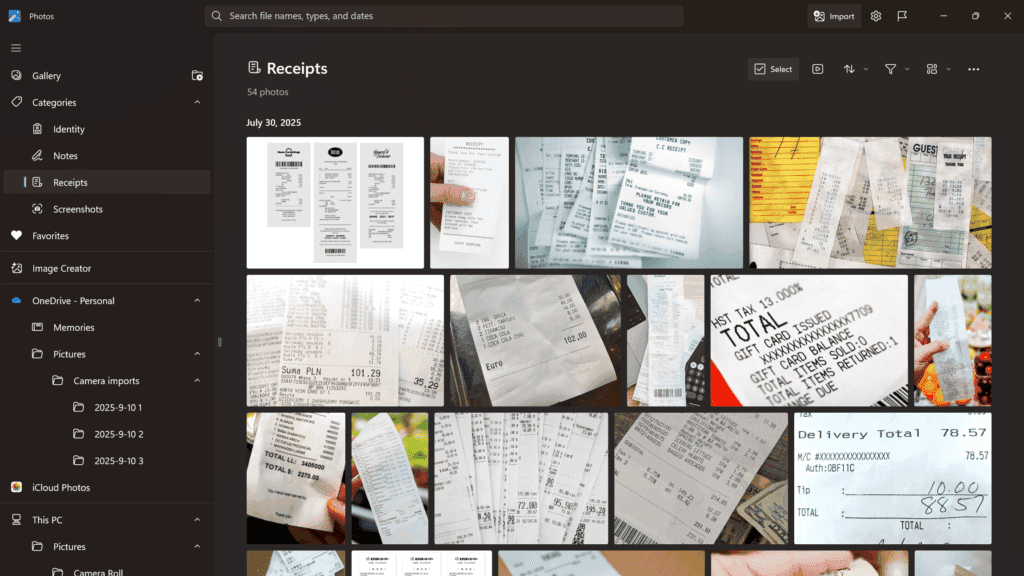
Microsoft is rolling out a groundbreaking feature for Windows 11 called 'Describe Image', which utilizes local AI to generate detailed descriptions of images, charts, and graphs without requiring an internet connection. This feature, part of the latest Windows Insider Preview Build 26200.5702 (KB5062653), is being introduced in the Dev Channel for Insider testers
1
2
.How It Works
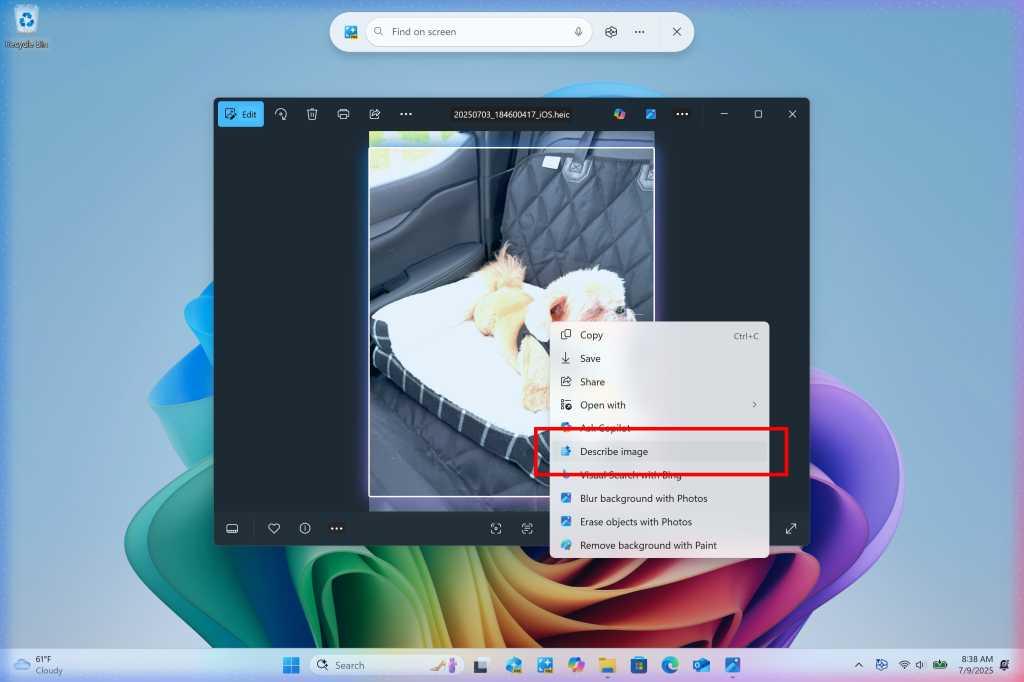
The 'Describe Image' option is accessible through the Click to Do menu, which users can open by pressing the Q and Windows keyboard keys together or by clicking the mouse while holding down the Windows key. When activated, Windows creates a text description of the selected image, with a one-click option to copy it to the clipboard
1
.
Source: PCWorld
Local AI Processing and Privacy
A key aspect of this feature is its use of a local AI model running on the device itself. This means that images are not sent to any external server during processing, ensuring user privacy and data security. The first time the feature is used, the required AI models are set up on the device. After that, all image descriptions are generated locally and remain on the user's PC
2
3
.Availability and Requirements
Currently, the feature is rolling out to Windows Insiders on Snapdragon-powered Copilot+ PCs in the Dev Channel. Microsoft has announced that support for AMD and Intel-powered Copilot+ PCs will be coming soon
1
2
3
. It's worth noting that this feature will require a Copilot+ PC even after it rolls out to stable Windows 11 versions.
Source: Beebom
Potential Applications and Benefits
The 'Describe Image' feature has several potential applications:
- Accessibility: It can significantly benefit users with limited vision by describing visual content as spoken text
1
. - Content Creation: The feature could streamline the process of creating image descriptions for documents, articles, presentations, and websites, enhancing SEO and accessibility
1
. - Quick Visual Analysis: Users can get rapid overviews of visual content without the need for manual interpretation
2
.
Related Stories
Comparison to Existing Technologies
This new feature is similar to object recognition software like Google Lens but with the added advantage of local processing. It also bears resemblance to cloud-based AI models like OpenAI's GPT for image description, but without the need for internet connectivity or potential privacy concerns associated with cloud processing
1
3
.Additional Windows 11 Updates

Source: How-To Geek
Alongside the 'Describe Image' feature, Microsoft is introducing other updates in the Insider build, including an updated design for privacy dialogs, an 'Administrator protection' feature for performing admin actions, and the deprecation of PowerShell 2.0
1
.As Microsoft continues to integrate AI capabilities into Windows 11, this offline image description feature represents a significant step towards more accessible and privacy-conscious AI integration in everyday computing tasks.
References
Summarized by

Navi
[1]
Related Stories
Recent Highlights



Recent Highlights
Today's Top Stories









Don’t drown in AI news. We cut through the noise - filtering, ranking and summarizing the most important AI news, breakthroughs and research daily. Follow topics that matter to you and stay ahead.


