Microsoft Copilot's New 'Direct Settings Access' Feature Simplifies Windows 11 Navigation


3 Sources
[1]
This new Copilot trick will save you tons of time in Windows 11 - here's how
The new skill is currently available only for Windows 11 Insiders. Figuring out how and where to find every feature in Windows can be challenging, even for advanced users. If only we had a guide that could direct us to a specific setting just by asking about it. Well, that's the idea behind a new
[2]
Windows 11 Has a New Way to Find System Settings
A significant feature is making its return to the Windows Copilot app. You can give direct links to the operating system's Settings. The new capability, officially called "Direct Settings Access," is beginning to roll out to users in all Windows Insider Channels. Now, if you ask Copilot a question
[3]
Think Copilot in Windows 11 is useless? This new feature could change your mind
It also gives some useful extra advice, too, in a succinct fashion Microsoft's giving the Copilot app in Windows 11 some fresh powers to allow the AI to be more helpful in terms of adjusting settings in the operating system. Thurrott.com highlighted that Microsoft revealed a new 'Direct Settings
Share
Copy Link
Microsoft is rolling out a new feature for Windows 11's Copilot AI assistant that provides direct links to system settings, making it easier for users to navigate and adjust their Windows environment.
Copilot's New Navigation Assistant
Microsoft is enhancing its Copilot AI assistant for Windows 11 with a new feature called 'Direct Settings Access'. This functionality aims to simplify the often challenging task of navigating Windows settings, especially for users who find the operating system's complexity daunting
1
.
Source: TechRadar
How It Works
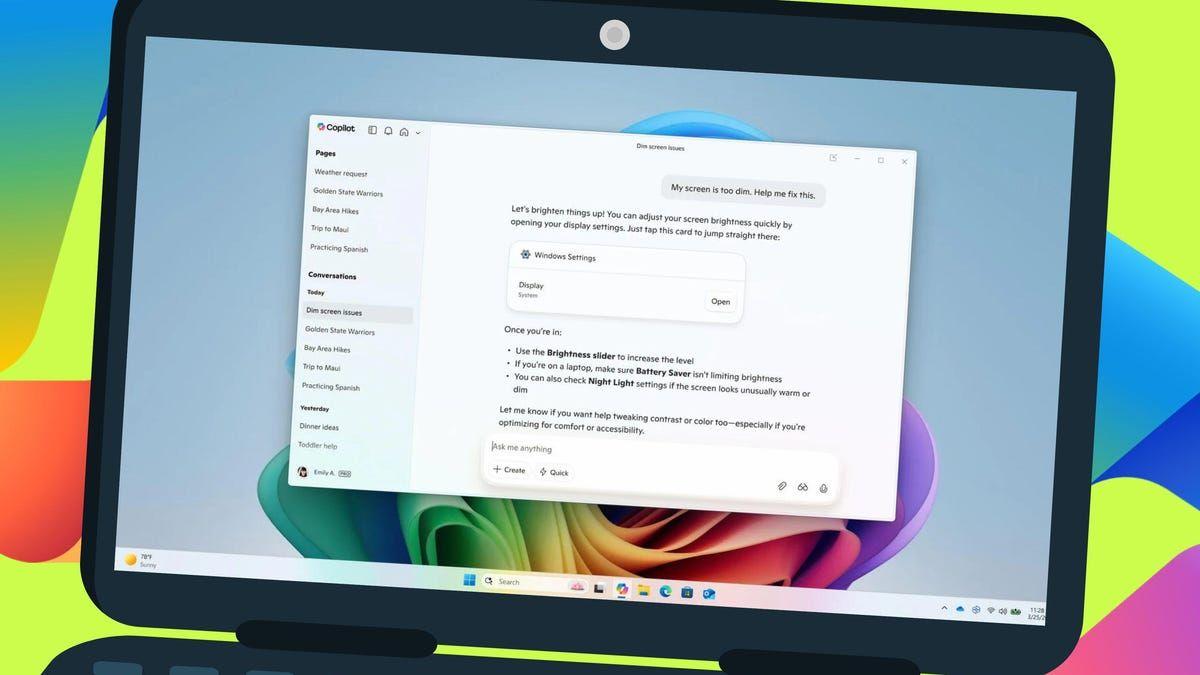
The new feature allows users to ask Copilot questions about specific Windows settings or features. In response, Copilot provides not only information but also a direct link to the relevant settings page. For instance, if a user asks how to make their screen easier to read or how to reduce distractions, Copilot will offer a clickable link that takes them straight to the appropriate settings screen
2
.
Source: ZDNet
Practical Applications
Microsoft has demonstrated several practical use cases for this feature. Users can ask questions like "Why is my screen too dim?" or "How do I brighten my screen?" Copilot will then provide a link to the brightness settings and offer additional advice, such as checking battery saver or night light settings that might affect screen brightness
3
.Availability and Rollout
Currently, the Direct Settings Access feature is available to Windows Insiders across all channels. It's being introduced through an update to the Copilot app (version 1.25095.161 or later) distributed via the Microsoft Store. The rollout is gradual, so not all Insiders will have immediate access to the feature
1
.Improved User Experience
This new capability represents a significant improvement in Copilot's integration with Windows features. Previously, while Copilot could open apps, finding specific settings often remained a manual task. The Direct Settings Access feature bridges this gap, making Copilot a more comprehensive assistant for Windows users
2
.Related Stories

Future Potential
As the feature develops, there's potential for even more advanced functionality. Some speculate that Copilot might eventually be able to check and modify settings directly, further streamlining the user experience. Microsoft is also working on interface changes for the Copilot app, indicating ongoing efforts to enhance its utility and user-friendliness
3
.Implications for Windows Users
This update to Copilot could significantly improve the Windows 11 experience, particularly for users who find the Settings interface difficult to navigate. By providing direct links and concise, relevant advice, Copilot is evolving into a more practical tool for managing Windows settings and features
2
3
.
Source: How-To Geek
References
Summarized by

Navi
[2]
Related Stories
Recent Highlights



Recent Highlights
Today's Top Stories









Don’t drown in AI news. We cut through the noise - filtering, ranking and summarizing the most important AI news, breakthroughs and research daily. Follow topics that matter to you and stay ahead.


