Apple Watch AI Features Enter Beta Testing: Live Rewind and Siri Recap Launch for Series 12


2 Sources
[1]
Apple Watch's AI features for rewinding and recapping conversations begin beta testing
Apple's AI-powered "Audio Intelligence" technology for the Apple Watch is now rolling out into beta testing, initially for developers in the iOS 27.3 update, after first being announced at the company's Surprise and Shine hardware event in September. The technology includes a set of four opt-in AI
[2]
Apple Watch's new AI memory features enter beta testing, and they could change how you remember (or forget) conversations
Apple's memory-jogging Watch features come with a privacy promise. Your watch already tracks your steps, heartbeat, and even sleep. Apple now wants it to help you remember what people say (without tracking it), which is either brilliant or mildly unsettling, depending on how you feel about having
Share
Copy Link
Apple has begun beta testing Live Rewind and Siri Recap, two AI-powered Audio Intelligence features for Apple Watch Series 12 and Ultra 4. Live Rewind captures the last 15 seconds of conversation as text with a double-press of the Digital Crown, while Siri Recap summarizes full conversations into bullet points without storing raw audio.
Apple has officially launched beta testing for its AI-powered Audio Intelligence features, introducing Live Rewind and Siri Recap to Apple Watch Series 12 and Apple Watch Ultra 4 users. Rolling out initially to developers through the iOS 27.3 update, these Apple Watch AI features represent a significant shift in how wearable technology can assist with memory and note-taking, while navigating the complex terrain of privacy concerns that have plagued similar AI recording devices.
1
Live Rewind Captures Missed Moments in Real-Time
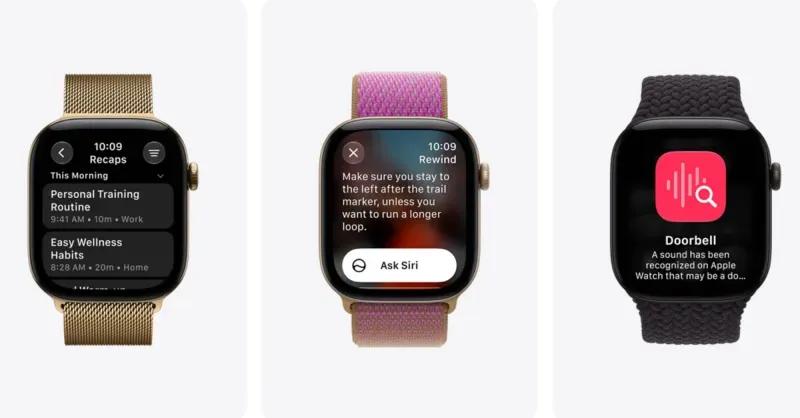
Live Rewind addresses a common frustration: missing what someone just said. By double-pressing the Digital Crown, users can instantly view the last 15 seconds of speech as a text snippet displayed on the watch face. The feature activates with an audible chime and visual animation, even in silent mode, ensuring those nearby know when recording occurs.
1
This transparency mechanism directly addresses concerns about covert recording that have plagued other AI wearables in the market.
Source: TechCrunch
The captured text snippet offers multiple options: users can simply view it and let it disappear permanently after 30 seconds, save it to the standalone Siri app that shipped with iOS 27 for later access, or tap an "Ask Siri" option to get clarification on technical terms or unfamiliar concepts mentioned in the conversation.
1
This functionality proves particularly valuable when someone is giving verbal directions, reading restaurant specials, or sharing a name you want to remember.Siri Recap Takes Ambient Listening Further
Siri Recap represents a more ambitious implementation of AI memory features, enabling Apple Watch owners to generate high-level summaries of entire conversations. Unlike traditional transcription services, Siri Recap doesn't identify individual speakers, save raw audio, or provide word-for-word transcriptions. Instead, it condenses conversations into a short title with bullet points highlighting key information such as important dates, deadlines, pricing details, and payment plan information.
1
Apple suggests using Siri Recap during work meetings, parent-teacher conferences, or personal training sessions—scenarios where manual note-taking might be impractical because your hands are occupied or you need to focus entirely on the discussion. The feature intentionally omits sensitive information including government-assigned identifiers, financial and authentication data, and language promoting self-harm.
1
Users receive prompts to review saved Siri Recaps at day's end and upon unlocking their Apple Watch each morning, with all untouched recaps automatically deleting within seven days.2
Source: Digital Trends
Privacy Safeguards Built Into Audio Intelligence
Addressing inevitable privacy concerns, Apple emphasizes that neither Live Rewind nor Siri Recap creates or stores audio recordings. The S11 chip processes sound within a locked-down environment before immediately deleting it, preventing apps, users, and even Apple from accessing raw audio.
2
For Siri Recap summaries, condensed text processed on the paired iPhone 16 or later is sent to Apple's Private Cloud Compute for summary generation, then immediately deleted.2
Both features remain entirely opt-in, with users able to disable them anytime from Control Center. Siri Recap offers additional flexibility through scheduling options, allowing users to activate rewinding and recapping conversations only during work hours or ensuring they never run at night.
1
The recaps won't record when users are listening to music through headphones or using noise cancellation features.Related Stories
Technical Requirements and Broader Audio Intelligence Suite
These AI memory features require Apple Watch Series 12 or Apple Watch Ultra 4 paired with an iPhone 16 or later (excluding the iPhone 16e) running Apple Intelligence.
2
The Audio Intelligence suite also includes sound recognition to help deaf and hard-of-hearing users identify important sounds like sirens, alarms, or doorbells, plus song identification through integration with Apple's Shazam app.1
The Apple Watch beta testing phase begins with developers receiving iOS 27.3 starting November 3, 2026, with public beta access potentially following in mid-December.
2
These features leverage a combination of the S11 chip, built-in microphone, Apple Intelligence models running on the iPhone 16, and Private Cloud Compute infrastructure.1
Saved recaps can be exported to the Notes app for work-related content or the Journal app for more personal reflections, providing flexibility in how users organize captured information.References
Summarized by

Navi
[1]
Related Stories
Apple Watch Audio Intelligence Features Spark Privacy Debate Over Always Listening Technology
09 Sept 2026•Technology

Apple Watch Series 12 and Ultra 4 to Add Siri Recap and Live Rewind Features Later This Year
01 Oct 2026•Technology
Apple Watch to Receive Key AI Feature with iOS 18.1 Update
04 Oct 2024•Technology

Recent Highlights
1
OpenAI's AI Models Disprove 27-Year Exponential Time Hypothesis, Rendering Decades of Research Obsolete
Science and Research
2
Google DeepMind unveils Genie 4 world model with audio and 2-minute interactive simulations
Technology

3
Google Unveils Gemini 4 Carbon AI Model With Major Cybersecurity Gains, Beating Claude Opus 5.5
Technology

Recent Highlights
Today's Top Stories





Don’t drown in AI news. We cut through the noise - filtering, ranking and summarizing the most important AI news, breakthroughs and research daily. Follow topics that matter to you and stay ahead.


