2 Sources
[1]
Siri AI on watchOS 27 Beta Helped Me Plan My Weekend
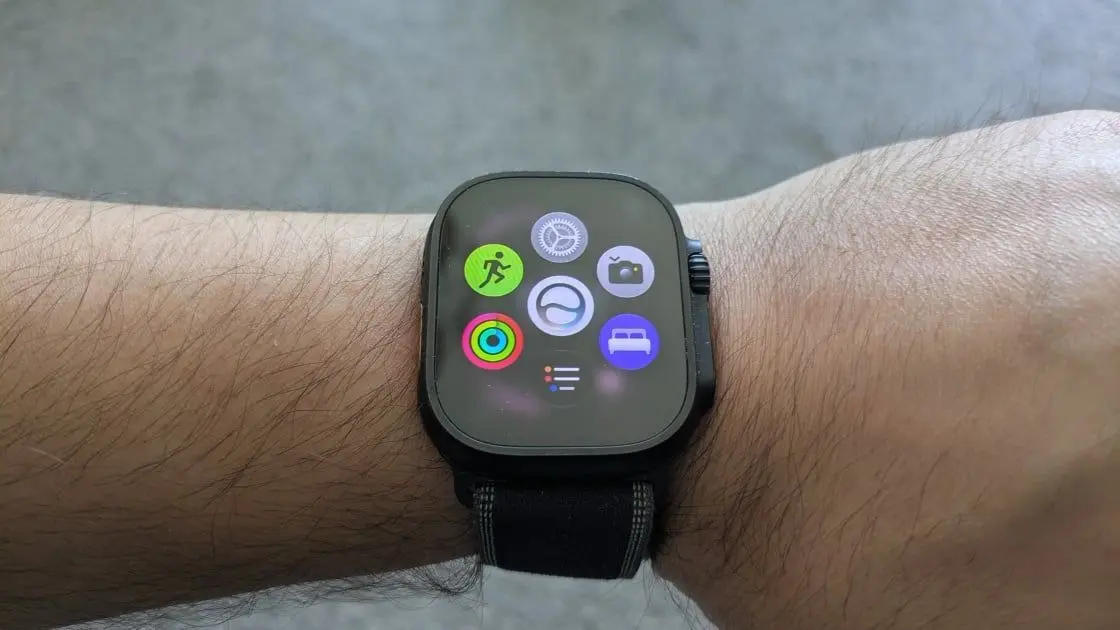
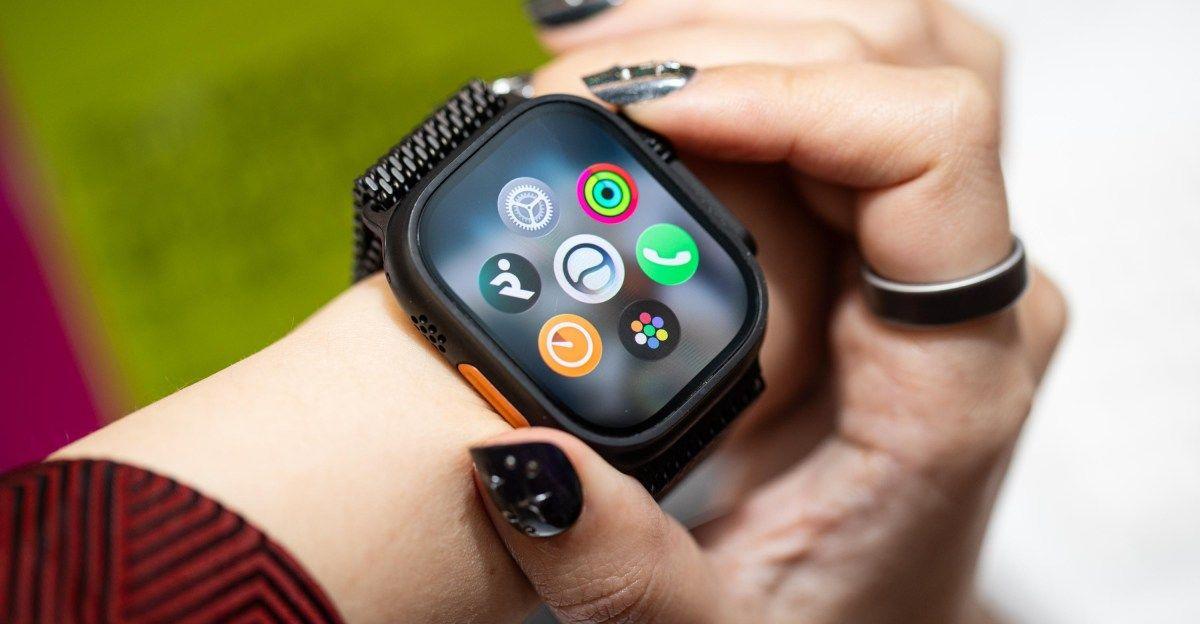
I felt a bit like Dick Tracy on a late Friday afternoon, as I had an extended conversation with my Apple Watch Ultra 3. I wasn't trying to fight crime; I was planning my weekend with Siri. The new AI-powered version of Apple's famous digital assistant lives in its own dedicated app in watchOS 27 and can use context from past questions to sustain a back-and-forth dialogue. I've spent roughly a week testing the beta of Apple's latest watch software, and while Siri AI is the headliner, Apple made a lot of existing features more convenient and informative. Workout Buddy has gotten better and can now work without your iPhone nearby. The Smart Stack offers more contextual suggestions and has added convenient gesture controls. Apple also updated Cycle Tracking and Child Accounts. First announced at WWDC in June, the watchOS 27 public beta is available to download and try now ahead of its general release, expected this fall. If you're interested in trying out the software on your own Apple Watch, read on for instructions on how to get the public beta up and running. If you don't want to take the risk, wait for the stable version to arrive later this year. Meanwhile, check out my first impressions of watchOS 27 beta below. For this first look, I tested the latest watchOS 27 developer beta, which arrived one week before the public beta release. How to Get the watchOS 27 Beta Grabbing the watchOS 27 beta is free and easy, as long as you have a current Apple Watch and some time to download. Specifically, you need an iPhone 11 or later and an Apple Watch 9 or later (the Apple Watch SE 3 and the Apple Watch Ultra 2 and Ultra 3 are eligible). To get started, you need to sign up for Apple's beta software program using your Apple ID. Next, download the iOS 27 beta to your phone, which is also public. Go to Settings > General > Software Update > Beta Updates to get it. After you update your phone to iOS 27, you must go through a similar process in the Watch app. Open the app, switch to the My Watch tab, and navigate to General > Software Update > Beta Updates. While the software is downloading, Apple recommends keeping your phone and watch close together, with the watch on the charger. The files for the iOS 27 and the watchOS 27 updates are pretty big, so expect each step to take 30 minutes or more, depending on your internet speed. They also need additional time to install after the download. You might want to budget an hour for the process. If possible, keep both devices plugged in to avoid any potential battery issues. Note that this is still beta software, and you can't go back once you install it. I haven't encountered any major issues thus far, but it's possible you will encounter bugs that you wouldn't find in a general release. Siri AI Siri got an AI makeover across Apple's platforms. Siri itself is more conversational and can answer a broad range of questions about most topics searchable on the internet, as well as questions that include personal context, as it can quickly pull info from your Apple devices to find the relevant data. The makeover is similar to Alexa's transformation into Alexa+ and Google switching from Google Assistant to Gemini. Indeed, the change to Siri AI comes after Apple partnered with Google on AI, so Gemini is part of Siri's new smarts. In addition to its enhanced smarts, Siri now lives in an app called Siri AI. You can still talk to Siri using the "Hey Siri" voice commands and other shortcuts, but you can now see your past conversations in a central place and start a new query through the app. This app has a specific wrist version that mirrors the phone version in iOS 27. On the watch, you can quickly access the app by pressing the crown. On watchOS 26 and before, this button opened your app drawer. Now, it pulls up a grid of apps with Siri AI in the center with suggested apps around it. The suggested apps are populated dynamically based on which ones you've used recently and which you use most often. From here, you can swipe up to return to the app drawer. I often found this grid was smart enough to surface the app I was looking for, so I didn't often have to go to the app drawer during my week of testing. As for Siri AI, I enjoyed chatting with it. When planning my weekend, it let me know about upcoming festivals in my home city of Chicago and provided extra details when I had follow-up questions about music acts and food at the Taste of Chicago. It stumbled a bit when I asked for an outdoor patio where I could drink with my friends and play Cornhole. It did recommend a spot with a patio, but no yard games. After enabling access to my health data, I was able to ask Siri how I slept, but it didn't respond to my follow-up inquiry about the amount of deep sleep I got. Instead, it referred me to the Health app on my iPhone. Siri on the watch also didn't show my past conversations like the phone version. For general information inquiries, Siri drew on past questions, and I was able to have a back-and-forth about the offerings at nearby breweries. While the software still seems to need some polish (as expected for a beta version), Siri AI feels more conversational and helpful than past versions of Apple's digital helper. Health Features Workout Buddy gets smarter with watchOS 27. The cheerful AI motivator still chimes in during certain exercises with encouragement and stat updates. With Apple's latest software, you can use it without your phone as long as your watch has a cellular connection. It's aware of more metrics for more detailed insights as it talks, and it's now available in Spanish. This is particularly noticeable in its opening and closing greetings, where Workout Buddy adds extra context. It talked about my exercise rings with specific detail about how much progress I still needed to make. It went over all of my stats after the run in a helpful overview, and complemented my durability after my longer session. Apple has avoided making Workout Buddy prescriptive. It's designed to provide encouragement and updates on the stats you want to track, but it won't offer unprompted critiques or advice. After my run, it could have easily noted my particularly slow pace on my sluggish day, but it kept things positive by focusing on duration. Siri AI is not yet integrated with Workout Buddy for extra in-depth analysis. For indoor workouts, Apple has improved distance tracking on treadmills. And within the Cycle Tracking feature in the Health app, Apple has added support for monitoring symptoms related to perimenopause and menopause, as well as options to find support and educational resources. A Smarter Smart Stack You can now control Apple's Smart Stack with additional gestures. The Smart Stack is a customizable list of widgets that Apple dynamically updates based on your personal context. It surfaces the Exercise app if you're near the gym, for instance, or the Camera app if you have your phone's cam open. With a new single-tap gesture, you can now select one of these widgets to open the related app. You can also double-tap to scroll through the widgets. I found both gestures worked reliably and made it easier to navigate my watch with a single hand. Apple also added more widgets to the Smart Stack. You can pull up ID cards quickly at an airport or see your transit card account after hopping on the subway. A noise widget will warn you of an overly loud environment, and you can even quickly find your parked car on Apple Maps. Child Safety, Call Context, and More A few other new watchOS 27 features are designed to make your wearable experience safer and smoother. Parents can set intuitive screen time limits with the revamped Apple Watch for Your Kids setup. If you're on a call with a business, your watch can find and surface relevant context, like confirmation numbers, so you don't have to search your phone. The Liquid Glass look, central to watchOS 26, is refined with improved contrast. Music playback should start faster, and Apple will proactively disable unused features to extend battery life. The Find My app has also been refined with a map-centric design. Apple tucked a lot of subtle changes into this update, and after a few days of testing, I'm just scratching the surface of what's new in watchOS 27. I'm excited to keep exploring the rest and see what else Apple has in store as the summer progresses. The full release will undoubtedly be timed with Apple's next smartwatch debut in the fall (hopefully in early September). In the meantime, be sure to check out all of our current favorite smartwatches.
[2]
Top watchOS 27 features that will enhance your Apple Watch
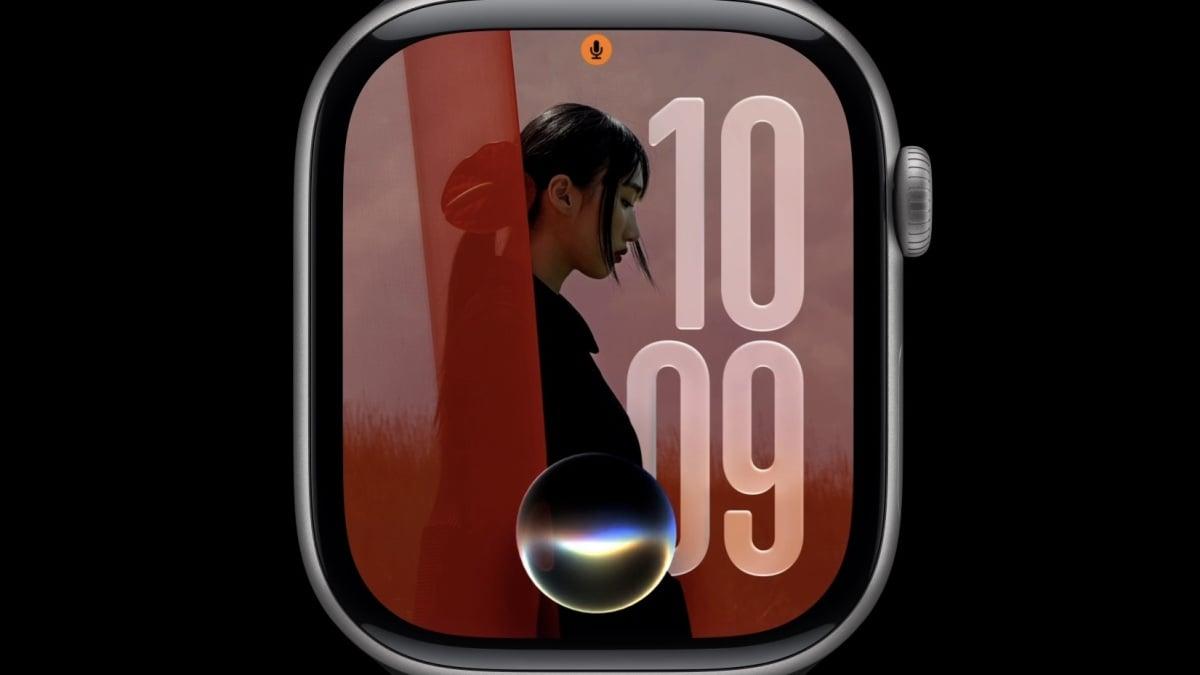
watchOS 27 packs some great new features. Here's everything new coming to Apple Watch this fall so far. Siri AI on Apple Watch, including dedicated app The flagship watchOS 27 feature is Siri AI. When Apple redesigned Siri and introduced Apple Intelligence two years ago, the Apple Watch wasn't part of that story. Now with watchOS 27, Apple Watch is gaining access to the redesigned and enhanced Siri. This includes a dedicated Siri app on watchOS that syncs with the Siri app on iPhone, iPad, Mac, and Apple Vision Pro. Apple Watch will gain the Siri chatbot app, personal context understanding, in-app action capabilities, and much broader world knowledge. Siri AI isn't included in watchOS 27 beta 1, but Apple says it will be available in English this year. It's great to see Siri on the Apple Watch become as capable as the new Siri AI system on iPhone, iPad, Mac, and Apple Vision Pro. Apple Watch was pretty left out of the original Apple Intelligence story. Dynamic app grid from Digital Crown Pressing the Digital Crown on Apple Watch with watchOS 27 invokes the new dynamic app grid. This is a set of six Siri-suggested apps that appear. If Siri AI is enabled, the Siri app takes the center position. An icon for launching the full app grid or app list also appears. The other apps chosen are based on recency and popularity, according to Apple. Clicking the Digital Crown once will invoke the dynamic app grid. Clicking it again will return to the watch face. You can click the Digital Crown and swipe up to go straight to the full app grid. Workout Buddy gains three enhancements in watchOS 27 watchOS 26's Workout Buddy feature was really the first AI-focused feature that came to the Apple Watch, and it required a nearby iPhone to work. That meant you couldn't benefit from Workout Buddy if you left your iPhone behind while exercising. That also changes this year as Workout Buddy now works without a nearby iPhone. Additionally, Workout Buddy language support expands from English-only to also include Spanish. Apple says Workout Buddy covers more insights as well including progress for pace, distance, and workout duration. Health and Fitness tracking improves in two ways Beyond Workout Buddy, Health and Fitness tracking in watchOS 27 includes two more improvements. First, Cycle Tracking is now more advanced with perimenopause and menopause support. "Cycle Tracking in the Health app can provide notifications when your logged cycle patterns are suggestive of perimenopause," Apple says. "You can track related symptoms and find support with educational resources." Next, tracking indoor runs or walks with a treadmill is now more accurate as well. "Improved motion tracking algorithms help measure the distance of your treadmill runs and walks more precisely right from your wrist," according to Apple. Apple also says that the step count in the Fitness app now syncs with steps counted in the Health app with watchOS 27 and iOS 27. watchOS 27 brings a new tap gesture Double tap on Apple Watch lets you open the Smart Stack to cycle through app widgets from your watch face. Starting with watchOS 27, a single tap gesture will let you interact with app widgets from the Smart Stack. This means you can tap your thumb and index twice to open the widgets view, double tap again to move to the next widget, or tap your thumb and index finger once to interact with widgets. For example, you can open the Heart Rate app from the Heart Rate widget to take a live reading, start a workout from a workout suggestion widget, or play/pause media playback from the Now Playing widget. It all works without tapping the watch face with your other hand. Smart Stack adds new widget suggestions Beyond a new gesture, watchOS 27 also greatly expands the number of widget suggestions that can automatically appear in the stack. New options include parked car location, the Siri app, birthday messages and celebrations, pinned messages, and much more. We'll dive into these further this summer. Find My app unified on Apple Watch Next up is the Find My app on Apple Watch. Starting with watchOS 27, Find My is a single, unified app, just like on iPhone, iPad, and Mac. Previously, the Find My experience on Apple Watch consisted of three separate app icons on the app grid or list for people, items, and devices. watchOS 27 also brings Precision Finding support to Apple Watch for locating a paired iPhone, AirTag 2, and AirPods Pro 3. watchOS 27 will suggest ways to save battery life Apple says that watchOS 27 introduces new battery optimization suggestions. In practice, this will come in the form of notifications about unused features being disabled to save battery life. These can include things like Start Workout reminders, gestures, and Raise to Speak for summoning Siri. If watchOS 27 sends a notification about an unused feature being disabled to extend battery life, there will be the option to override the proactive battery extension notification and leave the feature enabled. More app updates and changes Additionally, Apple says that watchOS 27 offers faster music playback on Apple Watch. Liquid Glass has been updated to focus on readability with more uniform refraction and better contrast. Wallet app supports new custom-generated cards from iOS 27. These can be pinned in the Smart Stack for easy access. Call Context, a new proactive feature for surfacing relevant data like flight information when on the phone with a business, also works on Apple Watch. And Apple's Child Safety features extend to Apple Watch and watchOS 27. During the keynote, Apple also listed these changes relevant to watchOS 27 and Apple Watch: * Improved Wi-Fi connectivity in watchOS * Guest key in watchOS * GymKit on iPhone and Apple Watch (previously Apple Watch-only) * Faster app extension launch in watchOS * More efficient water detection on Apple Watch * Redesigned settings in the Apple Watch app * View card balance in Wallet in watchOS * Transit cards and IDs in Smart Stack in watchOS watchOS 27 is currently available in developer and public beta. The final version is expected to arrive in September. Apple Watch Series 11 is currently priced from $299, a 25% discount on the regular $399 price, on Amazon. watchOS 27 requires Apple Watch Series 9 and later, Apple Watch Ultra 2 and later, and Apple Watch SE 3.
Share
Copy Link
Apple's watchOS 27 beta introduces Siri AI as a dedicated app on Apple Watch, enabling contextual conversations and personal data queries. The update also enhances Workout Buddy to work without an iPhone nearby, adds gesture controls to Smart Stack, and improves health tracking with perimenopause support and better treadmill accuracy.
Apple has released the watchOS 27 beta, marking a significant shift in how users interact with Siri on Apple Watch. For the first time, Siri AI comes to the wearable as a standalone app, mirroring the AI-powered Siri features introduced across iPhone, iPad, Mac, and Apple Vision Pro
2
. This dedicated Siri app syncs conversations across all Apple devices and brings conversational abilities that allow users to ask follow-up questions using context from previous queries1
.The transformation addresses a notable gap from when Apple Intelligence launched two years ago, leaving Apple Watch users without access to the redesigned assistant. Now, Siri on Apple Watch gains chatbot functionality, personal context understanding, in-app action capabilities, and broader world knowledge powered by Apple's partnership with Google's Gemini
1
. Early testing shows users can engage in extended dialogues about weekend planning, local events, and health data, though some limitations remain in accessing detailed health metrics directly from the watch1
.
Source: 9to5Mac
The Digital Crown receives a functional overhaul in watchOS 27. Pressing it now invokes a dynamic app grid displaying six Siri-suggested apps chosen based on recency and usage patterns
2
. When Siri AI is enabled, the Siri app occupies the center position, with frequently used apps arranged around it. This change replaces the previous behavior of opening the full app drawer, which now requires swiping up from the grid1
.The intelligence behind these suggestions proved effective during testing, often surfacing the desired app without requiring navigation to the complete app drawer
1
. This streamlined access reflects Apple's broader push toward AI-driven enhancements that anticipate user needs rather than simply responding to commands.
Source: PC Magazine
Workout Buddy, introduced in watchOS 26 as the Apple Watch's first AI-focused fitness feature, now works without a nearby iPhone
2
. This independence matters for users who prefer to exercise without carrying their phone, enabling them to receive AI-powered insights on pace, distance, and workout duration directly from their wrist. The feature also expands language support beyond English to include Spanish2
.Beyond Workout Buddy, health and fitness tracking receives additional refinements. Cycle Tracking now supports perimenopause and menopause with notifications when logged patterns suggest perimenopause, along with educational resources for tracking related symptoms [2](https://9to5mac.com/2026/07/14/top-watchos-27-features-that-will-enhance- Luganda-apple-watch/). Treadmill tracking accuracy improves through enhanced motion tracking algorithms, and step counts in the Fitness app now sync with the Health app
2
.The Smart Stack evolves with new features for Apple Watch users. A single tap gesture allows interaction with app widgets without touching the watch screen—users can double tap thumb and index finger to open widgets, double tap again to cycle through them, or single tap to interact
2
. This hands-free approach enables starting workouts, checking heart rate, or controlling media playback through finger gestures alone.The Smart Stack also expands its contextual suggestions to include parked car location, the Siri app, birthday celebrations, pinned messages, and more
2
. These additions make the feature more responsive to daily activities and special occasions.Related Stories
watchOS 27 unifies the Find My app into a single interface matching iPhone, iPad, and Mac, replacing the three separate icons for people, items, and devices
2
. The update adds Precision Finding support for locating paired iPhones, AirTag 2, and AirPods Pro 3 directly from the Apple Watch2
.Battery optimization receives attention through proactive suggestions. The system will send notifications about disabling unused features like Start Workout reminders, gestures, and Raise to Speak for Siri, with options to override these changes
2
.The watchOS 27 beta is available now for public testing ahead of its fall release. Compatible devices include Apple Watch 9 or later, Apple Watch SE 3, Apple Watch Ultra 2, and Apple Watch Ultra 3, paired with iPhone 11 or later running iOS 27
1
. Installation requires significant time—potentially an hour—due to large file sizes for both iOS 27 and watchOS 27 updates. Apple warns that beta software cannot be rolled back once installed1
.Summarized by
Navi
[1]
08 Jun 2026•Technology

06 Jul 2026•Technology

25 Jul 2025•Technology

1
Technology

2
Business and Economy

3
Technology