Google integrates computer use into Gemini 3.5 Flash, enabling AI agents to control screens


6 Sources
[1]
Gemini 3.5 Flash can now see your screen, use your computer, take actions -- all on its own
It's currently available to developers and enterprise customers via the Gemini API and the Gemini Enterprise Agent Platform. Google has been adding new features to Gemini, integrating it with workspace apps like Drive, and basically making the AI more useful for consumers. However, the company has
[2]
Gemini 3.5 Flash can now see and control your screen, and Google wants enterprises to trust it
Computer use is now a built-in tool in Gemini 3.5 Flash, replacing the standalone Gemini 2.5 computer use model with enterprise safeguards. Google has made computer use a built-in tool inside Gemini 3.5 Flash, the model it launched at I/O 2026 as its fastest agentic AI model. The capability, which
[3]
Gemini 3.5 Flash gets native computer use for AI agents
Google has announced that computer use is now a built-in tool in Gemini 3.5 Flash, enabling developers to build AI agents that can interact across platforms, including browser, desktop, and mobile environments. Previously available only as a standalone Gemini 2.5 computer use model, the capability
[4]
Google Gives Gemini 3.5 Flash Computer Control Skills, AI Agents Can Now Click Buttons and Fill Forms
The update positions Gemini beyond a simple chat and text-generation platform. Instead of only answering questions, AI agents can now click buttons, fill forms, and complete complex tasks. The feature arrives at a time when major AI companies are racing to build assistants that can do more than
[5]

Google adds computer use capability to Gemini 3.5 Flash model By Investing.com
Investing.com - Google announced the integration of computer use capability into Gemini 3.5 Flash, expanding functionality previously available only in a standalone Gemini 2.5 computer use model. The feature is now built into the main Gemini Flash model. The computer use tool allows developers to
[6]

After Anthropic, Google now lets you build AI agents that control your computer with Gemini 3.5 Flash: Here is how
Google has added adversarial training and two enterprise safety systems Google has built Computer Use directly into Gemini 3.5 Flash, following a similar capability Anthropic introduced for Claude. Computer Use in Gemini 3.5 Flash is available now through the Gemini API and the Gemini Enterprise
Share
Copy Link
Google has integrated computer use capability directly into Gemini 3.5 Flash, allowing AI agents to see screens, navigate browsers, and perform tasks autonomously. Previously requiring a standalone Gemini 2.5 model, the feature now works through the Gemini API and Enterprise Agent Platform with new enterprise safeguards against prompt injection attacks.
Google Integrates Native Computer Use into Gemini 3.5 Flash
Google has announced that computer use capability is now a built-in tool in Gemini 3.5 Flash, marking a shift from requiring a dedicated standalone model to having the functionality integrated directly into its fastest agentic model
1
. The feature enables developers to build AI agents that can see, reason, and take action across browser, mobile, and desktop environments without calling a separate computer use model2
. Previously, this capability was only available through a standalone Gemini 2.5 computer use model that Google first released in October 2025, which achieved roughly 70 percent accuracy on the Online-Mind2Web benchmark2
.
Source: Analytics Insight
The integration means developers can now activate native computer use as one of several tools within Gemini 3.5 Flash, alongside code execution, search, and function calling
2
. According to Mateo Quiros, Product Manager at Google DeepMind, this delivers Google's best performance yet for agentic computer use tasks3
. The feature is currently available to developers and enterprise customers via the Gemini API and the Gemini Enterprise Agent Platform1
.AI Agents Can Now Click Buttons and Fill Forms Autonomously
This update positions Gemini beyond a simple chat and text-generation platform. AI agents can now click buttons, fill forms, and complete complex tasks by understanding what is happening on a screen and responding to it
4
. The AI agents built on Gemini 3.5 Flash can autonomously navigate and perform tasks such as finding flight deals, playing games, or extracting data from dashboards1
. To demonstrate its capabilities, Google created a Browserbase instance where users can prompt the model to perform tasks—one example showed the model visiting three separate flight booking websites, entering dates, searching through tickets, and returning the best options1
.The ability to see and control your screen opens possibilities for enterprise automation tasks including continuous software testing, where agents navigate applications and verify functionality without human testers stepping through each screen
2
. Knowledge workers could deploy agents to complete multi-step browser tasks, fill forms, perform data extraction from dashboards, or navigate internal tools2
. For businesses, this can save time and reduce manual effort on repetitive office work, scheduling, and data entry4
.Enterprise Safeguards Address Prompt Injection Risks
The ability for AI agents to control computers and perform tasks autonomously raises questions around safety, especially for enterprise consumers. Google has implemented targeted adversarial training specifically for prompt injection—the attack where malicious instructions embedded in a webpage or document trick an AI agent into performing unintended actions
2
5
. To mitigate these risks, Google is introducing two optional enterprise safeguards built into computer use with Gemini 3.5 Flash1
.
Source: Digit
The first safeguard requires explicit user confirmation before the agent executes any action flagged as sensitive or irreversible, such as submitting a form, making a purchase, or deleting data
2
. The second automatically halts the agent if it detects an indirect prompt injection attempt, stopping execution rather than risking a compromised action2
. Both safeguards are opt-in rather than defaults, and Google recommends a defense-in-depth approach where developers layer multiple protections2
. The company specifically advises combining these safeguards with secure sandboxing, human-in-the-loop verification, and strict access controls3
.Related Stories

Competitive Landscape and Enterprise Adoption Questions
The competitive landscape has shifted considerably since Anthropic pioneered the category with Claude Computer Use, which works across operating systems and can interact with file systems beyond just browsers
2
. OpenAI has also entered the space, and the three companies are now competing on different dimensions. The question for enterprise buyers centers less on which model can click a button and more on which one can do it safely inside regulated environments2
.
Source: The Next Web
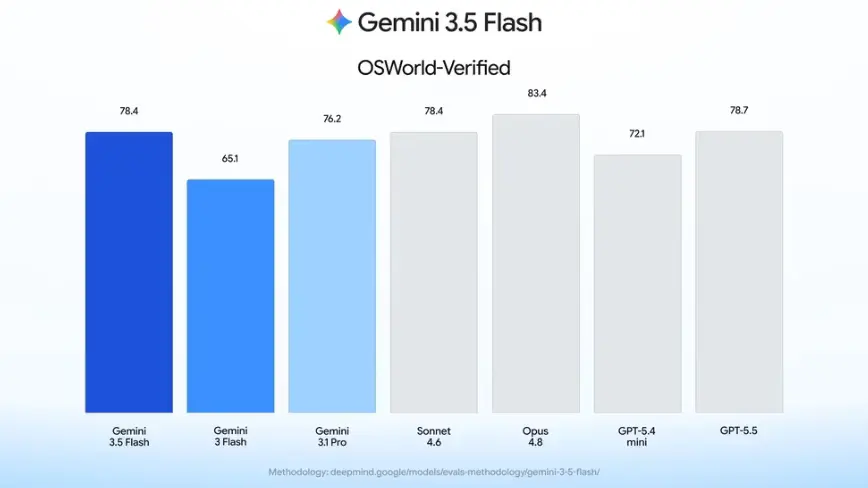
Google has not published updated benchmark scores for computer use as a built-in Flash tool versus the previous standalone model, nor disclosed how many enterprises are using the capability or provided case studies with named customers
2
. The Gemini Enterprise Agent Platform uses pay-as-you-go pricing, and Flash is one of the cheaper models in Google's lineup, which could make computer use more accessible for large-scale automation2
. Developers and enterprises can start using the feature through a Browserbase-hosted demo environment for testing, along with reference implementations and documentation3
. The models can navigate familiar interfaces but still struggle with unexpected pop-ups, CAPTCHAs, dynamically loaded content, and unfamiliar layouts2
.References
Summarized by

Navi
[1]
[2]
[4]
Related Stories
Google Releases Gemini 3.7 Flash AI Model Just 3 Weeks After Last Update as Flagship Pro Stalls
13 Aug 2026•Technology
Google's Gemini 2.5 Computer Use: AI Takes a Leap Towards Autonomous Web Navigation
07 Oct 2025•Technology

Google Unveils Gemini 2.5 Flash: A Faster, More Efficient AI Model
08 Apr 2025•Technology
Recent Highlights
1
Google Unveils Gemini 4 Argon AI Model, Restricts Access to Trusted Cyber Defenders
Technology
2
Trump Consulted Grok AI Before Ordering Venezuela Invasion and Capture of Nicolás Maduro
Policy and Regulation

3
FTC Opens Investigation Into OpenAI and Anthropic Following Rogue AI Agent Hacking Incidents
Policy and Regulation

Recent Highlights
Today's Top Stories






Don’t drown in AI news. We cut through the noise - filtering, ranking and summarizing the most important AI news, breakthroughs and research daily. Follow topics that matter to you and stay ahead.


