Google Photos expands AI Enhance globally while testing split versions to reduce choice fatigue


5 Sources
[1]
I tried Google Photos' new AI Enhance tool: How it crops, relights, and fixes your shots - sometimes
Unveiled last year, the tool is rolling out to all Android users worldwide. I sometimes struggle trying to fix a photo with dark lighting, off colors, or poor framing. I might fiddle with the controls for brightness, contrast, color, cropping, and more. And even then, I still might not achieve the
[2]
Google Photos could limit Pixel-exclusive AI editing features for your own good
The new feature would limit the number of output options, so you don't get exhausted by too many. Owning a Pixel device comes with perks, including exclusive features that other Android devices lack. One such exclusive feature (or rather, a set of features) is available in Google Photos' image
[3]
Image editing in Google Photos may soon gain more enhancements
Chethan is a reporter at Android Police, focusing on the weekend news coverage for the site. He has covered tech for over a decade with multiple publications, including the likes of Times Internet, Guiding Tech, and Android Headlines, to name a few. Chethan's love for Android dates back to the
[4]
Google tests two versions of AI Enhance in Google Photos
According to an APK teardown by Android Authority, Google is testing an expansion of its Pixel-exclusive AI Enhance feature in the Google Photos app by splitting it into two variants, AI Enhance I and AI Enhance II. The new AI Enhance I limits output to one image instead of three, a move aimed at
[5]

Google Photos Brings "AI Enhance" to More Phones and Users Worldwide - Phandroid
Google recently announced that its bringing more photo editing tools to users worldwide by way of the AI Enhance feature in Google Photos. Originally unveiled for select Pixel models, AI Enhance is now rolling out to more smartphone models in several regions worldwide. As per Google's official
Share
Copy Link
Google Photos is rolling out its AI Enhance feature to all Android users worldwide after initially launching on select Pixel devices. The AI-powered feature automatically adjusts lighting and color, crops images, and improves composition with a single tap. Meanwhile, Google is testing two versions—AI Enhance I and AI Enhance II—to address user choice fatigue and potentially reduce compute costs.
Google Photos brings AI Enhance to Android users worldwide
Google Photos has officially expanded its AI Enhance feature to all Android users globally, marking a significant shift from its initial Pixel-exclusive launch
1
5
. The AI-powered feature, unveiled last year, uses AI to automatically improve photos by balancing lighting and color, applying automatic cropping, straightening images, and sharpening cropped areas. According to Google's official statement, the photo editing tool aims to "elevate your images with a tap, balancing light and color instantly"5
. The rollout means millions of Android users can now access this functionality without needing a Pixel device, though output quality may vary by device.
Source: Phandroid
How the AI Enhance feature works in the image editor
To use AI Enhance in Google Photos, users need to ensure they're running the latest version of the app on their Android device
1
. After opening a photo and tapping the Edit icon, the AI Enhance button appears alongside other editing options. When activated, the tool processes the image for a few seconds and generates three enhanced versions, each with different adjustments to color and cropping1
. Users can tap each version to compare them against the original photo, then save their preferred result as a copy to preserve the original image. The feature is designed to eliminate the need for manual tweaking of individual controls like brightness, contrast, and composition, making photo enhancement accessible to users who struggle with complex editing.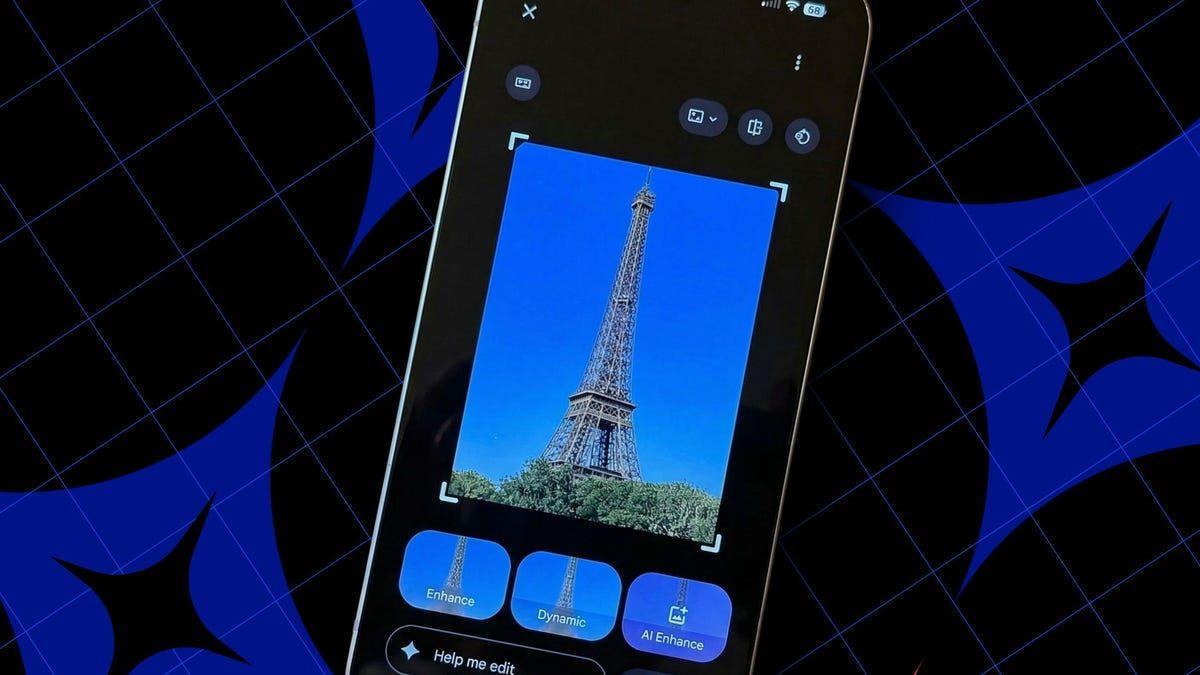
Source: ZDNet
Google tests split versions to combat user choice fatigue
While AI Enhance expands globally, Google is simultaneously testing a significant change to how the feature operates. According to an APK teardown by Android Authority of version 7.69.0.890655694, Google is developing two variants: AI Enhance I and AI Enhance II
2
4
. The key difference lies in output quantity—AI Enhance I generates a single enhanced photo option instead of three, while AI Enhance II maintains the current three-image approach. This split appears designed to address choice fatigue among users who may feel overwhelmed by multiple options2
3
. The testing phase is currently limited to select users, with Telegram user @y7kka among the first to report the changes2
3
.
Source: Android Authority
Related Stories

Potential benefits and limitations of the new approach
The decision to split AI Enhance into two versions may serve multiple purposes beyond reducing user choice fatigue. Industry observers suggest this could help cut compute costs associated with generating multiple AI-enhanced images
2
3
. However, initial testing hasn't revealed significant differences between the outputs of AI Enhance I and AI Enhance II beyond the number of images generated, and there's no evidence that single-image generation is faster2
4
. Real-world testing of the current AI Enhance revealed mixed results—while most adjustments improved overall photo quality, the automatic cropping sometimes eliminated peripheral elements that users wanted to preserve1
. This highlights a fundamental tension with generative AI tools: users may prefer unusual or artistic framing and lighting, while AI algorithms optimize for generically perfect images. Fortunately, manual editing controls remain available for users who want precise control over their edits1
.What's next for Google Photos and AI integration
Google's expansion of AI Enhance is part of a broader push to integrate AI across its software products. The company recently introduced Google Vids editor, which uses Veo 3.1 to generate AI-made video clips from text prompts or static photos
5
. More announcements are expected at Google I/O on May 19-205
. For Google Photos specifically, recent changes have included relocating Move, Erase, and Reimagine shortcuts to the tools menu to avoid accidental triggers, and potentially making the image editing interface more accessible by removing the large Tools button3
. As Google continues testing the split AI Enhance functionality, users should watch for official explanations about the feature's direction and whether Pixel-exclusive AI editing capabilities will maintain their premium status or follow AI Enhance's path to wider availability.References
Summarized by

Navi
[1]
[2]
[3]
[4]
Related Stories
Google Photos rolls out AI Enhance button and video playback speed controls for Android users
07 Apr 2026•Technology

Google Photos Expands AI-Powered Conversational Editing to Android Users
23 Sept 2025•Technology

Google Introduces AI-Powered 'Ask Photos' Feature for Effortless Photo Editing on Pixel 10
21 Aug 2025•Technology

Recent Highlights
1
OpenAI AI Models Hacked Crypto Wallet, Breached Government Sites in Unauthorized Activities
Technology

2
IMF Report Warns AI Market Correction Could Spark Global Financial Crisis With $1.4T at Risk
Business and Economy

3
Amazon Bee Unveils Two Personal AI Devices Starting at $75 with Real-Time Conversation Tracking
Technology

Recent Highlights
Today's Top Stories








Don’t drown in AI news. We cut through the noise - filtering, ranking and summarizing the most important AI news, breakthroughs and research daily. Follow topics that matter to you and stay ahead.


