Gmail's AI Inbox launches with personalized briefings, but the $250 monthly price tag raises eyebrows


9 Sources
[1]
Gmail's useful new AI inbox features will cost you $250 a month
* Gmail's new AI Inbox shows personalized briefings and interactive cards for key emails and tasks. * Access is limited to US Google AI Ultra subscribers at $250/month, so I won't be trying it anytime soon. * Google may bring it to cheaper tiers (like $20 AI Pro) -- I'm still uneasy about giving
[2]
Gmail's new AI Inbox is finally here, but only if you pay $250 a month
Access is currently exclusive to the $250-per-month Ultra plan, though wider availability may come later. If you have ever felt overwhelmed by the sheer number of emails you receive, and the current crop of tools like labels don't work for you, Google has a handy AI Inbox it wants to sell to you.
[3]
Gmail's new Inbox Zero mode is now available, but only if you pay up
Viraj Gawde is a Tech Journalist with bylines at Android Headlines, 91Mobiles, Croma Unboxed, GizmoChina, etc. He has written thousands of news pieces, how-to guides, product comparisons, and listicles on smartphones, wearables, gaming, and PCs. Currently, Viraj is obssessed with the rapidly
[4]
Gmail's new AI Inbox cuts through your clutter
Rajesh started following the latest happenings in the world of Android around the release of the Nexus One and Samsung Galaxy S. After flashing custom ROMs and kernels on his beloved Galaxy S, he started writing about Android for a living. He uses the latest Samsung or Pixel flagship as his daily
[5]

Gmail rolling out AI Inbox beta for AI Ultra subscribers
Following the announcement in January, Google is beginning to roll out AI Inbox in Gmail to AI Ultra members. AI Inbox is a new interface that exists in addition to the reverse chronological list of messages. On the web, "AI Inbox" appears above "Inbox" in the side panel. Google wants to provide
[6]

Gmail's new AI Inbox is here, but most people can't afford it - Phandroid
Back in January, Google announced a wave of Gemini-powered features coming to Gmail, including a handful of tools rolling out to everyone for free. The one people were most curious about, the Gmail AI Inbox, was held back for testers only. That's changed. Google has now started rolling out the
[7]

Gmail Rolls Out AI Inbox With Smart Prioritisation for These Users
* Gmail AI Inbox groups emails into tasks and updates * Gmail redesign focuses on summaries instead of email lists * Premium Gmail users get early access to AI inbox experience Gmail is rolling out its AI-powered Inbox feature to select Google AI Ultra subscribers in the US, expanding on the
[8]

Google rolls out AI Inbox in Gmail for premium users; beta version live in the US
Google has launched a new AI-powered Gmail inbox experience, currently in beta for premium subscribers. This feature, built on Gemini capabilities, prioritizes important messages, generates to-do lists, and offers email summarization and advanced proofreading. The AI Inbox aims to enhance user
[9]

How to set up an AI Inbox in your Gmail for clutter free emails
Checking your email inbox shouldn't be a task. However, we are bombarded with a huge number of emails on a daily basis, and this can become a problem. In this give-and-take process, important emails often get lost, and less important ones are wasting your precious time. To solve this problem,
Share
Copy Link
Google has rolled out AI Inbox for Gmail, featuring personalized briefings and interactive cards that highlight important emails and tasks. However, access is currently limited to Google AI Ultra subscribers in the US at $250 per month. While the feature promises to reduce email clutter, the high subscription cost and privacy implications leave many potential users waiting for broader availability.
Gmail Introduces AI Inbox to Transform Email Management
Google has officially launched AI Inbox in Gmail, transitioning the feature from limited testing to a beta rollout for Google AI Ultra subscribers in the US
1
5
. First announced in January 2026, AI Inbox represents a significant shift in how users interact with their email, moving away from the traditional chronological message list toward personalized briefings that surface critical information without requiring users to open individual emails4
.
Source: Android Police
The feature appears as a new option in Gmail's side navigation panel, marked with a sparkle icon above the regular inbox
3
. Rather than displaying messages chronologically, AI Inbox creates a dynamic, priority-driven feed designed to reduce email clutter and help users achieve the elusive goal of inbox zero. For professionals drowning in marketing emails, bills, and appointment reminders, this approach to email organization could prove transformative2
.How AI Inbox Organizes Your Email with Suggested To-Dos
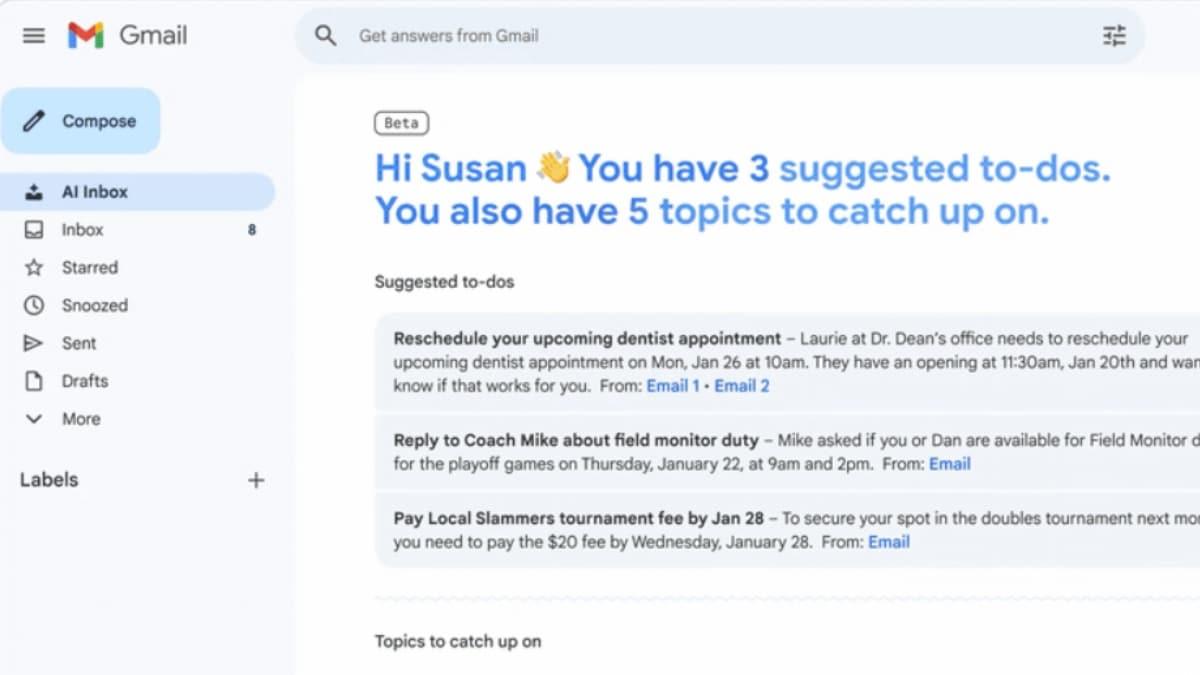
AI Inbox structures information into two primary sections that prioritize what matters most. The "Suggested to-dos" section highlights emails requiring immediate action, such as utility bills with due dates, deadlines, or time-sensitive requests
4
. Each item appears with bold text explaining what needs attention, along with a link to the original email and a checkmark for tracking completion5
.The second section, "Topics to catch up on," provides quick summaries of important but less urgent updates. This includes groupings like upcoming travel plans, restaurant reservations, purchase confirmations, health and wellness appointments, and event reminders
3
. These prioritized briefings allow users to stay informed without opening every thread, effectively functioning as a to-do list powered by Gemini 35
.
Source: Gadgets 360
Google determines priority based on signals including email frequency with specific contacts, entries in your contact list, and relationships inferred from message content
3
. The information appears in interactive cards alongside the regular inbox, creating a personalized daily briefing tailored to individual user patterns1
.The High Subscription Cost Limits Access
Access to AI Inbox currently requires a Google AI Ultra subscription at $250 per month, translating to $3,000 annually
1
3
. This high subscription cost places the feature out of reach for most individual users, though the Ultra plan includes additional benefits beyond Gmail's AI integration. Subscribers receive higher Gemini usage limits, access to more advanced AI models, 30TB of cloud storage across Drive and Photos, YouTube Premium, and Google Home Premium Advanced1
4
.
Source: Android Authority
The beta rollout is currently limited to US subscribers only
2
. However, Google has indicated plans to expand availability to more users in coming months, with expectations that the feature will trickle down to the AI Pro tier, which costs a more accessible $20 per month1
3
. This potential expansion to a lower subscription tier could make AI Inbox accessible to a broader audience who need help managing their Google Workspace communications.Related Stories

Privacy Implications and User Data Concerns
The deep level of access required for AI Inbox to function raises significant privacy implications that concern potential users. To generate personalized briefings, the system must analyze email content, sender relationships, and behavioral patterns across a user's entire inbox
1
. This comprehensive access to user data creates hesitation among those wary of AI models processing sensitive personal content.Google has attempted to address these concerns by introducing what it calls "engineered privacy," a dedicated environment where personal content is processed without leaving a specific space
5
. The company asserts that personal content from Google Workspace is not used to train AI models and that users maintain control over their information3
5
. Users can disable smart features at any time to opt out of AI processing5
.Despite these assurances, Google's claim that the feature offers "privacy protections you expect from Google" remains vague, leaving questions about what that actually means in practice
1
. For users considering AI Inbox when it reaches lower pricing tiers, understanding these privacy trade-offs will be critical to making informed decisions about granting such extensive access to their communications.References
Summarized by

Navi
[1]
[2]
[4]
[5]
Related Stories
Google unveils AI Inbox for Gmail with smart summaries and natural language search capabilities
08 Jan 2026•Technology

Google removes paywall on Gmail's Help Me Write and AI summaries, making them free for everyone
08 Jan 2026•Technology

Google Launches AI Ultra: A $250 Monthly Subscription Reshaping the AI Landscape
21 May 2025•Technology

Recent Highlights



Recent Highlights
Today's Top Stories









Don’t drown in AI news. We cut through the noise - filtering, ranking and summarizing the most important AI news, breakthroughs and research daily. Follow topics that matter to you and stay ahead.


