6 Sources
6 Sources
[1]
Google updates Workspace to make AI your new office intern | TechCrunch
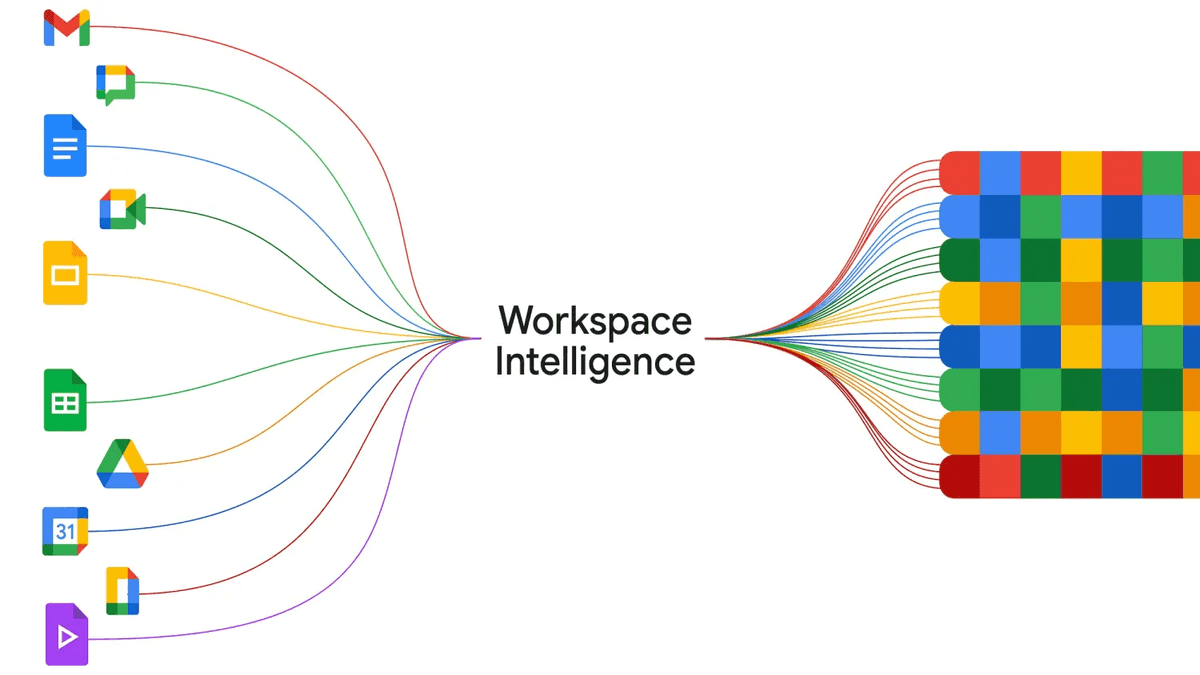
At Google Cloud Next this week, the tech giant announced a bevy of new updates to Workspace, its subscription-based productivity suite aimed at professionals. As you might expect, the updates are heavy on AI, integrating new automation tools into various workflows -- everything from drafting emails to organizing Google Sheets. Overall, the changes are clearly designed to give office workers a leg up in their pursuit of less busy work. Here's some of what is new: Workspace Intelligence. Workspace Intelligence, a new AI system built into Google's office suite, is designed to automate assistance across various tasks. The system draws on a user's Workspace data, including their Gmail, Calendar, Chat, and Drive (Docs, Slides, and Sheets). Google has given users administrative control over what the AI system can see and access. Users can disable Workspace Intelligence's access to particular data sources at any time. The tradeoff: the more data the system has access to, the more it's able to assist in those particular areas. Build and fill out Google Sheets with Gemini. A number of new features allow users to both build and fill out Google Sheets, the company's spreadsheet tool. Users can construct sheets by prompting Gemini to construct them. Prompts can include things like formatting and data retrieval, allowing Google's AI system to do much of the work a human would've previously needed to do. At the same time, Gemini also helps with data entry, automatically filling out Sheets with "prompt-based" filling. Google claims that its new feature allows users to populate the spreadsheets "9x faster" than manual entry, because the system is designed to infer what you're going to enter. Another new Sheets feature allows users to convert unstructured data into organized tables. AI writing capabilities. Google has also brought new new AI writing tools to Google Docs. Users can now use Gemini to "generate, write, and refine" documents. The feature is powered by the company's Workspace Intelligence system, which draws on data from a user's Drive, Chat, and Gmail archives, as well as the internet, to assist with editorial tasks. Users merely prompt Gemini to help them write or edit their documents. Users can prompt Gemini to "help me write" or ask it to "match" their writing style so that it can effectively mimic their voice. Realizing that enterprise customers are where the money is, tech companies are racing to deploy the most convenient and efficient office tools -- applications that can make the average worker's life a matter of degrees easier. Google has a certain advantage; its office products are already deeply embedded in workplaces worldwide, giving it a built-in audience for these AI upgrades. But Microsoft, Apple, and a growing field of startups are all competing for the same turf.
[2]
Google's big Gemini-powered Workspace upgrades are out of beta and hitting Docs, Sheets, and more
In addition to Workspace accounts, users on Google AI Ultra and AI Pro plans can start using them. This week, Google's got big news for its enterprise clients as it shares a host of announcements at Cloud Next '26. We've already heard about the next-gen Tensor Processing Units coming to Google's data centers, and learned how Gemini Personal Intelligence is finding a home with businesses through Workplace Intelligence. But now we've got some news with a little more impact for all of us end users, as we get some updates on the latest features hitting Google's biggest productivity tools.
[3]
Workspace Intelligence turns Gemini into an all-knowing do-it-all AI agent for your work
A few weeks ago, Google announced a new feature called Personal Intelligence. Broadly, the idea is to let Gemini access the content saved in your Gmail inbox and Photos library. The next time you ask the AI about travel plans, projects, or anything relevant, it will seamlessly reference your stored information to offer helpful responses, without asking you for any context. It just knows you. Now, Google is doing the same for Workspace, the hub of your work tools such as Docs, Sheets, Slides, and Drive, among others. Of course, the name has to be fitting, so Google is calling it Workspace Intelligence. Broadly, it allows Gemini to dip into the pool of information stored across Workspace apps and offer personalized responses. Alright, so what's the big deal about Workspace Intelligence? Google says Workspace Intelligence saves you the hassle of dipping and bouncing between different files and folders. Instead, all you need to do is give it the right command -- in natural language, of course -- and it will get work done by using its knowledge of all your work data and picking the right context. Recommended Videos "Workspace Intelligence retrieves your relevant emails, chats, files, and information from the web to transform ideas into professionally formatted drafts that mimic your exact voice, brand, style, and company templates," says the company in a blog post. The idea is similar to what Anthropic's Claude can pull off, particularly in Microsoft PowerPoint using an extension system. So, how does it benefit me? Take, for example, Docs. When you summon Gemini in Google Docs, it will handle tasks based on its historical understanding of your workflow. For example, when you ask it to edit an image, it will automatically apply the suitable edits based on your past preferences, ensuring that you get consistent results without having to do manual work for each asset in the document. Gemini will also handle comments, and based on your instructions, it will autonomously make the necessary edits in the document. Google notes that you can one-shot slide decks by simply asking Gemini to create them. "Gemini uses context from Workspace Intelligence and strictly adheres to your company's templates and visual styles to build a ready-to-present deck," explains the company. AI Inbox and AI Overviews in Gmail are also a part of the Workspace Intelligence package. The former turns your Gmail inbox into a task-based overflow, letting you quickly catch up on conversations and the work at hand. The latter creates a brief summary of the email conversations, similar to AI Overviews for Google Search.
[4]
With Workspace Intelligence, Google's productivity suite gets more AI smarts - SiliconANGLE
With Workspace Intelligence, Google's productivity suite gets more AI smarts Google Cloud has long believed that one of most compelling benefits of artificial intelligence is that it helps people get more work done faster, and that's the main purpose behind a slate of new capabilities being added to Google Workspace. The main update is a new system called Workspace Intelligence, announced today at Google Cloud Next 2026, that helps transform simple applications into autonomous and collaborative AI agents. In a blog post, Google Workspace Vice President of Product Yulie Kwon Kim said the company is no longer content with AI serving as a passive assistant that just sits and waits for a prompt. Instead, it's pushing the idea of "agentic work," where AI understands the context behind the projects someone is working on, and possesses the organizational knowledge to start working on them autonomously. According to Kim, modern work remains extremely fragmented, with most business workers spending days stitching together "scattered info" that lives across multiple platforms. This means wasting hours jumping between tabs and apps, hunting through emails and digging through chat threads, rather than getting tasks done. Google's philosophy is that AI needs to help people get things done faster, and Workspace Intelligence is meant to power this shift. It's a secure, dynamic system that maps semantic relationships across Docs, Slides and Gmail in order to understand what users are trying to achieve and eliminate the bulk of this context switching that slows them down. "Workspace Intelligence does more than just connect to your apps and pull from your data to create an output," Kim said. "It is a secure, dynamic system that inherently understands complex semantic relationships within your Workspace apps (such as Docs, Slides, or Gmail) content, your active projects, your collaborators, and your organization's domain knowledge." One way in which Workspace Intelligence aims to make its presence felt is by bridging the gap between raw data and finished work, and it has several features that should enable this. For instance, there's a new, unified command line in Google Chat that aims to reposition the tool as a kind of central nervous system for enterprise work. This is powered by Gemini, and allows users to simply state what they're trying to accomplish, such as schedule a meeting for a particular project team, or dig up the latest budget file, and get it done instantly. Gemini handles all of the execution, Kim said. Another useful new capability aims to solve the headaches associated with manual preparatory work. Gemini in Docs and Slides can now retrieve all of the relevant emails, chats and web information to transform a vague idea into a professionally formatted draft that mimics a company's voice and branding. For each new idea, it will create a full, editable Slides presentation that follows corporate templates. Meanwhile, Google is extending its AI Overviews feature to Gmail and Drive. Rather than scrolling through dozens of threads or browsing through endless files trying to find the information they need, users can simply generate the insights they need to know by asking Gemini questions. In Drive, the new Drive Projects tools makes it easy to organize files and emails centrally so that Gemini has the full context available for a specific project. The updates aren't limited to general intelligence, for there were additional updates that impact the broader Google Workspace ecosystem. For instance, there's a new "Sheets canvas" that makes it quick and easy to create interactive mini-applications and dashboards on top of any dataset, including information stored in Salesforce and HubSpot. In the "agentic" realm, Google introduced new "Skills" that make it easy for teams to build and deploy automated workflows across the Workspace suite. For instance, someone might create a new skill for agents to automatically review invoices by comparing new ones against historical documents, in order to flag any discrepancies. Meanwhile, Google Vids is getting a boost with its new "digital avatars," which can be customized with company branding and logos. They now support 24 languages, making it easier for international companies to create high-quality video messaging without a production studio. Elsewhere, the "Take Notes for Me" feature in Google Meet is being expanded to capture summaries and action items, even on third-party platforms such as Zoom and Teams, so long as the user accesses that meeting from a Google device. As AI agents become more autonomous, securing them becomes more important than ever, which is why Google is looking to address this with its new AI Control Centers and agent management tools. These give administrators everything they need to monitor and audit how agents interact with sensitive data, and for companies with strict regulatory needs, Google is also expanding its sovereign controls. This means that customers will soon be able to lock their data into a specific region, such as the U.S., the EU or specific countries such as India and Germany.
[5]
Google's Workspace Intelligence wants to be the ultimate AI coworker that actually knows your business
At Cloud Next 2026, Google introduced Workspace Intelligence, a new semantic layer for Google Workspace that creates a unified context by mapping emails, chats, files, collaborators, and active projects. The idea is to shift Workspace from a collection of productivity apps into an AI-driven system that can replicate how you actually work. Workspace Intelligence is aimed at organizations that want AI to be more than just a chatbot. Google Workspace head of product Yulie Kwon Kim says the system is intended to "emulate the institutional knowledge of a long-tenured employee, but for AI." Google says it can gather material, rank priorities, track stakeholders, and adjust outputs to user writing styles. To build a truly useful AI coworker, you need context, and a lot of it. Workspace Intelligence's goal is to provide rich organizational context from a company's documents, emails, presentations, and messages. This lets the system do things like generate content in your voice, picking up on preferences like whether you never use exclamation marks or love using them. In practice, that gives Google Chat a larger role. Kim describes conversations with Gemini as becoming more like running a "command center for your work." The chat feature, now named Ask Gemini in Chat, will make it easier for workers to find files, generate documents and slides, and schedule meetings. Google paired the launch with a broad product update across the suite. In Google Docs, Gemini can tap into Workspace Intelligence to create infographics from business data, edit multiple images for visual consistency, and handle user comments with automated revisions. In Sheets, users can generate and modify spreadsheets with data imported from Gmail or Drive. The new Sheets Canvas lets Gemini transform data into mini-apps or dashboards unique to Sheets. Slides gains the ability to produce editable decks in one pass using company templates and brand visuals, while Gmail introduces AI Inbox and AI Overviews for email search. Drive, on the other hand, adds Drive Projects, providing a centralized hub for shared files and emails. Since companies need to hand over important organizational data, Google has confirmed that Workspace won't use customer data for ads or model training outside Workspace without permission. It is also worth noting that Google has offered AI tools across Workspace before, but those interactions didn't have access to an organization's broader data. Workspace Intelligence is now available to all paid Google Workspace users. Some features are rolling out over the coming weeks, while others stay in preview, including Workspace actions in Gemini Enterprise, Gemini auto-browse in Chrome Enterprise for US customers, and a new Workspace MCP Server for external AI apps and agents.
[6]
Google's New 'Workspace Intelligence' Is About to Be Your Ultimate AI Coworker
Some of the most popular work-focused apps of all time are about to become more intertwined than before, thanks to artificial intelligence. Google has announced Workspace Intelligence, a new "semantic layer" for its Google Workspace suite of products. The new capability enables Gemini-powered AI agents to understand and replicate the unique context of your workplace and job when you use products like Google Sheets and Google Docs. Yulie Kwon Kim, Google Workspace's head of product, says that Workspace Intelligence is intended to emulate the institutional knowledge of a long-tenured employee, but for AI systems. "There are a lot of LLMs out there that are powerful and capable," says Kim, "but they end up being generic. They don't know your institutional history, how you like to format your professional voice and preferences." The key to creating an actually-useful AI coworker, says Kim, is to provide AI models with the "rich organizational context" found in a company's documents, emails, presentations, and messages. Because Workspace Intelligence automatically scans your emails and messages, it can generate content that sounds like it was written by you, and can transform its outputs to replicate your unique voice. With this context, Gemini will know to format a spreadsheet in Google Sheets the right way, for example, or know to never include exclamation points in your emails. Or maybe to include them all the time!
Share
Share
Copy Link
Google announced Workspace Intelligence at Cloud Next 2026, a new AI system that transforms Gemini into an autonomous AI coworker. The update integrates across Gmail, Docs, Sheets, and Drive to automate office tasks by understanding organizational context. Unlike passive AI assistants, it actively draws on company data to generate content, fill spreadsheets 9x faster, and create presentations that match brand templates.
At Google Cloud Next 2026, Google unveiled a comprehensive overhaul of Google Workspace, introducing Workspace Intelligence as the centerpiece of its strategy to transform productivity tools into autonomous AI-powered features
1
.
Source: Inc.
The new system represents a fundamental shift from passive AI assistance to what Google calls "agentic work," where Gemini understands context, possesses organizational knowledge, and works autonomously on tasks
4
.Workspace Intelligence is designed to map semantic relationships across Google Docs, Slides, Gmail, Google Drive, and Google Chat, creating a unified context that understands active projects, collaborators, and domain knowledge
4
.
Source: TweakTown
According to Google Workspace Vice President of Product Yulie Kwon Kim, the system aims to "emulate the institutional knowledge of a long-tenured employee, but for AI"
5
. This AI agent for work draws on user data including Gmail, Calendar, Chat, and Drive to automate assistance across various tasks, though users maintain administrative control over what the AI system can access1
.The Gemini-powered Workspace upgrades bring substantial changes to Google Sheets, where users can now construct spreadsheets by prompting Gemini with formatting and data retrieval instructions
1
. Google claims its new feature allows users to populate spreadsheets 9x faster than manual entry, as the system infers what users intend to enter through prompt-based filling1
. The new Sheets Canvas functionality enables Gemini to transform data into mini-apps or dashboards, with the ability to import information from external platforms like Salesforce and HubSpot4
.In Google Docs, the AI coworker can "generate, write, and refine" documents by retrieving relevant emails, chats, files, and web information to transform ideas into professionally formatted drafts
1
3
. Users can prompt Gemini to match their writing style, ensuring the AI mimics their voice effectively1
. The system also handles comments autonomously, making necessary edits based on user instructions3
.
Source: SiliconANGLE
Google Chat now functions as a command center for enterprise work, with a unified command line powered by Gemini that allows users to state objectives in natural language
4
. The feature, called Ask Gemini in Chat, can schedule meetings for project teams, locate budget files, and execute tasks instantly4
5
. This positions Chat as the central nervous system for automate office tasks across the platform.Slides gains the ability to create full, editable presentations in one pass using company templates and brand visuals, strictly adhering to organizational styles
3
4
. Gmail introduces AI Inbox and AI Overviews, transforming the inbox into a task-based interface that helps users quickly catch up on conversations and generates brief summaries of email threads3
5
. Google Drive adds Drive Projects, providing a centralized hub for organizing files and emails so Gemini has full context for specific projects4
5
.Related Stories
Recognizing that enterprise customers drive revenue, Google has implemented comprehensive administrative controls and data privacy measures
1
. Users can disable Workspace Intelligence's access to particular data sources at any time, though the tradeoff is that more data access enables better assistance1
. Google confirmed that Workspace won't use customer data for ads or model training outside Workspace without permission5
.New AI Control Centers and agent management tools give administrators everything needed to monitor and audit how agents interact with sensitive data
4
. For companies with strict regulatory requirements, Google is expanding sovereign controls to meet compliance needs4
. The system also introduces "Skills" that enable teams to build and deploy automated workflows across the productivity suite, such as automatically reviewing invoices against historical documents to flag discrepancies4
.Google holds a significant advantage as its office products are already deeply embedded in workplaces worldwide, providing a built-in audience for these AI-driven updates
1
. However, Microsoft, Apple, and a growing field of startups are competing for the same territory in the race to deploy the most convenient and efficient office automation tools1
. The competitive pressure mirrors what Anthropic's Claude can accomplish, particularly in Microsoft PowerPoint using extension systems3
.Workspace Intelligence is now available to all paid Google Workspace users, with users on Google AI Ultra and AI Pro plans also gaining access
2
5
. Some features are rolling out over the coming weeks, while others remain in preview, including Workspace actions in Gemini Enterprise and Gemini auto-browse in Chrome Enterprise for US customers5
. Additional updates include digital avatars in Google Vids supporting 24 languages with company branding, and the "Take Notes for Me" feature in Google Meet expanding to capture summaries on third-party platforms like Zoom and Teams when accessed from Google devices4
.Summarized by
Navi
[2]
[3]
[4]
1
Policy and Regulation

2
Technology

3
Business and Economy