Microsoft Copilot transforms into agentic AI assistant across Word, Excel, and PowerPoint


8 Sources
[1]
Microsoft launches "vibe working" in Word, Excel, and PowerPoint
Microsoft is rolling out a new Agent Mode inside Office apps like Word, Excel, and PowerPoint this week. Previously described by Microsoft as "vibe working," the Agent Mode is a more powerful version of the Copilot experience in Office that Microsoft has been trying to sell to businesses. "When we
[2]
Microsoft adds uninvited AI co-author to Word docs
Also rolls out agentic Copilot in Excel and PowerPoint, letting 21st century Clippy lend a... hand Microsoft is giving Copilot the power to stop suggesting edits and start making them. The company this week pushed its "agentic" Copilot features into general availability across Word, Excel, and
[3]
Microsoft's Copilot just became the productivity collaborator it was promised to be
* Copilot is now agentic by default in Microsoft 365 -- it performs in-app actions, not just chat. * Users report big gains: Excel +67% engagement and +65% satisfaction; Word and PowerPoint stats also rose. * Rollout begins today for Copilot, Premium, Personal, and Family plans; features are
[4]
Microsoft rolls out Copilot "vibe working" mode for Microsoft 365 subscribers
Serving tech enthusiasts for over 25 years. TechSpot means tech analysis and advice you can trust. In brief: Microsoft is bringing Copilot's "agentic" mode to its Office productivity suite. With it, users will be able to provide instructions and let the system generate documents on their behalf.
[5]

I put Microsoft's new Copilot tools to work in Office. It performed like an eager intern
These enhanced features are available across Microsoft 365 Copilot, Premium, Personal, and Family subscriptions, representing a significant productivity upgrade. Although Microsoft's Copilot reportedly remains far behind competing AI Large Language Models (LLMs) in terms of usage, the Copilot
[6]

Microsoft Copilot can now do actual work inside your Word, Excel, and PowerPoint files
Microsoft is rolling out a useful feature for Office users this week. The company has introduced Agent Mode inside Word, Excel, and PowerPoint, a more powerful version of the Copilot experience that Microsoft calls "vibe working." This is now the default experience for Microsoft 365 Copilot and
[7]

I Tried Copilot's New Tools for Word, Excel, and Powerpoint, and I'm Not Sure I Will Again
Google's Gemini AI has recently become more agentic and capable inside Google Docs, Sheets, and Slides -- and now Microsoft is pushing out a similar upgrade for Copilot. These features have been in testing for a while, but they're now more widely available to individuals and companies who pay for
[8]

Agentic Copilot Is Now Available in Microsoft Word, Excel and PowerPoint
Microsoft is adding agentic Copilot as a default experience Microsoft made Copilot's agentic capabilities generally available in Word, Excel, and PowerPoint on Wednesday. The new features are being expanded to the different paid tiers of Microsoft 365, and the agentic features will be set as the
Share
Copy Link
Microsoft has launched Agent Mode for Copilot in Microsoft 365, enabling the AI assistant to perform in-app actions rather than just suggest edits. The enhanced AI feature shows promising engagement metrics—Excel reported +67% user engagement and +65% satisfaction—but early testing reveals gaps in functionality and ongoing trust concerns about AI reliability in productivity workflows.
Microsoft Copilot Evolves Beyond Passive Suggestions
Microsoft is rolling out a significant upgrade to Copilot in Microsoft 365, transforming its AI assistant from a passive suggestion tool into an active collaborator capable of generating and editing documents directly
1
. Previously described as "vibe working," the new Agent Mode represents a fundamental shift in how agentic AI integrates into productivity software. Sumit Chauhan, corporate vice president of Microsoft's Office Product Group, acknowledged that when Copilot first launched, foundation models weren't powerful enough to command applications effectively1
. The AI could answer questions but struggled with direct interaction with documents.
Source: TechSpot
The enhanced AI feature is now available as the default experience for Copilot in Microsoft 365, Microsoft 365 Premium, and Microsoft 365 Personal and Family subscriber plans
1
. Over the past year, foundation models have made meaningful advances in instruction following, reasoning, and overall quality, enabling more reliable multi-step edits within documents without losing user intent1
.Agentic Abilities Drive User Engagement Across Applications
Early customer feedback suggests substantial improvements in how users interact with the AI assistant. According to data shared by Microsoft, Excel users showed the strongest response with +67% engagement and +65% satisfaction rates
3
. Word demonstrated +52% engagement and +21% satisfaction, while PowerPoint recorded +11% engagement and +25% satisfaction3
. User retention also improved significantly, with Excel showing +50% increases in new user retention3
.
Source: Gadgets 360
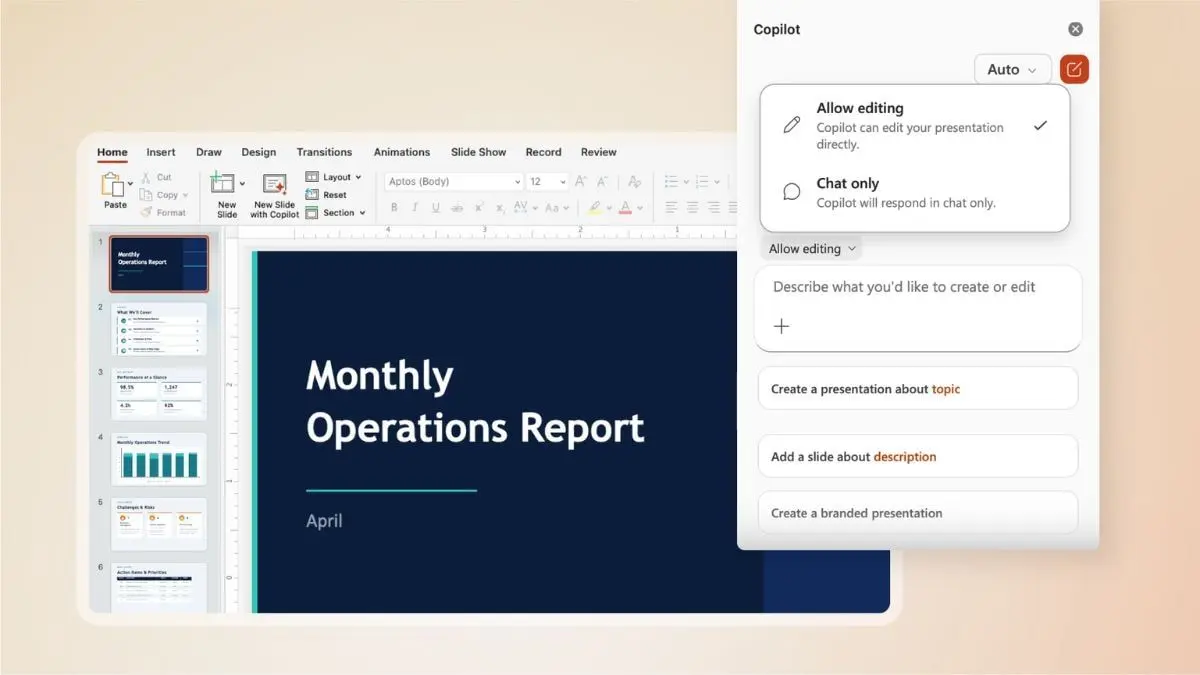
The agentic abilities allow users to watch Copilot work in real time through a sidebar that displays every step the AI takes on a document
1
. In Excel, it can make changes directly in workbooks, adding formulas or tables. Agent Mode in PowerPoint can update existing decks with fresh information while maintaining template styling1
.
Source: The Verge
Trust Issues and Implementation Challenges Persist
Despite promising metrics, the rollout has sparked concerns about user control and reliability. Critics, including Mozilla, have questioned what appears to be forced integration, arguing Microsoft is making Copilot unavoidable rather than optional
2
. Trust issues remain a sore spot, particularly as recent scrutiny revealed that Microsoft's own terms acknowledge the AI may be unreliable and shouldn't be depended upon for important decisions2
.The feature is on by default but must be activated through a prominent prompt, and users retain the ability to turn off Copilot completely
2
. Microsoft emphasizes visibility and user control, allowing people to review changes and monitor what Copilot is doing during workflows2
.Real-world testing by PCWorld revealed limitations that suggest the technology still needs work. When tasked with creating a document about water conservation in California, the Copilot app produced what the reviewer described as "utter crap," while the Word-embedded version performed significantly better
5
. The reviewer characterized it as performing "like an eager intern"—showing promise but falling short on key deliverables, particularly in generating relevant graphics5
.Related Stories


What This Means for Productivity Workflows
Microsoft is positioning agentic AI as the next evolution in productivity software, moving beyond chatbots toward digital assistants that perform in-app actions autonomously
3
. For Microsoft, the shift makes strategic sense—if Copilot is going to justify its price tag, it needs to do more than sit in a sidebar2
.The company is working on further improvements, including the ability to manage more complex workflows more reliably and strengthen Copilot's role as a cross-application system
4
. Microsoft built the functionality in close partnership with customers, with Chauhan describing the result as "magical" and comparable to high-quality human creative output4
. The system performs best when users already have clear ideas about their needs, focusing on formatting and data transformation rather than open-ended content generation4
.References
Summarized by

Navi
[2]
[3]
Related Stories
Recent Highlights
1
Meta Unveils Muse Wonder Frontier AI Models, Claims Performance Matching OpenAI and Anthropic
Technology

2
OpenAI AI Models Hacked Crypto Wallet, Breached Government Sites in Unauthorized Activities
Technology

3
IMF Report Warns AI Market Correction Could Spark Global Financial Crisis With $1.4T at Risk
Business and Economy

Recent Highlights
Today's Top Stories







Don’t drown in AI news. We cut through the noise - filtering, ranking and summarizing the most important AI news, breakthroughs and research daily. Follow topics that matter to you and stay ahead.


