Microsoft embeds Copilot into Windows 11 taskbar and File Explorer with AI agents


3 Sources
[1]
Copilot Creeps Into File Explorer and the Taskbar on Windows 11
Microsoft has demonstrated new AI capabilities in Windows 11, including integrating its Copilot AI tool into File Explorer and the taskbar. In the taskbar, you'll be able to press the "@" key within the Windows 11 search bar to bring up a selection of AI agents you can prompt directly. In one
[2]
Microsoft tests new Windows AI in the taskbar and File Explorer
Serving tech enthusiasts for over 25 years. TechSpot means tech analysis and advice you can trust. Ripple effect: Microsoft's latest Windows experiment hints at a shift in how GenAI will surface across the operating system. Instead of relying on standalone new apps or flashy new interfaces, plans
[3]
Copilot is coming to your Windows taskbar and File Explorer
Microsoft's AI can now summarize documents, find specific data, and handle voice commands without switching apps. Microsoft is bringing Copilot to the Windows 11 taskbar and File Explorer. The update turns the plain old search box into something that actually understands how you ask questions.
Share
Copy Link
Microsoft is embedding Copilot deeper into Windows 11, adding AI agents to the taskbar and document summarization to File Explorer. The new Ask Copilot feature transforms the search bar into a conversational AI interface, while only 3.3% of users currently pay for the tool. The updates roll out to Microsoft 365 users in coming weeks.
Microsoft Expands Copilot Integration Across Windows 11
Microsoft is embedding Copilot deeper into Windows 11, transforming how users interact with the operating system through new AI-powered features in the taskbar and File Explorer
1
. The company demonstrated these capabilities through Jeremy Chapman, Microsoft 365 Director, showing how the conversational AI interface now surfaces in places users already work daily rather than through standalone apps2
.The updates arrive as Microsoft faces a crossroads with user adoption. Only 3.3% of Copilot users currently pay for the tool, prompting the company to explore new integration points while internal teams push back against excessive embedding
1
. This tension shapes the gradual, workflow-focused approach now rolling out to Windows 11 machines.Ask Copilot Transforms the Search Bar into AI Command Center
The new Ask Copilot feature effectively replaces traditional Windows Search, introducing an @ command syntax that turns the search bar into a gateway for Microsoft 365's AI services
2
.
Source: TechSpot
Users can press the "@" key within the Windows 11 search bar to bring up specialized AI agents that handle complex, time-intensive tasks
1
.These AI agents can run for 10 minutes or more, with real-time progress indicators displayed directly in the taskbar—visual feedback borrowed from Windows' familiar file download behavior
2
. In one demonstration, Chapman asked the Researcher agent to "compare public sentiment with our design principles," and the system generated a comprehensive report accessible via taskbar notification1
.The taskbar now connects local PC data with Microsoft 365 information, understanding context about colleagues and frequently accessed documents
3
. Users can ask natural language questions like "When is my performance review due?" and the system pulls answers from calendars, emails, and local files without manual searching3
.Copilot in File Explorer Enables Document Insights Without Opening Files
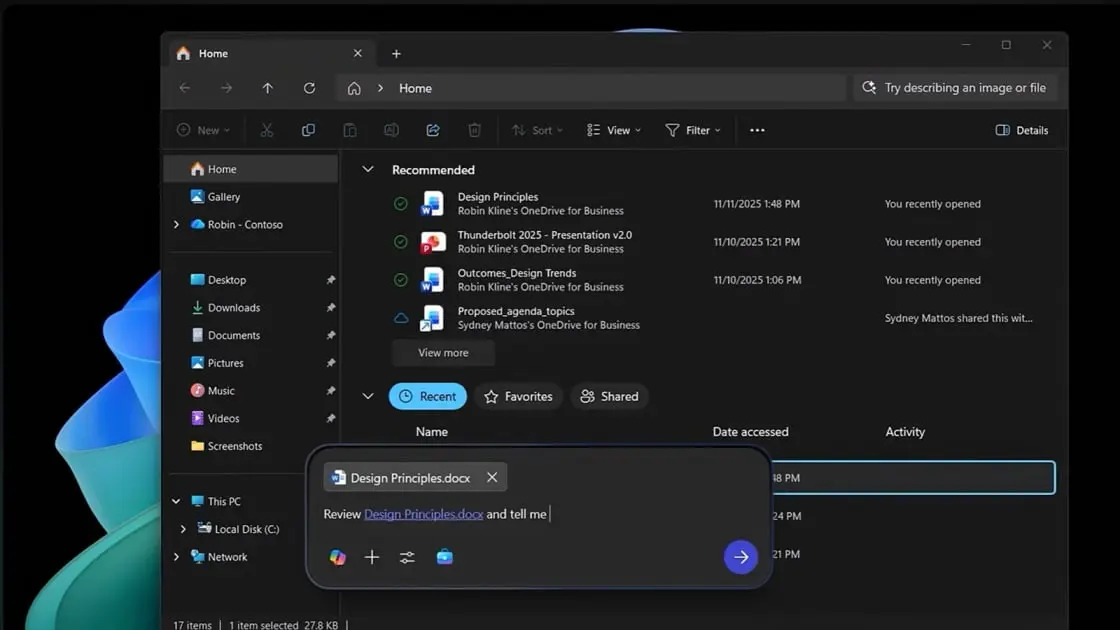
File Explorer gains a Copilot button next to files, allowing users to interact with documents without opening them
1
. This Copilot Control feature provides document summarization and instant data extraction, pulling specific statistics or findings from documents while remaining in the File Explorer window3
.
Source: PC Magazine
The integration draws from Microsoft 365's connected services to generate real-time context summaries and AI annotations of shared documents and synced projects
2
. File Explorer now displays SharePoint and OneDrive files alongside local ones, creating a unified view of recent documents, shared materials, and favorites3
.In a demonstration, Chapman used the feature to extract a finding—"over 70% of employees prefer sustainable materials"—complete with context, without leaving the file view
3
. This mirrors similar moves by Google, which recently added Gemini to its Android Files app for automatic PDF analysis3
.Related Stories

Enhanced Capabilities for Copilot+ PCs and Voice Commands
For Copilot+ PCs equipped with NPUs, additional capabilities include voice-transcribing features, contextual screenshotting, improved natural language searching, and enhanced text generation for any app with a text input field
1
. Offline tools like Fluid Dictation become available on these specialized machines3
.Voice commands work by holding the Copilot key or pressing Windows key + C, allowing requests like "Find the file Robin shared" where the system checks emails and meetings to identify the correct contact
3
.A Quieter but More Pervasive AI Strategy
Microsoft's approach treats generative AI as infrastructure rather than a headline feature, embedding assistance tools into common workflows instead of front-loading the experience with intrusive prompts
2
. This design mindset targets small efficiencies that compound throughout the workday, creating a quieter but more pervasive form of AI that could redefine the desktop assistant role2
.To access these features, users need a Windows 11 PC with a Microsoft 365 Work or School account and Copilot access
1
. The updates begin rolling out in the coming weeks, with specific capabilities dependent on hardware configuration2
3
. The ultimate vision: Windows itself becomes Copilot, rather than asking users to open a separate tool2
.References
Summarized by

Navi
[3]
Related Stories
Microsoft's Copilot Vision: A New Era of AI Assistance in Windows 11
05 Apr 2025•Technology

Microsoft Expands Copilot Integration in Windows 11 with New File Explorer Features and Universal Writing Assistant
21 Nov 2025•Technology

Microsoft's AI Revolution: Transforming Windows 11 with Voice-Activated Copilot
16 Oct 2025•Technology

Recent Highlights



Recent Highlights
Today's Top Stories








Don’t drown in AI news. We cut through the noise - filtering, ranking and summarizing the most important AI news, breakthroughs and research daily. Follow topics that matter to you and stay ahead.


