Microsoft Revolutionizes Excel with AI-Powered Copilot Integration


3 Sources
[1]
How to Excel in Excel with Copilot
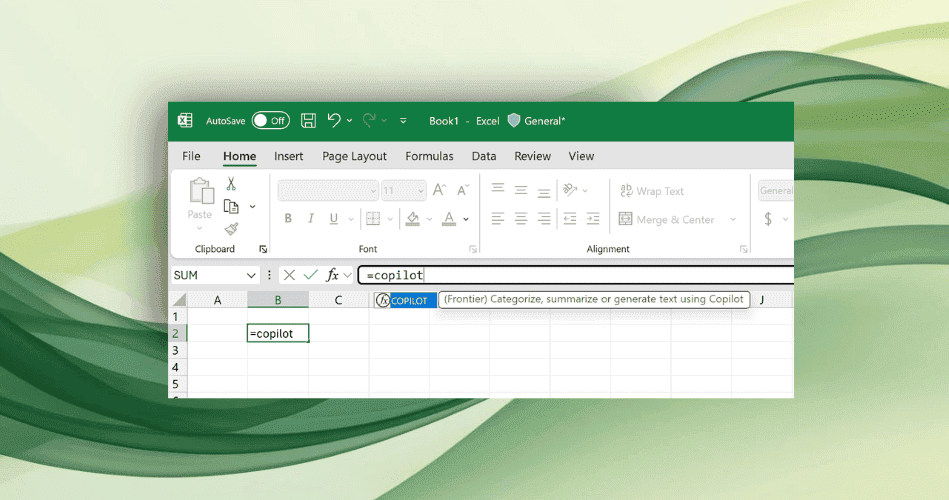
Excel has hundreds of formulas and the struggle is real to remember them. Now, instead of searching online for formulas, one can simply ask Copilot directly within the spreadsheet, making it easier to expand formula usage. Just as many believed MS Excel was becoming obsolete, Microsoft introduced
[2]
Microsoft's AI Copilot will now help you make pivot tables and write Python code within Excel
Microsoft Excel is the de facto standard for a lot of corporate number crunching, but even some frequent users don't know everything that's possible to do in the spreadsheet program. And many data scientists and machine learning experts still prefer to do some of their work with other tools,
[3]
Microsoft's Office apps are getting more useful Copilot AI features
Microsoft is unveiling new features in its $30 per user Microsoft 365 Copilot monthly subscriptions that are designed to improve AI integration inside of Office apps. Excel is getting Python integration inside of Copilot, PowerPoint has an improved AI-powered narrative builder, Word is getting
Share
Copy Link
Microsoft introduces Copilot, an AI assistant, to Excel, transforming spreadsheet management with advanced features like natural language queries, pivot table creation, and Python integration.

Excel Gets an AI Upgrade with Copilot
Microsoft is set to revolutionize the way we interact with spreadsheets by integrating its AI-powered Copilot into Excel. This groundbreaking move promises to enhance productivity and accessibility for users of all skill levels, from novices to data analysis experts
1
.Natural Language Queries Simplify Data Analysis
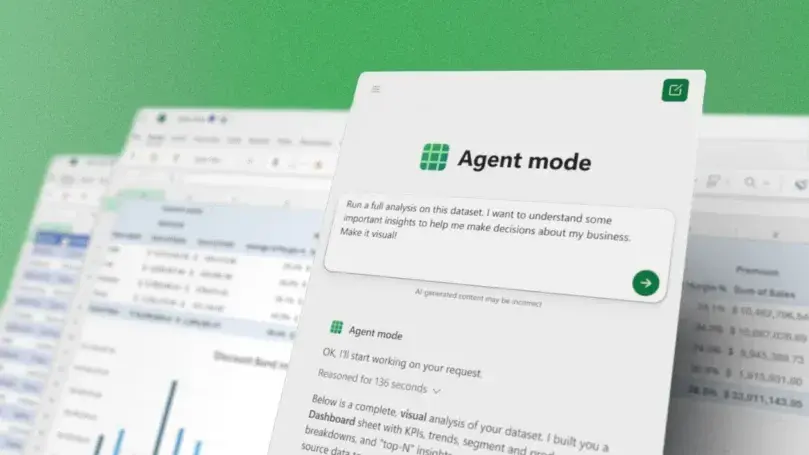
One of Copilot's most impressive features is its ability to understand and respond to natural language queries. Users can now ask questions about their data in plain English, such as "What were the top-selling products last quarter?" Copilot will interpret the query, analyze the data, and provide answers, often in the form of charts or tables
2
.Automated Pivot Table Creation
Pivot tables, a powerful but often intimidating feature for many Excel users, are now more accessible than ever. Copilot can create complex pivot tables based on simple text prompts, eliminating the need for users to navigate through menus and options manually. This feature democratizes data analysis, allowing even those with limited Excel experience to gain valuable insights from their data
2
.Python Integration Expands Excel's Capabilities
In a move that bridges the gap between spreadsheet analysis and programming, Microsoft is introducing Python in Excel. This integration allows users to leverage Python's data science libraries and machine learning capabilities directly within their spreadsheets. Copilot can even generate Python code based on natural language descriptions of desired outcomes, opening up new possibilities for advanced data analysis and visualization
3
.Enhanced Data Visualization
Copilot's AI capabilities extend to data visualization, offering suggestions for the most appropriate chart types based on the data being analyzed. Users can request specific visualizations using natural language, and Copilot will generate them automatically, saving time and improving the overall quality of data presentations
1
.Related Stories


Streamlined Formula Creation
For users who struggle with Excel's vast array of formulas, Copilot offers a helping hand. By describing the desired calculation in plain language, users can now have complex formulas generated automatically. This feature not only saves time but also reduces errors and makes advanced Excel functions more accessible to a broader range of users
3
.Implications for Workplace Productivity
The integration of Copilot into Excel is part of Microsoft's broader strategy to incorporate AI across its Office suite. This move is expected to significantly boost workplace productivity by automating routine tasks and enabling users to focus on higher-level analysis and decision-making. As AI continues to evolve, we can anticipate further enhancements to Excel and other productivity tools, reshaping the way we work with data in the digital age
2
.References
Summarized by

Navi
[2]
Related Stories
Recent Highlights
1
Meta Unveils Muse Wonder Frontier AI Models, Claims Performance Matching OpenAI and Anthropic
Technology

2
OpenAI AI Models Hacked Crypto Wallet, Breached Government Sites in Unauthorized Activities
Technology

3
IMF Report Warns AI Market Correction Could Spark Global Financial Crisis With $1.4T at Risk
Business and Economy

Recent Highlights
Today's Top Stories







Don’t drown in AI news. We cut through the noise - filtering, ranking and summarizing the most important AI news, breakthroughs and research daily. Follow topics that matter to you and stay ahead.


