November Pixel Drop Expands Gemini Intelligence and AI Features to Pixel 10 Series


7 Sources
[1]
November Pixel Drop brings Gemini Intelligence to Pixel 10 family
Spruce up your home screen with expanded custom icons and AI-generated widgets. Google's Pixel phones get an update every month, but most are just security patches and bug fixes. The bigger changes are bundled into quarterly Pixel Drops, and one is rolling out today. The update brings a few new
[2]
Google's impressive Rambler dictation tech is now available on Pixel 10 devices too
November's Pixel Drop also brings other AI features to older Pixel phones, while the Pixel 11's HiLight feature now works with Google Messages. Google is allowing its Gemini-powered dictation tech to trickle down to the Pixel 10 series, meaning those who haven't yet upgraded to the Pixel 11 series
[3]
Google rolls out Create My Widget to Pixel 10 and 11 series, but the Pixel 10a misses out
Google confirmed that Create My Widget is also coming soon to the Pixel Watch 4 and Pixel Watch 5 in select regions. Google's November 2026 Pixel Feature Drop is officially here, bringing one of the most anticipated personalization tools to your Pixel: Create My Widget. Google announced Create My
[4]
November 2026 Pixel Drop: Create My Widget, HiLight for Google Messages, Pixel 10 Rambler, & more
Like last year, the next Pixel Drop is rolling out a month early in November. Coupled with Android 17 QPR2, it's quite a big Feature Drop for Gemini and other AI capabilities, as well as the Pixel 10 series. Gemini Intelligence is coming to the Pixel 10, Pixel 10 Pro, Pixel 10 Pro XL, and Pixel 10
[5]

Your Pixel just got a ton of new features -- here's what dropped and how they work
Google just announced its November Pixel Drop, which adds a slew of new features for Pixel phones and watches. Plus, the Pixel Tag officially goes on sale today (look out for our review here). There's a ton of stuff in the drop, but some highlights include expanded Gemini Intelligence, a new
[6]

Google's Pixel 10 update lets Gemini order groceries, book cabs, and make calls on your behalf
If you decided to hold on to the Pixel 10 instead of splurging on the Pixel 11 (great decision, by the way), I have some really good news for you. Google's latest Pixel Drop brings Gemini Intelligence, the agentic AI ability that basically executes multi-step tasks on your behalf, to the baseline
[7]
Google Pixel phones are getting custom AI widgets, new icons, and a useful HiLight upgrade
You can now build your own widgets just by describing what you want, and there's more coming. If you like customizing your Pixel phone, Google has just announced a bunch of new features that might interest you. The November Pixel Drop is bringing a new AI-powered tool that lets you create your own
Share
Copy Link
Google's November Pixel Drop extends Gemini Intelligence to the Pixel 10 lineup, bringing Rambler dictation that removes filler words and formats speech into clean text. The update introduces Create My Widget for building custom home screen widgets using natural language prompts, while the Pixel 10a notably misses out on these AI-powered features.
Google Expands Gemini Intelligence to Pixel 10 Series
Google's November Pixel Drop brings a significant expansion of AI features to the Pixel 10 lineup, marking one of the most substantial quarterly updates for the company's smartphone ecosystem.
1
While most monthly Pixel updates focus on security patches and bug fixes, this quarterly drop introduces features previously exclusive to the Pixel 11 series. However, the budget-oriented Pixel 10a remains excluded from these AI-powered features, creating a clear distinction in Google's device hierarchy.3
The rollout centers on Gemini Intelligence, Google's branding for its suite of AI capabilities that debuted with the Pixel 11. This expansion means Pixel 10, Pixel 10 Pro, Pixel 10 Pro XL, and Pixel 10 Pro Fold users now gain access to tools that reshape how they interact with their devices.
4

Source: Digital Trends
Rambler Dictation Technology Reaches Older Devices
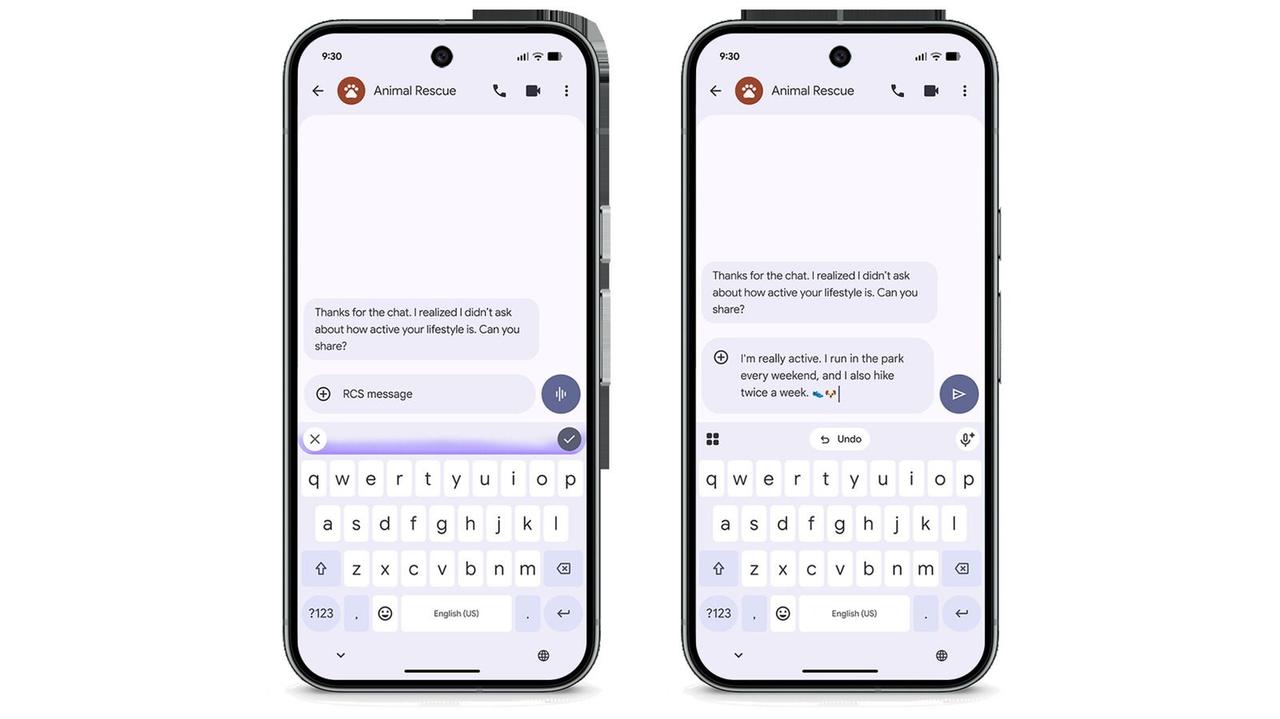
The standout addition is Rambler dictation, an AI-assisted voice input system that transforms natural language ramblings into coherent, grammatically correct text.
2
This Gemini-powered technology automatically strips out filler words like "umms" and "ahhs," removes unnecessary words, and smooths out self-corrections during dictation. The keyboard-native feature earned praise in initial Pixel 11 reviews despite skepticism from users who typically avoid voice texting.2
For Pixel 10 and 11 series users, Rambler represents a fundamental shift in how voice input functions. Instead of requiring carefully structured speech, users can speak naturally while Gemini handles the formatting and cleanup work behind the scenes.
5
Source: Engadget
Create My Widget Brings Generative AI to Home Screen Customization
Create My Widget, previously exclusive to Googlebook laptops, now arrives on Pixel 10 and 11 series phones.
3
This generative AI tool lets users design personalized home screen widgets through natural language prompts. Under the "Describe your widget" prompt screen, users can provide minimal or detailed guidance to generate custom widgets.For example, entering "Show me my monthly shopping spend" generates a carousel of Material-style widgets displaying November spend totals with dedicated icons.
3
Users can preview, edit, or recreate widgets before adding them to their home screen. The feature supports data accessible through search, including stock prices, sports scores, and weather, as well as select Google account data from Gmail or calendar.1
Google confirmed that Create My Widget will arrive "coming soon" on Pixel Watch 4 and Pixel Watch 5 in select regions with English language support.
3
Gemini App Automation and Proactive Actions Expand Capabilities
The November Pixel Drop introduces Gemini app automation to Pixel 10 devices, enabling multi-step task completion across select app categories.
4
These automations work with rideshare, food delivery, travel, grocery ordering, marketplace transactions, and reservation booking apps.1
Proactive Gemini Actions, previously known as Magic Cue, now deliver improved personalized suggestions. Users can send grocery lists to Google Keep directly from ongoing conversations and generate summaries through the context menu.
4
For Pixel 10 and 11 phones, Gemini can make calls on behalf of users for tasks like checking inventory, putting items on hold, or changing reservations.5
AI-Powered Icon Theming Gets Major Upgrade
Google's AI-powered icon theming, introduced in March, receives a significant enhancement through the more powerful Nano Banana model.
1
This upgrade unlocks 10 new icon styles for home screens on Pixel 6a and newer devices. The original feature matched icon colors to system themes when developers didn't include necessary theming assets, but the Nano Banana model delivers higher-quality icons with expanded customization options.4
Related Stories

HiLight Notification System Expands to Google Messages
The Pixel 11's HiLight camera module notification system now supports Google Messages alongside incoming calls.
2
When a Pixel 11 Pro sits face-down, the HiLight module glows when users receive messages from important contacts.5
While this represents an improvement for Google's hardware feature, it highlights the limitations compared to notification LEDs from previous smartphone generations.1
Pixel Watch Gains Step-by-Step Workout Guidance
Pixel Watch 3 and newer models now offer step-by-step workout routines that track live metrics on the watch display.
2
The feature provides instructions for each exercise in a routine and logs reps and weights without interrupting live metrics.1
This functionality also works on phones, expanding workout tracking options across Google's device ecosystem.5

Source: 9to5Google
Pixel Tag Tracker Launches Alongside Feature Drop
Google's Pixel Tag, announced in August, officially goes on sale with this update.
2
The pill-shaped tracker pairs with devices running Android 9 or later, though accessing its full feature suite requires Bluetooth 6.0 support and Android 16. Pricing starts at $29 for a single unit or $99 for a four-pack, positioning it as Google's answer to Apple's AirTag.2
The November Pixel Drop begins rolling out today and should reach most devices within days.
1
The update demonstrates Google's commitment to extending premium AI features across its device lineup, though the exclusion of the Pixel 10a suggests the company maintains clear segmentation between budget and flagship experiences.References
Summarized by

Navi
[3]
[4]
Related Stories
Google's December 2024 Pixel Update: Gemini AI Takes Center Stage with Personalization and Extended Functionality
06 Dec 2024•Technology

Google's October 2024 Pixel Drop: AI Enhancements and Feature Upgrades Across Devices
16 Oct 2024•Technology

Google's March 2025 Pixel Feature Drop: AI-Powered Upgrades and Enhanced Connectivity
05 Mar 2025•Technology

Recent Highlights



Recent Highlights
Today's Top Stories







Don’t drown in AI news. We cut through the noise - filtering, ranking and summarizing the most important AI news, breakthroughs and research daily. Follow topics that matter to you and stay ahead.


