ShareX swaps Windows' text recognition for a local AI engine that reads over 100 languages


2 Sources
[1]
My favorite third-party Windows screenshotting tool just got even better at extracting text from images
* ShareX 22.5 swaps Windows OCR for AI-powered PaddleOCR with far better accuracy and support for100+ languages. * Region capture now opens about twice as fast, and the image editor adds right-click delete for shapes and size-to-fit. * A new pixel-art editor comes with layers, animation timeline,
[2]
Windows' best free screenshot app just got much better at copying text off your screen
ShareX 22.5.0 replaces Windows' built-in OCR with a local AI engine that can recognize text in over 100 languages. There are no language packs to install or languages to pick. The project says the results are significantly more accurate, and the update is currently available as a pre-release. Add
Share
Copy Link
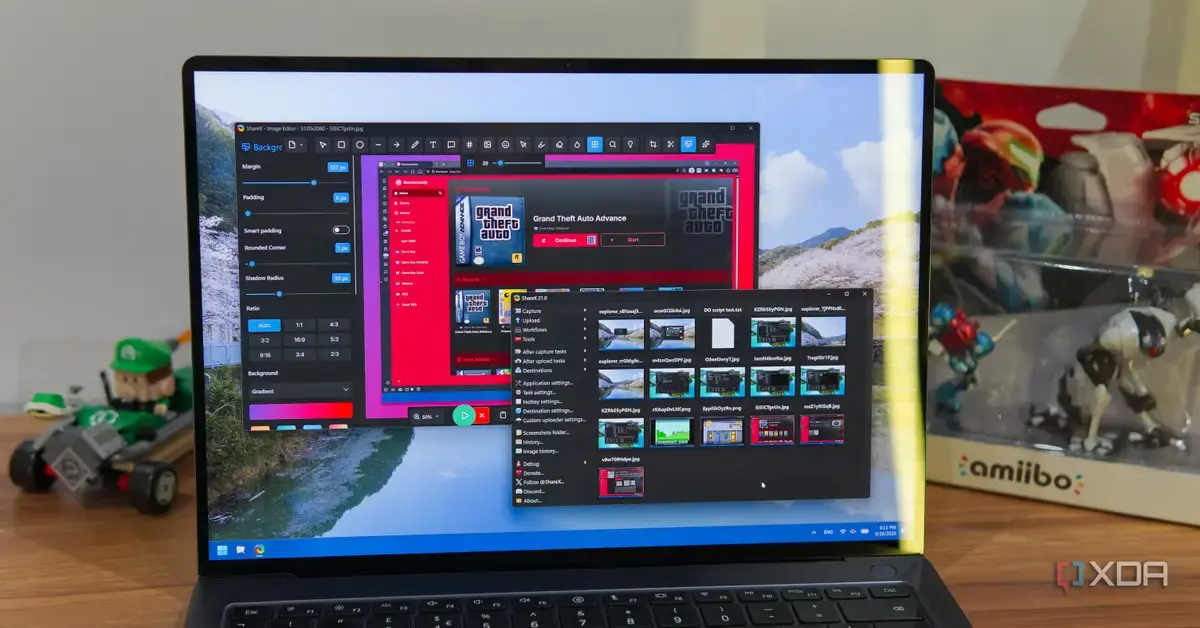
ShareX, the free open-source screenshot utility for Windows that one outlet calls the best free screenshot app, has released version 22.5.0, and its headline change swaps the recognizer Windows supplies for PaddleOCR, an AI-powered text recognition engine
1
2
.
Source: XDA-Developers
What the new engine does
Text recognition quality matters to anyone who uses the tool to copy text out of images, and that is the change this release leads on. The project's release notes put it plainly: "Replaced Windows OCR with AI powered PaddleOCR, which gives significantly more accurate results. It supports over 100 languages out of the box, with no language packs to download and no switching between languages, and everything still runs locally on your device" (ShareX release notes)
1
.Local processing means the text extraction works offline, and the multilingual support removes the old friction of downloading Windows language packs
2
. The recognition models are small enough to bundle rather than download separately: two models plus configuration files total about 31MB, included in both the setup and portable builds2
.The recognition window has been redesigned around the new engine. It shows a preview with recognized text outlined, supports click-to-copy per region and mouse-wheel zoom, and adds a Separate paragraphs option plus the ability to make captured text searchable in history.
The writer who reported the change judged from PaddleOCR's GitHub demos that it handles handwritten and tightly packed English well
1
. The accuracy claim rests on the project's own word plus that impression; no independent test has been run yet1
.Everything else in 22.5.0
The release adds a pixel art editor with layers, an animation timeline, tilemaps, slices, plus importing and exporting sprite sheets. That stretches the free tool well past screenshots
1
2
. Region capture, the path most users hit most often, now opens about twice as fast1
2
. Smaller tweaks round it out. Right-click deletes a shape under the cursor, the image editor can size its window to fit the image, and there is an optional compact toolbar. The ellipse and freehand region tools have returned. The project also migrated the app to a newer framework version2
.The trade is size. The 64-bit setup grew from 138.7MB to 160.4MB and the portable build from 200MB to 221.8MB, with the recognition models, the pixel editor and the framework migration all contributing
2
.That puts it alongside Microsoft's PowerToys Text Extractor as another free, local way to grab text from the screen
2
. It targets people who use ShareX as a stand-in for several Windows utilities, or who copy text with Windows 11's Snipping Tool2
.Related Stories



Getting it
Version 22.5.0 is currently a pre-release, and the ShareX website's setup and portable buttons still point to stable version 22.4.0. Getting the new engine means downloading the pre-release separately
2
. As of reporting, the project has not published hardware requirements for it. Anyone on an older machine cannot yet check whether the local recognition will run before downloading2
.References
Summarized by

Navi
[1]
Related Stories
Recent Highlights


Recent Highlights
Today's Top Stories










Don’t drown in AI news. We cut through the noise - filtering, ranking and summarizing the most important AI news, breakthroughs and research daily. Follow topics that matter to you and stay ahead.


