Google unveils Gemini Intelligence, transforming Android into an AI-first smartphone platform


26 Sources
[1]
Android is getting a big AI overhaul in 2026
Google's I/O conference is next week, and we expect to hear a lot about the company's AI endeavors. The company says there's so much to talk about that it's spilling the Android beans a little early, and yes, a lot of AI is involved. In the coming months, Google will roll out more smartphone AI
[2]
Google brings agentic AI and vibe-coded widgets to Android | TechCrunch
Google announced a number of new Gemini Intelligence-branded AI features at its "Android Show: I/O Edition" event on Tuesday. These include the ability for AI to complete tasks across apps, browse the web, fill out forms, dictate speech, and even allow you to vibe-code your own Android
[3]
Google Just Took Another Step Toward the AI-First Smartphone
After years of sprinkling AI into its mobile products, Google's fully leaning in. The company is integrating Gemini more deeply into Android, allowing its AI assistant to manage a wider range of everyday tasks across apps -- a move that could fundamentally reshape how people interact with their
[4]
Your Android phone is getting agentic powers with Gemini Intelligence - here's how and when
Gemini Intelligence will roll out first to Galaxy and Pixel phones. At I/O 2026, Google announced something called Gemini Intelligence. It's the company's next step toward turning Android from a mobile OS into a personal AI agent that can get things done for you on your phone. Also: I tested
[5]
Android 17 Is Smarter Than Ever, Thanks to Gemini Intelligence
Blake has over a decade of experience writing for the web, with a focus on mobile phones, where he covered the smartphone boom of the 2010s and the broader tech scene. When he's not in front of a keyboard, you'll most likely find him playing video games or watching horror movies. Android is no
[6]

Google's Gemini Intelligence can fill your shopping cart straight from your notes app
* Agentic AI has eclipsed chatbots; AI now acts on your behalf and doesn't just answer questions. * Gemini Intelligence adds agentic app actions and visual context to Android's assistant. * Rollout starts on the latest Samsung Galaxy and Google Pixel this summer; wider Android rollout later in
[7]

Everything announced at The Android Show: I/O 2026 edition - Engadget
As companies like Google continue to nudge us toward using agentic AI systems and expand their capabilities, concerns regarding privacy and security continue to grow. The company claims that many of the Gemini Intelligence features harness the same systems that protect other Google products, and
[8]

Google races to put Gemini at the center of Android before Apple's AI reboot
An Android character is displayed in front of a building on the Google headquarters campus on July 23, 2025 in Mountain View, California. Google is using its latest Android rollout to make Gemini less of a chatbot and more of an operating layer across the phone, browser, car and laptop, just weeks
[9]

Google "Gemini Intelligence" shows off agentic Android 17 features that Apple has yet to deliver with Siri
Serving tech enthusiasts for over 25 years. TechSpot means tech analysis and advice you can trust. In brief: A large portion of Google's recent Android Show event focused on the next major update for the company's generative AI assistant. Later this year, the newest Android devices will begin
[10]

If Gemini can do everything for me, what's the point of Android?
We didn't see it coming (honestly, neither did Apple), but Google just showcased what could perhaps be the biggest moment for AI: Gemini Intelligence. It brings to reality Gemini's agentic mode that we have all been dreaming of: where AI can execute multi-step tasks on your behalf as you watch your
[11]

Google is Unleashing Gemini on Android Users
Google has given us a new naming convention to navigateâ€"along with giving Android users some new features. On Tuesday, in the lead-up to the company's Google I/O developer conference, it announced Gemini Intelligence, a suite of AI-powered features that will reportedly integrate more deeply into
[12]

Google is quietly turning Gemini into a productivity OS, and it's awesome
When he is not busy with technical analysis and software evaluation, Parth dedicates his time to watching K-dramas, studying mobile technology trends and the role of artificial intelligence. Gemini is no longer a mere chatbot on Android. By moving Gemini from a simple overlay to a central
[13]

Android 17 isn't an operating system anymore -- it's a digital assistant that controls your phone
Joe Fedewa has been writing about technology for over a decade. Android and the rest of the Google ecosystem have been a focus for years, as well as reviewing devices, hosting podcasts, filming videos, and writing tutorials. Joe loves all things technology and is also an avid DIYer and food
[14]
Gemini Intelligence brings app automation to Android - Engadget
If Google has its way, soon your phone, and many other Android-based devices, won't need much input from you at all. During the Android Show: I/O Edition, the company announced Gemini Intelligence, a system designed to automate tedious tasks. In short, Google has created a computer use agent
[15]

Gemini Intelligence brings gen UI widgets, Gboard 'Rambler' to Android, debuting on Pixel & Samsung
Google today announced "Gemini Intelligence" as the overarching name for a new series of AI features on premium Android devices. Gemini Intelligence starts with a design language that builds upon Material 3 Expressive. It's meant to subtly indicate when Gemini is listening, thinking, and working
[16]

Google just revealed 'Gemini Intelligence' -- and it could change Android forever
Gemini is now the intelligence layer powering Android itself For the past two years, Google has mostly been framed around Gemini as a chatbot. From Gemini Live to Nano Banana, Gemini has proved to be a useful tool for users, even reaching the number one spot in Google play and app store. But
[17]

Google just revealed Gemini Intelligence for Android -- here are 7 ways it wants your phone to do all the work for you, so you don't have to
* Gemini Intelligence adds AI-powered automation directly into Android and Chrome * New features include smarter Autofill, voice cleanup, and custom AI widgets * Google wants Android to handle more tedious digital tasks for you Google has just unveiled Gemini Intelligence for Android at the
[18]

6 things Gemini Intelligence is about to do across your Android devices
Google is bringing Gemini Intelligence to Android, which brings the best of Gemini to its most intelligent devices. The company really wants you to get your work done by Gemini throughout the day, all while staying in control and keeping your data private. Google is rolling out these features
[19]

Android Is About to Get a Lot Smarter With Google AI Boosts -- Here's How - Decrypt
Gemini Intelligence launches first on Samsung Galaxy S26 and Google Pixel 10 devices this summer. Google wants Android phones to act less like collections of separate apps and more like AI agents that handle tasks in the background. Google on Tuesday introduced "Gemini Intelligence," a new AI
[20]

Android's Agentic Future: Building Gemini Intelligence on a Foundation of Security & Privacy
Android is evolving from an operating system into an intelligence system. With Gemini Intelligence, your device can help you get things done by deeply understanding your context, anticipating your needs, and completing tasks on your behalf. Because great AI experiences require uncompromising
[21]

Google Just Announced 'Gemini Intelligence' at The Android Show: I/O Edition
Gemini Intelligence can generate custom widgets based on your prompts, which lets you create personal widgets for your home screen. Google's AI has gone through a couple of stages thus far. First, Google launched "Bard" as a direct competitor to ChatGPT. Soon after, the company rebranded to
[22]

Gemini gets a major upgrade on Android phones, where widgets plan for you
Sara Heritage is a tech and gaming journalist, who's currently making her way up to Master Ball rank in Pokemon Champions. Bylines in IGN, GAMINGbible, The Gamer and more. You can usually find her tinkering with tech, or restoring old consoles, always with one of her 3 cats nearby. Come and talk
[23]

Google Says It Will Bring These Agentic Capabilities to Android Soon
Google is bringing Gemini Intelligence to Android, its new suite of AI-powered tools for its operating system, the Mountain View-based tech giant announced during the Android Show I/O Edition event. The company hosted the event as part of Google I/O, which is scheduled to take place from May 19 to
[24]

Google introduces Gemini intelligence to make android more proactive and personal
Google has unveiled Gemini Intelligence, a new AI-powered experience designed to make Android devices smarter, more proactive, and deeply personalised. The update brings advanced automation, intelligent form filling, natural voice refinement, and custom widget creation directly into Android
[25]

Android Intelligence System brings Gemini app automation, AppFunctions, and XR support
At The Android Show, Google announced a major shift for Android, positioning the platform as an "Intelligence System" powered by Gemini. The company said Android is evolving beyond a traditional operating system by combining AI, hardware, and software to proactively assist users across apps and
[26]

Gemini Intelligence comes to Android 17: How worried should Apple be?
The battle lines have been drawn by Google at its recent Android Show 2026. Gemini Intelligence, the new premium AI level for Android from Google, is scheduled to roll out this summer, and it will do things that Apple Intelligence can't. The point is not if Apple needs to worry about it but whether
Share
Copy Link
Google announced Gemini Intelligence at its Android Show event, marking a significant AI overhaul for Android in 2026. The system enables agentic AI capabilities that handle multi-step tasks across apps, from booking appointments to filling forms. Rolling out first to Samsung Galaxy and Google Pixel devices this summer, the update positions Android as an "intelligence system" rather than just an operating system.
Google Positions Android as Intelligence System with Gemini Integration
Google has announced a major AI overhaul for Android through Gemini Intelligence, a system-level integration that transforms how users interact with their smartphones
1
. Unveiled at the company's "Android Show: I/O Edition" event, the update represents Google's commitment to building an AI-first smartphone experience where Google Gemini serves as a personal AI agent capable of handling complex tasks without constant user instruction2
.
Source: ZDNet
According to Ben Greenwood, director and product manager for Android Core Experiences, the technology marks a fundamental shift. "The difference between the technology of yesterday and the technology of Gemini Intelligence is that it's there with you," he explained
3
. Google now describes Android 17 not as an operating system, but as an "intelligence system" designed to learn and work on behalf of users5
.Agentic AI Handles Multi-Step Tasks Across Apps
The cornerstone of Gemini Intelligence lies in its ability to execute multi-step tasks across apps through agentic AI capabilities. Users can press the phone's power button and describe a task, with the content on screen providing context for the assistant
2
. The system can find a course syllabus in Gmail and automatically add necessary books to a shopping cart, or transform a grocery list from a notes app into a complete delivery order1
.App automation expands on earlier testing Google conducted with DoorDash and Uber on Pixel and Samsung Galaxy phones, though the initial experience proved frustrating
1
. Google has spent months fine-tuning the system to handle more sophisticated cross-app tasks. Users can now snap a picture of a travel brochure and ask Gemini to find a similar tour for six people on Expedia, or secure a front-row bike during a spin class4
.These Android AI-powered features will run in the background, with progress updates surfaced through notifications, and users must approve final confirmations before tasks complete
4
. However, automation currently works only in select apps, primarily limited to food and grocery ordering and ride-hailing services1
.Gemini-Powered Auto Browse and Chrome Integration
The Gemini-powered Auto Browse feature, which debuted on desktop Chrome several months ago, will launch on Android toward the end of June for all Android 12 and higher devices
1
. This feature uses powerful cloud-based Gemini models to parse webpages and handle multi-step tasks, including booking appointments, making reservations, and building delivery carts4
.In late June, Android devices will also receive Gemini in Chrome, an AI feature that helps users summarize content or ask questions about webpage information, similar to the desktop experience
2
. While Auto Browse on desktop can complete ordering, booking, and reservation tasks, Android users will initially receive Gemini's ability to work across tabs for research, summarization, and comparison4
.Enhanced Autofill and Form Completion Capabilities
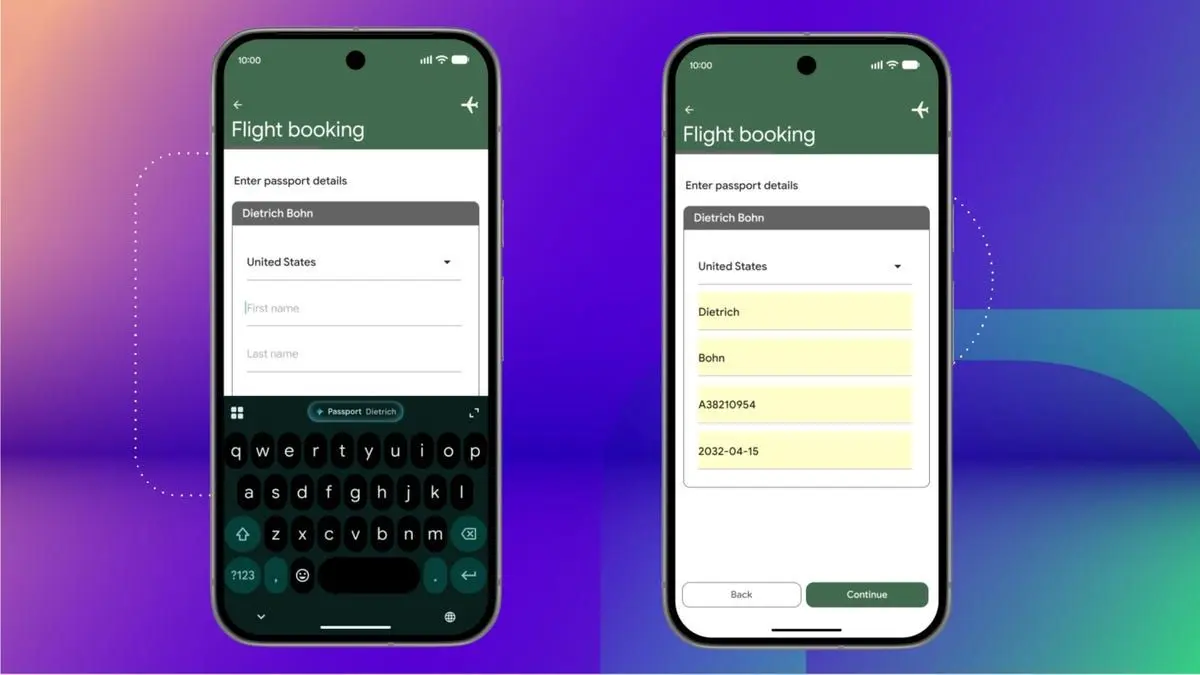
Gemini Intelligence introduces AI-powered features for Android that extend to form filling through an enhanced Autofill experience. The system can now leverage Personal Intelligence to complete complicated forms using specific information pulled from connected Google apps like Gmail, Docs, Drive, Photos, and YouTube
4
. Instead of just filling in basic details like names and addresses, Autofill can automatically populate forms with passport numbers, driver's license information, or license plates with a single tap5
.
Source: CNET
Google emphasized that this new Autofill experience with Personal Intelligence is entirely opt-in and can be turned on or off in settings at any time
2
. The feature aims to reduce the tedious work of manually entering information across multiple fields, particularly for complex forms that require detailed personal data.Rambler Transforms Speech-to-Text on Gboard
Gboard on Android is gaining a Gemini Intelligence-powered dictation feature called Rambler, designed for users who rely on voice-to-text functionality
4
. The feature uses Gemini's multimodal capabilities to transcribe natural speech while removing filler words, self-corrections, and repetitions2
.For example, if a user says "Can you get toast, cereal and bananas -- actually no bananas," Rambler will only transcribe toast and cereal
3
. The real-time transcription tool can also handle multilingual switching within a single message, accommodating how people actually speak rather than requiring structured dictation4
.Related Stories

Vibe-Coded Widgets and Material Expressive Design
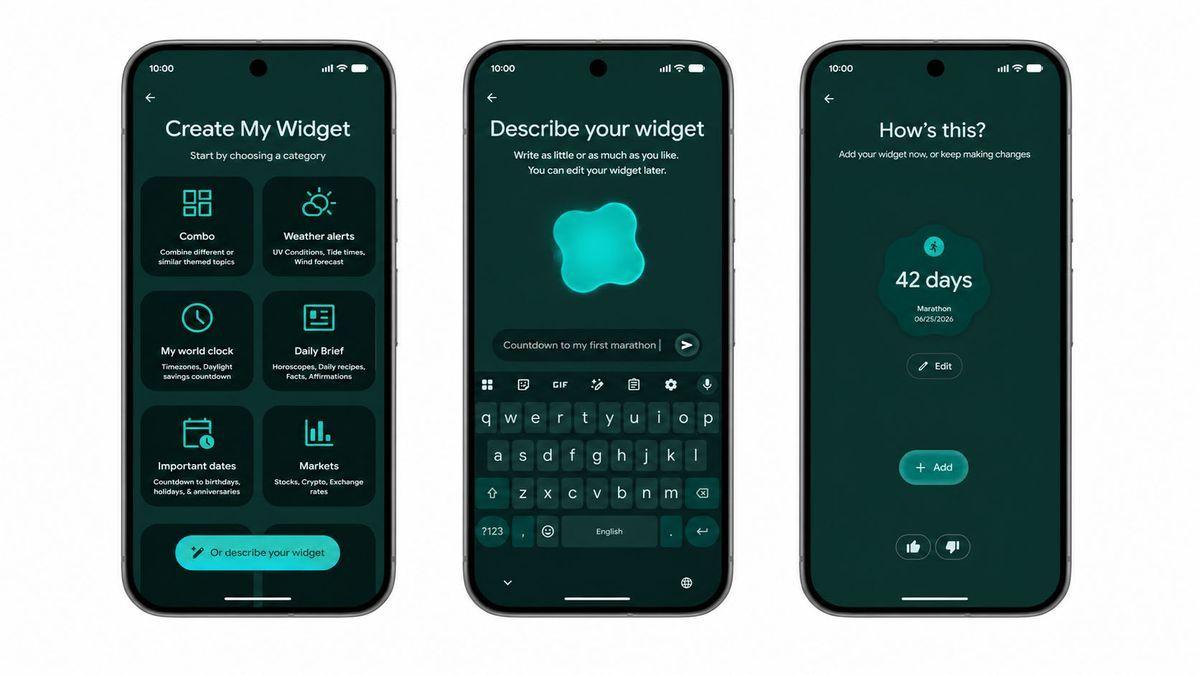
Google is introducing a feature that allows users to build vibe-coded widgets by describing them in natural language
2
. Users can create custom widgets using simple prompts like "Suggest three high-protein meal prep recipes every week" or request displays showing temperature in both Fahrenheit and Celsius3
. These widgets aren't tied to specific apps but surface information users would typically need to access manually5
.
Source: TechRadar
Gemini Intelligence will follow Google's Material 3 expressive design language, featuring visual cues when the AI is thinking, listening, or working on behalf of users
2
. The design refinements are intended to be subtle and functional rather than flashy, melting into the background and surfacing only when needed5
.Rollout Timeline and Device Availability
Gemini Intelligence will first arrive on the latest Samsung Galaxy and Google Pixel devices this summer, with availability expanding to other Android devices later this year
2
. The system will also work on Android Auto, Wear OS, and Google's smart glasses for a unified experience across devices3
.Google hasn't specified which upcoming Galaxy devices will be compatible, though Samsung is expected to unveil the next generation of its foldables in coming months
3
. The company is also set to debut new Pixel phones during the summer rollout period.Industry Implications and Competitive Landscape
Bringing Gemini Intelligence to premium Android devices could give Google an edge over competitors like Apple, which has yet to deliver a more intuitive Siri experience to the iPhone
3
. The Android AI shift signals what industry analyst Ming-Chi Kuo describes as a fundamental change in how people think about smartphones: "Users are not trying to use a pile of apps. They are trying to get tasks done and fulfill needs through the phone"3
.Reports suggest OpenAI may be developing its own AI-powered smartphone with potential mass production in the first half of next year, while Amazon is reportedly eyeing reentry into the smartphone market with a handset focused on AI features rather than traditional apps
3
. These developments indicate the broader industry is moving toward AI-centric devices that could eventually replace app-based interactions with intelligent agents that respond to user commands.Greenwood acknowledged growing AI fatigue, noting the team focused on solving real problems people encounter. "We're all a little fatigued of the 'Times Square-AI' kind of experience," he said, emphasizing the importance of practical applications over flashy announcements
3
. With Google I/O still a week away, additional announcements are expected as the company sets the tone for developer conference season before Apple and Microsoft present their own AI initiatives5
.References
Summarized by

Navi
[1]
[4]
Related Stories
Google's Gemini gains screen automation to control Android apps and perform tasks for you
04 Feb 2026•Technology
Google Gemini Set to Revolutionize Android 16 with Advanced In-App Task Automation
22 Nov 2024•Technology

Google Unveils Gemini Live: Revolutionizing AI Assistance with Real-Time Video and Screen Sharing
03 Mar 2025•Technology
Recent Highlights



Recent Highlights
Today's Top Stories






Don’t drown in AI news. We cut through the noise - filtering, ranking and summarizing the most important AI news, breakthroughs and research daily. Follow topics that matter to you and stay ahead.


