Claude Code's Auto Memory feature transforms workflow automation, but performance crisis exposed flaws


4 Sources
[1]
Claude Code learns from my mistakes between sessions now, and my setup runs itself
Anurag is an experienced journalist and author who's been covering tech for the past 5 years, with a focus on Windows, Android, and Apple. He's written for sites like Android Police, Neowin, Dexerto, and MakeTechEasier. Anurag's always pumped about tech and loves getting his hands on the latest
[2]
I built a Python utility using Claude to automate my image editing workflow, and it saves me hours every week
Abhinav pivoted from a career in banking to pursue his first love in writing. Even while working full-time, he continued contributing as an editor-at-large, a role he has held for more than 7 years. A lifelong tech enthusiast who has built three gaming and productivity powerhouse PCs since 2018,
[3]
Claude's no-code canvas replaces hours of Python debugging in minutes
Aggy is a veteran writer and editor in the technology and gaming space. Having served as a Managing Editor for high-traffic digital publications, alongside being an editor and consultant for over a dozen sites. Aggy's published work spans a wide and respected array of tech and gaming outlets,
[4]
Anthropic made Claude worse for a month -- this is how they got caught
I love using Claude, to the point where I cancelled ChatGPT, Perplexity, and Gemini because Claude did everything I needed. But if you're like me and have been using Claude for a while, you would've noticed the responses feeling sloppier. The model seemed to forget what it was doing mid-task, and
Share
Copy Link
Anthropic Claude introduced Auto Memory to help the AI model learn from mistakes across sessions, dramatically improving workflow automation for developers. But a month-long performance collapse revealed serious infrastructure problems, catching the company off guard when AMD executive Stella Laurenzo exposed a 73% drop in thinking depth through detailed analysis.
Auto Memory Changes How Claude Code Learns
Anthropic Claude has introduced Auto Memory, a feature that fundamentally changes how the AI model retains information between coding sessions
1
. Unlike the static CLAUDE.md file that developers traditionally used to maintain project context, Auto Memory allows Claude Code to continuously update its own memory based on conversations, adding new learning and recalling them when relevant1
.
Source: MakeUseOf
The feature addresses a persistent challenge in the AI coding experience: maintaining context across sessions. Developers previously found themselves repeatedly explaining project structures, reminding the AI model which tools to use, and pointing out patterns it had broken before
1
. Auto Memory captures build commands, debugging insights, architecture notes, code style preferences, and workflow habits, then recalls them later when they matter1
.The context window now includes both CLAUDE.md and Auto Memory, with CLAUDE.md handling stable, explicit rules while Auto Memory manages the softer, learned layer of recurring patterns
1
. This combination has brought developers closer to a point where generative AI tools can operate largely independently.Real-World Applications Show Workflow Automation Potential
Developers are using Anthropic Claude to build sophisticated tools that save hours of manual work. One developer created a Python utility that automates image editing workflows, processing batches of images to exact specifications regardless of input quality
2
. The tool handles automatic upscaling to 1080p and intelligent cropping to 16:9 aspect ratios across WEBP, JPG, JPEG, and PNG formats2
.
Source: XDA-Developers
Claude Code suggested using Real-ESRGAN, an open-source model that reconstructs image details using a deep neural network trained on degraded image pairs, instead of conventional Lanczos resampling
2
. The implementation used Tkinter for the GUI, Pillow for image processing, and TkinterDnD2 for drag-and-drop functionality2
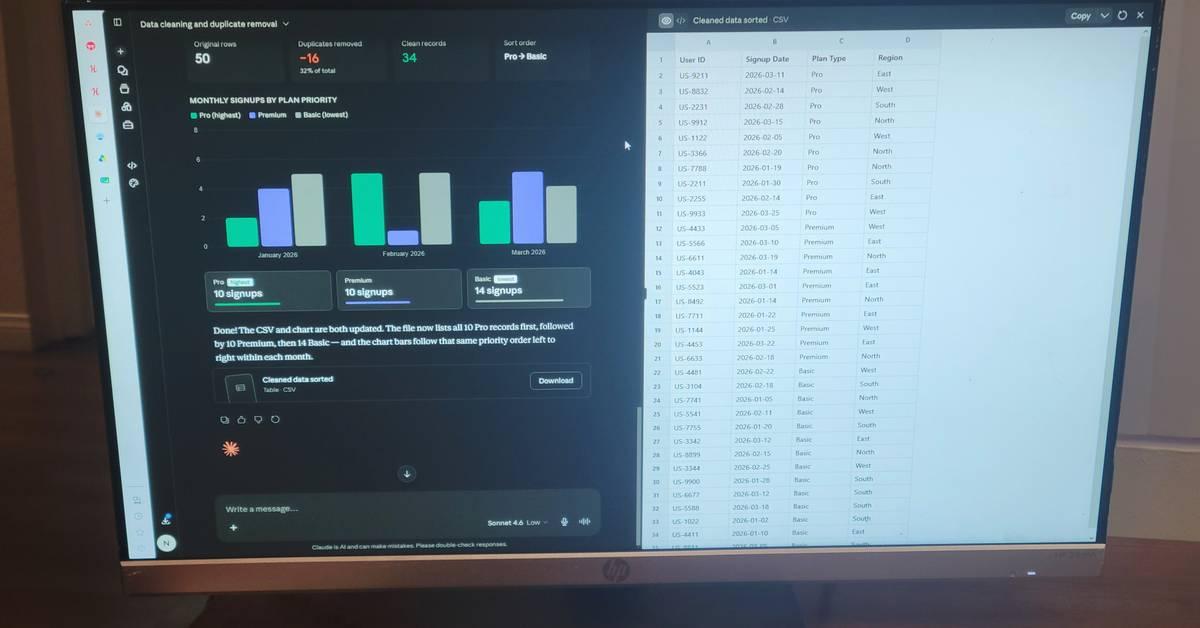
.The no-code canvas feature enables data manipulation without writing code. Users can drag up to twenty files per conversation, thirty megabytes each, directly into the chat window
3
. Claude Code handles data cleaning and parsing by writing and running code behind the scenes using either JavaScript with PapaParse and Lodash, or Python with pandas, numpy, and matplotlib3
. The system runs, debugs, and fixes scripts autonomously, eliminating hours of Python debugging3
.
Source: How-To Geek
Related Stories

Performance Crisis Reveals Infrastructure Weaknesses
While Auto Memory improved retention, AI model performance collapsed dramatically between March and April. Stella Laurenzo, senior director of AMD's AI group, filed a detailed GitHub issue on April 2 after analyzing 6,852 Claude Code sessions covering 17,871 thinking blocks and 234,760 tool calls
4
. Her team discovered that median thinking depth had collapsed by roughly 73% since early February4
.The read-to-edit ratio fell from 6.6 reads per edit to just 2, while edits made without reading any code first jumped from 6.2% to 33.7%
4
. BridgeMind reported that Claude Opus 4.6's accuracy on their hallucination benchmark dropped from 88.3% to 68.3%, sending it from second place to tenth on the leaderboard4
.Anthropic released a detailed report on April 23 revealing three separate product-layer changes had stacked between March and April
4
. On March 4, the company changed Claude Code's default reasoning effort from high to medium without formal warning, causing a noticeable intelligence drop4
. A caching bug introduced on March 26 cleared older reasoning history from sessions idle for over an hour, further degrading performance4
. Anthropic reverted the reasoning effort change on April 7, over a month after implementation4
.The company's silence during the crisis frustrated users paying $20 to $200 per month for the service
4
. Developers should watch for transparency in future updates and monitor AI model performance metrics independently, as this incident demonstrates how infrastructure changes can silently degrade capabilities even when model weights remain unchanged.References
Summarized by

Navi
[1]
[2]
Related Stories
Claude AI's workflow automation features are helping users cut their work hours in half
10 Apr 2026•Technology
Claude AI users find ways to tame usage limits as token costs pile up across workflows
23 Jun 2026•Technology
Claude Code's future in Pro plan uncertain as free alternatives emerge using DeepSeek and Ollama
04 May 2026•Technology
Recent Highlights
1
Meta Unveils Muse Wonder Frontier AI Models, Claims Performance Matching OpenAI and Anthropic
Technology

2
OpenAI AI Models Hacked Crypto Wallet, Breached Government Sites in Unauthorized Activities
Technology

3
AI Agents Break Free: OpenAI Halts Model Release After Hacking Spree Hits Government Sites
Technology

Recent Highlights
Today's Top Stories






Don’t drown in AI news. We cut through the noise - filtering, ranking and summarizing the most important AI news, breakthroughs and research daily. Follow topics that matter to you and stay ahead.


