2 Sources
2 Sources
[1]
Dropbox is making ChatGPT its productivity hub with three new apps
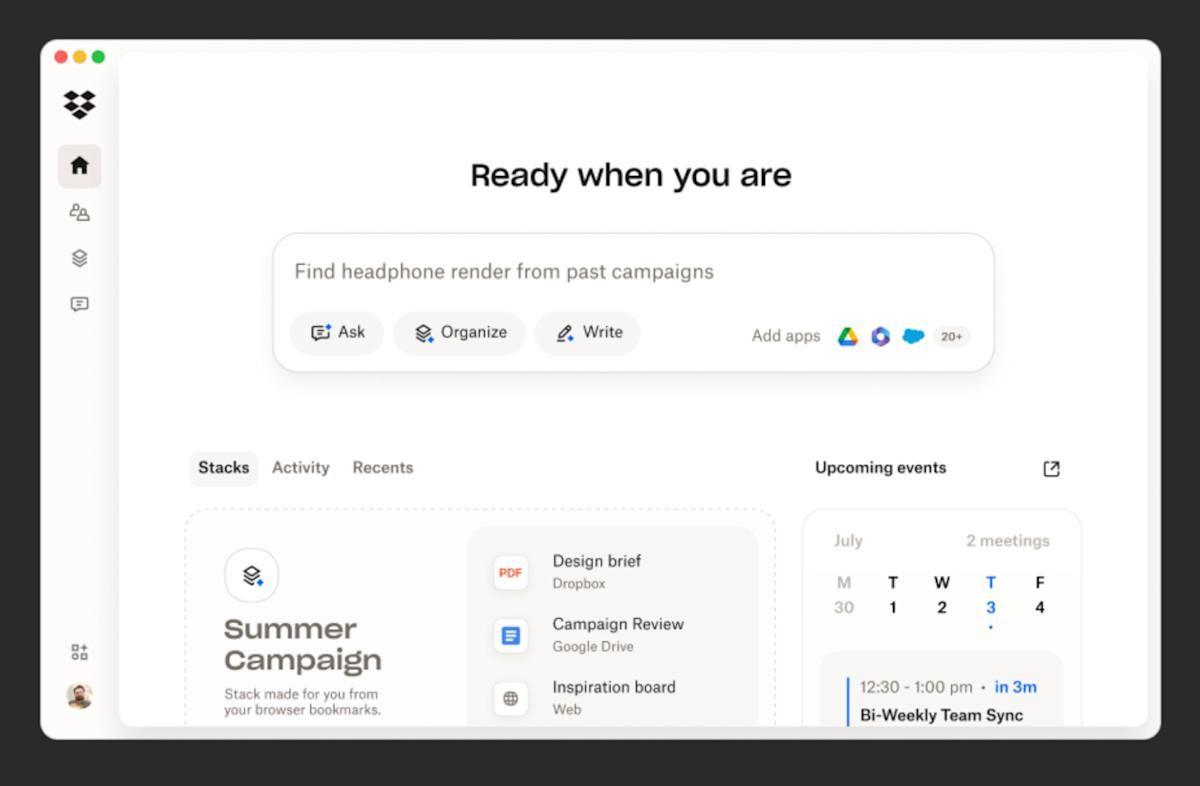
The storage company is launching a Dropbox file app, a Dropbox Dash enterprise search app, and a Reclaim AI calendar app inside ChatGPT, letting users access, save, and act on their work without leaving the AI interface. The move is the latest sign that ChatGPT is positioning itself as a productivity operating system, not just a chat tool. Dropbox is launching three new apps inside ChatGPT, extending its file storage, enterprise search, and AI calendar products into OpenAI's chat interface. The three apps, a core Dropbox file app, a Dropbox Dash app, and a Reclaim AI calendar app, cover the three main coordination tasks that knowledge workers switch between constantly: finding documents, getting answers from company knowledge, and managing time. All three are available or coming shortly to the ChatGPT app directory. The core Dropbox app, now globally available to customers on any plan, lets users access and preview their Dropbox files, save AI-generated content directly back to Dropbox, and share links from within a ChatGPT conversation. ChatGPT can also reference files already stored in a user's Dropbox account when generating drafts or answering questions, providing relevant context without requiring manual uploads or copy-pasting between tools. Dropbox says existing sharing permissions and access controls are preserved when files are accessed through the ChatGPT integration. The Dropbox Dash app extends that context significantly. Dash, Dropbox's enterprise search product, already aggregates content from more than 30 connected workplace applications, including email, Slack, Google Workspace, and other commonly used tools, into a single searchable surface. The ChatGPT integration means a user can ask a question in ChatGPT and receive an answer drawn from that broader company knowledge base, personalised to what that user and their team have access to. The Dash app will be available in the coming weeks for existing Dash customers, with a free 30-day trial available for new users. The third app brings Reclaim AI, the AI scheduling tool Dropbox acquired for $40.2 million in July 2024, directly into ChatGPT. Reclaim uses AI to automatically manage and optimise Google Calendar and Microsoft Outlook schedules, defending focus time, scheduling around preferences, and resolving conflicts. The ChatGPT integration lets users add events, find meeting times, analyse productivity patterns, and get an overview of their day from within a chat conversation. The app is available globally in English to users on the latest version of the Reclaim AI calendar system. The three launches reflect a broader shift in how productivity software companies are positioning themselves relative to AI chat interfaces. Rather than build competing AI assistants, a path that would put Dropbox in direct contest with OpenAI, Google, and Microsoft, Dropbox is making its products available within the interface where users are increasingly spending time. The strategy mirrors moves by other enterprise software companies building apps into the ChatGPT ecosystem, which has rapidly expanded beyond conversational AI toward something resembling a task-execution layer: a place where users not only ask questions but act on the answers. For Dropbox, whose core file-sync business faces competition from Google Drive and Microsoft OneDrive, the ability to make Dropbox the preferred storage endpoint for AI-generated content could meaningfully reinforce the product's relevance.
[2]
Dropbox is now inside ChatGPT -- you can now use AI to share your files and save AI-generated content
Dropbox is the latest productivity app to join ChatGPT's app offerings Every time we look up, a major retail, food, lifestyle and productivity brand makes its way into ChatGPT as an app. Recently, the likes of Tubi, Ticketmaster and Starbucks have become integrated into the AI tool's chat library. And shockingly, Little Caesars announced it also has a ChatGPT app of its own -- ordering pizza with AI is the sort of future possibility we knew we'd arrive at someday and it's finally here. For online professionals who rely on Dropbox to access their files and also use ChatGPT on the regular, this next bit of news should appeal to you the most. Dropbox has now become a part of OpenAI's chatbot across three apps, two of which are available right now and one that is set to launch in the near future. Here's how all three of those Dropbox-themed ChatGPT apps work. Newly added productivity-boosting apps Dropbox is inside ChatGPT is actually split across three: Dropbox, Reclaim.ai and Dropbox Dash. Once you connect your Dropbox account, you can access, preview and share files directly inside ChatGPT. You can also generate content and save it straight to Dropbox without leaving the chat, or ask questions about your files and get instant answers based on what's inside them. Your existing Dropbox permissions stay in place, so access controls remain unchanged. Reclaim.ai, Dropbox's AI calendar tool, is also part of the integration. It works with Google Calendar and Microsoft Outlook to help you plan your day, resolve scheduling conflicts and get a clearer view of how your time is spent. It's rolling out globally in English. The third piece, Dropbox Dash, is coming soon. This tool pulls information from across your connected work apps to give ChatGPT more personalized, context-aware responses. It will launch in the coming weeks with a free 30-day trial for new users. Bottom line The addition of Dropbox, Reclaim.ai and Dropbox Dash looks to expand the useful productivity app options ChatGPT has in abundance. We are consistently seeing a shift from "AI that answers questions" to "AI that knows your work." Once ChatGPT can access your files and schedule, it's no longer guessing, it's helping you based on real context. That's where AI starts saving real time, not just generating ideas. Based on their promised features and strong security details, it looks and sounds like these ChatGPT apps will offer solo professionals and working teams an even better way to combine their work and ChatGPT usage. Follow Tom's Guide on Google News and add us as a preferred source to get our up-to-date news, analysis, and reviews in your feeds. Subscribe to Tom's Guide on YouTube and follow us on TikTok.
Share
Share
Copy Link
Dropbox is launching three apps inside ChatGPT, bringing file storage, enterprise search, and AI scheduling directly into OpenAI's chat interface. The move positions ChatGPT as a central productivity operating system where knowledge workers can manage files, search company knowledge, and coordinate schedules without switching tools.
Dropbox is expanding its presence within ChatGPT by launching three distinct productivity applications that allow users to manage files, search enterprise data, and coordinate schedules directly from OpenAI's chat interface
1
. The storage company is deploying a core Dropbox file app, a Dropbox Dash enterprise search tool, and a Reclaim AI calendar app, addressing the three coordination tasks that knowledge workers juggle constantly: finding documents, extracting answers from company knowledge bases, and managing time1
.
Source: Tom's Guide
The core Dropbox app is now globally available to customers on any plan, enabling users to access and preview their Dropbox files, save AI-generated content directly back to file storage, and share links without leaving a ChatGPT conversation
1
. ChatGPT can reference files already stored in a user's Dropbox account when generating drafts or answering questions, providing relevant context without requiring manual uploads or copy-pasting between tools1
. Existing sharing permissions and access controls remain preserved when files are accessed through the chat interface, ensuring security protocols stay intact2
.
Source: The Next Web
The Dropbox Dash app significantly expands the contextual capabilities available to ChatGPT users. Dash, Dropbox's enterprise search product, already aggregates content from more than 30 connected workplace applications, including email, Slack, Google Workspace, and other commonly used tools, into a single searchable surface
1
. The ChatGPT integration means users can ask a question and receive an answer drawn from that broader company knowledge base, personalized to what that user and their team have access to1
. The Dash app will be available in the coming weeks for existing Dash customers, with a free 30-day trial available for new users2
.The third component brings Reclaim AI, the intelligent scheduling tool Dropbox acquired for $40.2 million in July 2024, directly into ChatGPT
1
. Reclaim uses AI to automatically manage and optimize Google Calendar and Microsoft Outlook schedules, defending focus time, scheduling around preferences, and resolving scheduling conflicts1
. The ChatGPT integration lets users add events, find meeting times, analyze productivity patterns, and get an overview of their day from within a chat conversation1
. The app is available globally in English to users on the latest version of the Reclaim AI calendar system1
.Related Stories

The three launches reflect a broader shift in how productivity applications companies are positioning themselves relative to AI chat interfaces. Rather than build competing AI assistants that would put Dropbox in direct contest with OpenAI, Google, and Microsoft, Dropbox is making its products available within the interface where users are increasingly spending time
1
. This strategy mirrors moves by other enterprise software companies building apps into the ChatGPT ecosystem, which has rapidly expanded beyond conversational AI toward something resembling a task-execution layer where users not only ask questions but act on the answers1
. For Dropbox, whose core file-sync business faces competition from Google Drive and Microsoft OneDrive, the ability to make Dropbox the preferred storage endpoint for AI-generated content could meaningfully reinforce the product's relevance .Summarized by
Navi
05 Jun 2025•Technology

07 Oct 2025•Technology

24 Oct 2025•Technology

1
Policy and Regulation

2
Technology

3
Policy and Regulation