5 Sources
[1]
Google Gemini's Agentic AI Tool Comes to Chrome, Can Use Your Passwords
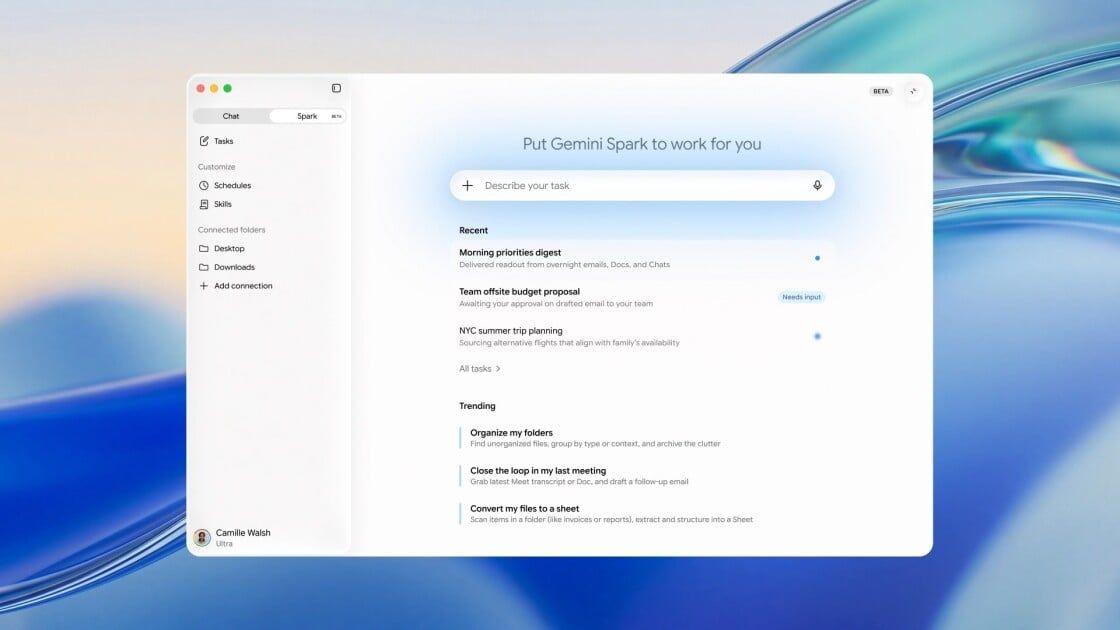
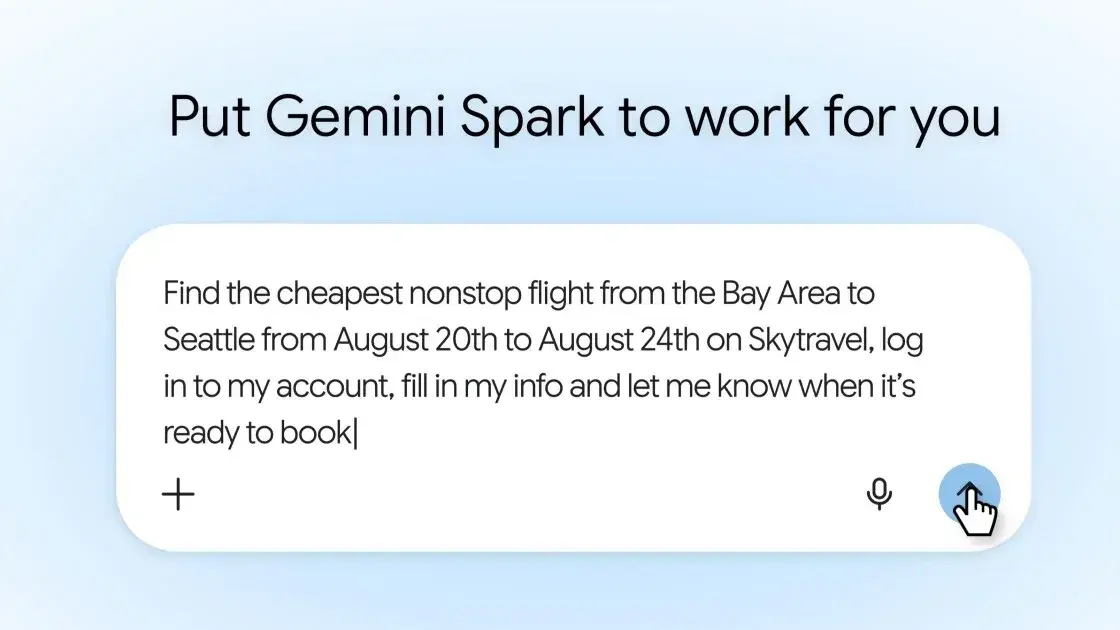
Google's Spark agentic AI tool rolled out to its AI Pro subscription tier last week, and it's now ready to use in your Chrome web browser. Spark lets Gemini use your connected passwords and leverage your direct logins to reduce friction and get further through processes that require an account, such as booking tickets. An example from Google shows someone asking Spark to find the cheapest nonstop flights on a route. The user tells Spark to log in to their Skytravel account, fill in all their relevant information, and then notify them when it's ready to book. After you give Spark permission, it uses a saved password in Chrome to log in to your account and sets up a flight booking, such as finding the best price for that time and route and adding personal details. It then notifies the user to help them finalize the booking. Google says the option will keep "you in the loop on sensitive actions, such as payments, by handing the task back to you." However, sharing your personal accounts and information with an AI tool may be nerve-wracking for those who aren't sure what will happen through their accounts without their consent. Google confirms Spark comes with improved protection against prompt injection attacks, in which malicious websites or user-generated content, such as reviews, include wording that an AI might mistake for a prompt, helping bad actors gain access to sensitive information. However, opening your personal accounts to an AI like this may pose a security risk, depending on the websites you prompt Gemini to visit or the tasks you ask it to complete, so connect wisely To use Spark, you'll need a Google AI Pro subscription for $19.99 a month or the AI Ultra tier for $99.99 a month. Google says the feature is rolling out to Chrome users in the US now.
[2]
Gemini Spark now has Chrome web-browsing capabilities - Engadget
Google's AI assistant can "use your logged-in accounts and saved passwords to handle tedious web errands." Google's agentic AI assistant Spark can now integrate with the company's Chrome web browser. Once logged in to Chrome, Spark "can use your logged-in accounts and saved passwords to handle tedious web errands." This is a modern AI tool, so the tedious web errands that Spark handles seem to revolve around "researching flight options and starting the booking process." When did booking flights become the number one pain point of existing? The company did suggest that it could also be used for "scheduling viewings of apartments." Those are the only two use case examples provided by Google. Engadget has reached out to the company to ask for more information as to what this integration means for actual users. We'll update this post when we hear back. Google has noted some safety features, for those wary of handing off passwords and log-in information to an AI assistant. The company says there are tools in place to protect against prompt injection, which is when prompts are hidden on malicious websites and user-generated content. These prompts can force the assistant to take unwanted actions, "such as initiating financial transactions or exfiltrating sensitive data." The company hasn't provided concrete details on these safety tools, other than saying it's "investing in a layered defense that includes both deterministic and probabilistic defenses to make it difficult and costly for attackers to cause harm." Additionally, Spark won't complete payments on its own, handing it back to the user to review and finish the purchase. That's good to know. This new feature is rolling out now in the US, with more regions to come in the future. To that end, the company just expanded Spark access to Google AI Pro subscribers in over 160 countries. The AI assistant also integrates with Google's Workspace apps.
[3]
Gemini Spark now works with Chrome, because giving your accounts to AI is a good idea
Web automation is rolling out in the US, while Spark is expanding to Google AI Pro users in 160+ additional countries. We've all had those days where a quick online task somehow eats up half an hour. You open five tabs in Chrome to compare flights, jump between apartment listings, fill out the same contact form three times, and before you know it, you've forgotten what you were originally doing. That's exactly the kind of digital busywork Google wants Gemini Spark to take over. Through its new Chrome integration, Spark can tap into the browser you're already using and, with your permission, use your logged-in accounts and saved credentials to handle repetitive tasks across the web. That could mean reaching out to landlords about apartments you've bookmarked, narrowing down flight options for your next vacation, or getting everything ready for a booking before handing things back to you for the final confirmation. That also doesn't mean Spark can act on its own without limits. If a task involves something sensitive, like paying for a purchase, it'll pause and ask for your confirmation first. There are also built-in protections meant to defend against prompt injection attacks, reducing the chances of someone tricking the assistant into doing something it shouldn't. As useful as that sounds, this is also where things become a little more complicated. Chrome isn't just another browser for many people -- it's where passwords are saved, payment methods are stored, browsing history lives, and countless accounts stay logged in. That's why this update feels different from asking an AI to summarize an article or draft an email. For Spark to handle these tasks, you have to trust it with access to a huge part of your digital life. Personally, that's where I'd hesitate. I love the idea of AI taking care of repetitive chores, but I'm still not convinced I want an assistant logging into my personal accounts on my behalf. Some people won't think twice if it saves them time every week, while others will see it as giving up more privacy than they're comfortable with. At the end of the day, it all comes down to how much convenience you're willing to trade for privacy. For now, these new web automation features are rolling out in the US, with a broader expansion planned for the future. At the same time, Google is bringing Gemini Spark to Google AI Pro subscribers in more than 160 additional countries, meaning many more users will soon get the chance to decide whether handing everyday online chores over to AI is a convenience worth embracing.
[4]
I tried Gemini Spark in Chrome and it's the perfect AI for handling all the boring bits online
As soon as I heard that Gemini Spark was now part of the Chrome browser I had to try it for myself. Gemini Spark is an AI agent designed to take on longer-running tasks that continue in the background. It's much smoother now thanks to an update that incorporates the platform directly into Google's Chrome browser. So now the AI can actually browse the web alongside you, doing its own tasks, instead of simply talking about it, even if you close your browser. Before you can try Spark, you need the right ingredients. You will need the latest version of Google Chrome on Windows or macOS, a personal Google account, and either a Google AI Pro or Google AI Ultra subscription. With the right subscriptions, you just need to set Safe Browsing to either Standard Protection or Enhanced Protection before Spark becomes available. With those requirements out of the way, click the three dots in the upper right corner of Chrome and choose Settings, then AI Innovations or Gemini in the Chrome menu, where you can navigate to the Permissions section and switch on the Let Gemini browse for you option. Now you can open the Ask Gemini panel at the top of Chrome and give it a task that benefits from browser access. Spark will show you its proposed plan before doing anything, and the first time you use it, Chrome will ask whether you want to connect your browser to Spark. Click Allow or Connect, and from then on you can start handing Spark more ambitious jobs. If something involves making a purchase, entering sensitive information, or confirming an important action, Spark pauses and asks for your approval before continuing. The video below shows you exactly how Spark works: Comparison shopping I first decided to see how the AI did at the often time-consuming but important chore of comparison shopping. I asked Gemini using Spark to find a good deal for a TV. Instead of asking which television I should buy, I gave Spark a proper assignment. I told it to compare prices for a 65-inch model at Amazon, Best Buy, Costco and Walmart, look for promo codes, and calculate the final price after discounts then prepare for checkout. Spark didn't just provide a summary. I could watch the AI navigate to different websites, try out different options, and work out which I might prefer. When it found what it believed was the best option, it added the television to the cart and stopped, waiting for me to approve the purchase before doing anything involving payment. Spark is happy to do the repetitive work, but it won't spend your money without asking first. It feels like exactly the right balance between useful automation and common sense. Planning a family day out My second experiment was slightly more ambitious because it combined several different tasks into one. I asked Spark to plan a family day out for two adults and two toddlers. Normally that would have meant switching constantly between Google Maps, museum websites, restaurant reviews and booking pages. Spark simply got on with it. It compared opening hours, checked travel times, built a schedule that actually flowed logically through the day, found a restaurant with online reservations and reserved it, then prepared the museum ticket purchase and before asking me to approve the bookings. AI for tedious tasks Google claims Spark is great at filling out paperwork, especially using information from your own Google accounts. As my kid is getting to the right age for it, I asked Spark to fill out his library card application. After checking that it had the right information about my address and other details, Spark opened up my library's website and went to work. It filled in my contact information, mailing address and other saved details. When it reached the final submission page, it stopped and waited for my approval instead of clicking the button itself. It's not an incredibly long form, but it's easy to see how Spark could save quite a lot of time on the more complex medical or insurance papers. It's a lot faster to review and make sure the AI got it right than to write it all out yourself. Using Spark highlighted how different it feels from regular Gemini. Spark shifts the workload because it can actually interact with the browser instead of simply describing what I should do next. Gemini Spark is one of the more compelling AI features Google has introduced in quite some time. It won't replace every online task, but it can quietly eliminate a surprising amount of clicking, tab juggling and repetitive typing. Follow TechRadar on Google News and add us as a preferred source to get our expert news, reviews, and opinion in your feeds.
[5]
Gemini Spark can now use Chrome logins and saved passwords to run errands on your behalf
Gemini Spark can use Chrome's auto browse feature to navigate websites and complete online tasks Google is integrating Gemini Spark with Chrome so it can carry web-based tasks further without users having to take over at every step. The search giant is also expanding access to AI Pro subscribers in more than 160 additional countries, although the new browser capabilities are initially limited to the United States. How Chrome auto browse works Chrome auto browse allows Spark to navigate websites using the accounts you are already signed into and passwords saved in the browser. Access requires permission from the user rather than being enabled automatically. Recommended Videos Google says Spark can use the feature to schedule viewings for saved apartment listings, compare flight options, and begin the booking process. It can move between pages and complete several steps without requiring the user to guide every action. Spark hands control back before sensitive actions such as payments. Google also says it has added protections against prompt injection, where instructions hidden on a webpage attempt to manipulate an AI agent into performing an unintended action. Chrome auto-browse is rolling out first in the US, with additional regions expected to follow later. Spark is reaching considerably more users Gemini Spark launched at Google I/O in May as a cloud-based agent that can continue working after a laptop is closed or a phone is locked. It initially focused on Google services such as Gmail, Drive, Docs, Calendar, Keep, and Tasks before adding several third-party integrations. Spark also arrived on the Mac in June, gaining the ability to organize local files and work across supported desktop apps. Google recently expanded access beyond its expensive Ultra subscription, bringing Spark to the $20-per-month Google AI Pro plan in the US. Pro subscribers in more than 160 additional countries are now gaining access. Chrome integration is one of Spark's most important upgrades so far. It removes one of the agent's biggest limitations by allowing tasks to continue beyond connected apps instead of stopping when the next step requires navigating a website.
Share
Copy Link
Google rolled out Chrome integration for Gemini Spark, its agentic AI tool that can now use saved passwords to automate repetitive web tasks. Available to Google AI Pro subscribers at $20-per-month in the US, the feature handles multi-step tasks like flight bookings and apartment scheduling while maintaining user control over sensitive actions like payments.
Google has integrated Gemini Spark with Chrome, transforming how the AI agent handles web-based tasks by tapping into your browser's saved passwords and logged-in accounts. The update rolled out to Google AI Pro subscribers in the US last week, marking a significant expansion of what agentic AI tools can accomplish without constant human intervention.
1
The Chrome integration enables Gemini Spark to navigate websites using your existing credentials, eliminating user friction across multi-step tasks that previously required manual input at every stage. After you grant permission, the AI agent accesses Chrome's auto-browse feature to move between pages, fill forms, and complete several steps independently.
5
When you ask Spark to find the cheapest nonstop flights, for example, it logs into your travel account using saved passwords, compares options across routes, fills in personal details, and notifies you when ready to finalize the booking.1
The system maintains user control by handing sensitive actions like payments back to you for approval before proceeding.
Source: Engadget
Real-world testing reveals how Gemini Spark handles repetitive web tasks that typically consume significant time. One user asked Spark to compare prices for a 65-inch television across Amazon, Best Buy, Costco, and Walmart, search for promo codes, calculate final discounted prices, and prepare for checkout.
4
The agentic AI tool navigated between retailers, evaluated options, added the best deal to cart, then stopped before completing the purchase. Another test involved planning a family outing for two adults and two toddlers—Spark compared museum hours, checked travel times, built a logical schedule, found restaurants with availability, reserved a table, and prepared ticket purchases for final approval.4
Allowing an AI agent to use saved passwords raises legitimate security concerns about what happens through your accounts without direct oversight. Google acknowledges these privacy trade-offs and has implemented protections against prompt injection attacks, where malicious websites or user-generated content include hidden instructions that trick AI into unauthorized actions like initiating financial transactions or stealing sensitive data.
2
The company describes "investing in a layered defense that includes both deterministic and probabilistic defenses to make it difficult and costly for attackers to cause harm," though concrete details about these safeguards remain limited.2
Opening personal accounts to automate online tasks means trusting the AI with a substantial portion of your digital life—passwords, payment methods, browsing history, and logged-in sessions.3
To use the Chrome integration, you need the latest Chrome version on Windows or macOS, a personal Google account, and either a Google AI Pro subscription at $20-per-month or AI Ultra tier at $100-per-month.
1
Set Safe Browsing to Standard or Enhanced Protection, then enable "Let Gemini browse for you" in Chrome's AI Innovations settings.4
The first time you assign a task requiring browser access, Chrome requests permission to connect with Spark. The feature is currently rolling out in the US, with broader regional expansion planned.5
Source: PC Magazine
Related Stories
Google simultaneously expanded Gemini Spark access to Google AI Pro subscribers in over 160 countries, significantly broadening the user base beyond the initial Ultra-only availability.
3
Spark launched at Google I/O in May as a cloud-based agent continuing work after devices close, initially focusing on Gmail, Drive, Docs, Calendar, Keep, and Tasks before adding third-party integrations.5
The Chrome integration removes a major limitation by extending capabilities beyond connected apps to any website requiring navigation.This development signals a shift toward AI agents handling increasingly complex workflows with minimal supervision. The convenience of automating booking flights, scheduling apartment viewings, filling paperwork, and comparison shopping comes with questions about how much digital autonomy users feel comfortable delegating.
2
Watch how Google refines security protections as usage scales, whether competitors introduce similar capabilities, and how users balance time savings against potential risks. The technology's success depends on building trust that Gemini Spark can reliably handle sensitive credentials while maintaining appropriate boundaries around financial transactions and personal data.
Source: Android Authority
Summarized by
Navi
[3]
[4]
24 Jul 2026•Technology

23 May 2026•Technology

03 Jun 2026•Technology