Google Gemini Now Lets You Edit Files Directly in Chat Without Downloading


3 Sources
[1]
Google brings richer document editing to Gemini on mobile and the web
The mobile app supports PDFs, while Gemini on the web can handle a larger variety of file types. At this point, we've all seen how easy it is for AI to generate some documents. But there's still often a big gap between getting that first draft produced, and fine-tuning the model's output to the
[2]
Google Gemini can now create and edit PDFs, documents, and more right inside your chat
No more downloading, editing, and uploading files all over again. Google has recently released many updates introducing new features to its AI suite, and the latest one could save users dealing with documents a lot of tedious work. The company has added the ability to create, preview, and edit
[3]
Gemini's New Feature Lets You Edit Files Directly in Chat
Google has just rolled out new features for its Gemini AI, which finally bring over built-in file and code handling capabilities, and allows users to generate, preview, and edit files directly within the chat interface. Available worldwide for several languages, the update lets users expand
Share
Copy Link
Google has launched richer document editing capabilities for Gemini on mobile and web, allowing users to create and edit PDFs, spreadsheets, presentations, and code directly within AI chat conversations. The update eliminates the need to download, edit, and re-upload files, streamlining workflows for students, professionals, and anyone working with documents regularly.
Google Gemini Transforms Document Editing with In-Chat Capabilities
Google has rolled out a significant update to Gemini that fundamentally changes how users interact with documents through AI chat
1
. The new feature allows users to generate, preview, and edit files directly within Gemini conversations without the tedious cycle of downloading, modifying, and re-uploading documents2
. This enhancement addresses the persistent gap between AI-generated first drafts and the fine-tuned final versions users actually need1
.
Source: Phandroid
Richer Document Editing Across Multiple File Types
The update brings comprehensive file handling to Google Gemini, supporting PDFs, spreadsheets, presentations, Google Docs, Markdown, TXT files, and code
3
. Users can now explain their edits using natural language instructions and receive interactive previews immediately, combining text and visual input to refine what Gemini creates1
. The interface enables full-screen preview expansion, text highlighting for targeted questions, and on-the-fly content refinement3
.Platform-Specific Capabilities for Gemini on Mobile and Web
While Gemini on the web enjoys the broadest support across different document types—including Google Workspace cloud files, Markdown, Google Sheets, and code—the mobile app currently limits users to working with PDFs
1
2
. PDF preview and editing function across both web and mobile platforms, but documents, spreadsheets, slide decks, and other formats remain web-exclusive for now3
.
Source: Digital Trends
Practical Applications for Students and Professionals
The workflow efficiency improvements are substantial for various user groups. Students can upload photos of handwritten lecture notes, ask Gemini to convert them into a PDF study guide, preview the result inside the conversation, and make corrections without leaving the chat
2
. Professionals preparing reports, presentations, or spreadsheets can build structured documents from simple prompts and open them directly in Google Sheets or export presentation decks to Google Slides, PPTX, or PDF3
.Related Stories
Seamless Integration with Google Workspace and Drive
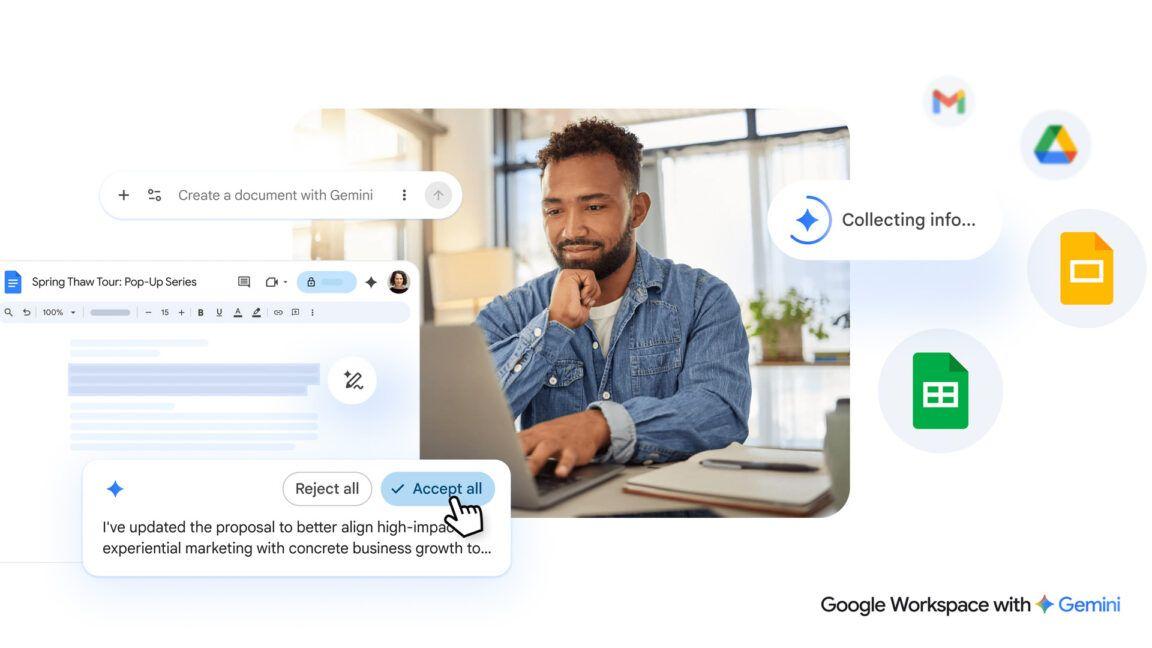
The update strengthens Gemini's integration with Google Workspace, allowing direct drafting and inline editing of documents with options to upload them straight to Google Drive
3
. Users can highlight specific sections and ask Gemini to rewrite them, answer questions, or modify visuals without disrupting their workflow2
.Widespread Availability Across User Tiers
The new capabilities are now live for all Google Workspace customers, Workspace Individual subscribers, and users with personal Google accounts
3
. Access is available to Gemini users in all supported languages and regions where the Gemini app operates, with users of all ages able to begin using the features by prompting the app to create their desired file type1
3
.References
Summarized by

Navi
[1]
[2]
Related Stories
Gemini now generates files directly in chat, supporting PDF, Word, Excel and LaTeX formats
29 Apr 2026•Technology

Gemini gains four new AI features to manage comments and edits in Google Docs
29 Jul 2026•Technology
Google Expands Gemini AI Integration to Google Docs on Android Devices
11 Jun 2025•Technology
Recent Highlights
1
OpenAI's AI Models Disprove 27-Year Exponential Time Hypothesis, Rendering Decades of Research Obsolete
Science and Research

2
Google DeepMind unveils Genie 4 world model with audio and 2-minute interactive simulations
Technology

3
Microsoft AI Diagnostic Tool Beats Doctors With 83% Accuracy on Complex Medical Cases
Health

Recent Highlights
Today's Top Stories








Don’t drown in AI news. We cut through the noise - filtering, ranking and summarizing the most important AI news, breakthroughs and research daily. Follow topics that matter to you and stay ahead.


