5 Sources
[1]
Google built a great smart speaker, but Gemini isn't ready for it
Smart speakers have spent the past few years searching for a compelling second act. Beyond music, timers, and controlling your lights, they've struggled to justify taking up space on the kitchen counter. AI promised to change that. Amazon debuted its new hardware powered by a revamped Alexa last fall, and now it's finally Google's turn. The Google Home Speaker is the company's first new smart speaker in six years and its first "built for Gemini." After years of neglect, Google appears to be finally getting serious about the smart home -- again. The new speaker is the clearest sign yet. Gemini for Home, however, still feels unfinished. As a piece of hardware, the $99.99 Google Home Speaker is a delightful device. It is the Goldilocks of smart speakers: big enough to sound good, small enough to blend into a room, attractive without drawing attention, and inexpensive enough to consider buying more than one. The Home Speaker fits in seamlessly everywhere I tested it: bedside table, kitchen counter, or two paired under the TV. The soft green jade color blends in without being dull. My only disappointment is the lack of a color-matched cable, something both Apple's HomePod Mini and Amazon's Echo Dot Max offer. (Oh, and while the cable finally uses USB-C for the wall brick, it's not removable from the speaker itself, which is an issue if you want a longer cable run or if it ever starts to fray.) There are no visible controls to mar the mesh fabric-covered body, and the activity indicator light ring encircling the base is subtle enough not to be distracting. If it is -- for example, when using two speakers under a TV in a dark room -- you can turn the light off in settings, something no other speaker offers. The invisible controls, which frustrated me on previous Google speakers, are much more responsive. A tap on top stops or starts the sound or quickly shuts up the assistant, and a tap on either side raises or lowers the volume, with faint glowing white dots to show you hit the right spot. As my colleague David Pierce wrote in his hands-on with the speaker, the sound is good for its softball size. I enjoyed listening to music and podcasts on it. As expected, side by side with the Nest Audio -- Google's larger, previous-generation speaker, which was also priced at $99.99 -- the Home Speaker doesn't sound as good. The Audio had both a woofer and a tweeter; the new speaker has just a single driver, and its bass is thinner since it's smaller. But the smaller size makes it easier to find a spot for it around the home. It does offer 360-degree sound, which the Audio didn't, and it's a huge upgrade to the smaller, prior-gen Nest Mini. I had two review units, so I was able to test the Home Speaker's stereo pairing feature, and it was a significant upgrade. At 80 percent volume, the new Taylor Swift song was clear, crisp, and super loud -- house-filling loud. Bass, however, is barely there; Bad Bunny and RosalĂa's vocals soar in "La Noche de Anoche," but when the boom is supposed to come in, it's more like a bump. Compared to the competition -- the $99.99 Echo Dot Max and the now pricier $129 HomePod Mini -- the Home Speaker came in a close third on audio quality for me (David preferred it over the Max). Testing Taylor Swift's "...Ready for It?" on the Max brought a hint more bass and a fuller sound, while the Mini is quieter but cleaner. The Home Speaker is loud and clear and holds its own on mids and vocals, though they stretch a little thin at times, and, as mentioned, the bass falls short -- which it does on most speakers this size. This is the first Google smart speaker you can pair with a Google TV Streamer (and only a Streamer) as an audio output. You can use just one, but adding two gets you simulated spatial audio. My experience was mostly good. The sound synced well with no dropouts. Streaming YouTube was great; the voices came through loud and clear. During a Game of Thrones re-watch, the screams of agony were suitably bone-chilling. But watching the World Cup, it sounded like the commentators were talking in a tin can, necessitating a switch back to my (much more expensive) Sonos system. If you're just using your TV speakers, a pair of Home Speakers will be an upgrade. But it only works with content played through the Streamer -- if you switch to another HDMI input, the audio switches away from the Home Speaker. The Home Speaker also listens well, which is an important ability for a smart speaker. It has three far-field microphones and a neural processing unit that handles background noise. It did well in every scenario I tested, hearing me even from across the room or when it was playing loud music. It was more responsive than the HomePod Mini, but a tad less than the Echo Dot Max. As with the competition, the Home Speaker is a Matter controller, so you can use it to add and control Matter devices through Google Home. It's also the first Google Home audio speaker that can act as a Thread border router. (It's on Thread 1.3 for now, but Google tells me it's working on supporting Thread 1.4, which will make it easier for Thread border routers from different manufacturers to work together.) If you're considering a Home Speaker, the hardware is the main reason to buy one. On the software side, Gemini for Home -- Google's new smart home voice assistant powered by Gemini models and designed to be more conversational, more useful, and smarter -- works on all Google Home speakers. In my testing, it was mostly the same experience on the Nest Audio, Nest Hub (2nd gen), and Nest Hub Max. That's good news -- Google isn't locking its newest AI features to new hardware. But it also means there's little reason to upgrade to the new speaker if you're happy with what you have. As it's built for Gemini for Home, I had expected the Home Speaker to be noticeably snappier than current models, but it wasn't any faster than the Nest Audio when responding to commands. Occasionally, some requests that require the cloud took close to 10 seconds, and even local commands like "Turn on the lights" sometimes lagged just as long. While Gemini handled complex requests well -- I asked it to turn off one room, set the thermostat, and turn on the lights in another room in one sentence -- it took 10 seconds to do so. Alexa Plus completed the same request in under three. (To be fair, Alexa used to be painfully slow, but it has improved substantially.) Speed aside, Gemini was very good with natural conversational control. I could say "Hey Google, I'm cooking and I don't want to get too hot," and it knew to turn down the AC. "Hey Google, it's too dark in here," and it brightened the lights. When I said I thought there was someone outside, it offered to show my camera feed on a smart display and check my locks. These feel like genuine quality-of-life improvements because they make voice control easier. I like that you don't have to repeat "Hey Google" during the same conversation, but Gemini has the memory of a goldfish. While following a recipe, Gemini started walking me through making a cherry tomato pasta sauce until I paused too long and it completely lost the thread. Gemini Live fixes some of this by keeping the conversation open until you tell it to stop and remembering previous chats. But this experience feels bolted on. You invoke it differently, by saying "Hey Google, let's chat," and unlike Gemini for Home, it can't take any actions for you (it punts them to Home); it's just for chatting with. Gemini Live is also behind a $10-a-month Google Home Premium subscription. For general knowledge, Gemini is excellent. It's substantially better than Google Assistant ever was. I couldn't stump it with questions about the World Cup's bewildering brackets, and I was genuinely impressed when I asked which of the matches that had already been played today were worth watching. It summarized them without revealing the score -- correctly inferring that I planned to watch them. As a household assistant, it feels less dependable. Mid-cook, I'd ask "When do I add the tomatoes?" only to be told Gemini couldn't answer until it verified my voice. This same thing happened fairly regularly when adding items to my shopping list -- despite Google's Voice Match being set up. The biggest problem with Gemini for Home is that I can't trust it. Like most LLMs, Gemini is often confidently wrong. It announced the correct title when I asked for "La Noche de Anoche," then played an entirely different song. Then, when I told it it was wrong, it played another incorrect song. When I asked if I could change the Home Speaker's voice, it repeatedly insisted it had no alternative voice options; it does. Then the same query on the Nest Hub Max caused it to apparently hallucinate a list of names, including Dimitrix, Impetus, Cameo, and Russell Gethy. (The actual Gemini for Home voices are named after plants.) At one point, it misinterpreted a command to adjust the thermostat as a security request, telling me instead that if I wanted a summary of what was happening in my home, I needed to upgrade to Google Home Premium Advanced. It then proceeded to spell out the upgrade URL. TV controls were the least reliable. Sometimes "Turn on the TV and play YouTube TV" worked. Sometimes Gemini claimed content wasn't available when it was. Occasionally it announced "Turning on the Living Room TV and launching ESPN," and then did nothing. I've seen similar hiccups with Alexa Plus. They're part of the current tradeoffs that have come with replacing rigid command-and-control voice assistants with more powerful, flexible LLMs. In the home, when these mistakes happen enough, they undermine the convenience. After spending five days testing Gemini for Home in the Home Speaker, I give the edge to Alexa Plus and its Echo Dot Max. While Gemini for Home's inference skills were superior in my testing, Alexa Plus has narrowed the gap significantly when it comes to general knowledge. It also has better smart home controls, and I can ask it to set up routines with my voice, something Google doesn't offer. Both let you use natural language to query and control your home and skip repeating the wake word. But Alexa handles it more smoothly and remembers context and past conversations better. I do prefer Gemini's voices. My pick, Violet -- bright and British -- is perfect: no-nonsense without overt personality. I've yet to find an Alexa Plus voice I'm comfortable with. What Google Home doesn't have is ads, something Amazon has introduced to its Echo Show smart displays. But with Gemini for Home, Google is putting some voice assistant and smart home features behind a paywall for the first time. Access to Gemini Live and Help me create, which lets you use natural language to build smart home automations in the app, requires the $10-a-month Standard plan. The $20-a-month Advanced tier adds Home Brief and AI-powered Nest camera features that tie into the Home Speaker. With the Home Speaker, Google built the smart speaker its ecosystem needed: good sound, a cleaner, more modern design, and the radios and processing power to anchor a modern smart home. But Gemini for Home isn't there yet as an assistant. It's easier to talk to than Google Assistant ever was, and a lot smarter. But today it's slow and less reliable. Add the subscription requirement for some of its more interesting features, and the result is a great smart speaker waiting for its AI to catch up. Photos and videos by Jennifer Pattison Tuohy / The Verge
[2]
Google Home Speaker Review: A Faster Way of Being Frustrated
Google's first smart speaker in six years is finally here, and with its launch, the company is ushering in a new era of shouting at an inanimate object to turn your lights on and off. Wave goodbye to Google Assistant; this is the age of Gemini for Home. The new Google Home Speaker, which retails for $100, is less about the bright new colors, audio upgrades, and fancy new ring lighting, and more about how all of those things wave the flag for Gemini, Google's new North Star, and all of the smart home improvements the AI chatbot promises to usher in. In this generation of smart speaker, Google is pitching something that's smoother, smarter, and more human than anything it's released before. It's a tall order for a short speaker, but given the state of voice assistant progress over the past decade (or lack thereof), it's a welcome proposition on paper. "On paper" isn't where progress takes place, though, and unfortunately, neither is the Google Home Speaker, lots of the time. Berry charming on the surface Though I have complaints about the experience of using the Google Home Speaker, almost none of them are about the hardware itself. Let me just start by saying it looks great. I love the new berry (red) color as well as the new jade (green). Props to Google's design team for making a speaker that I genuinely want to put in my home for aesthetic purposes. I also like the new lighting flourishes -- a light ring on the bottom of the speaker that glows in different colors depending on what you're doing. Purple is for when you're chatting with Gemini Live, white is for regular voice commands, and a yellowish glow appears when your mic is disabled with the switch. It's nice to look at, but also functional, in that you know when Gemini is listening or if your session has ended. Like previous Google speakers, there are tap controls on top that work fine -- you can use them to activate Gemini for Home or adjust volume, for example. There's also a new mesh 3D-knit cover, which feels interesting to the touch. Honestly, not my favorite tactile experience, but you're probably not going to be touching your speaker a lot anyway. One thing I do not love in terms of hardware is that the cable is hardwired this time around. Unlike previous generations of Google smart speakers, including the Nest Audio, you cannot remove the cable from the speaker itself, meaning you're stuck with what Google gives you. In the event that something happens to the cable, or if you want to extend the reach, you're kind of SOL. It's not a great choice for consumers or for the environment. Though, to be fair, Apple's HomePods also have hardwired cables. As nice as the speaker looks, the audio is a little less flashy. Don't get me wrong, for its size, the Google Home Speaker does a decent job with audio playback, but I wouldn't count on it displacing the setup of anyone who's already invested in Bluetooth speakers like the Sonos Play, Bose's Lifestyle Ultra Speaker, or a beefier smart speaker like Amazon's Echo Studio. The sound quality is definitely an improvement on the Google Nest Mini that I've been using since 2019, but if I'm being honest, that's not saying a whole lot. The Google Home Speaker performs better with more low-key songs like Squarepusher's "Andrei," a noodling acoustic guitar track. On rock songs like Feeble Little Horse's "Rewind," though, things get a bit muddy at higher volumes, with mids and lows mushing together. If you're really committed to using the smart speaker as your main audio source, you can pair two of them together for stereo sound. This option sounds pretty decent, widening the soundstage and filling out my living room a bit more, but it's not a marked improvement on the sound quality overall, and it doesn't catapult the Google Home Speaker into a must-have home audio device. You can also couple a stereo pair to a Google TV Streamer to listen to movies and other media through your TV, though I didn't have one on-hand to test that feature. It's to be expected that the audio from the Google Home Speaker wouldn't compete with more premium devices like offerings from Sonos, Bose, and Amazon, since all of those are around $300, but it also pales in comparison to ultra-portable Bluetooth speakers like JBL's Grip, which is tiny, versatile, and only costs $65 compared to the Google Home Speaker's $100 price tag. The fact is, this is not a speaker; it's a smart speaker that you can play music on sometimes. If you're looking for an audio device, buy a dedicated speaker. If you're looking for smarts, well... keep reading. Home is where the frustration is Gemini for Home is really the highlight of this generation of Google smart speaker. The Google Home Speaker is specially designed to run Gemini for Home, and that fine-tuning is palpable. Responses to queries are snappy, both in terms of processing and in microphone pickup. I rarely had to repeat myself, and the smart speaker heard my wake words almost all of the time. I also don't have to wait nearly as long for a response as when I query my old Google Nest Mini. The issue isn't whether the Google Home Speaker has the horsepower, necessarily, though, it's whether it has the brains, and on that front, there's still work to be done. Gemini for Home is full of quirks. Take "Gemini Live," for example, a new mode that uses the full power of Gemini to have live conversations -- as opposed to the regular Gemini for Home voice assistant that only has a dash of Gemini sprinkled in. To activate Gemini Live, you can say "let's chat live" or "let's have a conversation," and it allows you to have a back-and-forth, real-time conversation about a topic of your choosing. This feature, I should note, is actually paywalled for $10 a month. The Gemini Live experience can be interesting but also frustrating. On two occasions, when I tried to discuss the bird living in my backyard (which I've identified as a catbird, thanks to Merlin Bird ID), I ran into some hiccups. The first time, I was interrupted mid-conversation when Gemini Live started playing music randomly despite the fact that no one in the room had asked it to do so (I was the only one speaking). The second time, it abruptly stopped listening to me in the middle of our conversation, even though I was still talking. I found that Gemini for Home has a tendency to sometimes ignore my questions completely, despite the fact that the light indicated that it was listening. It really didn't want to answer my question about whether I was able to create automations using voice commands. You cannot do that, for the record, though you can use natural language in the Google Home app. This is a nice flourish, since you may not have to tap as many buttons, but it can feel limited and will probably only appeal to power users who want to really lock in on their smart home tuning. There are some improvements in Gemini for Home, but nothing that hasn't been covered before. It understands more complex commands like "turn off every light, except..." and it can finally add time to an existing timer. It does feel more conversational, though that can be a good or a bad thing depending on what you're trying to do at the time. Features like Gemini Live are interesting, though I'm not sure that they're useful enough to make the experience of using the Google Home Speaker feel truly next-gen. Even while having a conversation about birds and, separately, about some health issues I've been having lately, I'm left questioning the veracity of the things Google tells me. One minute, Gemini Live tells me that the catbird in my backyard screams at my actual cats because it's "teasing" them, and then it tells me that it's actually "threatened." When I point out the inconsistency, Gemini, of course, apologizes, but my questions about its usefulness can't really be brushed away so quickly. Sure, I could go into the app and double-check the sources after our conversation is done, but isn't that just doubling the work of a Google search? While the Google Home Speaker is faster, my opinion of Gemini for Home hasn't changed much since I last reviewed it on my old Google Nest Mini speaker. Google, Amazon, and Apple still have a long way to go before they can successfully combine LLMs with everyday voice assistants in a way that makes everything feel leaps and bounds better -- if it can even be done. Then there are the added subscriptions of it all. While you can still use Gemini for Home for free, Google is, for the first time, paywalling its home assistant features with two tiers. The standard premium tier is $10 a month and gives you access to Gemini Live, intelligent alerts that describe things seen on your camera in more detail, (i.e., "a person is walking by the bush outside your house" instead of "person seen"), and 30 days of event video history. An advanced plan for $20 per month gives you all of the above, plus a "home brief" feature that summarizes what happened while you were gone using info from your cameras, as well as an extended 60 days worth of event history. Google, for its part, seems to be making improvements to Gemini for Home and has been active in its updates for the Google Home app, but when you're charging people for a premium service (as much as $20 per month, no less), consumers are going to have high expectations, and I'm not sure a work-in-progress is an easy thing for Google to sell. How's your Home life? Whether or not you find value in Google's new smart speaker will depend mostly on your expectations. If you want a small smart speaker with decent sound that feels snappier than your old Google Nest Mini, then it will rise to the occasion. If you've bought in on Google's overtures of a truly evolutionary smart home experience being driven by Gemini, you are likely not going to be a happy camper in the vast estate that is Google's smart home ecosystem. I'm hopeful that Google can unlock more value with the help of large language models and maybe the agentic capabilities of Gemini, but let's be honest here: the ascendancy of voice assistants as a do-everything mode of computing has been a long time coming -- like, really long -- and it's difficult to muster up optimism. Sure, there are improvements to the experience, but I'd be lying if I said the experience of using the first Google smart speaker in six years felt like a thrilling step into the future. There are some things that I didn't get to try, like being able to search camera footage by asking Gemini, for example. I don't have a security camera, which is sort of a prerequisite. Maybe that would shift my opinion? But probably not. Most people are using their smart speakers for the same old things they've been using them for since the beginning: turning their lights on and off, setting timers, and, in my case, asking Google to play "rain sounds" while I sleep. By those metrics, Gemini for Home and the Google Home Speaker are a fine combination, but Google will have to forgive me if I'm not busting out the golden trumpet to herald the AI-superpowered age of smart homes quite yet. As solid as the hardware in the Google Home Speaker is, Gemini for Home could use a bit more construction before it becomes the glow-up it's meant to be.
[3]
Google Home Speaker vs. the mainstay Nest Mini: Is this a true upgrade? [Video]
The Google Home Speaker is now the easiest and most affordable way to get Gemini into your smart home, but how does it perform against the device it's meant to replace - the Nest Mini? To clear things up, the Nest Mini is perfectly capable of offering a serviceable Gemini experience, but the image of having a fluid conversation via Gemini Live is not one you'll get with the Nest Mini. As Google continues to expand the function of its AI model and outperform what Google Assistant was capable of, we get a new small-ish speaker, positioned as a fair replacement. In design, both devices bear some appealing similarities. Google chose to keep the fabric accents and go for a small profile, though the new Google Home Speaker is several inches taller than the Nest Mini. Top-down, the profiles are about the same, and Google chose to keep the volume adjustment just as simple, with a tap on the right or left side to adjust. Whether it's down to new internals or a conscious decision to make a bigger model, the larger Google Home Speaker, on the other hand, is designed to be a more prominent part of your home decor. That said, it is not a major departure from the Mini's hidden-hardware approach. To put it into perspective Because of its height, weight, and acoustic requirements, you cannot simply pin it to a wall. You need to dedicate shelf space or a prime spot on your kitchen counter to accommodate its very modest size increase. The most noticeable change comes in reactionary lighting. When you chat with the Home Speaker, a ring of LEDs at the base lights up with Google's iconic color scheme, then it fades to blue as it listens and responds. It mimics the LEDs on the Nest Mini in every way, even glowing orange when muted. Google did pull some sort of switcharoo, opting to integrate the USB-C cable into the speaker at the base rather than at the brick, like the Nest Mini. This means you can't switch the cable out for a longer one. Perhaps even worse - at least, to me - is the exclusion of cable clips that have been present on every Nest Speaker up to this point. Shame! Colors also play a role depending on where you plan to put a smart speaker. While the Nest Mini comes in a variety of muted shades to blend into different rooms, the Google Home Speaker mostly sticks to simple neutral tones, but with one bold, bright Berry option. The annoyance is that the Jade and Berry colors are limited to the US market. Improved smart home experience As for the internals, things get a little more complex. The Google Home Speaker is, by all accounts, meant to be a speaker, first and foremost. Yes, it's a vessel for Gemini and future features, but it's also an entertainment hub. You can use Google Cast to play music in the same way as the Nest Mini, and grouping the device with others in the home is just as easy. But processing time on the Nest Mini is far outdone by the Google Home Speaker. So long as you have signed up for Early Access to Gemini, the "core" assistant experience on both devices is identical on paper. Even if you use the "old" Google Assistant experience, the Nest Mini relies heavily on cloud processing for many of its smart home commands, which can sometimes result in a slight delay between asking for the lights to turn off and it actually happening. The new speaker listens, processes, and plays music much faster. It offers a smoother experience, and the same quirks that cause Gemini to make mistakes here and there have nothing to do with the hardware. The full-sized Google Home Speaker includes upgraded onboard machine learning chips that process your most common commands locally. Performance is noticeably snappier because of it. You will rarely see the frustrating lag that sometimes plagues the aging Nest Mini when asking complex queries. Gemini processing is faster and handles complex input. Additionally, the larger footprint leaves room for robust connectivity protocols. The Google Home Speaker acts as a fully-fledged Matter and Thread border router, helping your smart bulbs, locks, and sensors talk to each other without needing a separate hub. The Mini can participate in these networks, but it does not offer the same robust networking backbone as the larger model. Bigger, but better sound? As for sound, I'm having a hard time getting around how Google designed it. I thought I'd be able to easily say, "yeah, the Google Home Speaker sounds far superior to the Nest Mini. After all, it's been over 6 years." I can't say that, though, because the Google Home Speaker has audio quirks that have detracted from my experience. First off, using the EQ settings is key. I have my units set to 40 for bass and 80 for treble. That's just to kick the highs up a little bit and clear the headroom in most music. The issue is that there seems to be a lot of muddy artifacts left over from the low-end amplification Google is trying to do with the new drivers. They do add a little bass, and you can feel it in your fingertips as opposed to the Nest Mini, but it doesn't add much of that room-filling "oomph" you'd expect. What it does do is give it a cardboard tube effect, as if it were playing through a paper towel roll. And that, somehow, gives the high ends a little bit of a "warble," where cymbals and hi-hats have an unintended crunch. The Nest Mini performs surprisingly well in the highs, but the lows are absent. It can sound tinny, but the Google Home Speaker sounds both dark and tinny. As for the benefit of 360-degree audio, I'm troubled to find the benefit over a simple up-firing design like the Nest Mini when these two are side-by-side. It's likely a no-brainer on the design front, as long as it doesn't negatively impact the sound. That being said, I don't think it really adds much when you put them against each other. The Google Home Speaker is not an audiophilic streaming device. It's, again, a vessel for Google Gemini that plays your favorite tunes while you cook or hang out. That being said, if you're upgrading for better sound quality, I think there are better options, even if the Home Speaker sounds better - subjectively. If it's for sound and Gemini, it's an easy justification, even though it's $50 more than the last small display-free speaker. The Google Home Speaker is available for pre-order with shipping in July. Damien Wilde contributed to this article.
[4]
Google Home Speaker vs. the mainstay Nest Mini: Is this a true upgrade?
The Google Home Speaker is now the easiest and most affordable way to get Gemini into your smart home, but how does it perform against the device it's meant to replace - the Nest Mini? To clear things up, the Nest Mini is perfectly capable of offering a serviceable Gemini experience, but the image of having a fluid conversation via Gemini Live is not one you'll get with the Nest Mini. As Google continues to expand the function of its AI model and outperform what Google Assistant was capable of, we get a new small-ish speaker, positioned as a fair replacement. In design, both devices bear some appealing similarities. Google chose to keep the fabric accents and go for a small profile, though the new Google Home Speaker is several inches taller than the Nest Mini. Top-down, the profiles are about the same, and Google chose to keep the volume adjustment just as simple, with a tap on the right or left side to adjust. Whether it's down to new internals or a conscious decision to make a bigger model, the larger Google Home Speaker, on the other hand, is designed to be a more prominent part of your home decor. That said, it is not a major departure from the Mini's hidden-hardware approach. To put it into perspective Because of its height, weight, and acoustic requirements, you cannot simply pin it to a wall. You need to dedicate shelf space or a prime spot on your kitchen counter to accommodate its very modest size increase. The most noticeable change comes in reactionary lighting. When you chat with the Home Speaker, a ring of LEDs at the base lights up with Google's iconic color scheme, then it fades to blue as it listens and responds. It mimics the LEDs on the Nest Mini in every way, even glowing orange when muted. Google did pull some sort of switcharoo, opting to integrate the USB-C cable into the speaker at the base rather than at the brick, like the Nest Mini. This means you can't switch the cable out for a longer one. Perhaps even worse - at least, to me - is the exclusion of cable clips that have been present on every Nest Speaker up to this point. Shame! Colors also play a role depending on where you plan to put a smart speaker. While the Nest Mini comes in a variety of muted shades to blend into different rooms, the Google Home Speaker mostly sticks to simple neutral tones, but with one bold, bright Berry option. The annoyance is that the Hazel and Berry colors are limited to the US market. Improved smart home experience As for the internals, things get a little more complex. The Google Home Speaker is, by all accounts, meant to be a speaker, first and foremost. Yes, it's a vessel for Gemini and future features, but it's also an entertainment hub. You can use Google Cast to play music in the same way as the Nest Mini, and grouping the device with others in the home is just as easy. But processing time on the Nest Mini is far outdone by the Google Home Speaker. So long as you have signed up for Early Access to Gemini, the "core" assistant experience on both devices is identical on paper. Even if you use the "old" Google Assistant experience, the Nest Mini relies heavily on cloud processing for many of its smart home commands, which can sometimes result in a slight delay between asking for the lights to turn off and it actually happening. The new speaker listens, processes, and plays music much faster. It offers a smoother experience, and the same quirks that cause Gemini to make mistakes here and there have nothing to do with the hardware. The full-sized Google Home Speaker includes upgraded onboard machine learning chips that process your most common commands locally. Performance is noticeably snappier because of it. You will rarely see the frustrating lag that sometimes plagues the aging Nest Mini when asking complex queries. Gemini processing is faster and handles complex input. Additionally, the larger footprint leaves room for robust connectivity protocols. The Google Home Speaker acts as a fully-fledged Matter and Thread border router, helping your smart bulbs, locks, and sensors talk to each other without needing a separate hub. The Mini can participate in these networks, but it does not offer the same robust networking backbone as the larger model. Bigger, but better sound? As for sound, I'm having a hard time getting around how Google designed it. I thought I'd be able to easily say, "yeah, the Google Home Speaker sounds far superior to the Nest Mini. After all, it's been over 6 years." I can't say that, though, because the Google Home Speaker has audio quirks that have detracted from my experience. First off, using the EQ settings is key. I have my units set to 40 for bass, and 80 for treble. That's just to kick the highs up a little bit and clear the headroom in most music. The issue is that there seems to be a lot of muddy artifacts left over from the low-end amplification Google is trying to do with the new drivers. They do add a little bass, and you can feel it in your fingertips as opposed to the Nest Mini, but it doesn't add much of that room-filling "oomph" you'd expect. What it does do is give it a cardboard tube effect, as if it were playing through a paper towel roll. And that, somehow, gives the high ends a little bit of a "warble," where cymbals and hi-hats have an unintended crunch. The Nest Mini performs surprisingly well in the highs, but the lows are absent. It can sound tinny, but the Google Home Speaker sounds both dark and tinny. As for the benefit of 360-degree audio, I'm troubled to find the benefit over a simple up-firing design like the Nest Mini when these two are side-by-side. It's likely a no-brainer on the design front, as long as it doesn't negatively impact the sound. That being said, I don't think it really adds much when you put them against each other. The Google Home Speaker is not an audiophilic streaming device. It's, again, a vessel for Google Gemini that plays your favorite tunes while you cook or hang out. That being said, if you're upgrading for better sound quality, I think there are better options, even if the Home Speaker sounds better - subjectively. If it's for sound and Gemini, it's an easy justification, even though it's $50 more than the last small display-free speaker. The Google Home Speaker is available for pre-order with shipping in July. Damien Wilde contributed to this article.
[5]
Gemini for Home gave my aging Nest speakers a second life
Brady is a technology journalist for MakeUseOf with years of experience covering all things mobile, computing, and general tech. He has a focus on Android phones and audio gear, and holds a B.S. in Journalism from St. John's University. Brady has written for publications like Android Central, Android Authority, XDA, Android Police, iMore, and others. He has experience reporting on major events held by Google, Apple, and Samsung, as well as trade shows like Lenovo Innovation World and IFA. When he's not writing about and testing the latest gadgets, you'll find Brady watching Big East basketball and running. All eyes are on the Google Home Speaker, which is available now and is the first smart speaker designed for Gemini first and foremost. The new speaker is hitting shelves with an upgraded processor and a neural processing unit (NPU) specifically made to handle AI tasks. If you don't want to shell out another $99 for the Google Home Speaker, don't worry. Almost every smart speaker and display with Google Assistant has already gotten the boost to Gemini, and you can try it right now. Google catches a lot of flak for discontinuing products and services early and often, but the Gemini for Home transition is a completely different story. Every smart speaker and display Google released in the last decade is supported, down to the original Google Home. If you have a Google Home, Home Mini, Nest Mini, Nest Audio, or Home Max smart speaker, you have a Gemini-ready device. It made my Nest speakers and displays so much smarter, and didn't cost a dime. I finally tried Google Home's new Gemini upgrade and it feels like talking to a completely different assistant Living with Google Home's new Gemini upgrade feels like talking to a completely different assistant. Posts 5 By Bryan M. Wolfe An instant upgrade for old gear Even third-party Assistant speakers and displays have Gemini Google Home and Nest speakers and displays have one major flaw, and in this case, that flaw became a feature. The hardware relies completely on cloud processing, to the point that these smart speakers and displays can't even tell the time without an active internet connection. This overreliance on the cloud is what enabled Google to flip a switch and upgrade millions of Google Assistant devices to Gemini instantly. When Gemini for Home is available for your home, you'll receive a push notification prompting you to swap out Assistant. This will replace Assistant with Gemini on every Google smart speaker or display released since 2016. If you have one of the rarer third-party Assistant smart speakers or displays, like the Insignia Voice Speaker and the Lenovo Smart Display 10, you'll also be able to enjoy Gemini. I joined the Gemini for Home early access program, and my Nest hardware got smarter in a snap. It can handle multistep commands and natural-language requests that caused Google Assistant to trip up. It's neat that the Nest Mini and Home Hub I've been rocking since high school are suddenly reimagined with Gemini at the helm. Gemini's new voice and conversational tone shines It's not just a surface-level upgrade -- it'll change how you use your devices Google Assistant's robotic nature is replaced with Gemini's friendliness, even if the latter feels uncanny at times. During the onboarding process for Gemini for Home, you'll be able to select a new voice for your smart speakers and displays. There are more options than ever before, with 10 voices that each have their own accent, speaking style, and tone. Pick the one you like most, and every smart speaker and display in your home will start using it. It sounds like a minor improvement, but Gemini's new voices make my smart home more lively. That may be because Gemini for Home has the casual comprehension required to back up its welcoming, conversational intonation. I can ask my Nest Mini, Home Speaker, and Nest Hub a question just like I would a friend, and Gemini can understand and respond in a similar way. It's great that Gemini handles my smart home requests the same way using my 2017 speaker as it does my 2026 speaker -- even if the former is slower to respond. Better yet, it's easier to keep the conversation going. Google Home Premium subscribers can use Gemini Live on their smart speakers and displays, and it's superb for longer chats. You can say "Hey Google, let's chat" to start a Gemini Live session. It's a back-and-forth conversation that doesn't require you to say "Hey Google" every time you have a follow-up question. This comes in handy when you want to use a Nest speaker or display to learn a new topic, study for a big exam, or simply want some (artificial) company. For free Google Home users, Continued Conversation is back. It's a feature that lets you ask follow-up questions without saying "Hey Google" that stops short of the continuous Gemini Live experience. This is a solid middle ground between basic Gemini and Gemini Live, and it matches the old Google Assistant functionality. So, you're getting a more capable Gemini assistant without losing much compared to Google Assistant. Gemini taps into all your Home and Nest products Cameras and thermostats can't run Gemini on their own, but they still benefit There are edge cases and unique setups that cause Gemini to fail where Assistant previously succeeded. That hasn't been my experience, though. Between Gemini's on-speaker smarts and the new Google Home app's AI-powered automation builder, the experience is as seamless as ever. One thing that shocked me was how Gemini not only improved my speakers and displays, but everything connected to them. Neither my Google Nest cameras nor my JBL receiver have Gemini built-in, but they benefit from Gemini running on the devices that control them. I can use natural-language commands to cast media to the JBL receiver without specifying the exact device name, or ask my camera when a person arrives home. These requests would've caused Assistant to stumble, but Gemini stuck the landing. Really, it's hard to complain about the Gemini upgrade -- a free enhancement for devices I purchased years ago. Google Assistant wasn't cutting it in 2026, and Gemini is here to save millions of Home and Nest speakers and displays. Google Home Speaker Brand Google Dimensions 3.4 height x 4.2 diameter (inches) Audio 58 mm full-range driver Connectivity Wi-Fi 6 802.11ax (2.4 GHz/5 GHz), Bluetooth 5.4, Thread 1.3 border router (2.4 GHz) Colors Hazel, Porcelain, Jade, Berry SMART ASSISTANTS Gemini The Google Home Speaker is a tiny, 360-degree smart speaker powered by Gemini for Home. It includes a quad-core processor paired with an NPU and a gigabyte of RAM. It can manage your entire smart home with Wi-Fi 6, Bluetooth 5.4, and Thread Border Router support. If you don't already have a Home or Nest speaker, this is the one to get. $100 at Google Store $100 at Best Buy Expand Collapse
Share
Copy Link
Google released its first smart speaker in six years, the $99.99 Google Home Speaker, built specifically for its AI model Gemini. While the hardware impresses with responsive controls, Matter and Thread support, and local processing capabilities, reviews reveal that Gemini for Home still feels unfinished. The speaker breathes new life into older Nest devices through cloud updates, but audio quality and AI performance fall short of expectations.
Google has launched the Google Home Speaker at $99.99, marking its first new smart speaker release in six years and the company's most visible commitment to reviving its smart home ambitions
1
. The device is positioned as the first speaker "built for Gemini," designed to showcase Google's AI model Gemini and signal a shift away from the aging Google Assistant platform that has powered Google Nest and Home smart speakers for years.
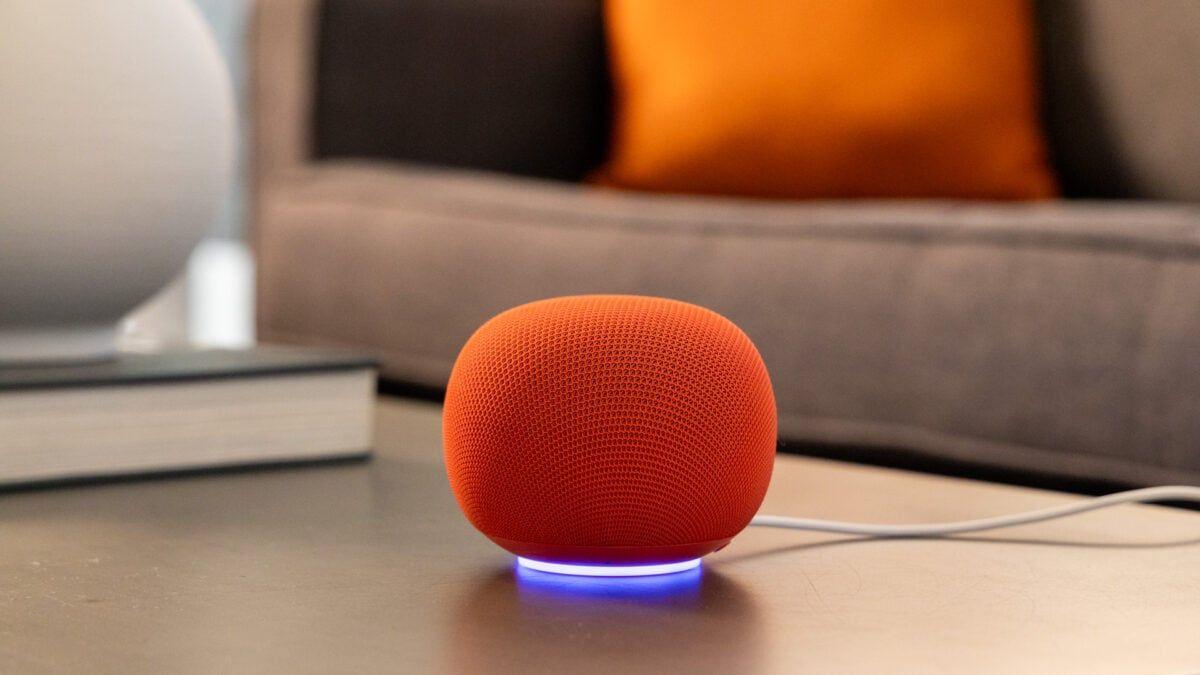
Source: Gizmodo
The hardware itself earns praise across reviews for its thoughtful design choices. Available in colors including jade, berry, and neutral tones, the smart speaker features a mesh fabric cover and a subtle LED ring at its base that glows different colors depending on activityâpurple for Gemini Live conversations, white for standard voice commands
2
. At softball size, it strikes a balance between being large enough to deliver decent audio quality while remaining compact enough to fit seamlessly on kitchen counters or bedside tables1
.Beneath its attractive exterior, the Google Home Speaker packs upgraded machine learning chips that enable local processing for common smart home integration commands
3
. This represents a significant upgrade over the Nest Mini, which relies heavily on cloud processing and often experiences frustrating delays when executing voice commands. The new speaker processes requests noticeably faster, reducing lag when controlling smart bulbs, locks, and sensors.
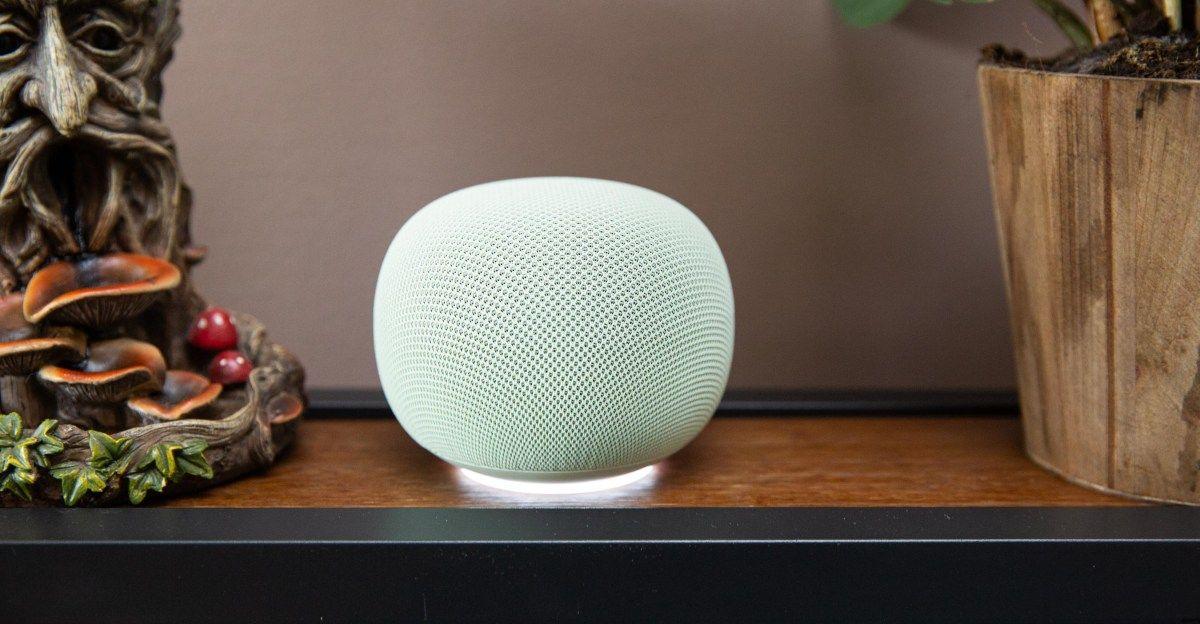
Source: The Verge
The device also functions as a full Matter and Thread border router, allowing it to serve as a central hub for compatible smart home devices without requiring separate hardware
3
. This positions it competitively against the Amazon Echo Dot Max at $99.99 and the Apple HomePod Mini at $129. The speaker includes three far-field microphones and a neural processing unit designed to handle background noise, demonstrating strong performance in hearing commands even from across rooms or during loud music playback1
.While the Google Home Speaker performs adequately for its size, audio quality presents a more complicated picture. The device features a single driver with 360-degree sound, compared to the larger Nest Audio's combination of woofer and tweeter
1
. Bass response proves particularly weak, with reviewers noting that low-end frequencies feel more like "a bump" than the intended boom1
.In direct comparisons, the speaker ranked third behind both the Echo Dot Max and HomePod Mini in audio quality testing
1
. At higher volumes, mids and lows tend to blend together, creating muddy sound on rock tracks, though acoustic music fares better2
. Stereo pairing two units improves the experience significantly, delivering house-filling volume at 80 percent, though bass remains minimal1
. Users can pair the speaker with a Google TV Streamer for simulated spatial audio, though performance varies by content type1
.The AI assistant Gemini represents the speaker's primary selling point, yet this is where the device stumbles most noticeably. Gemini for Home handles natural-language understanding better than Google Assistant, managing multistep commands and conversational requests that previously caused confusion
5
. The AI offers 10 new voice options with different accents and speaking styles, creating a more welcoming, conversational tone compared to Assistant's robotic delivery5
.Google Home Premium subscribers gain access to Gemini Live, which enables extended back-and-forth conversations without repeating wake wordsâuseful for studying topics or longer interactions
5
. Free users get Continued Conversation, a middle-ground feature allowing follow-up questions without saying "Hey Google" each time.However, reviews consistently describe Gemini for Home as feeling "unfinished"
1
. While response times are snappy and microphone pickup proves reliable, the AI-driven smart home experience doesn't yet justify the hardware investment for users expecting transformative capabilities beyond basic music playback, timers, and light control.Related Stories
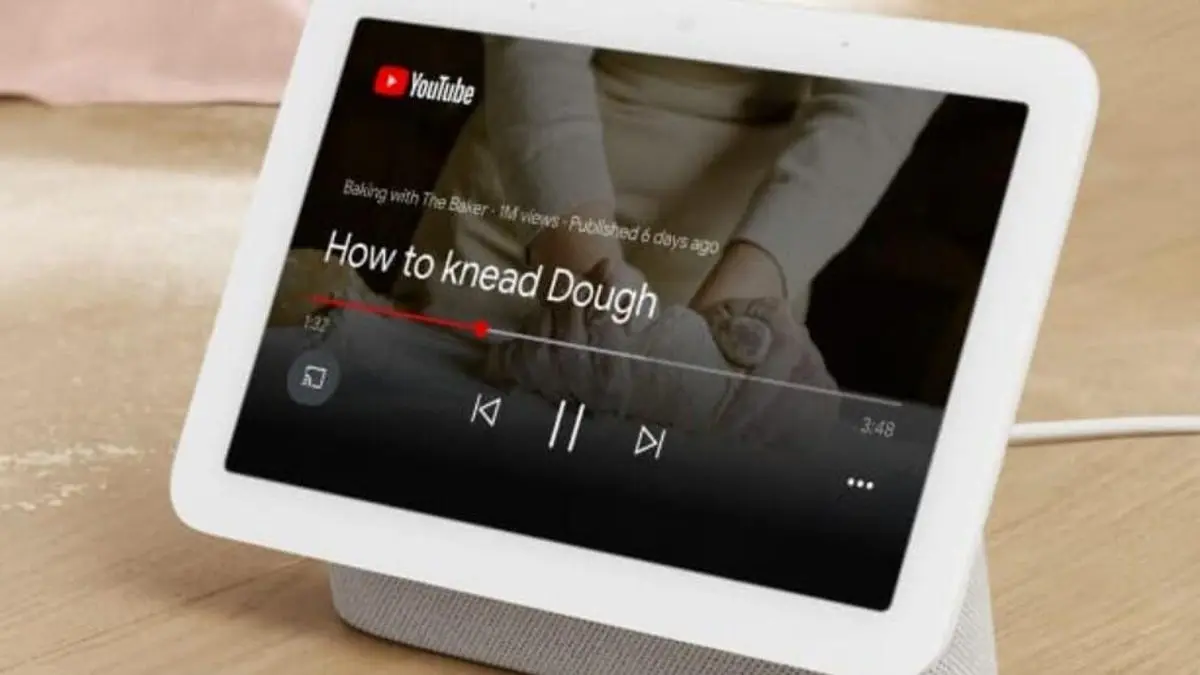
In an unexpected benefit, Google's cloud-dependent architecture allowed the company to upgrade nearly every smart speaker and display released since 2016 to support Gemini for Home
5
. Devices including the original Google Home, Home Mini, Nest Mini, Nest Audio, and Home Max all received the Gemini upgrade through a simple software update, along with third-party Assistant devices like the Insignia Voice Speaker and Lenovo Smart Display 10.
Source: 9to5Google
This instant upgrade path gives millions of existing devices access to improved natural-language understanding and conversational capabilities without requiring new hardware purchases
5
. While older devices like the Nest Mini respond more slowly than the new Google Home Speaker due to less powerful processors, they still benefit from Gemini's enhanced comprehension and friendlier voice options.Despite its polished appearance, the Google Home Speaker includes several questionable design decisions. The USB-C cable is hardwired directly into the speaker base rather than being removable, preventing users from replacing damaged cables or using longer runs
2
3
. This contrasts with the Nest Mini's removable cable and raises concerns about long-term durability and environmental impact when cables fray.Google also eliminated the cable clips present on previous Nest speakers and failed to include a color-matched cable, features offered by competitors like Apple's HomePod Mini and Amazon's Echo Dot Max
1
3
. The speaker's increased height and weight compared to the Nest Mini mean it cannot be wall-mounted, requiring dedicated counter or shelf space3
.Summarized by
Navi
17 Jun 2026â˘Technology

18 Dec 2025â˘Technology

26 Feb 2025â˘Technology

1
Policy and Regulation

2
Technology

3
Technology