11 Sources
[1]
Google rolls out fake call detection to protect against AI deepfake impersonation scams
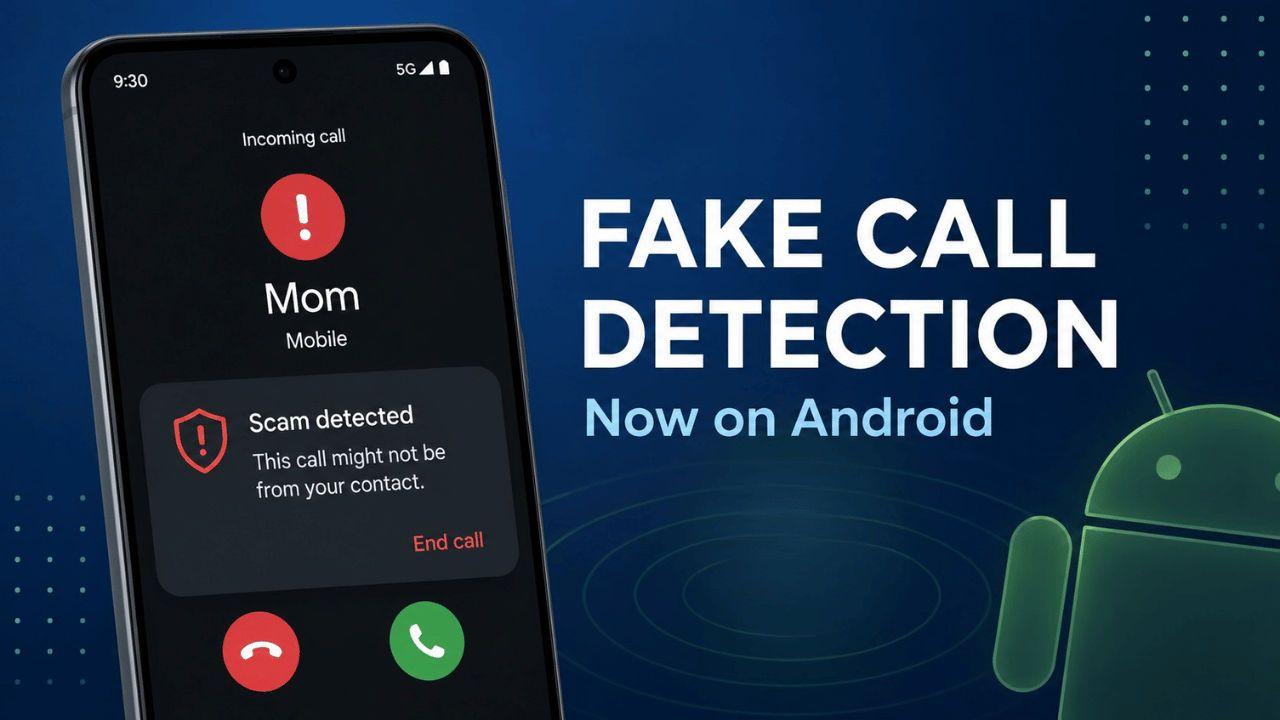
Google announced on Tuesday that Android is launching fake call detection to protect against AI deepfake impersonation scams. The feature is rolling out globally in Phone by Google to Android 12+ devices this month, starting with Pixel devices. As people increasingly refuse to answer calls from unknown numbers, scammers are shifting their tactics by spoofing trusted phone numbers and using AI deepfake technology to sound like authority figures, family members, or employers. For example, a person may receive a phone call showing the caller ID "Mom," and the voice may sound exactly like her, but the caller is actually a scammer using AI tools to impersonate her and request money for a fake emergency. The new feature is on by default and works automatically behind the scenes. Google explains that the new feature works kind of like a "digital handshake between devices." When a contact calls you, and you're both using Phone by Google, their phone sends a silent confirmation signal to your device to verify the call is legitimate and actually coming from their phone. "If a scammer tries to impersonate your trusted contact, that initial confirmation signal will be missing," Google explained in a blog post. "Your device will instantly notice this and ping your contact's actual device to double-check. If their real device says, 'I'm not making a call right now,' you'll get a warning on your screen advising you to hang up immediately." The tech giant notes that it built this feature on top of Rich Communication Services (RCS), making it possible for other apps and companies to adopt the technology. The launch of fake call detection was announced alongside other updates from Android, including a new Google Photos feature that lets users mix and match outfits and try them on virtually. The new "wardrobe" feature catalogs the clothes you're wearing in your photo library by turning them into snapshots you can browse on your phone. The feature is rolling out next week to eligible users in the U.S., India, and Brazil with Android 10+. Additionally, Google Play Books is getting a new "Catch me up" feature that lets users jump back into a story with a recap. Users can also highlight a passage to ask questions. These features are rolling out today for select English titles. Google is also making it possible to search entire outfits with its "Circle to Search" feature. Now, the feature will be able to find every item in an outfit at once, getting rid of the need to search piece by piece. This update is now available on all Android 14+ devices that have Circle to Search.
[2]
Android Is Fighting Phone Scams With a New Feature to Prove Who's Calling
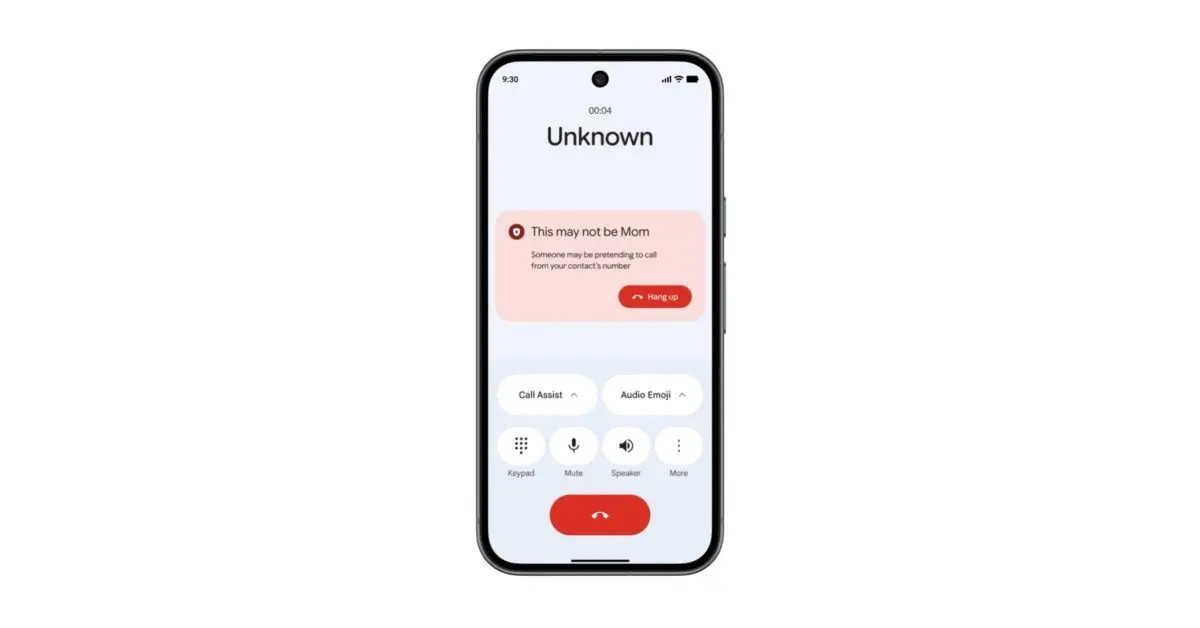
I've been covering spam calling for years, so when Google offered me details about a new Android feature built to detect and flag spoofed calls, I was ready to hear more. What I didn't expect from the demo was to hear my own voice. "I'm so excited to be interviewing you today about this new fake call detection feature!" I heard myself saying while a headshot I've used publicly for years popped up on the demo device. The caller ID name said "Lily." "Unfortunately, I lost my wallet and I'm stuck. Any chance you can Venmo me so I can take an Uber to the interview?" As my disembodied voice calmly made the ask, a pop up appeared as an overlay on the regular call screen: "This may not be Lily. Someone may be pretending to call from your contact's number." For Android phones calling each other, the new feature does a digital validity check and flags with a pop-up warning if a call isn't coming from your contact's smartphone and may be a scam. When the feature flags a call as a scam, it instantly removes the contact photo from the backdrop of the call to underscore the seriousness of the situation (not shown in the prototype demo Google made for WIRED). And the feature also changes the entry in Android's recent call log to say "Unknown caller" instead of displaying the contact name. Spam calls have been a scourge for decades, and the threat has only ramped up as attackers have started incorporating AI voice-cloning tools into their attacks -- making it possible to convincingly mimic an acquaintance of a victim, or even a family member, in real-time. And while a years-long push has improved detection of traditional robocalling, it hasn't eliminated the problem, and not all spam calls get flagged. Those calls that still slip through the cracks are particularly problematic as attackers focus their attention on impersonation scams -- making it look like their call is coming from a number you trust, or at least recognize, and then using AI tools to sound like the person you expect when you pick up. With these types of invasive and potentially devastating scams on the rise, Dave Kleidermacher, Android's vice president of security and privacy, and Eugene Liderman, director of Android security and privacy product, say that there was a real desire within Google to move defenses for victims forward. And they emphasized that while an obvious strategy is to attempt to fight fire with fire -- to use AI tools to help detect voice clones in calls -- this strategy alone is insufficient. It can have false positives and false negatives, but it can also feed an endless arms race between attackers and defenders. "We're always looking at whether there is a provable way, something much higher confidence that we can do," Kleidermacher says. The feature is built on the RCS communication standard and baked into the Google Dialer. Beginning today, it will start rolling out in updates for all Android phones running Android 12 (from 2021) and later. The mechanism uses RCS to digitally bind your phone number with your actual smartphone handset. When you call another Android user, your device will send what Kleidermacher describes as "a real-time, silent background confirmation signal" to the device of the person you're calling to verify the legitimacy of your call. If that hardware-based confirmation is missing, the Google Dialer will flag the call. "If you're calling me and we're in each others' mutual contacts databases, and we're both using the Google dialer that has this capability built into it, then I will always know if it's really you," Kleidermacher says. "If someone tries to call me through a VoIP session or some other mechanism and spoof your phone number and your voice, the Dialer will say that this is not you." The feature is meant to be very straightforward, and the pop-up for a potential scam call simply offers the option hang up. Phones running Android 12 or later are ubiquitous around the world, but for the feature to truly have an impact, it would need to be incorporated into basically every device, including Apple's iPhones. Google says it intentionally built the feature on RCS so it will be maximally interoperable with as many platforms as possible. Apple did not immediately return a request for comment about whether it has any plans to implement the feature or a similar one in its iOS mobile operating system. For now, Kleidermacher says he hopes the feature will play a role in protecting people from a type of scam that can fool anyone -- with potentially disastrous consequences. "Some of these attacks individually are just very devastating," he says. "People lose a lot, and it's very scary."
[3]
Google's Phone app will tell you if a scammer is impersonating one of your contacts
Google is launching a new feature for its Phone app that aims to protect you from AI impersonation scams. Now, when you receive a call from a scammer that appears to be coming from the same number as one of your contacts, Phone by Google will flag the call as suspicious so you can hang up. In a post explaining the update, Google describes impersonation scams as a growing threat, with the FBI reporting that Americans lost over $893 million to scams using AI in 2025. To carry out the attack, scammers spoof one of your contacts' phone numbers and then use AI-powered tech to make their voice sound like a friend, family member, or authority figure. The Phone by Google app will display a notification if you receive one of these fake calls, saying "Someone may be pretending to call from your contact's number," along with the option to end the call. Google is turning on this feature by default for users with Android 12 and later, starting with Pixel phones. This feature only works if you and a trusted contact both use Phone by Google, as a contact's device will send a "silent confirmation signal" that verifies the call is actually coming from your friend or family member. If a scammer tries to spoof your contact's number, "that initial confirmation signal will be missing," according to Google. The company notes that it built this feature atop end-to-end encrypted rich communication services (RCS) technology, allowing other apps to adopt it. Several other features are coming to Android devices along with this update, including the ability for kids under 13 to access Google's Personal Safety app. Kids will soon be able to display emergency contacts and medical information on their devices' lockscreens, as well as turn on car crash detection. Google is more widely rolling out support for Apple AirDrop, its AI-powered clothing try-on feature in Photos, and the ability to find items in an outfit with Circle to Search. Google Play Books users can also use a new AI-powered insights feature that can summarize what you've read so far in select titles or answer questions about a specific passage.
[4]
Google Will Soon Spot Fake Calls on Supported Android Phones
June's Android feature drop also expands AirDrop compatibility, Personal Safety features for kids, and fashion-finding options. A new update from Google will be able to tell you when to hang up on calls from friends and family -- because those pals and relatives are not actually on the line. This fake call detection feature, announced Tuesday, relies on encrypted back-channel communication between your phone and the Android phones of the real contacts being spoofed. Provided both devices run at least the 2021-vintage Android 12 and the Phone by Google app -- not a third-party dialer from Samsung or another firm -- your contact's phone will verify a real call by sending an end-to-end-encrypted confirmation signal to your phone. As Google explains, the absence of that signal will lead your device to ping the contact's device for confirmation: "If their real device says, 'I'm not making a call right now,' you'll get a warning on your screen advising you to hang up immediately." The threat model here targets both spoofed phone numbers -- easily generated with mobile apps -- and frighteningly effective AI deepfake audio tools. Today, your security-aware responses to a strange call from a family member suddenly asking for a financial or other favor include calling them back via phone or video, confirming that it's them by asking about a bit of shared experience that only they should know, or exchanging a secret word or phrase if you both thought to agree on one up-front. Google explains that this feature relies on the encrypted infrastructure of RCS messaging. For years, RCS was an Android-only proposition, but Apple's belated move to support RCS in iOS now includes end-to-end encryption for RCS chats between iPhone and Android users. So, while Google will first ship this feature on its own Pixel phones, its post says the technology here is open to "other apps and device manufacturers." Also Coming to Android... Also today, Google announced a set of additional Android features. The most relevant one for people with cross-platform contacts is expanded support for sending files to nearby iPhones via the QuickShare tool. Google first revealed this interoperability in November and has been steadily expanding its availability; Tuesday's post says AirDrop support will come to "more Android devices" but offers no further specifics. (For devices that still don't have this option, the free, open-source LocalSend can help bridge these platform gaps when installed on both an Android phone and an iPhone or iPad.) Two other items in this feature drop put fashion first. On phones running Android 14 or newer releases, the AI-powered Circle to Search feature can help you find where to buy the attire and accessories seen in a picture of somebody. And a new Wardrobe feature in Google Photos will catalog the clothes you're wearing in photos of you; its rollout starts this week on phones running at least Android 10 in the US, Brazil, and India. Kids under 13 with Android phones -- a larger demographic than you might expect -- get new features in Google's Personal Safety app that include showing their emergency contacts and medical information on a phone's lock screen and the option to turn on car crash detection. Google Play Books, an app that historically hasn't done much to distinguish itself from other ereader apps, is gaining a reading-companion feature that can catch you up with previous events in a book or answer questions about characters. That may seem silly, but I won't rule out its utility with such famously dense works as James Joyce's Ulysses or David Foster Wallace's Infinite Jest. Finally, because no Android feature drop seems to complete without some emoji feature, this one includes yet another set of new combinations possible in the Gboard app's Emoji Kitchen tool.
[5]
Android will now warn you if a caller is impersonating someone you know - Engadget
Google is adding new features to Android before releasing its next major update, Android 17, later this year. Alongside a more sophisticated version of scam call detection, Android users will also reap the benefits of updates to Google Photos and Circle to Search the company teased earlier this year, and a new AI-powered recap feature in Google Play Books. Android has had the ability to warn you if you're on a scam call since 2024, but Google's new fake call detection feature takes the idea even further. As part of an update to Google's Phone app, Android users will now be warned to end a call if a caller is impersonating someone on their contact list. "When a contact calls you and you're both using Phone by Google, their device sends a silent confirmation signal in real time to your device to verify the call is legitimate and truly coming from the contact's device," Google writes in a blog explaining the new feature. "Because this digital handshake uses end-to-end encrypted Rich Communication Services (RCS) technology, it is completely private." If your Phone app doesn't receive the handshake, it knows to show you a warning so you can immediately end your call. Google says fake call detection is available on devices with Android 12 and up that use its phone app. The company also plans to make its Personal Safety app available to users under the age of 13, so they can display their medical and emergency contact information on their lock screen and quickly enable safety features like car crash detection. Outside of the realm of improving safety on Android, two key apps are getting new AI-powered skills. Google is rolling out its "wardrobe" feature to Google Photos, giving the app the ability to catalog the clothes you've worn in photos and help you virtually try them on. Google Play Books, meanwhile, can now use AI to provide contextual information about whatever you highlight and recap what you're currently reading. Google Photos wardrobe is available on select devices in the US, India and Brazil running Android 10 and up. Google Play Books' new AI insights are rolling out now to select titles in English. Google is also updating existing tools like Circle to Search and Quick Share. Like the company demoed on Samsung phones in February, Circle to Search can now identify and search for multiple items in an image instead of just one. Google's workaround to make its file sharing feature Quick Share work with Apple's AirDrop is now also available on more Android devices. And if you don't find those updates satisfying, Emoji Kitchen can smash together new emoji in Gboard, Google's software keyboard.
[6]
Google's got an easy new way to keep you safe from scam calls
Availability is getting started with Pixel phones, but will extend to other handsets running Android 12 and later. Compared to modern, secure communication systems, the ancient public telephone network has long felt like a weak link. While we still rely upon it to receive important information, it's far too easy for bad actors to take advantage of its limitations, and try and fool us by impersonating callers we trust. Thankfully, Google's been working on a solution, and shares how its new tool is going to work as part of today's June Android Drop announcements. Unlike call authentication protocols like STIR/SHAKEN that operate on a network level and require carrier support, Google's new system is much simpler to implement widely, and operates more person-to-person. Basically, when you get an incoming call from one of your known contacts, your phone will silently communicate with the remote phone over an encrypted RCS link in order to verify the caller is who you expect it to be. Even if someone's able to spoof the incoming number, or maybe even use an AI tool to fake the caller's voice, they wouldn't be able to successfully respond to that encrypted RCS authentication step. Being able to take advantage of these protections requires you to have Google Contacts and Messages installed, and both users will need to use Google's Phone app. But even with all that Google software required, this isn't destined to be a Pixel exclusive. Availability will start with Pixel devices, to be fair, but Google says that it plans to extend support to other Android 12 and later handsets. That's great to hear, because the more people out there running an easy-to-use call verification system like this, the more secure all of us can feel about knowing we're talking to the person we think we are.
[7]
Google's new Pixel feature catches AI impersonation scams before you fall for them
Timi is the news and deals reporter for Android Police, who has been reporting on technology since 2008. He has worked in tech retail and also the IT space, providing hardware and software support, which gives him a unique perspective on the tech that he covers. This allows him to effectively break down complex subjects into easy-to-read pieces that even casual readers can enjoy. Before joining Android Police, he was a news writer for XDA, where he eventually transitioned to covering deals. He also worked as an editor and reporter for Neowin, where he covered news and attended major tech events like CES. He also reviewed phones, tablets, PC products, and other devices. In addition, he also created video content for the Neowin YouTube channel. If you're a Pixel user, you have to appreciate the updates that Google delivers, offering small and large updates throughout the year to keep things fresh. Most recently, Google dropped its June 2026 Android Feature Bundle, which delivers a bunch of great new features to explore. With that said, some features are going to be better than others, but one of the more important ones to highlight is the Pixel's new ability to detect impersonation scams using fake call detection. Things are getting more complex, and Google has answers Things used to be pretty simple, but scams and fishing attempts have not gotten more complex over time, requiring big brands to step in to provide some form of protection. We know that Android already has a variety of layers to ensure that your data and privacy remain safe, and cellular providers also have a few layers to try to stop bad actors as well. With that said, Google is now stepping things up with its new feature to help protect against impersonations. This is part of the June 2026 Android Feature Bundle, which is now rolling out to compatible Pixel phones. We've all been there before. We see a number we don't know, and we simply don't pick it up because we assume it's something harmful. But what if you get a call from a number you think you know, like a caller ID that identifies as a family member or close friend? Naturally, you pick up the call, and the person on the other end sounds just like what you'd expect. The only problem is that this person isn't who you think they are, and it's a clever person or organization that's leveraging AI for a bad purpose. While this might sound like something from the future, it's actually a problem that's happening now. Google is attempting to combat this by adding a feature that will look for a digital handshake in its Phone by Google app. If it is not able to confirm this with the other user, then it will alert you that this call could be a possible scam. The great part about this is that this feature will actually ping the true contact's device to see whether there's an outgoing call to ensure it's not getting things wrong. This feature is rolling out now, so you'll want to keep an eye out for it. Once again, it's part of Google's June 2026 Android Feature Bundle, which also comes with other great features as well.
[8]
Google Phone app rolling out Android fake call detection that uses RCS
Phone by Google wants to combat the "growing threat of impersonation scams" and protect Android users against "sophisticated, AI-powered deepfake attacks" with fake call detection. June Android Drop: Quick Share AirDrop expansion, AI in Play Books, & more, Android 17 coming soon Imagine your phone rings. The caller ID says "Mom." You answer, and it sounds exactly like her; she has the same tone, the same voice. However, the person on the other end isn't your mom -- it's a scammer using AI tools to impersonate her and demand money from you for a fake emergency. Fake call detection requires that both parties are on Android and use the Phone by Google app, while Google Messages and Google Contacts also have to be installed. When a contact calls, their phone "sends a silent confirmation signal in real time to your device to verify the call is legitimate and truly coming from the contact's device." This digital handshake uses end-to-end encrypted RCS (Rich Communication Services). If you're being scammed by an impersonator, your phone will notice that the "initial confirmation signal will be missing," and ping the contact's real device to double-check. If their real device says, "I'm not making a call right now," you'll get a warning on your screen advising you to hang up immediately. This feature will be available globally on Android 12+ phones starting with Pixel devices this month. Fake call detection is enabled by default but can be turned off at any time. Google says it's "possible for other apps and device manufacturers to adopt this technology" given the RCS underpinnings.
[9]
Android will now warn you if someone is using AI to fake your contact's voice on a call
Google's fake call detection is the first time a phone platform has built a real-time cryptographic defense against AI voice cloning scams. Yes, advancements in AI help people from different walks of life, but they have some cons. One of the most exploited con has been AI voice cloning. Over the years, it has reached the point where most people can no longer tell a deepfake voice from a real one. Scammers already know this, and they've been spoofing users' contacts, cloning their voice, and committing financial frauds for quite some time. Android's new fake call detection is designed to stop that exact scenario before it costs you. How does fake call detection actually work? Fake call detection is an industry-first feature. It identifies when a caller is not who they claim to be, even when the caller ID looks legitimate and the caller's voice sounds familiar. Recommended Videos Without any action required from you, the feature operates silently in the background. When a contact calls you, and both of you are using Google's Phone app, the caller's device sends an encrypted confirmation signal to your device, functioning like a digital handshake, verifying that the call is coming from that person's phone. This handshake is built on end-to-end encrypted RCS technology; the verification is completely private. When a scammer spoofs your contact's number, the signal will be absent, and your device immediately pings your contact's actual phone to check whether they are making a call. Does the feature work for all Android phones? When their real device confirms it is not making a call, a warning appears on your screen, telling you it's a fake call and you should immediately hang up. The entire process happens instantly, before the scammer has had a chance to manipulate you. Fake call detection is enabled by default. It is rolling out globally in Phone by Google this month, starting with Pixel devices, running on Android 12 and above. The only catch is that both the caller and the recipient must be using Phone app and the recipient's device also needs RCS enabled in Google Messages.
[10]
How Android helps keep you safe from impersonation scams with fake call detection
Imagine your phone rings. The caller ID says "Mom." You answer, and it sounds exactly like her; she has the same tone, the same voice. However, the person on the other end isn't your mom -- it's a scammer using AI tools to impersonate her and demand money from you for a fake emergency. To help protect you from the growing threat of impersonation scams, Android is introducing fake call detection, an industry-first protection that can detect and flag suspected spoofed calls when your contact and you are both using Phone by Google. This builds on our recent launch of verified financial calls, which warns you if a scammer is attempting to impersonate your financial institution. Marking a major milestone in mobile security, fake call detection helps protect you, your family and friends by identifying when a caller isn't who they claim to be, giving you an extra layer of defense against sophisticated AI-voice cloning scams, also called deepfake attacks, of your contacts.
[11]
Your Android Phone Now Detects Fake Calls Impersonating People
Being worried about a future filled with AI doesn't mean you an alarmist. While AI certainly has its uses, it likely has as many or more downsides if we step back and look at the bigger picture of it all. One of those downsides would be ways for criminals or scam artists to use AI in order to pull off the crimes they so love to commit. Today, Google announced that its Phone by Google app has new tech in place that could stop potential AI scams that happen via phone calls. Since AI can be used to spoof or clone a person's voice, you can probably imagine that a faked call using a voice that sounds like yours or someone you know could be bad. The amounts of information that could be abstracted from a call where one party doesn't realize they are talking to a scam artist could be huge. To protect against this, Google's fake call detection works when a call happens from a number you have as a contact that can't be verified by that person's phone. Or think about it a different way. If a person you know calls you using the Google Phone app, and you also use the Google Phone app, there is a behind-the-scenes confirmation that you are both calling each other from your phones. If a scammer were to spoof their number and call you, that little verification or handshake from your friend's phone would be missing and the call would then alert you that this might not be the person you thought it was. Google is doing this through a digital handshake that uses end-to-end encrypted RCS technology. Yes, that's the same RCS that we now use to text message everyone we know. Oh, and if you don't like the idea of this digital handshake, you can disable this feature at any time (instructions). This new fake call detection will land on Pixel phones first later this month and then rollout globally.
Share
Copy Link
Google is rolling out fake call detection to protect Android users from AI-powered scammers who spoof trusted phone numbers and use voice-cloning technology to impersonate family members, authority figures, or employers. The feature works automatically by sending encrypted confirmation signals between devices to verify call legitimacy, warning users immediately if someone is pretending to call from a contact's number.
Google announced on Tuesday that Android is launching fake call detection globally to protect users against AI deepfake impersonation scams
1
. The feature is rolling out this month through Phone by Google to devices running Android 12 and later, starting with Pixel phones2
. The timing addresses an urgent threat, as the FBI reports Americans lost over $893 million to AI scams in 20253
.As people increasingly refuse to answer calls from unknown caller numbers, scammers are shifting tactics by spoofing trusted phone numbers and deploying AI voice-cloning tools to sound like authority figures, family members, or employers
1
. For example, a person may receive a call showing the caller ID "Mom," with a voice that sounds exactly like her, but the caller is actually a scammer using AI tools to impersonate her and request money for a fake emergency1
.
Source: TechCrunch
The new feature operates automatically and is enabled by default, functioning as what Google describes as a "digital handshake between devices"
1
. When a contact calls you and both parties are using Phone by Google, their phone sends a silent confirmation signal to your device to verify call legitimacy and confirm it's actually coming from their phone5
."If a scammer tries to impersonate your trusted contact, that initial confirmation signal will be missing," Google explained in a blog post
1
. Your device will instantly notice this and ping your contact's actual device to double-check. If their real device says it's not making a call, you'll receive a warning on your screen advising you to hang up immediately1
.
Source: 9to5Google
The mechanism uses Rich Communication Services (RCS) to digitally bind your phone number with your actual smartphone handset
2
. When flagging a spoofed scam call warning, the feature instantly removes the contact photo from the call screen and changes the entry in Android's recent call log to say "Unknown caller" instead of displaying the contact name2
.Dave Kleidermacher, Android's vice president of security and privacy, and Eugene Liderman, director of Android security and privacy product, emphasized that while an obvious strategy is to use AI tools to detect voice clones in calls, this strategy alone is insufficient
2
. It can have false positives and false negatives, but can also feed an endless arms race between attackers and defenders. "We're always looking at whether there is a provable way, something much higher confidence that we can do," Kleidermacher says2
.Spam calls have been a scourge for decades, and the threat has ramped up as attackers incorporate AI voice-cloning tools into their attacks, making it possible to convincingly mimic an acquaintance or family member in real-time
2
. While a years-long push has improved detection of traditional robocalling, it hasn't eliminated the problem, and not all spam calls get flagged2
.Related Stories
Google intentionally built this feature atop end-to-end encrypted Rich Communication Services technology, making it possible for other apps and companies to adopt the technology
1
. The feature is baked into the Google Dialer and uses RCS to send what Kleidermacher describes as "a real-time, silent background confirmation signal" to verify the legitimacy of calls2
.
Source: Droid Life
For the feature to truly have an impact, it would need to be incorporated into basically every device, including Apple's iPhones
2
. Google says it intentionally built the feature on RCS so it will be maximally interoperable with as many platforms as possible2
.The launch of fake call detection was announced alongside other updates from Android
1
. Google Photos is getting a new "wardrobe" feature that catalogs the clothes you're wearing in your photo library by turning them into snapshots you can browse on your phone, rolling out next week to eligible users in the US, India, and Brazil with Android 10 and later1
.Google Play Books is receiving a new "Catch me up" feature that lets users jump back into a story with a recap, and users can also highlight a passage to ask questions
1
. Google is also making it possible to search entire outfits with its Circle to Search feature, now available on all Android 14 and later devices that have Circle to Search1
. Additionally, QuickShare's compatibility with Apple AirDrop is expanding to more Android devices4
.Summarized by
Navi
[1]
[4]
1
Policy and Regulation

2
Technology

3
Technology

1
Pope Leo XIV releases major AI encyclical calling for 'disarmament' of artificial intelligence

2
Apple's Siri overhaul for iOS 27 brings Gemini integration and standalone app to compete with ChatGPT

3
Nvidia unveils RTX Spark chip to chase $200B CPU market with AI agent PCs from Microsoft, Dell, and HP