Google Launches AI Voice Features in Gmail, Docs and Keep with Conversational AI


10 Sources
[1]
Google launches AI voice features in Gmail, Docs and Keep
Google is launching conversational AI features within Docs, Gmail and Keep that let users ask questions about their inboxes and documents as well as do tasks using natural-language queries and dictation. The company first previewed these features in May during its Google I/O conference. The
[2]
Google Adds Voice Commands to Gmail, Docs and Keep for Some Users - CNET
Omar Gallaga has covered technology, digital culture and other topics for outlets including CNET, NPR, WIRED, Texas Monthly, MSNBC, Consumer Reports, The Washington Post, the Los Angeles Times, The Atlantic and the Austin American-Statesman, where he was a longtime tech reporter, editor and
[3]
Google now lets you chat with Gmail, Docs, and Keep
Google is rolling out AI-powered voice assistant modes for Gmail, Docs, and Keep that allow you to manage the apps by talking to them. The real time conversational capabilities are called Gmail Live, Docs Live, and Keep Live, and like the Gemini Live experience for Google's chatbot, aim to make it
[4]
Google is turning its email, document, and note-taking apps into conversational AI experiences
Serving tech enthusiasts for over 25 years. TechSpot means tech analysis and advice you can trust. What just happened? Google introduced its Gemini Audio AI models earlier this year, during the latest developer-focused I/O conference. Now, the advertising corporation is going to bring these
[5]

Google rolling out Gmail Live, Docs Live, and Keep Live
Following the announcement at I/O 2026, Google is rolling out Gmail Live, Docs Live, and Keep Live this week. After testing in recent months, these voice capabilities are now generally available. Gmail Live lets you talk to your inbox. Instead of manually searching for information and reading
[6]

Google's New AI Update Now Lets You Have Conversations with Gmail & Docs
Google has confirmed that it's bringing a new update to its Gemini Audio models for Gmail, Docs, and Keep, which finally allows users to manage tasks, search information, and even draft content entirely through real-time voice conversations. Initially teased at this year's Google I/O conference,
[7]

Google Brings Conversational AI Search to Gmail | PYMNTS.com
Gmail Live is part of a larger series of new voice artificial intelligence offerings for Gmail, Google Docs and the note-taking tool Google Keep that the tech giant took live, per the post. "As technology evolves, so does the way we get things done," the post said. "That's why we're bringing
[8]

Google launches voice features in Workspace on productivity push By Investing.com
Investing.com - Google announced Friday it is rolling out three voice-activated features across its Workspace products, allowing users to draft documents, search email, and organize notes through spoken commands. The new capabilities, powered by Gemini Audio models, are launching in Gmail, Docs,
[9]

Google launches Gmail Live: Gemini voice features come to Gmail, Docs, and Keep
Users can search emails, draft text, and organize notes by voice Google is rolling out Gmail Live, Docs Live, and Keep Live, three new features that let us talk to our apps to look up information, draft text, and sort through our ideas. All three run on Gemini, and they push Google a little
[10]

Google now lets you search emails, write docs and organise notes using your voice: Here is how
The update brings voice-based conversations to Gmail, Google Docs and Google Keep. Google is making it easier to get everyday tasks done without typing. The company has started rolling out Gemini Audio models across Google Workspace products. The update brings voice-based conversations to Gmail,
Share
Copy Link
Google rolls out Gmail Live, Docs Live, and Keep Live—conversational AI features powered by Gemini 3.5 that let users interact with documents, emails and notes using voice commands. The features are now available for Google AI Plus, Pro, and Ultra subscribers on iOS and Android.
Google Rolls Out Voice-Powered AI Features Across Core Productivity Tools
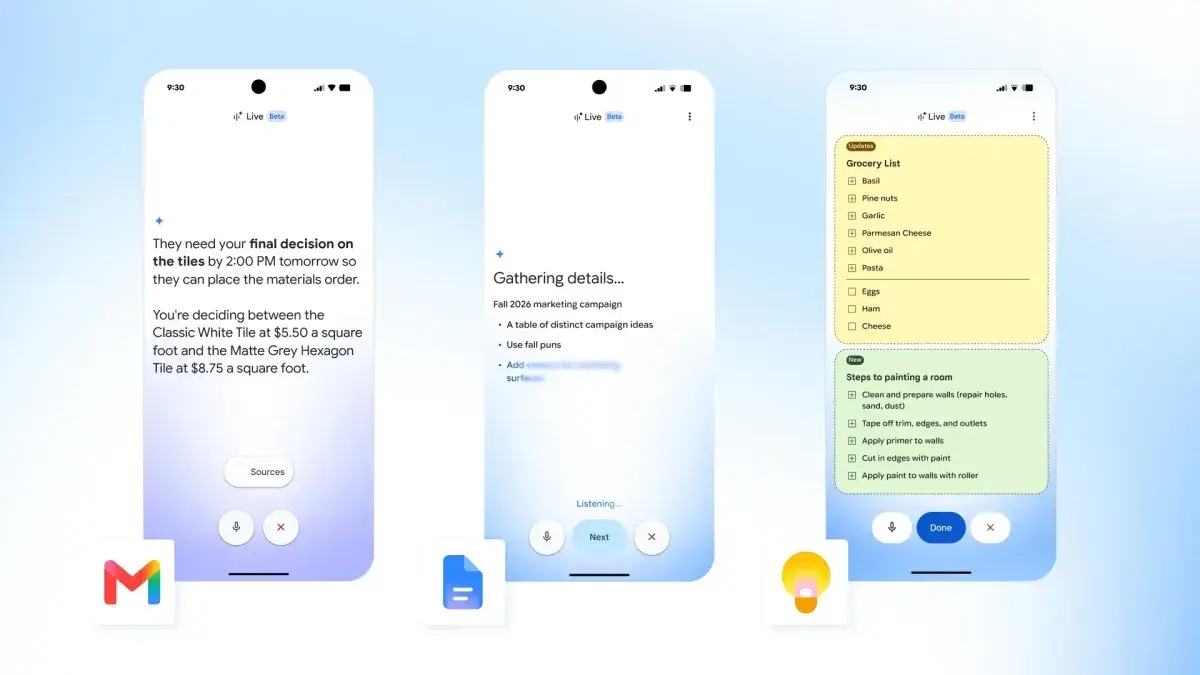
Google is launching conversational AI features within Gmail, Docs, and Keep that enable users to interact with documents, emails and notes through natural-language queries and voice commands
1
. The features, dubbed Gmail Live, Docs Live, and Keep Live, were first previewed at Google I/O in May and are now rolling out globally to mobile platforms in English3
. These capabilities transform how users engage with Google Workspace apps by replacing traditional typing and manual searches with real-time spoken interactions powered by Gemini AI2
.
Source: TechCrunch
How Gmail Live Changes Email Management
Gmail Live allows users to ask questions about their inbox contents instead of typing in a search box, with a Gemini-powered AI assistant providing answers while displaying a live transcript
1
. Users can ask questions like "when is my kid's next school event?" and the voice assistant pulls information from email threads, feeding back a summarized version verbally while linking source emails in the on-screen transcript3
. The feature supports follow-up questions without repeating context and can be interrupted mid-sentence to pivot to different topics without starting a new session5
. To launch, users simply tap the new Live icon in the Gmail search bar5
. This matters because it eliminates the need to dig through lengthy email threads using keywords or subject lines, making information retrieval significantly faster for busy professionals managing high-volume inboxes.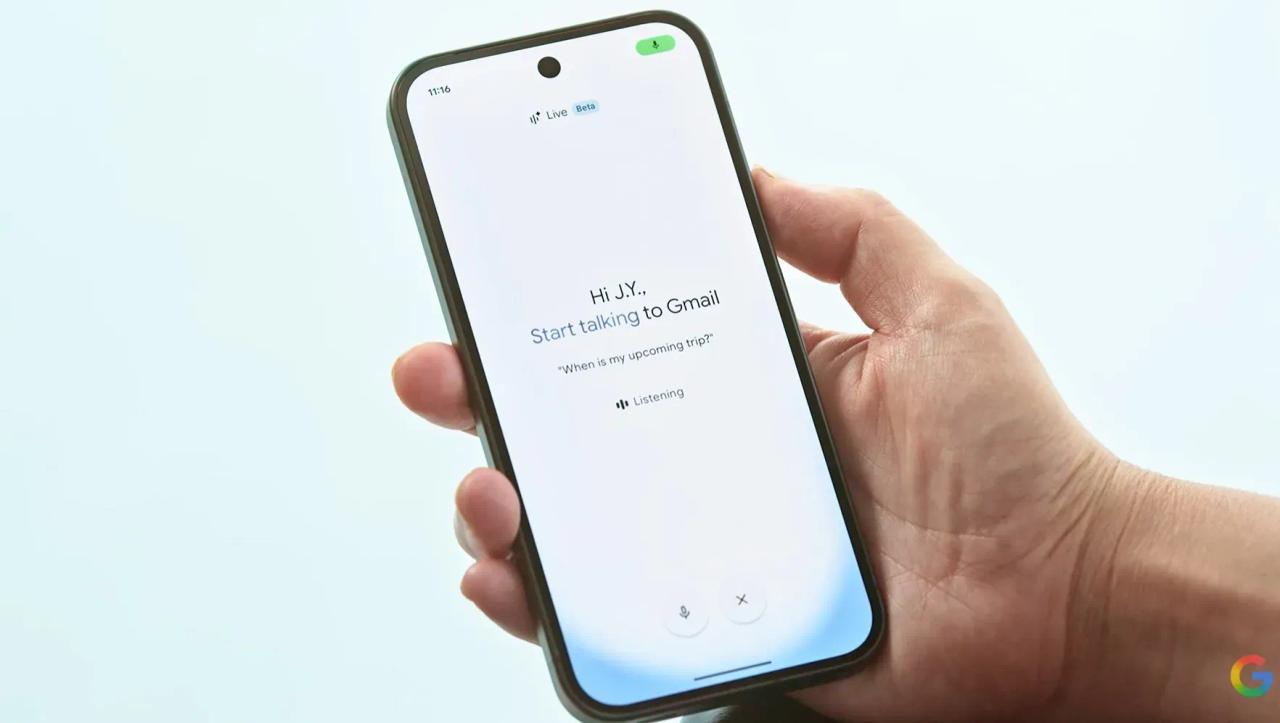
Source: CNET
Docs Live Functions as a Hands-Free Thought Partner
Docs Live positions itself as a hands-free thought partner and co-writer that helps users quickly create first drafts for summaries, proposals, and more
5
. Users can describe what they want to write, and the AI assistant helps create initial drafts by pulling information from Gmail, Drive, Chat, and the web to personalize outputs1
3
. The feature shows a recap of information before generating the document, and users can ask Docs Live to add specific information and format as needed through interactive voice commands5
. In the Google Docs app, tapping the floating action button reveals a new "Create with voice" option to launch the experience5
. This capability transforms document creation from a blank-page problem into a conversational process, particularly valuable for users who think better verbally than through typing.Keep Live Transforms Note-Taking with Voice-Enabled Scratchpad
Keep Live lets users employ the app as a voice-enabled scratchpad to jot down notes without typing, capable of pulling together recipes and lists when instructed
1
. The feature listens to "audio brain dumps and processes them" to generate notes and lists, with Gemini understanding stream-of-consciousness input5
. Users can tell Google Keep to add "ingredients for pesto pasta" to their shopping list, and Gemini understands the intent and reflects it in the note5
. Google Keep shows an inline preview of what it generated after a few seconds, and multiple notes can be created in the same session5
. Importantly, Keep Live isn't limited to new notes and can add information to existing ones—if you already have a grocery list and mention needing bananas, Keep will add bananas to your existing list5
.Availability and Subscription Requirements
Gmail Live is available for Google AI Plus, Pro, and Ultra customers on both iOS and Android
1
. Docs Live and Keep Live are available for Google AI Pro and Ultra users, with Keep Live currently limited to Android only while Docs works on both iOS and Android platforms3
. All features are rolling out in English worldwide5
. Google stated these capabilities will arrive soon for Workspace business customers1
4
. The tiered availability suggests Google is testing market response among premium subscribers before broader rollout, potentially indicating future expansion to free-tier users if adoption proves strong.
Source: Digit
Related Stories

Broader Context of Google's Voice AI Strategy
These launches represent part of Google's broader push into voice-based features across its product ecosystem. The company added cross-app dictation to its Mac app in April, and Pixel 11 smartphones received a Gemini-powered dictation tool called Rambler last month that removes filler words from speech
1
. In August, Google introduced the Gemini 3.5 Transcribe model specifically for speech-to-text use cases1
. The features utilize Gemini 3.5 AI and are based on Gemini Live's conversational AI models2
4
. This coordinated rollout across multiple products signals Google's commitment to natural language processing as a core interaction paradigm, competing directly with voice-first approaches from rivals like OpenAI's Advanced Voice Mode.User Reception and Future Implications
While Google positions these conversational interfaces as making apps more natural and faster than typing, early reactions are mixed
2
. Some users consider talking to mobile apps a natural way to interact with devices, while others express concern about the growing number of AI tools being proposed for Android apps, with one disgruntled user stating that "chatting" with an email app is not appealing4
. Watch for how adoption rates among Google AI subscription plans influence whether these features expand to free users, and whether privacy-conscious users embrace or resist voice-based interactions with personal data. The success of these productivity tools may determine whether conversational AI becomes standard across enterprise software or remains a premium feature for specific use cases.References
Summarized by

Navi
[3]
[4]
[5]
Related Stories
Google adds voice prompting to Docs, Keep, and Gmail as Workspace gets conversational AI upgrade
19 May 2026•Technology

Gmail Live brings AI-powered voice search to Google AI subscribers and Workspace users
16 Oct 2026•Technology

Google starts beta testing Gmail Live, bringing voice search to your inbox
30 Jun 2026•Technology

Recent Highlights
1
Binance Hack: How AI-Enabled Cyberattack Led to Record $6.3 Billion Crypto Theft
Technology

2
Pope Leo XIV Demands AI Disarmament and Ban on Autonomous Weapons at UN Geneva Meeting
Policy and Regulation

3
Apple Opens Siri AI to Third-Party Apps After Two-Year Wait, Introduces Daily Usage Limits
Technology

Recent Highlights
Today's Top Stories












Don’t drown in AI news. We cut through the noise - filtering, ranking and summarizing the most important AI news, breakthroughs and research daily. Follow topics that matter to you and stay ahead.


