6 Sources
[1]
Turn Your Spoken Ramblings Into Coherent Articles With Google Docs Live
Expertise Smartphones | Gaming | Telecom industry | Mobile semiconductors | Mobile gaming It's gotten pretty easy to use tools such as ChatGPT or Google Gemini to generate reams of text, but it often requires rounds of refining prompts to get the output you want. Now you can voice your disorganized thoughts within Google Docs and a new AI feature will fuse them into readable text, though only higher-tier Google AI subscribers will be able to use it when it arrives this summer. At Google I/O 2026, the company unveiled a new feature -- Docs Live -- that turns spoken ramblings into organized text. The kicker is, if you grant it permission, it will rifle through your connected Google accounts (Gmail, Drive and Chat) as well as pore over the web to refine the output. At last week's Android I/O Edition event, we saw a similar feature, called Rambler, added to the Gboard keyboard that lets you dictate text messages while intelligently omitting verbal stumbles and mid-thought changes. Google is positioning Docs Live as a combination dictation secretary and editor, and there are likely plenty of people who'd be relieved to have AI translate their thoughts into cohesive, compelling text. As someone who has built a career around that difficult transmutation, I understand the appeal of avoiding the struggle, but writing is a skill that takes effort and repetition to develop. Docs Live may do the work for people, but outsourcing that labor won't make them better writers. That's assuming Docs Live works as advertised, transforming spoken thoughts into outlined and written text, something we'll have to test ourselves. As with other AI tasks, I'm curious how long the revision and reformatting of something Docs Live outputs will take and whether it'll be quicker to simply write something the old-fashioned way. (To be clear, we do not use generative AI to write content. See CNET's AI Policy.) Docs Live might quickly spit out more unrefined text, though. In a pre-brief ahead of Google I/O, I saw a recorded video demonstrating a scenario in which a nameless Google employee described using the feature to sketch out a speech to deliver at their former high school's career day. In the spoken stream of consciousness, the employee worked through steps to get Docs Live to ingest their resume and come up with "some funny analogies," so it would be more engaging to students. After reading the output text, they asked the AI tool to reformat the generated analogies into a table to make them easier to read and generate a story about how their brother inspired them to become a software engineer. It took about a minute for Docs Live to generate a speech based on those parameters and revisions. As previously mentioned, Docs Live will only be available to Google AI subscribers, specifically those with the AI Pro ($20 per month) or Ultra ($100 or $200 per month) tiers. Other services in the Google software ecosystem are getting voice-controlled features, too, such as inbox searching in Gmail Live and automatic note-taking and organizing in Keep.
[2]
Are you really going to talk to Gemini like that? - Engadget
Google's new AI features capitalize on the popularity of voice dictation, and a desire to leave the thinking to AI. Over a decade ago, Amazon and Google taught the world how to speak to AI. Through Amazon Alexa and Google Assistant, wake words were learned and natural language prompts were practiced, all in the name of setting timers, asking for music, controlling your smart home and plumbing search results for information. Things are a bit different in 2026. If there is a theme at this year's Google I/O outside of AI agents, it's that the way Google imagines we'll speak to AI is changing. Multiple new features the company showed off featured voice input -- but in an unpolished form, where the onus fell on Gemini to interpret intent and act accordingly. The change could have unintended effects: Google wants users to ramble to AI to get things done, but in the process they might do a lot less thinking in general. Take for example, Rambler, an updated version of Gboard's speech-to-text feature that Google demoed during The Android Show: Google I/O 2026 Edition on May 12. "With Rambler, you don't have to worry about getting your words exactly right before you start," Google writes. "You can speak naturally and it will take the important parts, then fit them all together into a concise message." The on-device model Rambler uses can strip out ums and ahs, and captures the gist of a message without transcribing your ramble verbatim. Importantly, it can also accommodate switching languages mid-flow, the way many bilingual people speak with family and friends. The feature offers at least one clear accessibility benefit in the sense that both the transcribing and editing of a message can happen at the same time, without having to touch a keyboard. The ability to send a long text while one or both hands are occupied could theoretically be helpful to anyone. The task-tracking app Todoist has explored similar ideas via a feature called Ramble, which lets you rattle off things you need to do to the app, and leaves the creation and sorting of tasks up to AI. In Silicon Valley at large, The Wall Street Journal has already documented a turn towards voice dictation in corporate workspaces. Apps like Wispr Flow and Monologue let you talk or whisper to your computer and convert your speech into text, automatically editing for tone and style depending on what app you're using. In the healthcare industry, many doctors quickly adopted AI transcription tools as a way to take notes during appointments. What Google is offering is the benefits of those tools without the need for a third-party subscription or an extra app. You can use it on anything that runs Android 17. Docs Live, on the other hand, is one of several examples of Google integrating the experience of using Gemini Live -- live voice chats with Gemini -- into its other apps. With Docs Live you can spout off at an AI model and it will make a Google Doc based on what you share. "Just talk, and Docs Live handles the heavy lifting -- organizing your thoughts, structuring your document, and, with your permission, pulling relevant details from your Gmail, Drive, Chat and the web," Google writes. In Google's own demo, this prompting is much more along the lines of dictating an outline, but Docs Live is supposed to be equally capable of turning a stream of consciousness rant into a draft. Keep Live will bring a similar experience to Google's notetaking app, while Gmail Live will transform AI voice chats into a faster way to find emails. What goes unremarked on in the use-cases of these new features is what they eliminate. Google's video demo for Docs Live features a software engineer who's been asked to return to his alma mater to talk to students about his career. That's an experience that, at least hypothetically, would be meaningful enough that you might want to write your own speech, but instead the demo user offloads the task to Docs Live. Not everyone is a born writer -- it seems intentional that Google specified this person is a software engineer -- but being able to think clearly and communicate your own thoughts and feelings transcends career path. Rambler, too, seems to skip over the rewarding part of communication. Most everyone labors over the meaning or intent of a text message at some point in their life, but Rambler lets you hand off some of that stressful (but rewarding) work to AI. No one is required to use these tools, and in the case of Docs Live, Keep Live and Gmail Live, they'll be limited to paying AI Pro, AI Ultra and business Workspace subscribers to start. What the preponderance of AI voice features does make me wonder is what they'll teach frequent users about AI. Google Assistant and Amazon Alexa got better at understanding the weirdness of human speech over time, but the structure of most interactions with those voice assistants still defaulted to a robotic call-and-response because it was the best way to make sure you got what you wanted. You had to think about what lightbulb you wanted Google Assistant to turn on or Alexa skill you wanted to invoke, and speak accordingly. Google now seems less interested in the quality or clarity of what you input, provided it can produce a result you'll leave satisfied with, which in the age of AI seems like an easier bar to clear than before. What is Google Docs when you don't need to think very hard about what you want to write? Or Google Messages when you leave the delivery of a text up to AI? Google's new features could very well be useful to millions, but by demanding less actual thought, they may end up altogether changing how people think.
[3]
Docs Live brings Gemini's conversational AI to Docs and Gmail
I've been writing about Android since 2011, with a focus on device reviews, Samsung and Google Pixel hardware, and the latest happenings in the ecosystem. In my entire writing career, I've reviewed more than 75 Android phones. Carrying both a Samsung or Pixel flagship and an iPhone as a daily driver provides me with deep insight into how Android works and how it compares to iOS. I have been writing for Android Police since 2021, covering news, how-tos, and features. You can find my previous work on Neowin, AndroidBeat, Times of India, iPhoneHacks, MySmartPrice, and MakeUseOf. When not working, I tend to mindlessly scroll through X, play with new AI models, or go on long road trips. You can reach out to me on X or drop a mail at [email protected]. Gemini Live is a great way to converse with Google's AI assistant and get real-time answers to your questions. You can even use Gemini Live's integration with other Google services, like Maps, Tasks, and Calendar, for more context and to help you get more done. At I/O 2026, Google announced that it is bringing the same conversational AI power to more of its products. Docs Live will harness Gemini's voice capabilities to let you create documents with your voice. You just tell Gemini what you want to create, and Gemini will take care of the rest. Right now, while you can use Gemini to draft documents in Google Docs or Sheets, you have to type the prompt. This interaction isn't conversational or natural. Docs Live wants to change that, bringing a Gemini Live-like experience for creating documents. As Google puts it, this will allow you to verbally dump whatever you have in mind and let Gemini do the heavy lifting. It can even pull relevant information from specified sources for more context. And once the document is generated, you can again use your voice to ask Gemini to make further changes. Coming this summer to AI Pro and Ultra subscribers Docs Live should be particularly helpful in Gmail, enabling you to use Gemini to quickly draft replies to emails. That's not it, though. You can also use Gmail Live to ask Gemini to find content from your inbox and then have a conversation about it. And if you spend hours working in Google Docs, the conversational AI power should make your life easier by capturing your thoughts and ideas and turning them into a readable document. Google will initially make Docs Live available in Google Docs, Gmail, and Google Keep. It will roll out to Google AI Pro and Ultra subscribers this summer.
[4]
Google is turning the brain dump into a productivity feature
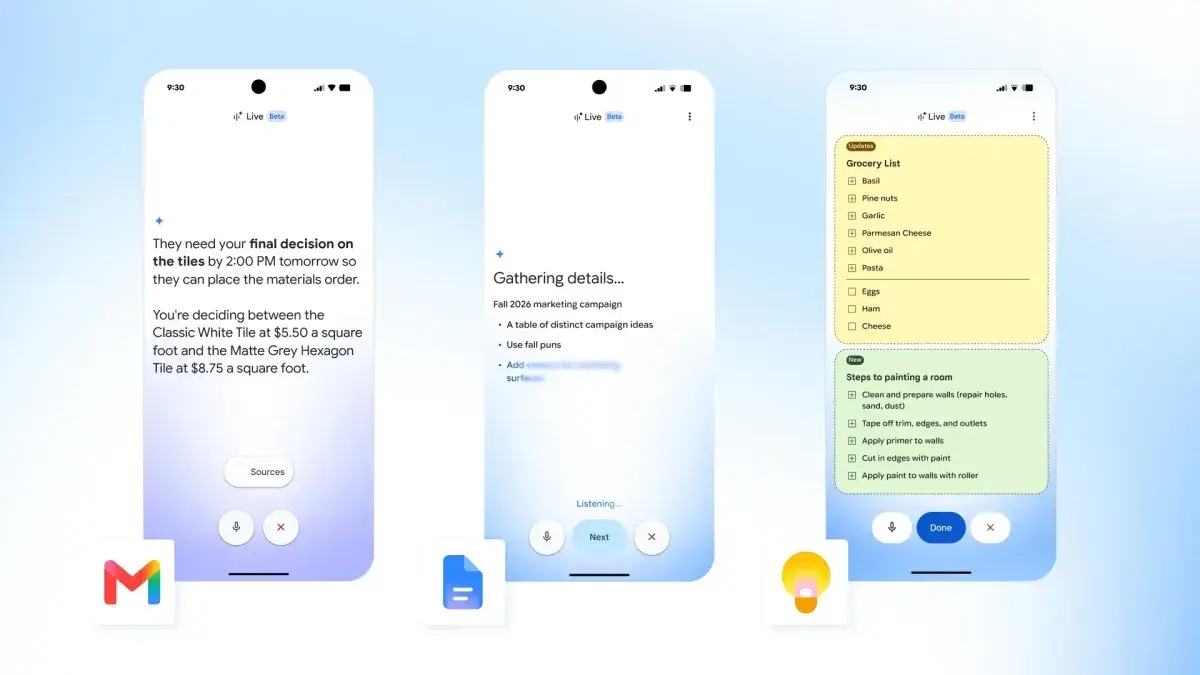
These advanced AI features will require Google AI Pro or Ultra subscriptions when they launch this summer. We've all been in this situation: you know what you want to say, but you're too mentally exhausted, distracted, or confused to actually say it. Google's new conversational AI, Docs Live, wants to help. The metaphor Google is using here is a "brain dump," and Google is applying this technique to Docs, Gmail, and Google Keep. Google's trying to offload more of the "thinking" away from you and on to Google apps, using what it knows about you -- naturally! -- to inform its decisions. The most developed implementations seem to be Docs Live and the version applied to Google Keep. Docs Live and the new Keep features are coming to Google AI Pro and Ultra subscribers this summer. What is Google Docs Live? Docs Live isn't revolutionary -- just the opposite, in fact. Using a prompt to create text (or an entire document) has existed for months and years. Orally commanding an AI to do this? We've been able to talk to Google Gemini for months. And Google has quietly and not-so-quietly asked you to link your various Google Apps -- aka more sources of personal data -- for some time now. What Docs Live tries to do is to hash together all of the relevant sources of information into something that you could produce while on the road, The earliest days of Outlook and Gmail mobile apps meant that you could reply to an email while in a taxi on the way to an appointment, without the need to pull out your laptop. Docs Live feels very similar, in that you could use it to produce something coherent, maybe even professional, at the last minute. "To create a doc with Gemini, before you'd have to type up a really precise prompt," Sundar Pichai, the chief executive of Google, said in a briefing with reporters. "Now you can just verbally brain dump whatever is on your mind and let Gemini do the rest." The demonstration that Pichai and Google showed off was haphazard in concept, perhaps deliberately so. "So, I just remembered I'm doing an alumni talk for my high school's career day tomorrow," the demo "prompt" said. "I used to come up with some talking points to explain what I do for a living as a software engineer, but I'm not really sure where to start. Oh, actually, can you just pull my resume from Drive, although that might be boring? Maybe can you come up with some funny analogies, so it'll be more of an engaging talk for the students. Oh, and also I think the school sent me an email. I think the subject is something like career day logistics. Maybe just grab the details from there, throw them at the top of the doc, so I know where to go and what time to get there." That's not really a prompt, just a stream of consciousness request that asks Gemini to make sense of all of the information you have stashed away -- though it does, interestingly, tell Gemini which documents to use, specifically. The same goes for Keep. Yes, you can still ask it to store a reminder for a certain time, or stash some little bit of info away, something that I use Keep for religiously. But Keep is expanding to author reminders and tasks, too -- instead of trying to figure out what steps you need to take to paint a room, you can ask Keep to simply create a checklist, filling in the steps itself. That's handy. Even better, Docs Live can format on the fly. A followup asked Gemini to pull out specific details and compile them into a table, which Gemini did. Of course, like many advanced features, Google wants you to pay for it -- especially as it telegraphs a move to "compute" or token-based fees. Next up? Gmail Live Next up? Gmail, Pichai said. Who needs to email Mom details of your holiday, when Gmail/Gemini can do it for you? Right now, though, Gmail Live seems little more than an improved search tool for Gmail -- which is what Gmail was founded upon, anyway. The example Google gave was asking Gmail what gate number you needed to be at for a flight -- something that Gmail usually pulls out as a card, or stores in a Google Wallet, or something else. This, too, will require either an AI Pro or Ultra subscription. Gmail is rolling out what it calls an "AI Inbox" today, which certainly has some value. When you're on your phone, it can take forever to try and find a specific document file. Gmail's promising that it will surface it immediately. You'll be able to "check off" emails, eliminating the back and forth if a coworker stepped in and finished the task. Of course, Gmail's also promising to draft its own email, too, if needed. Maybe it's the pace of innovation, West Coast culture, or simply the influence of a younger generation where "vibes" matter as much as anything else -- but document creation just doesn't feel as formal as it once did. A PowerPoint "presentation" felt more formal a few years ago than it does now. People don't share "final" Word documents, but drafts. And why not? Office apps have become more collaborative. People aren't sending formal letters to one another, or even publishing a formal paper in the expectation of a response. A casual "brain dump" simply might be good enough for a team meeting, a school presentation, or hammering out the details of a summer vacation.
[5]
Google Docs and Keep Get Live Talking Experiences Too
Like Gmail, both Google Docs and Google Keep are getting their own live experiences. They are similar too, in that they want you to just speak naturally to Gemini and have it get things done, even if you pause or hesitate or your ideas aren't spoken in the clearest of ways. For Google Docs, you could fire up a live session and put together a speech that pulls from all sorts of attached Google apps, adds proper structure, provides ideas based on the subject, and so much more. Here's how Google describes it working: To get the full picture of how powerful this could be, you should watch the demo video below. As for Google Keep, you can probably guess how this works. You fire up a live session and can then describe multiple lists or notes that Keep (with the help of AI) can organize for you. Google describes it below, plus they offer an example of someone going live and putting together a birthday list, shopping list for a recipe, and then a to-do list for room painting preparations. Like with Gmail, these live features will hit Docs and Keep this summer for Google AI Pro and Ultra customers.
[6]
Google Will Use AI to Turn Your Rambling Ideas Into a Written First Draft
In Google Docs, users will now be able to activate Docs Live, a new voice chat feature that Google says will act as a "thought partner and co-writer to help you get to a first draft faster using just your voice." The company says that Docs Live will help writers refine their work by processing focused directions, brainstorming sessions, and rambling stream-of-consciousness idea generation. The feature will also be able to pull in data from your other Google Workspace apps, like Gmail, Drive, and Chat. For instance, you could tell Gemini to format all documents according to a template sitting in your Gmail inbox. Speaking of Gmail, the mega-popular email client is also getting some voice upgrades. Users will now be able to activate a Gemini-powered voice agent and ask questions about the contents of their inbox. As an example, Google wrote, you could ask Gemini questions like "What's my flight's gate number?" or "What's going on at my kid's school this week?" and the AI voice agent will search through your messages to find the relevant information.
Share
Copy Link
Google unveiled Docs Live at I/O 2026, a feature that converts unstructured voice input into organized documents. Available this summer for Google AI Pro subscribers at $20 per month and Ultra subscribers at $100-$200 per month, the tool integrates with Gmail, Drive, and Chat to pull context while users speak naturally without worrying about precision or verbal stumbles.
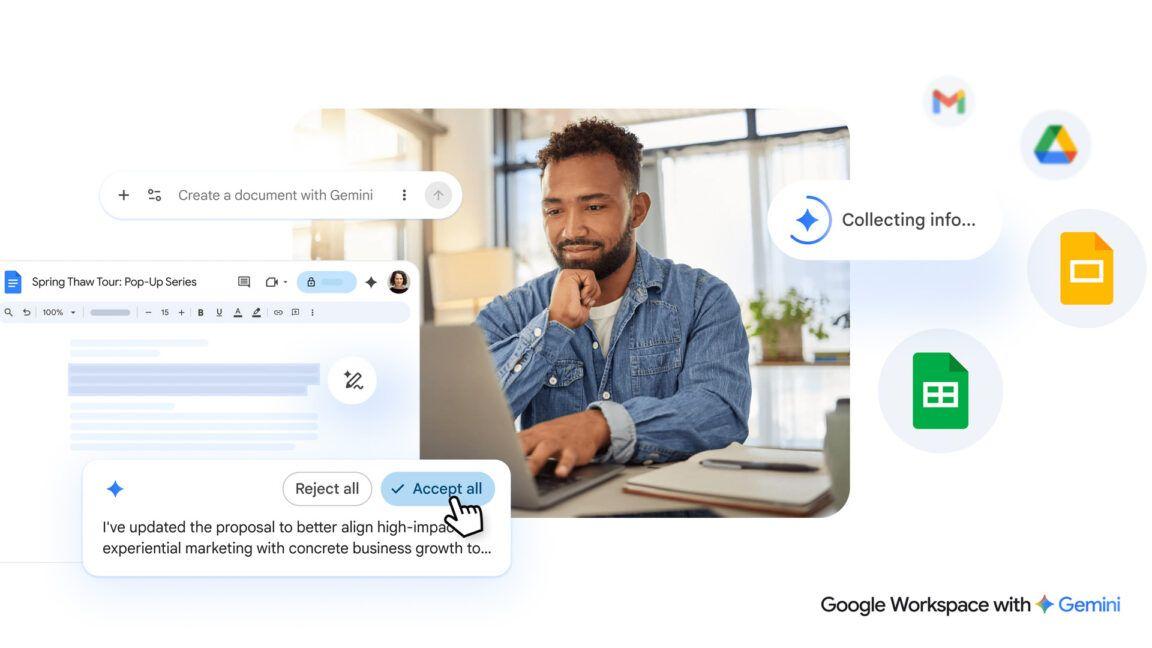
Google announced Docs Live at Google I/O 2026, marking a shift in how users interact with Gemini AI through voice-powered content creation. The feature allows users to speak their thoughts in an unpolished, stream-of-consciousness manner while the AI organizes them into structured documents
1
. Unlike traditional voice dictation tools, Docs Live interprets unstructured input and transforms spoken thoughts into coherent text without requiring precise prompts3
.
Source: PCWorld
The conversational AI feature represents Google's effort to make document creation more accessible by eliminating the need for carefully crafted prompts. "You can just verbally brain dump whatever is on your mind and let Gemini do the rest," explained Google CEO Sundar Pichai during a press briefing
4
. This approach aims to streamline document creation for users who struggle to articulate their ideas in writing or lack time to compose formal text.Docs Live leverages deep integration with Google Workspace services to enhance its output. With user permission, the feature accesses Gmail, Google Drive, and Chat to pull relevant information while generating documents
1
. During demonstrations, Google showed a software engineer preparing a speech for a high school career day by asking Docs Live to retrieve his resume from Drive and extract logistics from an email with the subject "career day logistics"4
.
Source: Droid Life
The AI-powered features extend beyond simple transcription. Users can request formatting changes on the fly, such as converting analogies into tables or generating additional content like personal stories
1
. The demo showed the entire process taking approximately one minute from initial voice input to a complete speech draft with multiple revisions1
.Google is bringing similar voice-powered capabilities to other applications through Gmail Live and Keep Live. Gmail Live enables users to search their inbox conversationally and draft email replies through voice commands
3
. The feature promises to surface specific documents or flight information instantly, addressing the challenge of searching for files on mobile devices4
.Google Keep is evolving beyond simple reminders with Keep Live, which can create checklists and organize multiple lists simultaneously. Users can describe various tasks—such as birthday planning, recipe shopping lists, and room painting preparations—and the AI will organize them into separate, structured notes
5
. This productivity feature transforms Keep from a storage tool into an active assistant that authors reminders and tasks based on spoken requests4
.
Source: CNET
Alongside Docs Live, Google introduced Rambler for the Gboard keyboard during The Android Show: Google I/O 2026 Edition. This speech-to-text feature allows users to speak naturally while automatically removing verbal stumbles like "ums" and "ahs" and capturing the essential message without verbatim transcription
2
. The on-device model can accommodate language switching mid-conversation, reflecting how bilingual speakers naturally communicate2
.Rambler offers accessibility benefits by enabling simultaneous transcription and editing without keyboard input, making it useful for sending messages when hands are occupied
2
. The feature will be available on devices running Android 17, expanding voice dictation capabilities across the mobile ecosystem2
.Related Stories

Docs Live, Gmail Live, and Keep Live will launch this summer exclusively for Google AI Pro and Ultra subscribers
1
. The AI Pro tier costs $20 per month, while Ultra subscriptions range from $100 to $200 per month1
. Business Google Workspace subscribers will also gain access to these features2
.The premium pricing reflects Google's strategy to monetize advanced AI capabilities while potentially moving toward compute or token-based fees in the future
4
. For AI subscribers, these tools represent a significant expansion of voice-powered productivity features across Google's ecosystem.The introduction of brain dump technology raises concerns about its impact on critical thinking and communication skills. Critics note that while Docs Live may help users avoid the struggle of writing, it won't develop their ability to articulate thoughts clearly
1
. The technology eliminates the rewarding process of laboring over message intent and learning to communicate effectively2
.Observers question whether the time saved using these tools will offset the effort required for revision and reformatting of AI-generated content
1
. The shift toward voice-based interaction with AI represents a departure from the structured commands used with earlier assistants like Google Assistant and Amazon Alexa, potentially teaching users to rely on AI interpretation rather than clear communication2
. As document creation becomes less formal and more collaborative, these features may accelerate the trend toward draft-based workflows where AI handles initial content creation while humans focus on refinement and direction.Summarized by
Navi
[3]
[5]
19 May 2026•Technology

10 Mar 2026•Technology

19 May 2026•Technology

1
Technology

2
Business and Economy

3
Health