Google adds voice prompting to Docs, Keep, and Gmail as Workspace gets conversational AI upgrade


7 Sources
[1]
Google adds voice-based prompting to Docs and Keep | TechCrunch
At the Google I/O developer conference, Google announced it's bringing a voice-based prompting feature to Workspace apps such as Docs, Keep, and Gmail. These features can help you create drafts, take notes, and search for emails. In Docs, you can create a draft document using your voice. For
[2]
Google brings more conversational features to Gmail, Docs and Keep - Engadget
Google thinks that it's good to speak out loud and so, to that end, is bringing more conversational features to Gmail, Docs and Keep in the form of Live. Gmail Live, for instance, will let you ask your inbox a natural language question to save you the turmoil of having to search for the keyword
[3]
Google brings voice prompting to Docs, Keep, and Gmail at I/O 2026
Google is betting that the future of productivity software starts with your voice, not your keyboard. At its I/O 2026 developer conference on Monday, the company unveiled voice-based prompting features for Docs, Keep, and Gmail, all powered by its Gemini AI models. The headline feature is Docs
[4]
Your favorite Google apps are getting a massive Gemini Live-like upgrade
Gmail Live will roll out this summer on Android and iOS to Google AI Pro and Google AI Ultra subscribers in the US, in English. It will also roll out in preview to Google Workspace business customers this summer. Keep's AI voice capabilities are very similar to Gboard's Rambler upgrade, but
[5]

Docs Live and voice AI in Google Keep let you talk to create, 'Google Pics' announced
Besides Gmail announcements, Google at I/O 2026 announced AI voice features for Docs and Keep. The company also unveiled "Google Pics" as the newest Workspace app. In Keep, you'll find a new floating action button with Google's Live icon above the "Create a note" FAB. This launches a fullscreen
[6]

Google adds conversational AI tools to Gmail, Docs and Keep
Google is launching conversational features, branded as "Live," in Gmail, Docs, and Keep, aimed at enhancing user interactions with its applications. Gmail Live enables users to ask questions in natural language, allowing them to retrieve information from their inbox without manual keyword
[7]

Google I/O 2026: Docs Live Brings Gemini Voice AI to Gmail, Docs and Keep
Google Keep organises voice notes into lists automatically Google introduced Docs Live at Google I/O 2026, bringing Gemini-powered conversational AI to Gmail, Google Docs and Google Keep. The new feature lets users speak naturally to draft documents, search their inbox, and organise notes without
Share
Copy Link
Google unveiled voice-based prompting features for Docs, Keep, and Gmail at its I/O 2026 developer conference. The new capabilities let users create documents, organize notes, and search emails entirely by speaking. Rolling out this summer to Google AI Pro and Ultra subscribers, the features mark a shift toward voice as the primary interface for productivity software.
Google Workspace Gets Voice-First AI Overhaul at I/O 2026
Google is betting that productivity software starts with your voice, not your keyboard. At the Google I/O developer conference on Monday, the company unveiled voice-based prompting features for Docs, Keep, and Gmail, all powered by its Gemini AI models
1
3
. The new Google AI features represent a fundamental shift in how users interact with Google Workspace, moving from typed commands to natural language conversations that can handle complex, multi-step requests in a single breath.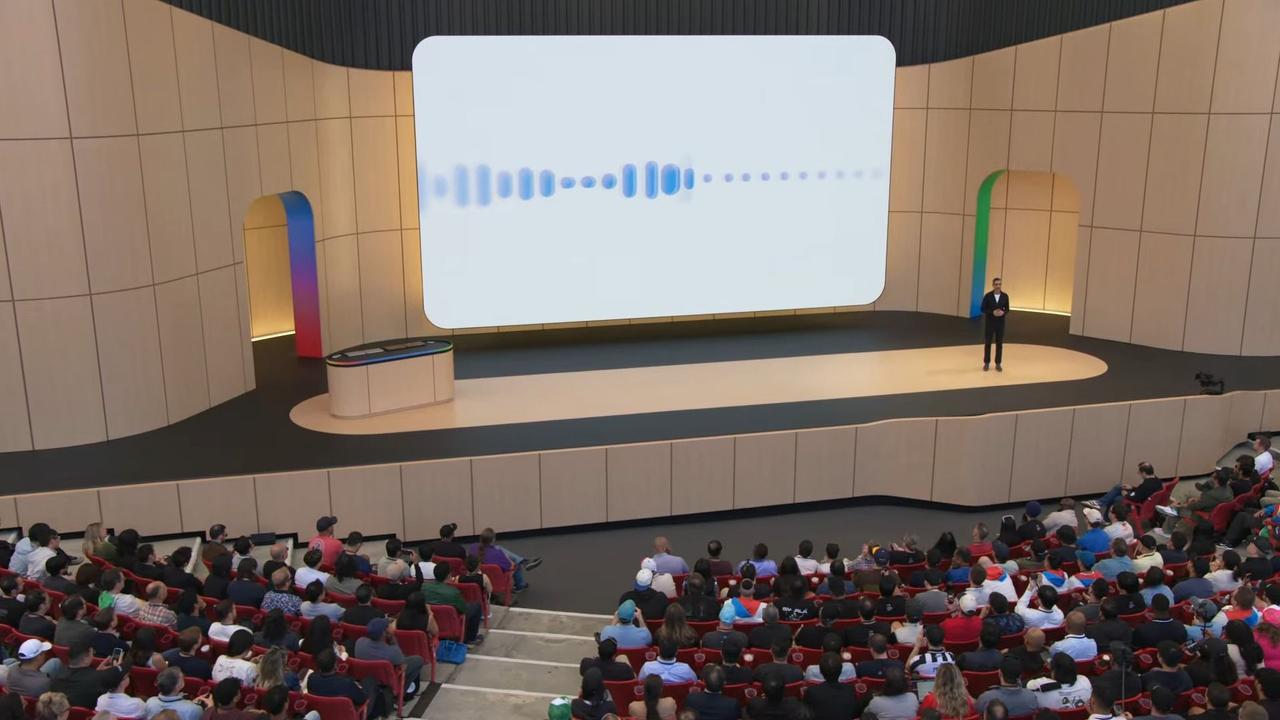
Source: Android Authority
The headline feature is Docs Live, which lets users create and edit documents entirely by speaking. In a demo, Google showed a user verbally instructing the tool to pull résumé details from Drive, layer in event logistics from an email thread, and sprinkle in humorous anecdotes, all in a single, unscripted stream of speech
3
. Previously, users would have to type all this out, potentially writing short sentences and various follow-ups that resulted in a multi-turn conversation taking considerable time1
. Google's idea is that with voice, you can use long sentences or ask for multiple tasks in one go, and the feature understands when you change your mind and ask for a detail to be changed in the same conversation turn.
Source: Engadget
Gmail Live Brings Conversational AI Features to Your Inbox
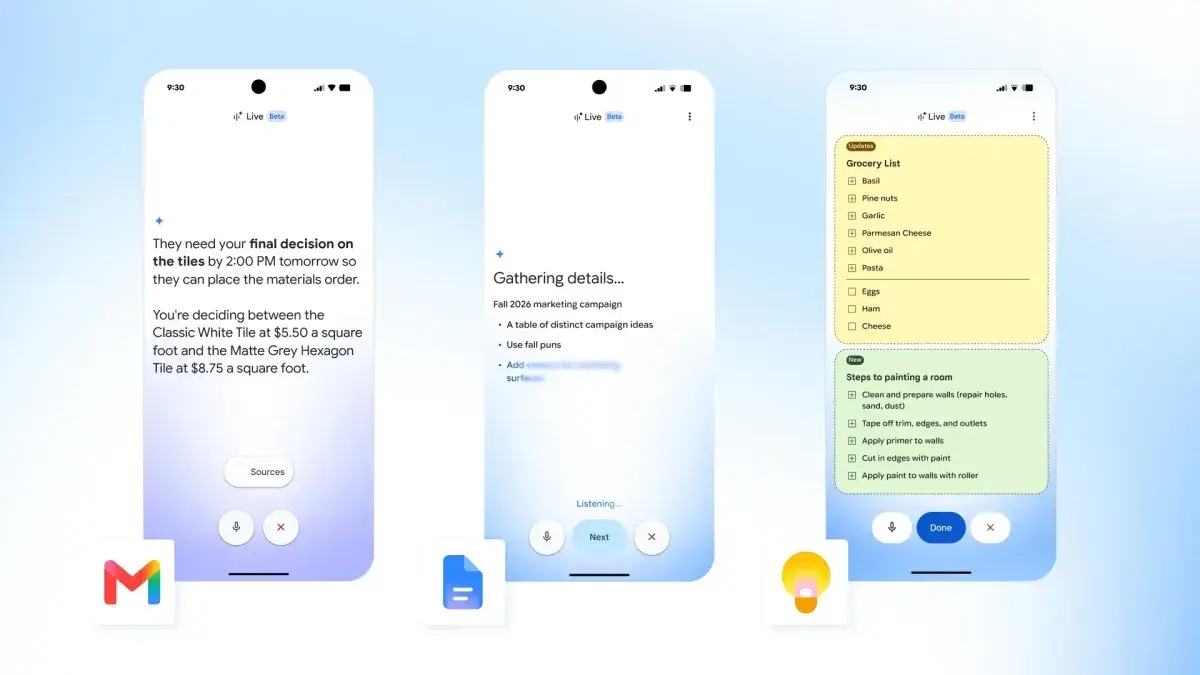
Gmail is gaining what Google calls Gmail Live, a conversational voice interface for your inbox
3
. Instead of typing search queries, you can ask Gmail to surface specific details like flight confirmation codes, Airbnb check-in instructions, or your child's school schedule, and get answers drawn from your messages. Say you're rushing to the airport and need to know your gate number—you can now just ask the system "What's my flight's gate number?" using natural language2
. It's essentially an AI agent for your email, one that understands context well enough to handle multi-step requests. In many ways, it feels similar to Ask Gemini but with each feature plugged into the specific app in question.AI in Google Keep Transforms Voice Notes Into Structured Lists
Google Keep is getting a similar voice overhaul with AI voice capabilities that let users dump a stream of unstructured thoughts
5
. You could talk about completely different things, like buying a gift, making a grocery list, and painting a spare room, and Keep will make separate notes for each topic. In Keep, you'll find a new floating action button with Google's Live icon above the "Create a note" FAB, launching a fullscreen experience with a waveform that hugs the perimeter5
. This goes beyond transcription as the underlying Gemini AI model understands intent and what you're actually asking for. Notes are generated in real time with users able to edit them via voice before tapping "Save to Keep" at the bottom of the screen.The concept isn't entirely new. Apps like Voicenotes and AudioPen have offered voice-to-structured-text workflows for years, and desktop dictation tools like Wispr Flow, Monologue, and Aqua Voice have built loyal followings
3
. What Google brings to the table is scale: Keep is already baked into the broader Google Workspace ecosystem, meaning voice notes can flow straight into Google Docs, Sheets, and the rest of the suite. Earlier this month, Google released its own dictation product called Rambler, which is built into Gboard and works across apps1
.Rollout Timeline and Availability for Voice-Based Prompting Features
The new voice features will roll out this summer for Google AI Premium subscribers and Google Workspace business users
3
. Gmail Live will roll out this summer on Android and iOS to Google AI Pro and Google AI Ultra subscribers in the US, in English, and will also roll out in preview to Google Workspace business customers. Docs Live will roll out to Google Docs for Android and iOS this summer with Google AI Pro and Ultra in English globally5
. Keep's AI voice capabilities will be coming to Google Keep on Android this summer for Google AI Pro and Ultra subscribers in English in the US5
.Related Stories

Google Pics Debuts as Newest Workspace App
Beyond voice features, Google also unveiled Google Pics as the newest Google Workspace app
5
. This is an AI image generation and design app aimed at creating graphics for business presentations or personal use cases like making an event invite or poster. Advanced Gemini reasoning is leveraged to treat every element in an image as an editable object, with the interface letting you select a portion and edit as if you're leaving a Docs comment. Google Pics is fully integrated into Workspace, with future updates letting you access this editor in any application. It's first launching as a standalone website this summer for Google AI Ultra subscribers in English in the US.Why Voice Matters for Productivity Software
CEO Sundar Pichai framed the shift as inevitable, saying that users will soon create and edit documents using voice as a matter of course
3
. The broader trend is clear: users are asking increasingly complex, multi-part questions of AI tools, and voice is simply a more natural interface for that kind of interaction than a text box. Tech companies are cramming AI into all products and features, and as a result, users are getting attuned to asking lengthier queries1
. In some cases, voice is an easier input method to blurt out long sentences and queries describing complex multi-tasking requests. What's more, the current generation of models is good enough to understand if users change their mind about something in the middle of a sentence and output the final query accordingly. Whether talking to your documents catches on as a mainstream habit remains to be seen, but Google is clearly convinced that the keyboard's monopoly on productivity is overdue for a challenge. This Gemini Live-like upgrade across core productivity apps signals Google's commitment to making voice the default interface for work.References
Summarized by

Navi
[4]
Related Stories
Google Launches AI Voice Features in Gmail, Docs and Keep with Conversational AI
03 Sept 2026•Technology
Google starts beta testing Gmail Live, bringing voice search to your inbox
30 Jun 2026•Technology

Google AI Docs Live transforms spoken thoughts into documents for Pro and Ultra subscribers
19 May 2026•Technology

Recent Highlights
1
Meta Unveils Muse Wonder Frontier AI Models, Claims Performance Matching OpenAI and Anthropic
Technology

2
IMF Report Warns AI Market Correction Could Spark Global Financial Crisis With $1.4T at Risk
Business and Economy

3
OpenAI Releases 722 AI-Generated Math Solutions, Triggering Existential Crisis in Mathematics
Technology

Recent Highlights
Today's Top Stories








Don’t drown in AI news. We cut through the noise - filtering, ranking and summarizing the most important AI news, breakthroughs and research daily. Follow topics that matter to you and stay ahead.


