Google starts beta testing Gmail Live, bringing voice search to your inbox


6 Sources
[1]
Google's Gmail Live AI feature is now available in beta - Engadget
You can use Gemini to quickly search your inbox with natural language. As we know, Google is deeply committed to find new ways that AI can save you from arduous tasks like, I don't know, manually typing a keyword into the Gmail search box. Gmail Live, announced back at Google I/O last month and
[2]
Gmail Live now in testing on Android and iOS
Following the announcement at I/O 2026 last month, Google is now testing Gmail Live on Android and iOS. Gmail Live lets you search your inbox by voice. You can think of it as an instance of Gemini Live optimized for emails. Google positions the feature as letting you conversationally find
[3]
Google starts testing Gmail Live, its new voice search tool for your inbox
The feature lets you ask questions about your inbox with your voice and is set to roll out later this summer. At I/O this year, Google showcased Gmail Live, a new Gemini-powered feature that lets users search their inbox using their voice instead of typing. The feature has now moved into testing,
[4]
How to Access Gmail Live on Android and iOS
At Google I/O last month, Google introduced Gmail Live as the future of the way you search your inbox. This week, Gmail Live in beta form went live for select users on Android and iOS. If you happen to subscribe to Google AI Pro or Ultra, you should have access today on your personal Gmail
[5]

Google's testing a way to search Gmail with just your voice
Digging through old emails to find one specific detail is one of those small daily annoyances nobody asks for. Google's working on a fix. The company is now testing Gmail Live on Android and iOS. It's a voice feature that lets you search your inbox by talking instead of typing. Gmail Live builds
[6]

Google Gemini Live comes to Gmail and Keep: voice chat starts in summer 2026
Google used I/O 2026 to show off two new Gemini features for Workspace: Gmail Live and Keep Live. Gmail Live brings voice conversation into your inbox, so you can ask for a flight detail, an order number, or the latest update from a colleague and keep the exchange going naturally. Keep Live takes
Share
Copy Link
Google has begun beta testing Gmail Live, an AI-powered feature for Gmail that lets users search their inbox using voice commands. Announced at Google I/O last month, the feature is rolling out to select Android and iOS users who subscribe to Google AI Pro and Ultra. Gmail Live uses the conversational AI framework from Gemini Live to process natural language voice commands and deliver spoken responses alongside relevant emails.
Google Launches Gmail Live Beta for Voice-Powered Inbox Search
Google has started beta testing Gmail Live, an AI-powered feature for Gmail that allows users to search their inbox using voice commands instead of typing. First announced at Google I/O last month, the feature is now rolling out to a limited group of Android and iOS users, with a broader release planned for Google AI Pro and Ultra subscribers this summer
1
2
.Gmail Live represents Google's attempt to bring the Gemini Live experience—live voice chats with the Google Gemini AI chatbot—into its productivity tools. The feature is designed for moments when users don't have time to dig through emails manually, offering a faster way to retrieve information through natural language voice commands
2
. Users can ask questions like "What are my upcoming travel dates?" or "What are updates on my latest orders?" and receive spoken responses alongside the relevant email content3
.
Source: 9to5Google
How the Voice Search Feature Works
Once available, Gmail Live appears as a Live icon directly in the search field of the Gmail app. Tapping this icon launches a fullscreen interface with a blue glow that traces the edge of the screen while listening to your voice
2
5
. The interface displays suggested prompts to help users get started, and all voice commands are transcribed in real time.
Source: Droid Life
The conversational AI framework processes each query, then reads the answer aloud while displaying both the response and the original email on screen. This dual presentation makes it easy for users to verify details without additional steps
3
. Currently, there is a small waiting period for voice commands to be processed, and the feature remains labeled as "Beta" within the app1
.Controls at the bottom of the interface let users mute their microphone or exit Gmail Live to return to their standard inbox view
2
. The feature also works alongside the existing "Ask Gmail" search bar, which already supports natural-language searches and delivers AI Overviews for text-based queries2
.Expanding Voice Interaction Across Google's Ecosystem
Gmail Live is part of Google's broader push to integrate voice interaction and hands-free queries across its app ecosystem. The company plans to bring similar functionality to other productivity tools, including Docs Live and Keep Live, in the coming months
1
3
. Docs Live will transform spoken thoughts into structured document drafts, while Keep Live will enable voice-based note-taking on the go.This approach mirrors Google's existing voice-first features like Gemini Live, which enables natural conversations with Google's AI assistant for tasks like setting reminders or adding calendar events, and Search Live, which brought conversational voice search to Google Search's AI Mode earlier this year
3
.Related Stories

Availability and Early User Feedback
The beta testing on Android and iOS is currently limited to select users, with full availability expected for Google AI Pro and Ultra subscribers later this summer
4
5
. Google Workspace business customers will also gain access to preview the feature during this timeframe1
.Early testers have provided mixed feedback. While some appreciate the convenience of speaking rather than typing, others question whether the feature addresses a genuine pain point. One tester noted that after five minutes with Gmail Live, it "feels like a forced AI moment" that provides basic recap-style information without substantially improving the inbox search experience
4
. However, Google positions this as an evolving tool that will improve as the technology matures.For users who frequently search for specific details buried in old emails—such as flight numbers, order confirmations, or event information—Gmail Live could save time by eliminating the need to scroll through messages or construct precise search queries. The success of this feature will likely depend on how accurately it interprets voice commands and retrieves relevant information as it moves beyond beta testing.
References
Summarized by

Navi
[2]
[4]
Related Stories
Gmail Live lets you talk to your inbox as Google expands AI search to millions of users
19 May 2026•Technology

Google Launches AI Voice Features in Gmail, Docs and Keep with Conversational AI
03 Sept 2026•Technology
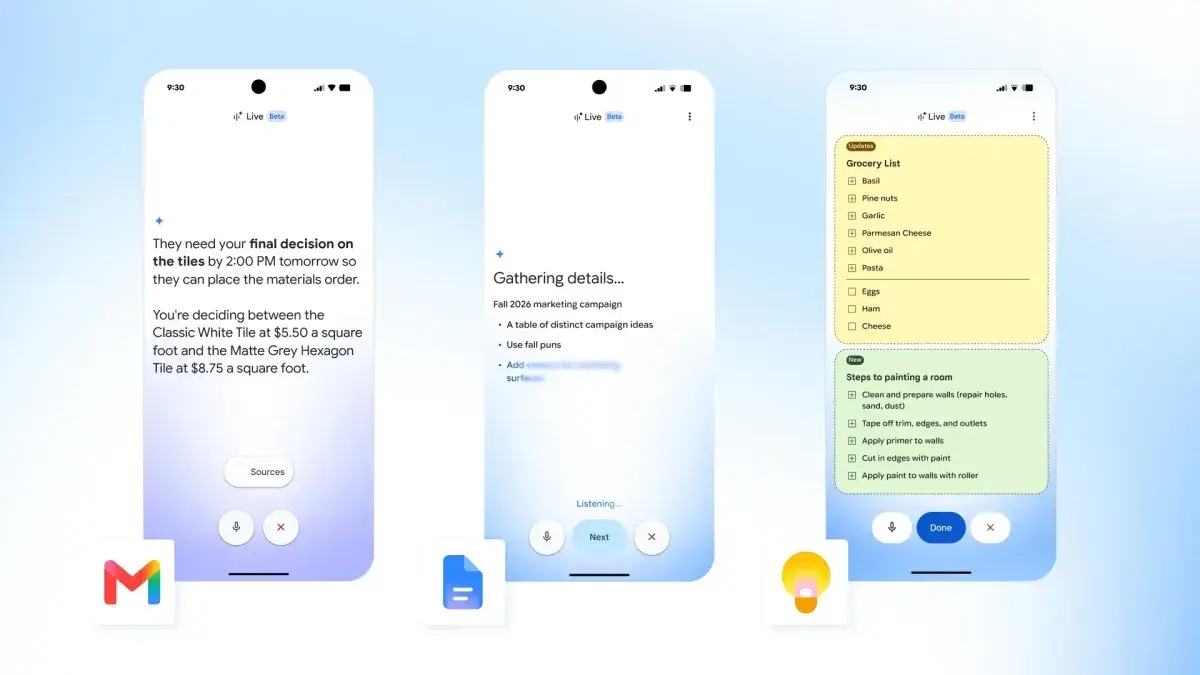
Google adds voice prompting to Docs, Keep, and Gmail as Workspace gets conversational AI upgrade
19 May 2026•Technology

Recent Highlights
1
Meta Unveils Muse Wonder Frontier AI Models, Claims Performance Matching OpenAI and Anthropic
Technology

2
IMF Report Warns AI Market Correction Could Spark Global Financial Crisis With $1.4T at Risk
Business and Economy

3
OpenAI Releases 722 AI-Generated Math Solutions, Triggering Existential Crisis in Mathematics
Technology

Recent Highlights
Today's Top Stories







Don’t drown in AI news. We cut through the noise - filtering, ranking and summarizing the most important AI news, breakthroughs and research daily. Follow topics that matter to you and stay ahead.


