17 Sources
[1]
Gemini Gets New Notebooks Feature That Syncs With NotebookLM
Blake has over a decade of experience writing for the web, with a focus on mobile phones, where he covered the smartphone boom of the 2010s and the broader tech scene. When he's not in front of a keyboard, you'll most likely find him playing video games, watching horror flicks, or hunting down a good churro. Gemini is getting a new feature in the form of notebooks, further integrating with NotebookLM, Google announced on Wednesday. NotebookLM is easily one of Google's best AI tools available. It allows you to add sources to a notebook and ask questions or generate a series of outputs, based only on the material you've given it, making it self-contained. It's different from the Gemini chatbot on its own, which will search the entire internet for an answer. NotebookLM's answers are grounded only in your sources. It's great for studying for school, getting prepped for work and even creative inspiration. There's no wrong way to use it, and its flexibility lends itself to be explored, so it comes as no surprise that it's getting further integrated into Google's own chatbot. Late last year, Google allowed you to add a NotebookLM notebook into Gemini so it would have all the context you added. Google says to look at notebooks as personal knowledge bases. You can add files, past chats and documents on a particular subject, and you can always jump back into that conversation with Gemini and pick up where you left off. Having a dedicated space to keep things in one place is great on its own for Gemini, but you can use those notebooks in NotebookLM, too. Notebooks make it easier to keep all the information on a particular subject in one place and give Gemini everything it needs without having to manually add details all over again. Now, that integration goes even further, and you can create notebooks directly in Gemini. Notebooks can be synchronized between Gemini and NotebookLM, making the data in one tool instantly available in the other. This means you can add artifacts to the notebook in Gemini and immediately have the option to create a Video Overview, Infographic or other outputs within NotebookLM. Having the same synced notebook in both tools allows you to use each tool in its own way with the same database. When the feature is available, you'll see a new notebooks section in the side menu bar of Gemini, allowing you to quickly create one or access others you've made in the past. Google is rolling out Notebooks in Gemini to AI Ultra, Pro and Plus plans on the web, and will expand access to mobile, more countries across Europe and free users in the coming weeks.
[2]
Gemini gets notebooks to help you organize projects
Google's Gemini is getting a feature called "notebooks" to help you organize things about certain topics in a single place while using the AI chatbot, the company announced on Wednesday. You can pull in things like files, past conversations, and custom instructions into notebooks that Gemini can then use as context while you're talking with it. Notebooks sound a lot like ChatGPT's Projects feature, which launched in 2024 and similarly lets users store things about a certain topic in one spot. Google says to "think of notebooks as personal knowledge bases shared across Google products, starting in Gemini." Gemini's Notebooks also sync with Google's NotebookLM AI research tool, meaning sources you add while using one of the apps will show up in both. Gemini's notebooks are rolling out this week on the web for subscribers of Google's AI Ultra, Pro, and Plus plans, according to Google. The feature will come to mobile and to free users in the "coming weeks."
[3]
Google Gemini's New Notebooks Help Organize Chats, Research Into Projects
With over a decade of experience reporting on consumer technology, James covers mobile phones, apps, operating systems, wearables, AI, and more. Google Gemini is rolling out dedicated spaces to help you organize your files, conversations, research, and more into individual projects. The new feature, called notebooks, lets you keep everything related to a single topic in a dedicated space. Google says to think of these as "personal knowledge bases" shared across all of its products. The option to add a new notebook will appear in Gemini's side panel, so you can build out each project. It'll ask for a notebook name, and then there's an Add sources button to start building out the knowledge base. You can use relevant files from your computer or Google Drive, as well as link to websites you want to use as references. There's also an option to import text, or you can pull your previous conversations with Gemini into the notebook. If you add a source to notebooks within Gemini, you'll also find that accessible through NotebookLM and vice versa. Google says, "This continuity means you can use unique features of each app, like Video Overviews and Infographics in NotebookLM, even if you started a notebook in the Gemini app." The feature is rolling out now on the web for Google AI Plus, Pro, and Ultra subscribers, but it won't appear for those with Workspace or Education accounts. Google also confirmed that it won't work for users under 18. It's unclear why that is, especially given that Google has focused on the educational benefits of notebooks in its marketing, highlighting how they're helpful for studying for projects or revising for exams. Google says it plans to bring the notebook feature to its free users in the "coming weeks," plus there are plans to bring the tools to the mobile version of Gemini soon. ChatGPT has a similar organizational feature called Projects, where you can store files and conversations in one place to ensure you don't lose track of things and build helpful knowledge bases.
[4]
I paired NotebookLM with Gemini, and it's the biggest upgrade I've made for my research
NotebookLM has been my research tool of choice for a while now. I use it for everything from dumping sources, helping with briefs, cross-referencing documents I'd otherwise lose in a folder somewhere, and much more. For the longest time I treated it as a standalone tool, opening it separately, working inside it, and then jumping back to whatever I was actually studying, designing, or building. That worked fine, until I started using it through Gemini instead, and it became so much better. Pairing NotebookLM with Gemini isn't a huge technical lift - it takes about three clicks to attach a notebook to a conversation. But what it actually changes is where research stops and work begins, and how I jump between them. Instead of pulling insights from NotebookLM and then copy-pasting them somewhere useful, Gemini acts on my notebook directly, pulling in live web context, running tasks, and generating outputs. It's the same research, just doing a lot more. Google connected NotebookLM to Gemini And your notebooks can be attached to a chat Google rolled out this integration back in December 2025 and didn't really make a big fuss about it, but I think it deserves a little more attention. It basically works as an attachment type inside the chat, where you can attach one or multiple notebooks to a Gemini chat alongside photos or Drive files. Gemini will then use the sources in the notebooks as references just like anything else you add to a chat. The whole thing lives on Gemini's side, nothing you do in the chats will reflect back in your NotebookLM notebooks. And it's read-only, so you can't use this feature for automated organization or anything similar. Lastly, this applies to the static sources in your notebooks only - none of the more dynamic content such as chats, quizzes, mind maps, or notes will be fetchable from within Gemini. This integration is just a way to give Gemini access to your sources sorted by notebook, but there's a lot of use you can get from this simple feature... Gemini just got a new notebooks feature that syncs with NotebookLM It's a productivity-empowering partnership. Posts By Simon Batt Gemini gives you the live web NotebookLM's web access is more static Both Gemini and NotebookLM have web access, but it works differently in each one. In NotebookLM, web access is a manual, one-time sourcing action. You have to deliberately engage the Web Search feature and then look for live sources to pull in. Those pages then become static in your notebook, just like all the other sources. The web still doesn't factor into its responses at all and it remains completely source-grounded, which is the whole point of NotebookLM. Gemini queries the web the same way it queries its training data - it dynamically pulls from both, it's all just context it draws from as it's forming responses. This is expected, as it is a chatbot after all. Layering this functionality over your notebooks can be great in several ways. The weakest point of source-grounded AI is that it's only as good as what you put in it. So, bringing Gemini's web access into the mix can help you ensure you're actually working with the right stuff to begin with. You can ask it to overview your notebook, cross-reference it to official sources on your topic, check for anything that seems out of place, or what it could use more of. It also lets you organize your notebook in a way, as Gemini can point out duplicates, help you rename sources more accurately, and display your sources in any order you want (old to new, most to least dense, and so on). It's less about NotebookLM lacking web access and more about working with sources you've already curated . The whole point is so I can actually return to NotebookLM with better-vetted and better-organized sources. Using Gemini's tools on top of my notebooks Giving my notebooks the tools they don't have in NotebookLM I just talked about web access, but that's more of a feature in Gemini than a tool. Gemini has some unique tools that you can use on top of your notebooks, stuff you wouldn't find in NotebookLM, or any other AI for that matter. There are tools like Guided Learning and Thinking Mode that help you dive deep into a curated notebook with specialized outside knowledge. Canvas is a more recent feature, and it can be similar to NotebookLM's Studio panel depending on what you do with it. And whereas Studio generates something and hands it to you, Canvas lets you actually edit and interact with the output. Gemini can open the Canvas into a document editor, complete with formatting options and NotebookLM-like features such as quizzes, infographics, flashcards, and audio overviews. But it can also act as a prototyping space, similar to Claude's Artifacts actually, where you can build apps and anything you want, really. And all of this can happen with your notebook as the reference. Then there are Gems. These are little custom AI experts that you can set up to work directly with a notebook as its source of truth. They're primarily used for automating repetitive tasks via preloaded instructions and knowledge. And they usually rely on you loading in the context, but a notebook is already a curated knowledge base, so you only need an instruction. This way, a notebook on a niche topic becomes a persistent expert that already knows everything you've put into it, every time you open it. The coolest part about this integration is that you can combine multiple notebooks into one chat, regardless of the tools you use on top of them. This gives you a sort of cross-notebook querying ability that you don't have in NotebookLM. NotebookLM is better with Gemini NotebookLM is already one of the best tools out there for working with your own sources. While its source-grounded nature is its biggest selling point, it's also a limitation - it only knows what you put in, and what you do with that information stops at the chat and Studio outputs. Gemini removes both of those limits. It works on your pre-curated notebooks, but your research gets web context, your outputs get collaborative workspaces, and your most-used notebooks become permanent specialized assistants. It's a pretty easy upgrade for something that costs nothing to set up. NotebookLM See at NotebookLM Expand Collapse Google Gemini See at Google Gemini Expand Collapse
[5]
Gemini meets NotebookLM is Google's latest powerful integration
The feature is rolling out now to paid users on the web, with mobile and free access coming later. Gemini and NotebookLM are two of Google's most powerful AI tools right now, and the company is now bringing them together with a new Gemini feature called "Notebooks." We've been tracking the feature in our APK teardowns for a while now. Google was previously referring to it internally as "Projects" before coming up with this final release name, i.e., "Notebooks." It makes all the sense too since the feature is directly tied to NotebookLM. Notebooks in Gemini are designed to help you manage complex tasks and ongoing projects. The company says Notebooks act like personal knowledge bases that live inside Gemini and sync with NotebookLM. This means you can keep your chats, files, and research neatly organized in one place instead of juggling multiple conversations. With Notebooks, you can group related chats, add documents or PDFs, and even give Gemini custom instructions for better responses. You can do this by heading to Gemini's side panel and clicking "New notebook." Once everything is inside a Notebook, Gemini uses those sources alongside its own tools and web search to generate more useful answers. The best part is that any content you add to a Notebook in Gemini will automatically sync with NotebookLM. This lets you use NotebookLM features like video overviews or infographics, even if you started your work in Gemini. Google is pitching Notebooks as especially useful for students and long-term projects. For example, you could upload class notes into a Notebook, generate a video summary in NotebookLM, and later return to Gemini to create an essay outline based on the same material. Notebooks in Gemini also let you use more sources based on your subscription plan. Notebooks in Gemini start rolling out this week for Google AI Ultra, Pro, and Plus subscribers on the web. Google says mobile support, wider regional availability across Europe, and free user access will arrive in the coming weeks.
[6]
Gemini just got a new notebooks feature that syncs with NotebookLM
* NotebookLM and Google Gemini now sync notebooks, sharing sources across both apps. * Use features like NotebookLM's Video Overviews/Infographics even if started in Gemini. * Available now for Google AI Ultra, Pro, and Plus on the web; free users can join in a few weeks. We love NotebookLM here at XDA. There isn't a week where someone in the team isn't playing around with it and finding new ways to boost their productivity with the handy app. Turns out, letting an AI manage your project notes and documents essentially turns it into a first-class assistant that helps you with your workload. If you're a fan of both NotebookLM and Google Gemini, then I have some excellent news for you. The two have just teamed up, and you can now create notebooks in Gemini and source your Gemini chats in NotebookLM for an even easier time studying. NotebookLM can now search the web, and it's a game changer for research Let NotebookLM handle the research for you Posts By Mahnoor Faisal NotebookLM and Google Gemini team up in the best way possible Getting stuff done just got a lot easier As announced on Google's blog The Keyword, Gemini is now getting a notebook feature. If you've never heard of them, they're a way to help collate all your media and LLM chats under one banner. For instance, if you find yourself constantly opening your fave LLM to talk about, say, home renovation, you can create a notebook where all your queries, photos, and files can live. That way, your AI knows all the context when you ask your next question. However, the announcement goes much further than just adding notebooks. As it turns out, NotebookLM is also coming along for the ride. As per the blog post: ...since notebooks sync across the Gemini app and NotebookLM, any source you add in one place automatically appears in the other. This continuity means you can use unique features of each app, like Video Overviews and Infographics in NotebookLM, even if you started a notebook in the Gemini app. The usage between Google Gemini and NotebookLM goes both ways. For example, you can ask Gemini questions about something you made in NotebookLM without needing to manually share it. Similarly, you can research something with Gemini, then source everything you unearth in NotebookLM, something we saw back in December. Best of all, you can use one app's features in the other, and any changes or additions you make in your notebooks will automatically sync between the two. It's a match made in research heaven. Subscribe for NotebookLM + Gemini integration guides Tap into our newsletter for clear, hands-on coverage of NotebookLM and Google Gemini integration. Subscribe to read in-depth walkthroughs, step-by-step workflows, and feature breakdowns to learn how synced notebooks, Video Overviews, and sourcing chats wo Get Updates By subscribing, you agree to receive newsletter and marketing emails, and accept our Terms of Use and Privacy Policy. You can unsubscribe anytime. You can give the feature a try right now if you're a Google AI Ultra, Pro, and Plus subscriber on the web, with free users joining the party in a few weeks. 3 productivity tools I pair with NotebookLM to instantly boost my workflow Why use it alone when it's even more powerful with the right support? Posts 5 By Mahnoor Faisal
[7]
Gemini gets a big upgrade with this long-awaited feature
Rajesh started following the latest happenings in the world of Android around the release of the Nexus One and Samsung Galaxy S. After flashing custom ROMs and kernels on his beloved Galaxy S, he started writing about Android for a living. He uses the latest Samsung or Pixel flagship as his daily driver. And yes, he carries an iPhone as a secondary device. Rajesh has been writing for Android Police since 2021, covering news, how-tos, and features. Based in India, he has previously written for Neowin, AndroidBeat, Times of India, iPhoneHacks, MySmartPrice, and MakeUseOf. When not working, you will find him mindlessly scrolling through X, playing with new AI models, or going on long road trips. You can reach out to him on Twitter or drop a mail at [email protected]. Google has rolled out plenty of improvements to Gemini in the last few months, but it still lacks one basic organizational feature: folders. This is a feature that ChatGPT and Claude have offered for ages. Google is finally catching up to its competitors and announced support for notebooks in Gemini -- essentially a folder for your chats, but more powerful. You can create new notebooks in Gemini on the web and move your chats to it for better organization. As seen on ChatGPT and Claude, you can also give custom instructions and add relevant files, including PDFs and documents, to provide Gemini with more context about that project. This will help Google's AI assistant to provide more personalized and tailored responses as it will use the shared information alongside its own sources and the web. Thankfully, you can move your existing conversations to new notebooks in Gemini as well. What makes Google's notebook implementation in Gemini more powerful is that it syncs with NotebookLM as well. So, any notebook that you create in Gemini will appear in NotebookLM and vice versa. This deep integration will enable you to have a detailed conversation with Gemini on the web and then move to NotebookLM to generate Infographics or Video Overviews. Google AI subscribers get priority access Notebooks in Gemini start rolling out from this week on the web for Google AI Ultra, Pro, and Plus subscribers. Its availability will expand to mobile, free users, and more countries in the coming weeks. Subscribe to the newsletter for Gemini notebook insights Want deeper clarity on Gemini notebooks? Subscribe to the newsletter for clear explainers, step-by-step usage tips, comparative analysis with other assistants, and practical breakdowns of integrations like NotebookLM and Personal Intelligence. Get Updates By subscribing, you agree to receive newsletter and marketing emails, and accept our Terms of Use and Privacy Policy. You can unsubscribe anytime. Google was spotted working on project support in Gemini months ago, so this feature has been a long time coming. Its addition finally closes a key usability gap between Gemini and its AI rivals. Notebooks come to Gemini less than a month after the company rolled out Personal Intelligence support to even free users in the US. It enables you to connect Gemini to your Workspace account to provide more detailed and proactive insights based on your emails and documents.
[8]
Gemini app rolling out 'notebooks' to organize chats & files, integrates with NotebookLM
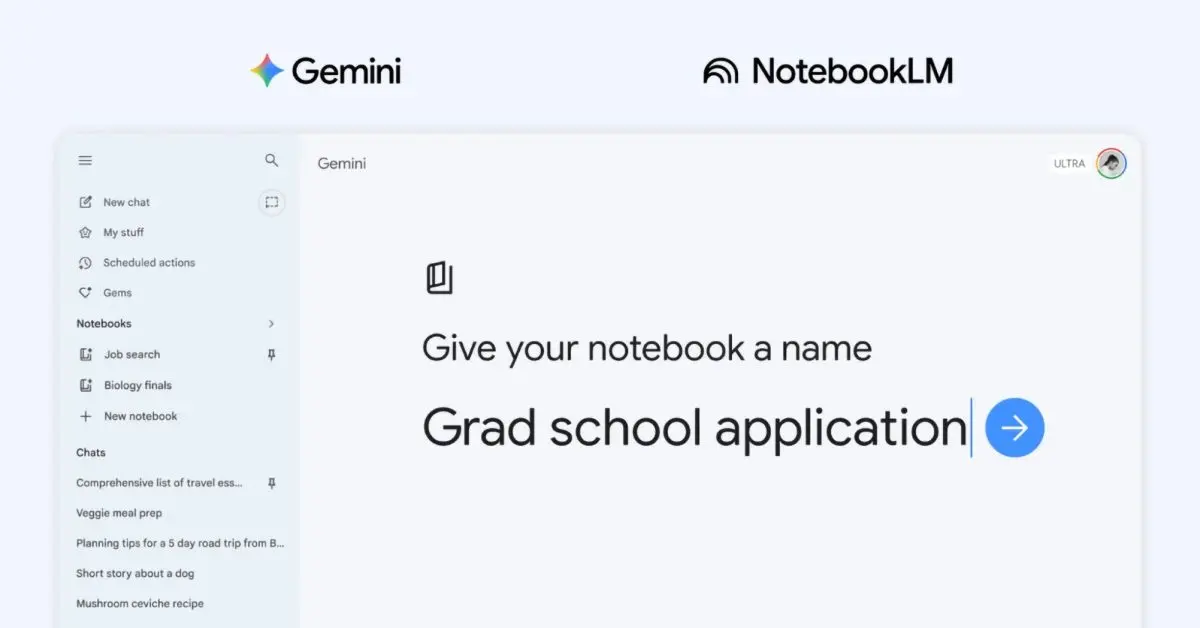
The Gemini app is getting deeper NotebookLM integration after the initial source support introduced last year. Google is introducing the concept of "notebooks." These notebooks are "personal knowledge bases shared across Google products, starting in Gemini." There's a new "Notebooks" section in the Gemini side panel in-between My stuff and Gems. They give you a dedicated space to organize your chats and files, and because they sync with NotebookLM, you can unlock even more efficient workflows directly from Gemini. Selecting a notebook lets you ask questions with Gemini and all the existing prompt box tools. Sources are noted just above with the ability to delete and add more (Files, Drive, Websites, or Copied text). There's a shortcut to open NotebookLM in the top-right corner, while the overflow menu lets you enable/disable "Use notebook memory" and add Instructions to "Tell Gemini how to respond and what tone to use." Once your handpicked sources are organized into a notebook, Gemini uses them alongside its powerful tools and web search to provide uniquely helpful responses. Meanwhile, conversations you've had with Gemini using that notebook appear under the prompt box. Meanwhile, those "Chats from Gemini" will appear as a source in NotebookLM. Notebooks you create in the Gemini app will appear in NotebookLM For example, if you're a student, try adding class notes to a notebook and using NotebookLM to create a Cinematic Video Overview. The next day, open the Gemini app and ask it to draft an essay outline on that exact material. Finally, all chats now feature an "Add to notebook" option in the overflow menu. This is rolling out first to Google AI Plus, Pro, and Ultra subscribers on the web. It will be available on "mobile, more countries across Europe, and to free users" over the coming weeks.\, and we're only seeing one account today.
[9]
I replaced my notes app with Gemini's new Notebooks -- and I'm not going back
I was drowning in scattered notes and tabs -- this new Gemini feature finally fixed it I'm the kind of person who takes a screenshot to remember something... and then forgets where I saved it. My Notes app is full of half-baked ideas. I've used Google Docs as a dumping ground. I've even walked around with actual sticky notes in my pocket. In other words, my system was chaotic and beyond messy to the point of it being exhausing. I was constantly digging through apps, reopening documents and re-finding the same information over and over again. So when Google rolled out Notebooks inside Google Gemini, I decided to try something a little extreme: I replaced my notes app entirely. Here's what happened. What Gemini notebooks actually are (and what makes them different) If you've ever used NotebookLM, this will feel familiar -- but hear me out, it's even more powerful. Gemini Notebooks are essentially personal AI workspaces. Now, instead of asking random questions in a blank chat, you build a contained environment by uploading your own materials such as notes, documents, PDFs, ideas, research and yes, even my hand written sticky notes get scanned and uploaded. From there, Gemini responds based on your information. Essentially, instead of asking AI to think for you, you're giving it the facts to think with. It's not replacing your brain (let's be clear), it's helping sift through everything you're working on to help you stay organized. For me, that has meant thinking clear and staying on task far more. The experiment: I moved my entire workflow into Gemini Google has said that Notebooks in Gemini will initially roll out to Google AI Ultra, Pro and Plus subscribers on the web. So if you don't see it yet, rest assured that it's coming. If you don't see it, try logging out and back in just to make sure. (That worked for me). If it's available to you, you'll see it on the left side bar near where you'd start a new chat. To make this a real test, I created three notebooks: * Work: Story drafts, article ideas, outlines and rough notes * Life: Errands, reminders, random thoughts, things I'd normally dump into my phone * Projects: Longer-term ideas, prompts, experiments and anything I didn't want to lose From there, any time I had an idea, needed to plan something or wanted to find information -- I went straight to Gemini. What surprised me most is that Gemini actually remembers context without me repeating myself. With all my notes and information within the Notebook, I didn't have to start from scratch every time. Whenever I went into my "LIfe Notebook" to pull up something about my son's soccer game this weekend or plans for an upcoming birthday party, everything was organized. I didn't have to dig through old chats, which felt like a huge win. Gemini just picks up where you left off. It feels like thinking with your past self. Let me explain. I didn't expect that when I asked Gemini to expand an idea, that it would take my previous notes and push it further. It's wild because it felt less like I was using AI and more like I was collaborating with an organized version of myself. Even better? It replaced Google Docs, my notes app and I finally stopped emailing myself ideas. Anyone else do that? Everything now lives in one place -- and more importantly, it was usable. The takeaway I'm never going back to my old way again. I have seen what organized looks like and I can't imagine returning to what wasn't working. The ability to work within my own notes and reearch, while feeling structured is a total gamechanger for me. I just can't wait for this feature to come to the Gemini app! If you're wondering how Google Notebooks differs from NotebookLM, in my opinion, it feels like Notebook Lite. Something for less heavy projects. For instance, I don't need my "Life" Notebook turned into a podcast or video, I just need all those messy notes organized. Whereas, the Work Notebook, might lead to NotebookLM once my ideas are fully organized. Google Notebooks is for building a system AI can think inside. It's a very different, yet productive way of working. Give it a try and let me know what you think. For me, this is why we need AI. It's simply a useful way to stay productive and one of the first times I've felt like AI is actually working with my brain instead of replacing it. Follow Tom's Guide on Google News and add us as a preferred source to get our up-to-date news, analysis, and reviews in your feeds.
[10]
Google just made Gemini far more useful for real life with its new notebooks feature that's borrowed straight from NotebookLM
The latest AI feature focuses on continuity instead of one-off answers * Google has introduced a new notebooks feature to Gemini * Notebooks keep chats, files, and projects organized in one place * Gemini uses notebooks to apply context and give more relevant, up-to-date help Google has a new way for people to use Gemini models to organize their digital lives. The new "notebooks" feature inside the Gemini app provides a central depot for storing conversations, files, and instructions for ongoing projects. Gemini then uses the notebooks, chats, and documents to give more context for its answers. Google calls them "personal knowledge bases," but basically, it makes Gemini better at remembering details in the long term. The notebooks feature is rolling out first to paying subscribers on the web, with broader access coming soon. The appeal is immediately obvious if you've had conversations with an AI chatbot pile ever higher. With notebooks, Google promises you won't have to constantly re-explain your project to Gemini. That space does more than just store information. Once a notebook is set up, Gemini can pull from those saved chats and files alongside its usual tools like web search. If you are studying for exams, you can load in class notes, readings, and previous questions, then return later and ask for a structured essay outline or revision plan. If you are learning a hobby, the same notebook can hold guides, personal notes, and ongoing questions, all feeding into future responses. The connection to NotebookLM is what makes this more powerful than a simple organizational tweak. NotebookLM has already built a reputation as a kind of AI research assistant capable of summarizing documents or turning them into AI podcasts, videos, or presentations. Now, notebooks sync between the two systems. Add a source in Gemini and it appears in NotebookLM. Start in NotebookLM and pick up in Gemini. That continuity means you can move between different modes of thinking without losing your place. You might begin by dumping research into a notebook, switch to NotebookLM to generate a podcast-style explanation of it, and then return to Gemini to draft something more structured from the same material. Long-term AI Imagine planning a trip. Instead of juggling browser tabs, saved links, and scattered notes, you build a notebook with destinations, booking details, and ideas. A few days later, you can ask Gemini to suggest a day-by-day itinerary based on everything already stored there. Or you could collect articles and write out personal fitness goals and put them into one notebook. Then, instead of asking a generic question about workouts, you ask for a plan that reflects your actual history and preferences. Google is moving its AI away from being a tool you visit when necessary and making it instead something that is embedded in all your ongoing projects. Google Gemini is already designed to handle all sorts of input. The notebooks give it more structure. If it works as intended, it changes the rhythm of using AI. You don't need brilliant prompt design. The system remembers what you have already asked. Follow TechRadar on Google News and add us as a preferred source to get our expert news, reviews, and opinion in your feeds. Make sure to click the Follow button! And of course you can also follow TechRadar on TikTok for news, reviews, unboxings in video form, and get regular updates from us on WhatsApp too.
[11]
NotebookLM arrives inside Gemini notebooks starting today
Personal notebooks and AI chats now work together in one unified workspace. NotebookLM is now inside Gemini, marking a shift in how Google handles personal research in its AI tools. Starting today, users can access existing notebooks directly in the app instead of switching between separate products. This builds on last year's step where notebooks could be added as sources. With this update, saved material sits alongside chats and prompts, making it usable in real time rather than just stored. Recommended Videos Past conversations can be pulled into collections and reused, tightening the link between research and chat. Gemini starts to feel more like a system that retains context across tasks. The rollout begins on the web for Google AI Ultra, Pro, and Plus subscribers, with mobile support and wider access expected soon. Google hasn't shared timing for free users. How Gemini uses stored material The biggest change is how Gemini treats saved material. Instead of static references, collections now act as live context during conversations. Once selected, their contents shape responses automatically, cutting down on repeated inputs. That builds on what NotebookLM already did well, which is grounding outputs in user-provided content. The capability now lives in the same interface, keeping responses tied to documents or research sets without extra steps. Google is also expanding how sources behave. Existing chats can be folded into collections, turning past interactions into reusable input. Research and conversations now reinforce each other over time. Why this changes AI workflows This move pushes Gemini closer to a full workspace rather than a simple chatbot. Combining NotebookLM with its core experience reduces the friction between saving information and using it. It also reflects a broader shift toward memory and continuity in AI tools. Instead of starting fresh each time, the system can draw from a growing pool of material, changing how longer projects are handled. There's a tradeoff, though. Response quality still depends on how well that material is organized, so messy inputs may limit usefulness. What to watch next The rollout is still limited, focused on higher-tier subscribers on web. Mobile support and broader availability are expected, but timing remains unclear. If Google deepens this integration, Gemini could become a central hub for research-heavy workflows. That would raise pressure on competitors to match persistent context and document-aware responses. For now, this update signals a clear direction. Gemini is evolving into a tool for ongoing work, not just quick answers, with its next phase tied to wider rollout and feature parity.
[12]
Google Gemini's 'Notebooks' Let You Focus Your Chats on a Specific Subject
Notebooks automatically sync with NotebookLM, so you can pick up where you left off and take advantage of the tool's features. On Wednesday, Google announced "notebooks," a new feature for Gemini designed to help organize your research materials while using the company's flagship chatbot. Google says you should think of notebooks as "personal knowledge bases shared across Google products, starting in Gemini." If that's a bit too vague for you, here's a simpler explanation: Notebooks are like Gemini chats, but designed to focus on a single topic, complete with bespoke resources Gemini can reference as you discuss that topic. If you're a frequent Gemini user, you probably have a number of chats spanning any number of topics. The goal of notebooks is similar, but more focused: When you know you want to start compiling resources on a specific subject, you can choose the "New notebook" option on the side panel of the Gemini app, give it a name, then start adding sources. These can be from anywhere, including your Google Drive, your computer, websites, or text from your clipboard. You can also move previous chats into this notebook, if they're relevant to the topic at hand. Once everything is in the notebook, you can start prompting Gemini and asking the AI questions about your topic. Gemini will then pull from all the resources in the notebook to offer detailed, relevant responses. Depending on your subscription plan, Google says you may be able to add more sources to notebooks, too. This tool isn't made in isolation. Despite launching in the Gemini app, notebooks will sync with NotebookLM, Google's deep research tool -- which is perhaps its biggest perk. That means, notebooks you create in Gemini automatically appear in NotebookLM, so you can not only pick up where you left off, you can take advantage of NotebookLM's features. That means if you create a notebook in Gemini, you can open it in NotebookLM and turn your project into a video, or generate a "podcast" from your Gemini conversations. I think this cross-platform syncing is probably the best use-case for notebooks. You could already share resources with Gemini if you wanted to chat about a specific topic, but now, you have a dedicated function for that purpose, one that automatically moves across Google's AI research platforms. Notebooks will be available to all Gemini users, even those on the free tier, but paid subscribers will have first dibs: Google is rolling out the feature to AI Ultra, Pro, and Plus plans this week, and will make the feature available to mobile and free users in the coming weeks.
[13]
Google adds Notebooks to Gemini and ties them directly to NotebookLM
TL;DR: Google's new Gemini Notebooks feature lets you organize research, chats, and sources around a single topic. Integrated with AI-powered NotebookLM, it gives you seamless access to tools like Video Overviews and Infographics on the same material, all without switching between apps. Google has introduced a new Notebooks feature for Gemini that helps you organize research materials. Google describes notebooks as "personal knowledge bases shared across Google products," designed to pull together scattered research, conversations, and documents into a single reusable space. The feature arrives alongside Google's full integration of NotebookLM, its AI-powered research tool, into the Gemini app. Google launched a standalone NotebookLM app last year and added it as a source within Gemini shortly after, but now you can create and manage notebooks directly inside the chatbot. Notebooks work similarly to regular Gemini chats but are designed to help you focus on a single topic. They keep all relevant information and resources together, allowing Gemini to reference them throughout your conversation. To get started, select "New notebook" from the side panel of the Gemini app, give it a name, and begin adding sources. Those sources can come from anywhere, including Google Drive, your computer, websites, or text copied to your clipboard. You can also pull previous chats into a notebook if they are relevant to the topic. Once everything is in place, you can start prompting Gemini, and it will draw from all the resources in that notebook to give you detailed, relevant responses. Thanks to the NotebookLM integration, notebooks created in Gemini are automatically imported into NotebookLM, giving you access to its unique tools, like Video Overviews and Infographics, on the same material. The reverse works too. A student could upload class notes to a notebook, generate a video summary in NotebookLM, and ask Gemini to draft an essay outline from those same notes, all without copying files back and forth. The feature is similar to ChatGPT's Projects, which lets users group files and conversations around a single topic. The key difference is the NotebookLM link, which gives Google users access to additional research and media tools that Projects does not offer. Google is rolling out Gemini notebooks this week for AI Ultra, Pro, and Plus subscribers on the web. Mobile support, broader regional availability, and free-tier access are all expected to roll out over the next few weeks.
[14]
Gemini Gets Notebooks Feature to Organise Chats and More
Google plans to expand mobile support and free-tier access in the future Google introduced a new Notebooks feature in its Gemini app on Wednesday. It is aimed at helping users organise long-running conversations, files, and research in one place. Users can not only have new conversations in Notebooks, but also migrate old conversations. As per the Mountain View-based tech giant, the feature builds upon the earlier integration of NotebookLM within Gemini and supports complex use cases like content creation, project planning, and studying. Notebooks in Gemini The Notebooks feature serves as a personal knowledge hub within Gemini, Google explained in a blog post. It allows users to create a notebook from the app's side panel. They can organise conversations, upload files like PDFs and documents, and provide custom instructions to guide Gemini's responses. Once the setup process is complete, Gemini leverages the curated content within a notebook alongside its web search and AI capabilities. This results in more contextual and relevant answers, as per the company. Users can also revisit ongoing topics without having to re-enter context repeatedly. Google said the introduction of Notebooks makes it easier to manage multi-step tasks such as research projects or exam preparation. Notebooks in Gemini are integrated with NotebookLM. Any notebook created in Gemini syncs automatically with NotebookLM. This, as per the company, allows users to quickly switch between platforms. Providing an example, Google mentioned that a user could upload study material in Gemini, generate structured insights in NotebookLM, such as video overviews or infographics, and then return to Gemini to draft summaries or essays based on the same data. As per the tech giant, Notebooks in Gemini will support more sources depending on the user's subscription tier, enabling larger and more complex workflows over time. The Notebooks feature is rolling out to Gemini AI Ultra, Pro, and Plus subscribers on the web. Google will introduce support for mobile devices, additional regions, including parts of Europe, and free-tier users in the coming weeks. However, this is just an initial rollout, and the company will expand the feature with more capabilities in future updates. The introduction of notebooks in Gemini, notably, draws comparisons to ChatGPT Projects, which was first introduced by OpenAI in December 2024. Like Notebooks, this feature also helps users organise chats, files, and instructions into structured workspaces.
[15]
Google Just Put NotebookLM Inside Gemini: Here's What You Can Do Now
Google's integration of NotebookLM with the Gemini AI platform introduces a structured way to handle information and streamline tasks. As explained by Universe of AI, one standout feature is persistent memory, which allows the system to remember details from previous interactions. This is particularly useful for long-term projects, as it reduces repetitive data entry and helps maintain continuity in workflows. Explore how this update enhances workflow organization with features such as task categorization through folders and the ability to consolidate conversations into notebooks. Learn how customizable AI instructions can assist with tasks like summarizing complex research or creating detailed reports. Gain insight into AI Studio, which offers tools for organizing knowledge, including mind mapping, flashcard creation and slide deck development. The integration of NotebookLM and Gemini provides a cohesive interface that allows users to switch effortlessly between managing notebooks and interacting with AI. Any changes made in one platform are automatically synchronized with the other, making sure consistency across tools. This unified approach eliminates the need to juggle multiple applications, allowing you to focus on your tasks without unnecessary distractions : This integration is particularly beneficial for professionals, researchers and students who need a structured and reliable system to manage their workflows. Managing complex workflows has become more intuitive with the introduction of new organizational tools. Users can now: These features are designed to help users working on multiple projects simultaneously. By offering a structured way to organize and access information, the integration reduces the time spent searching for resources and increases overall efficiency. Check out more relevant guides from our extensive collection on Google's NotebookLM that you might find useful. One of the most innovative aspects of this update is the persistent memory feature. This allows the AI to retain context from previous interactions, making conversations more meaningful and continuous. For example, if you're working on a long-term research project, the AI can recall relevant details from earlier sessions, saving you the effort of re-explaining your requirements. Additionally, users can provide custom instructions to the AI, tailoring its responses to specific tasks. Whether drafting reports, generating audience-specific insights, or analyzing data, this feature ensures that the AI delivers results aligned with your objectives. The integration also brings significant improvements to notebook creation and research capabilities. Users can now: These tools provide a centralized workspace for compiling and organizing research materials, saving time and effort. Whether you're preparing a presentation, conducting market research, or studying for exams, these features simplify the process and enhance productivity. NotebookLM now includes AI Studio, a versatile suite of tools designed to help users build and manage knowledge bases. This feature set includes: These tools cater to a wide range of users, from professionals and educators to students, offering solutions for diverse needs. By integrating these capabilities, NotebookLM becomes a powerful resource for managing and using knowledge effectively. Gemini's interactive AI chat is optimized to work seamlessly with the knowledge bases created in NotebookLM. This feature enables users to engage in dynamic, organized conversations with the AI, making it easier to extract insights, clarify concepts, or brainstorm ideas. The integration ensures that your chats are always aligned with the information stored in your notebooks, enhancing both accuracy and efficiency. For example, if you're preparing a business proposal, the AI can pull relevant data from your notebooks, suggest improvements and even help draft sections of the document. This level of interactivity transforms how users interact with their stored information. To improve usability, the update introduces several new features designed to simplify access and organization: These enhancements are particularly useful for users managing multiple projects, making sure that essential resources are always within reach. By reducing the time spent navigating between tools, these features contribute to a more efficient and user-friendly experience. Currently, the integration is available exclusively on desktop, with mobile support expected in future updates. The rollout is being conducted in phases, starting with Ultra users, followed by Pro and free users. While the desktop-only availability may limit accessibility for some, this phased approach ensures a stable and robust experience for early adopters. One notable application of this integration is in B2B sales prospecting. By using NotebookLM's research tools and Gemini's AI capabilities, users can create tailored outreach strategies. For instance, the AI can analyze market trends, compile client profiles and suggest personalized communication approaches. This demonstrates how the platform can drive innovation and efficiency in professional settings, offering tangible benefits for businesses. The integration of NotebookLM and Gemini represents a significant advancement in AI-powered productivity and organization. By combining the strengths of both platforms, Google has created a tool that simplifies workflow management while enhancing how users interact with and use information. Whether you're a researcher, project manager, or business professional, this update offers a range of features designed to meet your needs and improve your overall experience. Disclosure: Some of our articles include affiliate links. If you buy something through one of these links, Geeky Gadgets may earn an affiliate commission. Learn about our Disclosure Policy.
[16]
Google Gemini gets Notebooks with support for PDFs, documents, and custom instructions
Google has introduced Notebooks in the Google Gemini app to help users structure chats, files, and ongoing work in a single space. The feature extends the earlier connection with NotebookLM and is designed to support organized handling of study material, research inputs, and multi-step projects by grouping related content together and maintaining context across tools. Notebooks provide a dedicated workspace within Google Gemini where users can group and manage related content around a specific topic. They can be created from the side panel using the "New notebook" option, after which users can add existing chats, attach supporting files such as PDFs and documents, and define custom instructions to guide responses within that notebook. The content stored in a notebook is used as contextual input for Gemini's responses along with its built-in capabilities and web search. Notebooks are also shared across Google products and stay synchronized with NotebookLM, allowing the same sources to be accessed in both apps without re-adding them. Notebooks in Gemini are rolling out on the web starting this week for users subscribed to Google AI Ultra, Pro, and Plus plans. The rollout will expand over the coming weeks to mobile platforms, additional regions across Europe, and eventually to free users. The feature is not available for users under 18, nor for Workspace and Education accounts.
[17]
Google adds notebooks to Gemini AI: How it works
The feature aims to make it easier for users to organise their chats and projects. Google has announced a new feature for Gemini to make it easier for users to organise their chats and projects. The company has introduced notebooks inside the Gemini app. Instead of juggling multiple conversations and documents across different places, users can now store everything related to a topic in a single location with the new notebooks feature. Keep reading for all the details about the notebooks feature in Gemini. Google describes notebooks as 'personal knowledge bases' within the Gemini app. Users can create a notebook and add chats, documents, PDFs and other files related to a specific topic. Gemini can then use these sources as context to provide more relevant responses. Also read: Meta launches Muse Spark AI: What it is and what it can do To use the notebooks feature, users can select the 'New notebook' option on the side panel of the Gemini app. From there, they can move previous chats into the notebook, upload files and even give Gemini custom instructions. Once everything is organised inside the notebook, Gemini combines that information with its built-in tools and web search to generate more helpful responses. Another key highlight of the feature is its connection with NotebookLM. Notebooks created in Gemini automatically sync with NotebookLM, which allows users to continue working across both apps. Also read: Anthropic launches Project Glasswing to fight AI-driven cyberattacks, know how Notebooks feature in Gemini is starting to roll out this week in the Gemini web app. Initially, it will be available to users with Google AI Ultra, Pro and Plus subscriptions. The company also plans to expand access to mobile, more countries across Europe and to free users in the coming weeks.
Share
Copy Link
Google announced a new notebooks feature for Gemini that syncs directly with NotebookLM, creating unified personal knowledge bases across both AI tools. The integration lets users organize chats, files, and research into dedicated project spaces, with sources automatically syncing between platforms. Rolling out to AI Ultra, Pro, and Plus subscribers this week, with mobile and free access coming soon.
Google has launched a new notebooks feature for Gemini that fundamentally changes how users can organize projects and manage research across its AI ecosystem
1
. The integration connects Gemini with NotebookLM, one of Google's most capable AI research tools, allowing users to create personal knowledge bases that sync seamlessly between both platforms5
. Users can now pull files, past conversations, and custom instructions into dedicated notebooks that Gemini uses as context during interactions, similar to how ChatGPT's Projects feature operates2
.
Source: 9to5Google
The new notebooks feature appears in Gemini's side panel, where users can click to create a new notebook and start building their knowledge base
3
. You can add relevant files from your computer or Google Drive, link to websites as references, import text, or pull previous Gemini conversations into the notebook3
. What makes this integration powerful is the bidirectional sync with NotebookLMāany content added to a notebook in Gemini automatically becomes accessible in NotebookLM, and vice versa1
. This means you can add artifacts to your notebook in Gemini and immediately create video summaries, infographics, or other outputs within NotebookLM1
.
Source: XDA-Developers
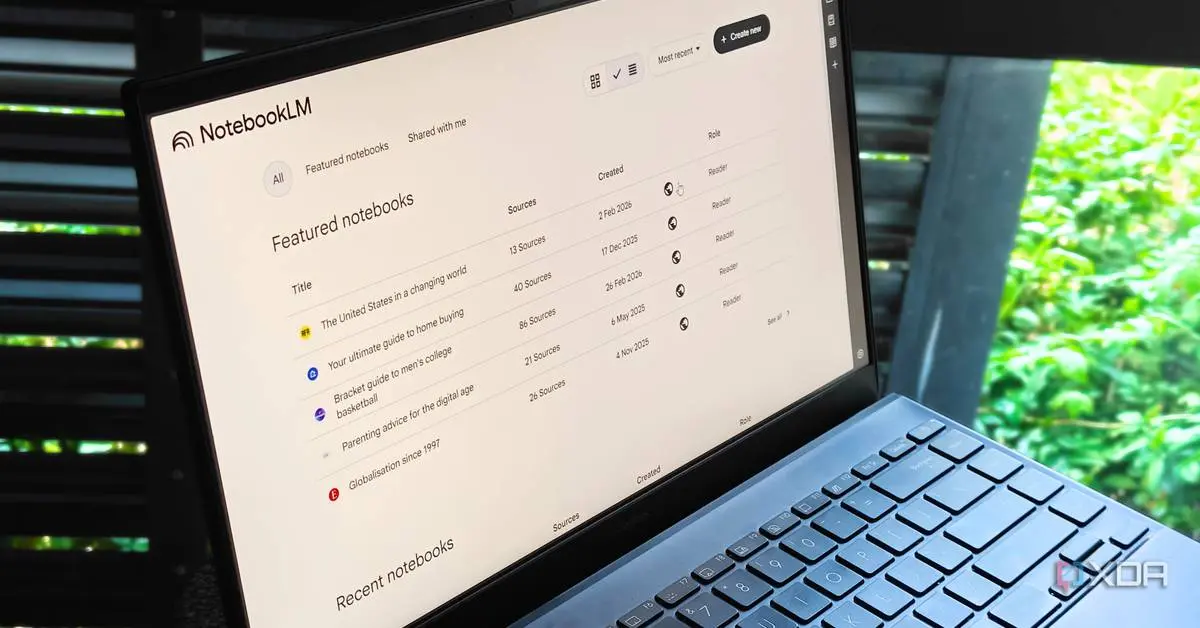
The pairing of these AI tools creates a more dynamic research workflow than either platform offers alone
4
. While NotebookLM provides source-grounded responses based only on materials you've provided, Gemini brings live web access that dynamically pulls context as it forms responses4
. This combination helps users verify sources, cross-reference official materials, identify duplicates, and organize chats and research more effectively before returning to NotebookLM for deeper analysis4
. Gemini also offers unique tools like Guided Learning, Thinking Mode, and Canvas that can work on top of your curated notebooksāfeatures you wouldn't find in NotebookLM alone4
.
Source: Android Police
Related Stories
Gemini Notebooks is rolling out this week on the web for subscribers of Google's AI Ultra, Pro, and Plus plans
5
. The feature won't appear for those with Workspace or Education accounts, and Google confirmed it won't work for users under 183
. Google plans to expand access to mobile platforms, more countries across Europe, and free users in the coming weeks1
. The number of sources you can use in Notebooks varies based on your subscription plan5
. Google is positioning this feature as particularly valuable for students working on long-term projects and professionals managing complex tasks, enabling them to upload materials, generate summaries, and create outlines all within a unified knowledge base5
.Summarized by
Navi
[2]
[4]
[5]
19 Apr 2026ā¢Technology

15 Dec 2025ā¢Technology

24 Nov 2025ā¢Technology

1
Entertainment and Society

2
Policy and Regulation

3
Technology