2 Sources
[1]
The A.I. in Google's New Pixel 11 Is Not Very Helpful
Brian X. Chen is The Times's lead consumer technology writer and the author of Tech Fix, a column about the social implications of the tech we use. Your next smartphone will probably be what the tech industry calls an artificially intelligent phone, a handset that does all the work for you. But is that something people even want? Google thinks so. Each year, the search giant releases new Pixel smartphones that include quirky new A.I. software for speeding up tasks. Its Pixel 11 phones, which arrive in stores this week, will let users ask Google's A.I. assistant, Gemini, to order groceries, hail rides and book restaurant tables. The A.I. in the new Pixel phones is part of Google's ambition to redefine personal computing. The company is betting that A.I. will eventually supersede the operating system in importance as people rely on Gemini instead of using apps themselves. Apple will test a similar idea this fall with the release of Siri AI, a new version of its personal assistant (also powered by Gemini) for iPhones. Google's Pixel phone, which starts at $900, doesn't sell well and makes up a tiny portion of the handset market. But it is very influential. Many companies, including Apple and Samsung, eventually add some of Google's best ideas to their own phones. So each year, I take the new Pixel for a spin to assess which features are likely to start a trend, and which are likely to be a fad. In addition to Gemini-controlled apps, Google debuted new camera software on the Pixel 11 to help people take better pictures with minimal effort. It also released a translation tool that automatically dubs a video or podcast into a user's preferred language. To try Google's new A.I. technology, I tested the $1,100 Pixel 11 Pro for a week. Though I was impressed with the automatic dubbing technology, I walked away unconvinced that people would prefer letting A.I. take control of their apps and cameras. Here's what you need to know. A.I.-Controlled Apps The new Pixel phones are among the first to feature Gemini Intelligence, which is software that lets its A.I. control apps. For example, if you and a friend are text-messaging about making dinner plans at your favorite restaurant, you can ask Gemini to book a table for two there. That triggers the assistant to check OpenTable, the app for booking restaurant reservations, for available slots. This sounds like a time saver, but in my tests, the experience was buggy. In one test, I held down a button to summon Gemini and asked it to book a table for two at Zuni Café in San Francisco for lunch on Friday. OpenTable showed a few time slots. Minutes later, I checked with my wife to see what time would work for her. When I went back to Gemini to book a table, the slots had disappeared from the screen. (I manually checked the OpenTable app, and there were plenty of tables.) I also asked Gemini for help placing an Instacart order from Costco. I held down the button and started reading out my order: diapers, baby wipes, sugar, brown sugar, toilet paper, paper towels and more. Because my list was long and my request was taking a while, the phone turned off. That's because the button for talking to Gemini is also the power button for the phone, and holding it down for 60 seconds forces the phone to restart. Gemini was so clunky with controlling my apps that I would have saved more time booking restaurant reservations and ordering groceries manually. I'm not optimistic that mainstream consumers will warm up to the idea of A.I.'s controlling their apps anytime soon. Google said it was working on addressing the issue I experienced with OpenTable. Regarding the Instacart order that was cut short, it said I could have released the button after summoning Gemini, but in my experience, the assistant stopped listening to me momentarily after I released the button. A 'Magic' Camera The new Pixel phones include a new camera mode that Google calls Magic Capture, which tries to take and curate photos for you. To use it, you open the camera app and tap on the Gemini logo (a four-pointed star). When you take a picture, the camera records a video and chooses a still frame that Gemini considers to be the best photo. For example, when you photograph fidgety toddlers, the software will ignore images of their frowns and blinks and pick out the one where they are smiling. I had a mixed experience with Magic Capture. It did a fine job picking out a nice photo of my corgi, Max, sitting in a chair. But when I tested it on my 2-year-old daughter, it picked out a photo of her with a neutral expression. After reviewing the video clip, I preferred an image of her smiling with her eyes closed. A Google spokeswoman said I could choose a different image if I disagreed with the A.I.'s preferences. While it's nice to have that flexibility, choosing a different shot felt counterproductive compared with the normal process of taking a burst of photos by myself and picking out my favorite shot. People generally love the ritual of shooting lots of photos, reviewing them later and choosing their favorites. Letting an A.I. bot take over your photography feels joyless. Live Translation The most wow-inducing feature arriving with Pixel 11 phones is an automatic dubber for videos and podcasts. While a user is watching a YouTube video or listening to a podcast, a window will appear offering to dub the audio into the user's chosen language. The A.I. will even try to imitate the speaker's voice. The Pixel 11 is launching with a small number of languages available for live dubbing. I tested the feature with French, which I studied in college, on some New York Times cooking videos produced in English. A window popped up offering to do the translation, and within seconds, I was watching Tom Holland and Matt Damon chatting about pizza in French. While the translation seemed vaguely accurate, my colleague Léo Hamelin, a native French speaker, reviewed a few A.I.-dubbed clips and found the translations to be overly literal and occasionally jarring. Nonetheless, if the technology improves, it's a strong example of how A.I. can improve the experience of using a phone for users worldwide, similar to the live translation technology that arrived in Apple's AirPods last year. Bottom Line My experience with the latest Pixel convinces me that people will treat A.I. like another app that they turn to for certain tasks rather than a new interface that transforms the way they use their phones. Only a few A.I.-powered phone features that Google has introduced over the years have stuck with the masses, including the ability to erase photo bombers from a picture with the press of a button, a call screener for filtering scam calls and a tool that automatically transcribes recorded phone conversations. Live dubbing will probably be another when more languages become available and the technology becomes more polished. None of those features fundamentally changed the way we use phones, but they certainly made our phones better.
[2]
Pixel 11 Pro and 11 Pro XL Review: Still Growing Into Their AI Shoes
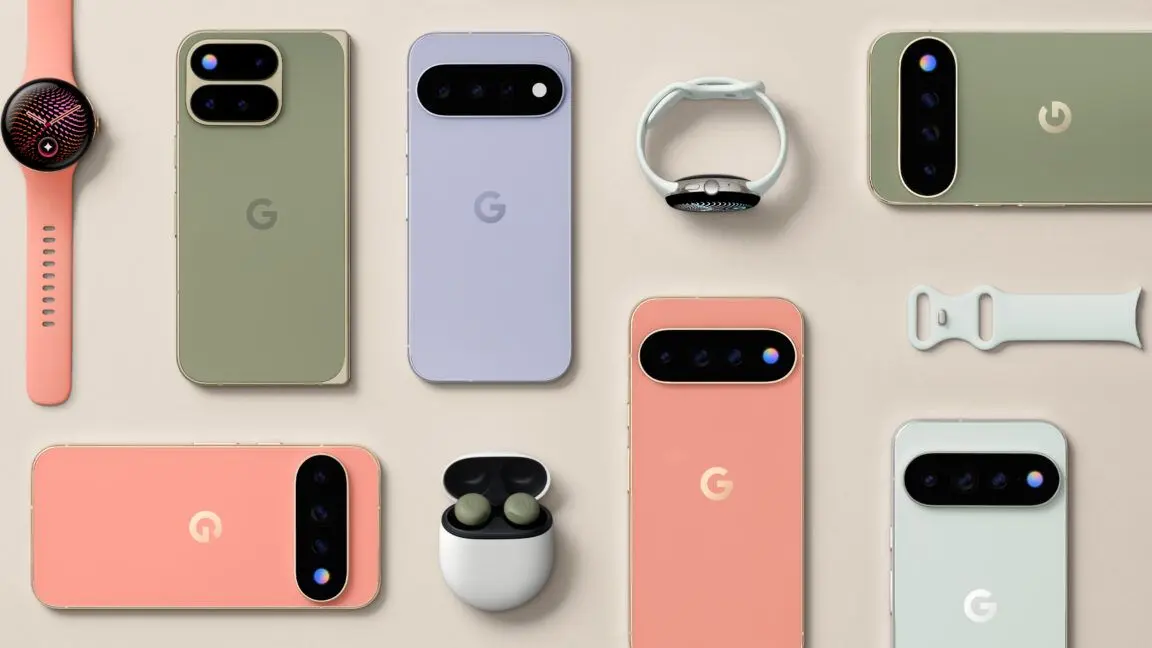
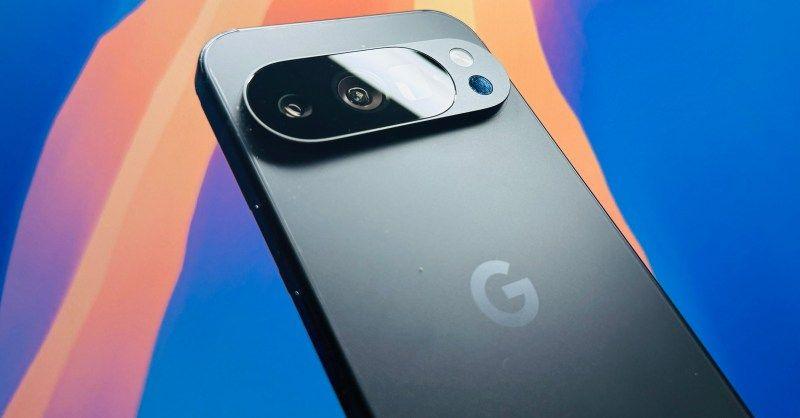
For the iPhone's 10th anniversary, Apple released the iPhone X, a stunning glass-and-steel monolith that also introduced Face ID and redesigned mobile software for the swipe-up instead of a physical home button. Google made no such grand makeover for the 10th anniversary of its Pixel phones. The Pixel 11 Pro and 11 Pro XL are mostly incrementally better versions of the Pixel 10 Pro and 10 Pro XL. That shouldn't surprise anybody. Phones -- even "pro" ones -- peaked years ago. Any hardware changes are bound to feel minor year over year. You may only feel impressed upgrading from a phone that's several years old. For better or worse, Google's North Star for the Pixel remains the same as ever: Gemini and AI at the center of everything you do. The Pixel 11 Pro and 11 Pro XL have far more AI integrated into Android, but it's still a long way off from being the do-it-all-for-you "agentic" phone that Google envisions. Call it boring or lazy, but I don't mind that the Pixel 11 Pro and 11 Pro XL merely refine the design established with the Pixel 9 Pros. After a week of testing, the Canyon and Olive colors have really grown on me. I love how light catches the polished aluminum frames (matte on the Obsidian version) and reflects off the satin glass backs. They're handsome phones that look more elevated and luxurious than the utilitarian iPhone 17 Pros, in my opinion. See Pixel 11 Pro and 11 Pro XL at Amazon Visible changes include a fully black camera bar with a round telephoto zoom lens instead of a rectangular one, along with a new flash that doubles as a glowing "HiLight" LED for when Gemini is active face-down on a surface and a favorite contact is calling. Gone is the temperature sensor; I don't miss it. The Pixel 11 Pro XL feels especially nice in the hand. It's 6g lighter than the Pixel 10 Pro XL, and I could feel the weight difference. While the display sizes on both models are the same as before -- 6.3 inches on the 11 Pro and 6.8 inches on the 11 Pro XL -- they can reach a higher peak brightness of 3,600 nits. This was most noticeable in direct sunlight, where visibility can often be challenging. I could see the screen on the Pixel 11 Pros more clearly compared to the iPhone 17 Pros, which max out at 3,000 nits. I noticed the increased brightness the most when taking photos and videos outdoors. The screens are also up to two times more scratch-resistant. I don't know if it's as tough as the Ceramic Shield 2 on the iPhone 17 Pros, but I haven't found any scratches on the Pixel 11 Pro and 11 Pro XL displays yet, and I've had them in my pockets with my loose change, a set of keys, and a card case. My personal nitpick remains the position of the power button. It's higher and more difficult to reach compared to an iPhone 17 Pro or Samsung Galaxy S26. I would have preferred that Google invert the power button and volume rocker, particularly on the larger 11 Pro XL, where they sit even higher, but then it'd also look like a Galaxy S26, so I guess Google had to do something different. A more plugged-in Gemini On the Pixel 10 series, Google let it be known that Gemini and AI are the main differentiators with features like Magic Cue, Voice Translate, and Help Me Edit (to name a few). This is even more true on the Pixel 11s. Rather than chase Apple Silicon and Qualcomm's chips, Google gave the Pixel 11 Pro and 11 Pro XL a Tensor G6 chip, which is fine for regular Android operating stuff and faster for running on-device AI tasks, but it doesn't compare to the performance you'll get from the A19 Pro chip in the iPhone 17 Pros or Qualcomm's Snapdragon 8 Elite Gen 5 chip in phones like the Galaxy S26 Ultra. Neither Geekbench 6 nor the newer Geekbench 7 app was available on the Google Play Store to run my usual single-core and multi-core tests in time for this review. (I'll update this review when they are available later.) But anecdotally, I found next to no gains in graphics-intensive apps like 3D gaming. I played Asphalt: Legends and Genshin Impact and noticed the same dropped frames I did when I tested the Pixel 10 Pros. The Pixel 11 Pros also get warm fast when they're pushed hard for 3D games. Android 17 is mostly responsive on the Pixel 11 Pros, though there's still more latency than there should be from Google's flagship devices. Sometimes images in help menus or settings take a few seconds to load up; the multitasker can hang just by a few ticks; apps don't open instantly and sometimes take a few seconds to load content. They're small things that can be fixed in future software updates, but it shows there's room for better optimization with the Tensor G6. Mind you, I noticed these little hang-ups on review units with 512GB of storage and 16GB of RAM. The entry-level 256GB models come with only 12GB of RAM, which is less than what came with every storage tier for the Pixel 10 Pros. One of the best things about the Pixel 11 Pros is easily Quick Share, which works with AirDrop on Apple devices. It's such a game-changer to be able to send and receive photos and videos directly to iPhones and MacBooks without needing to use another app like LocalSend. If the Tensor G6 is pulling its weight, it's doing it mostly invisibly as it crunches through "Gemini Intelligence," the catch-all term for AI on the Pixel 11 series. Google says Gemini can surface even more info at the right time and right place from more than 40 apps. The AI chatbot can also do more things for you, like order groceries and book rideshares, through supported services. I tried some of these "agentic" tasks, like asking Gemini to order me an Uber to the Empire State Building, and it did automate the task, taking me to the final ride type and payment screen, but it also took longer than it would have for me to just do it myself. This was also the case for ordering groceries from the Walmart app. I asked Gemini to buy milk, pasta, beans, red chili flakes, and Cheerios, and it added everything to my cart, and I just needed to finalize delivery and pay for them. In both situations, I was mighty impressed that Gemini successfully automated everything A to Z (you have to have the proper apps installed, of course). Ordering an Uber worked better than it did on the Galaxy S26 Ultra. But at the same time, automating the tasks always took longer to complete. For groceries, it took Gemini 2 minutes and 39 seconds after my request. I timed myself, and I was able to add the same items in just under half that time. Automation also means you don't get to choose which brands or prices; in three tests, Gemini chose different brands and prices for the items. It always got Cheerios right because I was specific on that, but it would change the serving size so the price changed, too. Talking to Gemini to automate tasks was also a good way to test out the Rambler feature, which works wherever Gboard is supported and removes all the filler words like "um" and "uh" from your speech. On almost every test, Gemini heard me clearly and removed the filler words. I did notice that it failed to add punctuation in many of my Google Keep notes, though. I guess it did its job just by dictating my rambling, then. I like the Magic Cue suggestions, and I like that it happens more often and in more apps. However, there's still always the fact that Gemini can get things wrong, even from my own data. I have not been able to blindly trust anything that any AI chatbot on any phone tells me, especially important information like flight details that I am always anxious about even when I've double-checked them several times. AI chatbots are getting better every year, but they can still get confused with context. And if you're always fact-checking its responses, doesn't that kind of defeat the whole point of relying on it in the first place? There are other useful AI features here, like a "Sign-to-Text" that can recognize American Sign Language and convert that into text, Live Translate for dubbing videos, and multi-language support for texting so you can text in Chinglish (Chinese and English), like I do. It's wild when the AI works almost flawlessly, but when it fumbles... you remember all of this stuff is still a work in progress. The most overhyped "AI" hardware feature on the Pixel 11 Pros is the HiLight LED. As I mentioned earlier, it glows when Gemini is talking while the screen is face-down. I found it kind of pointless since I rarely have my phone face-down. It also lights up a specific color when a favorite contact is calling. It's still wild that Google brought back the notification LED without support for app notifications. That's coming in the future, but it really should be there at launch. Walking back from the AI Camera ledge Before Google shifted its focus to AI, Pixel phones had class-leading cameras. Night Sight on the Pixel 3 was a game-changer for night and low-light photography; Super Res Zoom magically sharpened blurry digitally zoomed-in pictures; and Google kept leveling up its computational photography with each generation. The latter became an almost unhealthy obsession for Google -- chasing perfect "memories" and vibes instead of capturing reality as it really happened. That's how we got features like "Best Take," which creates a group photo where everyone is smiling perfectly and "Add Me," which uses augmented reality to essentially insert the person taking the photo into a shot with others. Recently, Google leaned hard into generative AI, suggesting there's no need to fly to Paris and snap a photo in front of the Eiffel Tower when you could just prompt one into existence. That felt like crossing a line to me. Google reeled in the zanier AI camera features this year and focused on authenticity. Instead of forcing you to accept the default richer contrast tones, all of the Pixel 11 phones let you adjust the default image to "Natural," "Shadows," or "Vanilla" and also dial in exactly how you want settings like highlights, shadows, and grain. It makes for a more personalized shooting experience that spits out photos better to your liking. There are also six "Camera Looks," which are basically filters that you can also dial in the settings for. As a camera nerd and somebody who wants to spend as little time editing my photos as possible, I appreciate the myriad image settings. A less-experienced shooter may feel overwhelmed fiddling with all the options. Of course, you can always just stick to the default Camera Looks. "Digi," for example, produces a point-and-shoot aesthetic and looks good without needing further adjustments. Night Sight mode is also noticeably faster on the Pixel 11 Pro and 11 Pro XL. Night photos process up to 4.5x faster than on the Pixel 10 Pros, according to Google. Whereas I would need to hold steady for a few more seconds and then wait for processing to finish, Night Sight photos on the Pixel 11 Pros is more instant. For me, this is more meaningful than modes like Best Take and Add Me. "Magic Camera" is an AI camera feature that can actually be useful in some situations. The idea is that you record a video, and then Magic Capture will automatically find "moments" -- based on signals like smiles, laughs, and action -- and save them as 12-megapixel Ultra HDR-resolution still photos. It's a neat mode that works completely on-device that could save you from burst-shooting dozens of photos, but it's also hit or miss. I found it's better at making photos with people smiling or laughing than it is at understanding an action shot. I tried taking photos of my cats chasing a wand, and the photos that Magic Capture created were mostly blurry. I'm sticking to rapidly pressing the shutter button. The Creator Suite that's geared towards content creators, with features like a teleprompter that scrolls when you talk, social media gridlines for framing vertical videos, and a speech enhancer that reduces background noises like wind, is useful but clearly has a very specific use case. It's nice all of these settings are built into the default camera app, rather than needing to use a third-party app that, in my experience, usually records worse-looking video. Portrait mode also works with the 5x telephoto lens, and you get 120x "Pro Zoom," which uses AI to generate sharper details (and sometimes completely fabricated ones like garbled text) at that magnification, compared to the 100x on the Pixel 10 Pros. I wouldn't say either is a must-have for me personally. I'm sure somebody out there is excited for them. All of this is to say: The cameras on the Pixel 11 Pro and 11 Pro XL are solid. Google's added more features again, and this time they all feel grounded in practicality. Pictures from the 50-megapixel main, 48-megapixel ultrawide, larger 48-megapixel 5x telephoto, and 42-megapixel selfie cameras all look good. I don't think many people will complain about image quality. The difference will always be in the details, but we're at a point where cameras on phones are all versatile enough. More for less, unless it's AI The Pixel 11 and 11 Pro XL are "safe" annual refreshes to a phone series still in the early stages of pivoting its identity to AI. As a whole, the phones check off almost every box you'd want in a flagship except performance, especially if you're buying into the AI-centric future where Gemini is able to do more for you. The hardware feels great, the cameras take good photos and videos, and the battery life lasts all day (there's also built-in Pixelsnap for magnetic Qi2.2 wireless charging and accessories). Maybe one day it'll be intelligent and fast enough to do your every bidding perfectly while you're at a beach somewhere drinking cocktails and making money without lifting your finger too much. But we are still very far from that future. That AI future also isn't cheap, not amid a "RAMpocalypse" at least. The Pixel 11 Pro starts at $1,099, and the Pixel 11 Pro XL starts at $1,299. That's $100 more for the 11 XL compared to the 10 Pro XL's MSRP for 256GB of storage, and you get less RAM unless you spring for the 512GB or 1TB model. The regular Pixel 11 Pro starts with the same 256GB storage, but it costs the same as the 10 Pro did last year with the same storage. Like the Pixel 11 XL, you also get less RAM for that base storage. If you're all-in on the Pixel ecosystem of phones, smartwatches, and wireless earbuds, the Pixel 11 Pros slot in seemlessly. Just know that the limited RAM on the base model and the Tensor G6 chip performance may not go the distance after a few major software updates down the line. For actual phone excitement, you'll need to consider a foldable like Samsung's Galaxy Z Fold 8.
Share
Copy Link
Google's Pixel 11 and Pixel 11 Pro arrive with ambitious AI-driven features powered by Gemini AI, but early reviews reveal significant usability issues. The AI-controlled apps feature struggles with basic tasks like restaurant bookings, while the Magic Capture camera mode fails to consistently pick better photos than users would choose themselves.

Google released its Pixel 11 smartphones this week, positioning them as the company's most AI-centric devices yet. Starting at $900, these handsets showcase Google's vision for AI-powered personal computing, where Gemini AI controls apps and automates tasks. However, post-release reviews from major tech publications reveal that the AI features struggle to deliver on their promises, raising questions about whether consumers actually want AI to take control of their phones.
The Pixel 11 introduces Gemini Intelligence, software designed to let AI-controlled apps handle tasks like booking restaurant reservations and ordering groceries. In testing by The New York Times, the system proved unreliable. When attempting to book a table for two at Zuni Café through OpenTable, available time slots disappeared from the screen after the initial search. A manual check of the OpenTable app confirmed plenty of tables remained available
1
.The user experience deteriorated further during an Instacart order from Costco. Because the Gemini activation button doubles as the power button, holding it down for 60 seconds to complete a long grocery list forced the phone to restart, cutting the order short. Google acknowledged it was addressing the OpenTable issue but suggested users could release the button after summoning Gemini—though testers found the assistant stopped listening momentarily after button release
1
.Reviewers concluded that manually booking reservations and ordering groceries would save more time than using Gemini AI, casting doubt on mainstream adoption of AI-controlled apps
1
.Google's new Pixel 11 smartphones feature Magic Capture, a camera mode that records video and uses Gemini AI to select what it considers the best still frame. The feature targets scenarios like photographing fidgety toddlers by ignoring frowns and blinks to pick smiling shots. In practice, the AI's photo selection often missed the mark. While it successfully chose a good photo of a corgi sitting in a chair, it selected an image with a neutral expression when photographing a 2-year-old, while the reviewer preferred a different frame showing the child smiling with eyes closed
1
.Google noted users can choose different images if they disagree with the AI's preferences, but reviewers found this flexibility counterproductive compared to taking burst photos and selecting favorites manually
1
.The Pixel 11 Pro and 11 Pro XL, priced at $1,100, represent incremental updates rather than revolutionary changes. Gizmodo's review noted the devices refine the design established with the Pixel 9 Pros, featuring polished aluminum frames and satin glass backs in new Canyon and Olive colors. The camera bar now appears fully black with a round telephoto zoom lens, and a new "HiLight" LED glows when Gemini is active
2
.Display improvements include peak brightness reaching 3,600 nits on both the 6.3-inch Pixel 11 Pro and 6.8-inch Pixel 11 Pro XL—higher than the iPhone 17 Pros' 3,000 nits. This proved most noticeable in direct sunlight when taking photos and videos outdoors. The screens also offer up to two times more scratch resistance
2
.Related Stories
Google equipped the Pixel 11 Pro models with the Tensor G6 chip, optimized for running on-device AI tasks rather than competing with Apple's A19 Pro or Qualcomm's Snapdragon 8 Elite Gen 5. The chip handles regular Android operations adequately but shows limitations in graphics-intensive applications. Testing with Asphalt: Legends and Genshin Impact revealed the same dropped frames experienced on Pixel 10 Pros, with devices getting warm quickly under heavy 3D gaming loads
2
.Android 17 on the Pixel 11 Pros exhibits occasional latency issues. Images in help menus or settings sometimes take seconds to load, the multitasker can hang briefly, and apps don't always open instantly. These issues appeared on review units with 512GB storage and 16GB RAM, while entry-level 256GB models include only 12GB RAM—less than what came with every Pixel 10 Pro storage tier
2
.Google's North Star for the Pixel remains Gemini and AI at the center of everything, but the Pixel 11 series is still far from being the do-it-all-for-you agentic phone Google envisions
2
. The company is betting that AI will eventually supersede the operating system in importance as people rely on Gemini instead of using apps themselves. Apple will test a similar concept this fall with Siri AI, a new version of its personal assistant also powered by Gemini1
.Despite making up a tiny portion of the handset market, Google's Pixel phone remains highly influential. Companies including Apple and Samsung eventually add some of Google's best ideas to their own phones, making each Pixel release important for assessing which features will trend and which will fade
1
. The mixed reception of AI-driven features like Magic Cue, Voice Translate, and Help Me Edit suggests the industry still has work to do before AI-controlled smartphones become genuinely useful for mainstream consumers.Summarized by
Navi
11 Sept 2025•Technology
12 Aug 2026•Technology

21 Aug 2025•Technology
1
Technology

2
Technology

3
Technology