Microsoft Tests Customizable Copilot Key in Windows 11 Preview Build


2 Sources
[1]
New Windows 11 build lets you use Copilot key to launch things that aren't Copilot
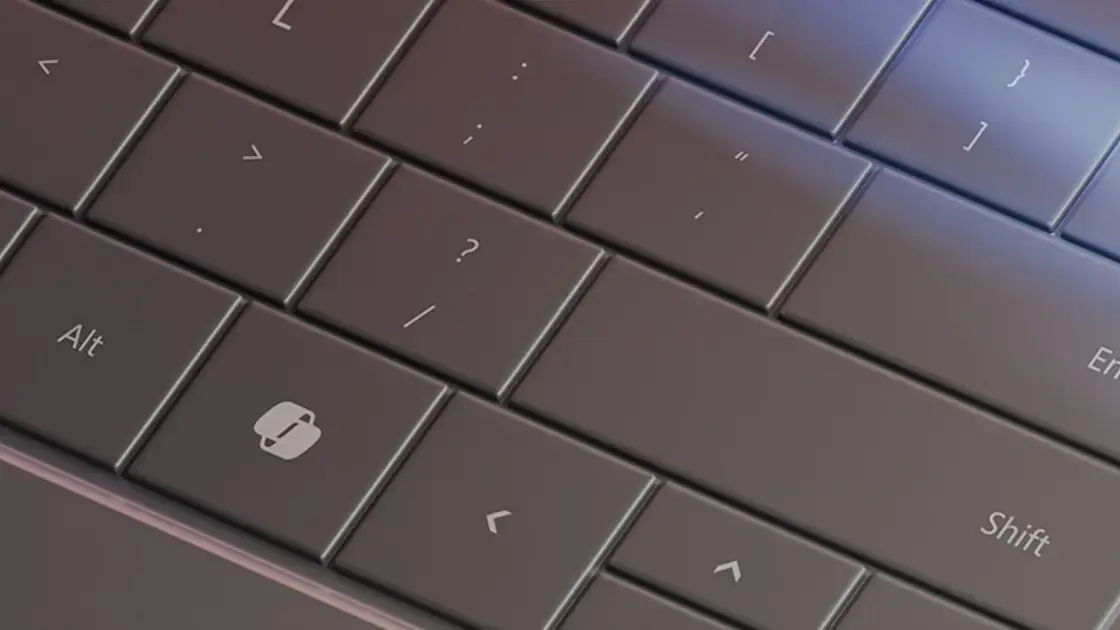
The Copilot button on a Surface Pro keyboard cover. Credit: Andrew Cunningham Whether you care about Microsoft's Copilot AI assistant or not, many new PCs introduced this year have included a dedicated Copilot key on the keyboard; this is true whether the PC meets the requirements for Microsoft's
[2]
Don't like Copilot? Microsoft might let you preprogram the new Copilot button
Windows Insiders are now testing out this potential feature When Microsoft launched its new Copilot + PCs earlier this year, it also introduced the first change to the standard Windows keyboards in over 30 years by adding a new dedicated Copilot Key. Not every new PC meets Microsoft's
Share
Copy Link
Microsoft is testing a feature in Windows 11 that allows users to reprogram the new Copilot key to launch other applications, addressing concerns about the key's utility for those who don't frequently use the AI assistant.

Microsoft Introduces Customizable Copilot Key in Windows 11 Preview
Microsoft is testing a new feature in its Windows Insider Preview build that allows users to reprogram the recently introduced Copilot key on Windows keyboards. This development comes in response to concerns about the key's utility for users who don't frequently use the Copilot AI assistant
1
.Background on the Copilot Key
Earlier this year, Microsoft made a significant change to the standard Windows keyboard layout by adding a dedicated Copilot key. This marked the first alteration to the Windows keyboard in over three decades, highlighting the company's commitment to integrating AI features across its products
1
2
.New Customization Options
The latest Windows Insider Preview build in the Dev channel introduces the ability to reprogram the Copilot key to launch applications other than Copilot. This feature aims to provide flexibility for users who may not regularly use the AI assistant or have disabled it
1
.Limitations and Requirements
While the new functionality offers more versatility, there are some restrictions:
-
App Compatibility: To be eligible for launching via the Copilot key, an app must be "MSIX packaged and signed," meeting Microsoft's security and privacy requirements
1
. -
Source Limitations: Generally, apps installed from the Microsoft Store or built into Windows will meet these criteria. However, applications from other sources may not be compatible
1
2
. -
Functionality Constraints: The Copilot key can only be used to launch apps and cannot be customized to execute other tasks like running batch files or executables without third-party tools
1
.
Implications for Users and Microsoft's Strategy
This potential feature addresses concerns from users who found the dedicated Copilot key less useful, especially on PCs that don't meet the requirements for Microsoft's Copilot+ PC program
2
. It also demonstrates Microsoft's responsiveness to user feedback and its commitment to balancing AI integration with user choice.Related Stories



Future Outlook
As this feature is currently in the Windows Insider Preview, it may undergo changes before a potential public release. However, industry observers speculate that this customization option is likely to make it to the public Windows 11 builds in the coming months
2
.Broader Context of Copilot Updates
Alongside this keyboard customization, Microsoft has recently released several updates to Copilot itself, including the reintroduction of the Recall feature as an opt-in option. These developments are part of the Windows 11 24H2 update, showcasing Microsoft's ongoing efforts to refine and expand its AI offerings
2
.References
Summarized by

Navi
Related Stories
Recent Highlights
1
Google Unveils Gemini 4 Carbon AI Model With Major Cybersecurity Gains, Beating Claude Opus 5.5
Technology

2
Binance Hack: How AI-Enabled Cyberattack Led to Record $6.3 Billion Crypto Theft
Technology

3
Pope Leo XIV Demands AI Disarmament and Ban on Autonomous Weapons at UN Geneva Meeting
Policy and Regulation

Recent Highlights
Today's Top Stories










Don’t drown in AI news. We cut through the noise - filtering, ranking and summarizing the most important AI news, breakthroughs and research daily. Follow topics that matter to you and stay ahead.


