12 Sources
12 Sources
[1]
OpenAI takes aim at Anthropic with beefed-up Codex that gives it more power over your desktop | TechCrunch
There is currently a low-grade war between OpenAI and Anthropic over who can release the most convenient and powerful AI-coding tools and, so far, Anthropic seems to be winning. Claude Code has been dubbed the tool of choice for many businesses, as TechCrunch reported last week, but OpenAI isn't giving up yet. This week, OpenAI announced a revamp of Codex, its own automated tool, with a variety of new updates designed to give it significantly expanded powers. On Thursday, the company announced a plethora of new features and updates, perhaps the most notable of which is that Codex can now operate in the background on your computer -- opening any app on your desktop and carrying out operations with a cursor that clicks and types. Functionally, what this does is allow Codex to deploy multiple agents, all of which work on a user's Mac "in parallel, without interfering with your own work in other apps," the company said in a blog post. In other words, because of the way Codex runs in the background, a user can still be using the machine as the agent goes about its own work. The agent will then function, according to the company, as a kind of coding buddy that does auxiliary tasks while you work on topline projects. OpenAI's lists "iterating on frontend changes, testing apps, or working in apps that don't expose an API" as potential use-cases for this kind of agentic assistance. Overall, this agentic update and other new additions demonstrate OpenAI's desire to not only make Codex a competitive coding assistant but also a more multifaceted tool that can be integrated into a variety of corporate workflows. Watchers of the AI coding space will also note that some of the powers OpenAI is now adding to Codex seem to resemble those previously released by Anthropic for Claude Code. Last month, Anthropic announced that Claude and Cowork could remotely control your Mac and desktop on a user's behalf while they were away from their keyboard. In addition to the agentic tools, OpenAI's Codex now has an in-app browser, which allows a user to issue commands to the agentic tool, which it will then ostensibly carry out on specific web applications. OpenAI says this function will be useful for frontend and game development, and that it plans to eventually expand the capability so that Codex can "fully command the browser beyond web applications on localhost." There are other updates. A new feature in preview called "memory" allows Codex to recall previous work sessions and generate important context about how a particular user works. The agent has also been given a new image-generation ability, which OpenAI says can be used to create product concepts, slide visuals, mockups, placeholder images, and other corporate paraphernalia. Finally, to expand Codex's ability to get things done, the company has announced 111 plugin integrations from apps like CodeRabbit and Gitlab Issues, which allows Codex to carry out tasks involving those tools. The way OpenAI has framed it, these plugins give Codex the ability to carry out minor clerical work to organize your work life. For example, if you want Codex to take a look at your Slack channels and Google calendar and give you a to-do list for a given day, OpenAI says that it can now do that for you. A new pay-as-you-go Codex pricing option for ChatGPT enterprise and business customers has also been announced in an apparent effort to give users more flexibility when it comes to procuring the coding tool's services. Once considered the undisputed leader of its industry, OpenAI has more fiercely competed with Anthropic in recent months, with a focus on enterprise capabilities and a retreat from consumer tools like its social video app Sora 2. The company has also battled various controversies in recent months, including lawsuits over ChatGPT's alleged mental health impact on some users.
[2]
These New Codex Updates Are the 'First Phase' of OpenAI's Dream Super App
Codex is less than a year old, but the AI coding platform may be the key to OpenAI's dream of a superapp -- a theoretical one-stop shop for ChatGPT, its Atlas browser and Codex. OpenAI said that Codex, not ChatGPT, will be the foundation for this app. "We're actually doing the sneaky thing where we're building the super app in the open and evolving it out of the Codex app," Thibault Sottiaux, engineering lead for Codex, told reporters during a briefing this week. Codex has been a popular app of choice for AI developers and vibe coders. As of now, OpenAI says Codex has more than 3 million weekly users. But nearly half of Codex use is for non-coding tasks, according to OpenAI. So the company on Thursday announced a series of updates to make Codex more integrated into every part of your work day, not just coding. The biggest news is that Codex can work across many of your computer's apps, not just ChatGPT. This is the "first phase" of making Codex the foundation for a future super app, Sottiaux said. Codex can run multiple agents across your desktop apps. There are more than 100 new plugins available for developers, including Atlassian Rovo, CircleCI, CodeRabbit, GitLab Issues, Microsoft Suite and Neon by Databricks. But you can also give Codex access to your Slack, Notion and Google apps. The idea is that Codex will be more helpful if it has access to more of your digital work life. It has an improved memory, so it can learn and adapt to your work style. Codex can be used as a kind of personal assistant; it's agentic, which means it can autonomously handle tasks. The new Automations tool lets you set reminders for Codex to run repetitive tasks, called "heartbeats," like constantly scanning your messages and prioritizing what needs your attention. You can also set it up to give you briefings at the beginning and end of your days. Developers can also now work from in-app browsers, so you can preview projects you're building in Codex from the app, and see them as they would appear in a web browser. This makes it easier to see the final product and make changes. You can leave comments on the browser page, and Codex's agents will make those changes. AI image generation is also coming to Codex (GPT Image 1.5), so you can make those iterative changes with photos, too. Coding platforms like Codex have been all the rage for AI companies this year. Anthropic released Claude Code earlier this year, stunning enthusiasts and Wall Street with its advanced capabilities. OpenAI recently introduced a new, relatively cheaper $100 per month plan with higher Codex usage limits -- half the price of the usual ChatGPT Pro plan. Developers and vibe coders tend to need those more expensive plans because those requests use more tokens and are more compute-intensive.
[3]
OpenAI's Codex Desktop can run your computer now - and has its own browser
While the capabilities are undoubtedly powerful, the messaging is a little murky. In a briefing yesterday, OpenAI recognized that Codex Desktop is still targeted at programmers but includes additional productivity tools that go beyond code generation. Also: 7 AI coding techniques I use to ship real, reliable products - fast I quite enjoy OpenAI briefings because the excitement from the folks building the AI is tangible and genuine. They give off a "Check out what we did" vibe that's refreshing among all the corporate speak we get from AI vendors every day. However, I think there's a law somewhere that all briefings must include slides. One of the company's slides said that 80% of OpenAI's staff use Codex, which highlights how non-programmers can use the Codex Desktop app. A key feature of the new Codex Desktop is computer use, which means the AI inside Codex Desktop can operate your computer. Also: How AI has suddenly become much more useful to open-source developers This release lets the AI run applications in the background. So, while the technology runs an automation, you can do other tasks in other applications. The computer use feature is only available for MacOS, at least for now. Codex Desktop now includes an in-app browser. OpenAI didn't demonstrate the in-app browser performing automations, so we'll have to test this feature out and let you know what we think once we get our hands on the app itself. Also: I built two apps with just my voice and a mouse - are IDEs already obsolete? One interesting (and long overdue) feature is the ability to click on an element in the browser and have the AI understand where you're clicking. So, rather than trying to explain you want the font changed in the third headline in column two, you can click the item you want changed and tell the AI to "change this to that." If this feature is reliable, it will definitely save some serious time. ChatGPT has had excellent image generation capabilities for quite some time, but Codex Desktop has not. Now, however, you should be able to create an agent that generates an image, chart, or diagram automatically as part of the overall automation. Also: I tested the new ChatGPT Images - it's a stunning improvement, and enormously fun This is another feature that needs to be tested to see how well it works. If the feature keeps pace with the improvements we've seen in competing Gemini offerings, the image-generation capabilities should prove handy. Automations can now be added to existing conversational threads, allowing the AI to pick up on context from earlier discussions and interactions. Codex can assign itself work that, according to OpenAI, means it can "wake up automatically to continue on a long-term task, potentially across days or weeks." Although ChatGPT has had a memory feature for a while, the Codex app was particularly problematic because it had to be brought back up to speed on every relaunch. Now, the app has a memory capability that, according to the company, can "remember useful context from previous experience, including personal preferences, corrections, and information that took time to gather." OpenAI said: "This helps future tasks complete faster and to a level of quality previously only possible through extensive custom instructions." Also: The overselling of AI - and how to resist it Codex now has a nag feature that launches with the app. Here's how the developers described this feature: "Codex now also proactively proposes useful work to continue where you have left off." Basically, when you jump back into Codex, the AI will try to see what you were working on and will propose continuing those workflows. The product has a bunch of developer-oriented features, including: Personally, I'm most excited about the multiple tabs feature. Unfortunately, as far as I can tell, you can't color-code the tabs the way I do to keep track of my different projects in different terminal tabs. But, at the rate this feature is improving, it's probably something we'll see soon. Also: Is Perplexity's new Computer a safer version of OpenClaw? How it works Finally, Codex Desktop is shipping with access to more than 100 plugins. In AI-speak, plugins are apps that combine skills, app integrations, and MCP servers for more in-depth capabilities. Given OpenClaw's problems with user-contributed skills that have led to a flood of malware, I asked the developers how they are addressing plugin issues. I was told that OpenAI curates plugins before they're made available. The new Codex Desktop is available to any OpenAI tier with Codex access. Obviously, running more automations and long-run projects will use up token allocations more quickly, so proceed with caution and test before you let an agent run unattended. The new Codex Desktop is available for Mac and Windows, although the Computer Use feature is only available on MacOS and is not yet available in the EU. Is Codex Desktop starting to feel like a true productivity tool to you, or is it still primarily a programmer's assistant? Let us know in the comments below.
[4]
OpenAI's latest Codex update builds the groundwork for its upcoming super app
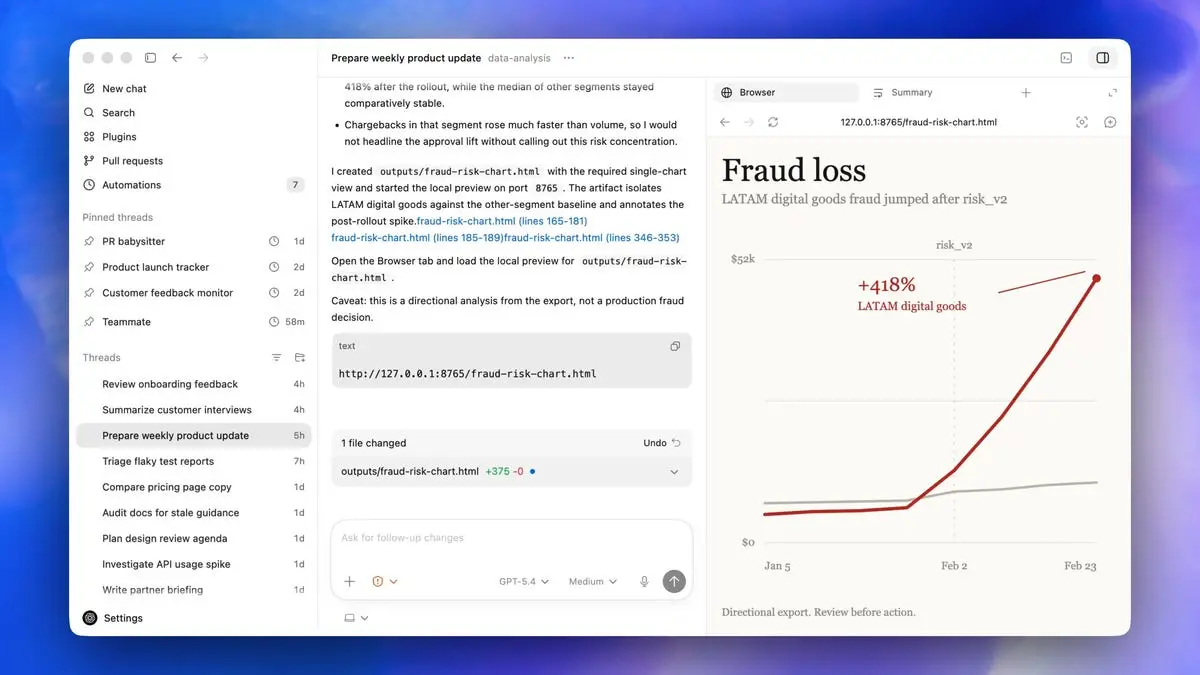
Last month, following reporting from The Wall Street Journal, OpenAI confirmed it was working on a desktop super app that would combine ChatGPT, its Codex coding agent and Atlas web browser into one cohesive experience. OpenAI is not releasing that application today. Instead, it's pushing out a major update to Codex that significantly expands what that software can do. However, the new release offers a glimpse of what OpenAI hopes to build with its latest effort. "We're building the super app out in the open," said Thibault Sottiaux, the head of Codex, during a press briefing held by OpenAI. "This release is about developers. In the future, we will broaden it up to a wider audience." Until then, the latest version of Codex offers developers multi-purpose AI agents that can work across a "larger surface area," while being more proactive. In practice, that translates to a host of new capabilities, starting with computer use. The agents inside of Codex can interact with other apps on your PC. When prompting one of OpenAI's models, you can name a specific program or let it determine the best application for the job. Computer use is available in competing apps like Claude Cowork, but where OpenAI believes Codex offers an edge in that department is in the "secret sauce" it built to allow an agent to run an app without bogging down your entire system, so the two of you can work in tandem. At the same time, OpenAI is releasing 111 new plugins for Codex that combine skills, app integrations and model context protocol server connections to give Codex more ways to gather context and use the tools developers depend on for their work. The company has also added a built-in browser, with a commenting system that allows you to prompt Codex to make tweaks to specific parts of a webpage or web app you're building. In the demo OpenAI showed, one member of the Codex team used this tool to instruct Codex to change the margins on a graph so that the y axis wasn't cut off. Complementing this is built-in image generation. Codex can use gpt-image-1.5 to create product concepts, mockups, frontend designs and even assets for simple games. It also allows Codex to use screenshots to verify it's on the right track with a user request. With today's update, OpenAI is also previewing a pair of memory features. The first allows Codex to recall context from previous tasks to inform how it goes about future prompts. According to OpenAI, with time, this will allow Codex to complete requests faster and to a higher standard. The app will also use the context it's gathered to suggest proactive actions. For example, at the start of your day, it might suggest you respond to a comment a coworker left on a Google Doc draft you wrote. If you want to try the updated Codex for yourself, OpenAI is starting to roll out the new version to desktop app users who are logged in with their ChatGPT account. Computer use is available to macOS users first, with availability for people in the EU and UK to follow soon. Similarly, Brits and Europeans will need to wait to try the memory features OpenAI has built into Codex.
[5]
OpenAI's Codex Mac app adds three key features that go beyond agentic coding - 9to5Mac
OpenAI is releasing a new version of its Codex desktop app today. The latest Codex update adds three key features that expand its use beyond agentic coding. Today's release signals the start of a shift for Codex. The app is going from strictly developer-focused to having more general utility as an AI tool on the Mac. Today's Codex release includes three key features that extend the desktop app's capabilities. These include Codex-powered background computer use, an in-app browser built on OpenAI's Atlas, and image generation powered by gpt-image-1.5 -- all without leaving Codex. OpenAI specifically highlights the "background" aspect of Codex's computer use capabilities. Codex can use desktop apps on your Mac in the background while you actively use your machine without interruption. "Multiple agents can work in parallel, without interfering with your own work in other apps," OpenAI says. "For developers, this is helpful for testing and iterating on frontend changes, testing apps, or working in apps that don't expose an API." Last fall, OpenAI released its first AI-focused web browser with the launch of ChatGPT Atlas. Today, Codex is bringing Atlas technology into the stack with its own in-app browser. OpenAI says Codex's in-app browser will let you "comment directly on pages to provide precise instructions to the agent." "This is useful for frontend and game development today, and over time we plan to expand it so Codex can fully command the browser beyond web applications on localhost," the company adds. Image-gen is also now integrated with Codex. This removes the need to switch to the ChatGPT app for creating AI-generated images. For developers, OpenAI expects image-gen inside Codex to be especially useful for making visual concepts and more based on screenshots and code. Beyond these three key features, OpenAI is releasing a curated collection of 111 additional Codex Plugins. These combine skills, app integrations, and MCP servers to extend Codex's capabilities. Codex includes these new software development support features beyond agentic coding: The app now includes support for addressing GitHub review comments, running multiple terminal tabs, and connecting to remote devboxes over SSH in alpha. It also lets you open files directly in the sidebar with rich previews for PDFs, spreadsheets, slides, and docs, and use a new summary pane to track agent plans, sources, and artifacts. Automation has expanded capabilities in the new version of Codex as well: We have expanded automations to allow re-using existing conversation threads, preserving context previously built up. Codex can now schedule future work for itself and wake up automatically to continue on a long-term task, potentially across days or weeks. Lastly, Codex gets a "preview of memory" similar to the ChatGPT app. Codex can "remember useful context from previous experience, including personal preferences, corrections and information that took time to gather." Memory will allow Codex to surface useful prompt suggestions based on ongoing projects: Using context from projects, connected plugins, and memory, Codex can now suggest how to start your work day or where to pick up on a previous project. For example Codex can identify open comments in Google Docs that require your attention, pull relevant context from Slack, Notion, and your codebase, then provide you with a prioritized list of actions. These prompts should improve with use as Codex gains more context. In addition to enhancing the Codex desktop app, OpenAI recently introduced a subscription designed for Codex users. OpenAI's $100/month Pro tier arrived last week. It's an upgrade from the $20/month plan, and a cheaper upgrade than the $200/month Pro tier. The new Pro tier is for "those who use advanced tools and models throughout the week with 5x higher limits than Plus." At launch, it actually includes "10x Codex usage vs. Plus for a limited time," OpenAI says. OpenAI shared last week that Codex has 3 million weekly users. That's a 5x increase in three months with 70% month over month usage growth. OpenAI suggests future versions of Codex will lean further into general productivity use cases for builders beyond engineering. This follows OpenAI's plan to build one "superapp" that integrates all of its technologies. We see the start of that today with background computer use, in-app browser, and image generation being bundled.
[6]
OpenAI Codex Update Adds Computer Use, Image Generation, and Memory on Mac
OpenAI is making several updates to its Codex AI coding agent. Codex is now able to operate desktop Mac apps with its own cursor, seeing what's on the screen, clicking, and typing to complete tasks. Codex can run multiple agents on the Mac in parallel, without interfering with the user's own work. OpenAI says developers will find it useful for testing apps, iterating on frontend changes, and more. Codex can now remember preferences, recurring workflows, tech stacks, and other information about each user's personal workflow. With automation improvements, Codex is able to resume work after a pause using existing conversation threads, and it can schedule future work for itself and work on a task across days or weeks. Codex also proposes work using context from projects, memory, and connected plugins. There is an in-app browser for Codex that allows users to comment directly on pages to provide more precise instructions to the agent. In the future, Codex will get full use of the browser for opening websites, working through user flows, taking screenshots, and inspecting outputs. Codex has been updated to use gpt-image-1.5 for generating images in the app, which OpenAI says is helpful for creating visuals for product concepts and mockups. Codex now includes support for multiple terminal tabs, addressing GitHub review comments, and opening files directly in the sidebar with rich previews for documents like PDFs and spreadsheets. Along with these changes, Codex has over 90 new plugins that can combine skills, app integrations, and MCP servers to improve Codex's context gathering and actions. The updates to Codex are rolling out today to Codex desktop users signed in with ChatGPT. The personalization features are not yet available to Enterprise, Education, EU, and UK users, but will be rolling out soon. Computer use is also not yet available in the EU or the UK.
[7]
OpenAI drastically updates Codex desktop app to use all other apps on your computer, generate images, preview webpages
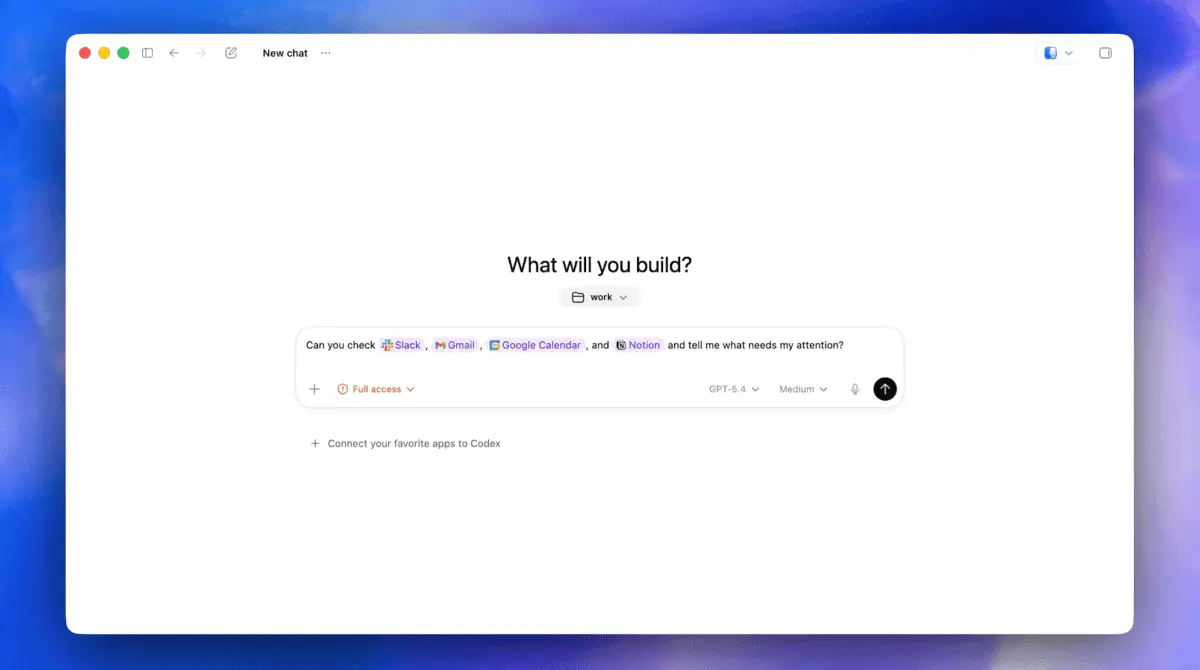
Confirming it has reached 3 million weekly developers, OpenAI is massively updating its Codex developer environment via its Mac and Windows desktop apps today to bring it closer to the "Super App" the company has confirmed it is pursuing. Before today, Codex was primarily an environment for using OpenAI's underlying language models to write, edit, debug and ship software as directed by the user. Now, Codex will be able to access all of the other apps on your computer, surface relevant information from within them to you when asked or proactively, take actions as directed in said applications, and, in the case of Mac users, even do so while you continue manually using your computer simultaneously to your agents working in the background. Andrew Ambrosino, an OpenAI technical staffer on the Codex team, described the change plainly in an embargoed press briefing I attended virtually yesterday: "Codex can actually click on apps, launch apps, and type into apps. This works with any apps on your machine." Codex on desktop is further getting its own built-in web browser, allowing users to preview their front-end development, and a directly integrated pipeline to OpenAI's powerful AI image generation model gpt-image-1.5, allowing users to generate imagery for their projects -- everything from websites to presentations to full playable PC games with hundreds of assets -- all in the same style. As Thibault "Tibo" Sottiaux, Head of Codex at OpenAI, said during the briefing: "It's not just about the growth. It is putting a very capable agent in the hands of builders, and now we're seeing that we're able to expand and do a lot more work entirely across your computer" Asked why OpenAI was pursuing all this in Codex, not its more recognizable flagship app, ChatGPT, Sottiaux told VentureBeat: "Codex is our most powerful agent.It already worked on your computer, and so we're expanding the capabilities there. It felt very natural. We will make it make sense at some point." The update comes as rival Anthropic has previously courted similar use cases with the launch of its Claude Cowork and redesigned Claude Code desktop app views, all available within the Claude desktop app for Mac and Windows. But Claude does not allow for simultaneous background app cursor usage from the desktop app across all of a user's apps like Codex does. The most significant technological leap in this release is "Computer Use," limited for now to macOS users. This feature allows Codex to break out of the traditional chatbot container to "see, click, and type" across all applications on a machine. Crucially, this happens in the background. "It can use apps on your computer in the background, as opposed to taking over your entire computer," explained Caffrey Lynch of OpenAI's developer product communications. This enables "multi-agent" workflows where Codex might be testing a frontend change or triaging a JIRA ticket while the developer continues working in a different application. For Windows users, the core Codex desktop app remains available and supported -- as does pulling information in from those apps to surface to the user in Codex -- though it lacks the cursor-level background interaction available on Mac at launch. Beyond operating the OS, OpenAI is doubling down on the "Software Development Lifecycle" (SDLC). The Codex app now functions more like a unified workspace, supporting everything from GitHub PR reviews to managing remote infrastructure. "The simplest way to think about this release is teaching Codex and the app to work across a much larger surface area," said Andrew Ambrosino, lead of Codex app development. This surface area now includes: To connect these disparate tasks, OpenAI is releasing more than 90 new plugins. These connectors -- including CircleCI, GitLab, and Microsoft Suite -- allow the agent to gather context and take action across the entire toolchain a developer uses daily. In a demo video shown off during the briefing, OpenAI presented an example showing the user typing into the Codex prompt entry field, "Can you check Slack, Gmail, Google Calendar, and Notion and tell me what needs my attention?" showing how Codex can now scan across multiple apps and gather information from them all in single prompt, and surface what matters most to the user. "You can @ mention them if you want Codex to use a specific app, or if not, Codex can discover which apps to use," Ambrosino said. One of the more subtle but powerful shifts is the introduction of persistent agency. Through "Heartbeat Automations," Codex can now schedule future work for itself and "wake up" to continue long-term tasks. This allows teams to set up agents that monitor Slack channels or Notion docs and proactively update documentation or landing PRs. This is supported by a new "Memory" feature, currently in preview. Memory allows Codex to remember personal preferences, previous corrections, and gathered information, reducing the need for extensive custom instructions in every new session. "As you use Codex, Codex also becomes better at being proactive," noted Sottiaux. This proactivity manifests in a "daily brief" style feature where the app suggests how to start the day by identifying open Google Doc comments or relevant Slack context. It's similar in spirit and practice to the new "Routines" feature launched by Anthropic for its Claude Code product earlier this week. OpenAI has recently transitioned toward a more flexible pricing model for teams, including a $100 plan and pay-as-you-go options to accommodate the increased usage of autonomous agents. For individual users, these updates are rolling out today to those signed in to the Codex desktop app with ChatGPT. While the Codex desktop app is available on both macOS and Windows, the rollout of specific features is tiered: When asked if these features represent the foundation of an AI "Super App," Sottiaux confirmed the strategy: "We're building the Super App in the open and evolving it out of the Codex app". The goal is to address the reality that developers spend a majority of their time on coordination and context-gathering rather than writing code. By bringing Codex closer to the operating system and the broader ecosystem of developer tools, OpenAI is positioning it as the central nervous system for modern software development. "Our mission is to ensure that AGI benefits all of humanity," the company stated in its official announcement. "That means narrowing the gap between what people can imagine and what they can actually build".
[8]
OpenAI Super App Takes Shape: Codex Gets Computer Use, Browser, and Image Gen - Decrypt
New features position Codex against Claude Code and OpenClaw. OpenAI announced today it has updated its Codex desktop app with computer use, an in-app browser, image generation, and over 90 new plugins. Almost one year after initially launching Codex, the company now says more than 3 million developers use it every week. And now the idea, OpenAI says, is to let them use "Codex for (almost) everything." With background computer use, Codex can now see your screen, move its own cursor, and click and type inside any Mac application. Multiple agents can run simultaneously without interrupting whatever you're doing on the side. OpenAI says it's most useful for frontend iteration, app testing, and workflows that don't expose an API. The in-app browser lets users comment directly on pages to give the agent precise instructions. OpenAI says it's aimed at frontend and game development today, with plans to expand full browser control over time. Image generation, powered by gpt-image-1.5, is now built into the same workflow -- no API key needed, and with usage covered by a ChatGPT account. It also features 90+ new plugins, including integrations with Atlassian Rovo, CircleCI, CodeRabbit, GitLab Issues, the Microsoft Suite, and Neon by Databricks. They combine skills, app integrations, and MCP servers to extend what Codex can access and act on across a developer's existing toolset. On the workflow side, the app now supports multiple terminal tabs, GitHub PR review comment handling, SSH connections to remote devboxes (in alpha), and a summary pane that tracks agent plans, sources, and artifacts. Files open directly in the sidebar with rich previews for PDFs, spreadsheets, slides, and docs. OpenAI says the goal is to reach "a level of quality previously only possible through extensive custom instructions." There's also a new proactive mode. Using context from connected plugins, memory, and active projects, Codex can suggest where to start a work day or resume a previous task -- pulling open Google Docs comments, relevant Slack threads, Notion pages, and codebase context into a prioritized action list. The feature set covers a lot of the same ground as OpenClaw, the open-source agent framework that went viral in early 2026. OpenClaw was built by Austrian developer Peter Steinberger to run persistent agents locally, connected to messaging apps, files, browsers, and shell commands. It accumulated 60,000 GitHub stars in 72 hours and drew comparisons to a personal AI operating system. Steinberger joined OpenAI in February to lead personal agent development after Sam Altman, Mark Zuckerberg, and Satya Nadella all reached out following OpenClaw's rise. The project moved to an open-source foundation with OpenAI as financial sponsor. Before the OpenAI hire, Anthropic had sent Steinberger a trademark complaint over the original name "Clawdbot" -- a dispute that triggered two chaotic rebrands and, according to observers, accelerated his move to OpenAI. OpenClaw had been running primarily on Anthropic's Claude models at the time. The more direct mainstream, closed source coding-tool rival to OpenAI's Codex is Anthropic's Claude Code, a terminal-based agentic coding assistant that reads entire codebases, edits files, runs tests, and commits to GitHub. Anthropic also introduced its own computer use feature for Claude in March, available as a research preview for Pro and Max subscribers on macOS. Codex packages these capabilities differently -- computer control, browsing, image generation, and coding in one desktop app, tied to a ChatGPT account. OpenAI describes the direction as an effort on "narrowing the gap between what people can imagine and what they can build." The update is rolling out today to Codex desktop users signed in with ChatGPT. Personalization features and computer use are not yet available in the EU or UK.
[9]
OpenAI ratchets up Codex's agentic capabilities to rival Claude Code - SiliconANGLE
OpenAI ratchets up Codex's agentic capabilities to rival Claude Code OpenAI Group PBC today announced a major revamp of its artificial intelligence coding tool Codex, giving it a number of new "agentic" capabilities that enable more complex task automation. The ChatGPT maker is engaged in a fierce battle for AI coding supremacy with its rival Anthropic PBC, and is widely perceived to be losing, with Claude Code seen as the de facto leader by most businesses. But OpenAI is now hitting back, with one of the most notable updates today giving Codex the ability to operate in the background on a computer and carry out various tasks with a cursor that clicks and types. This new capability enables Codex to deploy multiple AI agents, which can work on user's Mac computers in parallel, "without interfering with your own work in other apps," the company said today. Because Codex just runs in the background, users will be able to operate their computer as normal, even while Codex's agents are working independently. This allows it to function as a kind of coding assistant that's able to perform auxiliary tasks while the user focuses on the most complex, topline work, OpenAI said. The company explains that this might include "iterating on frontend changes, testing apps, or working in apps that don't expose an API." The update not only makes Codex a more comprehensive coding assistant, but transforms it into a multifaceted tool that can assist in various other corporate tasks. Some of today's other updates seem to mimic recent additions to Claude Code. For instance, Anthropic last month gave Claude Code and Cowork the ability to remotely control user's computers while they're away from the device, and Codex gets similar functionality. There's also a new in-app browser for Codex, which allows users to issue commands instructing it to perform tasks over the web. According to OpenAI, this will be especially useful for game and frontend development. Elsewhere, OpenAI introduced a preview of "memory," which allows Codex to recall previous work sessions and access content about how users work when performing specific jobs themselves. There's also a new image generation tool that Codex can use to generate product designs, slides, presentations, mockups, placeholder images and other imagery. Finally, the company revealed more than 90 new plugin integrations for applications such as GitLab Issues and CodeRabbit, allowing Codex to use those tools as necessary to accomplish desired tasks. According to OpenAI, Codex needs these plugins to perform all of the clerical work developers need to get done, and will help them to become much more organized. For instance, they allow Codex to look at the user's Slack messages and Google Calendar and create a to-do list for each day, saving them time that would otherwise be spent on planning. In a different kind of update, OpenAI revealed a new pay-as-you-go pricing option for ChatGPT Enterprise and Business users, offering more flexibility for those who either want to test, or require only limited access to Codex's capabilities.
[10]
OpenAI's Codex Can Now Access Apps on Your PC and Generate Images
* Codex is now capable of natively accessing the web * The coding app can now schedule future work for itself * EU and UK users will soon get these capabilities OpenAI, on Thursday, released a major update to Codex, its coding-focused platform for desktop. The new update brings computer use, image generation, native access to the web, and other personalisation tools to users, significantly upgrading the usability of the tool. The new features are first arriving on macOS and will be rolled out to Windows and the integrated development environment (IDE) soon. Interestingly, the capability arrived the same day Anthropic released Claude Opus 4.7, which also focuses on bringing improvements to software engineering. OpenAI's Codex Gets New Capabilities In a post, the San Francisco-based artificial intelligence (AI) giant announced a new update for Codex. The developer and enterprise-focused product is now gaining several new features that will widen its use case. Making the announcement, the company also highlighted that Codex is now being used by more than three million developers who use the platform every week (weekly active users or WAU). The most noteworthy addition is computer use. Codex can now autonomously operate the user's desktop and control a large selection of apps and tools. By using specific agents, it can see and process the content on the screen, click on icons, and type text in text boxes and documents. The feature can work in the background, meaning the user has the option to either monitor Codex or do their own work in the meantime. This capability is first coming to macOS. Codex can now also work natively with the web using an in-app browser. Users can comment directly on pages to provide precise instructions for the AI agent. However, the feature is limited to locally accessing web applications. Alongside, the platform can also generate and edit images using the GPT-image-1.5 AI model. OpenAI claims that these capabilities will be helpful for developers who want to use Codex for frontend tasks, testing, and iterating on projects. Image generation is also useful for creating visuals for product concepts, frontend designs, mockups, and games. To broaden the use cases of Codex, the company has also released more than 90 additional plugins to let the agentic tool gather context and take action. Some of these include Atlassian Rovo, CircleCI, CodeRabbit, GitLab Issues, Microsoft Suite, Remotion, Render, and Superpowers. Other improvements include support for incorporating GitHub review comments, running multiple terminal tabs, and connecting to remote devboxes over SSH in alpha. Further, OpenAI is also releasing memory in preview, which will allow Codex to remember context from previous conversations and sessions. These can be personal preferences, corrections, and researched information.
[11]
OpenAI Updates its Agents SDK and Upgrades Codex; Takes on the Claude Hegemony
The move is in line with OpenAI's efforts to make a dent in the enterprise AI ecosystem, given the strong growth that arch rival Anthropic has achieved in this space OpenAI has introduced several new features to its agents software development toolkit (SDK) that will assist enterprises to build their own agentic solutions on the fly using the ChatGPT-maker's foundational models. And that's not all, the company has also revamped Codex, its automated tool that challenges the hegemony of Claude Code from arch rival Anthropic. Given the value that agentic AI is currently experiencing in the tech industry, especially since Anthropic delivered on solutions like Claude Work and Claude Code (since matched by OpenAI's own solutions in this realm), the latest move is an obvious effort from Sam Altman's team to get a piece of the growing enterprise AI pie. In a detailed blog post on the upgrades, OpenAI says the new capabilities to Agents SDK will give developers "standardised infrastructure that is easy to get started with and is built correctly for OpenAI models" that would let agents work across files and tools on a computer. And there would also be a native sandbox execution for running the work safely. That the recent updates to the agents SDK and Codex are part of a battle for supremacy between OpenAI and Anthropic is quite obvious. That Anthropic seems to be ahead in this race is also quite obvious, given the support it received during recent tech events such as the HumanX conference in San Francisco last week. The latest updates to Codex includes new features and updates of which the most notable is that it can now operate in the background of a user's computer, doing what it needs to do without actually needing the user's intervention. In other words, this lets Codex deploy multiple agents that works on the MacBook in parallel without interfering with one's work or other apps. In another blog post, OpenAI says the Codex app includes "deeper support for developer workflows, like reviewing PRs, viewing multiple files & terminals, connecting to remote dev boxes via SSH, and an in-app browser to make it faster to iterate on frontend designs, apps, and games." In other words, the user is now getting a coding buddy to do auxiliary tasks. The company lists "iterating on frontend changes, testing apps, or working in apps that don't expose an API" as potential use cases. Additionally, a new feature in preview called "memory" is also coming up where Codex would be able to recall previous work sessions and generate important context about how a particular user works. Additionally, the agents now also get a new image-generation feature which will find use for generating product concepts, slide visuals, mock-ups, placeholder images, and other corporate stuff that users need on a daily basis. The enhancements to Codex as well as the agents SDK indicate that OpenAI is finally chasing specific goals and moving away from side quests as they had promised some time ago by dropping their video generation app Sora. The battle with Anthropic is truly on. In recent times, there is an increasing level of concern around running agentic solutions unsupervised. This is the reason the latest SDK revisions by OpenAI makes sense by allowing the above-mentioned sandboxing capability. This upgrade allows agents to operate in controlled computer environments, thus making it less of a risk. With this facility, agents can work within silos in a specific workspace while accessing files and code only for those particular operations. This results in better protection of the system's overall integrity and considerably reduces the risk of unwanted changes to the database or processes. Additionally, OpenAI has also provided developers with better harnesses. "The Agents SDK harness becomes more capable for agents that work with documents, files, and systems. It now has configurable memory, sandbox-aware orchestration, Codex-like filesystem tools, and standardized integrations with primitives that are becoming common in frontier agent systems," says the blog post. Providing context around the harness, this is a term that refers to other components of an agent besides the model it is running on. In-distribution harness allows enterprises to deploy and test agents running on frontier models. OpenAI says that it understands the need among developers for stuff beyond the best models to build robust agentic AI solutions. They need systems that support how agents inspect files, run commands, write code, and keep working across many steps. And those that exist today come with trade-offs as teams move from prototypes to production, says the post. "Model-agnostic frameworks are flexible but do not fully utilize frontier models capabilities; model-provider SDKs can be closer to the model but often lack enough visibility into the harness; and managed agent APIs can simplify deployment but constrain where agents run and how they access sensitive data," the ChatGPT-maker says. The blog notes that agent systems must be designed assuming prompt-injection and exfiltration attempts. Separating harness and compute helps keep credentials out of environments where model-generated code executes. These new Agents SDK capabilities are generally available to all customers via the API and use standard API pricing, based on tokens and tool use, OpenAI says while noting that the company has set its sights on bringing the broader agent ecosystem together, with support for more sandbox providers, more integrations, and more ways for developers to plug the SDK into the tools and systems they already use.
[12]
OpenAI upgrades Codex with computer control, image generation to rival Claude Code
OpenAI has announced a major update for its AI coding assistant, Codex. The company says more than three million developers use Codex every week, and this update is designed to turn it into a more 'powerful partner' rather than just a code generator. The update also comes at a time when competition in AI coding tools is heating up. Rivals like Anthropic have been gaining attention with tools such as Claude Code, pushing OpenAI to expand Codex with new features that go beyond writing code. One of the main additions is background computer use. Codex can now interact with your computer by seeing the screen, clicking and typing using its own cursor. This means the AI can work across different apps on your system, helping with tasks like testing apps, adjusting frontend designs, or using tools that don't offer APIs. Multiple AI agents can even work at the same time without interrupting what you are doing. The desktop app now also includes a built-in browser. You can comment directly on webpages to guide the AI. Codex can now also generate and iterate images using the gpt-image-1.5 model. Also read: Is AI replacing jobs or creating them? Here is what LinkedIn data says Also, OpenAI has added more than 90 new plugins. As the company explains, these plugins will 'combine skills, app integrations, and MCP servers to give Codex more ways to gather context and take action across your tool.' Other key features are memory and automation. Codex can remember user preferences and information from past work to improve future tasks. It can also schedule tasks for later and automatically resume long-running work over days or even weeks. Also read: Google finally brings Gemini to Mac with dedicated app: All details These updates are currently rolling out to users of the Codex desktop app who are signed in with ChatGPT. Personalisation features including context-aware suggestions and memory will roll out to Enterprise, Edu, and EU and UK users soon. Also, computer use is initially available on macOS, and is planned to roll out to EU and UK users soon.
Share
Share
Copy Link
OpenAI has rolled out significant updates to Codex, transforming its AI coding tool into what the company calls the foundation for a future desktop super app. The revamped platform now features background computer use on MacOS, an in-app browser built on Atlas technology, and image generation capabilities. With 3 million weekly users and nearly half using it for non-coding tasks, Codex is evolving beyond its developer-focused roots to compete directly with Anthropic's Claude Code.
OpenAI announced a comprehensive overhaul of Codex this week, introducing features that signal a strategic shift from a developer-focused AI coding tool to the foundation of what the company envisions as a desktop super app. During a press briefing, Thibault Sottiaux, engineering lead for Codex, revealed the company's approach: "We're actually doing the sneaky thing where we're building the super app in the open and evolving it out of the Codex app."
2
This marks the first phase of integrating ChatGPT, the Atlas browser, and Codex into one cohesive experience4
.Source: 9to5Mac
The timing is significant. OpenAI faces intensifying competition from Anthropic, whose Claude Code has emerged as the tool of choice for many businesses
1
. With Codex now boasting 3 million weekly users—a 5x increase in three months with 70% month-over-month usage growth—the platform's evolution reflects OpenAI's determination to maintain its competitive edge5
. Notably, nearly half of Codex use involves non-coding tasks, underscoring demand for broader productivity tool capabilities2
.The most notable among the Codex updates is background computer use, which allows multiple AI agents to operate simultaneously on a user's MacOS system without interfering with other work. "Multiple agents can work in parallel, without interfering with your own work in other apps," OpenAI stated
5
. This functionality positions Codex as a coding assistant that handles auxiliary tasks like iterating on frontend changes, testing apps, or working in applications that don't expose an API while developers focus on primary projects1
.
Source: VentureBeat
The feature bears resemblance to capabilities Anthropic introduced for Claude Code last month, which allowed remote control of Mac desktops while users were away
1
. However, OpenAI emphasizes its "secret sauce" enables agents to run applications without bogging down the entire system, allowing simultaneous human and AI assistant work4
. This capability is currently exclusive to MacOS users, with availability for EU and UK users coming soon4
.Codex now includes an in-app browser built on OpenAI's Atlas technology, enabling developers to preview projects directly within the application and see how they appear in web browsers
2
. Users can comment directly on pages to provide precise instructions to agents, with OpenAI demonstrating how team members used this feature to adjust graph margins where the y-axis was cut off4
. The company plans to expand the capability so Codex can "fully command the browser beyond web applications on localhost"1
.Image generation capabilities powered by gpt-image-1.5 now allow Codex to create product concepts, slide visuals, mockups, placeholder images, and other corporate materials
1
. This integration removes the need to switch to the ChatGPT app for AI-generated images, streamlining workflows for developers who need visual concepts based on screenshots and code5
. One particularly useful feature allows users to click on specific elements in the browser, enabling the AI to understand precisely which components need modification rather than requiring detailed verbal descriptions3
.OpenAI introduced an enhanced memory feature in preview that allows Codex to recall previous work sessions and generate context about how individual users work. According to the company, this helps "future tasks complete faster and to a level of quality previously only possible through extensive custom instructions"
3
. The memory capability addresses a longstanding problem where Codex had to be brought back up to speed on every relaunch, storing useful context including personal preferences, corrections, and information that took time to gather3
.Codex now supports 111 plugin integrations from applications including CodeRabbit, GitLab Issues, Atlassian Rovo, CircleCI, Microsoft Suite, and Neon by Databricks
1
. Users can grant Codex access to Slack, Notion, and Google apps, positioning it as a productivity tool that organizes digital work life2
. For instance, Codex can scan Slack channels and Google Calendar to generate daily to-do lists, identify open comments in Google Docs requiring attention, and provide prioritized action lists1
. When asked about plugin security following OpenClaw's malware issues, OpenAI confirmed it curates plugins before making them available3
.
Source: TechCrunch
Related Stories
The new Automations tool allows users to set reminders for Codex to run repetitive tasks called "heartbeats," such as constantly scanning messages and prioritizing what needs attention
2
. Automations now support reusing existing conversation threads, preserving previously built context. Codex can schedule future work for itself and "wake up automatically to continue on a long-term task, potentially across days or weeks," according to OpenAI5
.Using context from projects, connected plugins, and memory, Codex proactively suggests how to start the work day or where to pick up on previous projects. The app now includes what developers described as a "nag feature" that launches with the application, proposing useful work to continue where users left off
3
. These suggestions improve with use as Codex gains more context about individual workflows5
.OpenAI announced a new pay-as-you-go Codex pricing option for ChatGPT enterprise and business customers, providing more flexibility for procuring the coding tool's services
1
. The company recently introduced a $100-per-month Pro tier—half the price of the usual ChatGPT Pro plan—designed for users who need advanced tools and models throughout the week with 5x higher limits than Plus5
. At launch, it includes "10x Codex usage vs. Plus for a limited time"5
.These updates demonstrate OpenAI's focus on enterprise capabilities and its retreat from consumer tools like the social video app Sora 2
1
. The company's internal adoption provides validation—80% of OpenAI's staff use Codex, highlighting how non-programmers can leverage the platform3
. Sottiaux indicated future versions will lean further into general productivity use cases for builders beyond engineering, stating: "This release is about developers. In the future, we will broaden it up to a wider audience"4
.For developers and businesses watching the AI coding space, the question becomes whether OpenAI's integrated approach will prove more compelling than Anthropic's specialized offerings. With coding platforms experiencing explosive growth this year and developers typically requiring more expensive plans due to compute-intensive requests, the competitive landscape will likely intensify as both companies race to capture enterprise market share.
Summarized by
Navi
[1]
1
Policy and Regulation

2
Policy and Regulation

3
Technology