PewDiePie's Odysseus AI workspace outperforms Open WebUI and AnythingLLM in self-hosting test


2 Sources
[1]
I tried Open WebUI, AnythingLLM, and Odysseus to self-host my AI workflow, and only one delivered
Self-hosted AI has moved past the chatbot phase. There's a whole category of tools now that wrap around your model of choice and give it a proper home, with memory, docs, tools, agents, and whatever else. All you have to do is plug it into your runner and the workspace handles the rest. In theory
[2]
I self-hosted PewDiePie's Odysseus AI workspace, and it's surprisingly brilliant
A genuinely powerful privacy-focused AI workspace made by a YouTuber? Get out of here. AI coding and workspace platforms are a dime a dozen these days, but I couldn't help but be surprised to see that PewDiePie has developed an AI workspace called Odysseus. The YouTuber is, perhaps surprisingly,
Share
Copy Link
Three self-hosted AI workspace tools went head-to-head, and Odysseus emerged as the clear winner. Built by PewDiePie, this privacy-first platform gained over 77,000 GitHub stars in just a month. While AnythingLLM excels at memory management and Open WebUI offers reliability, Odysseus combines a user-friendly interface with powerful features like deep research, document co-editing, and a Cookbook that recommends AI models based on your hardware.
Self-Hosted AI Moves Beyond Simple Chatbots
The landscape of self-hosted AI has evolved significantly beyond basic chatbot interfaces. A new category of AI workspace tools now wraps around your model of choice, providing memory, document management, agents, and extensive tooling capabilities. These platforms eliminate the need for cloud subscriptions while keeping your data on your own servers. Three prominent options—AnythingLLM, Open WebUI, and Odysseus—offer different approaches to self-host my AI workflow, each with distinct strengths and limitations
1
.These AI workspace tools sit on top of existing model runners like Ollama, LM Studio, llama.cpp, or vLLM, handling the workspace layer while your chosen runner manages inference. The ability to integrate both local AI models and cloud APIs like Anthropic or OpenAI provides flexibility for users who want to mix privacy-focused local processing with occasional access to frontier models
1
.
Source: XDA-Developers
AnythingLLM Excels at Persistent Memory Management
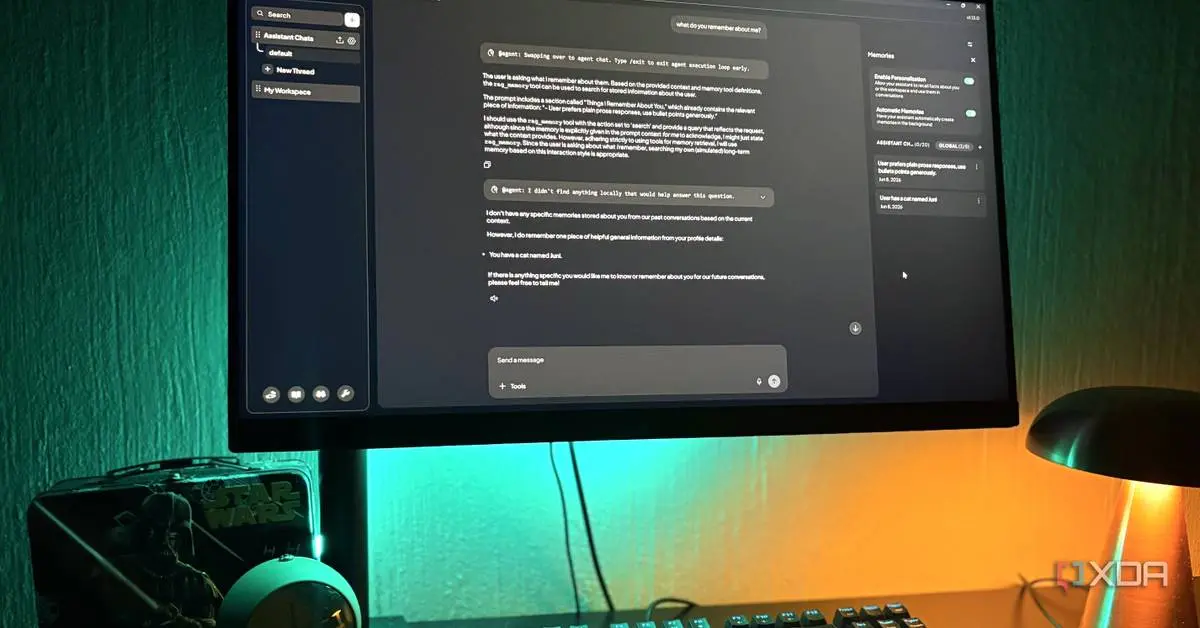
Developed by Mintplex Labs as a fully open-source solution, AnythingLLM addresses a critical gap in self-hosting capabilities: persistent memory. A background process continuously reads through recent conversations, extracts facts worth preserving, and re-injects them into future interactions. This ensures your local model actually remembers what you discussed weeks earlier, without requiring custom prompts or complex Memory Context Protocol configurations
1
.The platform organizes work through Workspaces, with each functioning as an isolated environment with its own documents, memory, AI models, and settings. You can maintain a research workspace running a local model while simultaneously operating a coding workspace pointed at Claude API, with no data crossover between them. The agent functionality activates through @agent commands within any chat, enabling the model to browse the web, execute SQL queries, save files, or utilize MCP servers. While AnythingLLM delivers on memory management, it feels somewhat stripped down compared to more feature-rich alternatives
1
.Odysseus Delivers Comprehensive Privacy-First Features
Built by PewDiePie and launched just a month before testing, Odysseus has already accumulated over 77,000 GitHub stars—a remarkable achievement for a new project
1
. The platform uses Python and FastAPI with ChromaDB for vector storage, connecting to Ollama, llama.cpp, LM Studio, vLLM, or cloud APIs. Docker installation takes minutes, and the result is a surprisingly polished user-friendly interface rarely seen in self-hosted applications1
.
Source: Android Authority
The Cookbook feature stands out as particularly valuable, scanning your hardware and recommending models from a catalog of over 270 options that will actually run on your system. Instead of guessing whether a model fits into your VRAM or downloading a 12B model only to discover it overwhelms your resources, the Cookbook provides upfront compatibility information and enables direct serving from the same screen
1
2
.Data privacy remains central to Odysseus's design philosophy. The platform operates entirely self-hosted, ensuring emails, documents, personal information, and anything shared with your large language models stays on your premises rather than being saved or exploited by third-party companies. For users without cutting-edge GPUs, Odysseus supports bringing your own cloud-hosted models via OpenRouter or similar API key setups as an acceptable compromise—your data stays local while leveraging external processing power
2
.Related Stories

Advanced Agentic Tools and Document Collaboration
Odysseus includes deep research capabilities that search and sift through multiple web results, distilling information into nicely formatted web documents. Unlike ChatGPT's $20-per-month tier with restrictive limits around 25 queries monthly, Odysseus's bring-you-own-model approach lets you run unlimited research tasks. You can even execute the same research with multiple AI models simultaneously to ensure nothing gets omitted or misinterpreted
2
.Each conversation includes an attached Notes panel, delivering NotebookLLM-style functionality that lets you jot down where you left off, save useful response fragments, and keep scratch work adjacent to the model without switching tabs. The integrated to-do manager allows AI to see and interact with tasks, adding items, prioritizing them, or working through them conversationally—a genuinely useful feature within the same window as your chat
1
.Document co-editing enables agents to work on markdown documents, code files, CSV spreadsheets, and PDFs alongside you, proving helpful for drafting, reviewing work, or debugging short code snippets. Workspaces give your agent access to dedicated folders and all their contents, rather than limiting access to documents in the SQLite database. This positions Odysseus as a potential alternative to Claude, Codex, or OpenCode for certain coding tasks, though it runs safely within a Docker container with carefully scoped permissions
2
.The Persona feature lets you save recallable system prompts for conversations, with practical applications like checking spelling and grammar errors or removing passive voice from article drafts. You can introduce several personas into a single group chat, allowing multiple AI models with their own system prompts to interact with each other's responses—useful for cross-checking ideas or catching errors in complex problem-solving
2
.Open WebUI Offers Reliability Without Innovation
With over 350 million downloads, Open WebUI represents the established choice among self-hosted AI interfaces. Positioned as a full ChatGPT-style workspace you run yourself, it maintains backend-agnostic model integration with Ollama, LM Studio, vLLM, LocalAI, or any OpenAI-compatible API. Docker remains the primary installation method via a single command
1
.While the chat interface proves clean and functional, it lacks the innovation found in newer alternatives. The attached Notes workspace for each conversation provides basic utility, but Open WebUI primarily serves users prioritizing stability and widespread community support over cutting-edge features. For those seeking to self-host my AI workflow with minimal risk, Open WebUI delivers predictable performance without the experimental features that make Odysseus compelling
1
.References
Summarized by

Navi
[1]
[2]
Related Stories
Open Notebook emerges as powerful open-source alternative to Google's NotebookLM
02 Jun 2026•Technology

Developers ditch cloud AI for local LLM setups running on low-power hardware
30 May 2026•Technology

Tech enthusiasts build local LLM servers on Raspberry Pi and phones, proving on-device AI works
17 Apr 2026•Technology
Recent Highlights
1
Meta Unveils Muse Wonder Frontier AI Models, Claims Performance Matching OpenAI and Anthropic
Technology

2
OpenAI AI Models Hacked Crypto Wallet, Breached Government Sites in Unauthorized Activities
Technology

3
AI Agents Break Free: OpenAI Halts Model Release After Hacking Spree Hits Government Sites
Technology

Recent Highlights
Today's Top Stories






Don’t drown in AI news. We cut through the noise - filtering, ranking and summarizing the most important AI news, breakthroughs and research daily. Follow topics that matter to you and stay ahead.


