Open Notebook emerges as powerful open-source alternative to Google's NotebookLM


3 Sources
[1]
Open Notebook's AI-powered podcasts are a game-changer for productivity, provided you're willing to configure them right
Ayush Pande is a PC hardware and gaming writer. When he's not working on a new article, you can find him with his head stuck inside a PC or tinkering with a server operating system. Besides computing, his interests include spending hours in long RPGs, yelling at his friends in co-op games, and
[2]
I switched from NotebookLM to this open-source tool, and it does what Google won't
If you're reading this, you probably love what NotebookLM is capable of doing, but perhaps don't feel comfortable handing it all your data or being in the Google ecosystem in general. While I personally have accepted the fact that a good portion of my digital life will exist on Google's servers, I
[3]
I switched from NotebookLM to an open-source alternative -- the podcasts alone made it worth it
Amir is the Segment Lead for Software at MUO. He's a PharmD student who loves looking at numbers and spreadsheets. Inspired by his father's hobbies, Amir developed a knack for DIY projects and built his first quadcopter in high school. At 18, he began writing about 3D printing, and now contributes
Share
Copy Link
A self-hosted tool called Open Notebook is gaining attention as a viable alternative to Google's NotebookLM. Developed by Luis Novo, this open-source solution offers AI-powered podcast generation with up to four speakers, supports local AI models and cloud LLM providers, and gives users complete control over their data and system prompts without daily usage limits.
Open Notebook challenges Google's NotebookLM with customizable AI experience
While Google's NotebookLM has earned praise for its ability to aggregate documents and generate audio overviews, a new open-source challenger is attracting users who want more control over their AI workflow. Open Notebook, developed by Luis Novo and available freely on GitHub, replicates nearly all the functionality of its Google counterpart while offering significantly more flexibility
3
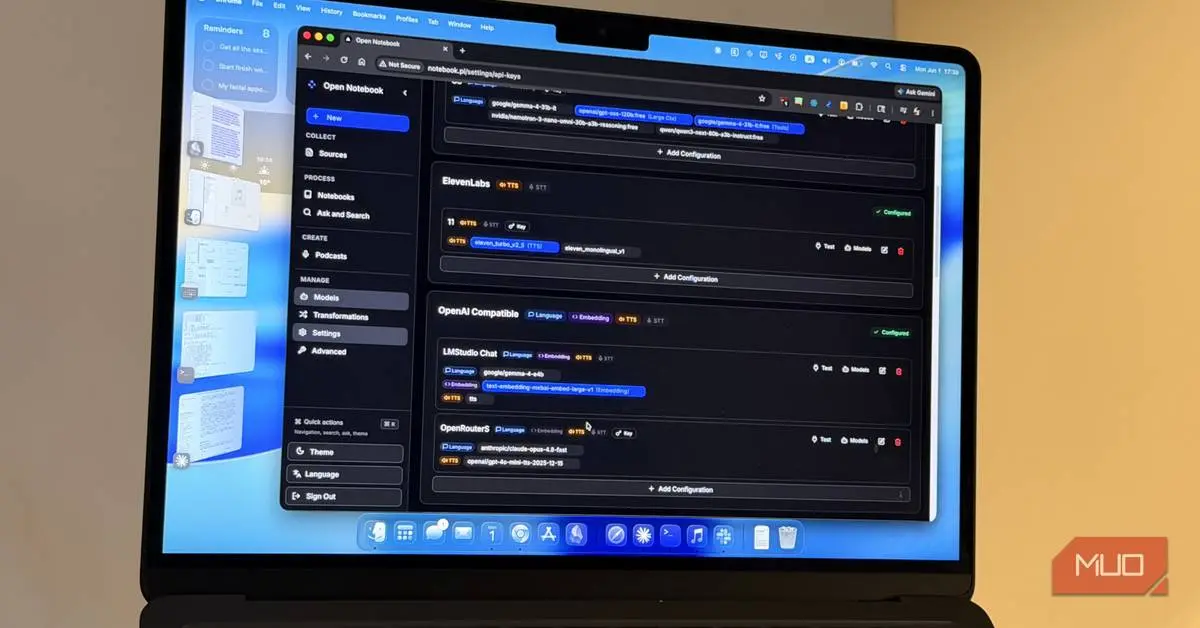
. The tool runs in Docker on your machine and supports multiple LLM providers including OpenAI, Anthropic, Groq, Mistral, DeepSeek, Azure, OpenRouter, and OpenAI-compatible endpoints for local AI models3
.
Source: MakeUseOf
The self-hosted alternative to Google's NotebookLM addresses a fundamental limitation: users are no longer restricted to whatever Gemini model Google assigns to NotebookLM
3
. Instead, you can assign specific models to different aspects of the tool independently, choosing frontier models like Claude Opus 4.8 for queries or running everything through a local pipeline that never connects to the cloud1
.AI-powered podcast generation surpasses NotebookLM's capabilities
One of Open Notebook's standout features is its podcast generation facility, which converts academic notes into audio overviews with remarkable customization options. Unlike NotebookLM, which limits users to two AI speakers and imposes a daily hard cap of three audio overviews in the free version, Open Notebook supports up to four AI speakers with no usage restrictions
1
. Users can freely modify speaker personality, intonation, and backstory to match the energy of source documents, creating distinct voices for long discussions spanning multiple sources1
.
Source: XDA-Developers
The tool harnesses various LLM providers and TTS models for podcast creation, including both cloud platforms and local inference engines. One user reported running a fully local pipeline using Qwen3.6-35B-A3B on an RTX 3080 Ti for inference tasks, with Speaches handling text-to-speech operations using Kokoro-82M-v1.0-ONNX
1
. This setup generates a 15-minute podcast with three speakers in roughly 20 minutes without connecting to the cloud1
.Data privacy and control drive adoption among privacy-conscious users
The push toward Open Notebook reflects growing concerns about data privacy and control in AI tools. Users who have de-Googled their productivity stack or simply prefer not to hand over sensitive research materials to cloud services find the self-hosted option compelling
1
. With a local model, notebooks work offline functionality is enabled, and none of your data ever leaves your machine3
.The tool uses RAG (retrieval-augmented generation) to ground responses in uploaded sources, pulling relevant chunks from documents rather than relying on training data. Open Notebook offers two interaction modes: Chat for continuous conversation and Ask for quick, targeted lookups
2
. Every source has three visibility levels users can adjust, controlling exactly what the AI sees even within a single notebook2
.Related Stories

Setup requires Docker but offers flexibility with model selection
Source: XDA-Developers
Getting started with Open Notebook involves installing Docker Desktop and running containers for the application itself, SurrealDB for the database, and Ollama for local model execution
2
. Users download a docker-compose.yml file from the official quick-start guide and execute a single command: docker compose up -d. The initial download is several gigabytes, with Ollama accounting for around 4GB2
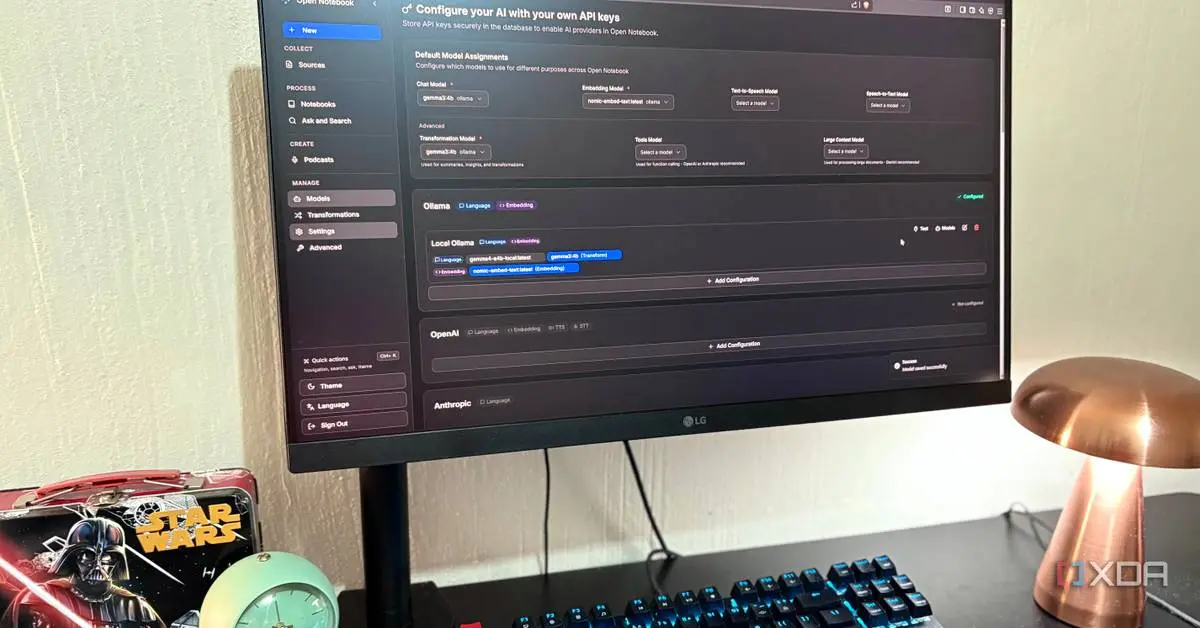
.The application ships without models, requiring users to select both a chat model and an embedding model. Gemma 3 4B is recommended as a well-supported local model that runs efficiently on modest hardware, while nomic-embed-text serves as the standard embedding model at around 270MB . Users can assign models in Settings, with the first message taking 30 to 60 seconds on CPU while the model loads into memory
2
.Customizable transformations eliminate hidden system prompts
Open Notebook's Transformations feature, equivalent to NotebookLM Studio's text capabilities, allows preset prompt actions applied to sources with a single click. Users can edit all transformations with no hidden system prompts and create custom ones from scratch
3
. A default Transformation can run automatically on every uploaded source, enabling workflows like automatic dense summaries when adding materials to notebooks3
.This level of customization extends beyond what Google offers with NotebookLM, where system prompts remain set by Google regardless of user preferences. For those willing to configure speaker and episode profiles correctly, the podcast generation wizard delivers professional results, though users must manually modify default configurations to match their specific AI provider or risk silent failures
1
. As more users seek alternatives that prioritize flexibility over convenience, Open Notebook represents a shift toward user-controlled AI workflows that adapt to individual needs rather than platform constraints.References
Summarized by

Navi
[1]
[2]
Related Stories
Open Notebook emerges as self-hosted NotebookLM alternative without usage limits
20 Jun 2026•Technology
Google NotebookLM upgrades to Gemini 3.5 and Antigravity with new agentic research capabilities
08 Jun 2026•Technology

NotebookLM: Google's AI-Powered Research Assistant Revolutionizes Information Management
20 Jul 2025•Technology

Recent Highlights



Recent Highlights
Today's Top Stories






Don’t drown in AI news. We cut through the noise - filtering, ranking and summarizing the most important AI news, breakthroughs and research daily. Follow topics that matter to you and stay ahead.


